The columns are easy. The wording is the hard part
A typical test case template asks for the same core fields: a unique ID, a short description, preconditions, numbered steps, an expected result, an actual result and a status such as passed, failed or blocked. You cite the ID when you file a bug, and the actual result stays blank until someone runs the test.
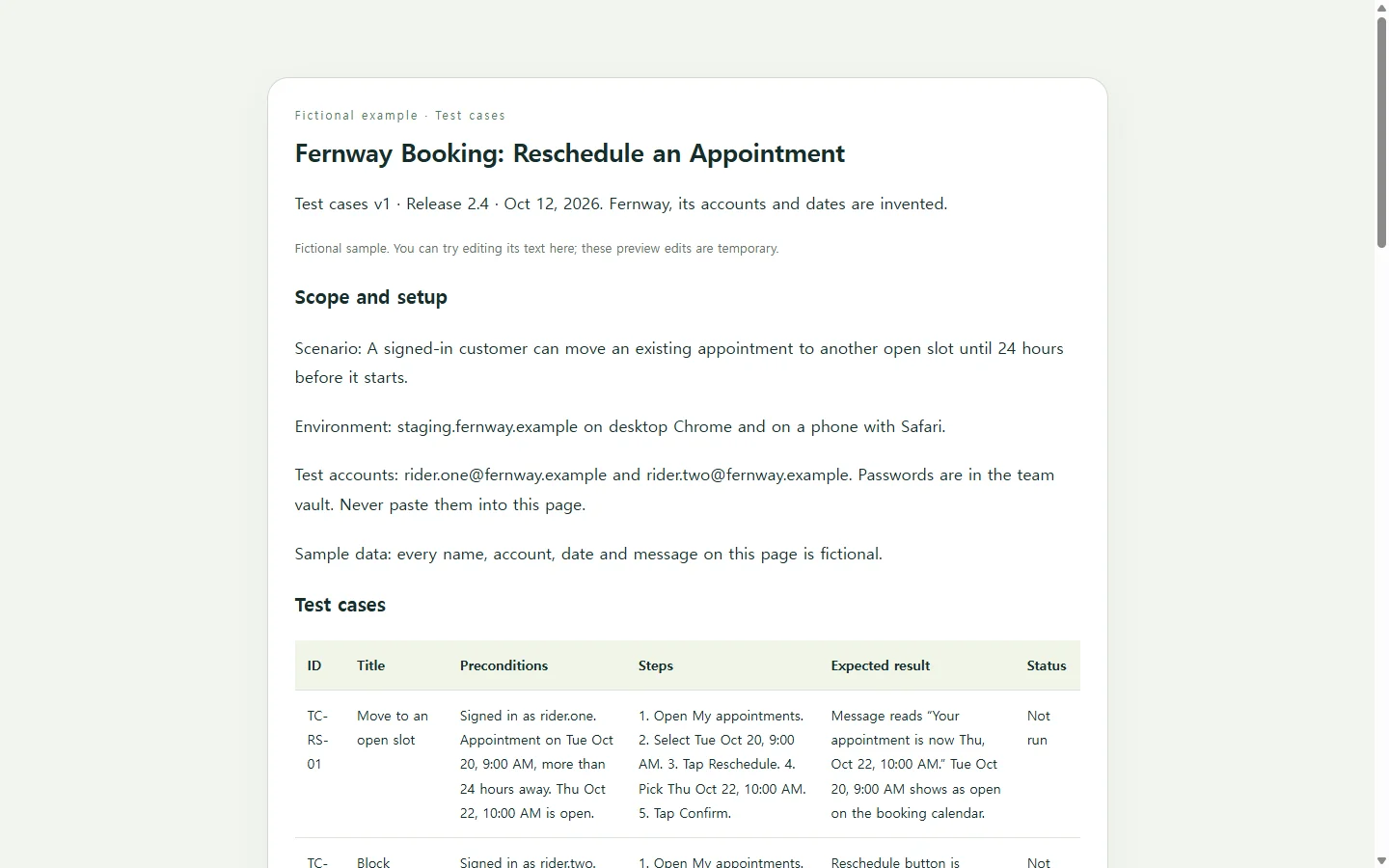
Cases usually go soft at the expected result. “Reschedule works” gives a tester nothing to compare against. “The confirmation reads ‘Your appointment is now Thu, Oct 22, 10:00 AM’ and the old slot shows as open” does. Steps work the same way: one action per step, with the exact value to enter, so two people running the case end up on the same screen.
A filled-in example: rescheduling a booking
The example below is fictional. Fernway is a made-up bike repair shop, and its booking app, test accounts and dates were invented for this article. The feature under test is a single rule: customers can move an appointment until 24 hours before it starts.
Notice that one rule produces more than one case. “Customers can reschedule” is a scenario, a one-line statement of what to test. Each case under it covers one path: an allowed change, an attempt inside the 24-hour window, a slot someone else books mid-change and a keyboard-only run.
Three habits are worth copying even if you never use this layout. Preconditions name the exact test account and appointment time, so nobody has to guess at setup data. Expected results quote the on-screen text word for word. Every status starts at “Not run,” which makes it obvious what still needs doing.
Spreadsheet, document or a page someone can open
If your team already keeps cases in a spreadsheet or a test management tool, keep them there. The format matters less than whether someone else can run each case. And if a job application, client or audit asks for an Excel or Word file, send that file. A link doesn’t replace a required format.
A web page makes sense in a narrower situation: the person running the cases doesn’t use your tools. A product owner doing an acceptance pass or a contractor checking one release can simply open a link in a browser. That page is HTML, the markup that structures headings, lists and tables. CSS controls how it looks.
Let AI handle the layout, not the requirements
Writing the cases is your job, because only you know the real rule and the real messages. Turning rough notes into a page that’s easy to read on a phone is a reasonable task to hand to an AI assistant. The prompt below keeps those roles separate: you supply the feature, the rule and your draft cases, and the AI is told to flag gaps instead of filling them in.
Two requirements in the prompt are easy to skip but worth keeping. A six-column table gets cramped on a narrow screen, so the prompt asks for each case to stack into a labeled card on mobile. It also asks for status written as a word, not shown only as a color. Before you share the result, check every expected result against your spec line by line. A tidy layout can hide a detail the AI invented.
When the rule changes after you’ve shared it
Say Fernway’s owner changes the cutoff from 24 hours to 12 after you’ve sent the cases out. The scope note and TC-RS-02 now state the wrong number. Worse, TC-RS-02’s setup no longer tests the edge: an appointment 20 hours away can now be moved. Update the affected cases and note what changed and why, so whoever runs them next knows the old wording no longer applies.
If you put the page in NOS, that update is a text edit. Click into TC-RS-02, change the precondition from 20 hours to 10, change “24 hours” to “12 hours” in the expected message and add a line to the change log. You don’t have to ask AI to rebuild the page for a few words. The product owner opens the same link you sent last week, sees the new rule and doesn’t need an account to view it.
Tell reviewers what the page is: a current, readable copy of the cases, not a place to record results. This example has no form or submit button. Ask reviewers to report pass, fail or blocked by case ID through whatever channel your team already uses.
Start with the feature you’re testing this week. Write the scenario in one line, then write three cases under it with quoted expected results. That already works as a test case template, whatever format it ends up in.
A prompt to adapt
Turn my draft test cases into a single, self-contained HTML page that a reviewer can read on a phone or a laptop.

Feature: [FEATURE NAME, e.g. Reschedule appointment]
Rule being tested: [THE EXACT REQUIREMENT, e.g. customers can reschedule until 24 hours before the appointment]
Environment: [WHERE TO TEST, e.g. staging URL, browsers, devices]
Test accounts: [ACCOUNT NAMES ONLY. No passwords and no real customer data]
Version and date: [e.g. v1, Oct 12, 2026]
Draft cases: [PASTE YOUR CASES: ID, title, preconditions, steps, expected result]

Requirements:
- Keep my wording for every precondition, step and expected result. Do not invent requirements, on-screen messages, accounts or data. If something is missing or ambiguous, show [NEEDS INPUT] in that spot and list every gap at the top of the page.
- Sections, in order: title with version and date, scope and setup, the test case table, a short 'Before you run' checklist, and a change log.
- Table columns: ID, Title, Preconditions, Steps (numbered list), Expected result, Status. Every status starts as 'Not run'.
- Use a real <table> with a <caption> and header cells marked with scope. On screens narrower than 600px, show each case as a stacked card with every field labeled, not a sideways-scrolling table.
- Show status as a text label, not only as a color. Keep strong text contrast, body text at least 16px, and a logical heading order (one h1, then h2s).
- Deliver one HTML file with inline CSS. No external scripts, fonts or images, no forms or submit buttons, and no calls to outside services.
- If I mark any names, accounts or dates as sample data, add a visible one-line note saying they are fictional.