What the plan has to answer before a template helps
Downloadable training plan templates tend to share a backbone: goals, a schedule of activities, a training method, a point of contact and a status for each item. Some also leave room to score competencies or note steps for improvement.
Those fields make a useful checklist, but they don't decide anything for you. A row reading “Learn the register — in progress” tells a new hire nothing about Tuesday. Before you open any template, write three things for each skill: who demonstrates it, by when, and what the person should be able to do alone afterward. That last line is what lets you check the plan, not just follow it.
For the overall rhythm, one common approach splits training into phases such as week one, then 30, 60 and 90 days, each with its own tasks and progress check-ins. If the core of the role can be learned in a month, start with a short first-month plan and add later phases once you see how that month goes.
A filled-in example: one month for a bike shop service writer
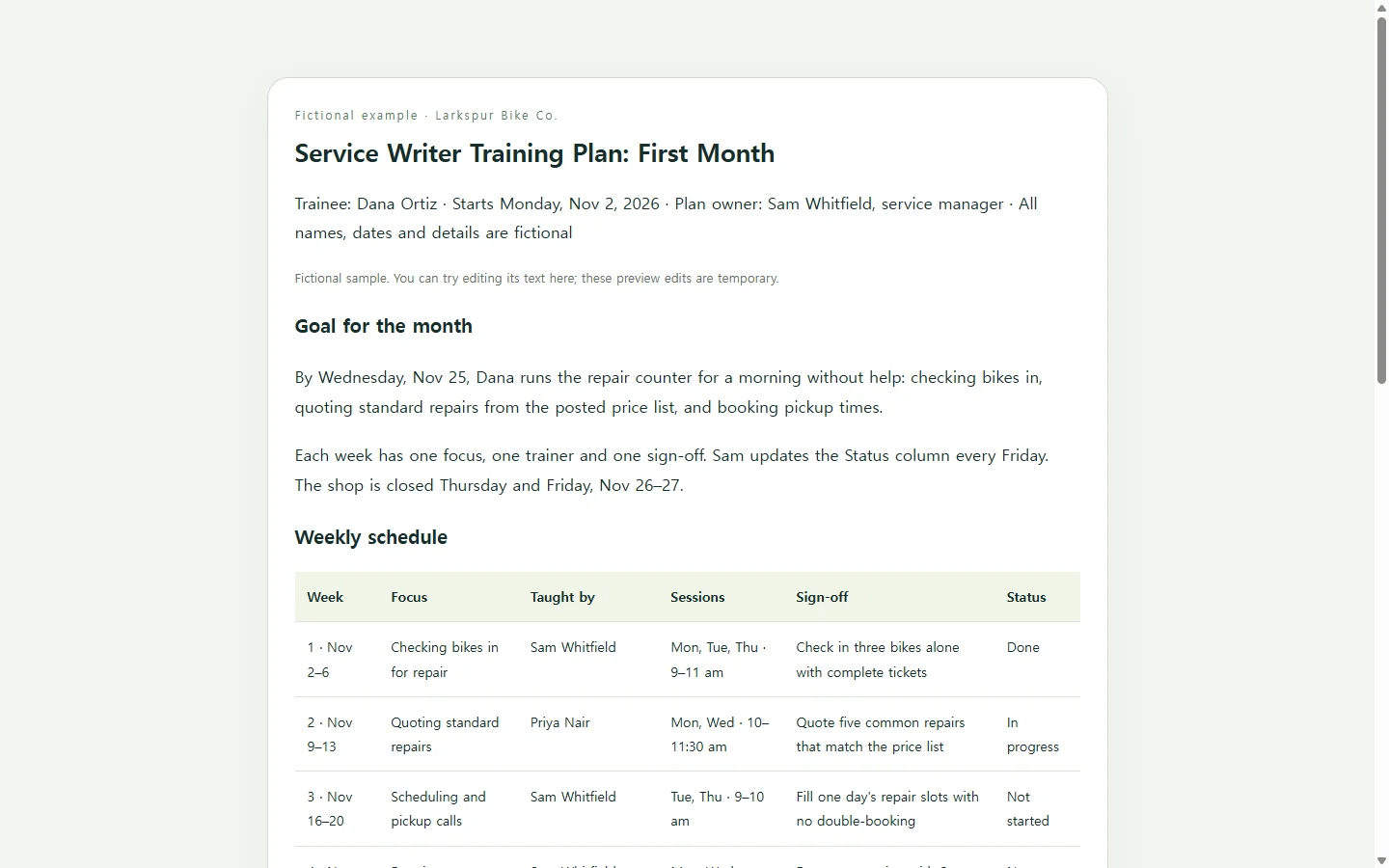
The example follows a fictional shop, Larkspur Bike Co., as it trains a new service writer, the person at the counter who checks bikes in for repair. The shop, names, dates and schedule are invented to show the level of detail. They don't describe a real business or real results.
Focus on the pattern more than the columns. Each week has one main skill and one named person teaching it. Each week ends with a sign-off the trainee performs in front of someone, like checking in three bikes with complete tickets or quoting five common repairs that match the posted price list. Replace the bike shop details with your own role and keep that pattern.
The tracking is deliberately light. For a single hire, a status column and a date are often enough, with no scoring rubric. If you are training a whole department, a spreadsheet with completion columns for each person will be easier to sort and total.
Pick the format by where the plan will live
A spreadsheet suits plans you track across many people. A document suits plans that HR keeps on file or that someone has to sign. Slides help when you walk a group through the plan in a meeting.
If HR, a client or a funding program asks for a PDF or Word file, send that file. A web page earns its place in a different case: when the trainee and trainers check the plan day to day, often on a phone, and the schedule keeps shifting.
Optional: let AI lay out the page
If you have the content but don't want to wrestle with table formatting, you can ask an AI chat assistant to turn your notes into one HTML file, a self-contained web page that opens in a browser. You still supply the facts: names, dates, skills and sign-offs. The assistant handles the layout and shouldn't invent any of your training content.
Use the prompt below, replace every bracketed part, and mark anything you don't know yet as TBD rather than letting the assistant guess. Then open the file on your phone. If the weekly table runs off the screen or the headings blur together, ask for that one fix instead of regenerating the whole page.
When week two changes
Back at the fictional shop, say the senior mechanic who runs the quoting session is out on Wednesday, so the session moves to Friday. The trainee already got the plan on day one.
If the plan is a page in NOS, you can click into the text and change Wednesday to Friday yourself without regenerating the page. The published link stays the same after the edit, so the trainee opens the link they already have and finds Friday. They don't need an NOS account to open it.
That's the practical case for a link here: one current schedule instead of a third attachment named final-v3. Keep the file HR asked for, and use the link for the plan people follow week to week.
Start with your own first week: three skills, three names, three sign-offs. Once that week reads clearly, most of the rest of the month follows the same pattern.
A prompt to adapt
Create a single, self-contained HTML file for a [NUMBER, e.g., 4]-week training plan.

Context:
- Role being trained: [ROLE, e.g., service writer at a bike repair shop]
- Trainee: [NAME or "New hire"]
- Start date: [DATE, e.g., Monday, Nov 2]
- Plan owner and main contact: [NAME, ROLE]
- Overall goal: [ONE SENTENCE: what the trainee should be able to do alone by the end]

Weekly details. Use exactly what I give you. Do not invent names, dates, skills or results. If a value is missing, show "TBD".
Week 1: Focus: [SKILL]; Taught by: [NAME]; Sessions: [DAYS AND TIMES]; Sign-off: [WHAT THE TRAINEE DOES WITHOUT HELP]
Week 2: Focus: [SKILL]; Taught by: [NAME]; Sessions: [DAYS AND TIMES]; Sign-off: [WHAT THE TRAINEE DOES WITHOUT HELP]
[Repeat for each week]
People to ask: [NAME, ROLE: WHAT TO ASK THEM ABOUT] (repeat for each person)
Check-in dates: [DATE: WHAT IS REVIEWED] (repeat as needed)

Page content, in this order:
1. Header: plan title, trainee, start date, plan owner, and the one-sentence goal.
2. A weekly schedule table with the column headers Week, Focus, Taught by, Sessions, Sign-off, Status. Set every Status to "Not started".
3. A "Who to ask" section with one short entry per person.
4. A "Check-ins" section listing the dates in order.
5. A sign-off checklist written as plain text with an empty box character before each item. Do not use form inputs.

Technical, accessibility and mobile requirements:
- One HTML file with inline CSS only. No JavaScript, external fonts, images, icon libraries or CDN links.
- Use semantic HTML: one h1, h2 for each section, and a real table element with header cells marked as column headers.
- Body text at least 16px. Use dark text on a light background with strong contrast. Don't rely on color alone to show status; always show the status word.
- The page must read well on a 375px-wide phone screen with no sideways page scrolling. On narrow screens, either stack each table row as a labeled card or let only the table scroll inside its own container.
- Don't add download buttons, sign-up or submit forms, or links to services, files or pages I haven't provided.
- Return only the complete HTML code.