Yes, ChatGPT can make a wedding invitation, and the useful version is a web page: names, date, venue and a schedule on one screen. What you get back is code, though. The missing step is a link guests can open.
Here is the kind of page the prompt below produces. Tap the tabs.
<!doctype html>
<html lang="en">
<head>
<meta charset="utf-8">
<meta name="viewport" content="width=device-width, initial-scale=1">
<title>Nora and Theo, 15 May 2027</title>
<style>
  * { box-sizing: border-box; }
  body { margin: 0; padding: 16px; background: #efe8dd; font-family: Georgia, "Times New Roman", serif; color: #3b2f2a; }
  .card { max-width: 440px; margin: 0 auto; background: #fffdf9; border: 1px solid #d9cbb6; border-radius: 6px; padding: 28px 22px 24px; text-align: center; box-shadow: 0 3px 14px rgba(70, 50, 30, .12); }
  .kicker { font-size: 13px; letter-spacing: 3px; text-transform: uppercase; color: #8a6f55; margin: 10px 0 4px; }
  h1 { font-size: 36px; line-height: 1.15; font-weight: 400; margin: 0 0 6px; color: #4a3a30; }
  h1 span { display: block; font-size: 20px; font-style: italic; color: #8a6f55; margin: 2px 0; }
  .when { font-size: 20px; margin: 14px 0 2px; }
  .where { font-size: 16px; color: #6b5a4d; margin: 0; line-height: 1.5; }
  .count { display: inline-block; margin: 16px 0 6px; padding: 6px 14px; border-radius: 20px; background: #f3e9da; font-size: 15px; color: #6b4f33; }
  .tabs { display: flex; gap: 6px; justify-content: center; margin: 14px 0 10px; flex-wrap: wrap; }
  .tabs button { font: inherit; font-size: 15px; padding: 9px 14px; border: 1px solid #cdb99d; border-radius: 6px; background: #fff; color: #5a4636; cursor: pointer; }
  .tabs button[aria-selected="true"] { background: #6b4f33; border-color: #6b4f33; color: #fff; }
  .panel { min-height: 118px; text-align: left; font-size: 16px; line-height: 1.55; background: #faf5ec; border-radius: 6px; padding: 12px 14px; margin: 0; }
  .panel[hidden] { display: none; }
  .panel b { color: #4a3a30; }
  .rsvp { margin: 16px 0 0; font-size: 15px; color: #6b5a4d; }
</style>
</head>
<body>
<main class="card">
  <svg width="64" height="40" viewBox="0 0 64 40" role="img" aria-label="Two rings">
    <circle cx="25" cy="22" r="13" fill="none" stroke="#b08d57" stroke-width="3"/>
    <circle cx="39" cy="22" r="13" fill="none" stroke="#d3b27a" stroke-width="3"/>
    <path d="M32 4 l3 5 -3 4 -3 -4z" fill="#b08d57"/>
  </svg>
  <p class="kicker">Together with their families</p>
  <h1>Nora Whitfield <span>and</span> Theo Alvarez</h1>
  <p class="kicker">invite you to their wedding</p>
  <p class="when"><strong>Saturday 15 May 2027</strong></p>
  <p class="where">Larkfield Garden Hall<br>12 Orchard Lane, Fairmont</p>
  <div class="count" id="count" aria-live="polite"></div>

  <div class="tabs" role="tablist">
    <button type="button" role="tab" aria-selected="true" data-tab="schedule">Schedule</button>
    <button type="button" role="tab" aria-selected="false" data-tab="getting">Getting there</button>
    <button type="button" role="tab" aria-selected="false" data-tab="dress">Dress code</button>
  </div>
  <p class="panel" id="schedule" role="tabpanel"><b>4:00 pm</b> Ceremony in the garden<br><b>5:00 pm</b> Drinks on the terrace<br><b>6:30 pm</b> Dinner and speeches<br><b>9:00 pm</b> Dancing until late</p>
  <p class="panel" id="getting" role="tabpanel" hidden>Free parking behind the hall, 80 spaces. The Fairmont tram stop is a 6 minute walk. Taxis can drop off at the front gate.</p>
  <p class="panel" id="dress" role="tabpanel" hidden>Garden party: light layers and flat shoes for the lawn. Any colour, but we would love you to leave the white to Nora.</p>

  <p class="rsvp">Please reply by 1 April 2027 by message to Nora or Theo.</p>
</main>

<script>
  // Days left until the wedding (month is 0-based: 4 = May)
  const day = new Date(2027, 4, 15);
  const left = Math.ceil((day - new Date()) / 86400000);
  document.getElementById('count').textContent =
    left > 1 ? left + ' days to go' : left === 1 ? 'Tomorrow!' : left === 0 ? 'Today is the day' : 'Thank you for celebrating with us';

  // Tabs: show one panel at a time
  const tabs = document.querySelectorAll('[data-tab]');
  tabs.forEach((t) => t.addEventListener('click', () => {
    tabs.forEach((x) => {
      const on = x === t;
      x.setAttribute('aria-selected', on);
      document.getElementById(x.dataset.tab).hidden = !on;
    });
  }));
</script>
</body>
</html>
Make it with AI
Paste this into ChatGPT, Claude or Gemini. Replace the square brackets with your own details. The prompt asks for plain text for names and times, which is what makes them fixable by clicking later.
Make a one-page wedding invitation as a single HTML file.
Names: [Name] and [Name]
Date: [weekday, day month year]
Ceremony: [time], [venue name], [street address, town]
Schedule: [time and event, one per line]
Getting there: [parking and transport, one line]
Dress code: [one line]
Reply by: [date], by message to [name]

Style: [soft cream and gold / modern and simple], one column,
big readable text on a phone. Add three tabs: Schedule,
Getting there, Dress code. Write every name, date and time
directly in the HTML, not inside JavaScript.
Use system fonts only. No outside images, libraries or forms.
Give me the complete file in one code block.
Then check the result before you go on:
- Names. Read each one letter by letter, for both partners and any parents named.
- Date and weekday. Look them up on a calendar. A date and a weekday can disagree.
- Invented details. Delete anything you did not give it, such as a dress code or a menu.
- The end of the file. The code should finish with the closing html tag. A chat window can cut a long answer short.
Preview it and check the names
According to OpenAI's help, a ChatGPT code block can offer a Preview for supported code, and HTML pages are among the supported previews. If Preview does not appear, that code block does not support one. As of October 2026 this can change.
Either way, the reliable check is the page itself. Copy all the code and paste it into a NOS document. The page renders with its scripts running, which is what guests will see. Open it on your own phone too.
A second page is worth having. Guests ask the same few questions, and an accordion answers them without scrolling. Share wedding details with guests goes deeper on what to put there. To write the page by hand instead, see wedding invitation HTML.
<!doctype html>
<html lang="en">
<head>
<meta charset="utf-8">
<meta name="viewport" content="width=device-width, initial-scale=1">
<title>Guest questions: Nora and Theo</title>
<style>
  * { box-sizing: border-box; }
  body { margin: 0; padding: 16px; background: #f4f1ec; font-family: system-ui, -apple-system, "Segoe UI", sans-serif; color: #2f2a26; }
  main { max-width: 480px; margin: 0 auto; }
  h1 { font-size: 22px; margin: 4px 0 4px; font-family: Georgia, serif; font-weight: 400; }
  .sub { margin: 0 0 14px; font-size: 15px; color: #6b625a; }
  .bar { display: flex; justify-content: space-between; align-items: center; margin-bottom: 10px; font-size: 14px; color: #6b625a; }
  .bar button { font: inherit; padding: 8px 12px; border: 1px solid #cfc6ba; border-radius: 6px; background: #fff; cursor: pointer; }
  details { background: #fff; border: 1px solid #e2dbd0; border-radius: 8px; margin-bottom: 8px; }
  summary { padding: 14px; font-size: 16px; font-weight: 600; cursor: pointer; list-style-position: inside; }
  details p { margin: 0; padding: 0 14px 14px; font-size: 16px; line-height: 1.55; color: #4a423b; }
  .upd { margin-top: 14px; font-size: 13px; color: #8b8176; }
</style>
</head>
<body>
<main>
  <h1>Questions guests ask</h1>
  <p class="sub">Nora and Theo, Saturday 15 May 2027</p>
  <div class="bar"><span id="state">0 of 5 open</span><button type="button" id="toggle">Open all</button></div>

  <details><summary>What time should I arrive?</summary><p>By 3:45 pm. The ceremony starts at 4:00 pm sharp in the garden.</p></details>
  <details><summary>Can I bring a plus one?</summary><p>Your invitation names everyone it is meant for. If you are unsure, message Nora.</p></details>
  <details><summary>Are children welcome?</summary><p>Yes, at the ceremony and dinner. There is a quiet room with games from 6:30 pm.</p></details>
  <details><summary>Is there a vegetarian or gluten free menu?</summary><p>Yes. Tell Theo about any allergies by 1 April 2027.</p></details>
  <details><summary>What if it rains?</summary><p>The ceremony moves into the hall. Guests will get a message by 10:00 am on the day.</p></details>

  <p class="upd">Last updated: the host can change this page at any time.</p>
</main>

<script>
  const items = document.querySelectorAll('details');
  const state = document.getElementById('state');
  const toggle = document.getElementById('toggle');

  function refresh() {
    const open = [...items].filter((d) => d.open).length;
    state.textContent = open + ' of ' + items.length + ' open';
    toggle.textContent = open === items.length ? 'Close all' : 'Open all';
  }
  items.forEach((d) => d.addEventListener('toggle', refresh));
  toggle.addEventListener('click', () => {
    const openAll = [...items].some((d) => !d.open);
    items.forEach((d) => { d.open = openAll; });
    refresh();
  });
  refresh();
</script>
</body>
</html>
Fix a name by clicking
A misspelt name matters most, and it may turn up after you have sent the link. Asking ChatGPT to fix one word can bring back a page with other changes in it, so you would have to check everything again.
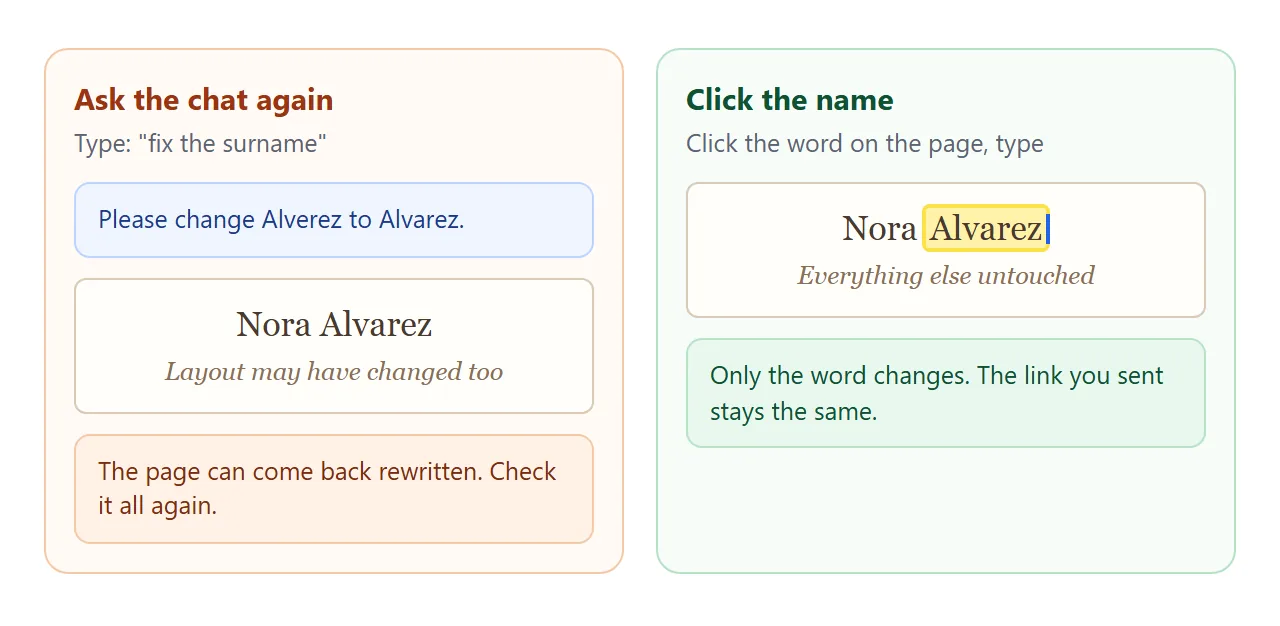
In NOS the words on the rendered page are clickable text. Click the name, type the correct spelling, and nothing else moves. Edit AI-generated HTML without code explains why this is safer than touching the markup.
Text that a script builds will not follow a typed change. The day counter in the demo is one. This is why the prompt asks for names and times as plain text.
Send it as a link
Choose Create share link in NOS and copy the address. HTML to link walks through it. Anyone with the link can open the page in a browser, on a phone too, without an account. They cannot edit it.
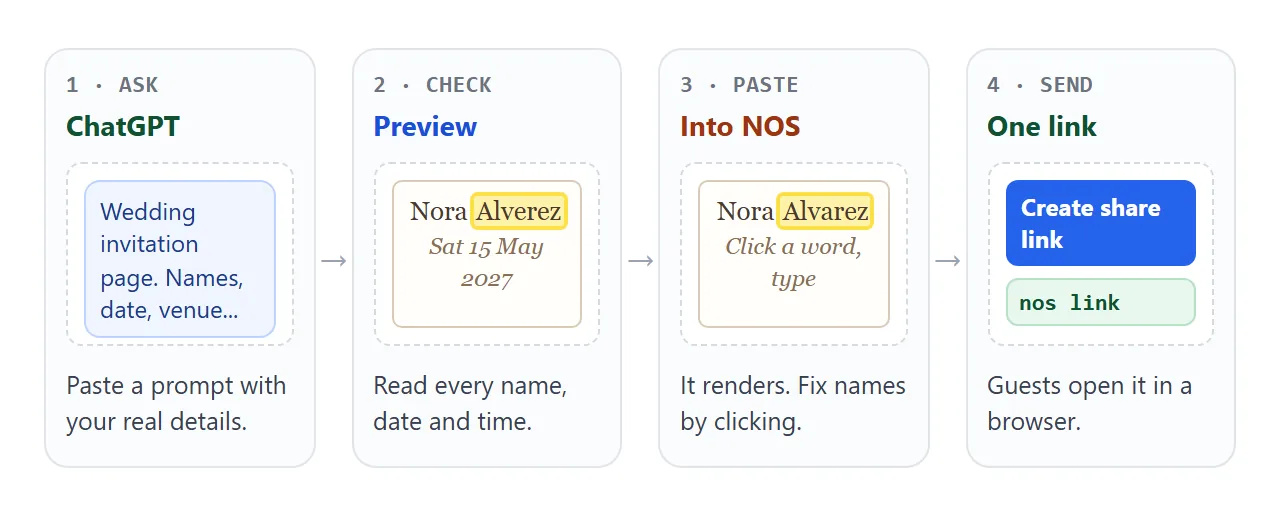
If you fix a name or a time later, the same link shows the new version. Nobody has to be told to throw away the old message.
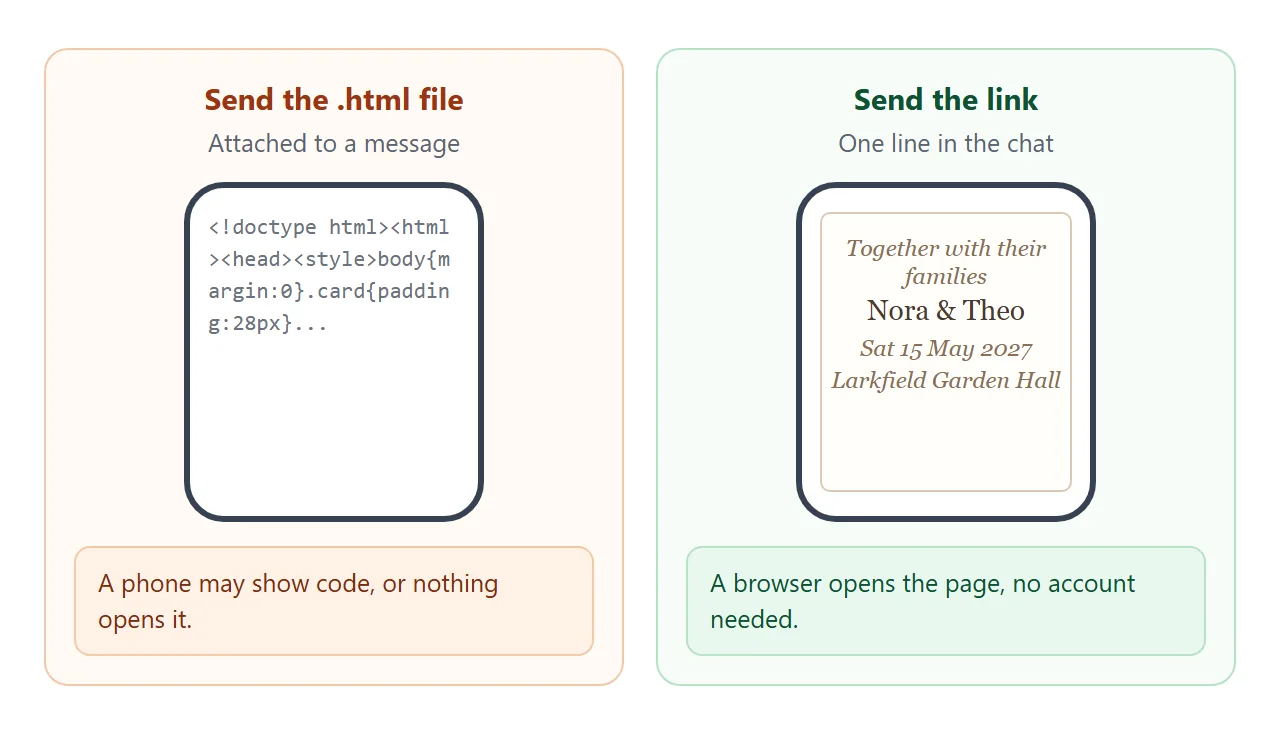
An attached file is the weaker route. A phone may show it as code or have nothing to open it. Opening an HTML file on a phone explains why.
For a printed card, put the link in a QR code. QR code link shows how, and why a printed code keeps working after you edit the page.
ChatGPT also has its own publishing feature, called Sites. OpenAI's help says it depends on your plan, and for workspaces on admin settings. As of October 2026, check the help page for your account. A NOS link does not depend on your ChatGPT plan.
Ways to send the invitation compared
| Link to the page | Image of the invitation | HTML file attached | |
|---|---|---|---|
| What a guest does | Taps, a browser opens it | Opens a picture | May see code, or nothing opens it |
| Fix a name later | Click the name, same link | Make a new image, resend | Send a new file |
| Guests who already have it | See the fix on reopening | Keep the old one | Keep the old one |
A link is not a password. Anyone who has it can open the page, so assume it will be forwarded, and keep private details such as a home address off it.
When it does not work
| Symptom | Cause | Fix |
|---|---|---|
| No Preview button in ChatGPT | That code block has no preview | Copy the code and paste it into NOS |
| The page is blank or half there | The code was cut off when copying | Ask ChatGPT to continue, or copy the whole block again |
| A name will not change when clicked | The name sits inside JavaScript | Ask for a version with names written in the HTML |
| Pictures or fonts are missing | They load from another website, which the page blocks | Ask for system fonts and no outside images |
| Guests cannot reply on the page | A page cannot send a form to a server | Put a reply date on the page and ask for replies by message |
| The day counter shows an odd number | It counts from the date on the device | Check the date in the code, or delete the counter |
| Weekday does not match the date | ChatGPT guessed the weekday | Look it up on a calendar and fix it by clicking |