What the weekly page needs to answer
Before you pick a layout, decide what you need to see at a glance. One workable set is a single goal for the week, then a focus, a main activity and a quick check for each day, plus one list of materials. The check column earns its place. If every day ends with an exit ticket or a two-minute partner explanation, Friday isn't the first time you find out the model didn't make sense.
Keep the page to what you'll actually read before first period. Step-by-step scripts can live in your daily plans; the weekly page is the map. If your school requires its own form, or asks you to turn plans in as a PDF or Word file, submit that. What follows is about the page you teach from.
A sample week, filled in
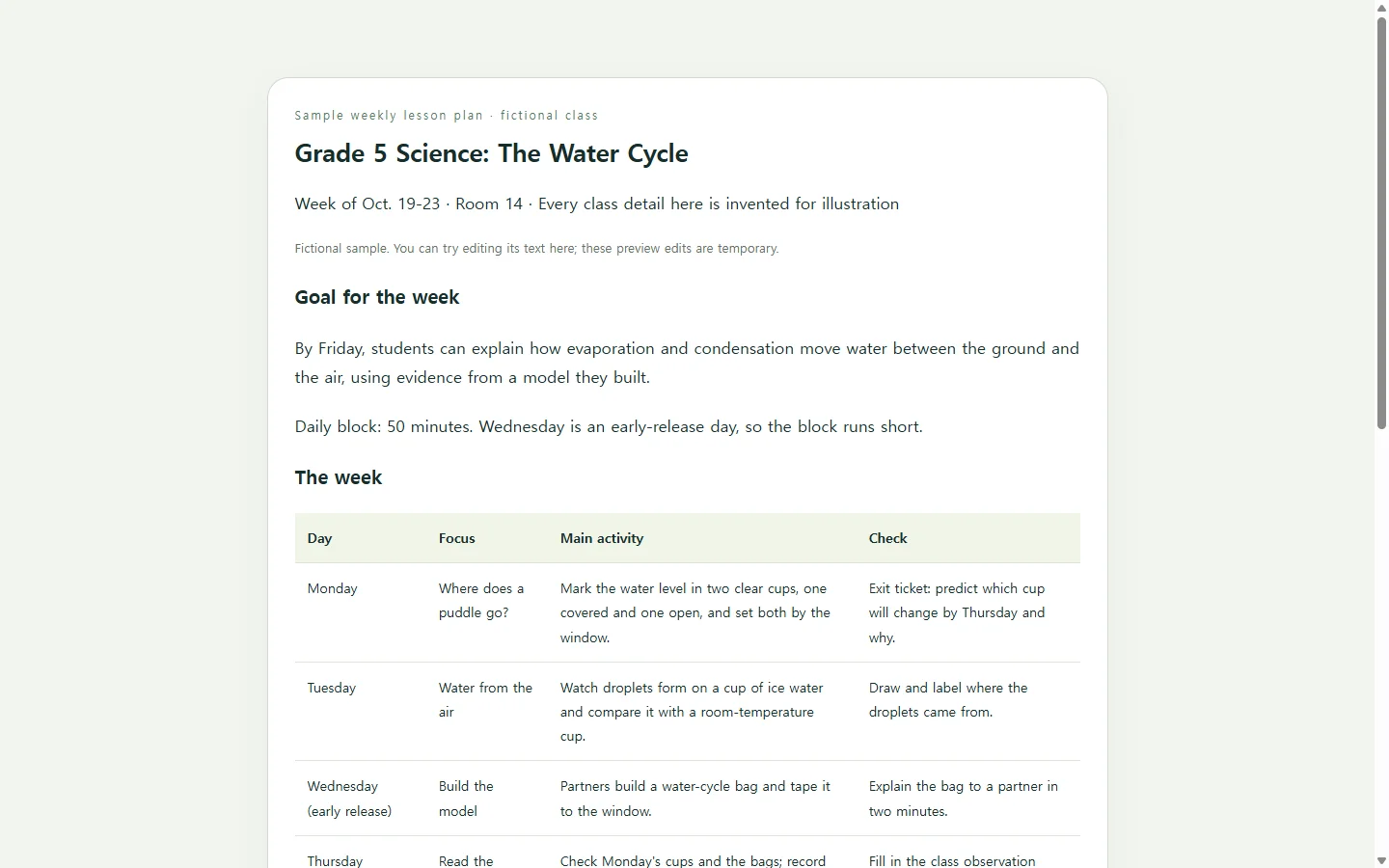
The example below is a fictional fifth-grade science week on the water cycle. The class, room, dates and notes are invented to show the shape, so replace all of them with your own.
Two choices in it are worth borrowing. Materials sit in one checklist instead of being scattered across five cells, so you can prep the whole week in one pass. And every day answers the same three questions, which lets you scan straight down a single column, like every check, in a few seconds.
Notice what's left out: standards codes and minute-by-minute timing. Add them if your school expects them, and leave them out if they'd only crowd the page.
Getting the layout to match your week
You have real options here. If a printable, Word or Google Docs template already fits your schedule, use it; filling boxes is faster than designing them. If it nearly fits, a plain table in your own document may be all you need. AI earns its place when your week has an awkward shape, such as a rotating block, a co-taught period or a lab day, and you'd rather describe it than redraw a grid.
Split the work cleanly. You bring the facts only you know: the goal, the activities, the materials and how you'll check. The AI handles structure and layout. Ask it for a single HTML file, which is simply a web page stored as one file that opens in a web browser. Then read every cell against your notes, because a model asked to fill a grid may add an activity you never planned.
A prompt you can copy
Replace each bracketed part with your own details. The examples inside the brackets show a useful level of detail; they aren't meant to stay.
Before you rely on the result, open it on your phone as well as your laptop. If one day looks cramped, ask for that fix by name instead of regenerating the whole page.
Build a weekly lesson plan as a single self-contained HTML file: one file with its CSS inside, and no external fonts, scripts, images or links.

Use only the details below. If I leave something blank, write 'TBD' in that spot instead of inventing content.

- Grade and subject: [e.g., Grade 5 science]
- Week of: [e.g., Oct. 19-23]
- Goal for the week: [e.g., Students can explain how evaporation and condensation move water between the ground and the air]
- Schedule shape: [e.g., one 50-minute science block Monday-Friday; early release Wednesday]
- For each day, the focus, main activity and quick check:
  Monday: [focus] / [activity] / [check]
  Tuesday: [focus] / [activity] / [check]
  Wednesday: [focus] / [activity] / [check]
  Thursday: [focus] / [activity] / [check]
  Friday: [focus] / [activity] / [check]
- Materials to prep for the week: [e.g., 10 clear cups, plastic wrap, 15 zip-top bags, blue tape]
- Notes for my co-teacher or student teacher: [e.g., You lead the room-temperature cup group on Tuesday]

Layout:
- A header with grade, subject, week and the weekly goal.
- The week as a real HTML table with header cells: days as rows; Focus, Activity and Check as columns.
- On screens narrower than 600px, show each day as a stacked card with the same three labels, with no sideways scrolling.
- The materials as a checklist below the week, then the co-teacher notes.

Accessibility:
- Headings in order (one h1, then h2s), body text at least 16px, dark text on a light background with strong contrast.
- Don't use color alone to mark anything; if a day is changed or shortened, say so in words.
- Content should read in day order with a screen reader.

Keep the style calm and plain: one accent color, no animations. Return only the HTML.
When Wednesday doesn't go to plan
Weeks shift. Say the bags in the sample week don't get finished before Wednesday's early release, so building them carries into Thursday, the evidence check slides to Friday, and the quiz moves to the following Monday. That's a few cells of text. Asking AI to rebuild the page for a few cells is more work than the change itself, and a fresh version can alter details you already checked.
If you keep the page in NOS, you click into the text and retype it directly, with no regenerating. That matters most when someone else teaches from the same plan. Share the page once with your co-teacher or student teacher. After you edit Thursday and Friday, the link they already have stays the same, so they don't need a new copy from you to find the changed days. They don't need an account to open it.
One limit to keep in mind: a PDF you already turned in won't change along with the page. If your school wants the revision on file, send it the way the school asks. The link is for the people working through the week with you.
Start with this week: fill the prompt with your real goal and days, check the page on your phone, and share it with whoever teaches beside you. When the week moves, change the cells, not the link.