Four questions a weekly report should answer
Search results for this keyword lean two ways: downloadable Word and Excel files, and design galleries with hundreds of layouts. Either can work, but a layout only decides where the words go. The template pages keep returning to the same content: what you accomplished, progress on ongoing work, challenges, and what comes next. Treat that as four questions rather than a required format: What got done? What's still moving? What's stuck, and what do I need? What's next week?
Order matters more than coverage. If something needs your manager's decision, put it near the top with its deadline, because a request buried under a list of finished tasks is easy to miss. Finished work can be brief; one line saying what changed is enough.
A filled-in example
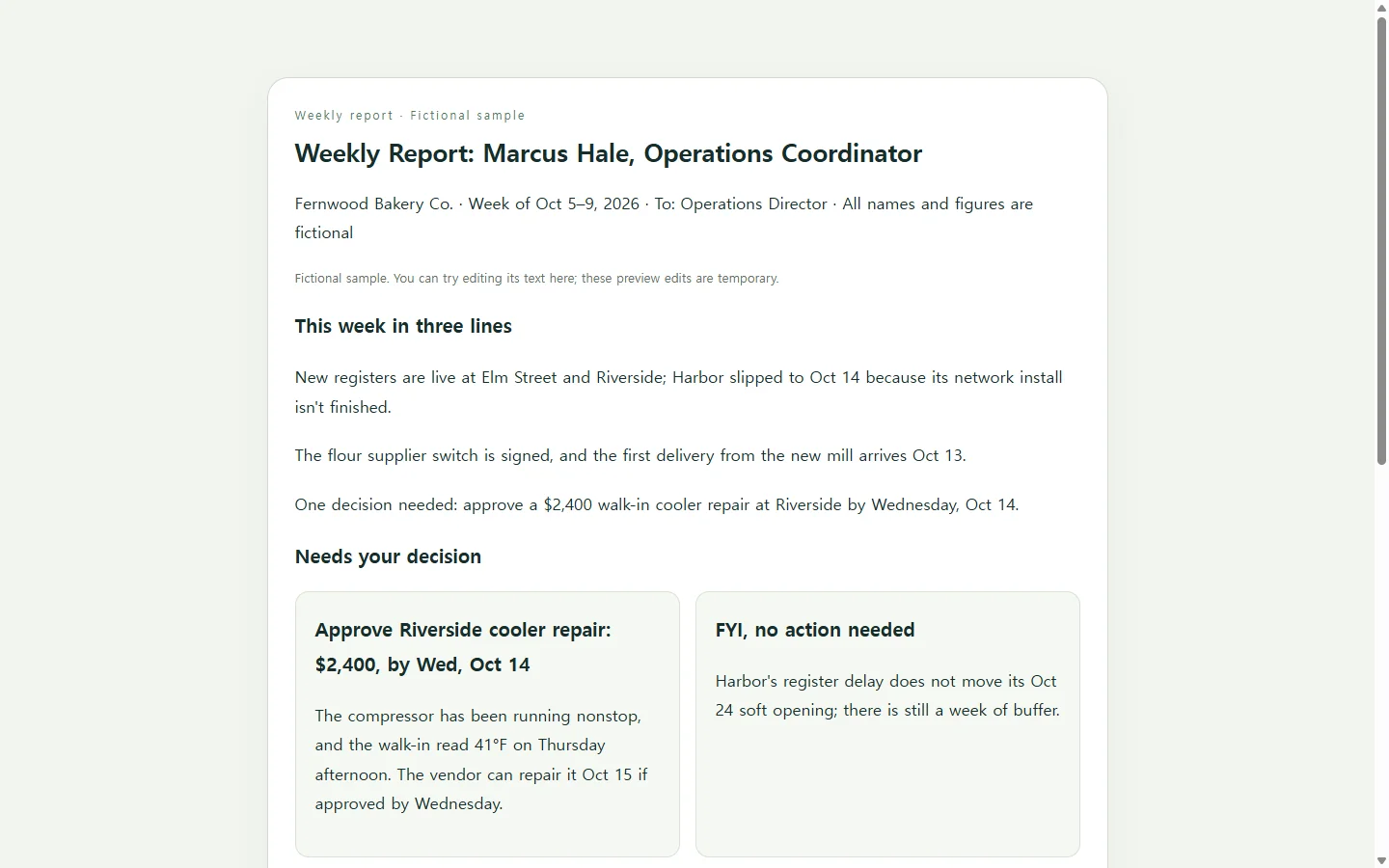
The sample below is a weekly report from Marcus Hale, an operations coordinator at Fernwood Bakery Co., written to the operations director for the week of October 5–9, 2026. Marcus, Fernwood, and every number in the report are fictional, made up to show the format.
A few choices are worth copying. Three summary lines sit above everything else, so a reader who stops there still has the headline. Each status is written as a word, such as On track, At risk, or Blocked, instead of being shown only as a color, so the meaning survives a grayscale printout and doesn't depend on telling colors apart.
The single request gets its own card with an amount and a date: approve a $2,400 cooler repair by Wednesday. The item that slipped, the third store's register install, stays in the table with its reason and a new date instead of quietly disappearing.
Swap in your own week
Start Friday afternoon with three sources: your task list, this week's calendar, and the messages you sent. Keep an item only if its status changed or someone is waiting on it; routine work that went as planned can get one line or none.
Write each status as the word plus the next step, like 'At risk: waiting on network install, now booked Oct 14.' If you repeat a date in the summary and the table, update both when the plan changes. A manager should not have to guess which one is current.
If your team asks for a Word, Excel, or PDF file, use one of the downloadable templates and submit the file they expect; the four questions fit there just as well. If a pasted email is the norm, the same order works in plain text. A page is worth building when a link is acceptable and you want something easier to scan than a long email.
Optional: let AI lay it out as a page
If design is the part you'd rather skip, an AI assistant can turn your notes into a single HTML file, which is a complete web page in one file that opens in a web browser. You supply the facts; the AI handles headings, spacing, and the table. The prompt below uses bracketed placeholders, and it tells the AI to mark missing details as [TBD] instead of filling them with plausible-sounding numbers.
Before you send anything, check three things: every number matches your notes, nothing appears that you didn't write, and the page reads cleanly on a phone, and the status remains easy to find. Check any wide tables on the device your manager will use.
After you send it: fix the line, keep the link
Say Marcus sends the link on Friday, and on Monday the director approves the cooler repair. If the report had gone out as an attachment, the update would usually mean a corrected file and another message, which is fine when a file is what the team needs.
If the page lives in NOS, Marcus can click into the rendered text and change 'Blocked' to 'Approved: repair scheduled Oct 15' without asking an AI to regenerate the page. The sharing link stays the same after the edit, so the director opens the address they already have and sees the current line, without needing an account.
Add a short 'Updated Monday' note under the summary so someone who read Friday's version can spot the change. For the following week, start a new page in the same workspace instead of overwriting this one, so each week's report stays as it was written.
A prompt to adapt
Build a one-page weekly report as a single self-contained HTML file.

Use only the details I provide. If something is missing, show [TBD] instead of inventing it.
- Name and role: [YOUR NAME, ROLE] (example: Marcus Hale, operations coordinator)
- Reader: [WHO READS IT] (example: operations director)
- Week: [DATES] (example: Oct 5–9, 2026)
- Three-line summary: [HEADLINE 1] / [HEADLINE 2] / [HEADLINE 3]
- Done this week: [ITEM — what changed], one per line
- In progress: [ITEM — status word — next step — date]
- Blocked or at risk: [ITEM — reason — new date]
- Decision I need: [REQUEST — amount if any — deadline] (example: approve $2,400 cooler repair by Wed, Oct 14)
- Next week: [3–5 PRIORITIES]

Layout, in this order: a title with my name, role, and the week; the three-line summary; a 'Needs your decision' box; a table of work items with the columns Item, Status, Note; a short next-week checklist.

Requirements:
- One HTML file with all CSS in a <style> tag. No external fonts, images, scripts, APIs, or forms.
- Use real headings (h1, h2), a <table> with <th> header cells, and a list for the checklist.
- Write every status as a word (Done, On track, At risk, Blocked). Color may support the word but must never replace it.
- Body text at least 16px, with text contrast of at least 4.5:1 against its background.
- Readable on a 375px-wide phone: below 600px, show each table row as a stacked, labeled block, with no horizontal scrolling.
- Print cleanly in black and white on letter-size paper.
- Return only the HTML code.