In short
A golf tournament flyer has to answer five things at a glance: the date and course, check-in and start time, the format, the entry fee and what it covers, and how to register or sponsor.
Print only what will not change: the event name, date, course, cause, and a QR code. Put the rest on one web page that the QR opens. Start times, spots left, and sponsor slots change in the weeks before the event. Paper can't keep up.
When something changes, edit the page, not the QR. Write the new value where the old one was, add "was 9:00" next to it, and say it again in a "Latest update" line at the top.
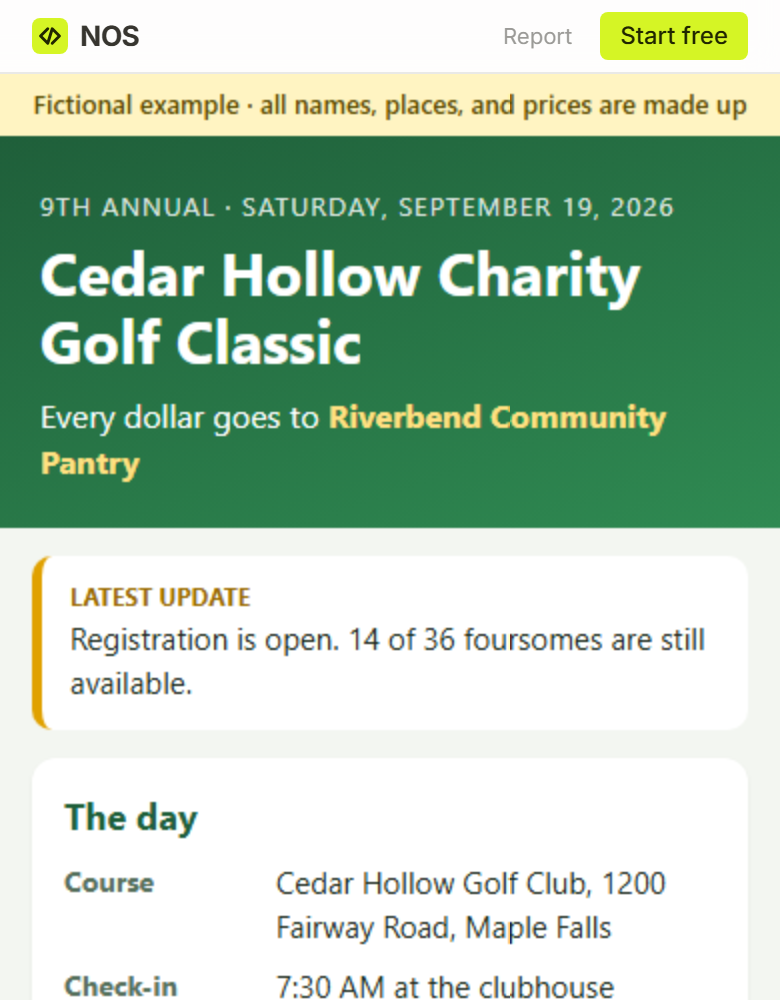
We built a flyer page for a made-up event, the Cedar Hollow Charity Golf Classic, raising money for a made-up food pantry. We put it on NOS and opened the share link at phone size. Then we made the change that flyers usually miss: the course moved the shotgun start from 9:00 to 8:30 AM, and only 6 foursomes were left. We fixed both in the editor and opened the same link again. The course, charity, sponsors, and prices are all fictional.
You can open the finished example flyer or download the HTML file and use it as a free template.
What should a golf tournament flyer include?
Template sites mostly sell the look: a green background, a ball on a tee, a big headline. Golfers and sponsors read past the look to the same short list. If one of these is missing, you get emails asking for it.
- Name, date, and cause. "9th annual" and the charity's name tell people this is a real, repeat event.
- Course and address. Many players choose the event by the course.
- Check-in, start, and finish. Say "shotgun start" if every team starts at once on different holes. Give an end point, such as the awards lunch.
- Format. "4-person scramble, all skill levels" tells a weak golfer they are welcome.
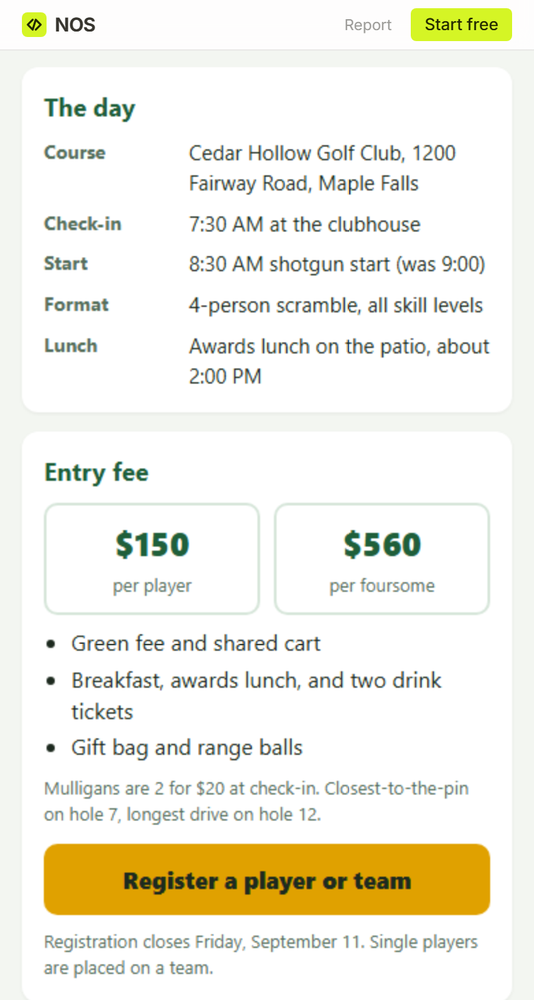
- Fee and what it covers. Per player and per foursome, then green fee, cart, meals, and gift bag in plain words.
- Extras. Mulligans, closest-to-the-pin, longest drive, raffle. These raise money on the day, so name the price.
- Register and sponsor. One clear button, the deadline, and what happens to single players.
- Contact and rain plan. One email address and the backup date.
How to make a golf tournament flyer
- Write the facts before the design. Confirm the start time, fee, and sponsor levels with the course and your committee first.
- Build one page for a phone. One column, large times, the fee in big numbers, and the register button right under the fee. Our example is one HTML file with no outside images, so it stays light on a weak parking-lot signal.
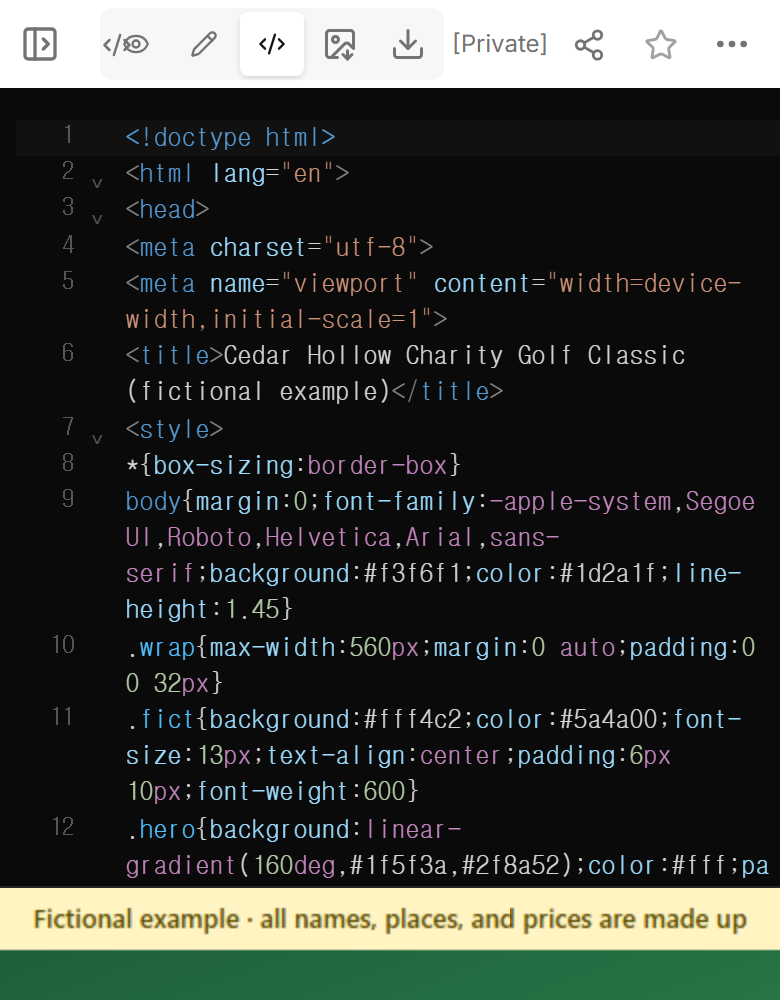
- Put the file on a NOS page. Create a page and paste the HTML in. The Code view shows the file you pasted, with the page itself below it.
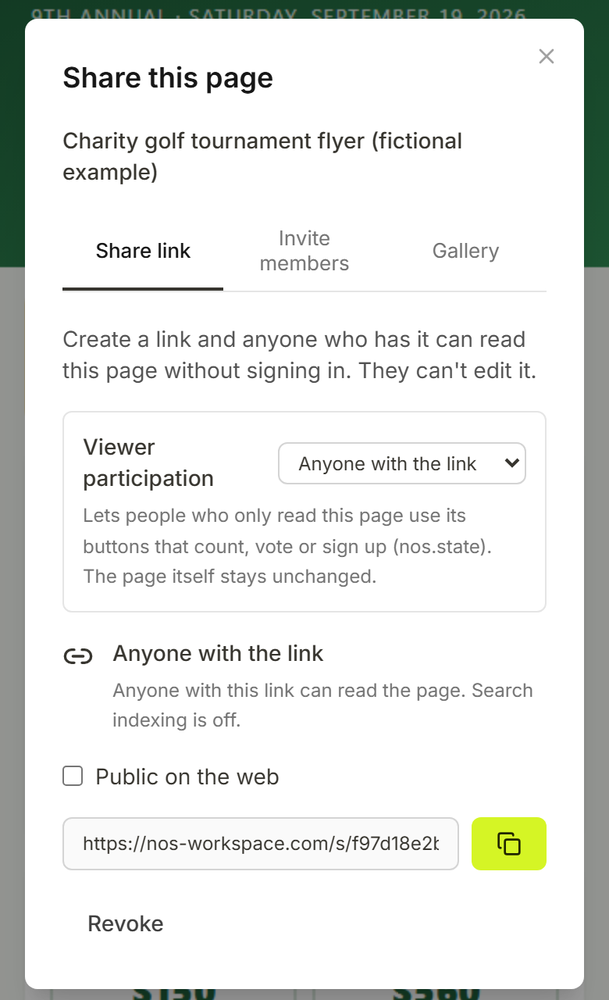
- Copy the share link. Click Share in the top bar. The panel explains that people with the link can read the flyer without an account and can't change it. Search engines stay out of it unless you tick "Public on the web."
- Open the link at phone size before you print anything. This is what a golfer sees after scanning. Check that the date, start time, and fee all show before much scrolling.
- Make the QR from the share link. Put it on the paper flyer, the pro shop counter card, and sponsor emails. For print size and how to test the code, see how to turn an HTML page into a QR code.
Changing the flyer after it is out
In our example the course asked to start 30 minutes earlier, and registrations had filled most of the field. Both facts were now wrong on the page. We changed them in Edit mode, where a bar says you can click any text to change it.
The update line first. We clicked the end of the "Latest update" text, deleted it, and typed the new message. A golfer who opens the link a week later sees the change before anything else.
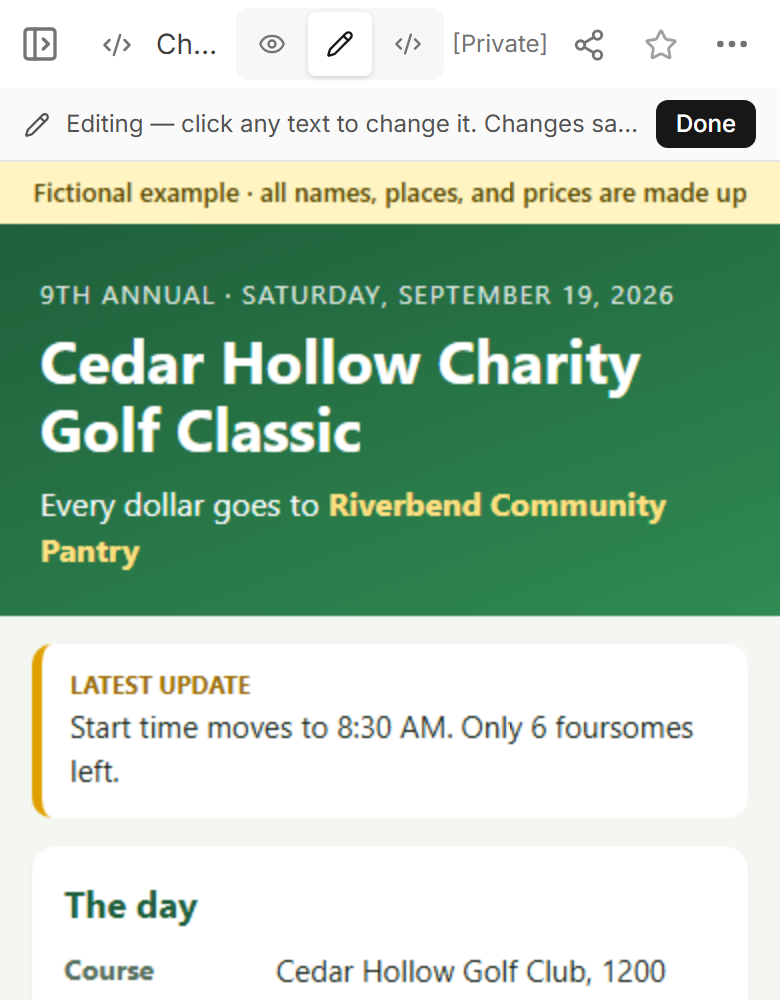
Then the start time itself. We replaced "9:00 AM shotgun start" with "8:30 AM shotgun start (was 9:00)" and pressed Done. The old time stays in brackets on purpose. Someone who saved 9:00 in a calendar sees at once that this is a change, not a typo.
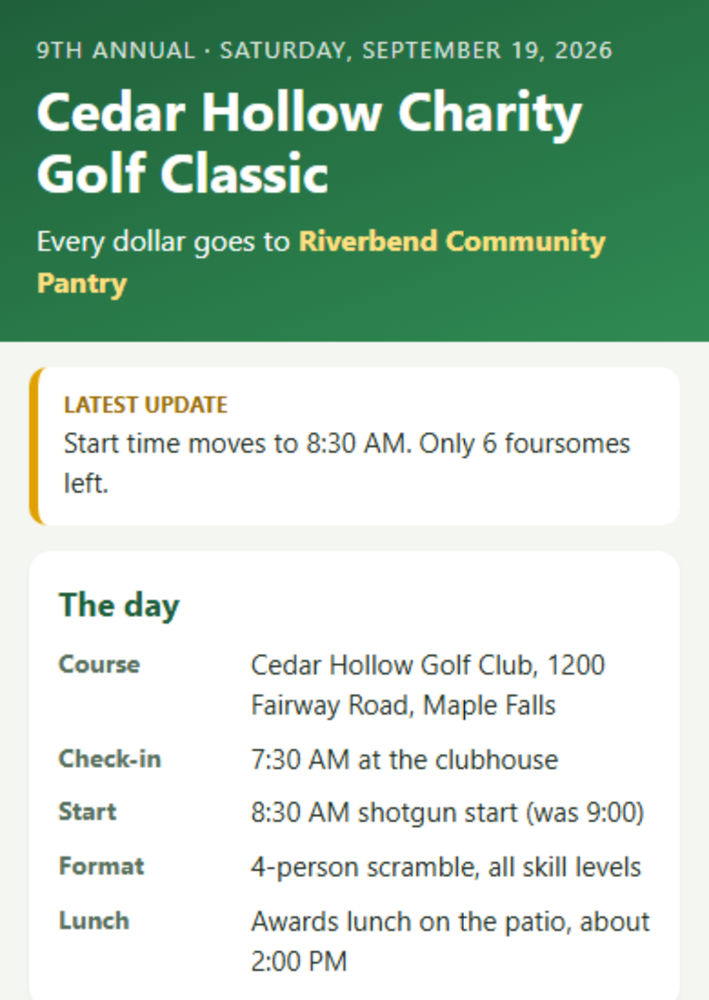
Then we opened the original share link again at phone size. The new update line and the new start time were both there. The address had not changed, so a QR code printed from it would open the new version.
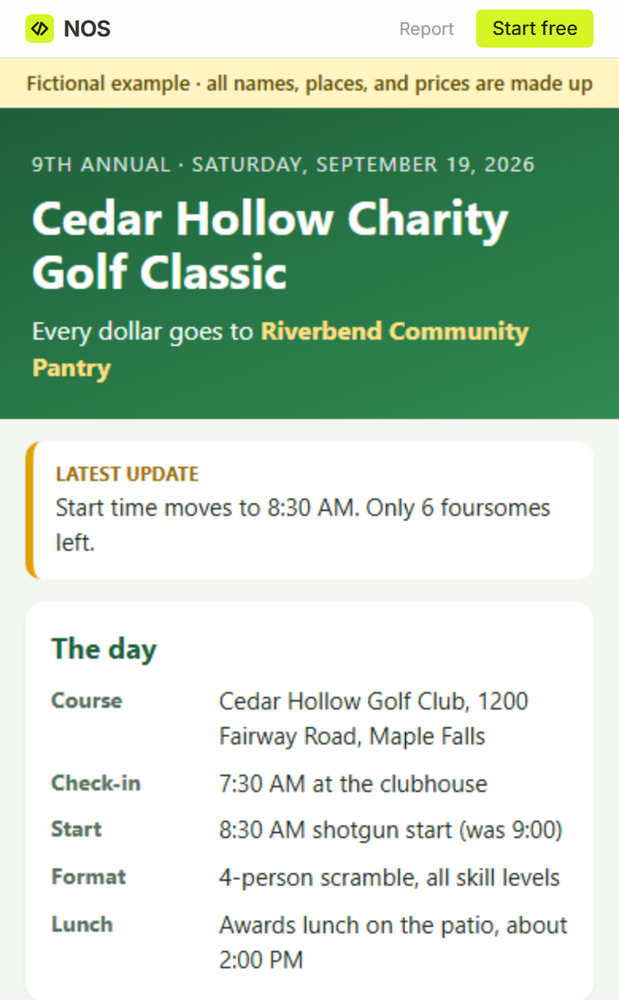
Check-in stayed at 7:30 AM in our example. If you move the start, read every other time on the page and ask whether it still works. Check-in, breakfast, and the awards lunch often hang on the start time.
What is a golf scramble format?
In a scramble, every player on the team hits a tee shot. The team picks the best one, and everyone plays the next shot from that spot. This repeats until the ball is in the hole. Weaker players still help, and the pace stays quick, which is why it suits charity events. Put one line on your flyer that says so. People new to golf may hold back if they think they need a good score of their own.
How much to charge for a charity golf tournament
Start with what the course charges you per player for green fee, cart, and food. Add the cost of prizes and gift bags per player. The entry fee is that cost plus the amount you want to raise per player. Then set the foursome price a little under four single entries, as our example does, so groups have a reason to sign up together. The example prices are made up. Get your real numbers from the course quote.
Say clearly what the fee covers. "Includes cart and lunch" heads off most questions at check-in.
How to get hole sponsors for a golf tournament
Hole sponsors buy a sign on a tee box. It is a low price, and a business can see exactly where its name will go. The flyer helps if it shows three things:
- Levels with prices. Title, lunch, cart, and hole, from the most expensive down.
- What is left. "11 of 18 left" tells a business owner the offer is real and not endless. Keep this current on the page as signs sell.
- A logo deadline. Signs need print time. We put the deadline right under the sponsor list.
Add each new sponsor's name to the thank-you list on the same page, so the recognition they paid for shows up right away. For the formal pitch with benefits and terms, use a separate sponsorship proposal.
How to promote a charity golf tournament
Every place you promote should point to the same link, so you only ever update one page.
- The course. Ask for a flyer with the QR at the pro shop counter and the first tee.
- Sponsors and past players. Email the link, not an attached PDF. An attachment keeps the old start time forever.
- The charity. Ask them to post the link in their newsletter and social channels.
- Local businesses. A counter card with the QR and the hole sponsor price doubles as a sponsor ask.
If you want a fuller event site with an agenda and several sections, see our guide to an event landing page. For a club or charity outing, one flyer page is often enough.
When not to do this
- You need to take payments or sign-ups on the page. Keep the flyer as the place people read the details. Link the register button to your ticketing or donation tool, and keep player lists there.
- Your golfers want paper. If many of your regulars won't scan a code, print a full flyer too. Keep the QR on it so it can point to the latest times.
- You would be posting private details. A shared flyer is open to whoever holds the link. Leave out player names, phone numbers, and pairings.
- The facts are not settled yet. If the course or date is still open, wait. A link can absorb a changed start time, but people who already booked the day can't absorb a changed date.
Where NOS fits
NOS turns an HTML file into a page you can fix in place and share as one link. You paste the file, check it in View mode, change words in Edit mode or the markup in Code view, and the same link shows the newest version. Viewers don't need an account. On the Free plan you can keep 3 share links at once; the pricing page lists the paid plans. If you are deciding how your QR should be built, read what a QR code link is first.