A project deadline needs a reminder one UTC day earlier, but the original deadline must remain intact. Making a separate Date object first prevents a small reminder adjustment from quietly rescheduling the event it belongs to.
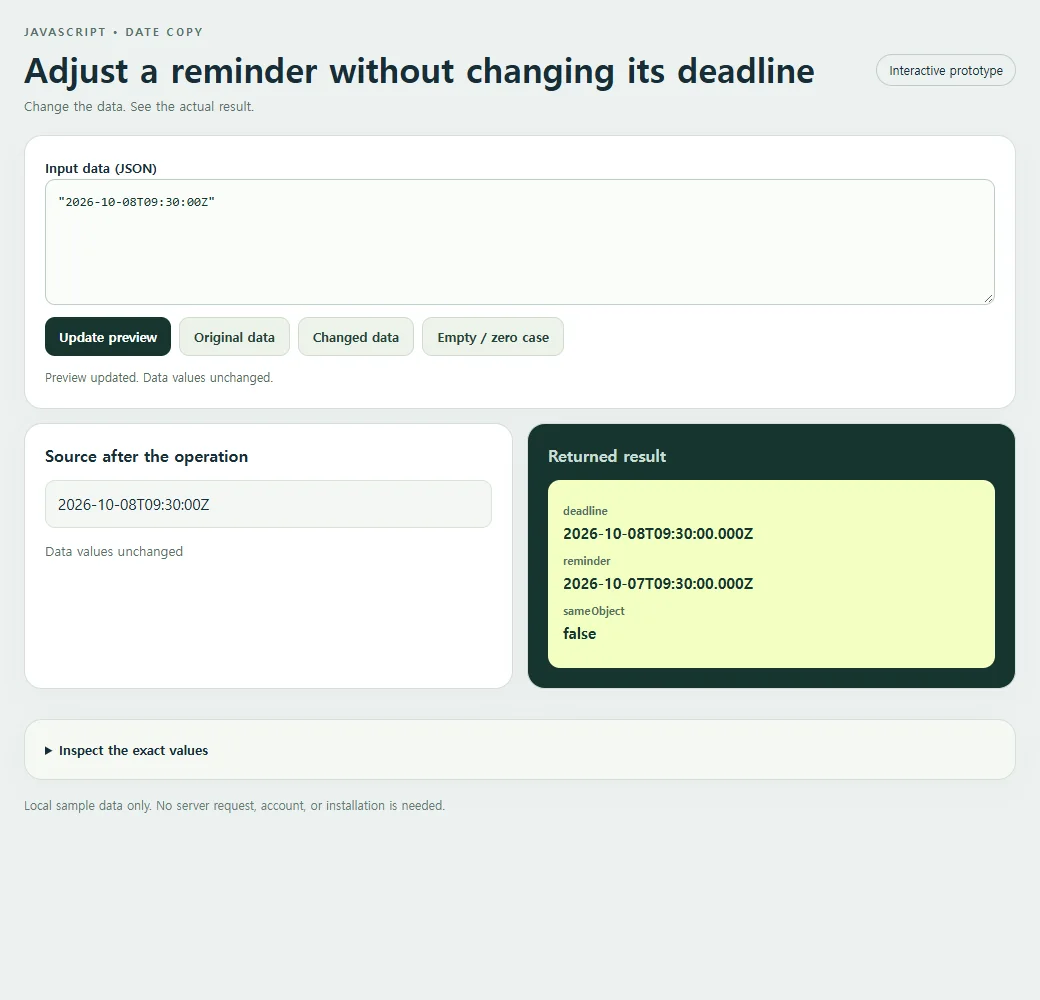
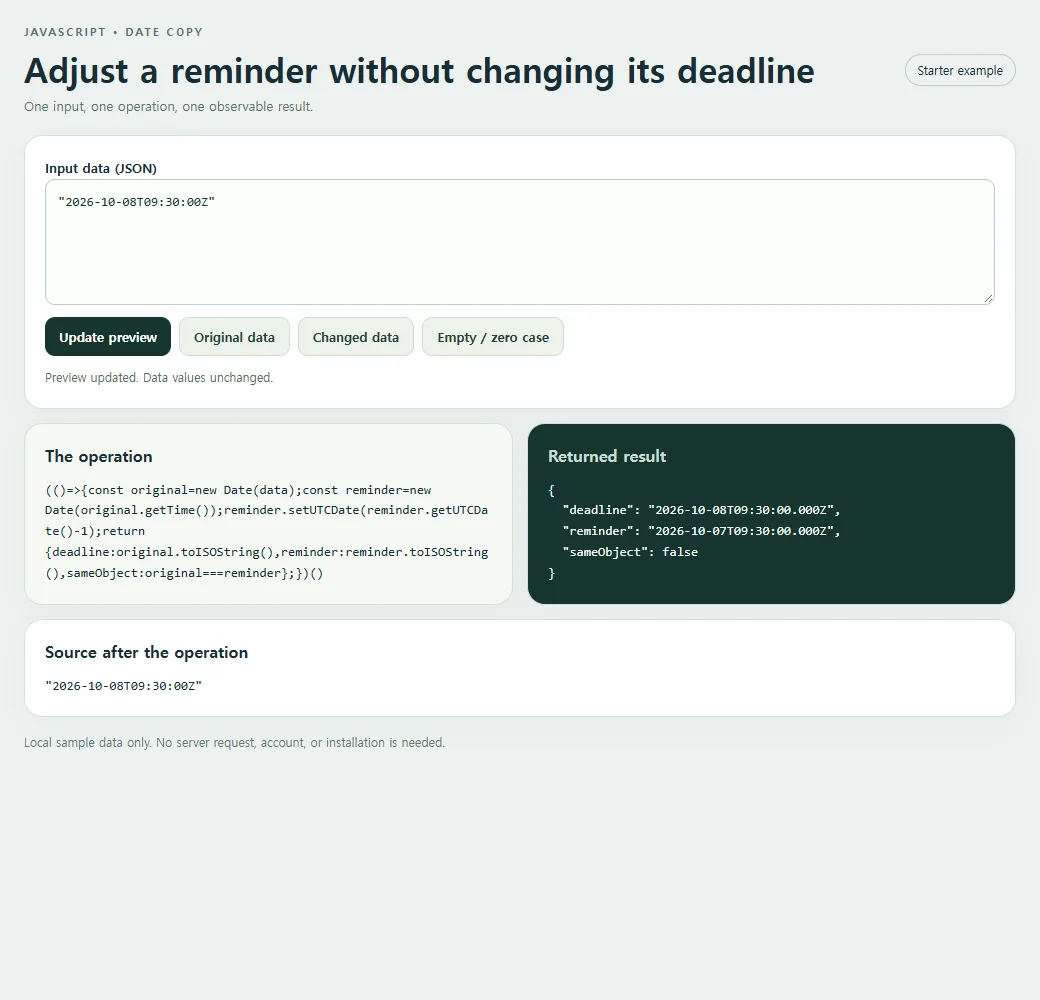
The result contains a deadline on October eighth and a reminder on October seventh, both at 09:30 UTC. sameObject is false because two separate Date objects were constructed. The second object began with the first object's numeric time, so it initially represented the same instant. Its later setter changes only the reminder and leaves the original deadline available for confirmation or storage.
Follow the value through the operation
Read the original Date's epoch milliseconds and construct another Date with that value. Updating the copied object's UTC day affects only the copy. The result exposes the unchanged deadline, the adjusted reminder, and the false object-identity comparison to make independence visible.
A plain assignment would not provide that independence. Writing reminder = original gives both variables the same object reference. Calling a setter through either variable then changes the shared Date, and a deadline preview may shift unexpectedly while preparing its reminder. This is one of the cases where a before-and-after inspection should check the actual original Date rather than only an untouched source timestamp string.
The example chooses a reminder one UTC calendar day earlier, using getUTCDate and setUTCDate. That rule preserves the UTC clock time and handles month boundaries through normalization. It is not a timezone-specific policy such as nine in the morning on the previous working day. If your reminder workflow requires business days or a recipient's local timezone, define those additional rules rather than reading them into this small copy operation.
Change the deadline to the first day of a month. The reminder should move into the preceding month while the deadline stays on the first. Then create a second copy in the standalone snippet and adjust it separately. The three independent objects should retain their own times. That concrete test establishes the copying behavior more clearly than relying on a variable name that merely contains the word copy.
<!doctype html><html lang="en"><head><meta charset="utf-8"><meta name="nos-demo-layout" content="responsive-lab"><meta name="viewport" content="width=device-width,initial-scale=1"><title>Adjust a reminder without changing its deadline</title><style>*{box-sizing:border-box}body{margin:0;background:#edf1f0;color:#172d36;font:15px/1.5 system-ui,sans-serif}main{max-width:1040px;margin:auto;padding:24px}header{display:flex;justify-content:space-between;gap:12px;align-items:center;margin-bottom:20px}.eyebrow{font-size:11px;font-weight:800;letter-spacing:2px;color:#55716b;text-transform:uppercase}h1{font-size:clamp(23px,4vw,34px);line-height:1.15;margin:8px 0}h2{font-size:16px;margin:0 0 12px}.tag{border:1px solid #bfceca;border-radius:99px;padding:6px 12px;font-size:12px;white-space:nowrap}.panel{background:white;border:1px solid #d4dfdb;border-radius:18px;padding:20px;margin-bottom:14px;box-shadow:0 9px 30px #1d393407}.grid{display:grid;grid-template-columns:1fr 1fr;gap:14px}.result{background:#17352f;color:#f7fffb}.result h2{color:#c9ded5}.cards{display:grid;gap:10px;grid-template-columns:repeat(auto-fit,minmax(135px,1fr))}.card{background:#f2ffc2;color:#17352f;padding:15px;border-radius:12px;min-width:0;overflow-wrap:anywhere}.card small{display:block;color:#536f60;font-size:11px;font-weight:700;text-transform:uppercase;margin-bottom:4px}.field{display:block;margin:8px 0}.field small{margin:0 0 3px;text-transform:none}.value{font-size:15px;font-weight:650;white-space:pre-wrap}.hero{font-size:clamp(28px,5vw,46px);font-weight:750;line-height:1.2;overflow-wrap:anywhere}.muted{color:#587169;font-size:13px}.result .muted{color:#bed7cb}pre{margin:0;white-space:pre-wrap;overflow-wrap:anywhere;font:13px/1.6 ui-monospace,monospace;max-height:220px;overflow:auto}.toolbar{display:flex;flex-wrap:wrap;gap:8px;margin:12px 0}button{background:#17352f;color:white;border:0;border-radius:10px;padding:10px 14px;font:600 13px system-ui;cursor:pointer}button.secondary{background:#edf3ea;color:#244337;border:1px solid #d0ddd0}button:hover{filter:brightness(.94)}button:focus-visible,textarea:focus-visible,summary:focus-visible{outline:3px solid #749919;outline-offset:3px}textarea{display:block;width:100%;height:126px;border:1px solid #bccfc5;border-radius:10px;background:#fafcf9;padding:12px;font:13px/1.5 ui-monospace,monospace;resize:vertical;color:#15362c}label{font-weight:650;font-size:13px}details{margin-top:16px}summary{cursor:pointer;font-size:13px;font-weight:650}#status{min-height:20px;font-size:12px;color:#526f60;margin-top:8px}.error{color:#ffcfbf}.footer{font-size:12px;color:#627b72;margin-top:16px}.empty{font-size:18px;color:#c7dacd}.source-card{background:#f4f7f3;border:1px solid #dbe4d8;border-radius:10px;padding:12px;overflow-wrap:anywhere;white-space:pre-wrap}.source-list{display:flex;flex-wrap:wrap;gap:8px;max-height:170px;overflow:auto}.source-list .source-card{flex:1;min-width:100px}.code{background:#f5f8f2}mark{background:#f2ffc2;color:#183a2d;padding:2px 5px;border-radius:4px}@media(max-width:620px){main{padding:15px}.grid{grid-template-columns:1fr}.panel{padding:16px}header{align-items:flex-start}.tag{display:none}h1{font-size:25px}.cards{grid-template-columns:repeat(auto-fit,minmax(125px,1fr))}.source-list{max-height:120px}pre{max-height:150px}}</style></head><body><main>
<header><div><div class="eyebrow">JavaScript • Date copy</div><h1>Adjust a reminder without changing its deadline</h1><div class="muted">Change the data. See the actual result.</div></div><span class="tag">Interactive prototype</span></header>
<section class="panel"><label for="input">Input data (JSON)</label><textarea id="input" maxlength="10000" spellcheck="false"></textarea><div class="toolbar"><button id="run" type="button">Update preview</button><button class="secondary" id="original" type="button">Original data</button><button class="secondary" id="changed" type="button">Changed data</button><button class="secondary" id="edge" type="button">Empty / zero case</button></div><div id="status" role="status" aria-live="polite"></div></section>
<div class="grid"><section class="panel"><h2>Source after the operation</h2><div id="source" class="source-list"></div><p id="source-status" class="muted"></p></section><section class="panel result"><h2>Returned result</h2><div id="result" aria-live="polite"></div></section></div><details class="panel code"><summary>Inspect the exact values</summary><pre id="inspect"></pre></details>
<p class="footer">Local sample data only. No server request, account, or installation is needed.</p></main><script>
'use strict';
const initial = "\"2026-10-08T09:30:00Z\"";
const alternate = "\"2026-10-09T09:30:00.000Z\"";
const empty = "\"\"";
const input = document.getElementById('input');
const output = document.getElementById('result');
const source = document.getElementById('source');
const status = document.getElementById('status');
function transform(data) { return (()=>{const original=new Date(data);const reminder=new Date(original.getTime());reminder.setUTCDate(reminder.getUTCDate()-1);return {deadline:original.toISOString(),reminder:reminder.toISOString(),sameObject:original===reminder};})(); }
function readable(value) {
 if (value === undefined) return 'undefined';
 if (typeof value === 'number' && Object.is(value, -0)) return '-0';
 return JSON.stringify(value, (_, v) => typeof v === 'number' && !Number.isFinite(v) ? String(v) : v, 2);
}
function renderCards(value, host) {
 host.replaceChildren();
 if (Array.isArray(value)) {
  if (!value.length) {const p=document.createElement('p');p.className='empty';p.textContent='No items returned';host.append(p);return;}
  const grid=document.createElement('div');grid.className='cards';
  value.slice(0,40).forEach((item,index)=>{const card=document.createElement('div');card.className='card';const label=document.createElement('small');label.textContent='Item '+(index+1);card.append(label);appendValue(item,card);grid.append(card);});host.append(grid);
  if(value.length>40){const p=document.createElement('p');p.textContent='Showing 40 of '+value.length+' items.';host.append(p);}
 } else if(value && typeof value==='object'){const card=document.createElement('div');card.className='card';appendValue(value,card);host.append(card);}
 else {const p=document.createElement('div');p.className='hero';p.textContent=typeof value==='boolean'?(value?'Yes · true':'No · false'):value===undefined?'No value · undefined':value===''?'Empty string':String(value);host.append(p);}
}
function appendValue(value,host){
 if(value && typeof value==='object' && !Array.isArray(value))Object.entries(value).slice(0,40).forEach(([key,item])=>{const row=document.createElement('div');row.className='field';const label=document.createElement('small');label.textContent=key;const text=document.createElement('span');text.className='value';text.textContent=typeof item==='string'?item:readable(item);row.append(label,text);host.append(row);});
 else {const text=document.createElement('div');text.className='value';text.textContent=typeof value==='string'?value:readable(value);host.append(text);}
}
function update(){
 try{
  if(input.value.length>10000)throw new Error('Keep this sample below 10,000 characters.');
  const data=JSON.parse(input.value);const before=readable(data);const result=transform(data);const after=readable(data);
  renderCards(result,output);source.replaceChildren();(Array.isArray(data)?data.slice(0,40):[data]).forEach(item=>{const card=document.createElement('div');card.className='source-card';card.textContent=typeof item==='string'?item:readable(item);source.append(card);});document.getElementById('source-status').textContent=before===after?'Data values unchanged':'Data values changed in place';document.getElementById('inspect').textContent='Input before:\n'+before+'\n\nReturned result:\n'+readable(result)+'\n\nSource after:\n'+after;
  output.classList.remove('error');status.textContent='Preview updated. '+(before===after?'Data values unchanged.':'Source data changed in place.');
 }catch(error){output.replaceChildren();output.classList.add('error');output.textContent=error.name+': '+error.message;source.replaceChildren();document.getElementById('source-status').textContent='';document.getElementById('inspect').textContent='';status.textContent='Check the JSON and the input shape. Restore Original data to start again.';}
}
document.getElementById('run').addEventListener('click',update);
[['original',initial],['changed',alternate],['edge',empty]].forEach(([id,value])=>document.getElementById(id).addEventListener('click',()=>{input.value=value;update();}));

input.value=initial;update();
</script></body></html>
Run the same calculation in your code
The JavaScript below isolates this example’s calculation. The complete HTML also includes its editable input and result panels.
const data = "2026-10-08T09:30:00Z";
const result = (()=>{const original=new Date(data);const reminder=new Date(original.getTime());reminder.setUTCDate(reminder.getUTCDate()-1);return {deadline:original.toISOString(),reminder:reminder.toISOString(),sameObject:original===reminder};})();
console.log(result);
The original input produces this result:
{
  "deadline": "2026-10-08T09:30:00.000Z",
  "reminder": "2026-10-07T09:30:00.000Z",
  "sameObject": false
}
Keep the timestamp unit and UTC convention visible while checking the result. Those are part of this example’s contract, rather than settings inferred from whichever machine opens the page.
Check the boundary before reusing it
Assigning one Date variable to another copies the reference rather than creating a new Date. Both names would then point to the same mutable object and share setter changes.
Move the original deadline across a month boundary and inspect both dates. The reminder should roll correctly while the original deadline remains exactly the supplied instant.
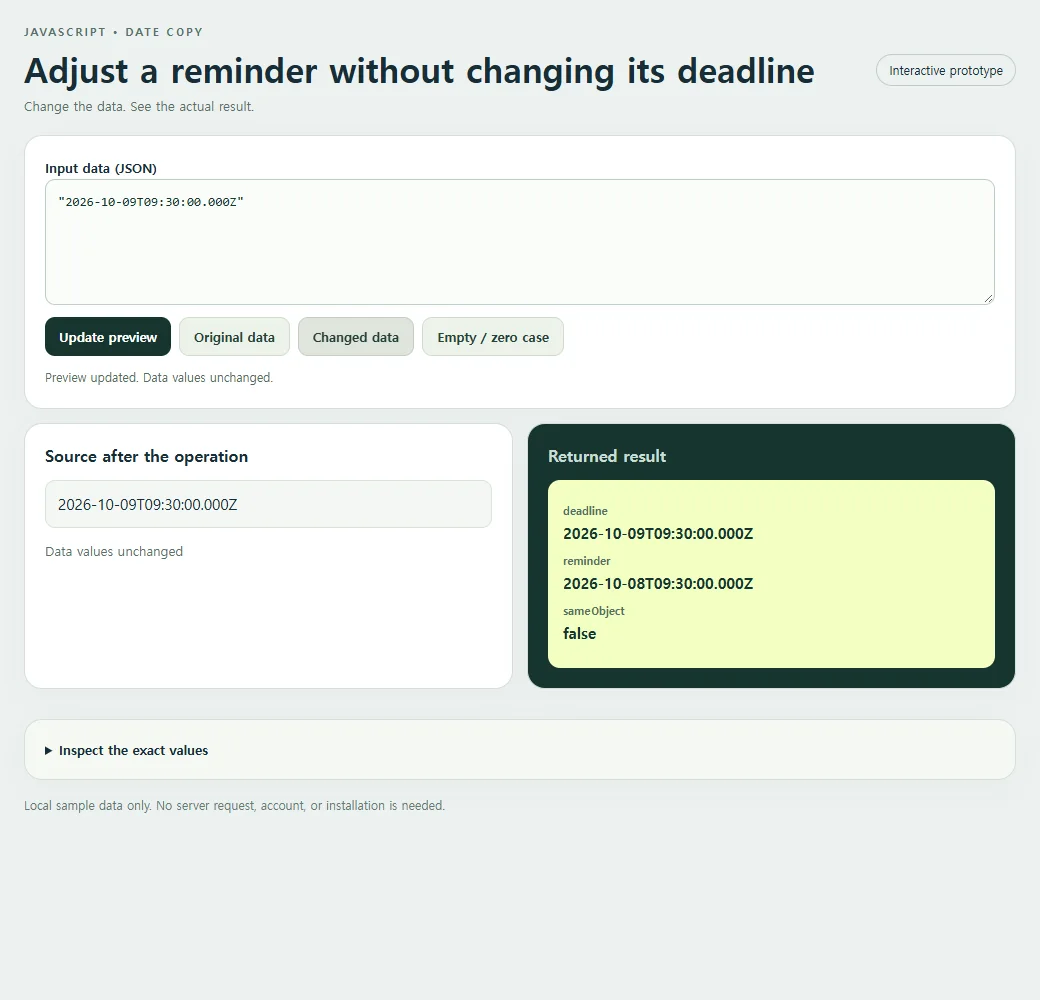
Changed moves the deadline to October ninth at 09:30 UTC. The copied reminder becomes October eighth while the original deadline remains the ninth. Inspect both fields and the false identity check to confirm the independent object relationship.
<!doctype html><html lang="en"><head><meta charset="utf-8"><meta name="nos-demo-layout" content="responsive-lab"><meta name="viewport" content="width=device-width,initial-scale=1"><title>Adjust a reminder without changing its deadline</title><style>*{box-sizing:border-box}body{margin:0;background:#edf1f0;color:#172d36;font:15px/1.5 system-ui,sans-serif}main{max-width:1040px;margin:auto;padding:24px}header{display:flex;justify-content:space-between;gap:12px;align-items:center;margin-bottom:20px}.eyebrow{font-size:11px;font-weight:800;letter-spacing:2px;color:#55716b;text-transform:uppercase}h1{font-size:clamp(23px,4vw,34px);line-height:1.15;margin:8px 0}h2{font-size:16px;margin:0 0 12px}.tag{border:1px solid #bfceca;border-radius:99px;padding:6px 12px;font-size:12px;white-space:nowrap}.panel{background:white;border:1px solid #d4dfdb;border-radius:18px;padding:20px;margin-bottom:14px;box-shadow:0 9px 30px #1d393407}.grid{display:grid;grid-template-columns:1fr 1fr;gap:14px}.result{background:#17352f;color:#f7fffb}.result h2{color:#c9ded5}.cards{display:grid;gap:10px;grid-template-columns:repeat(auto-fit,minmax(135px,1fr))}.card{background:#f2ffc2;color:#17352f;padding:15px;border-radius:12px;min-width:0;overflow-wrap:anywhere}.card small{display:block;color:#536f60;font-size:11px;font-weight:700;text-transform:uppercase;margin-bottom:4px}.field{display:block;margin:8px 0}.field small{margin:0 0 3px;text-transform:none}.value{font-size:15px;font-weight:650;white-space:pre-wrap}.hero{font-size:clamp(28px,5vw,46px);font-weight:750;line-height:1.2;overflow-wrap:anywhere}.muted{color:#587169;font-size:13px}.result .muted{color:#bed7cb}pre{margin:0;white-space:pre-wrap;overflow-wrap:anywhere;font:13px/1.6 ui-monospace,monospace;max-height:220px;overflow:auto}.toolbar{display:flex;flex-wrap:wrap;gap:8px;margin:12px 0}button{background:#17352f;color:white;border:0;border-radius:10px;padding:10px 14px;font:600 13px system-ui;cursor:pointer}button.secondary{background:#edf3ea;color:#244337;border:1px solid #d0ddd0}button:hover{filter:brightness(.94)}button:focus-visible,textarea:focus-visible,summary:focus-visible{outline:3px solid #749919;outline-offset:3px}textarea{display:block;width:100%;height:126px;border:1px solid #bccfc5;border-radius:10px;background:#fafcf9;padding:12px;font:13px/1.5 ui-monospace,monospace;resize:vertical;color:#15362c}label{font-weight:650;font-size:13px}details{margin-top:16px}summary{cursor:pointer;font-size:13px;font-weight:650}#status{min-height:20px;font-size:12px;color:#526f60;margin-top:8px}.error{color:#ffcfbf}.footer{font-size:12px;color:#627b72;margin-top:16px}.empty{font-size:18px;color:#c7dacd}.source-card{background:#f4f7f3;border:1px solid #dbe4d8;border-radius:10px;padding:12px;overflow-wrap:anywhere;white-space:pre-wrap}.source-list{display:flex;flex-wrap:wrap;gap:8px;max-height:170px;overflow:auto}.source-list .source-card{flex:1;min-width:100px}.code{background:#f5f8f2}mark{background:#f2ffc2;color:#183a2d;padding:2px 5px;border-radius:4px}@media(max-width:620px){main{padding:15px}.grid{grid-template-columns:1fr}.panel{padding:16px}header{align-items:flex-start}.tag{display:none}h1{font-size:25px}.cards{grid-template-columns:repeat(auto-fit,minmax(125px,1fr))}.source-list{max-height:120px}pre{max-height:150px}}</style></head><body><main>
<header><div><div class="eyebrow">JavaScript • Date copy</div><h1>Adjust a reminder without changing its deadline</h1><div class="muted">One input, one operation, one observable result.</div></div><span class="tag">Starter example</span></header>
<section class="panel"><label for="input">Input data (JSON)</label><textarea id="input" maxlength="10000" spellcheck="false"></textarea><div class="toolbar"><button id="run" type="button">Update preview</button><button class="secondary" id="original" type="button">Original data</button><button class="secondary" id="changed" type="button">Changed data</button><button class="secondary" id="edge" type="button">Empty / zero case</button></div><div id="status" role="status" aria-live="polite"></div></section>
<div class="grid"><section class="panel code"><h2>The operation</h2><pre id="expression"></pre></section><section class="panel result"><h2>Returned result</h2><pre id="result" aria-live="polite"></pre></section></div><section class="panel"><h2>Source after the operation</h2><pre id="source"></pre></section>
<p class="footer">Local sample data only. No server request, account, or installation is needed.</p></main><script>
'use strict';
const initial = "\"2026-10-08T09:30:00Z\"";
const alternate = "\"2026-10-09T09:30:00.000Z\"";
const empty = "\"\"";
const input = document.getElementById('input');
const output = document.getElementById('result');
const source = document.getElementById('source');
const status = document.getElementById('status');
function transform(data) { return (()=>{const original=new Date(data);const reminder=new Date(original.getTime());reminder.setUTCDate(reminder.getUTCDate()-1);return {deadline:original.toISOString(),reminder:reminder.toISOString(),sameObject:original===reminder};})(); }
function readable(value) {
 if (value === undefined) return 'undefined';
 if (typeof value === 'number' && Object.is(value, -0)) return '-0';
 return JSON.stringify(value, (_, v) => typeof v === 'number' && !Number.isFinite(v) ? String(v) : v, 2);
}
function renderCards(value, host) {
 host.replaceChildren();
 if (Array.isArray(value)) {
  if (!value.length) {const p=document.createElement('p');p.className='empty';p.textContent='No items returned';host.append(p);return;}
  const grid=document.createElement('div');grid.className='cards';
  value.slice(0,40).forEach((item,index)=>{const card=document.createElement('div');card.className='card';const label=document.createElement('small');label.textContent='Item '+(index+1);card.append(label);appendValue(item,card);grid.append(card);});host.append(grid);
  if(value.length>40){const p=document.createElement('p');p.textContent='Showing 40 of '+value.length+' items.';host.append(p);}
 } else if(value && typeof value==='object'){const card=document.createElement('div');card.className='card';appendValue(value,card);host.append(card);}
 else {const p=document.createElement('div');p.className='hero';p.textContent=typeof value==='boolean'?(value?'Yes · true':'No · false'):value===undefined?'No value · undefined':value===''?'Empty string':String(value);host.append(p);}
}
function appendValue(value,host){
 if(value && typeof value==='object' && !Array.isArray(value))Object.entries(value).slice(0,40).forEach(([key,item])=>{const row=document.createElement('div');row.className='field';const label=document.createElement('small');label.textContent=key;const text=document.createElement('span');text.className='value';text.textContent=typeof item==='string'?item:readable(item);row.append(label,text);host.append(row);});
 else {const text=document.createElement('div');text.className='value';text.textContent=typeof value==='string'?value:readable(value);host.append(text);}
}
function update(){
 try{
  if(input.value.length>10000)throw new Error('Keep this sample below 10,000 characters.');
  const data=JSON.parse(input.value);const before=readable(data);const result=transform(data);const after=readable(data);
  output.textContent=readable(result);source.textContent=after;
  output.classList.remove('error');status.textContent='Preview updated. '+(before===after?'Data values unchanged.':'Source data changed in place.');
 }catch(error){output.replaceChildren();output.classList.add('error');output.textContent=error.name+': '+error.message;source.replaceChildren();status.textContent='Check the JSON and the input shape. Restore Original data to start again.';}
}
document.getElementById('run').addEventListener('click',update);
[['original',initial],['changed',alternate],['edge',empty]].forEach(([id,value])=>document.getElementById(id).addEventListener('click',()=>{input.value=value;update();}));
document.getElementById('expression').textContent="(()=>{const original=new Date(data);const reminder=new Date(original.getTime());reminder.setUTCDate(reminder.getUTCDate()-1);return {deadline:original.toISOString(),reminder:reminder.toISOString(),sameObject:original===reminder};})()";
input.value=initial;update();
</script></body></html>
The editor expects valid JSON. If punctuation prevents a run, check the JSON parsing lesson before changing the calculation. If your copied page does not execute at all, check how JavaScript connects to HTML. The official MDN reference documents the underlying operation.
A reminder edit should never quietly move the deadline it belongs to. Share the runnable HTML as a link so a teammate can test the first day of a month and inspect both outputs. That gives you a concrete independence check before adding the reminder to a project workflow.