HTML 주석은 <!--로 시작하고 -->로 끝납니다. 두 마커 사이의 모든 내용은 파일에 유지되지만 페이지에는 남아 있습니다: <!-- Update these hours in January -->.
테스트하는 동안 메모를 작성하고 마크업을 끄려면 주석을 사용하세요.
왼쪽의 HTML을 편집하세요. 오른쪽에는 페이지가 표시되고 아래 목록에는 브라우저가 찾은 모든 주석이 표시됩니다.
<!doctype html>
<html lang="en">
<head>
<meta charset="utf-8">
<meta name="viewport" content="width=device-width, initial-scale=1">
<title>HTML comment playground</title>
<style>
  body { margin: 0; padding: 14px; font-family: system-ui, sans-serif; background: #f4f5f7; color: #1d2330; }
  .grid { display: grid; grid-template-columns: 1fr 1fr; gap: 12px; }
  @media (max-width: 560px) { .grid { grid-template-columns: 1fr; } }
  h2 { font-size: 13px; margin: 0 0 6px; color: #4b5563; text-transform: uppercase; letter-spacing: .4px; }
  textarea {
    width: 100%; box-sizing: border-box; height: 190px; padding: 10px;
    font: 13px/1.5 ui-monospace, Consolas, monospace;
    border: 1px solid #d5d9e0; border-radius: 8px; resize: vertical;
  }
  .box { background: #fff; border: 1px solid #e1e4ea; border-radius: 8px; padding: 10px 12px; min-height: 60px; }
  #page p { margin: 0 0 8px; }
  #found { margin: 0; padding-left: 20px; font: 12.5px/1.5 ui-monospace, Consolas, monospace; }
  #found li { background: #eef6f0; border-radius: 4px; padding: 2px 6px; margin-bottom: 4px; white-space: pre-wrap; word-break: break-word; }
  .count { font-size: 13px; margin: 10px 0 6px; }
</style>
</head>
<body>
<div class="grid">
  <div>
    <h2>Your HTML (edit it)</h2>
<textarea id="src" spellcheck="false"><p>Opening hours: 9 to 5.</p>
<!-- Update these hours in January -->
<p>Closed on public holidays.</p>
<!--
<p>Summer sale: 20% off.</p>
<p>Ends on Friday.</p>
-->
<p>Call us any time.</p></textarea>
  </div>
  <div>
    <h2>What the page shows</h2>
    <div class="box" id="page"></div>
  </div>
</div>

<p class="count" id="count"></p>
<div class="box"><ol id="found"></ol></div>

<script>
  const src = document.getElementById('src');
  const page = document.getElementById('page');
  const found = document.getElementById('found');
  const count = document.getElementById('count');

  function update() {
    page.innerHTML = src.value;  // the browser parses the HTML, comments included

    // Walk the parsed result and collect every Comment node
    const walker = document.createTreeWalker(page, NodeFilter.SHOW_COMMENT);
    const comments = [];
    while (walker.nextNode()) comments.push(walker.currentNode.data);

    count.textContent = comments.length + ' comment(s) found. They are in the page, but not on screen:';
    found.innerHTML = '';
    comments.forEach((text) => {
      const li = document.createElement('li');
      li.textContent = text.trim() || '(empty)';
      found.appendChild(li);
    });
  }

  src.addEventListener('input', update);
  update();
</script>
</body>
</html>
브라우저는 주석을 버리지 않습니다. 페이지의 각 항목을 주석 노드로 유지합니다. 그것은 결코 그들을 그리지 않습니다.
HTML 주석 구문
댓글은 시작 부분, 텍스트 부분, 마무리 부분의 세 부분으로 구성됩니다. 텍스트는 단어, 문장 또는 전체 마크업 블록일 수 있습니다.
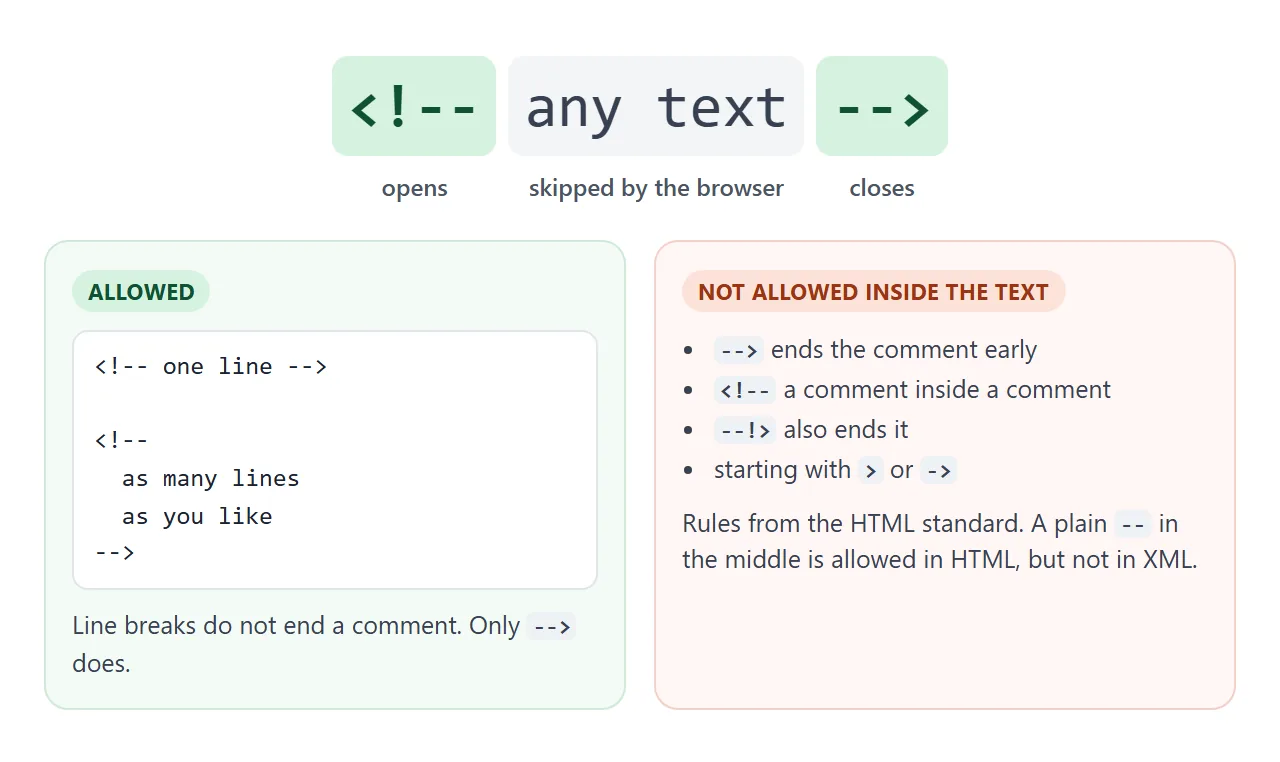
<!-- A one-line comment -->

<!--
  A comment can run over
  as many lines as you like.
-->
HTML 표준은 내부 텍스트에 몇 가지 제한을 둡니다. > 또는 ->로 시작할 수 없습니다. <!--, --> 또는 --!>를 포함할 수 없고 <!-로 끝나서는 안 됩니다.
<!-- step 1 -- draft -->와 같이 중간에 두 개의 하이픈이 현재 HTML에서 허용됩니다. XML 및 이전 버전의 HTML에서는 이를 허용하지 않았으므로 일부 스타일 가이드에서는 여전히 주석 내에서 --를 피하라고 말합니다. 이를 피하는 데는 비용이 들지 않습니다.
여러 줄 주석 및 코드 주석 처리
HTML에는 별도의 여러 줄 주석이 없습니다. -->만이 주석을 끝내기 때문에 동일한 마커가 여러 줄을 덮습니다. 줄바꿈은 그렇지 않습니다.
이는 주석을 테스트하는 동안 무언가를 끄는 가장 빠른 방법으로 만듭니다. 마크업을 래핑하고 다시 로드하면 요소가 사라집니다. 두 개의 마커를 제거하면 다시 돌아옵니다.
<p>Opening hours: 9 to 5.</p>
<!--
<p>Summer sale: 20% off.</p>
<p>Ends on Friday.</p>
-->
마커를 입력할 필요가 거의 없습니다. 많은 편집기에서 Ctrl+/(Mac의 경우 Cmd+/)는 현재 줄이나 선택한 줄에 주석을 달고 동일한 키를 누르면 주석이 다시 제거됩니다.
HTML을 이해하는 편집자는 일반적으로 커서가 <style> 또는 <script> 블록 내부에 있을 때 CSS 또는 JavaScript 마커로 전환합니다.
댓글은 중첩될 수 없습니다.
이것은 이미 주석이 포함된 블록을 주석 처리할 때 대부분의 사람들이 걸리는 함정입니다. 주석은 시작된 후 첫번째 -->에서 끝납니다. 내부 <!--는 더 많은 텍스트이고 내부 -->는 외부 주석을 닫습니다.
<!doctype html>
<html lang="en">
<head>
<meta charset="utf-8">
<meta name="viewport" content="width=device-width, initial-scale=1">
<title>The nested comment trap</title>
<style>
body { margin: 0; padding: 14px; font-family: system-ui, sans-serif; background: #f4f5f7; color: #1d2330; }
.tabs button {
font: 600 13px system-ui, sans-serif; padding: 7px 12px; margin: 0 6px 10px 0;
border: 1px solid #d5d9e0; border-radius: 99px; background: #fff; cursor: pointer;
}
.tabs button.on { background: #1d2330; color: #fff; border-color: #1d2330; }
h2 { font-size: 13px; margin: 12px 0 6px; color: #4b5563; text-transform: uppercase; letter-spacing: .4px; }
pre {
margin: 0; padding: 10px 12px; background: #fff; border: 1px solid #e1e4ea; border-radius: 8px;
font: 13px/1.55 ui-monospace, Consolas, monospace; white-space: pre-wrap; word-break: break-word;
}
.c { background: #d6f2df; color: #0f5132; } /* hidden by a comment */
.end { background: #0f5132; color: #fff; } /* the --> that closed it */
.box { background: #fff; border: 1px solid #e1e4ea; border-radius: 8px; padding: 10px 12px; }
.box p { margin: 0 0 6px; }
.legend { font-size: 12.5px; color: #4b5563; margin-top: 6px; }
.legend span { padding: 0 4px; border-radius: 3px; }
</style>
</head>
<body>
<div class="tabs">
<button id="bad" class="on">Nested comment (broken)</button>
<button id="good">Fixed</button>
</div>
<h2>Source</h2>
<pre id="code"></pre>
<p class="legend"><span class="c">green</span> = inside a comment, <span class="end">dark</span> = the <code>--></code> that ended it</p>
<h2>What the page shows</h2>
<div class="box" id="page"></div>
<!-- The two versions are kept in textareas so the markup stays plain text -->
<textarea id="v-bad" hidden><p>Welcome!</p>
<!-- Hide the banner for now
<div class="banner">
<!-- TODO: new photo -->
<b>Big sale today</b>
</div>
-->
<p>Thanks for visiting.</p></textarea>
<textarea id="v-good" hidden><p>Welcome!</p>
<!-- TODO: new photo -->
<!-- Hide the banner for now
<div class="banner">
<b>Big sale today</b>
</div>
-->
<p>Thanks for visiting.</p></textarea>
<script>
const code = document.getElementById('code');
const page = document.getElementById('page');
const esc = (s) => s.replace(/&/g, '&').replace(/</g, '<').replace(/>/g, '>');
// Mark comments the way the parser reads them:
// a comment starts at <!-- and ends at the FIRST --> after it.
function highlight(src) {
let out = '', i = 0;
while (true) {
const start = src.indexOf('<!--', i);
if (start < 0) break;
const end = src.indexOf('-->', start + 4);
if (end < 0) { out += esc(src.slice(i, start)) + '<span class="c">' + esc(src.slice(start)) + '</span>'; return out; }
out += esc(src.slice(i, start))
+ '<span class="c">' + esc(src.slice(start, end)) + '</span>'
+ '<span class="end">--></span>';
i = end + 3;
}
return out + esc(src.slice(i));
}
function show(which) {
const src = document.getElementById('v-' + which).value;
code.innerHTML = highlight(src);
page.innerHTML = src; // the real browser parser decides what is hidden
document.getElementById('bad').classList.toggle('on', which === 'bad');
document.getElementById('good').classList.toggle('on', which === 'good');
}
document.getElementById('bad').addEventListener('click', () => show('bad'));
document.getElementById('good').addEventListener('click', () => show('good'));
show('bad');
</script>
</body>
</html>
그 이후의 모든 것은 다시 일반적인 마크업입니다. 판매 텍스트가 다시 나타나고 외부 -->가 페이지에 리터럴 텍스트로 표시됩니다.
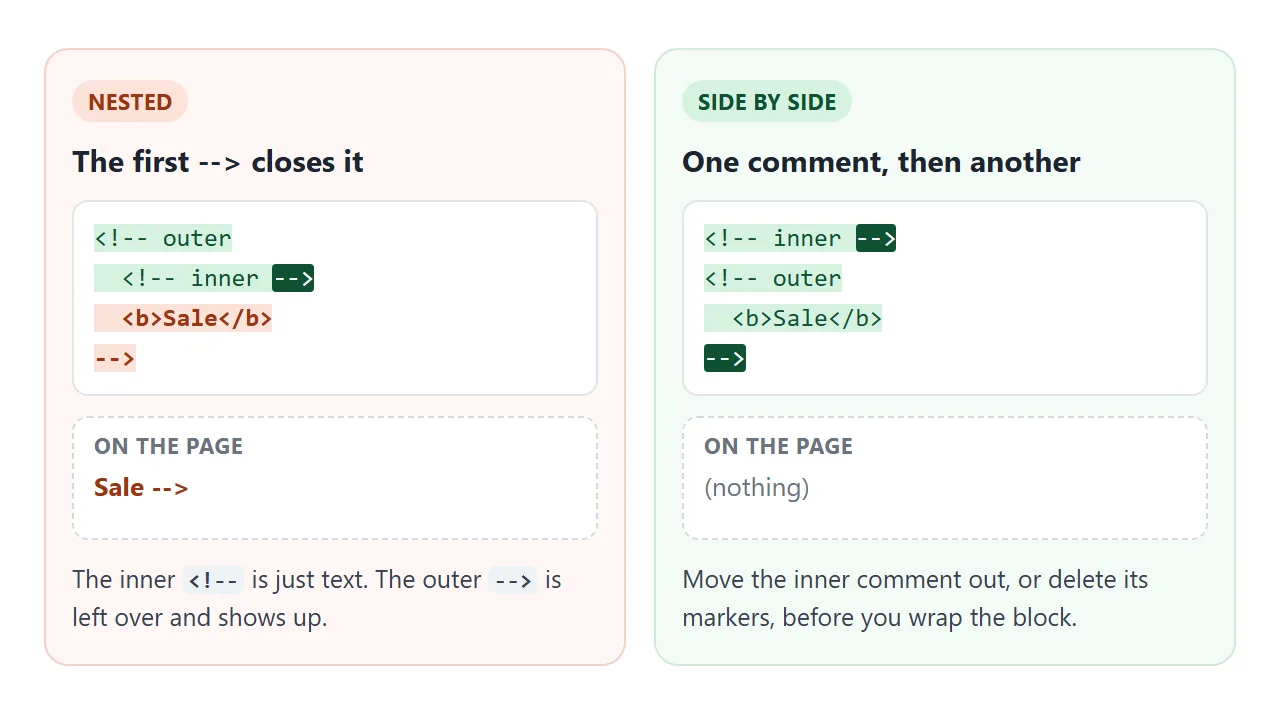
두 가지 수정 사항이 있습니다. 내부 주석을 먼저 블록 외부로 이동하거나 블록을 래핑하기 전에 해당 마커를 삭제하십시오. 어느 쪽이든 각 <!--는 정확히 하나의 -->를 가져옵니다.
CSS 및 JavaScript의 주석
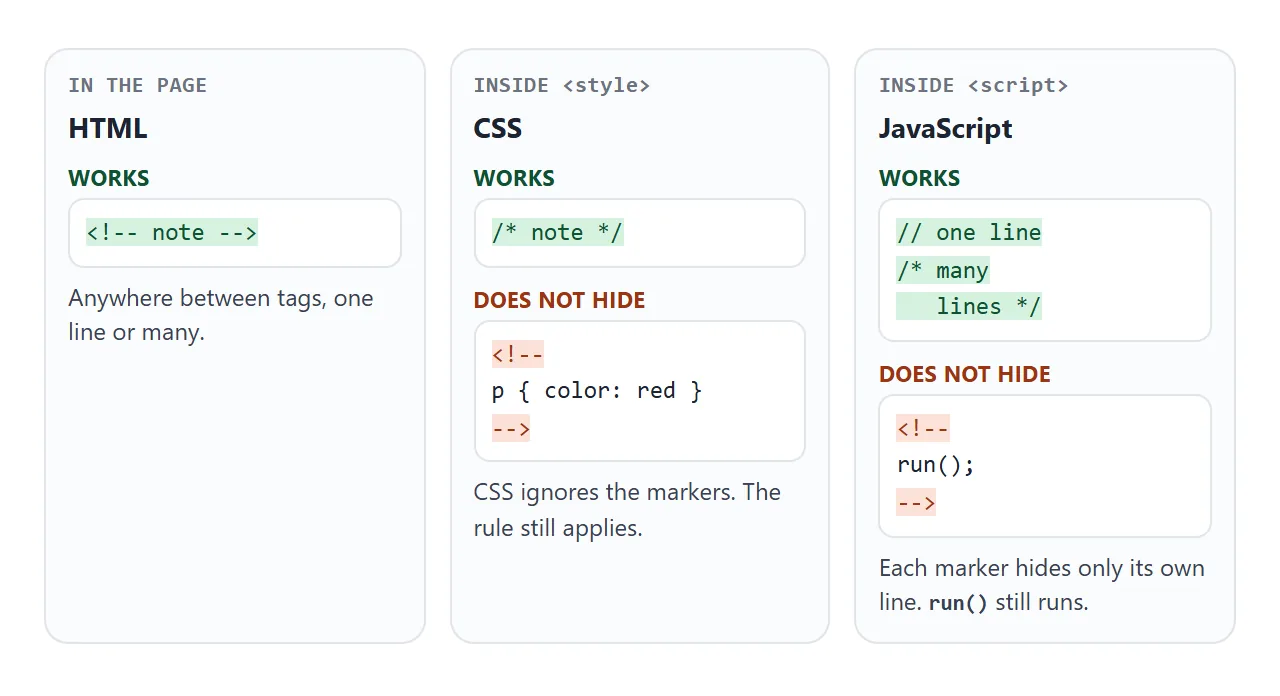
<style> 또는 <script> 요소 내에서 브라우저는 더 이상 HTML을 읽지 않습니다. 콘텐츠는 CSS 또는 JavaScript 엔진으로 이동하며 각 언어에는 고유한 주석 표시가 있습니다.
| 어디에 | 댓글 | 메모 |
|---|---|---|
| HTML, 태그 사이 | <!-- note --> |
한 줄 또는 여러 줄 |
<style> 또는 .css 파일의 CSS |
/* note */ |
CSS에는 한 줄짜리 // 주석이 없습니다. |
<script> 또는 .js 파일의 JavaScript |
// note |
해당 줄의 나머지 부분을 숨깁니다. |
| 자바스크립트, 여러 줄 | /* note */ |
중첩될 수도 없습니다. |
HTML 마커는 해당 작업을 수행하지 않습니다. CSS에서는 <!-- 및 -->를 건너뛰므로 둘 사이의 규칙이 계속 적용됩니다. 클래식 스크립트에서 각 마커는 해당 줄의 나머지 부분만 숨기므로 그 사이의 코드는 계속 실행됩니다.
/* This rule is switched off:
.card { border: 3px solid red; }
*/
별도 파일의 CSS에도 동일하게 적용됩니다. 외부 스타일시트는 /* */도 사용하며 인라인 CSS에 사용되는 style 속성도 마찬가지입니다. style="color: red; /* color: blue; */"는 텍스트를 빨간색으로 유지합니다.
누구나 내 댓글을 읽을 수 있습니다.
댓글은 사람이 아니라 페이지에서 숨겨집니다. 소스 보기는 파일이 전송된 그대로 표시되고 주석이 포함되며 브라우저 개발자 도구에는 요소 옆에 주석 노드가 나열됩니다.
이 완성된 페이지는 세 가지 종류를 모두 사용합니다. 이전 가격은 HTML 주석 뒤에 있고, CSS 주석 뒤에 빨간색 테두리가 있으며, JavaScript 주석 뒤에는 두 줄의 스크립트가 있습니다. 버튼은 방문자가 소스에서 보는 내용을 보여줍니다.
<!doctype html>
<html lang="en">
<head>
<meta charset="utf-8">
<meta name="viewport" content="width=device-width, initial-scale=1">
<title>Comments in HTML, CSS and JS</title>
<style>
body { margin: 0; padding: 14px; font-family: system-ui, sans-serif; background: #f4f5f7; color: #1d2330; }
.card { background: #fff; border-radius: 12px; padding: 14px 16px; box-shadow: 0 4px 14px rgba(0,0,0,.08); }
.card h1 { font-size: 18px; margin: 0 0 6px; }
.price { font-size: 26px; font-weight: 700; color: #0f5132; }
/* CSS comment: this rule is switched off
.card { border: 3px solid red; }
*/
#toggle { margin: 12px 0 8px; font: 600 13px system-ui, sans-serif; padding: 8px 12px; border-radius: 8px; border: 1px solid #1d2330; background: #1d2330; color: #fff; cursor: pointer; }
#source { display: none; margin: 0; padding: 10px 12px; background: #fff; border: 1px solid #e1e4ea; border-radius: 8px; font: 12px/1.5 ui-monospace, Consolas, monospace; white-space: pre-wrap; word-break: break-word; }
#source.open { display: block; }
#source mark { background: #d6f2df; color: #0f5132; }
</style>
</head>
<body>
<div class="card">
<h1>Starter plan</h1>
<p class="price" id="price">$9 / month</p>
<!-- HTML comment: the old price stays in the file, not on the page
<p class="price">$12 / month</p>
-->
<p id="note">Cancel any time.</p>
</div>
<button id="toggle">Show source</button>
<pre id="source"></pre>
<script>
// JS comment: the line below does nothing
// document.getElementById('note').textContent = 'Old note';
/* JS block comment: so does this one
document.getElementById('price').style.color = 'red';
*/
// Copy the page's own markup before anything changes
const markup = '<!doctype html>\n' + document.documentElement.outerHTML;
const esc = (s) => s.replace(/&/g, '&').replace(/</g, '<').replace(/>/g, '>');
// Mark the three kinds of comment in the source view
const marked = esc(markup).replace(/(<!--[\s\S]*?-->|\/\*[\s\S]*?\*\/|^\s*\/\/.*$)/gm, '<mark>$1</mark>');
const source = document.getElementById('source');
const toggle = document.getElementById('toggle');
source.innerHTML = marked;
toggle.addEventListener('click', () => {
const open = source.classList.toggle('open');
toggle.textContent = open ? 'Hide source' : 'Show source';
});
</script>
</body>
</html>
따라서 댓글에 비밀번호, API 키, 비공개 링크 또는 내부 메모를 남기지 마세요. 스크립트를 주석 처리해도 제거되지는 않습니다. 코드는 누구나 복사할 수 있도록 파일에 유지됩니다.
방문자에게 댓글이 전달되지 않아야 한다면 파일이 나가기 전에 댓글을 삭제하세요. 축소기는 파일 축소의 일부로 이를 수행합니다.
조건부 주석은 더 이상 사용되지 않습니다.
이전 페이지에는 때때로 다음과 같은 설명이 포함되어 있습니다.
<!--[if IE]>
  <link rel="stylesheet" href="ie-fixes.css">
<![endif]-->
이러한 조건부 주석은 이전 버전의 Internet Explorer에서만 읽을 수 있습니다. Microsoft는 Internet Explorer 10에서 이를 제거했습니다. 현재의 모든 브라우저는 모든 것을 하나의 일반적인 주석으로 처리하므로 내부 마크업은 로드되지 않습니다. 삭제할 수 있습니다.
작동하지 않을 때
| 당신이 보는 것 | 원인 | 수정 |
|---|---|---|
주석 처리된 블록의 일부가 나타나고 그 뒤에 -->가 나타납니다. |
댓글 안의 댓글 | 내부 주석을 밖으로 이동하거나 해당 마커를 삭제하세요. |
| 페이지의 나머지 부분이 사라집니다. | 닫는 -->가 누락되었거나 잘못 입력되었습니다(예: - ->). |
주석이 끝나야 하는 곳에 -->를 추가하세요. |
<!-- -->로 래핑한 후에도 CSS 규칙이 계속 적용됩니다. |
CSS는 HTML 주석 표시를 무시합니다. | /* */ 사용 |
<!-- -->로 래핑한 후에도 스크립트 줄이 계속 실행됩니다. |
각 마커는 해당 라인만 숨깁니다. | // 또는 /* */를 사용하세요. |
| 댓글이 텍스트로 표시됩니다. | < !--와 같은 오프너의 공간 |
공백 없이 <!--를 입력하세요. |
| 누군가가 귀하의 페이지에서 열쇠나 메모를 발견했습니다. | 댓글은 파일과 함께 제공됩니다. | 파일에서 삭제하고 키를 변경하십시오. |
링크로 공유하세요
댓글은 사람들이 열 수 있는 페이지에서 설명하기 가장 쉽습니다. 스크린샷은 소스에 포함된 내용을 표시할 수 없으며 .html 첨부 파일은 전화기에서 일반 코드로 열리거나 전혀 열리지 않을 수 있습니다.
작업 버전을 보내려면 페이지를 NOS 문서에 붙여넣고 공유 링크 만들기를 선택하세요. 링크할 HTML이 이를 안내합니다.
페이지는 작성된 대로 렌더링되고 해당 스크립트가 실행되므로 페이지를 받는 사람은 버튼을 누르고 소스를 직접 읽을 수 있습니다. 나중에 코드를 변경하면 동일한 링크에 새 버전이 표시됩니다.