HTML minification is the step that strips whitespace, comments and unnecessary characters from HTML, CSS and JavaScript so the same code arrives in fewer bytes. It works, and it is nearly always the wrong thing to reach for first.
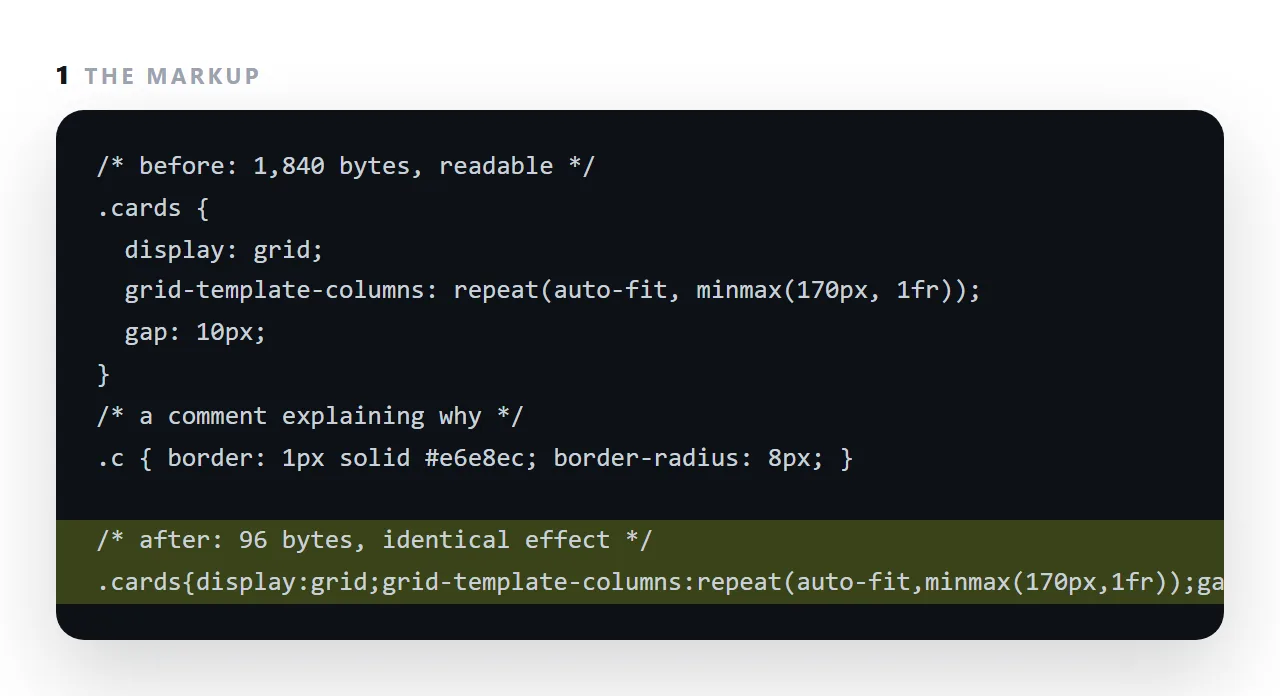
Server compression recovers most of the same bytes without touching the source, and a single image saved straight from a phone weighs more than every script and stylesheet on the page combined.
This guide covers the order that matters, what minification saves, what compression saves, and when a document should be minified at all.
<!-- before -->
<div class="card">
  <h2>Weekly overview</h2>
  <p>Signups rose.</p>
</div>

<!-- after -->
<div class="card"><h2>Weekly overview</h2><p>Signups rose.</p></div>
Same page, fewer bytes. Then the server compresses the response, and compression is extremely good at repeated whitespace — so much of what minification removed would have cost very little anyway.
That does not make it useless. It makes it a smaller lever than its reputation suggests, and worth doing after the larger ones.
The order that matters before minification
| Lever | Typical effect | Effort |
|---|---|---|
| Compress images properly | Large | Low |
| Enable Brotli or gzip | Large | One config line |
| Remove outside dependencies | Medium to large | Low |
| Defer offscreen images | Medium | One attribute |
| Minify CSS and JS | Small | A build step |
| Minify HTML | Smallest | A build step |
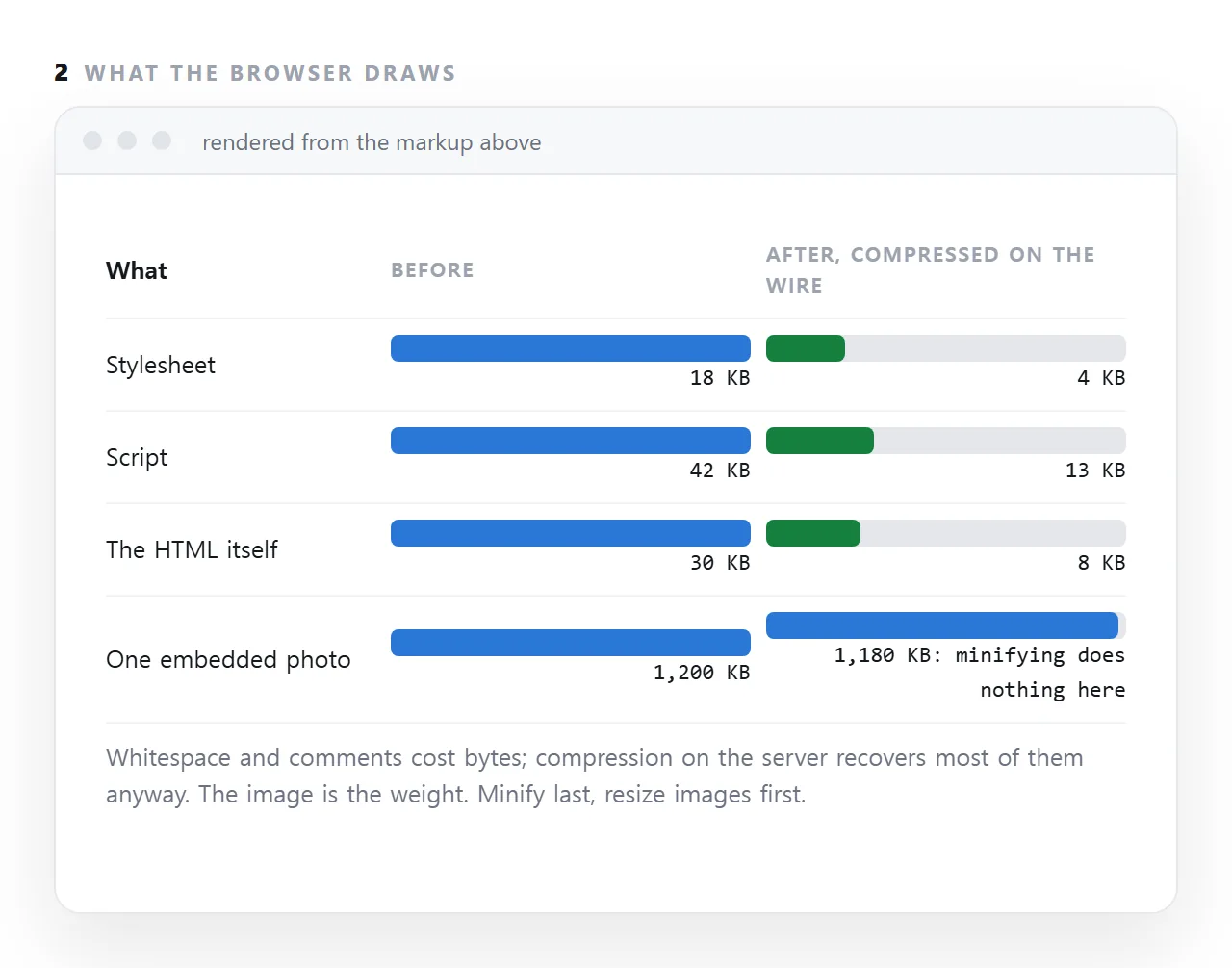
Images are nearly always the largest thing on a page, by an order of magnitude. A page with one uncompressed screenshot and perfectly minified markup is a slow page.
Compression, which is the real win
Content-Encoding: br
Brotli, with gzip as the fallback. Both are supported everywhere and usually enabled with a single configuration line on the server or at the delivery network.
Once it is on, further minification of text is a diminishing return — you are compressing something already compressed.
What to fix first
Resize before compressing
The commonest waste: a 4000-pixel image displayed in an 800-pixel column. The browser downloads all four thousand pixels and discards three quarters of them. Resize to roughly twice the display width.
Do not embed large images
A base64 image adds a third to its size and, worse, blocks the page from rendering until the whole document has arrived. For anything image-heavy, use separate files:
<img src="chart.webp" alt="Signups by source" width="1600" height="1000" loading="lazy">
loading="lazy" defers everything below the fold. width and height reserve the space so the page does not jump as images arrive.
Prefer SVG for anything geometric
Inline SVG is usually smaller than the equivalent picture, sharp at any zoom, and needs no request at all.
Remove what the page pulls from elsewhere
A charting library and a font service can be larger than your entire page, and each is a request to somewhere you do not control. Replacing them with divs and a system font stack is both smaller and more durable — see self-contained HTML.
Where minification genuinely helps
Very large repetitive markup. A page with a thousand table rows has real redundancy, though generating those rows from a data array is the better fix.
A page held in a size-limited place. Then every byte is a constraint rather than a performance question.
Long CSS with many comments. Comments are pure overhead in production.
Do not minify by hand
<!-- do not do this to your source -->
<div class=card><h2>Weekly overview</h2><p>Signups rose.
Minified source is unmaintainable, and you will be the one reading it in three months. Minification belongs to a build step that takes readable source and produces a compact output.
If there is no build step, leave the source readable. The difference over a compressed connection is small, and readable markup is worth more than a few hundred bytes.
Minified pages and the person who has to edit them
A minified file is one long line. It renders identically, and it cannot be read or corrected by a person.
For a page that will be edited by hand, or corrected by a colleague clicking on its text, the readable source is the one that should be kept, and minification, if it happens at all, should happen on the way out of a build step rather than to the file people work on.
What actually makes a document page slow
In order: images saved at camera size, a font loaded from an address that is slow to answer, a script that waits for an outside library, and a page that assembles itself in the browser before showing anything.
Whitespace in the markup is not on the list. A self-contained page with resized images, a system font stack and its scripts inside it is fast without minification, and minifying it afterwards saves a few percent that compression would have saved anyway.
Making a page lighter, in the right order: 4 steps
- Resize and compress the images first. This is where the bytes are. A page under a megabyte is usually all images; the portfolio guide shows the arithmetic.
- Make sure the server compresses text. gzip or brotli on HTML, CSS and JS. Most hosts do it by default; the response headers say so.
- Minify only what is built, keep the source readable. A build step can minify on the way out. A page you edit by hand, or that a colleague will correct by clicking, should stay readable.
- Measure before and after. The Network panel shows transferred bytes. If the number barely moved, the weight was somewhere else.