Here esbuild means the build tool: a JavaScript bundler that joins your script files, and the CSS they import, into a few output files. It does not build an HTML page.
To get one working HTML file, bundle the code first, then put the output inside <script> and <style> tags.
Try the smallest piece first. esbuild also ships as a WebAssembly build that runs inside a web page, so one plain HTML file can call it. Type TypeScript below and press the button.
<!doctype html>
<html lang="en">
<head>
<meta charset="utf-8">
<meta name="viewport" content="width=device-width, initial-scale=1">
<title>esbuild in a plain HTML file</title>
<style>
  * { box-sizing: border-box; }
  body { margin: 0; padding: 14px; font-family: system-ui, sans-serif; background: #f4f5f7; color: #1d2330; }
  h1 { font-size: 16px; margin: 0 0 10px; }
  label.cap { display: block; font-size: 12px; font-weight: 700; color: #4b5563; margin: 10px 0 4px; }
  textarea, pre {
    width: 100%; margin: 0; padding: 10px; border: 1px solid #d5d9e0; border-radius: 8px;
    font: 13px/1.45 ui-monospace, Consolas, monospace; background: #fff; color: #1d2330;
  }
  textarea { height: 140px; resize: vertical; }
  pre { min-height: 110px; max-height: 150px; overflow: auto; white-space: pre-wrap; word-break: break-all; }
  .bar { display: flex; flex-wrap: wrap; align-items: center; gap: 10px; margin-top: 10px; }
  button { font: 600 14px system-ui, sans-serif; padding: 9px 16px; border: 0; border-radius: 8px; background: #2563eb; color: #fff; cursor: pointer; }
  button:disabled { background: #9aa3b2; cursor: default; }
  .opt { font-size: 14px; }
  #status { font-size: 13px; color: #374151; margin-top: 10px; min-height: 18px; }
  #status.err { color: #9a3412; }
  #status.ok { color: #0f5132; }
</style>
</head>
<body>
<h1>Run esbuild on a TypeScript snippet</h1>

<label class="cap" for="src">Input (TypeScript)</label>
<textarea id="src" spellcheck="false">interface Greeting { name: string }

function greet(g: Greeting): string {
  const message = "Hello, " + g.name;
  return message;
}

console.log(greet({ name: "esbuild" }));</textarea>

<div class="bar">
  <button id="run" disabled>Loading esbuild...</button>
  <label class="opt"><input type="checkbox" id="min"> minify</label>
</div>

<label class="cap">Output (JavaScript)</label>
<pre id="out"></pre>
<div id="status"></div>

<script src="https://cdn.jsdelivr.net/npm/esbuild-wasm@0.28.2/lib/browser.min.js"></script>
<script>
  const src = document.getElementById('src');
  const out = document.getElementById('out');
  const run = document.getElementById('run');
  const min = document.getElementById('min');
  const status = document.getElementById('status');
  const size = (s) => new TextEncoder().encode(s).length;

  function say(text, cls) { status.textContent = text; status.className = cls || ''; }

  async function transform() {
    try {
      // loader 'ts' = parse as TypeScript and drop the types
      const r = await esbuild.transform(src.value, { loader: 'ts', minify: min.checked });
      out.textContent = r.code;
      say('Input ' + size(src.value) + ' bytes, output ' + size(r.code) + ' bytes.', 'ok');
    } catch (err) {
      out.textContent = '';
      say(err.message, 'err');  // a syntax error in the input lands here
    }
  }

  if (typeof esbuild === 'undefined') {
    run.textContent = 'esbuild did not load';
    say('The esbuild script could not be loaded from the CDN.', 'err');
  } else {
    esbuild.initialize({ wasmURL: 'https://cdn.jsdelivr.net/npm/esbuild-wasm@0.28.2/esbuild.wasm' })
      .then(() => { run.disabled = false; run.textContent = 'Run esbuild'; transform(); })
      .catch((err) => { run.textContent = 'esbuild did not start'; say(err.message, 'err'); });
    run.addEventListener('click', transform);
    min.addEventListener('change', transform);
  }
</script>
</body>
</html>
Two things make that work. A script tag loads esbuild-wasm from a CDN, and esbuild.initialize is given the address of the .wasm file. After that, esbuild.transform takes a string of code and returns an object whose code is the result.
What esbuild is, and what it is not
A bundler follows import lines and inlines each imported file into the output, recursively. That is what makes many source files become one script.
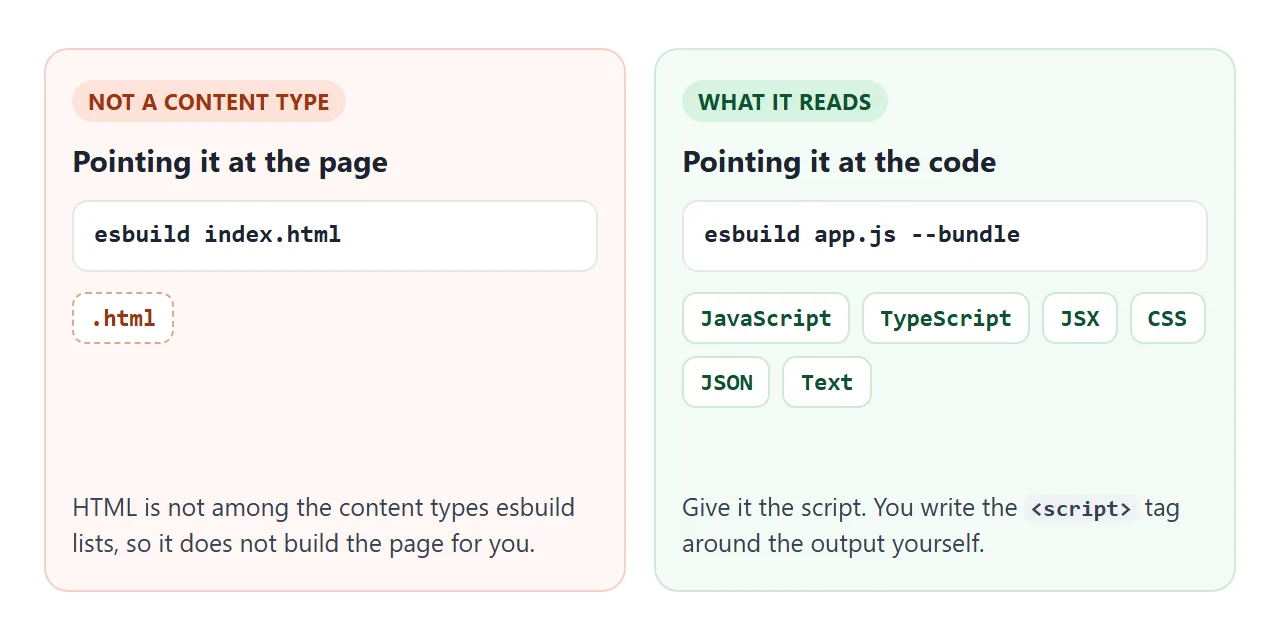
Because the page itself is not an input, esbuild never rewrites your <script src> tags. The HTML is yours to write, and esbuild produces the pieces that go in it.
It also removes TypeScript types without checking them, so keep a type check as a separate step.
From source files to one HTML file
On your own machine the steps are short. Install esbuild with npm, then run it on the entry file.
npm install --save-exact --save-dev esbuild
./node_modules/.bin/esbuild app.js --bundle --minify --outdir=out
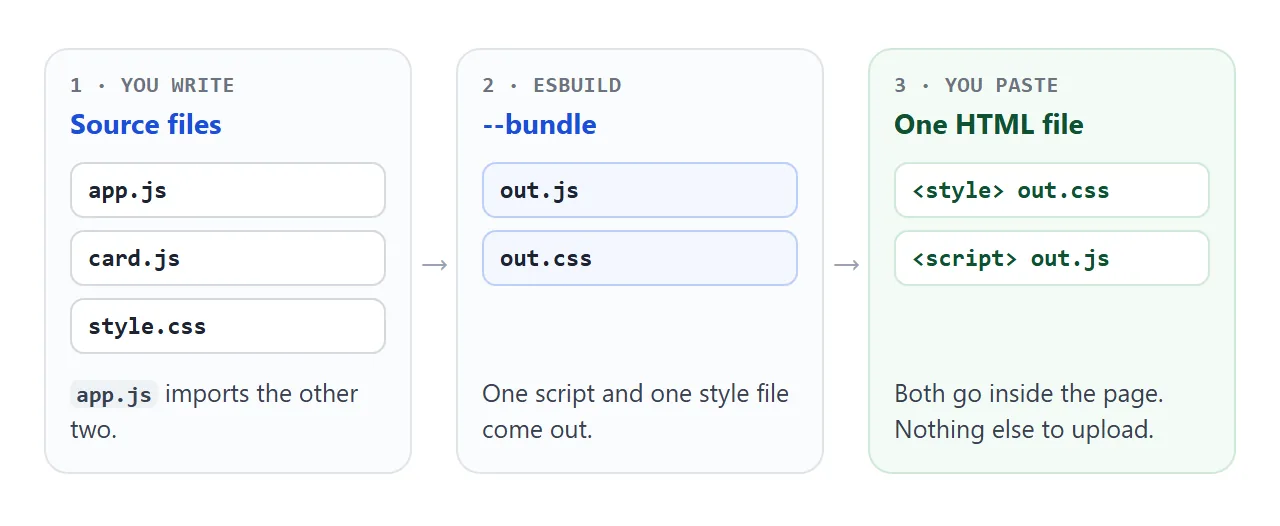
- Write modules. One entry file, here
app.js, imports the others. - Bundle.
--bundleinlines the imports, and--minifyshortens the result. - Paste. CSS goes in a
<style>tag, the script goes in a<script>tag. - Open it alone. If it works with nothing beside it, it is a single file.
The npm command needs Node and a terminal, so it cannot run inside a pasted page. What a pasted page can run is the finished output, and the in-page example further down shows that whole path.
Pick the format: iife or esm
When bundling for the browser with no format given, esbuild picks iife, an immediately-invoked function expression. It wraps your code in a function that runs as soon as the script loads. The other choice that matters here is esm, for type="module".
<!doctype html>
<html lang="en">
<head>
<meta charset="utf-8">
<meta name="viewport" content="width=device-width, initial-scale=1">
<title>esbuild output formats</title>
<style>
  * { box-sizing: border-box; }
  body { margin: 0; padding: 14px; font-family: system-ui, sans-serif; background: #f4f5f7; color: #1d2330; }
  h1 { font-size: 16px; margin: 0 0 8px; }
  p.note { font-size: 13px; line-height: 1.45; margin: 0 0 10px; color: #374151; }
  .files { display: grid; grid-template-columns: 1fr 1fr; gap: 10px; }
  .grid { display: grid; grid-template-columns: 1fr 1fr; gap: 10px; margin-top: 10px; }
  @media (max-width: 520px) { .files, .grid { grid-template-columns: 1fr; } }
  .box { border: 1px solid #d5d9e0; border-radius: 10px; background: #fff; padding: 10px; min-width: 0; }
  .box h2 { font: 700 13px ui-monospace, Consolas, monospace; margin: 0 0 6px; }
  .good { background: #f4fbf6; border-color: #cfe9d7; }
  .good h2 { color: #0f5132; }
  .warn { background: #fff7f5; border-color: #f3d1c8; }
  .warn h2 { color: #9a3412; }
  pre { margin: 0; font: 12.5px/1.45 ui-monospace, Consolas, monospace; white-space: pre-wrap; word-break: break-all; }
  .tip { font-size: 12.5px; color: #374151; margin: 8px 0 0; line-height: 1.4; }
  #status { font-size: 13px; margin-top: 10px; color: #9a3412; }
  .bar { margin: 10px 0 0; }
  label { font-size: 14px; }
</style>
</head>
<body>
<h1>One entry file, three outputs</h1>
<p class="note">Two small files go in. The same build runs three times with different options.</p>

<div class="files">
  <div class="box"><h2>app.js (entry)</h2><pre id="f-app"></pre></div>
  <div class="box"><h2>math.js</h2><pre id="f-math"></pre></div>
</div>

<div class="grid">
  <div class="box good">
    <h2>bundle, format iife</h2>
    <pre id="o-iife"></pre>
    <p class="tip">Runs as soon as it loads. Paste it into a plain script tag placed after the elements it uses.</p>
  </div>
  <div class="box good">
    <h2>bundle, format esm</h2>
    <pre id="o-esm"></pre>
    <p class="tip">Use it in a script tag with type="module". Module scripts wait until the page is parsed.</p>
  </div>
  <div class="box warn" style="grid-column: 1 / -1">
    <h2>no bundle (imports stay)</h2>
    <pre id="o-nobundle"></pre>
    <p class="tip">The import line is still there. Inside one HTML file there is no math.js for it to find.</p>
  </div>
</div>
<div id="status"></div>

<script src="https://cdn.jsdelivr.net/npm/esbuild-wasm@0.28.2/lib/browser.min.js"></script>
<script>
  // The two input files live in memory; a small plugin hands them to esbuild.
  const files = {
    'app.js': 'import { double } from "./math.js";\ndocument.getElementById("out").textContent = "21 doubled is " + double(21);',
    'math.js': 'export const double = (n) => n * 2;'
  };
  document.getElementById('f-app').textContent = files['app.js'];
  document.getElementById('f-math').textContent = files['math.js'];

  const memory = {
    name: 'memory',
    setup(build) {
      build.onResolve({ filter: /.*/ }, (a) => ({ path: a.path.replace(/^\.\//, ''), namespace: 'mem' }));
      build.onLoad({ filter: /.*/, namespace: 'mem' }, (a) => ({ contents: files[a.path], loader: 'js' }));
    }
  };

  async function show(id, options) {
    const r = await esbuild.build({
      entryPoints: ['app.js'], write: false, outdir: 'out', plugins: [memory], ...options
    });
    document.getElementById(id).textContent = r.outputFiles[0].text.trim();
  }

  async function main() {
    await esbuild.initialize({ wasmURL: 'https://cdn.jsdelivr.net/npm/esbuild-wasm@0.28.2/esbuild.wasm' });
    await show('o-iife', { bundle: true, format: 'iife' });
    await show('o-esm', { bundle: true, format: 'esm' });
    await show('o-nobundle', { bundle: false });
  }

  if (typeof esbuild === 'undefined') {
    document.getElementById('status').textContent = 'The esbuild script could not be loaded from the CDN.';
  } else {
    main().catch((err) => { document.getElementById('status').textContent = err.message; });
  }
</script>
</body>
</html>
The third box is the usual surprise. Without --bundle, esbuild leaves import lines alone, and a single HTML file has no math.js for them to find.
Where the script goes
An iife runs the moment the browser reads it. If the script sits in the head, the elements it looks for do not exist yet.
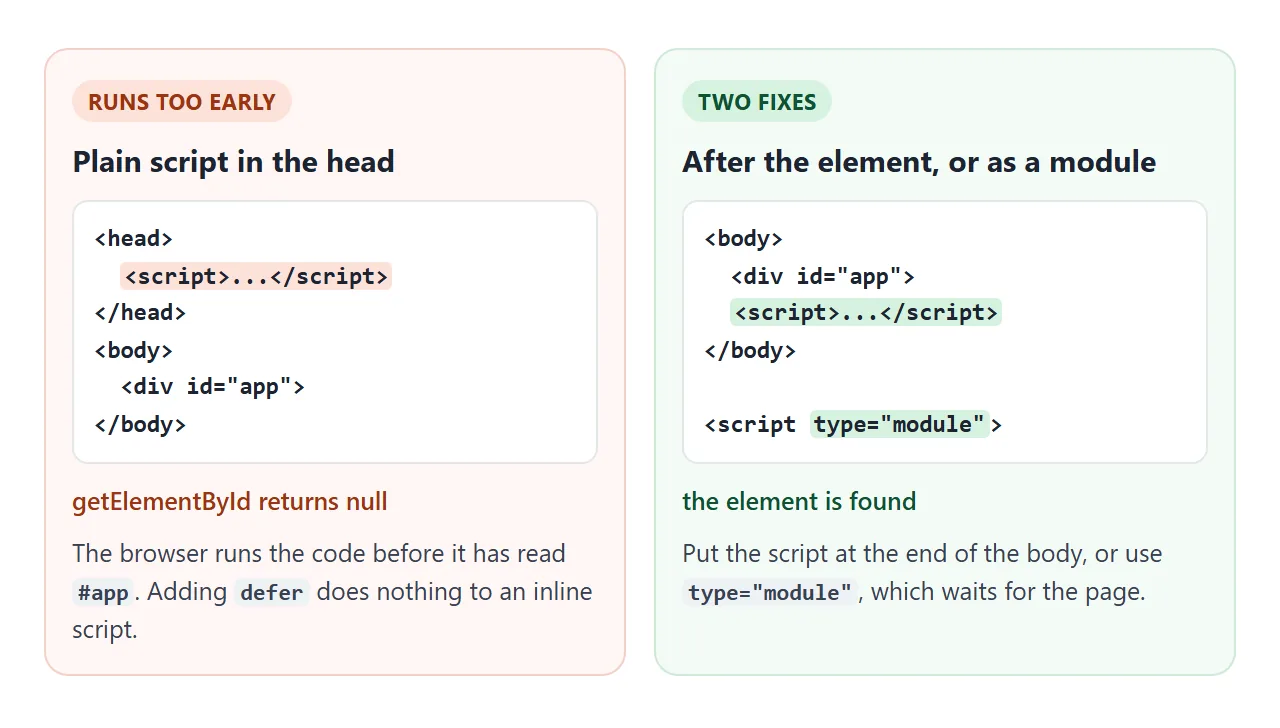
MDN notes that defer has no effect on an inline script, so adding it does not help. A module script is deferred by default, which is why type="module" is the other fix.
Both were tested for this article: the plain script in the head failed to find its element, and the module script found it.
CSS, images and the closing script tag
Three smaller details decide whether the single file works.
- CSS. When JavaScript imports a CSS file, esbuild writes the CSS as a separate file next to the script. Copy it into a style tag.
- Images. The
dataurlloader embeds a file in the bundle as a base64 data URL. Enable it per extension, for example--loader:.png=dataurl. - The closing script tag. The HTML standard says to escape
</scriptas\x3C/scriptwhen it appears in a literal inside a script. Otherwise the browser ends the script at that text.
A finished example: the one-file builder
This page does the whole job in the browser. Three source files sit behind the tabs. A small plugin hands them to esbuild, which bundles them. The page then builds a complete HTML file and runs the result in the box below.
<!doctype html>
<html lang="en">
<head>
<meta charset="utf-8">
<meta name="viewport" content="width=device-width, initial-scale=1">
<title>Bundle into one HTML file</title>
<style>
  * { box-sizing: border-box; }
  body { margin: 0; padding: 14px; font-family: system-ui, sans-serif; background: #f4f5f7; color: #1d2330; }
  h1 { font-size: 16px; margin: 0 0 8px; }
  h2 { font-size: 13px; margin: 14px 0 5px; color: #4b5563; }
  .tabs { display: flex; flex-wrap: wrap; gap: 6px; }
  .tabs button { font: 600 13px ui-monospace, Consolas, monospace; padding: 7px 11px; border: 1px solid #d5d9e0; border-radius: 8px; background: #fff; color: #1d2330; cursor: pointer; }
  .tabs button.on { background: #1d2330; color: #fff; border-color: #1d2330; }
  textarea { width: 100%; height: 150px; margin-top: 8px; padding: 10px; border: 1px solid #d5d9e0; border-radius: 8px; font: 13px/1.45 ui-monospace, Consolas, monospace; background: #fff; color: #1d2330; resize: vertical; }
  textarea.result { height: 130px; background: #fafbfc; }
  .bar { display: flex; flex-wrap: wrap; align-items: center; gap: 10px; margin-top: 10px; }
  .go { font: 600 14px system-ui, sans-serif; padding: 9px 16px; border: 0; border-radius: 8px; background: #2563eb; color: #fff; cursor: pointer; }
  .go:disabled { background: #9aa3b2; cursor: default; }
  .opt { font-size: 14px; }
  #status { font-size: 13px; color: #0f5132; margin-top: 8px; min-height: 18px; }
  #status.err { color: #9a3412; }
  #preview { border: 1px dashed #b8bfcc; border-radius: 10px; background: #fff; padding: 14px; min-height: 120px; }
</style>
</head>
<body>
<h1>Three source files in, one HTML file out</h1>

<div class="tabs" id="tabs"></div>
<textarea id="editor" spellcheck="false"></textarea>

<div class="bar">
  <button class="go" id="build" disabled>Loading esbuild...</button>
  <label class="opt"><input type="checkbox" id="min"> minify</label>
</div>
<div id="status"></div>

<h2>Result: the page the bundle makes</h2>
<div id="preview"><div id="app"></div></div>

<h2>The single HTML file (select all, copy, save as .html)</h2>
<textarea id="html" class="result" readonly spellcheck="false"></textarea>
<div class="bar"><button class="go" id="select">Select all</button></div>

<script src="https://cdn.jsdelivr.net/npm/esbuild-wasm@0.28.2/lib/browser.min.js"></script>
<script>
  const files = {
    'app.js':
'import { makeCard } from "./card.js";\nimport "./style.css";\n\nconst app = document.getElementById("app");\napp.append(makeCard("One file", "Three sources, one script, one style."));',
    'card.js':
'export function makeCard(title, text) {\n  const card = document.createElement("div");\n  card.className = "card";\n  const b = document.createElement("b");\n  b.textContent = title;\n  const p = document.createElement("p");\n  p.textContent = text;\n  const btn = document.createElement("button");\n  let n = 0;\n  btn.textContent = "Clicked 0 times";\n  btn.addEventListener("click", () => {\n    n += 1;\n    btn.textContent = "Clicked " + n + " times";\n  });\n  card.append(b, p, btn);\n  return card;\n}',
    'style.css':
'#app .card {\n  max-width: 260px; padding: 14px 16px;\n  border-radius: 12px; background: #eef4ff;\n  box-shadow: 0 4px 14px rgba(0, 0, 0, .12);\n  font-family: system-ui, sans-serif;\n}\n#app .card p { margin: 6px 0 10px; }\n#app .card button { padding: 7px 12px; border: 0; border-radius: 8px; background: #2563eb; color: #fff; }'
  };
  let current = 'app.js';

  const $ = (id) => document.getElementById(id);
  const tabs = $('tabs'), editor = $('editor'), status = $('status');

  Object.keys(files).forEach((name) => {
    const b = document.createElement('button');
    b.textContent = name;
    b.dataset.name = name;
    b.addEventListener('click', () => { current = name; draw(); });
    tabs.append(b);
  });
  function draw() {
    editor.value = files[current];
    [...tabs.children].forEach((b) => b.classList.toggle('on', b.dataset.name === current));
  }
  editor.addEventListener('input', () => { files[current] = editor.value; });
  draw();

  // Serve the in-memory files to esbuild
  const memory = {
    name: 'memory',
    setup(build) {
      build.onResolve({ filter: /.*/ }, (a) => ({ path: a.path.replace(/^\.\//, ''), namespace: 'mem' }));
      build.onLoad({ filter: /.*/, namespace: 'mem' }, (a) => {
        if (!(a.path in files)) throw new Error('No file named ' + a.path);
        return { contents: files[a.path], loader: a.path.endsWith('.css') ? 'css' : 'js' };
      });
    }
  };

  async function bundle() {
    status.className = '';
    try {
      const r = await esbuild.build({
        entryPoints: ['app.js'], bundle: true, write: false, outdir: 'out',
        minify: $('min').checked, plugins: [memory]
      });
      const js = r.outputFiles.find((f) => f.path.endsWith('.js')).text;
      const css = (r.outputFiles.find((f) => f.path.endsWith('.css')) || { text: '' }).text;
      // A closing script tag inside inline code ends the script early, so escape it.
      // Written in two pieces here because this code is itself inside a script tag.
      const END = '<' + '/script>';
      const safeJs = js.split('<' + '/script').join('\\x3C/script');

      $('html').value =
'<!doctype html>\n<html lang="en">\n<head>\n<meta charset="utf-8">\n<meta name="viewport" content="width=device-width, initial-scale=1">\n<title>App</title>\n<style>\n' +
        css + '</style>\n</head>\n<body>\n<div id="app"></div>\n<script>\n' + safeJs + END + '\n</body>\n</html>\n';

      // Show the result right here: inject the CSS, then run the script
      let st = $('built-style');
      if (!st) { st = document.createElement('style'); st.id = 'built-style'; document.head.append(st); }
      st.textContent = css;
      $('app').textContent = '';
      const s = document.createElement('script');
      s.textContent = safeJs;
      document.body.append(s);
      s.remove();
      status.textContent = 'Built: ' + js.length + ' bytes of script, ' + css.length + ' bytes of style, ' + $('html').value.length + ' bytes of HTML.';
    } catch (err) {
      status.textContent = err.message;
      status.className = 'err';
    }
  }

  $('select').addEventListener('click', () => { $('html').focus(); $('html').select(); });

  const btn = $('build');
  if (typeof esbuild === 'undefined') {
    btn.textContent = 'esbuild did not load';
    status.textContent = 'The esbuild script could not be loaded from the CDN.';
    status.className = 'err';
  } else {
    esbuild.initialize({ wasmURL: 'https://cdn.jsdelivr.net/npm/esbuild-wasm@0.28.2/esbuild.wasm' })
      .then(() => { btn.disabled = false; btn.textContent = 'Build'; bundle(); })
      .catch((err) => { btn.textContent = 'esbuild did not start'; status.textContent = err.message; status.className = 'err'; });
    btn.addEventListener('click', bundle);
    $('min').addEventListener('change', bundle);
  }
</script>
</body>
</html>
The pieces are the ones from above:
- Plugin.
onResolveandonLoadcallbacks serve files from memory, because a browser page has no file system for esbuild to read. - No disk.
write: falsereturns the output inoutputFilesinstead of writing files. - Assembly. The CSS goes in a style tag, the escaped script goes in a script tag at the end of the body.
Copy the text box into a file ending in .html and open it. It runs with nothing else beside it, which was checked by saving the output and opening it alone.
When it does not work
| What you see | Cause | Fix |
|---|---|---|
| esbuild does not turn index.html into a page | HTML is not a content type esbuild builds | Use the script as the entry and write the HTML yourself |
| Console says a property of null cannot be set | The script ran before its element existed | Move the script to the end of the body, or use type="module" |
| The page loads but has no styling | Imported CSS went to a separate file | Paste that file into a style tag |
| Blank page after sending only the HTML file | The script tag points at a file that was not sent | Put the code inside the script tag |
| Half the code appears as text on the page | The code contains the closing script tag | Escape it as \x3C/script |
| An import line is still in the output | The build ran without --bundle |
Add --bundle |
| Images are missing | Image paths point to files that were not sent | Use the dataurl loader |
| The in-page demo says esbuild did not load or start | The CDN script or the .wasm file could not be fetched |
Read the message under the button and check the connection |
Share it as a link
A single HTML file is the right thing to share, because the person opening it needs nothing else. A screenshot cannot be clicked, and an .html attachment may open as plain code on a phone.
To send the working version, paste the page into a NOS document and choose Create share link. HTML to link walks through it.
The page renders as written and its scripts run, so the people you send it to can use it themselves. If you change the code later, the same link shows the new version. Add the viewport meta tag first so it fits a phone.
Share the finished output of esbuild, not the builder. The output has no dependencies, while the builder page loads esbuild from a CDN. If a shared page shows nothing, HTML JavaScript not working lists the causes in order.