A Content Security Policy is a header, or a meta tag in the head, that tells the browser where this page is allowed to load things from: scripts from the page's own origin only, images from anywhere over https, no frames from other sites, no inline scripts.
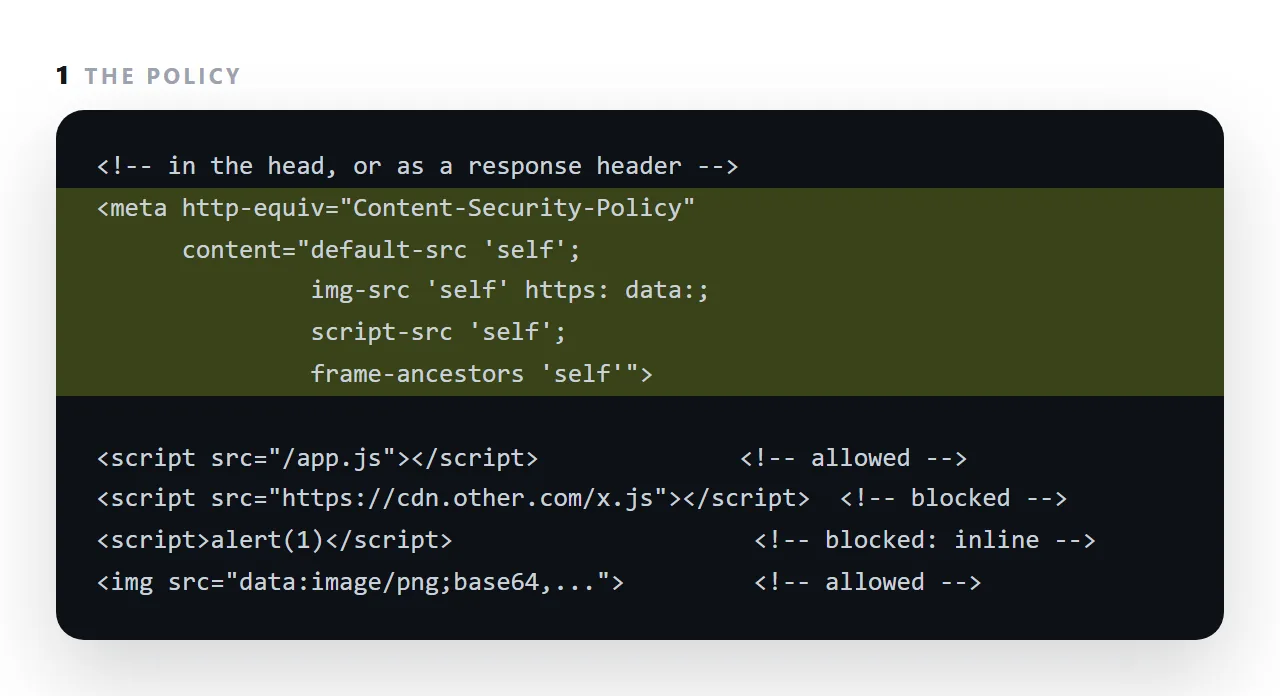
Anything outside the list is refused and reported in the console.
It exists because a page that can load a script from anywhere can be made to load an attacker's; and it is also the mechanism behind a preview pane that renders a pasted page but blocks its outside chart library.
This guide covers the directives worth knowing, a reasonable starting policy, and what breaks under one.
Content-Security-Policy: default-src 'self'; img-src 'self' data:; style-src 'self' 'unsafe-inline'
A response header listing permitted sources. Anything else is refused by the browser — including a script an attacker managed to inject into your markup, which is the point.
The Content Security Policy directives worth knowing
| Directive | Controls |
|---|---|
default-src |
The fallback for everything below |
script-src |
Where scripts may come from |
style-src |
Stylesheets |
img-src |
Images |
font-src |
Fonts |
connect-src |
fetch, WebSocket, EventSource |
frame-src |
What this page may put in a frame |
frame-ancestors |
Who may put this page in a frame |
form-action |
Where forms may submit |
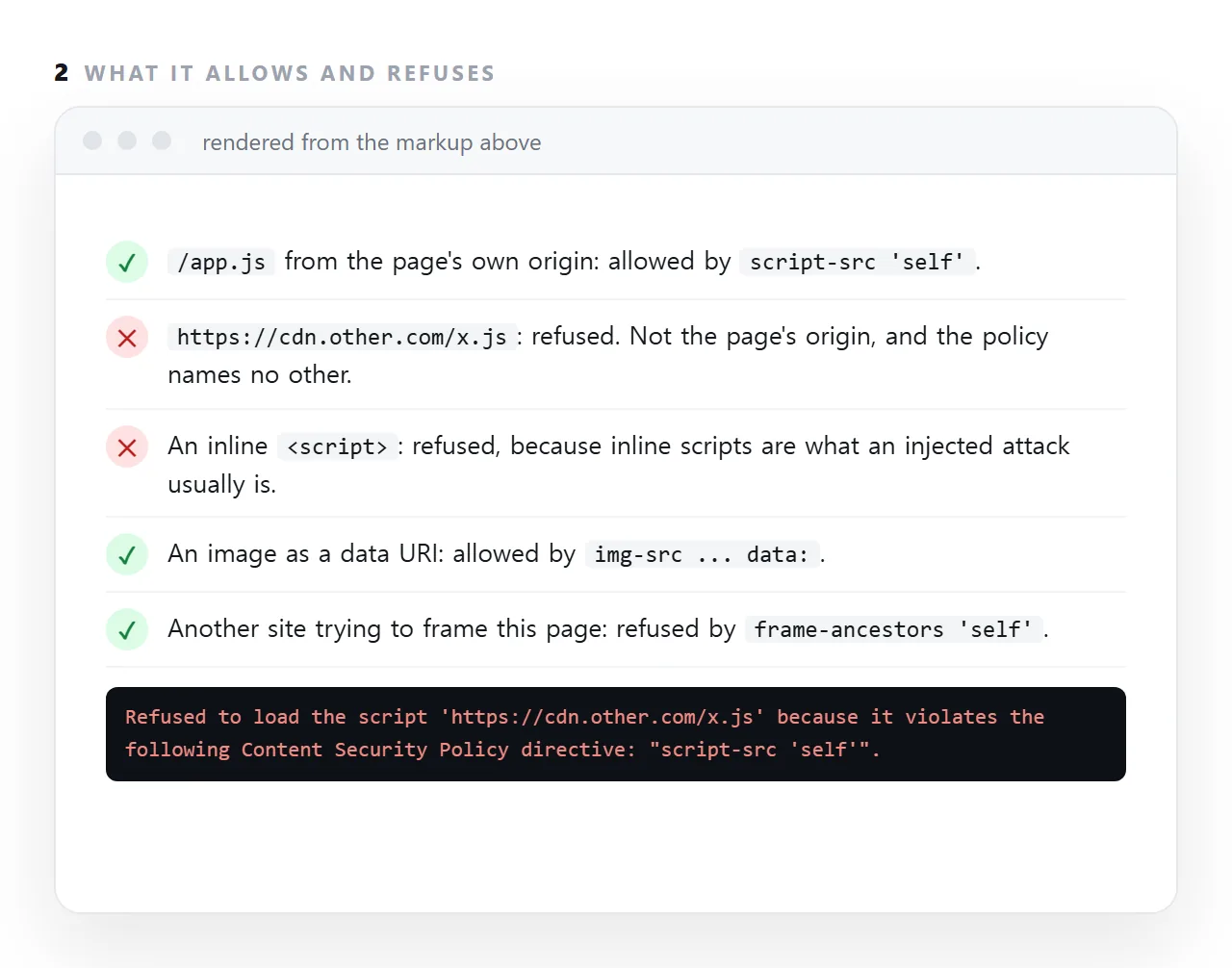
Two source keywords matter most: 'self' means the page's own origin, and 'none' means nothing at all.
A reasonable starting policy
Content-Security-Policy:
  default-src 'self';
  script-src 'self';
  style-src 'self' 'unsafe-inline';
  img-src 'self' data: https:;
  font-src 'self' data:;
  connect-src 'self';
  frame-ancestors 'self';
  form-action 'self';
  base-uri 'none';
  object-src 'none'
Notes on the choices:
style-src includes 'unsafe-inline' because inline style attributes are everywhere in real markup — including the bar widths in charts, which cannot be in a stylesheet. Inline styles are a much smaller risk than inline scripts.
img-src includes data: or embedded images are blocked. This is a frequent cause of icons that work locally and vanish once published.
object-src 'none' disables plugins entirely. Nothing legitimate needs them.
base-uri 'none' stops an injected <base> tag rewriting every relative address on the page — a real and often-forgotten attack.
frame-ancestors 'self' stops another site framing your page and overlaying it to capture clicks.
Why unsafe-inline in script-src defeats the policy
script-src 'self' 'unsafe-inline'
An injected script is inline. Permitting inline scripts permits precisely the attack CSP exists to prevent — so this configuration provides almost no protection while appearing to.
If inline scripts are unavoidable, use a nonce:
script-src 'self' 'nonce-r4nd0m'
<script nonce="r4nd0m">…</script>
The nonce must be regenerated per response. A fixed nonce is equivalent to unsafe-inline.
Roll it out in report-only mode first
Content-Security-Policy-Report-Only: default-src 'self'; report-uri /csp-report
Violations are reported and nothing is blocked. Run it for a week, read what would have broken, then enforce. Enforcing a guessed policy on a live site reliably breaks something you did not know the page depended on.
What it breaks, predictably
| Symptom | Missing directive |
|---|---|
| Embedded images gone | data: in img-src |
| A font falls back | font-src |
| An analytics script refuses to run | That host in script-src |
fetch fails with a policy message |
connect-src |
| An embed shows blank | frame-src |
| An iframe preview will not render | frame-src including the frame's source |
The last one matters if your page renders pasted HTML: a srcdoc frame needs the policy to permit it.
CSP or sandbox
They work from opposite ends, and both are useful.
CSP is set by the server and restricts what this page may load and run.
sandbox is an attribute on an iframe and restricts what embedded content may do.
A page that renders untrusted HTML should have both: a policy limiting its own loading, and a sandbox limiting the guest.
Not CORS
CORS is the other server saying whether you may read its response. CSP is your own page saying what it may reach at all. The error messages are different — a CSP violation names the policy and the violated directive.
Header or meta tag
A policy sent as an HTTP header applies before any of the page is parsed and can include frame-ancestors and reporting directives.
The same policy in a <meta http-equiv> tag works for a page you cannot set headers on, a single file, a page in someone else's host, but it cannot stop framing and it applies only from the point in the head where it appears.
For a document that will be sent as a file, the meta form is the only option; for a site, the header is better.
What a policy breaks in pasted HTML
A preview pane with a strict policy refuses a pasted page's outside chart library, its font service and its inline scripts, and the page shows a gap where each of those would have drawn. The console names the directive each time.
The page is not wrong; it depends on things the pane will not allow. A self-contained page with its scripts inside it and no outside addresses passes almost any policy, which is one more reason to build pages that way.
The sandbox attribute is the other wall a viewer uses, and the two are easy to confuse: sandbox limits what the framed page may do, a policy limits what a page may load.
Writing a policy: 4 steps
- Start with
default-src 'self'. Everything from the page's own origin only. Then open holes on purpose, one directive at a time. - Allow what the page actually needs.
img-src https: data:for images at addresses and embedded ones;script-src 'self'and nothing else if the page's scripts are its own. - Add
frame-ancestors.'self'or'none'to stop other sites framing the page, unless it is meant to be embedded, in which case name them. - Watch the console and adjust. Every refused load is logged with the directive that refused it. A self-contained page needs almost nothing opened, which is one more argument for building pages that way.