Cache busting is the practice of changing a file's address whenever its contents change, so that browsers and intermediate caches that kept the old copy have no reason to reuse it.
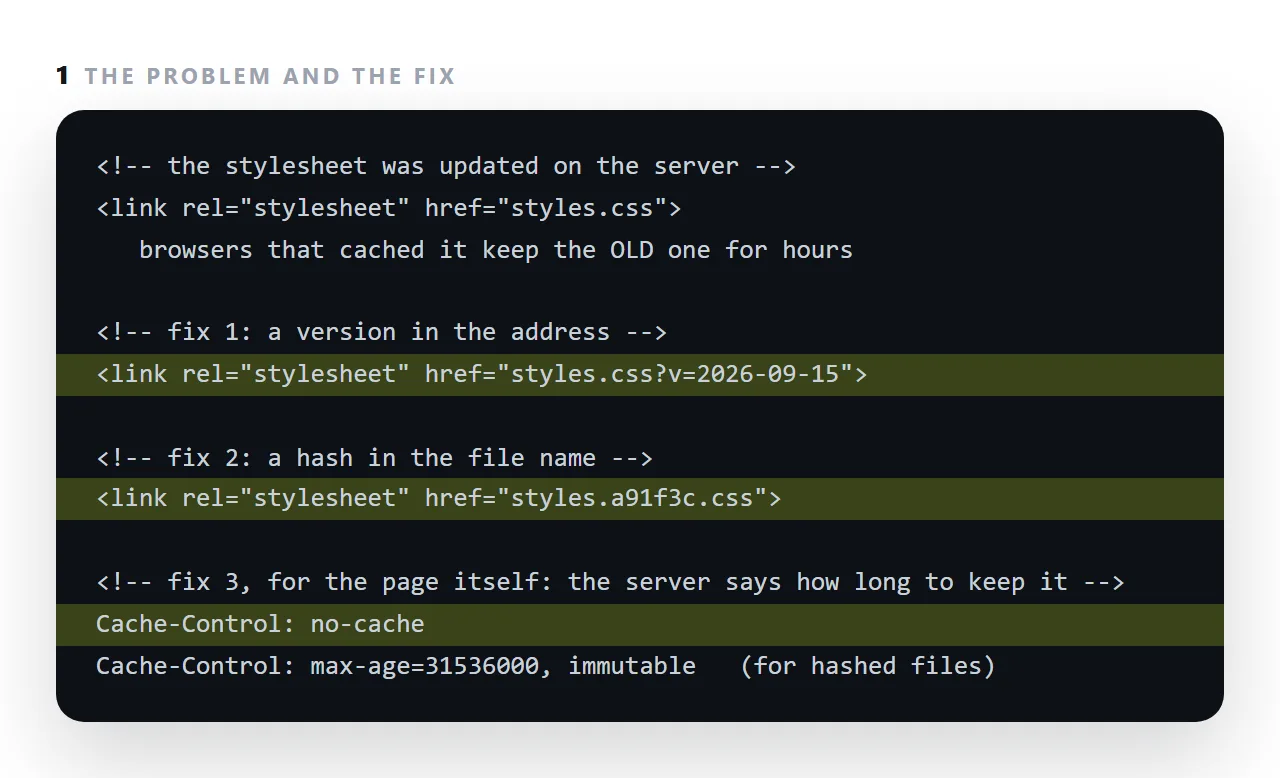
It exists because caching works: a stylesheet served with a long lifetime is kept for hours or days, which makes pages fast and makes the person who just uploaded a fix the only one who can see it.
This guide covers where copies are held, the two headers that control them, the version and hash techniques, and why a page served as a document rather than a file does not have the problem.
You fixed a number, republished, and three people still see the old figure. Nothing is broken — a cached copy is being served.
Where the cached copies are held
| Layer | Cleared by |
|---|---|
| The reader's browser | A hard reload, or expiry |
| A content delivery network | A purge you request, or expiry |
| A corporate proxy | Its own policy — not by you |
| A service worker | Its own update logic |
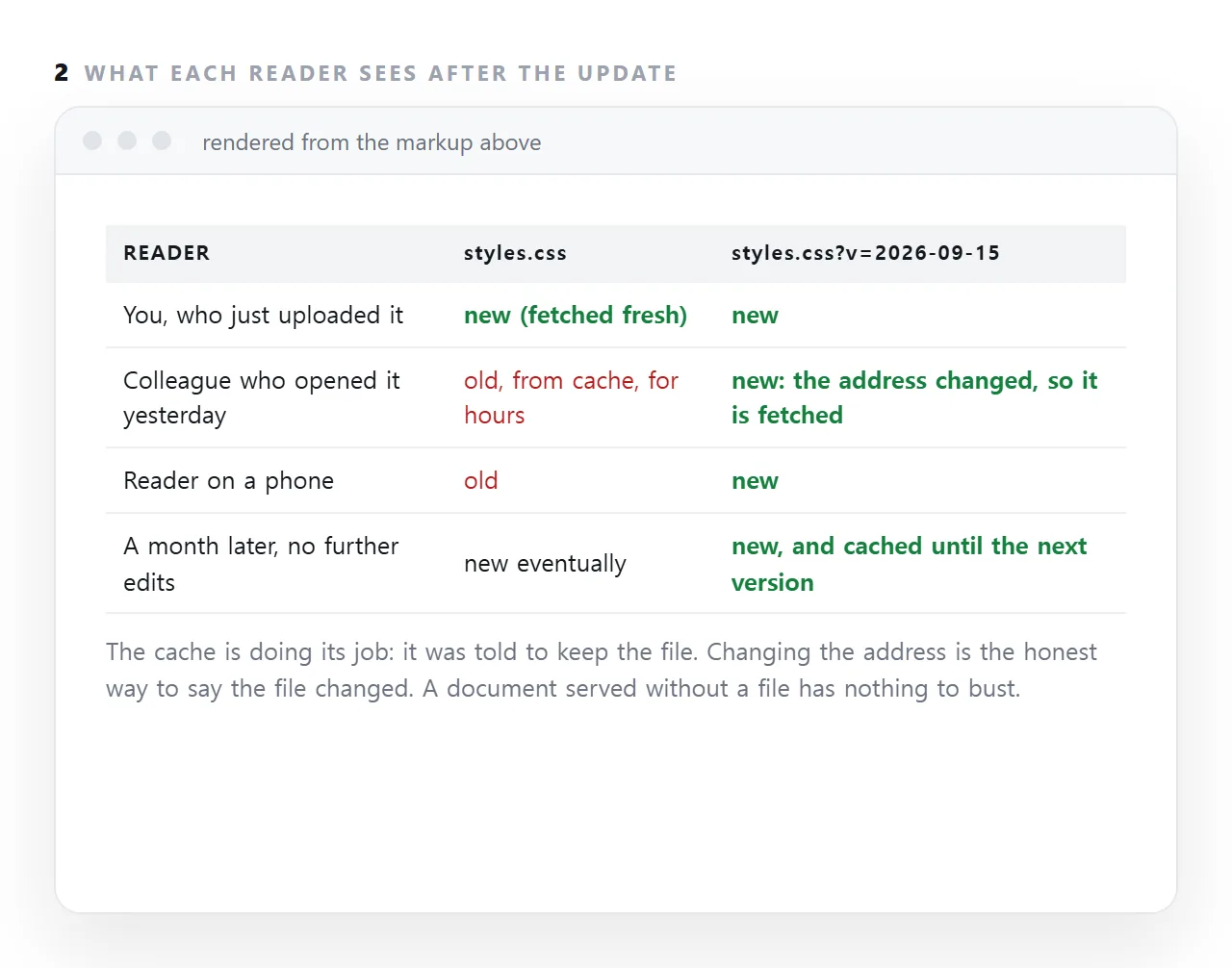
You control the first two at best. Hence the strategy below: rather than trying to clear caches, make the new content live at an address that has never been cached.
The two headers
Cache-Control: public, max-age=31536000, immutable
"Keep this for a year and do not ask again." Correct for a file whose address changes when its contents change.
Cache-Control: no-cache
Misleadingly named: it means "you may store it, but check with me before reusing it". Correct for an HTML page. The one that means never store is no-store, which you rarely want.
The standard arrangement
report.html          Cache-Control: no-cache
styles.a3f9c.css     Cache-Control: public, max-age=31536000, immutable
chart.8b21d.js       Cache-Control: public, max-age=31536000, immutable
logo.5c7e0.png       Cache-Control: public, max-age=31536000, immutable
The HTML is always checked; everything it points at is cached forever. When the CSS changes, its hash changes, so the HTML now points at a new address — which has no cached copy and is fetched. No purging, no waiting.
This is why build tools put hashes in filenames. It is the whole mechanism.
Without a build step
<link rel="stylesheet" href="/styles.css?v=12">
<script src="/chart.js?v=12"></script>
A version query is a different address as far as caches are concerned. Bump the number when you change the file. Manual, and it works.
Do not use a timestamp or a random value:
<!-- defeats caching entirely -->
<link rel="stylesheet" href="/styles.css?v=1757712000000">
That is a new address on every page load, so the file is re-downloaded every time and the cache is useless.
Favicons are the worst case
Favicons are cached more aggressively than anything else, sometimes surviving a hard reload. A version query is usually the only thing that works:
<link rel="icon" href="/icon.svg?v=3" type="image/svg+xml">
Why "hard reload" is not an answer
It works for you and tells you nothing about your readers, who will not do it and often cannot be asked to. It also may not clear a delivery network or a corporate proxy.
If your answer to a stale page is "tell them to hard reload", the caching setup needs fixing.
A single self-contained page
A self-contained page has one address and no assets, so there is nothing to version. With no-cache on the HTML, an update is visible immediately.
That simplicity is a genuine argument for single-file documents: the entire class of problem on this page does not exist.
Which is also why publishing beats re-uploading
The static-host cycle — edit locally, re-upload, wait for the cache — has this problem built in. A page whose content is edited in place at a stable address does not: the address never changes, and the content served from it is current.
In NOS an edit is visible at the same address without a re-upload, so "did they get the new version" stops being a question you have to ask.
The three places a copy can be
The reader's browser keeps a copy for as long as the response's max-age allows. A content delivery network in front of the host keeps its own copy, with its own rules, and serves it to every reader in a region.
A proxy at a company's edge may keep a third. A change has to get past all three, and changing the address is the only method that works on all of them at once, because none of them has ever seen the new address before.
Why "just refresh" does not fix it for anyone else
A hard refresh forces the reader's own browser to fetch again; it does nothing for the delivery network's copy or for anyone else's browser.
That is why the person who uploaded the fix can see it after a refresh and confidently tell everyone else it is live. Test from a browser that has never opened the page, or from a phone on a different network, before announcing an update.
Making updates show up: 4 steps
- Give changing files a version in their address.
styles.css?v=2026-09-15, or a hash in the file name. Change it whenever the file changes. - Let those files be cached for a long time.
Cache-Control: max-ageof a year withimmutable. Safe, because a change means a new address. - Tell browsers to revalidate the page itself.
Cache-Control: no-cacheon the HTML, so the page is checked on every open and its links point at the current versions. - For a document people edit, do not host it as a file at all. A NOS page is served from the document and is current on every open; the static host comparison is this point in full.