An HTML comment starts with <!-- and ends with -->. Everything between the two markers stays in the file but is left off the page: <!-- Update these hours in January -->.
Use comments for notes to yourself and to switch off a piece of markup while you test.
Edit the HTML on the left. The right side shows the page, and the list below shows every comment the browser found.
<!doctype html>
<html lang="en">
<head>
<meta charset="utf-8">
<meta name="viewport" content="width=device-width, initial-scale=1">
<title>HTML comment playground</title>
<style>
  body { margin: 0; padding: 14px; font-family: system-ui, sans-serif; background: #f4f5f7; color: #1d2330; }
  .grid { display: grid; grid-template-columns: 1fr 1fr; gap: 12px; }
  @media (max-width: 560px) { .grid { grid-template-columns: 1fr; } }
  h2 { font-size: 13px; margin: 0 0 6px; color: #4b5563; text-transform: uppercase; letter-spacing: .4px; }
  textarea {
    width: 100%; box-sizing: border-box; height: 190px; padding: 10px;
    font: 13px/1.5 ui-monospace, Consolas, monospace;
    border: 1px solid #d5d9e0; border-radius: 8px; resize: vertical;
  }
  .box { background: #fff; border: 1px solid #e1e4ea; border-radius: 8px; padding: 10px 12px; min-height: 60px; }
  #page p { margin: 0 0 8px; }
  #found { margin: 0; padding-left: 20px; font: 12.5px/1.5 ui-monospace, Consolas, monospace; }
  #found li { background: #eef6f0; border-radius: 4px; padding: 2px 6px; margin-bottom: 4px; white-space: pre-wrap; word-break: break-word; }
  .count { font-size: 13px; margin: 10px 0 6px; }
</style>
</head>
<body>
<div class="grid">
  <div>
    <h2>Your HTML (edit it)</h2>
<textarea id="src" spellcheck="false"><p>Opening hours: 9 to 5.</p>
<!-- Update these hours in January -->
<p>Closed on public holidays.</p>
<!--
<p>Summer sale: 20% off.</p>
<p>Ends on Friday.</p>
-->
<p>Call us any time.</p></textarea>
  </div>
  <div>
    <h2>What the page shows</h2>
    <div class="box" id="page"></div>
  </div>
</div>

<p class="count" id="count"></p>
<div class="box"><ol id="found"></ol></div>

<script>
  const src = document.getElementById('src');
  const page = document.getElementById('page');
  const found = document.getElementById('found');
  const count = document.getElementById('count');

  function update() {
    page.innerHTML = src.value;  // the browser parses the HTML, comments included

    // Walk the parsed result and collect every Comment node
    const walker = document.createTreeWalker(page, NodeFilter.SHOW_COMMENT);
    const comments = [];
    while (walker.nextNode()) comments.push(walker.currentNode.data);

    count.textContent = comments.length + ' comment(s) found. They are in the page, but not on screen:';
    found.innerHTML = '';
    comments.forEach((text) => {
      const li = document.createElement('li');
      li.textContent = text.trim() || '(empty)';
      found.appendChild(li);
    });
  }

  src.addEventListener('input', update);
  update();
</script>
</body>
</html>
The browser does not throw comments away. It keeps each one in the page as a comment node. It just never draws them.
HTML comment syntax
A comment has three parts: the opener, the text, and the closer. The text can be a word, a sentence or a whole block of markup.
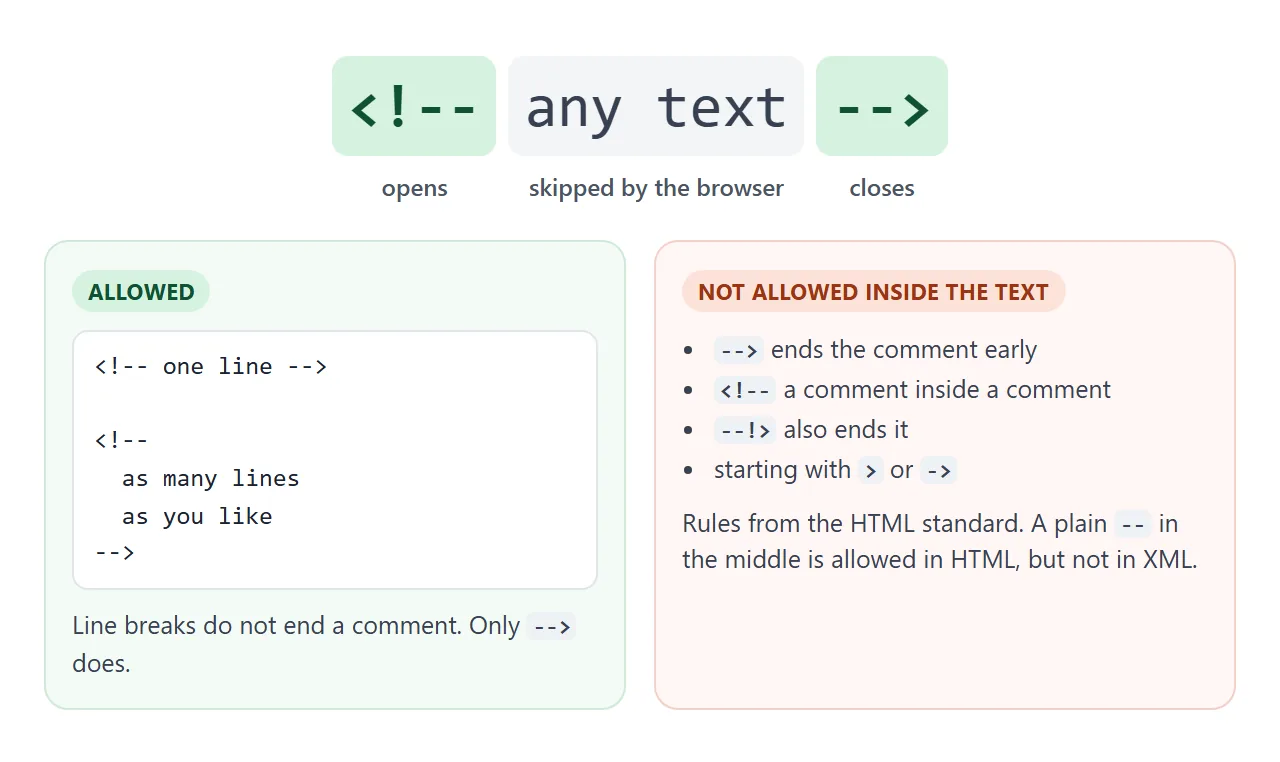
<!-- A one-line comment -->

<!--
  A comment can run over
  as many lines as you like.
-->
The HTML standard puts a few limits on the text inside. It must not start with > or ->. It must not contain <!--, --> or --!>, and it must not end with <!-.
Two hyphens in the middle, as in <!-- step 1 -- draft -->, are allowed in HTML today. XML and older versions of HTML did not allow them, so some style guides still say to avoid -- inside a comment. Avoiding it costs nothing.
Multi-line comments and commenting out code
HTML has no separate multi-line comment. The same markers cover any number of lines, because only --> ends a comment. A line break does not.
That makes comments the quickest way to switch something off while you test. Wrap the markup, reload, and the element is gone. Remove the two markers and it is back.
<p>Opening hours: 9 to 5.</p>
<!--
<p>Summer sale: 20% off.</p>
<p>Ends on Friday.</p>
-->
You rarely need to type the markers. In many editors, Ctrl+/ (Cmd+/ on a Mac) comments out the current line or the selected lines, and the same keys remove the comment again.
Editors that understand HTML usually switch to the CSS or JavaScript marker when the cursor is inside a <style> or <script> block.
Comments cannot be nested
This is the trap most people hit when they comment out a block that already has a comment in it. A comment ends at the first --> after it starts. The inner <!-- is just more text, and the inner --> closes the outer comment.
<!doctype html>
<html lang="en">
<head>
<meta charset="utf-8">
<meta name="viewport" content="width=device-width, initial-scale=1">
<title>The nested comment trap</title>
<style>
body { margin: 0; padding: 14px; font-family: system-ui, sans-serif; background: #f4f5f7; color: #1d2330; }
.tabs button {
font: 600 13px system-ui, sans-serif; padding: 7px 12px; margin: 0 6px 10px 0;
border: 1px solid #d5d9e0; border-radius: 99px; background: #fff; cursor: pointer;
}
.tabs button.on { background: #1d2330; color: #fff; border-color: #1d2330; }
h2 { font-size: 13px; margin: 12px 0 6px; color: #4b5563; text-transform: uppercase; letter-spacing: .4px; }
pre {
margin: 0; padding: 10px 12px; background: #fff; border: 1px solid #e1e4ea; border-radius: 8px;
font: 13px/1.55 ui-monospace, Consolas, monospace; white-space: pre-wrap; word-break: break-word;
}
.c { background: #d6f2df; color: #0f5132; } /* hidden by a comment */
.end { background: #0f5132; color: #fff; } /* the --> that closed it */
.box { background: #fff; border: 1px solid #e1e4ea; border-radius: 8px; padding: 10px 12px; }
.box p { margin: 0 0 6px; }
.legend { font-size: 12.5px; color: #4b5563; margin-top: 6px; }
.legend span { padding: 0 4px; border-radius: 3px; }
</style>
</head>
<body>
<div class="tabs">
<button id="bad" class="on">Nested comment (broken)</button>
<button id="good">Fixed</button>
</div>
<h2>Source</h2>
<pre id="code"></pre>
<p class="legend"><span class="c">green</span> = inside a comment, <span class="end">dark</span> = the <code>--></code> that ended it</p>
<h2>What the page shows</h2>
<div class="box" id="page"></div>
<!-- The two versions are kept in textareas so the markup stays plain text -->
<textarea id="v-bad" hidden><p>Welcome!</p>
<!-- Hide the banner for now
<div class="banner">
<!-- TODO: new photo -->
<b>Big sale today</b>
</div>
-->
<p>Thanks for visiting.</p></textarea>
<textarea id="v-good" hidden><p>Welcome!</p>
<!-- TODO: new photo -->
<!-- Hide the banner for now
<div class="banner">
<b>Big sale today</b>
</div>
-->
<p>Thanks for visiting.</p></textarea>
<script>
const code = document.getElementById('code');
const page = document.getElementById('page');
const esc = (s) => s.replace(/&/g, '&').replace(/</g, '<').replace(/>/g, '>');
// Mark comments the way the parser reads them:
// a comment starts at <!-- and ends at the FIRST --> after it.
function highlight(src) {
let out = '', i = 0;
while (true) {
const start = src.indexOf('<!--', i);
if (start < 0) break;
const end = src.indexOf('-->', start + 4);
if (end < 0) { out += esc(src.slice(i, start)) + '<span class="c">' + esc(src.slice(start)) + '</span>'; return out; }
out += esc(src.slice(i, start))
+ '<span class="c">' + esc(src.slice(start, end)) + '</span>'
+ '<span class="end">--></span>';
i = end + 3;
}
return out + esc(src.slice(i));
}
function show(which) {
const src = document.getElementById('v-' + which).value;
code.innerHTML = highlight(src);
page.innerHTML = src; // the real browser parser decides what is hidden
document.getElementById('bad').classList.toggle('on', which === 'bad');
document.getElementById('good').classList.toggle('on', which === 'good');
}
document.getElementById('bad').addEventListener('click', () => show('bad'));
document.getElementById('good').addEventListener('click', () => show('good'));
show('bad');
</script>
</body>
</html>
Everything after that point is ordinary markup again. The sale text reappears, and the outer --> shows up on the page as literal text.
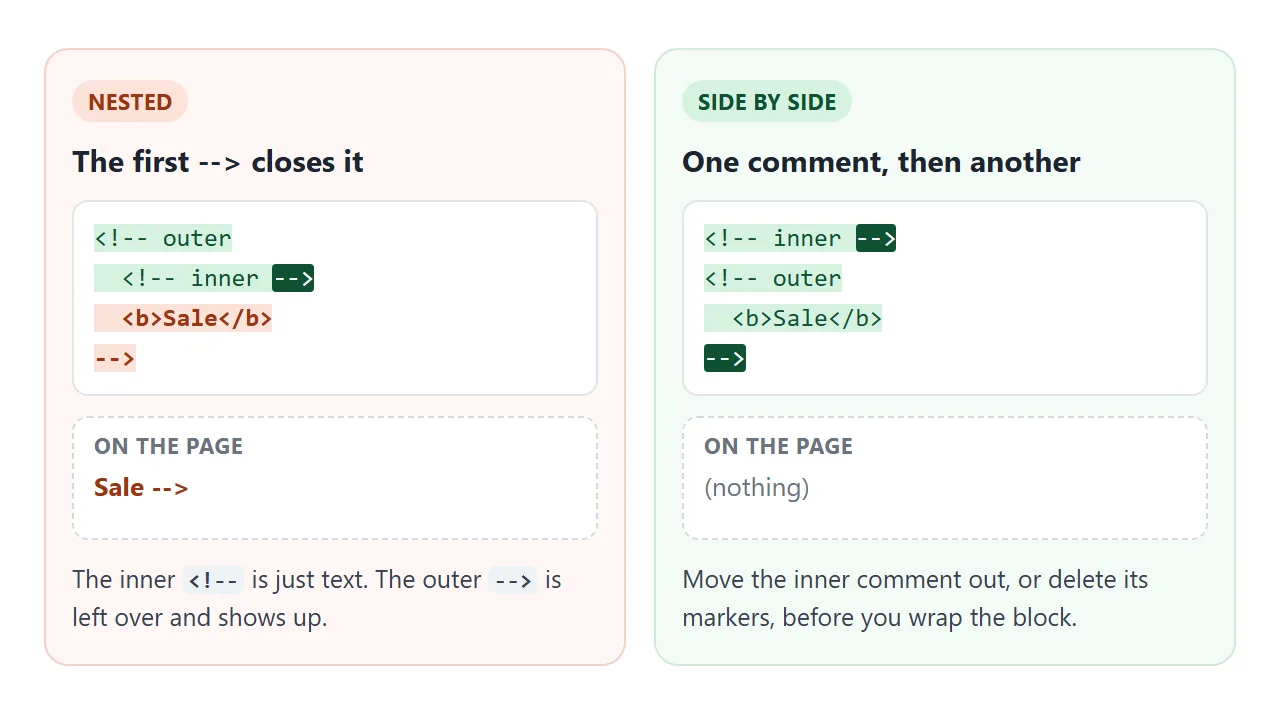
There are two fixes. Move the inner comment outside the block first, or delete its markers before you wrap the block. Either way, each <!-- gets exactly one -->.
Comments in CSS and JavaScript
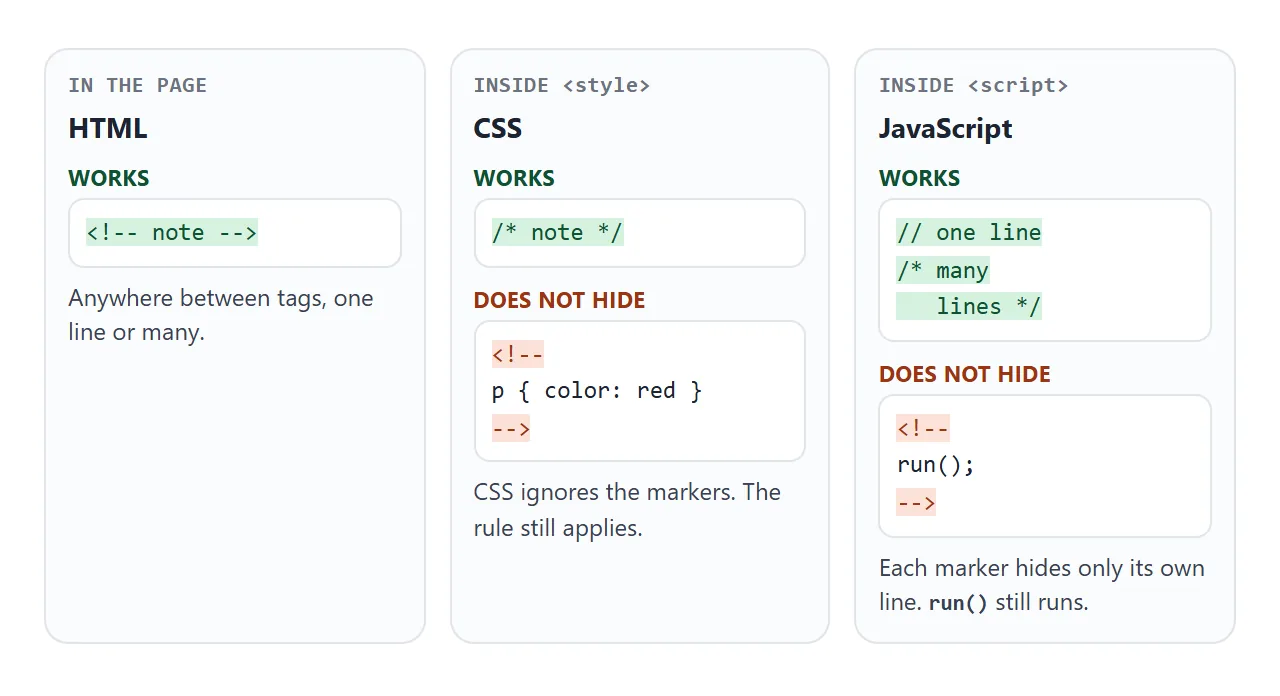
Inside a <style> or <script> element, the browser is no longer reading HTML. The contents go to the CSS or JavaScript engine, and each language has its own comment markers.
| Where | Comment | Notes |
|---|---|---|
| HTML, between tags | <!-- note --> |
One line or many |
CSS, in <style> or a .css file |
/* note */ |
CSS has no one-line // comment |
JavaScript, in <script> or a .js file |
// note |
Hides the rest of that line |
| JavaScript, several lines | /* note */ |
Cannot be nested either |
The HTML markers do not do the job there. In CSS, <!-- and --> are skipped, so a rule between them still applies. In a classic script, each marker hides only the rest of its own line, so the code between them still runs.
/* This rule is switched off:
.card { border: 3px solid red; }
*/
The same applies to CSS in a separate file. External stylesheets use /* */ as well, and so does the style attribute used for inline CSS: style="color: red; /* color: blue; */" keeps the text red.
Anyone can read your comments
A comment is hidden from the page, not from people. View Source shows the file exactly as it was sent, comments included, and the browser developer tools list comment nodes next to the elements.
This finished page uses all three kinds. The old price is behind an HTML comment, a red border behind a CSS comment, and two lines of script behind JavaScript comments. The button shows what a visitor sees in the source.
<!doctype html>
<html lang="en">
<head>
<meta charset="utf-8">
<meta name="viewport" content="width=device-width, initial-scale=1">
<title>Comments in HTML, CSS and JS</title>
<style>
body { margin: 0; padding: 14px; font-family: system-ui, sans-serif; background: #f4f5f7; color: #1d2330; }
.card { background: #fff; border-radius: 12px; padding: 14px 16px; box-shadow: 0 4px 14px rgba(0,0,0,.08); }
.card h1 { font-size: 18px; margin: 0 0 6px; }
.price { font-size: 26px; font-weight: 700; color: #0f5132; }
/* CSS comment: this rule is switched off
.card { border: 3px solid red; }
*/
#toggle { margin: 12px 0 8px; font: 600 13px system-ui, sans-serif; padding: 8px 12px; border-radius: 8px; border: 1px solid #1d2330; background: #1d2330; color: #fff; cursor: pointer; }
#source { display: none; margin: 0; padding: 10px 12px; background: #fff; border: 1px solid #e1e4ea; border-radius: 8px; font: 12px/1.5 ui-monospace, Consolas, monospace; white-space: pre-wrap; word-break: break-word; }
#source.open { display: block; }
#source mark { background: #d6f2df; color: #0f5132; }
</style>
</head>
<body>
<div class="card">
<h1>Starter plan</h1>
<p class="price" id="price">$9 / month</p>
<!-- HTML comment: the old price stays in the file, not on the page
<p class="price">$12 / month</p>
-->
<p id="note">Cancel any time.</p>
</div>
<button id="toggle">Show source</button>
<pre id="source"></pre>
<script>
// JS comment: the line below does nothing
// document.getElementById('note').textContent = 'Old note';
/* JS block comment: so does this one
document.getElementById('price').style.color = 'red';
*/
// Copy the page's own markup before anything changes
const markup = '<!doctype html>\n' + document.documentElement.outerHTML;
const esc = (s) => s.replace(/&/g, '&').replace(/</g, '<').replace(/>/g, '>');
// Mark the three kinds of comment in the source view
const marked = esc(markup).replace(/(<!--[\s\S]*?-->|\/\*[\s\S]*?\*\/|^\s*\/\/.*$)/gm, '<mark>$1</mark>');
const source = document.getElementById('source');
const toggle = document.getElementById('toggle');
source.innerHTML = marked;
toggle.addEventListener('click', () => {
const open = source.classList.toggle('open');
toggle.textContent = open ? 'Hide source' : 'Show source';
});
</script>
</body>
</html>
So never leave passwords, API keys, private links or internal notes in a comment. Commenting out a script does not remove it either. The code stays in the file for anyone to copy.
If comments should not reach visitors, remove them before the file goes out. A minifier does that as part of shrinking the file.
Conditional comments are obsolete
Older pages sometimes contain comments like this:
<!--[if IE]>
  <link rel="stylesheet" href="ie-fixes.css">
<![endif]-->
These conditional comments were read only by old versions of Internet Explorer. Microsoft removed them in Internet Explorer 10. Every current browser treats the whole thing as one ordinary comment, so the markup inside never loads. You can delete them.
When it does not work
| What you see | Cause | Fix |
|---|---|---|
Part of a commented block appears, followed by --> |
A comment inside the comment | Move the inner comment out, or delete its markers |
| The rest of the page disappears | The closing --> is missing or mistyped, such as - -> |
Add --> where the comment should end |
A CSS rule still applies after wrapping it in <!-- --> |
CSS ignores HTML comment markers | Use /* */ |
Script lines still run after wrapping them in <!-- --> |
Each marker hides only its own line | Use // or /* */ |
| A comment shows up as text | A space in the opener, as in < !-- |
Type <!-- with no spaces |
| Someone found a key or a note in your page | Comments ship with the file | Delete it from the file, and change the key |
Share it as a link
Comments are easiest to explain on a page people can open. A screenshot cannot show what the source holds, and an .html attachment may open as plain code, or not at all, on a phone.
To send the working version, paste the page into a NOS document and choose Create share link. HTML to link walks through it.
The page renders as written and its scripts run, so the people you send it to can press the buttons and read the source themselves. If you change the code later, the same link shows the new version.