Svelte는 사용자 인터페이스를 구축하기 위한 프레임워크입니다. 자체 문서에서는 이를 컴파일러라고 설명합니다. HTML, CSS 및 JavaScript로 구성 요소를 작성하면 이를 JavaScript로 변환합니다.
해당 컴파일러는 일반적으로 SvelteKit 또는 Vite를 통해 컴퓨터에서 실행됩니다. 그러나 페이지에서도 실행될 수 있으므로 단일 HTML 파일이 작동합니다.
먼저 시도해 보세요. 아래 버튼은 조금 전에 브라우저에서 컴파일된 Svelte 5 구성 요소입니다.
<!doctype html>
<html lang="en">
<head>
<meta charset="utf-8">
<meta name="viewport" content="width=device-width, initial-scale=1">
<title>Svelte in one HTML file</title>
<style>
  body { margin: 0; padding: 20px; font-family: system-ui, sans-serif; background: #f6f7f9; }
  #app { min-height: 150px; }
</style>

<!-- 1. The Svelte compiler, as one script (pinned version) -->
<script src="https://cdn.jsdelivr.net/npm/svelte@5.57.1/compiler/index.js"></script>

<!-- 2. Tell the browser where the Svelte runtime files live -->
<script type="importmap">
{
  "imports": {
    "svelte": "https://cdn.jsdelivr.net/npm/svelte@5.57.1/src/index-client.js",
    "svelte/internal/client": "https://cdn.jsdelivr.net/npm/svelte@5.57.1/src/internal/client/index.js",
    "#client/constants": "https://cdn.jsdelivr.net/npm/svelte@5.57.1/src/internal/client/constants.js",
    "esm-env": "https://cdn.jsdelivr.net/npm/esm-env@1.2.2/index.js",
    "esm-env/browser": "https://cdn.jsdelivr.net/npm/esm-env@1.2.2/true.js",
    "esm-env/development": "https://cdn.jsdelivr.net/npm/esm-env@1.2.2/false.js",
    "esm-env/node": "https://cdn.jsdelivr.net/npm/esm-env@1.2.2/false.js",
    "clsx": "https://cdn.jsdelivr.net/npm/clsx@2.1.1/dist/clsx.mjs"
  }
}
</script>
</head>
<body>
<div id="app">Loading Svelte...</div>

<script type="module">
  import { mount } from 'svelte';

  // 3. The component, written as in a .svelte file
  const source = `
<script>
  let count = $state(0);
<\/script>

<button onclick={() => count++}>Clicked {count} times</button>
<p>{count === 0 ? 'Press the button.' : 'Only this text was updated.'}</p>

<style>
  button { font: inherit; padding: 10px 16px; border: 0; border-radius: 8px;
           background: #ff3e00; color: #fff; cursor: pointer; }
  p { color: #4b5563; }
</style>`;

  // 4. Compile it here in the browser, then mount it
  const { js } = svelte.compile(source, { runes: true, css: 'injected', discloseVersion: false });
  const url = URL.createObjectURL(new Blob([js.code], { type: 'text/javascript' }));
  const { default: Counter } = await import(url);

  const app = document.getElementById('app');
  app.textContent = '';
  mount(Counter, { target: app });
</script>
</body>
</html>
아무것도 설치되지 않았고 빌드 폴더도 없습니다. 모든 것이 저장하고 열고 편집할 수 있는 하나의 .html 파일입니다.
파일 내용: 네 부분
페이지에 Svelte를 추가하는 단일 <script> 태그는 없습니다. 구성 요소를 먼저 컴파일해야 하며, 컴파일된 코드는 Svelte의 런타임을 가져옵니다. 따라서 파일은 항상 이 순서대로 네 부분으로 구성됩니다.
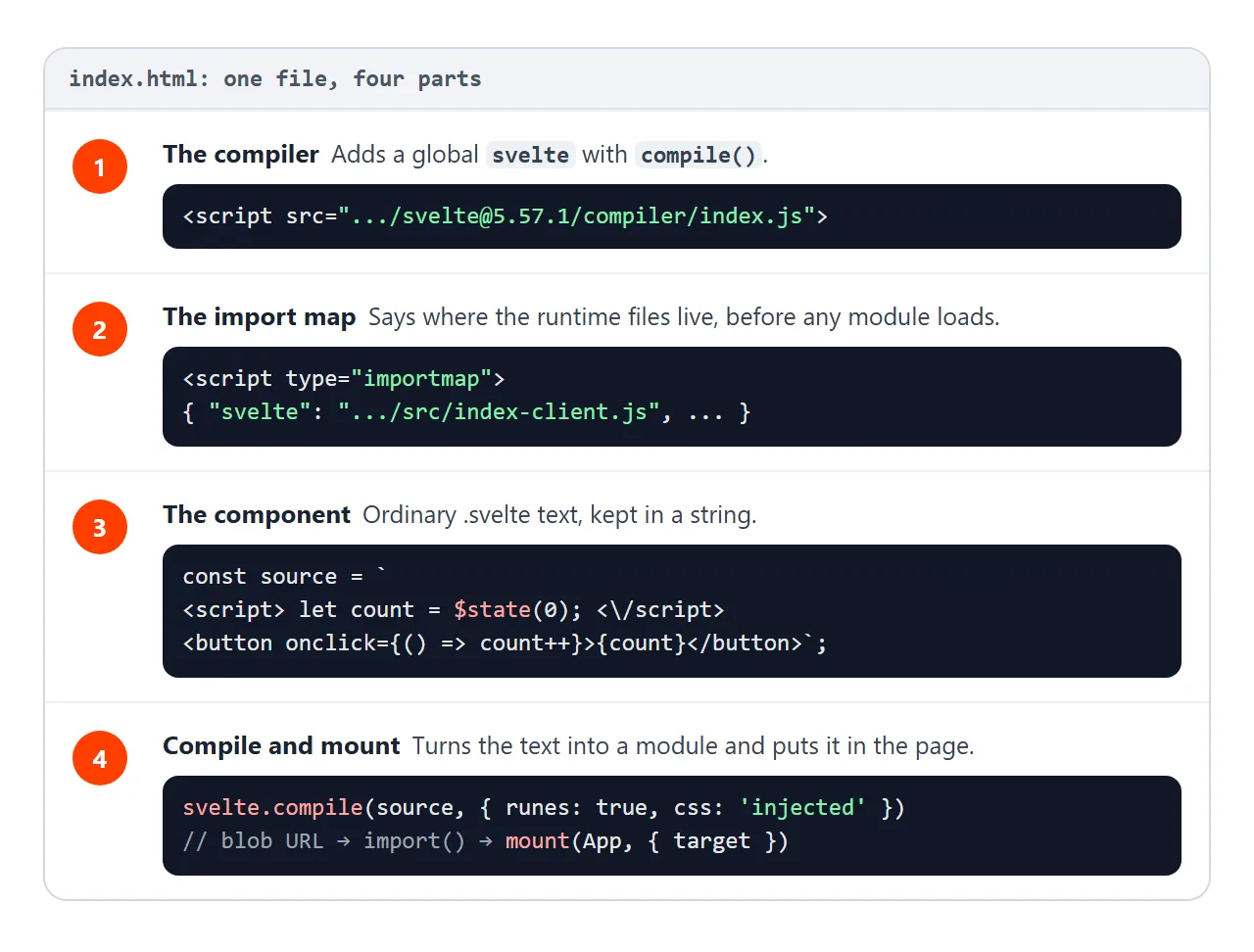
- 컴파일러. 컴파일러 파일의 클래식 스크립트 태그입니다.
compile()기능을 사용하여svelte라는 전역을 추가합니다. - 가져오기 맵.
svelte및svelte/internal/client가 어디에 있는지 브라우저에 알려주고 런타임에서 가져오는 세 개의 작은 도우미도 있습니다. - 구성요소. JavaScript 문자열로 유지되는 일반
.svelte텍스트입니다. - 컴파일 및 마운트.
svelte.compile()는 JavaScript 모듈을 텍스트로 반환합니다. 페이지는 Blob URL에서 이를 가져오고mount()를 호출합니다.
주소에 버전이 기록된 컴파일러 라인:
<script src="https://cdn.jsdelivr.net/npm/svelte@5.57.1/compiler/index.js"></script>
<script type="module"> 내부의 마지막 단계는 다음과 같습니다.
const { js } = svelte.compile(source, { runes: true, css: 'injected', discloseVersion: false });
const url = URL.createObjectURL(new Blob([js.code], { type: 'text/javascript' }));
const { default: Counter } = await import(url);
mount(Counter, { target: document.getElementById('app') });
css: 'injected'는 마운트 시 구성요소의 <style>를 페이지에 넣습니다. 이것이 없으면 CSS는 결과의 css 필드에만 반환됩니다. discloseVersion: false는 window에 Svelte 버전만 기록하는 추가 가져오기를 건너뜁니다.
가져오기 맵이 필요한 이유
컴파일된 코드를 열면 첫 번째 줄은 이름만 있는 가져오기입니다.
import * as $ from 'svelte/internal/client';
브라우저는 그런 이름을 로드할 수 없습니다. 가져오기 맵은 각 이름에 실제 주소를 제공하는 JSON 블록입니다. MDN에서는 해당 이름을 사용하는 모듈보다 먼저 선언해야 하므로 <head>에 들어갑니다.
런타임 파일은 Svelte 내부의 #client/constants, 패키지 esm-env 및 clsx 등 몇 가지 이름으로 서로를 가져옵니다. 각각은 지도에 한 줄씩 필요합니다. 예제의 전체 지도:
<script type="importmap">
{
  "imports": {
    "svelte": "https://cdn.jsdelivr.net/npm/svelte@5.57.1/src/index-client.js",
    "svelte/internal/client": "https://cdn.jsdelivr.net/npm/svelte@5.57.1/src/internal/client/index.js",
    "#client/constants": "https://cdn.jsdelivr.net/npm/svelte@5.57.1/src/internal/client/constants.js",
    "esm-env": "https://cdn.jsdelivr.net/npm/esm-env@1.2.2/index.js",
    "esm-env/browser": "https://cdn.jsdelivr.net/npm/esm-env@1.2.2/true.js",
    "esm-env/development": "https://cdn.jsdelivr.net/npm/esm-env@1.2.2/false.js",
    "esm-env/node": "https://cdn.jsdelivr.net/npm/esm-env@1.2.2/false.js",
    "clsx": "https://cdn.jsdelivr.net/npm/clsx@2.1.1/dist/clsx.mjs"
  }
}
</script>
모든 Svelte 주소는 컴파일러와 동일한 버전을 사용합니다. 런타임은 별도의 소스 파일로 로드되므로 브라우저는 처음 로드할 때 많은 작은 파일(Chromium 테스트에서는 103개 요청)을 가져옵니다.
페이지 내부에 구성요소 작성
구성 요소는 템플릿 리터럴에 있습니다. 한 가지 세부 사항이 중요합니다. <script> 요소 내에서 HTML 파서는 문자열 내부에 있는 첫 번째 </script>에서 스크립트를 종료합니다. 따라서 구성 요소 자체의 닫는 태그는 백슬래시로 작성됩니다.
const source = `
<script>
  let count = $state(0);
<\/script>

<button onclick={() => count++}>Clicked {count} times</button>
`;
JavaScript에서 \/는 /이므로 컴파일러는 일반 </script>를 받습니다.
두 번째 데모는 작은 놀이터입니다. 왼쪽의 컴포넌트를 편집하고 버튼을 누릅니다. 오른쪽에는 결과와 컴파일러가 작성한 JavaScript가 표시됩니다.
<!doctype html>
<html lang="en">
<head>
<meta charset="utf-8">
<meta name="viewport" content="width=device-width, initial-scale=1">
<title>Svelte compiler in the page</title>
<style>
  body { margin: 0; padding: 14px; font-family: system-ui, sans-serif; background: #f6f7f9; }
  .wrap { display: grid; gap: 12px; grid-template-columns: minmax(0, 1fr) minmax(0, 1fr); }
  h3 { margin: 0 0 6px; font-size: 13px; color: #374151; }
  textarea { box-sizing: border-box; width: 100%; height: 200px; font: 13px/1.45 ui-monospace, Consolas, monospace;
             padding: 8px; border: 1px solid #d1d5db; border-radius: 8px; }
  #run { margin-top: 6px; font: inherit; padding: 8px 14px; border: 0; border-radius: 8px; background: #111827; color: #fff; cursor: pointer; }
  #out { min-height: 90px; padding: 12px; background: #fff; border: 1px solid #e5e7eb; border-radius: 8px; }
  #err { color: #b42318; font: 12px/1.4 ui-monospace, Consolas, monospace; white-space: pre-wrap; margin: 6px 0 0; }
  pre#code { margin: 0; height: 130px; overflow: auto; padding: 8px; background: #111827; color: #d1fae5;
             font: 11px/1.4 ui-monospace, Consolas, monospace; border-radius: 8px; }
  @media (max-width: 600px) { .wrap { grid-template-columns: minmax(0, 1fr); } textarea { height: 170px; } }
</style>

<!-- 1. The Svelte compiler, as one script (pinned version) -->
<script src="https://cdn.jsdelivr.net/npm/svelte@5.57.1/compiler/index.js"></script>

<!-- 2. Tell the browser where the Svelte runtime files live -->
<script type="importmap">
{
  "imports": {
    "svelte": "https://cdn.jsdelivr.net/npm/svelte@5.57.1/src/index-client.js",
    "svelte/internal/client": "https://cdn.jsdelivr.net/npm/svelte@5.57.1/src/internal/client/index.js",
    "#client/constants": "https://cdn.jsdelivr.net/npm/svelte@5.57.1/src/internal/client/constants.js",
    "esm-env": "https://cdn.jsdelivr.net/npm/esm-env@1.2.2/index.js",
    "esm-env/browser": "https://cdn.jsdelivr.net/npm/esm-env@1.2.2/true.js",
    "esm-env/development": "https://cdn.jsdelivr.net/npm/esm-env@1.2.2/false.js",
    "esm-env/node": "https://cdn.jsdelivr.net/npm/esm-env@1.2.2/false.js",
    "clsx": "https://cdn.jsdelivr.net/npm/clsx@2.1.1/dist/clsx.mjs"
  }
}
</script>
</head>
<body>
<div class="wrap">
  <div>
    <h3>Your component (edit me)</h3>
<textarea id="src" spellcheck="false"><script>
  let name = $state('world');
  let shout = $derived(name.toUpperCase());
</script>

<input bind:value={name}>
<p>Hello {name}! {shout}!</p></textarea>
    <button id="run">Compile and run</button>
    <p id="err"></p>
  </div>
  <div>
    <h3>Result</h3>
    <div id="out"></div>
    <h3 style="margin-top:10px">What the compiler wrote</h3>
    <pre id="code"></pre>
  </div>
</div>

<script type="module">
  import { mount, unmount } from 'svelte';

  const out = document.getElementById('out');
  const err = document.getElementById('err');
  let current = null;

  async function run() {
    err.textContent = '';
    let js, warnings;
    try {
      ({ js, warnings } = svelte.compile(document.getElementById('src').value, { runes: true, css: 'injected', discloseVersion: false }));
    } catch (e) {
      err.textContent = e.message;  // compile errors name the line and column
      return;
    }
    // warnings do not stop the build, but they usually explain a bug
    err.textContent = warnings.map((w) => 'Warning: ' + w.message).join('\n');
    document.getElementById('code').textContent = js.code;
    const url = URL.createObjectURL(new Blob([js.code], { type: 'text/javascript' }));
    const { default: Component } = await import(url);
    if (current) unmount(current);  // remove the previous version first
    current = mount(Component, { target: out });
  }

  document.getElementById('run').addEventListener('click', run);
  run();
</script>
</body>
</html>
스크립트를 export let name;로 바꾸거나 $state를 제거해 보세요. 컴파일러는 무엇이 잘못되었는지 보고하고 Svelte 문서의 페이지로 연결합니다.
Svelte 5 파일의 Svelte 4 구문
Svelte 4로 작성된 코드는 형태가 다릅니다. Svelte 5에는 $state, $derived, $props처럼 $로 시작하는 함수인 **룬(runes)**이 도입되었습니다. runes: true를 사용하면 기존 방식은 오류나 경고를 발생시킵니다.
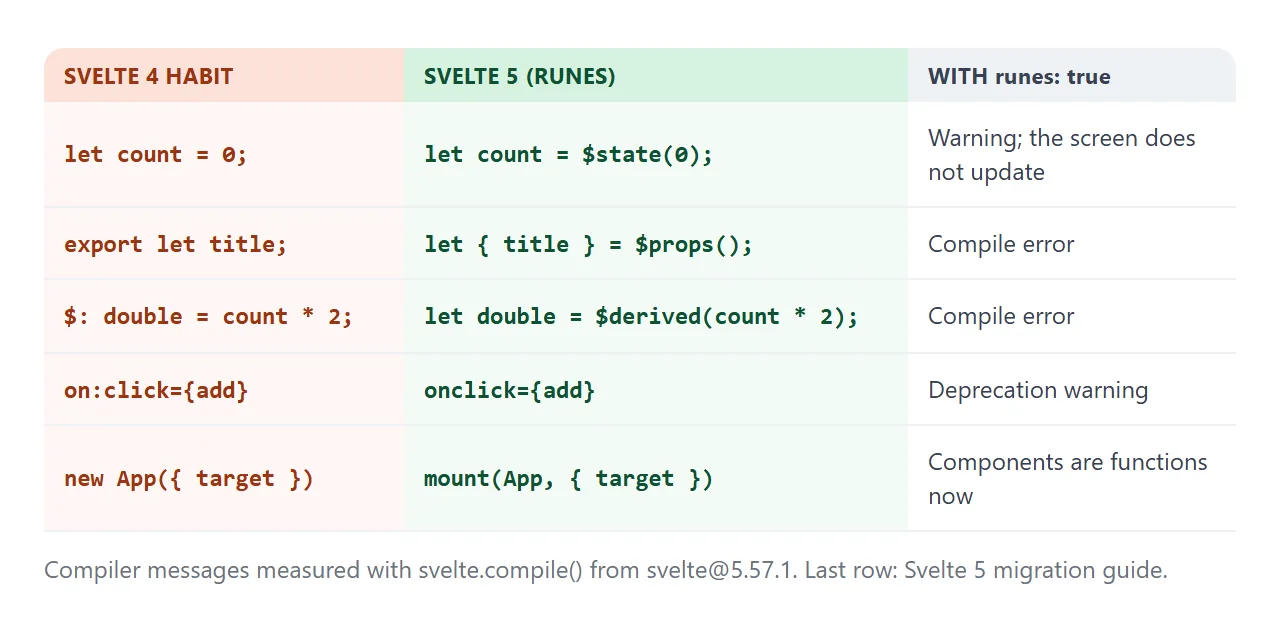
| 날씬한 4 | 날씬한 5 | 룬 포함: 사실 |
|---|---|---|
let count = 0 |
let count = $state(0) |
경고 및 텍스트가 업데이트되지 않습니다. |
export let title |
let { title } = $props() |
컴파일 오류 |
$: double = count * 2 |
$derived(count * 2) |
컴파일 오류 |
on:click={add} |
onclick={add} |
지원 중단 경고 |
new App({ target }) |
mount(App, { target }) |
이제 컴포넌트는 함수입니다 |
왜 runes: true를 통과해야 합니까? 룬이 없는 구성 요소는 이전의 비룬 모드에서 컴파일되며 해당 출력은 런타임 파일을 하나 더 가져옵니다. 우리는 정확히 다음과 같은 결과를 얻었습니다. 옵션이 추가될 때까지 일반 <h1>Hi</h1>가 실패했습니다.
완성된 예: 포장 목록
동일한 네 부분이 실제 구성 요소를 처리합니다. 이 목록은 mount()에서 제목을 전달하고, $state 배열에 항목을 유지하며, $derived에 남은 항목을 계산합니다.
<!doctype html>
<html lang="en">
<head>
<meta charset="utf-8">
<meta name="viewport" content="width=device-width, initial-scale=1">
<title>Svelte packing list</title>
<style>
  body { margin: 0; padding: 20px; font-family: system-ui, sans-serif; background: #f6f7f9; }
  #app { min-height: 150px; }
</style>

<!-- 1. The Svelte compiler, as one script (pinned version) -->
<script src="https://cdn.jsdelivr.net/npm/svelte@5.57.1/compiler/index.js"></script>

<!-- 2. Tell the browser where the Svelte runtime files live -->
<script type="importmap">
{
  "imports": {
    "svelte": "https://cdn.jsdelivr.net/npm/svelte@5.57.1/src/index-client.js",
    "svelte/internal/client": "https://cdn.jsdelivr.net/npm/svelte@5.57.1/src/internal/client/index.js",
    "#client/constants": "https://cdn.jsdelivr.net/npm/svelte@5.57.1/src/internal/client/constants.js",
    "esm-env": "https://cdn.jsdelivr.net/npm/esm-env@1.2.2/index.js",
    "esm-env/browser": "https://cdn.jsdelivr.net/npm/esm-env@1.2.2/true.js",
    "esm-env/development": "https://cdn.jsdelivr.net/npm/esm-env@1.2.2/false.js",
    "esm-env/node": "https://cdn.jsdelivr.net/npm/esm-env@1.2.2/false.js",
    "clsx": "https://cdn.jsdelivr.net/npm/clsx@2.1.1/dist/clsx.mjs"
  }
}
</script>
</head>
<body>
<div id="app">Loading Svelte...</div>

<script type="module">
  import { mount } from 'svelte';

  const source = `
<script>
  let { title } = $props();          // passed in from mount() below
  let items = $state([
    { text: 'Passport', done: true },
    { text: 'Charger', done: false }
  ]);
  let draft = $state('');
  let left = $derived(items.filter((i) => !i.done).length);

  function add(e) {
    e.preventDefault();               // stay on the page
    if (draft.trim()) items.push({ text: draft.trim(), done: false });
    draft = '';
  }
<\/script>

<h2>{title}</h2>
<form onsubmit={add}>
  <input bind:value={draft} placeholder="Add an item" aria-label="New item">
  <button>Add</button>
</form>

<ul>
  {#each items as item}
    <li class:done={item.done}>
      <label><input type="checkbox" bind:checked={item.done}> {item.text}</label>
    </li>
  {/each}
</ul>
<p>{left === 0 ? 'All packed.' : left + ' left to pack'}</p>

<style>
  h2 { margin: 0 0 10px; font-size: 18px; }
  form { display: flex; gap: 6px; }
  input:not([type]) { flex: 1; min-width: 0; font: inherit; padding: 8px; border: 1px solid #d1d5db; border-radius: 8px; }
  button { font: inherit; padding: 8px 14px; border: 0; border-radius: 8px; background: #ff3e00; color: #fff; }
  ul { list-style: none; padding: 0; margin: 12px 0; }
  li { padding: 8px 10px; margin-bottom: 6px; background: #fff; border-radius: 8px; }
  .done { color: #9ca3af; text-decoration: line-through; }
  p { color: #4b5563; margin: 0; }
</style>`;

  const { js } = svelte.compile(source, { runes: true, css: 'injected', discloseVersion: false });
  const url = URL.createObjectURL(new Blob([js.code], { type: 'text/javascript' }));
  const { default: List } = await import(url);

  const app = document.getElementById('app');
  app.textContent = '';
  mount(List, { target: app, props: { title: 'Trip packing list' } });
</script>
</body>
</html>
- 페이지의 소품:
props: { title }를mount()에 전달하고$props()를 사용하여 내부에서 읽습니다. - 목록:
{#each items as item}는<li>를 반복합니다.$state배열이 반응적이므로items.push()는 행을 추가합니다. - 양방향 입력: 텍스트 필드의
bind:value및 각 확인란의bind:checked. - 양식:
onsubmit는e.preventDefault()를 호출하므로 항목을 추가해도 페이지가 다시 로드되지 않습니다.
일반적인 Svelte 프로젝트가 더 적합한 경우
페이지에서 컴파일하는 것이 공유할 수 있는 하나의 파일에 대한 최단 경로입니다. 일반 프로젝트는 동일한 작업을 미리 한 번 수행합니다.
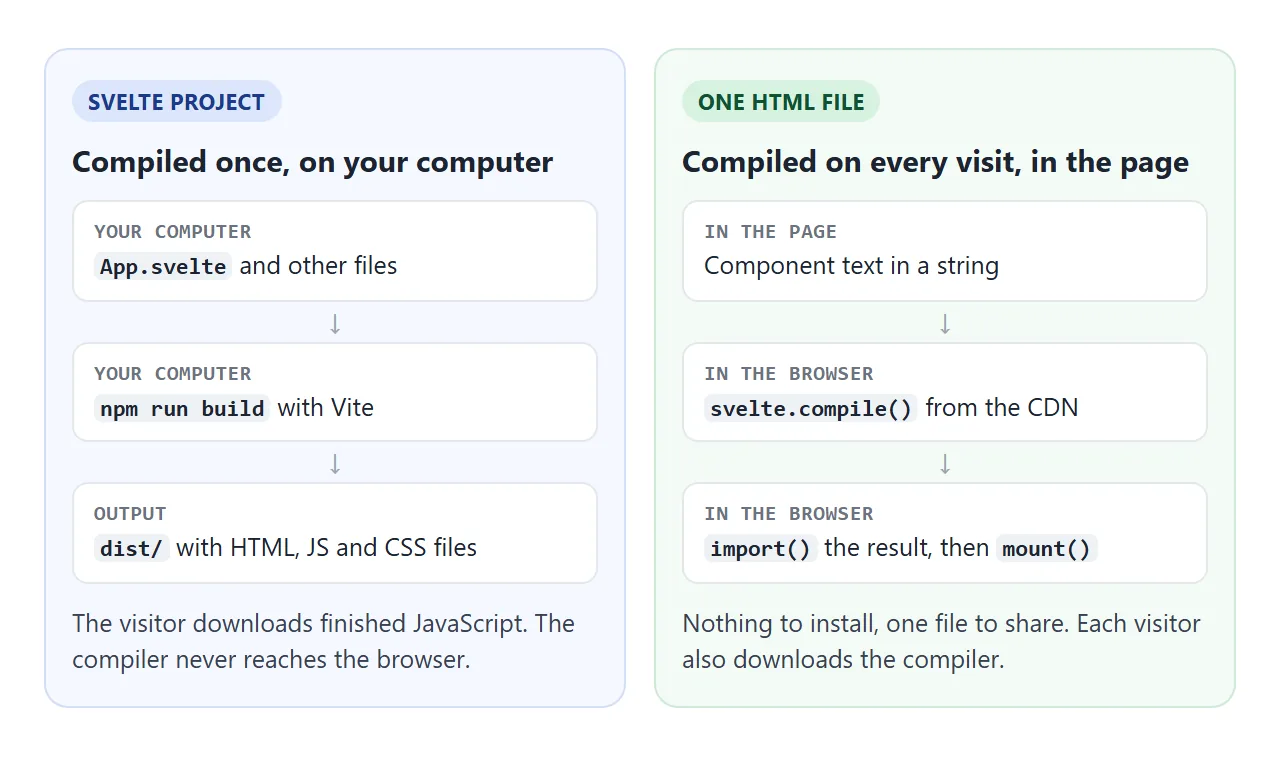
Svelte 문서에서는 새 프로젝트에 SvelteKit을 권장하거나 자체적으로 Vite를 권장합니다.
npx sv create myapp
cd myapp
npm install
npm run dev
Vite를 사용하면 npm run build는 HTML, JavaScript 및 CSS 파일을 dist 폴더에 씁니다. 해당 폴더는 정적 파일입니다.
빌드된 프런트 엔드 호스팅은 일반적인 라우팅 및 기본 경로 문제를 다룹니다. 서버 측 렌더링과 같은 SvelteKit 기능에는 단일 HTML 파일이 제공할 수 없는 서버가 필요합니다.
작동하지 않을 때
| 당신이 보는 것 | 원인 | 수정 |
|---|---|---|
| "Svelte 로드 중..."이 그대로 유지됩니다. 모듈 내에서만 import 문을 사용하라는 오류가 발생했습니다. | 마지막 스크립트는 고전적인 스크립트입니다. | <script type="module"> 사용 |
| 모듈 지정자 "svelte"를 확인하지 못했습니다. | 누락되거나 지연된 가져오기 지도 | 모듈 앞에 <head>에 맵을 넣습니다. |
| 레거시 플래그 파일에 대한 지정자를 확인하지 못했습니다. | 비룬 모드에서 컴파일된 구성 요소 | runes: true 통과 |
| 코드의 절반이 페이지에 텍스트로 표시됩니다. | 문자열 내부의 </script> |
<\/script>로 작성하세요. |
| 구성요소가 작동하지만 스타일이 없습니다. | CSS가 삽입되지 않고 반환되었습니다. | css: 'injected' 통과 |
| 클릭해도 숫자는 변하지 않습니다 | 룬 모드의 일반 let |
$state() 사용 |
다른 이유로 실패한 스크립트의 경우 HTML JavaScript가 작동하지 않음에서 일반 검사를 거칩니다.
링크로 공유하세요
Svelte 데모는 설명하는 것보다 보여주기가 더 쉽습니다. 스크린샷을 클릭할 수 없으며 .html 첨부 파일이 전화기에서 일반 코드로 열릴 수 있습니다.
작업 버전을 보내려면 페이지를 NOS 문서에 붙여넣고 공유 링크 만들기를 선택하세요. 링크할 HTML이 이를 안내합니다.
페이지는 작성된 대로 렌더링되고, 해당 스크립트가 실행되며, CDN에서 컴파일러와 런타임이 로드되므로 페이지를 받는 사람이 구성 요소 자체를 클릭하고 입력할 수 있습니다. 나중에 코드를 변경하면 동일한 링크에 새 버전이 표시됩니다.