Svelte is a framework for building user interfaces. Its own docs describe it as a compiler: you write components in HTML, CSS and JavaScript, and it turns them into JavaScript.
That compiler normally runs on your computer, through SvelteKit or Vite. But it can also run in the page, so a single HTML file works.
Try it first. The button below is a Svelte 5 component, compiled in your browser a moment ago.
<!doctype html>
<html lang="en">
<head>
<meta charset="utf-8">
<meta name="viewport" content="width=device-width, initial-scale=1">
<title>Svelte in one HTML file</title>
<style>
  body { margin: 0; padding: 20px; font-family: system-ui, sans-serif; background: #f6f7f9; }
  #app { min-height: 150px; }
</style>

<!-- 1. The Svelte compiler, as one script (pinned version) -->
<script src="https://cdn.jsdelivr.net/npm/svelte@5.57.1/compiler/index.js"></script>

<!-- 2. Tell the browser where the Svelte runtime files live -->
<script type="importmap">
{
  "imports": {
    "svelte": "https://cdn.jsdelivr.net/npm/svelte@5.57.1/src/index-client.js",
    "svelte/internal/client": "https://cdn.jsdelivr.net/npm/svelte@5.57.1/src/internal/client/index.js",
    "#client/constants": "https://cdn.jsdelivr.net/npm/svelte@5.57.1/src/internal/client/constants.js",
    "esm-env": "https://cdn.jsdelivr.net/npm/esm-env@1.2.2/index.js",
    "esm-env/browser": "https://cdn.jsdelivr.net/npm/esm-env@1.2.2/true.js",
    "esm-env/development": "https://cdn.jsdelivr.net/npm/esm-env@1.2.2/false.js",
    "esm-env/node": "https://cdn.jsdelivr.net/npm/esm-env@1.2.2/false.js",
    "clsx": "https://cdn.jsdelivr.net/npm/clsx@2.1.1/dist/clsx.mjs"
  }
}
</script>
</head>
<body>
<div id="app">Loading Svelte...</div>

<script type="module">
  import { mount } from 'svelte';

  // 3. The component, written as in a .svelte file
  const source = `
<script>
  let count = $state(0);
<\/script>

<button onclick={() => count++}>Clicked {count} times</button>
<p>{count === 0 ? 'Press the button.' : 'Only this text was updated.'}</p>

<style>
  button { font: inherit; padding: 10px 16px; border: 0; border-radius: 8px;
           background: #ff3e00; color: #fff; cursor: pointer; }
  p { color: #4b5563; }
</style>`;

  // 4. Compile it here in the browser, then mount it
  const { js } = svelte.compile(source, { runes: true, css: 'injected', discloseVersion: false });
  const url = URL.createObjectURL(new Blob([js.code], { type: 'text/javascript' }));
  const { default: Counter } = await import(url);

  const app = document.getElementById('app');
  app.textContent = '';
  mount(Counter, { target: app });
</script>
</body>
</html>
Nothing was installed and there is no build folder. The whole thing is one .html file that you can save, open and edit.
What is in the file: four parts
There is no single <script> tag that adds Svelte to a page. A component has to be compiled first, and the compiled code imports Svelte's runtime. So the file has four parts, always in this order.
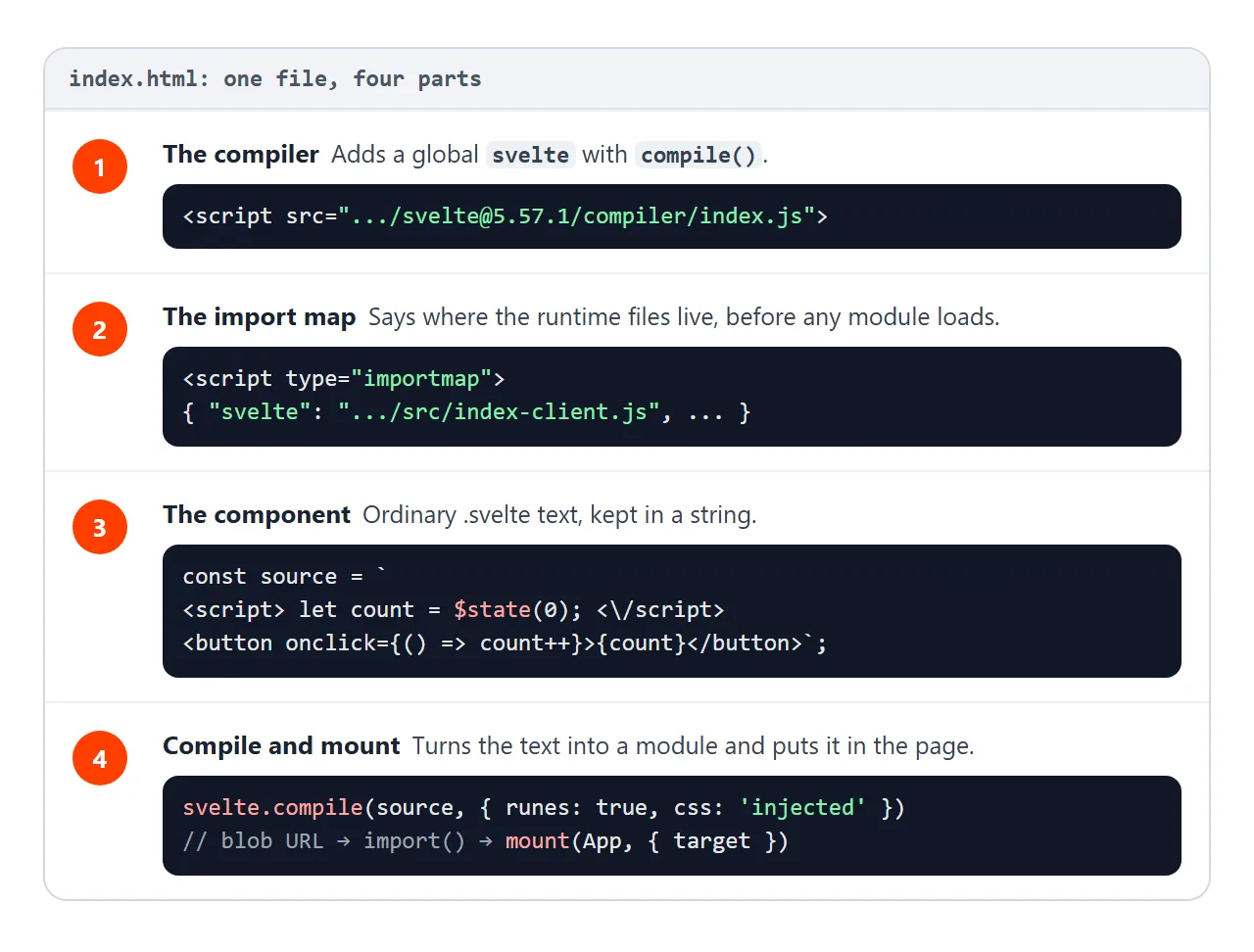
- The compiler. A classic script tag for the compiler file. It adds a global named
sveltewith acompile()function. - An import map. It tells the browser where
svelteandsvelte/internal/clientlive, plus three small helpers the runtime imports. - The component. Ordinary
.sveltetext, kept in a JavaScript string. - Compile and mount.
svelte.compile()returns a JavaScript module as text. The page imports it from a Blob URL and callsmount().
The compiler line, with the version written into the address:
<script src="https://cdn.jsdelivr.net/npm/svelte@5.57.1/compiler/index.js"></script>
And the last step, inside a <script type="module">:
const { js } = svelte.compile(source, { runes: true, css: 'injected', discloseVersion: false });
const url = URL.createObjectURL(new Blob([js.code], { type: 'text/javascript' }));
const { default: Counter } = await import(url);
mount(Counter, { target: document.getElementById('app') });
css: 'injected' puts the component's <style> into the page when it mounts. Without it, the CSS is only returned in the result's css field. discloseVersion: false skips an extra import that only records the Svelte version on window.
Why the import map is needed
Open the compiled code and the first line is an import with a bare name:
import * as $ from 'svelte/internal/client';
A browser cannot load a bare name like that. An import map is a JSON block that gives each name a real address. MDN notes it must be declared before any module that uses those names, so it goes in the <head>.
The runtime files import each other by a few more names: #client/constants inside Svelte, and the packages esm-env and clsx. Each needs one line in the map. The complete map from the examples:
<script type="importmap">
{
  "imports": {
    "svelte": "https://cdn.jsdelivr.net/npm/svelte@5.57.1/src/index-client.js",
    "svelte/internal/client": "https://cdn.jsdelivr.net/npm/svelte@5.57.1/src/internal/client/index.js",
    "#client/constants": "https://cdn.jsdelivr.net/npm/svelte@5.57.1/src/internal/client/constants.js",
    "esm-env": "https://cdn.jsdelivr.net/npm/esm-env@1.2.2/index.js",
    "esm-env/browser": "https://cdn.jsdelivr.net/npm/esm-env@1.2.2/true.js",
    "esm-env/development": "https://cdn.jsdelivr.net/npm/esm-env@1.2.2/false.js",
    "esm-env/node": "https://cdn.jsdelivr.net/npm/esm-env@1.2.2/false.js",
    "clsx": "https://cdn.jsdelivr.net/npm/clsx@2.1.1/dist/clsx.mjs"
  }
}
</script>
Every Svelte address uses the same version as the compiler. The runtime is loaded as separate source files, so the browser fetches many small files on first load: 103 requests in our Chromium test.
Writing the component inside the page
The component lives in a template literal. One detail matters. Inside a <script> element, the HTML parser ends the script at the first </script> it sees, even one inside a string. So the component's own closing tag is written with a backslash:
const source = `
<script>
  let count = $state(0);
<\/script>

<button onclick={() => count++}>Clicked {count} times</button>
`;
In JavaScript, \/ is just /, so the compiler receives a normal </script>.
The second demo is a small playground. Edit the component on the left and press the button. The right side shows the result and the JavaScript the compiler wrote.
<!doctype html>
<html lang="en">
<head>
<meta charset="utf-8">
<meta name="viewport" content="width=device-width, initial-scale=1">
<title>Svelte compiler in the page</title>
<style>
  body { margin: 0; padding: 14px; font-family: system-ui, sans-serif; background: #f6f7f9; }
  .wrap { display: grid; gap: 12px; grid-template-columns: minmax(0, 1fr) minmax(0, 1fr); }
  h3 { margin: 0 0 6px; font-size: 13px; color: #374151; }
  textarea { box-sizing: border-box; width: 100%; height: 200px; font: 13px/1.45 ui-monospace, Consolas, monospace;
             padding: 8px; border: 1px solid #d1d5db; border-radius: 8px; }
  #run { margin-top: 6px; font: inherit; padding: 8px 14px; border: 0; border-radius: 8px; background: #111827; color: #fff; cursor: pointer; }
  #out { min-height: 90px; padding: 12px; background: #fff; border: 1px solid #e5e7eb; border-radius: 8px; }
  #err { color: #b42318; font: 12px/1.4 ui-monospace, Consolas, monospace; white-space: pre-wrap; margin: 6px 0 0; }
  pre#code { margin: 0; height: 130px; overflow: auto; padding: 8px; background: #111827; color: #d1fae5;
             font: 11px/1.4 ui-monospace, Consolas, monospace; border-radius: 8px; }
  @media (max-width: 600px) { .wrap { grid-template-columns: minmax(0, 1fr); } textarea { height: 170px; } }
</style>

<!-- 1. The Svelte compiler, as one script (pinned version) -->
<script src="https://cdn.jsdelivr.net/npm/svelte@5.57.1/compiler/index.js"></script>

<!-- 2. Tell the browser where the Svelte runtime files live -->
<script type="importmap">
{
  "imports": {
    "svelte": "https://cdn.jsdelivr.net/npm/svelte@5.57.1/src/index-client.js",
    "svelte/internal/client": "https://cdn.jsdelivr.net/npm/svelte@5.57.1/src/internal/client/index.js",
    "#client/constants": "https://cdn.jsdelivr.net/npm/svelte@5.57.1/src/internal/client/constants.js",
    "esm-env": "https://cdn.jsdelivr.net/npm/esm-env@1.2.2/index.js",
    "esm-env/browser": "https://cdn.jsdelivr.net/npm/esm-env@1.2.2/true.js",
    "esm-env/development": "https://cdn.jsdelivr.net/npm/esm-env@1.2.2/false.js",
    "esm-env/node": "https://cdn.jsdelivr.net/npm/esm-env@1.2.2/false.js",
    "clsx": "https://cdn.jsdelivr.net/npm/clsx@2.1.1/dist/clsx.mjs"
  }
}
</script>
</head>
<body>
<div class="wrap">
  <div>
    <h3>Your component (edit me)</h3>
<textarea id="src" spellcheck="false"><script>
  let name = $state('world');
  let shout = $derived(name.toUpperCase());
</script>

<input bind:value={name}>
<p>Hello {name}! {shout}!</p></textarea>
    <button id="run">Compile and run</button>
    <p id="err"></p>
  </div>
  <div>
    <h3>Result</h3>
    <div id="out"></div>
    <h3 style="margin-top:10px">What the compiler wrote</h3>
    <pre id="code"></pre>
  </div>
</div>

<script type="module">
  import { mount, unmount } from 'svelte';

  const out = document.getElementById('out');
  const err = document.getElementById('err');
  let current = null;

  async function run() {
    err.textContent = '';
    let js, warnings;
    try {
      ({ js, warnings } = svelte.compile(document.getElementById('src').value, { runes: true, css: 'injected', discloseVersion: false }));
    } catch (e) {
      err.textContent = e.message;  // compile errors name the line and column
      return;
    }
    // warnings do not stop the build, but they usually explain a bug
    err.textContent = warnings.map((w) => 'Warning: ' + w.message).join('\n');
    document.getElementById('code').textContent = js.code;
    const url = URL.createObjectURL(new Blob([js.code], { type: 'text/javascript' }));
    const { default: Component } = await import(url);
    if (current) unmount(current);  // remove the previous version first
    current = mount(Component, { target: out });
  }

  document.getElementById('run').addEventListener('click', run);
  run();
</script>
</body>
</html>
Try replacing the script with export let name;, or remove $state. The compiler reports what is wrong and links to a page in the Svelte docs.
Svelte 4 syntax in a Svelte 5 file
Code written for Svelte 4 looks different. Svelte 5 introduced runes, functions that start with $, such as $state, $derived and $props. With runes: true, the old forms fail or warn:
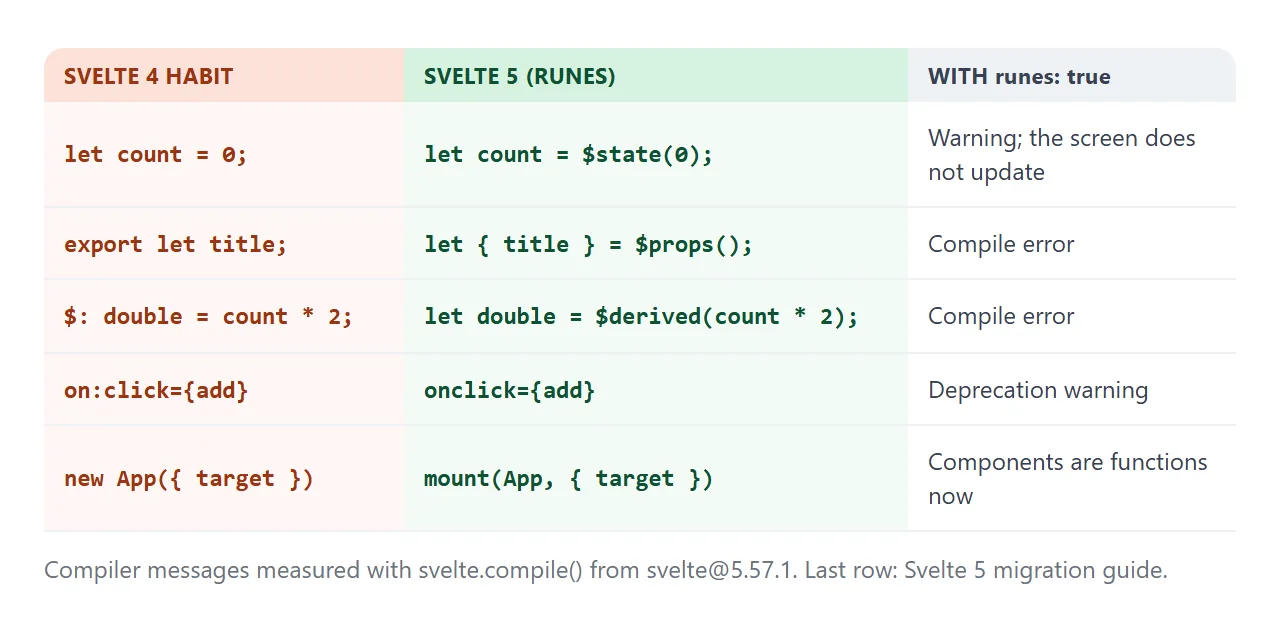
| Svelte 4 | Svelte 5 | With runes: true |
|---|---|---|
let count = 0 |
let count = $state(0) |
Warning, and the text never updates |
export let title |
let { title } = $props() |
Compile error |
$: double = count * 2 |
$derived(count * 2) |
Compile error |
on:click={add} |
onclick={add} |
Deprecation warning |
new App({ target }) |
mount(App, { target }) |
Components are functions now |
Why pass runes: true at all? A component with no rune in it is compiled in the older non-runes mode, and that output imports one more runtime file. We hit exactly this: a plain <h1>Hi</h1> failed until the option was added.
A finished example: a packing list
The same four parts handle a real component. This list passes a title in from mount(), keeps items in a $state array, and counts what is left with $derived.
<!doctype html>
<html lang="en">
<head>
<meta charset="utf-8">
<meta name="viewport" content="width=device-width, initial-scale=1">
<title>Svelte packing list</title>
<style>
  body { margin: 0; padding: 20px; font-family: system-ui, sans-serif; background: #f6f7f9; }
  #app { min-height: 150px; }
</style>

<!-- 1. The Svelte compiler, as one script (pinned version) -->
<script src="https://cdn.jsdelivr.net/npm/svelte@5.57.1/compiler/index.js"></script>

<!-- 2. Tell the browser where the Svelte runtime files live -->
<script type="importmap">
{
  "imports": {
    "svelte": "https://cdn.jsdelivr.net/npm/svelte@5.57.1/src/index-client.js",
    "svelte/internal/client": "https://cdn.jsdelivr.net/npm/svelte@5.57.1/src/internal/client/index.js",
    "#client/constants": "https://cdn.jsdelivr.net/npm/svelte@5.57.1/src/internal/client/constants.js",
    "esm-env": "https://cdn.jsdelivr.net/npm/esm-env@1.2.2/index.js",
    "esm-env/browser": "https://cdn.jsdelivr.net/npm/esm-env@1.2.2/true.js",
    "esm-env/development": "https://cdn.jsdelivr.net/npm/esm-env@1.2.2/false.js",
    "esm-env/node": "https://cdn.jsdelivr.net/npm/esm-env@1.2.2/false.js",
    "clsx": "https://cdn.jsdelivr.net/npm/clsx@2.1.1/dist/clsx.mjs"
  }
}
</script>
</head>
<body>
<div id="app">Loading Svelte...</div>

<script type="module">
  import { mount } from 'svelte';

  const source = `
<script>
  let { title } = $props();          // passed in from mount() below
  let items = $state([
    { text: 'Passport', done: true },
    { text: 'Charger', done: false }
  ]);
  let draft = $state('');
  let left = $derived(items.filter((i) => !i.done).length);

  function add(e) {
    e.preventDefault();               // stay on the page
    if (draft.trim()) items.push({ text: draft.trim(), done: false });
    draft = '';
  }
<\/script>

<h2>{title}</h2>
<form onsubmit={add}>
  <input bind:value={draft} placeholder="Add an item" aria-label="New item">
  <button>Add</button>
</form>

<ul>
  {#each items as item}
    <li class:done={item.done}>
      <label><input type="checkbox" bind:checked={item.done}> {item.text}</label>
    </li>
  {/each}
</ul>
<p>{left === 0 ? 'All packed.' : left + ' left to pack'}</p>

<style>
  h2 { margin: 0 0 10px; font-size: 18px; }
  form { display: flex; gap: 6px; }
  input:not([type]) { flex: 1; min-width: 0; font: inherit; padding: 8px; border: 1px solid #d1d5db; border-radius: 8px; }
  button { font: inherit; padding: 8px 14px; border: 0; border-radius: 8px; background: #ff3e00; color: #fff; }
  ul { list-style: none; padding: 0; margin: 12px 0; }
  li { padding: 8px 10px; margin-bottom: 6px; background: #fff; border-radius: 8px; }
  .done { color: #9ca3af; text-decoration: line-through; }
  p { color: #4b5563; margin: 0; }
</style>`;

  const { js } = svelte.compile(source, { runes: true, css: 'injected', discloseVersion: false });
  const url = URL.createObjectURL(new Blob([js.code], { type: 'text/javascript' }));
  const { default: List } = await import(url);

  const app = document.getElementById('app');
  app.textContent = '';
  mount(List, { target: app, props: { title: 'Trip packing list' } });
</script>
</body>
</html>
- Props from the page: pass
props: { title }tomount(), and read it inside with$props(). - A list:
{#each items as item}repeats the<li>;items.push()adds a row, because$statearrays are reactive. - Two-way inputs:
bind:valueon the text field andbind:checkedon each checkbox. - The form:
onsubmitcallse.preventDefault(), so adding an item never reloads the page.
When a normal Svelte project is the better fit
Compiling in the page is the shortest path to one file you can share. A normal project does the same work once, ahead of time.
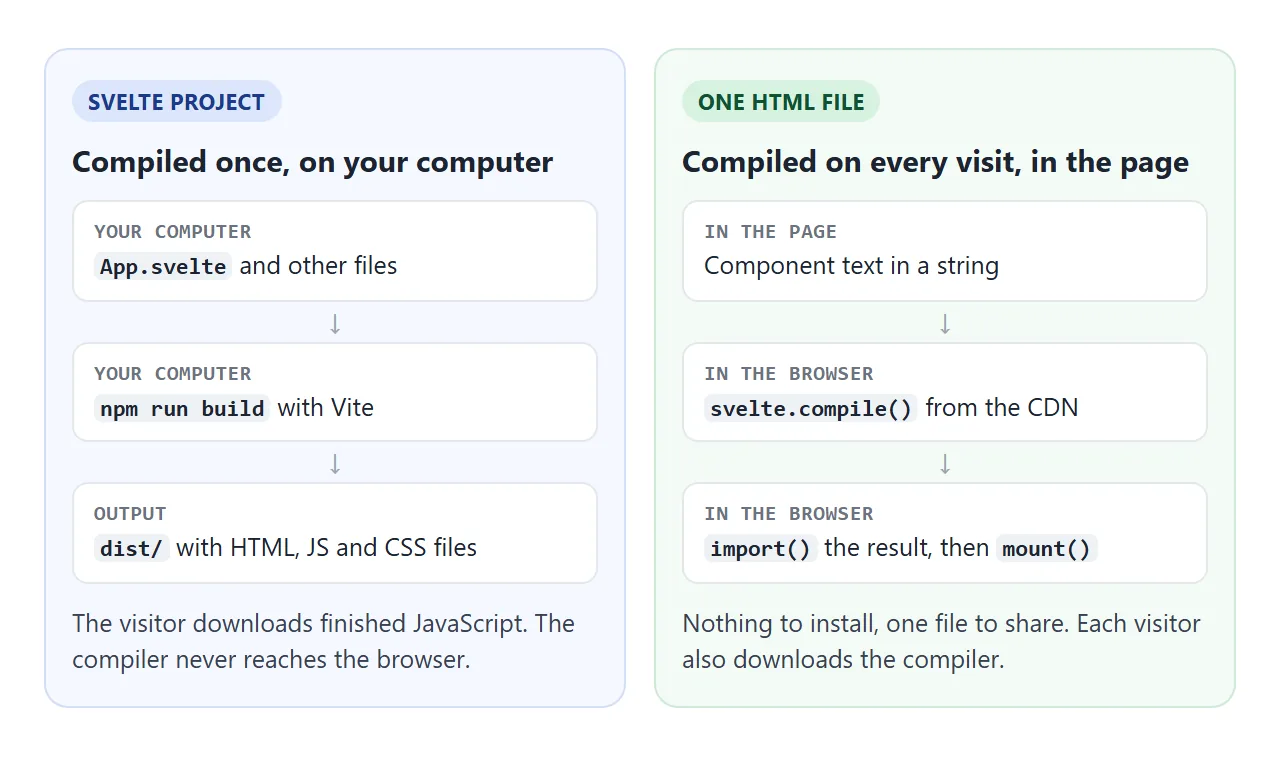
The Svelte docs recommend SvelteKit for new projects, or Vite on its own:
npx sv create myapp
cd myapp
npm install
npm run dev
With Vite, npm run build writes HTML, JavaScript and CSS files into a dist folder. That folder is static files.
Hosting a built front end covers the usual routing and base path problems. SvelteKit features such as server-side rendering need a server, which a single HTML file cannot provide.
When it does not work
| What you see | Cause | Fix |
|---|---|---|
| "Loading Svelte..." stays; error says to use an import statement only inside a module | The last script is a classic script | Use <script type="module"> |
| Failed to resolve module specifier "svelte" | Missing or late import map | Put the map in <head>, before modules |
| Failed to resolve specifier for a legacy flags file | Component compiled in non-runes mode | Pass runes: true |
| Half the code shows as text on the page | A </script> inside the string |
Write it as <\/script> |
| The component works but has no styles | The CSS was returned, not injected | Pass css: 'injected' |
| The number never changes on click | A plain let in runes mode |
Use $state() |
For scripts that fail for other reasons, HTML JavaScript not working goes through the general checks.
Share it as a link
A Svelte demo is easier to show than to describe. A screenshot cannot be clicked, and an .html attachment may open as plain code on a phone.
To send the working version, paste the page into a NOS document and choose Create share link. HTML to link walks through it.
The page renders as written, its scripts run, and the compiler and runtime load from the CDN, so the people you send it to can click and type in the component themselves. If you change the code later, the same link shows the new version.