A blob URL is a temporary address for data that lives in the page. Put text, CSV or an image in a Blob, pass it to URL.createObjectURL(), and you get a short blob: URL.
Use it in a link's href with a download attribute to save a file, or in an img or video src to show it.
Try it first. Type something, name the file, and press the button.
<!doctype html>
<html lang="en">
<head>
<meta charset="utf-8">
<meta name="viewport" content="width=device-width, initial-scale=1">
<title>Text to file</title>
<style>
  body { margin: 0; padding: 16px; font-family: system-ui, sans-serif; background: #f4f5f7; color: #1d2330; }
  label { display: block; font-size: 13px; font-weight: 600; margin-bottom: 4px; }
  textarea, input { width: 100%; box-sizing: border-box; font: 14px ui-monospace, Consolas, monospace;
    padding: 8px; border: 1px solid #cfd4dc; border-radius: 8px; background: #fff; }
  textarea { height: 90px; resize: vertical; }
  .row { display: flex; gap: 8px; margin-top: 10px; }
  .row input { flex: 1; }
  button { padding: 8px 14px; border: 0; border-radius: 8px; background: #1d4ed8; color: #fff; font-weight: 600; cursor: pointer; }
  #out { margin-top: 12px; padding: 10px 12px; border-radius: 8px; background: #fff; border: 1px solid #e1e4ea; font-size: 13px; line-height: 1.6; }
  #out code { word-break: break-all; }
</style>
</head>
<body>
<label for="text">File contents</label>
<textarea id="text">Hello from the browser.
This file was never on a server.</textarea>
<div class="row">
  <input id="name" value="note.txt" aria-label="File name">
  <button id="make">Make file</button>
</div>
<div id="out">Press <b>Make file</b>.</div>

<script>
  const out = document.getElementById('out');
  let url = null;  // the current blob URL, kept so it can be revoked

  document.getElementById('make').addEventListener('click', () => {
    if (url) URL.revokeObjectURL(url);  // free the previous file

    const text = document.getElementById('text').value;
    const blob = new Blob([text], { type: 'text/plain' });
    url = URL.createObjectURL(blob);

    const name = document.getElementById('name').value || 'note.txt';
    out.innerHTML =
      'URL: <code>' + url + '</code><br>' +
      'Size: ' + blob.size + ' bytes · Type: ' + blob.type + '<br>' +
      '<a href="' + url + '" download="' + name + '">Download ' + name + '</a>';
  });
</script>
</body>
</html>
The four steps: Blob, URL, use, revoke
Every blob URL follows the same path from data to file.
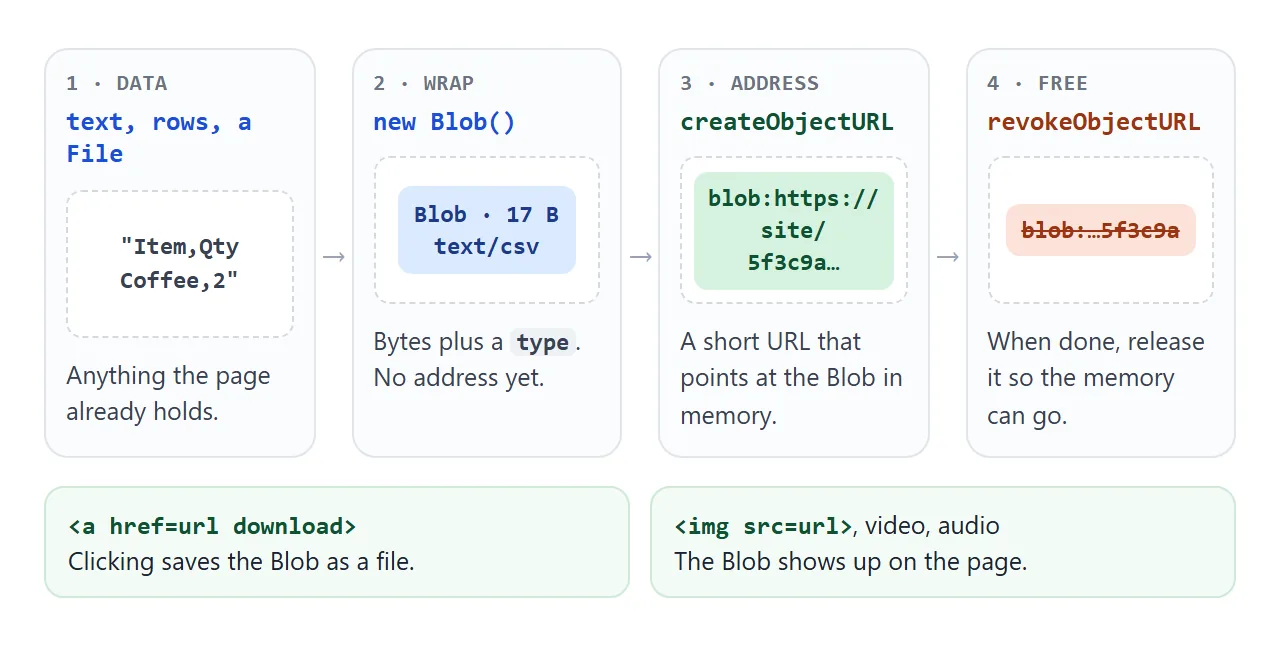
- Wrap the content.
new Blob([text], { type: 'text/plain' })takes an array of parts (strings, other Blobs, typed arrays) and a MIME type. - Create the address.
URL.createObjectURL(blob)returns a URL such asblob:https://example.com/5f3c9a2e-.... - Use it. Any attribute that takes a URL accepts it:
href,src, evenfetch(). - Revoke it.
URL.revokeObjectURL(url)tells the browser the address is no longer needed.
The core of the first example is only this:
const blob = new Blob([text], { type: 'text/plain' });
const url = URL.createObjectURL(blob);

link.href = url;
link.download = 'note.txt';   // suggested file name
Strings are stored as UTF-8, and blob.size is the length in bytes, not characters. An accented letter such as é takes two bytes in UTF-8, which is why "abc é" is 6 bytes.
Previews: show a picked file without uploading it
A File from an <input type="file"> or a drop is already a Blob. That means it can go straight into createObjectURL:
input.addEventListener('change', () => {
  const file = input.files[0];
  if (preview.src) URL.revokeObjectURL(preview.src);
  preview.src = URL.createObjectURL(file);   // works for img, video and audio
});
The picture appears at once, because nothing is read or converted. The whole drop-a-file flow, with size checks and upload, is in drag and drop file upload.
blob: URL vs data: URL
Both put your own data where a URL is expected, but they work differently. A blob URL points at bytes in memory. A data URI writes the bytes into the address itself.
<!doctype html>
<html lang="en">
<head>
<meta charset="utf-8">
<meta name="viewport" content="width=device-width, initial-scale=1">
<title>blob: vs data: URL</title>
<style>
  body { margin: 0; padding: 16px; font-family: system-ui, sans-serif; background: #f4f5f7; color: #1d2330; }
  .ctrl { font-size: 14px; margin-bottom: 12px; }
  .ctrl input { vertical-align: middle; width: 160px; }
  .grid { display: grid; grid-template-columns: 1fr 1fr; gap: 10px; }
  .box { background: #fff; border: 1px solid #e1e4ea; border-radius: 10px; padding: 10px; min-width: 0; }
  .box h3 { margin: 0 0 6px; font: 700 14px ui-monospace, Consolas, monospace; }
  .box img { display: block; width: 100%; max-width: 140px; aspect-ratio: 1; margin: 0 auto 8px; background: #f8fafc; border-radius: 6px; }
  .len { font-size: 13px; }
  .len b { font-size: 18px; }
  .url { font: 11px/1.4 ui-monospace, Consolas, monospace; color: #6b7280; word-break: break-all;
    max-height: 60px; overflow: hidden; margin-top: 6px; }
</style>
</head>
<body>
<div class="ctrl">
  <label for="n">Dots in the picture: <b id="nv">5</b></label>
  <input id="n" type="range" min="1" max="60" value="5">
</div>
<div class="grid">
  <div class="box">
    <h3>blob:</h3>
    <img id="blobImg" alt="Picture loaded from a blob URL">
    <div class="len">URL length: <b id="blobLen"></b> characters</div>
    <div class="url" id="blobUrl"></div>
  </div>
  <div class="box">
    <h3>data:</h3>
    <img id="dataImg" alt="Picture loaded from a data URL">
    <div class="len">URL length: <b id="dataLen"></b> characters</div>
    <div class="url" id="dataUrl"></div>
  </div>
</div>

<script>
  const $ = (id) => document.getElementById(id);
  let blobUrl = null;

  // An SVG picture written as a string: n coloured dots
  function makeSvg(n) {
    let dots = '';
    for (let i = 0; i < n; i++) {
      const x = 10 + (i * 37) % 80, y = 10 + (i * 53) % 80;
      dots += '<circle cx="' + x + '" cy="' + y + '" r="7" fill="hsl(' + i * 29 + ',70%,55%)"/>';
    }
    return '<svg xmlns="http://www.w3.org/2000/svg" viewBox="0 0 100 100">' + dots + '</svg>';
  }

  function draw() {
    const n = +$('n').value;
    $('nv').textContent = n;
    const svg = makeSvg(n);

    // blob: a short address that points at the bytes in memory
    if (blobUrl) URL.revokeObjectURL(blobUrl);
    blobUrl = URL.createObjectURL(new Blob([svg], { type: 'image/svg+xml' }));

    // data: the bytes written into the address itself
    const dataUrl = 'data:image/svg+xml,' + encodeURIComponent(svg);

    $('blobImg').src = blobUrl;
    $('dataImg').src = dataUrl;
    $('blobLen').textContent = blobUrl.length;
    $('dataLen').textContent = dataUrl.length;
    $('blobUrl').textContent = blobUrl;
    $('dataUrl').textContent = dataUrl;
  }

  $('n').addEventListener('input', draw);
  draw();
</script>
</body>
</html>
Move the slider. The picture gets bigger, the data URL gets longer, and the blob URL keeps the same length.
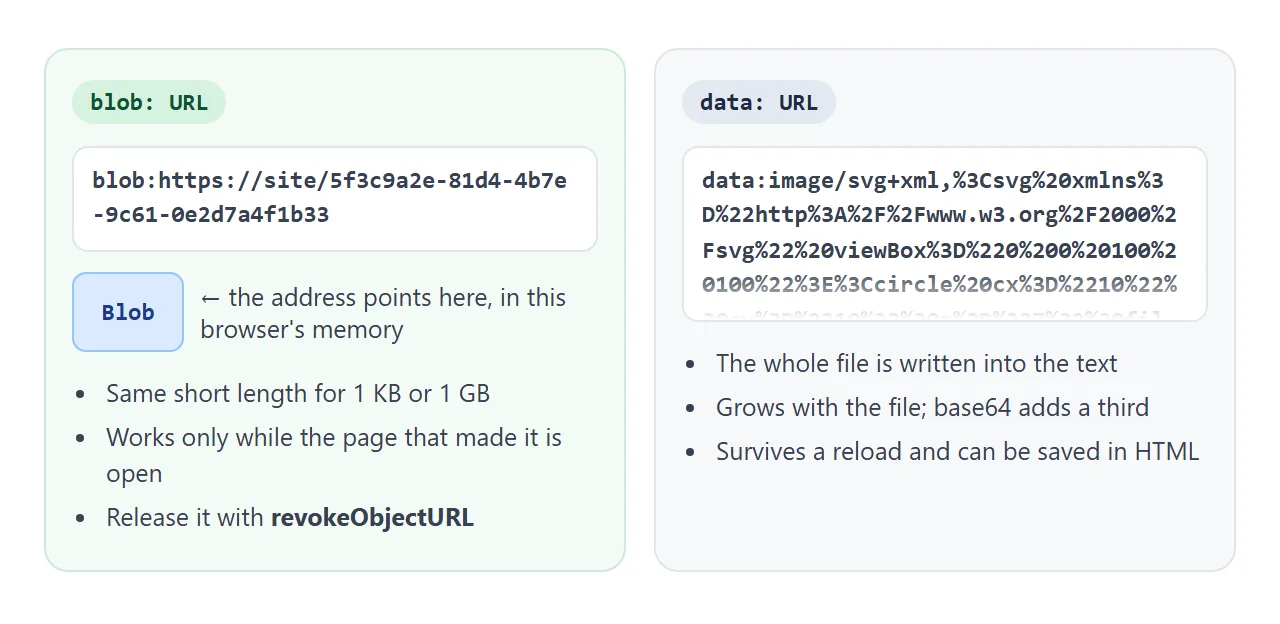
| blob: URL | data: URL | |
|---|---|---|
| Made with | URL.createObjectURL(blob) |
A string, or FileReader.readAsDataURL |
| Length | Short, whatever the file size | Grows with the file; base64 turns every 3 bytes into 4 characters |
| Survives a reload | No | Yes, it is plain text |
| Can be saved in the HTML | No | Yes |
| Needs cleanup | URL.revokeObjectURL |
No |
Use a blob URL for downloads and previews made while the page is open. Use a data URL when the content has to be stored in the file, as in base64 images in HTML.
How long a blob URL lives
A blob URL belongs to the page that created it. It stops working when that page reloads or closes, or when you revoke it.
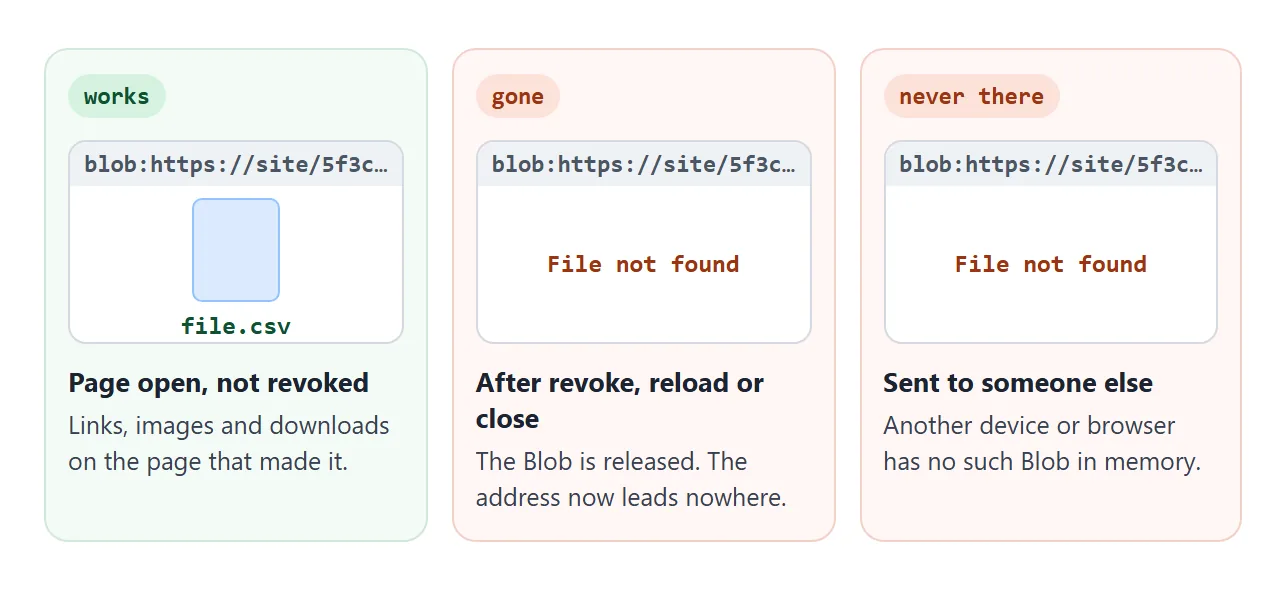
This is also why a blob URL cannot be shared. Pasted into a chat, it is an address for memory on your device. The other person's browser has no such Blob, so the link fails.
Revoking matters when a page makes many files. Each createObjectURL call keeps its Blob in memory until the page closes.
An exporter that makes a new file on every click should revoke the old URL first, which the finished example below does. An image that already loaded keeps showing after its URL is revoked.
Reading a Blob back
To check what is inside a Blob, read it:
const text = await blob.text();          // as a string (UTF-8)
const bytes = await blob.arrayBuffer();  // as raw bytes

// Older API, same result with an event
const reader = new FileReader();
reader.onload = () => console.log(reader.result);
reader.readAsText(blob);
blob.text() returns a promise and is the short way. FileReader also has readAsDataURL, which turns a Blob into a data URL when you do need one. For JSON files, pass the text to JSON.parse, covered in JSON.parse.
A finished example: export a table as CSV or JSON
Here the data comes from the page. Edit any cell, then export. The file is built from the table, shown back with blob.text(), and offered as a download.
<!doctype html>
<html lang="en">
<head>
<meta charset="utf-8">
<meta name="viewport" content="width=device-width, initial-scale=1">
<title>Table to CSV and JSON</title>
<style>
  body { margin: 0; padding: 14px; font-family: system-ui, sans-serif; background: #f4f5f7; color: #1d2330; }
  p.hint { margin: 0 0 8px; font-size: 13px; color: #4b5563; }
  table { width: 100%; border-collapse: collapse; background: #fff; font-size: 14px; }
  th, td { border: 1px solid #d5d9e0; padding: 6px 8px; text-align: left; }
  th { background: #eef1f5; }
  td:focus { outline: 2px solid #1d4ed8; outline-offset: -2px; }
  .bar { display: flex; flex-wrap: wrap; gap: 8px; align-items: center; margin: 10px 0; font-size: 13px; }
  button { padding: 7px 12px; border: 0; border-radius: 8px; background: #1d4ed8; color: #fff; font-weight: 600; cursor: pointer; }
  #links { font-size: 13px; line-height: 1.7; }
  #links code { font-size: 11.5px; word-break: break-all; color: #6b7280; }
  pre { margin: 6px 0 0; padding: 8px 10px; background: #111827; color: #e5e7eb; border-radius: 8px;
    font-size: 12px; max-height: 110px; overflow: auto; white-space: pre-wrap; }
</style>
</head>
<body>
<p class="hint">Click a cell to edit it, then export.</p>
<table id="t">
  <thead><tr><th>Item</th><th>Qty</th><th>Note</th></tr></thead>
  <tbody>
    <tr><td contenteditable>Coffee beans</td><td contenteditable>2</td><td contenteditable>Dark, "house" roast</td></tr>
    <tr><td contenteditable>Oat milk</td><td contenteditable>6</td><td contenteditable>Barista, 1 L</td></tr>
    <tr><td contenteditable>Filters</td><td contenteditable>1</td><td contenteditable>Size 4</td></tr>
  </tbody>
</table>
<div class="bar">
  <button id="csv">Export CSV</button>
  <button id="json">Export JSON</button>
  <label><input type="checkbox" id="bom"> Add BOM to CSV</label>
</div>
<div id="links">Nothing exported yet.</div>
<pre id="preview" hidden></pre>

<script>
  const $ = (id) => document.getElementById(id);
  let url = null, revoked = 0;

  // Read the table into an array of rows (header first)
  function rows() {
    return [...$('t').rows].map((tr) => [...tr.cells].map((c) => c.textContent.trim()));
  }

  // CSV: wrap a cell in quotes if it has a comma, quote or line break; double inner quotes
  function toCsv(data) {
    const cell = (v) => /[",\n]/.test(v) ? '"' + v.replace(/"/g, '""') + '"' : v;
    return data.map((r) => r.map(cell).join(',')).join('\r\n');
  }

  function toJson(data) {
    const [head, ...body] = data;
    const objs = body.map((r) => Object.fromEntries(head.map((h, i) => [h, r[i]])));
    return JSON.stringify(objs, null, 2);
  }

  async function exportFile(text, type, name) {
    if (url) { URL.revokeObjectURL(url); revoked++; }  // the old file is no longer needed
    const blob = new Blob([text], { type });
    url = URL.createObjectURL(blob);

    $('links').innerHTML =
      '<a href="' + url + '" download="' + name + '">Download ' + name + '</a> · ' +
      blob.size + ' bytes · ' + type + '<br><code>' + url + '</code><br>' +
      'Old URLs revoked: ' + revoked;

    // Read the blob back to show what is inside the file
    $('preview').hidden = false;
    $('preview').textContent = await blob.text();
  }

  $('csv').addEventListener('click', () => {
    const bom = $('bom').checked ? '' : '';
    exportFile(bom + toCsv(rows()), 'text/csv', 'shopping.csv');
  });
  $('json').addEventListener('click', () => {
    exportFile(toJson(rows()), 'application/json', 'shopping.json');
  });
</script>
</body>
</html>
- CSV quoting: a cell with a comma, a quote or a line break is wrapped in quotes, and inner quotes are doubled. The note cell becomes
"Dark, ""house"" roast". - JSON: the header row becomes the keys, and
JSON.stringify(rows, null, 2)makes it readable. - Types:
text/csvfor CSV,application/jsonfor JSON. - BOM: the checkbox adds
\uFEFFto the start. The file grows by 3 bytes. Some spreadsheet apps need it to read accented letters in a CSV correctly.
When it does not work
| What you see | Cause | Fix |
|---|---|---|
| The link opens the file instead of saving it | The URL is on another origin, so download is ignored |
Fetch the data (the server must allow it), make a Blob, link to its blob URL |
| Clicking Download does nothing | The page runs in a sandboxed frame without allow-downloads |
Open the page directly, or allow downloads on the frame |
| The link is dead after a reload or in a message | Blob URLs live only while the page that made them is open | Make the Blob again; use a data URL if it must be stored |
| Memory keeps growing as you export | Old blob URLs were never revoked | Call URL.revokeObjectURL before making the next one |
| An SVG blob does not show in an img | The Blob has no type or the wrong one | Use { type: 'image/svg+xml' } |
| Accented letters look broken in a spreadsheet | The app did not read the CSV as UTF-8 | Start the text with \uFEFF (a byte order mark) |
The sandbox row is covered in more detail in the iframe sandbox attribute.
Share it as a link
A page that makes files is easier to try than to describe. Send it as a link and the scripts run, so the people you send it to can edit the table and download the CSV themselves.
To do that, paste the page into a NOS document and choose Create share link. HTML to link walks through it.
The page renders as written, its scripts run, and downloads from blob URLs work there. If you change the code later, the same link shows the new version.