MediaRecorder is the browser's built-in recorder. You give it a MediaStream, call start() and stop(), and it hands back the encoded video in pieces called chunks. Join the chunks into a Blob and you have a file you can play or download.
The stream does not have to come from a camera. canvas.captureStream() turns a canvas into a video stream, so anything you draw can be recorded. There is no permission prompt, because no device is involved.
<!doctype html>
<html lang="en">
<head>
<meta charset="utf-8">
<meta name="viewport" content="width=device-width, initial-scale=1">
<title>Record a canvas with MediaRecorder</title>
<style>
  body { margin: 0; padding: 14px; font-family: system-ui, sans-serif; background: #f4f5f7; color: #1d2330; }
  .row { display: grid; grid-template-columns: 1fr 1fr; gap: 10px; }
  .row p { margin: 0 0 4px; font-size: 13px; color: #555; }
  canvas, video { width: 100%; aspect-ratio: 16 / 9; display: block; border-radius: 8px; background: #111; }
  .bar { display: flex; flex-wrap: wrap; gap: 8px; align-items: center; margin-top: 12px; }
  button { font: inherit; padding: 8px 14px; border: 0; border-radius: 8px; background: #1d4ed8; color: #fff; cursor: pointer; }
  button:disabled { background: #b8bfcc; cursor: default; }
  #stop { background: #b91c1c; }
  #status { font-size: 14px; }
  a[download] { font-size: 14px; }
</style>
</head>
<body>
<div class="row">
  <div><p>Canvas (live)</p><canvas id="scene" width="640" height="360"></canvas></div>
  <div><p>Recording</p><video id="out" controls playsinline></video></div>
</div>
<div class="bar">
  <button id="rec">Record</button>
  <button id="stop" disabled>Stop</button>
  <span id="status">Press Record, wait a few seconds, press Stop.</span>
  <a id="save" download hidden>Download</a>
</div>

<script>
  const canvas = document.getElementById('scene');
  const ctx = canvas.getContext('2d');
  const recBtn = document.getElementById('rec');
  const stopBtn = document.getElementById('stop');
  const status = document.getElementById('status');
  const video = document.getElementById('out');
  const save = document.getElementById('save');

  // The animation: a ball bouncing around, drawn every frame
  let x = 80, y = 80, vx = 4, vy = 3;
  function draw() {
    ctx.fillStyle = '#0f172a';
    ctx.fillRect(0, 0, 640, 360);
    x += vx; y += vy;
    if (x < 40 || x > 600) vx = -vx;
    if (y < 40 || y > 320) vy = -vy;
    ctx.fillStyle = '#facc15';
    ctx.beginPath(); ctx.arc(x, y, 40, 0, Math.PI * 2); ctx.fill();
    ctx.fillStyle = '#fff';
    ctx.font = 'bold 36px system-ui, sans-serif';
    ctx.fillText(new Date().toLocaleTimeString(), 24, 52);
    requestAnimationFrame(draw);
  }
  requestAnimationFrame(draw);

  let recorder;
  let chunks = [];

  recBtn.addEventListener('click', () => {
    const stream = canvas.captureStream(30);  // the canvas as a video track, 30 fps
    recorder = new MediaRecorder(stream);
    chunks = [];
    recorder.addEventListener('dataavailable', (e) => chunks.push(e.data));
    recorder.addEventListener('stop', () => {
      const type = chunks[0].type;            // e.g. "video/webm;codecs=vp8"
      const blob = new Blob(chunks, { type });
      if (video.src) URL.revokeObjectURL(video.src);
      const url = URL.createObjectURL(blob);
      video.src = url;
      save.href = url;
      save.download = 'canvas.' + (type.includes('mp4') ? 'mp4' : 'webm');
      save.hidden = false;
      status.textContent = (blob.size / 1024).toFixed(0) + ' KB, ' + type;
    });
    recorder.start();
    recBtn.disabled = true; stopBtn.disabled = false;
    status.textContent = 'Recording...';
  });

  stopBtn.addEventListener('click', () => {
    recorder.stop();
    recorder.stream.getTracks().forEach((t) => t.stop());  // release the capture
    recBtn.disabled = false; stopBtn.disabled = true;
  });
</script>
</body>
</html>
If you want the camera instead, camera in HTML covers getUserMedia. The recorder code below is the same for both.
The whole recording, in six steps
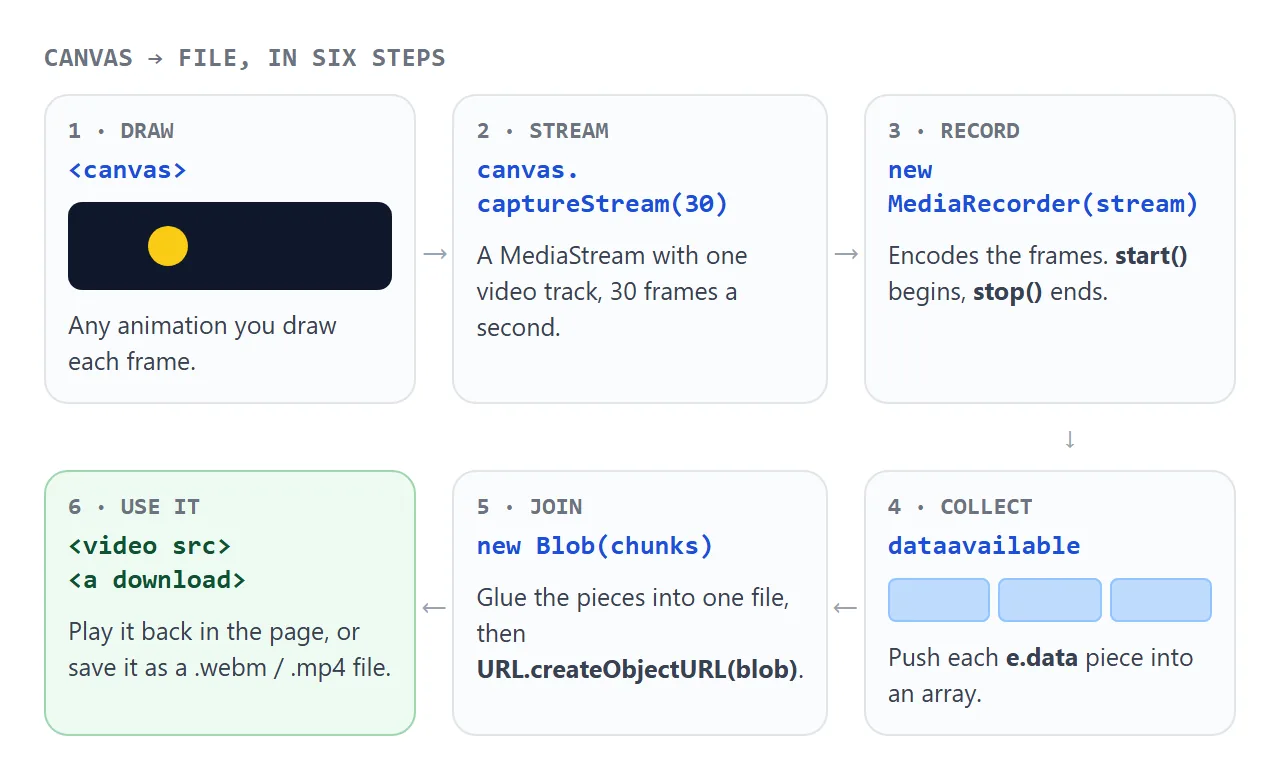
- Draw on a canvas, usually in a requestAnimationFrame loop.
- Stream it with
canvas.captureStream(30). The number is the highest frame rate you want. - Record with
new MediaRecorder(stream)and callstart(). - Collect each
e.datain thedataavailableevent. - Join the pieces with
new Blob(chunks, { type })after thestopevent. - Use it through
URL.createObjectURL(blob): as a videosrc, or as a download link.
The core of the first example is short:
const stream = canvas.captureStream(30);
const recorder = new MediaRecorder(stream);
const chunks = [];

recorder.addEventListener('dataavailable', (e) => chunks.push(e.data));
recorder.addEventListener('stop', () => {
  const blob = new Blob(chunks, { type: chunks[0].type });
  video.src = URL.createObjectURL(blob);
});

recorder.start();
// later: recorder.stop();
Wait for the stop event before building the Blob. The last chunk arrives in a dataavailable event just before stop, so building the Blob right after calling stop() misses it.
Pick a format with isTypeSupported
Each browser records a different set of formats. MediaRecorder.isTypeSupported() tells you, one type string at a time. The example below checks ten types and shows the answer from the browser you are using now.
<!doctype html>
<html lang="en">
<head>
<meta charset="utf-8">
<meta name="viewport" content="width=device-width, initial-scale=1">
<title>MediaRecorder formats and chunks</title>
<style>
  body { margin: 0; padding: 14px; font-family: system-ui, sans-serif; background: #f4f5f7; color: #1d2330; }
  h3 { font-size: 15px; margin: 0 0 8px; }
  ul { list-style: none; margin: 0 0 16px; padding: 0; display: grid; grid-template-columns: repeat(auto-fill, minmax(170px, 1fr)); gap: 6px; }
  li { font: 13px ui-monospace, Consolas, monospace; padding: 6px 8px; border-radius: 6px; background: #fff; border: 1px solid #e1e4ea; overflow-wrap: anywhere; }
  li.yes { border-color: #86c79b; background: #eefaf1; }
  li.no { color: #8a5a44; background: #fff6f0; border-color: #f0c7ad; }
  .bar { display: flex; flex-wrap: wrap; gap: 8px; align-items: center; margin-bottom: 10px; font-size: 14px; }
  select, button { font: inherit; padding: 7px 10px; border-radius: 8px; border: 1px solid #c9ced8; background: #fff; }
  button { background: #1d4ed8; color: #fff; border: 0; cursor: pointer; }
  button:disabled { background: #b8bfcc; }
  canvas { display: none; }
  #log { font: 13px/1.6 ui-monospace, Consolas, monospace; background: #0f172a; color: #e2e8f0; border-radius: 8px; padding: 10px 12px; height: 170px; overflow: auto; white-space: pre-wrap; }
</style>
</head>
<body>
<h3>MediaRecorder.isTypeSupported() in this browser</h3>
<ul id="types"></ul>

<h3>dataavailable: when do chunks arrive?</h3>
<div class="bar">
  <label>start(<select id="slice">
    <option value="">no timeslice</option>
    <option value="1000">1000</option>
    <option value="250">250</option>
  </select>)</label>
  <button id="go">Record 2 seconds</button>
</div>
<div id="log">Pick a timeslice and press the button.</div>
<canvas id="c" width="320" height="180"></canvas>

<script>
  // 1. Ask the browser which formats it can record
  const TYPES = [
    'video/webm',
    'video/webm;codecs=vp8',
    'video/webm;codecs=vp9',
    'video/webm;codecs=vp8,opus',
    'video/mp4',
    'video/mp4;codecs=avc1',
    'audio/webm;codecs=opus',
    'audio/ogg;codecs=opus',
    'audio/mp4',
    'image/gif',
  ];
  const list = document.getElementById('types');
  for (const t of TYPES) {
    const ok = MediaRecorder.isTypeSupported(t);
    const li = document.createElement('li');
    li.className = ok ? 'yes' : 'no';
    li.textContent = (ok ? '✓ ' : '✗ ') + t;
    list.append(li);
  }

  // 2. Record a hidden canvas and log every dataavailable event
  const canvas = document.getElementById('c');
  const g = canvas.getContext('2d');
  let hue = 0;
  setInterval(() => { g.fillStyle = `hsl(${hue += 7} 70% 50%)`; g.fillRect(0, 0, 320, 180); }, 33);

  const log = document.getElementById('log');
  const go = document.getElementById('go');
  go.addEventListener('click', () => {
    const slice = document.getElementById('slice').value;
    const recorder = new MediaRecorder(canvas.captureStream(30));
    const t0 = performance.now();
    const ms = () => String(Math.round(performance.now() - t0)).padStart(5) + ' ms  ';
    log.textContent = '';
    recorder.addEventListener('start', () => {
      log.textContent += ms() + 'start   mimeType = "' + recorder.mimeType + '"\n';
    });
    recorder.addEventListener('dataavailable', (e) => {
      log.textContent += ms() + 'chunk   ' + e.data.size + ' bytes\n';
    });
    recorder.addEventListener('stop', () => {
      log.textContent += ms() + 'stop\n';
      go.disabled = false;
    });
    if (slice) recorder.start(Number(slice)); else recorder.start();
    go.disabled = true;
    setTimeout(() => recorder.stop(), 2000);
  });
</script>
</body>
</html>
In our test runs, Chromium and Firefox both said yes to video/webm. Chromium also said yes to video/mp4, and Firefox said no to every MP4 type. So do not hard-code one format. Keep a list in order of preference and take the first match:
const WANTED = [
  'video/webm;codecs=vp9,opus',
  'video/webm;codecs=vp8,opus',
  'video/webm',
  'video/mp4',
];
const mimeType = WANTED.find((t) => MediaRecorder.isTypeSupported(t)) || '';
const recorder = new MediaRecorder(stream, mimeType ? { mimeType } : {});
Passing a type the browser cannot record throws a NotSupportedError from the constructor. Checking first avoids that.
| Type string | What you get |
|---|---|
video/webm |
WebM video. The browser picks the codec |
video/webm;codecs=vp8,opus |
WebM with VP8 picture and Opus sound |
video/mp4 |
MP4, where the browser supports recording it |
audio/webm;codecs=opus |
Sound only, for an audio-only stream |
If you pass no mimeType, recorder.mimeType stays an empty string until the start event fires. The type on each chunk, e.data.type, is filled in, which is why the first example reads chunks[0].type.
Chunks and the timeslice
start() with no argument keeps everything until you stop. You get one dataavailable event at the end. start(1000) asks for a chunk every 1000 milliseconds, plus a last one at stop.
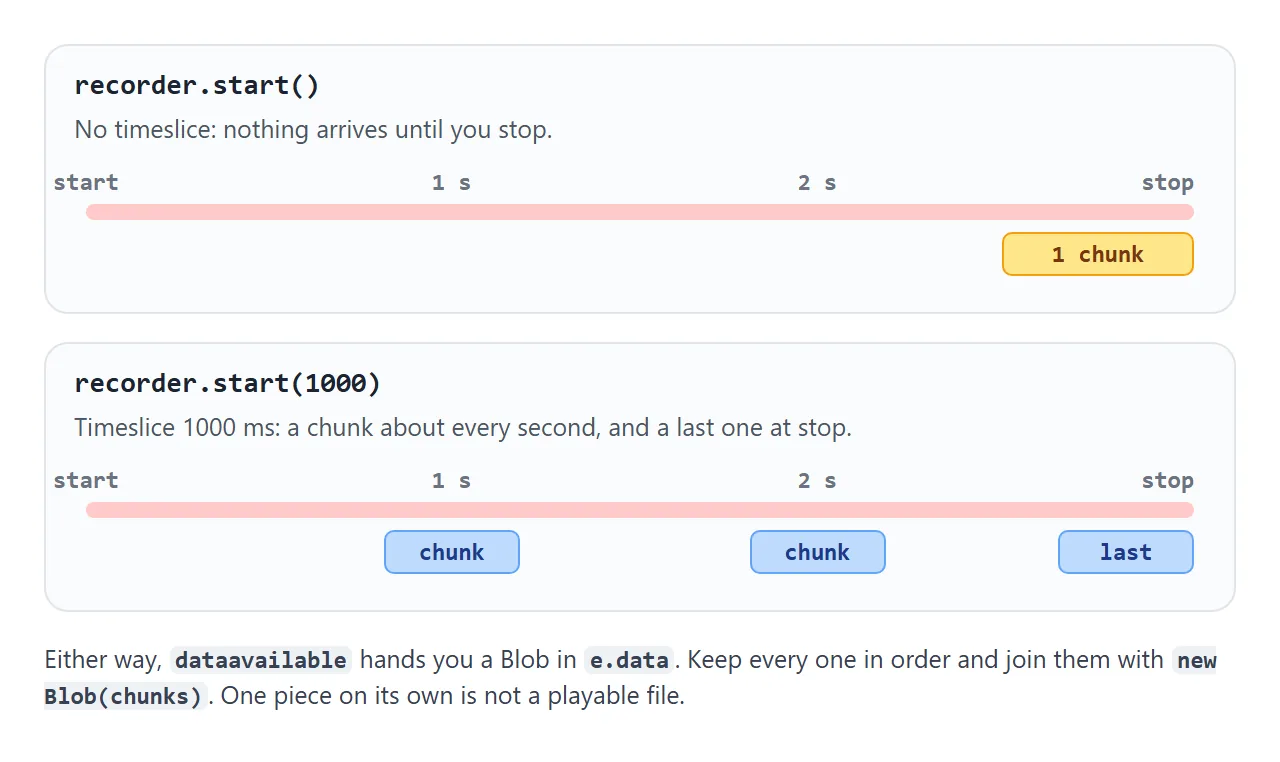
In the example above, a two-second recording gave 1 chunk with no timeslice, 2 with 1000, and 8 with 250.
A timeslice is useful when you upload while recording, or when a long recording should not sit in one piece. Either way, keep every chunk in order. A chunk from the middle is not a playable file on its own.
Call recorder.requestData() if you need the data so far without stopping. It fires one extra dataavailable right away.
Download the Blob
A download is an <a> element whose href is the Blob URL and whose download attribute names the file:
const url = URL.createObjectURL(blob);
link.href = url;
link.download = 'animation.webm';
Match the extension to the type you recorded: .webm for WebM, .mp4 for MP4. Call URL.revokeObjectURL(url) when you replace a recording, so the old one can be freed. Blob URLs explains what these addresses are and how long they last.
Record sound from Web Audio
The canvas stream has no sound. To add sound you generate with an AudioContext, send it to a MediaStreamAudioDestinationNode. That node has a stream with one audio track. Put the canvas video track and that audio track into one new MediaStream and record that.
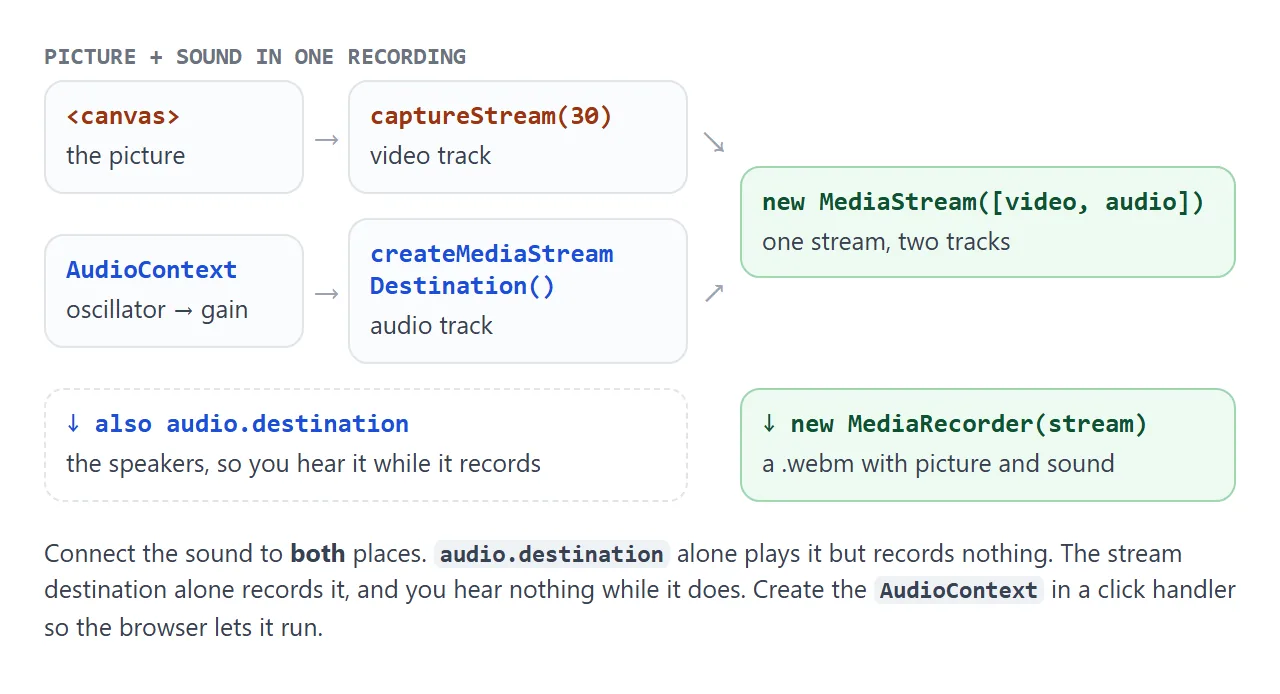
const audio = new AudioContext();
const tape = audio.createMediaStreamDestination();
// connect your nodes to both: gain.connect(tape) and gain.connect(audio.destination)

const stream = new MediaStream([
  ...canvas.captureStream(30).getVideoTracks(),
  ...tape.stream.getAudioTracks(),
]);
const recorder = new MediaRecorder(stream, { mimeType });
Create the AudioContext inside a click handler. A context created before the user has interacted with the page can start in the suspended state, and it records silence until it runs. For the basics of making a beep, see play a sound in JavaScript.
A finished example: a bouncing ball with sound
This one puts it all together. It picks a format with isTypeSupported, beeps on every bounce through Web Audio, records picture and sound with a one-second timeslice, and offers the result as a download.
<!doctype html>
<html lang="en">
<head>
<meta charset="utf-8">
<meta name="viewport" content="width=device-width, initial-scale=1">
<title>Record a canvas with sound</title>
<style>
  body { margin: 0; padding: 14px; font-family: system-ui, sans-serif; background: #f4f5f7; color: #1d2330; }
  .row { display: grid; grid-template-columns: 1fr 1fr; gap: 10px; }
  .row p { margin: 0 0 4px; font-size: 13px; color: #555; }
  canvas, video { width: 100%; aspect-ratio: 16 / 9; display: block; border-radius: 8px; background: #111; }
  .bar { display: flex; flex-wrap: wrap; gap: 8px; align-items: center; margin-top: 12px; font-size: 14px; }
  button { font: inherit; padding: 8px 14px; border: 0; border-radius: 8px; background: #1d4ed8; color: #fff; cursor: pointer; }
  button:disabled { background: #b8bfcc; cursor: default; }
  #stop { background: #b91c1c; }
  #status { width: 100%; font-size: 13px; color: #444; overflow-wrap: anywhere; }
</style>
</head>
<body>
<div class="row">
  <div><p>Canvas + beeps</p><canvas id="scene" width="640" height="360"></canvas></div>
  <div><p>Recording (with sound)</p><video id="out" controls playsinline></video></div>
</div>
<div class="bar">
  <button id="rec">Record with sound</button>
  <button id="stop" disabled>Stop</button>
  <a id="save" download hidden>Download</a>
  <span id="status">Turn your volume down a little: the ball beeps when it hits a wall.</span>
</div>

<script>
  const canvas = document.getElementById('scene');
  const ctx = canvas.getContext('2d');
  const video = document.getElementById('out');
  const save = document.getElementById('save');
  const status = document.getElementById('status');
  const recBtn = document.getElementById('rec');
  const stopBtn = document.getElementById('stop');

  // Pick the first format this browser can record
  const WANTED = ['video/webm;codecs=vp9,opus', 'video/webm;codecs=vp8,opus', 'video/webm', 'video/mp4'];
  const mimeType = WANTED.find((t) => MediaRecorder.isTypeSupported(t)) || '';

  let audio, tape, recorder, chunks = [];

  // A short beep, sent to the speakers and to the recording
  function beep(freq) {
    if (!recorder || recorder.state !== 'recording') return;  // quiet unless recording
    const osc = audio.createOscillator();
    const gain = audio.createGain();
    osc.frequency.value = freq;
    gain.gain.setValueAtTime(0.2, audio.currentTime);
    gain.gain.exponentialRampToValueAtTime(0.001, audio.currentTime + 0.15);
    osc.connect(gain);
    gain.connect(audio.destination);  // you hear it
    gain.connect(tape);               // the recorder hears it
    osc.start();
    osc.stop(audio.currentTime + 0.15);
  }

  let x = 100, y = 100, vx = 5, vy = 4;
  function draw() {
    ctx.fillStyle = '#0f172a';
    ctx.fillRect(0, 0, 640, 360);
    x += vx; y += vy;
    if (x < 40 || x > 600) { vx = -vx; beep(660); }
    if (y < 40 || y > 320) { vy = -vy; beep(440); }
    ctx.fillStyle = '#34d399';
    ctx.beginPath(); ctx.arc(x, y, 40, 0, Math.PI * 2); ctx.fill();
    requestAnimationFrame(draw);
  }
  requestAnimationFrame(draw);

  recBtn.addEventListener('click', () => {
    // Create audio inside the click, so the browser lets it play
    if (!audio) {
      audio = new AudioContext();
      tape = audio.createMediaStreamDestination();
    }
    audio.resume();
    // One stream: the canvas video track + the Web Audio track
    const stream = new MediaStream([
      ...canvas.captureStream(30).getVideoTracks(),
      ...tape.stream.getAudioTracks(),
    ]);
    recorder = new MediaRecorder(stream, mimeType ? { mimeType } : {});
    chunks = [];
    recorder.addEventListener('dataavailable', (e) => chunks.push(e.data));
    recorder.addEventListener('stop', () => {
      const blob = new Blob(chunks, { type: mimeType || chunks[0].type });
      if (video.src) URL.revokeObjectURL(video.src);
      video.src = save.href = URL.createObjectURL(blob);
      save.download = 'bounce.' + (blob.type.includes('mp4') ? 'mp4' : 'webm');
      save.hidden = false;
      status.textContent = (blob.size / 1024).toFixed(0) + ' KB, ' + blob.type;
    });
    recorder.start(1000);  // a chunk every second
    recBtn.disabled = true; stopBtn.disabled = false;
    status.textContent = 'Recording as ' + (mimeType || 'the default format') + '...';
  });

  stopBtn.addEventListener('click', () => {
    recorder.stop();
    recorder.stream.getVideoTracks().forEach((t) => t.stop());  // keep the audio track for next time
    recBtn.disabled = false; stopBtn.disabled = true;
  });
</script>
</body>
</html>
When you stop, stop the video track as well, with track.stop(). Stopping every track of a stream also ends the recording by itself: the recorder fires its last dataavailable and then stop.
When it does not work
| What you see | Cause | Fix |
|---|---|---|
NotSupportedError when creating the recorder |
That mimeType cannot be recorded here |
Check with isTypeSupported first |
| The Blob is empty or the last second is missing | The Blob was built right after stop() |
Build it in the stop event |
recorder.mimeType is "" |
No type was passed, and recording has not started | Read e.data.type from a chunk |
| The recording has no sound | The audio went only to audio.destination |
Connect it to a stream destination and add that track |
| The sound is silent in the file | The AudioContext is suspended |
Create or resume() it in a click handler |
SecurityError from captureStream |
A cross-origin image without CORS was drawn on the canvas | Serve the image with CORS, or draw your own |
| The picture freezes while the tab is hidden | The browser paused requestAnimationFrame |
Keep the tab visible while recording |
Share it as a link
A recorder is easier to show than to describe. A screen capture of the page does not let anyone press Record, and an .html attachment may open as plain code on a phone.
To send the working version, paste the page into a NOS document and choose Create share link. HTML to link walks through it.
The page renders as written and its scripts run, so the people you send it to can record their own clip and download it. If you change the code later, the same link shows the new version.