WebRTC is the set of browser APIs for sending video, audio and data directly between two browsers.
When it fails, this page covers five causes: the call order, missing signaling, no route between the peers, an insecure page for the camera, and a video element nobody connected.
The smallest working version needs no camera and no server. It puts two peers in one page and sends text between them. Press the button, then type in either box.
<!doctype html>
<html lang="en">
<head>
<meta charset="utf-8">
<meta name="viewport" content="width=device-width, initial-scale=1">
<title>WebRTC data channel, two peers in one page</title>
<style>
  * { box-sizing: border-box; }
  body { margin: 0; padding: 12px; font-family: system-ui, sans-serif; background: #f4f5f7; color: #1d2330; }
  .bar { display: flex; gap: 10px; align-items: center; flex-wrap: wrap; margin-bottom: 10px; }
  button { font: inherit; padding: 8px 14px; border: 0; border-radius: 8px; background: #2563eb; color: #fff; cursor: pointer; }
  button:disabled { background: #9aa3b2; cursor: default; }
  #state { font-size: 13px; color: #374151; }
  .peers { display: grid; grid-template-columns: 1fr 1fr; gap: 10px; }
  .peer { background: #fff; border-radius: 10px; padding: 10px; box-shadow: 0 2px 8px rgba(0,0,0,.08); }
  .peer h2 { margin: 0 0 6px; font-size: 14px; }
  .log { height: 130px; overflow-y: auto; font-size: 13px; background: #f9fafb; border-radius: 6px; padding: 6px; margin-bottom: 8px; }
  .log div { margin: 2px 0; }
  .me { color: #1d4ed8; } .them { color: #0f5132; }
  form { display: flex; gap: 6px; }
  input { flex: 1; min-width: 0; font: inherit; padding: 7px; border: 1px solid #d5d9e0; border-radius: 6px; }
  form button { padding: 7px 10px; }
  @media (max-width: 480px) { .peers { grid-template-columns: 1fr; } .log { height: 70px; } }
</style>
</head>
<body>
<div class="bar">
  <button id="connect">Connect A and B</button>
  <span id="state">not connected</span>
</div>
<div class="peers">
  <div class="peer"><h2>Peer A</h2><div class="log" id="logA"></div>
    <form id="formA"><input id="inA" placeholder="Message to B" autocomplete="off" disabled><button disabled>Send</button></form></div>
  <div class="peer"><h2>Peer B</h2><div class="log" id="logB"></div>
    <form id="formB"><input id="inB" placeholder="Message to A" autocomplete="off" disabled><button disabled>Send</button></form></div>
</div>

<script>
  const $ = (id) => document.getElementById(id);
  let chanA, chanB;

  function line(log, cls, text) {
    const d = document.createElement('div');
    d.className = cls; d.textContent = text;
    $(log).appendChild(d);
    $(log).scrollTop = $(log).scrollHeight;
  }

  function wire(chan, side, other) {
    chan.onopen = () => {
      document.querySelectorAll('#form' + side + ' input, #form' + side + ' button')
        .forEach((el) => (el.disabled = false));
    };
    chan.onmessage = (e) => line('log' + side, 'them', other + ': ' + e.data);
  }

  $('connect').addEventListener('click', async () => {
    $('connect').disabled = true;
    const a = new RTCPeerConnection();
    const b = new RTCPeerConnection();

    // Each side hands its ICE candidates to the other. Here the "network" is just a function call.
    a.onicecandidate = (e) => e.candidate && b.addIceCandidate(e.candidate);
    b.onicecandidate = (e) => e.candidate && a.addIceCandidate(e.candidate);
    a.onconnectionstatechange = () => ($('state').textContent = 'connection: ' + a.connectionState);

    chanA = a.createDataChannel('chat');          // create the channel BEFORE createOffer
    wire(chanA, 'A', 'B');
    b.ondatachannel = (e) => { chanB = e.channel; wire(chanB, 'B', 'A'); };

    // The offer/answer exchange. Normally these two objects travel through a server you write.
    await a.setLocalDescription(await a.createOffer());
    await b.setRemoteDescription(a.localDescription);
    await b.setLocalDescription(await b.createAnswer());
    await a.setRemoteDescription(b.localDescription);
  });

  function send(form, input, chan, log) {
    $(form).addEventListener('submit', (e) => {
      e.preventDefault();
      const text = $(input).value.trim();
      if (!text || chan().readyState !== 'open') return;  // send() throws unless the channel is open
      chan().send(text);
      line(log, 'me', 'me: ' + text);
      $(input).value = '';
    });
  }
  send('formA', 'inA', () => chanA, 'logA');
  send('formB', 'inB', () => chanB, 'logB');
</script>
</body>
</html>
What the API gives you
Three objects do the work. Each one is described in the MDN documentation of the WebRTC API.
RTCPeerConnectionrepresents the connection between your browser and a remote peer.RTCDataChannelis a two-way channel for any data between the peers.MediaStreamholds media tracks, such as the video from a camera.
The data channel is the easiest place to start, because it needs no camera permission. The same connection object carries media tracks when you want video.
Signaling: the part you write
Two browsers on different networks cannot find each other alone. They first swap an offer, an answer and ICE candidates. This swap is called signaling, and it goes through a third party that both sides can reach.
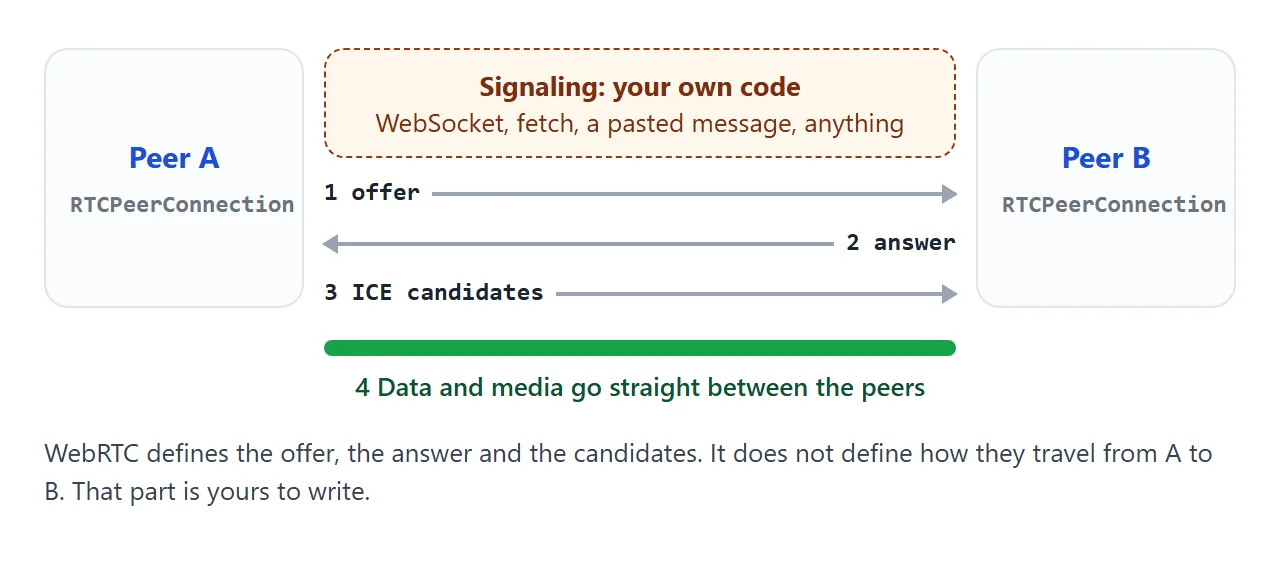
WebRTC does not specify how signaling travels. The MDN guide names WebSocket and fetch() as options. In the loopback example above, signaling is a plain function call, because both peers live in the same page.
On a real site, the browser side can look like this, with a server of your own behind it:
// A signaling channel is just a way to pass JSON. The URL is a placeholder.
const signal = new WebSocket('wss://signal.example.org/room/42');

pc.onicecandidate = (e) => {
  if (e.candidate) signal.send(JSON.stringify({ candidate: e.candidate }));
};

signal.onmessage = async (msg) => {
  const data = JSON.parse(msg.data);
  if (data.candidate) await pc.addIceCandidate(data.candidate);
  if (data.description) await pc.setRemoteDescription(data.description);
};
In this sketch the server only forwards each message to the other peer. The media does not pass through it.
Call the methods in this order
The offer and the answer follow one fixed sequence on two sides.
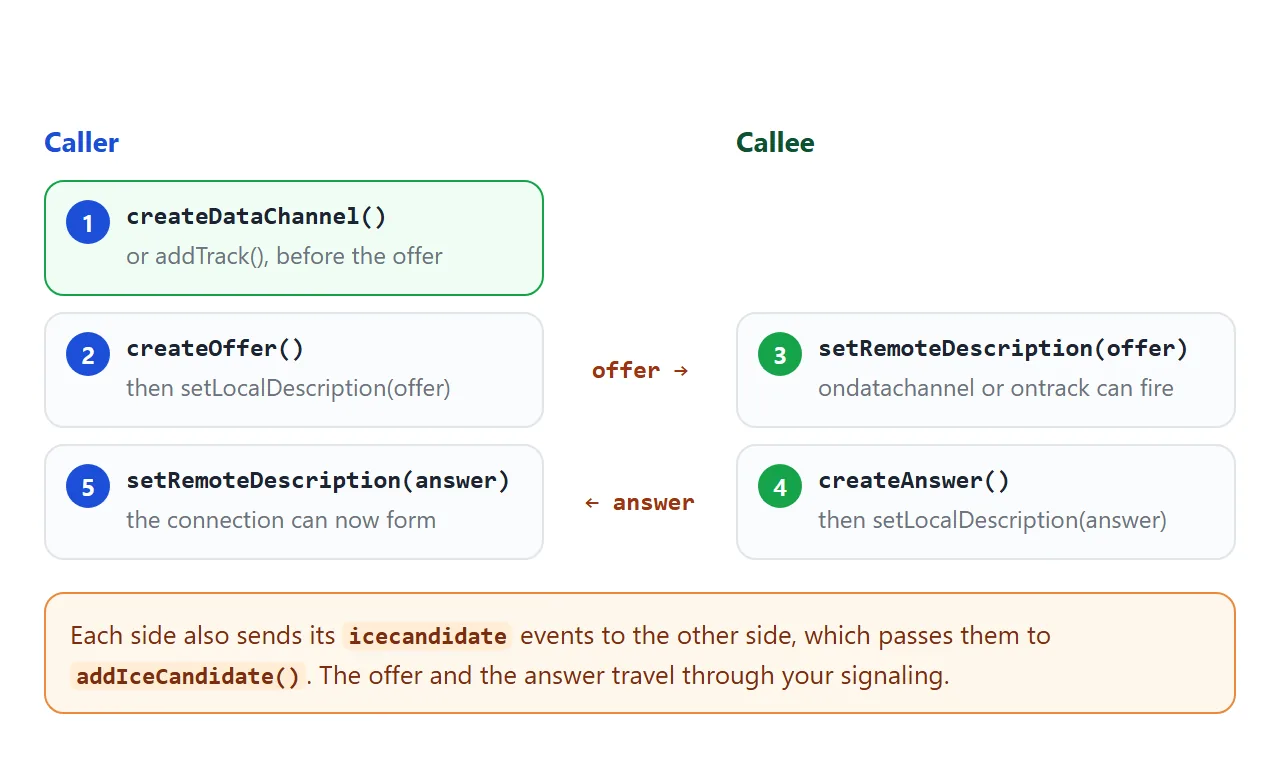
- Caller:
createDataChannel()oraddTrack(), so the offer has something to describe. - Caller:
createOffer(), thensetLocalDescription(offer), then send the offer. - Callee:
setRemoteDescription(offer). - Callee:
createAnswer(), thensetLocalDescription(answer), then send the answer back. - Caller:
setRemoteDescription(answer).
Order matters for step 1. The MDN page for createDataChannel says that adding the first channel starts a renegotiation, and addTrack does the same. If you add them after the offer, you need a second offer and answer round.
On the callee, the channel arrives in the ondatachannel event and tracks arrive in the track event. Do not create the channel again there.
Send video, not just data
Video uses the same exchange. Instead of a data channel, add a track on the sender and show it in the track event on the receiver. A canvas is a handy source because it needs no camera: canvas.captureStream() returns a stream with one video track.
<!doctype html>
<html lang="en">
<head>
<meta charset="utf-8">
<meta name="viewport" content="width=device-width, initial-scale=1">
<title>WebRTC video without a camera</title>
<style>
  * { box-sizing: border-box; }
  body { margin: 0; padding: 12px; font-family: system-ui, sans-serif; background: #f4f5f7; color: #1d2330; }
  .bar { display: flex; gap: 10px; align-items: center; flex-wrap: wrap; margin-bottom: 10px; }
  button { font: inherit; padding: 8px 14px; border: 0; border-radius: 8px; background: #2563eb; color: #fff; cursor: pointer; }
  button:disabled { background: #9aa3b2; cursor: default; }
  #state { font-size: 13px; color: #374151; }
  .pair { display: grid; grid-template-columns: 1fr 1fr; gap: 10px; }
  figure { margin: 0; background: #fff; border-radius: 10px; padding: 8px; box-shadow: 0 2px 8px rgba(0,0,0,.08); }
  figcaption { font-size: 13px; margin-bottom: 6px; font-weight: 600; }
  canvas, video { width: 100%; aspect-ratio: 4 / 3; display: block; background: #e5e7eb; border-radius: 6px; }
  #info { font-size: 13px; margin-top: 10px; color: #374151; }
  @media (max-width: 480px) { figure { padding: 6px; } figcaption { font-size: 12px; } }
</style>
</head>
<body>
<div class="bar">
  <button id="start">Send canvas video</button>
  <button id="stop" disabled>Hang up</button>
  <span id="state">idle</span>
</div>
<div class="pair">
  <figure><figcaption>Sender: a canvas</figcaption><canvas id="cv" width="320" height="240"></canvas></figure>
  <figure><figcaption>Receiver: a video</figcaption><video id="remote" autoplay muted playsinline></video></figure>
</div>
<div id="info"></div>

<script>
  const $ = (id) => document.getElementById(id);
  const cv = $('cv'), ctx = cv.getContext('2d');
  let pcs = [], t = 0, raf;

  // Something to send: a moving ball on a canvas
  function draw() {
    t += 0.04;
    ctx.fillStyle = '#1e293b'; ctx.fillRect(0, 0, 320, 240);
    ctx.fillStyle = '#facc15';
    ctx.beginPath();
    ctx.arc(160 + Math.cos(t) * 100, 120 + Math.sin(t * 1.3) * 70, 24, 0, 7);
    ctx.fill();
    ctx.fillStyle = '#fff'; ctx.font = '16px system-ui'; ctx.fillText('frame ' + Math.round(t * 25), 10, 22);
    raf = requestAnimationFrame(draw);
  }
  draw();

  $('start').addEventListener('click', async () => {
    $('start').disabled = true;
    const a = new RTCPeerConnection(), b = new RTCPeerConnection();
    pcs = [a, b];
    a.onicecandidate = (e) => e.candidate && b.addIceCandidate(e.candidate);
    b.onicecandidate = (e) => e.candidate && a.addIceCandidate(e.candidate);
    a.onconnectionstatechange = () => {
      $('state').textContent = 'connection: ' + a.connectionState;
    };

    // Receiver: show the incoming stream
    b.ontrack = (e) => {
      $('remote').srcObject = e.streams[0];
      $('info').textContent = 'A ' + e.track.kind + ' track arrived.';
    };

    // Sender: add the track BEFORE createOffer so the offer contains a video line
    const stream = cv.captureStream(25);
    stream.getTracks().forEach((track) => a.addTrack(track, stream));

    await a.setLocalDescription(await a.createOffer());
    await b.setRemoteDescription(a.localDescription);
    await b.setLocalDescription(await b.createAnswer());
    await a.setRemoteDescription(b.localDescription);
    $('stop').disabled = false;
  });

  $('stop').addEventListener('click', () => {
    pcs.forEach((pc) => pc.close());
    $('remote').srcObject = null;
    $('state').textContent = 'connection: closed';
    $('info').textContent = '';
    $('stop').disabled = true;
    $('start').disabled = false;
  });
</script>
</body>
</html>
// sender: add the track before createOffer
const stream = canvas.captureStream(25);
stream.getTracks().forEach((t) => pc.addTrack(t, stream));

// receiver: show whatever arrives
pc2.ontrack = (e) => { video.srcObject = e.streams[0]; };
To send a live camera instead, replace captureStream with a stream from getUserMedia. The camera guide covers permission, errors and turning the camera off. To record a stream, see MediaRecorder. Canvas drawing basics are in drawing on a canvas.
Across networks: STUN and TURN
Two tabs on one computer can reach each other. Two people on different routers may not be able to. ICE is the part of WebRTC that finds a route, and it uses STUN and TURN servers.
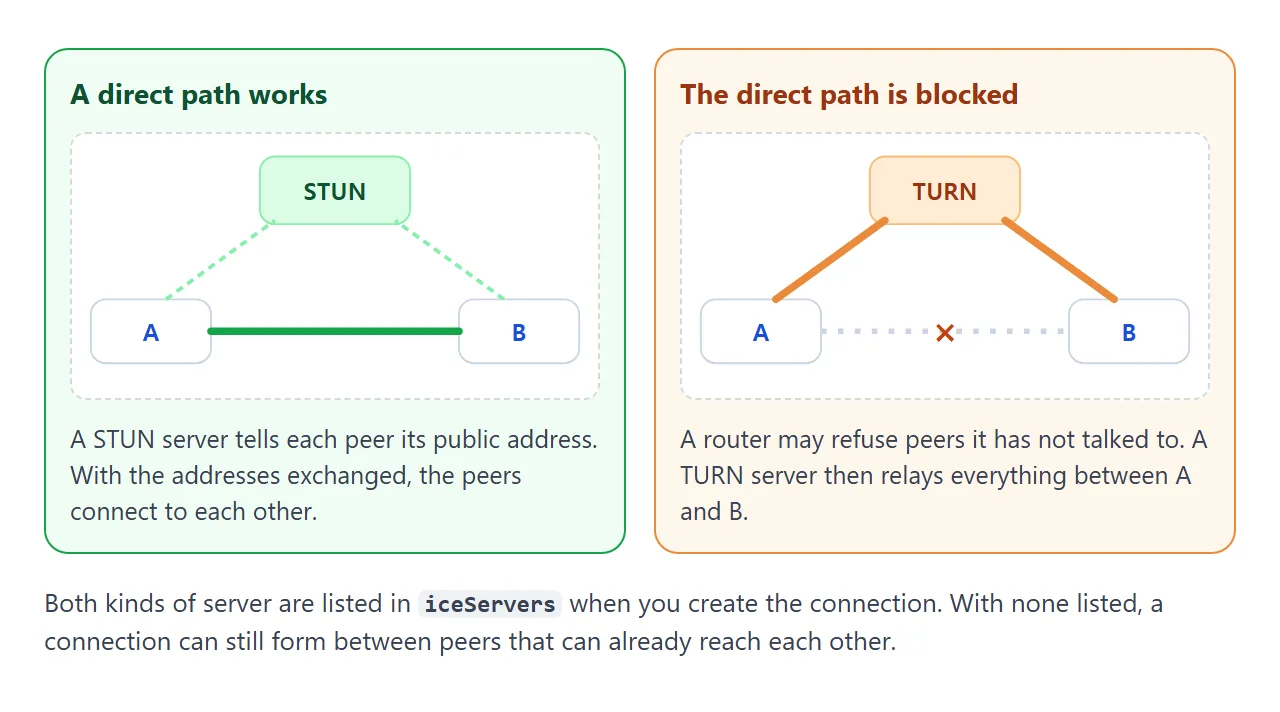
You list the servers when you create the connection. The URL below is a placeholder; use the servers your provider gives you.
const pc = new RTCPeerConnection({
  iceServers: [{ urls: 'stun:stun.example.org' }],
});
In our test, two connections in one page, and two tabs of one Chromium browser, both connected with no iceServers at all. That says nothing about two different networks. There, plan for a STUN server and a TURN server.
Read the connection state first
When nothing happens, print pc.connectionState and listen for the connectionstatechange event. It tells you whether the problem is before the connection, during it or after.
connectionState |
Meaning |
|---|---|
new |
Nothing has started connecting yet |
connecting |
One or more transports are still being set up |
connected |
Every transport in use is up |
disconnected |
At least one transport has lost its link |
failed |
One or more transports have failed |
closed |
The connection is closed |
If the state never leaves new, check that both sides ran setRemoteDescription. If it ends in failed, a transport failed, which is where STUN and TURN come in.
A finished example: chat with copy-paste signaling
This version has no loopback and no server. You are the signaling channel. Open the page in two tabs, copy the text from one tab, paste it into the other, and send the reply back.
<!doctype html>
<html lang="en">
<head>
<meta charset="utf-8">
<meta name="viewport" content="width=device-width, initial-scale=1">
<title>WebRTC chat with copy-paste signaling</title>
<style>
  * { box-sizing: border-box; }
  body { margin: 0; padding: 12px; font-family: system-ui, sans-serif; background: #f4f5f7; color: #1d2330; }
  h1 { font-size: 16px; margin: 0 0 4px; }
  p.hint { margin: 0 0 10px; font-size: 13px; color: #4b5563; line-height: 1.45; }
  .cols { display: grid; grid-template-columns: 1fr 1fr; gap: 10px; }
  .box { background: #fff; border-radius: 10px; padding: 10px; box-shadow: 0 2px 8px rgba(0,0,0,.08); }
  label { display: block; font-size: 13px; font-weight: 600; margin-bottom: 4px; }
  textarea { width: 100%; height: 84px; font: 11px/1.3 ui-monospace, Consolas, monospace; border: 1px solid #d5d9e0; border-radius: 6px; padding: 6px; resize: none; }
  .row { display: flex; gap: 6px; margin-top: 6px; flex-wrap: wrap; }
  button { font: inherit; font-size: 13px; padding: 7px 11px; border: 0; border-radius: 8px; background: #2563eb; color: #fff; cursor: pointer; }
  button:disabled { background: #9aa3b2; cursor: default; }
  button.alt { background: #475569; }
  #state { margin: 10px 0; font-size: 13px; color: #374151; }
  #log { height: 110px; overflow-y: auto; font-size: 13px; background: #fff; border-radius: 8px; padding: 6px; box-shadow: 0 2px 8px rgba(0,0,0,.08); }
  #log div { margin: 2px 0; }
  .me { color: #1d4ed8; } .them { color: #0f5132; }
  form { display: flex; gap: 6px; margin-top: 8px; }
  input { flex: 1; min-width: 0; font: inherit; padding: 7px; border: 1px solid #d5d9e0; border-radius: 6px; }
  @media (max-width: 480px) { .cols { grid-template-columns: 1fr; } }
</style>
</head>
<body>
<h1>Chat with no server: copy-paste signaling</h1>
<p class="hint">Open this page in two tabs. Tab 1 presses <b>Create offer</b> and sends the text to tab 2. Tab 2 pastes it, presses <b>Use their code</b>, and sends its text back. Tab 1 pastes that and presses <b>Use their code</b>.</p>

<div class="cols">
  <div class="box">
    <label for="mine">Your code (copy this)</label>
    <textarea id="mine" readonly></textarea>
    <div class="row"><button id="make">Create offer</button><button id="copy" class="alt">Copy</button></div>
  </div>
  <div class="box">
    <label for="theirs">Their code (paste here)</label>
    <textarea id="theirs"></textarea>
    <div class="row"><button id="use">Use their code</button></div>
  </div>
</div>

<div id="state">not connected</div>
<div id="log"></div>
<form id="form">
  <input id="msg" placeholder="Type a message" autocomplete="off" disabled>
  <button disabled>Send</button>
</form>

<script>
  const $ = (id) => document.getElementById(id);
  const pc = new RTCPeerConnection();   // no iceServers: fine for two tabs on one machine, not for across networks
  let chan = null, madeOffer = false;

  function line(cls, text) {
    const d = document.createElement('div');
    d.className = cls; d.textContent = text;
    $('log').appendChild(d);
    $('log').scrollTop = $('log').scrollHeight;
  }

  function setChannel(c) {
    chan = c;
    c.onopen = () => document.querySelectorAll('#form input, #form button').forEach((el) => (el.disabled = false));
    c.onmessage = (e) => line('them', 'them: ' + e.data);
  }

  pc.onconnectionstatechange = () => ($('state').textContent = 'connection: ' + pc.connectionState);
  pc.ondatachannel = (e) => setChannel(e.channel);

  // Wait until ICE gathering finishes, so the description already contains every candidate.
  // Then one pasted blob is all the other side needs.
  function gathered() {
    return new Promise((resolve) => {
      if (pc.iceGatheringState === 'complete') return resolve();
      pc.addEventListener('icegatheringstatechange', () => {
        if (pc.iceGatheringState === 'complete') resolve();
      });
    });
  }

  $('make').addEventListener('click', async () => {
    madeOffer = true;
    setChannel(pc.createDataChannel('chat'));
    await pc.setLocalDescription(await pc.createOffer());
    await gathered();
    $('mine').value = JSON.stringify(pc.localDescription);
    $('state').textContent = 'offer ready: send it, then paste the answer you get back';
  });

  $('use').addEventListener('click', async () => {
    let desc;
    try { desc = JSON.parse($('theirs').value); } catch (e) { $('state').textContent = 'that is not a valid code'; return; }
    await pc.setRemoteDescription(desc);
    if (!madeOffer) {                       // we are the joining side: answer the offer
      await pc.setLocalDescription(await pc.createAnswer());
      await gathered();
      $('mine').value = JSON.stringify(pc.localDescription);
      $('state').textContent = 'answer ready: send it back';
    }
  });

  $('copy').addEventListener('click', () => {
    $('mine').select();
    document.execCommand('copy');           // if blocked, the text is selected: copy it by hand
  });

  $('form').addEventListener('submit', (e) => {
    e.preventDefault();
    const text = $('msg').value.trim();
    if (!text || !chan || chan.readyState !== 'open') return;
    chan.send(text);
    line('me', 'me: ' + text);
    $('msg').value = '';
  });
</script>
</body>
</html>
- One blob per side: the code waits for
iceGatheringStateto reachcomplete, so the pasted description already holds every candidate. MDN recommends watchingicegatheringstatechangefor this. - Same button, two roles: Use their code sets the remote description. If the page did not make the offer, it also creates the answer.
- Wait before sending: the form checks that the channel is
open, becausesend()throwsInvalidStateErroron any other state.
When it does not work
| What you see | Cause | Fix |
|---|---|---|
navigator.mediaDevices is undefined |
The page is not on HTTPS or localhost | Serve it over HTTPS |
NotAllowedError from the camera |
Permission denied, or a frame without allow="camera" |
Check site settings and the iframe tag |
Nothing happens after createOffer |
The offer never reached the other peer | Send it through your signaling |
No ondatachannel or track event |
The channel or track was added after the offer | Add it before createOffer, or renegotiate |
send() throws InvalidStateError |
The channel is not open yet |
Send from the open event or check readyState |
State goes connecting, then failed |
No working route between the peers | Add STUN, then TURN |
| Pasted code fails on the other side | It was read before ICE gathering finished | Wait for iceGatheringState to be complete |
| Remote video is empty | Nothing set srcObject |
Set it from e.streams[0] in track |
For the first two rows, the camera guide shows each error name. A page inside an iframe also depends on the frame's permissions; see the sandbox attribute.
Share it as a link
A connection demo is hard to describe. Readers need to press the button and watch the state change. An .html attachment may open as plain code on a phone, and a screenshot cannot connect to anything.
To send a working version, paste the page into a NOS document and choose Create share link. HTML to link walks through it.
The page renders as written and its scripts run, so the people you send it to can press Connect and send messages themselves. If you change the code later, the same link shows the new version.
A NOS page cannot fetch from other sites, so share the loopback and copy-paste versions. Your own signaling server would need to run somewhere else.