"HTML5 speech recognition" means the SpeechRecognition interface of the Web Speech API: JavaScript that turns what the microphone hears into text. It is the speech-to-text half of that API. Reading text aloud is the other half, covered in text to speech in JavaScript.
The smallest version creates the object, listens for result, and calls start():
const SR = window.SpeechRecognition || window.webkitSpeechRecognition;
const rec = new SR();
rec.lang = 'en-US';
rec.addEventListener('result', (e) => {
  console.log(e.results[0][0].transcript);
});
rec.start();
Try it below. Press Start and allow the microphone, or press Run sample to push a made-up result through the same code.
<!doctype html>
<html lang="en">
<head>
<meta charset="utf-8">
<meta name="viewport" content="width=device-width, initial-scale=1">
<title>SpeechRecognition basics</title>
<style>
  * { box-sizing: border-box; }
  body { margin: 0; padding: 14px; font-family: system-ui, sans-serif; background: #f4f5f7; color: #1d2330; }
  .row { display: flex; flex-wrap: wrap; gap: 8px; align-items: center; }
  button { font: inherit; font-size: 14px; padding: 9px 14px; border: 0; border-radius: 8px; background: #2563eb; color: #fff; cursor: pointer; }
  button.alt { background: #e3e6ec; color: #1d2330; }
  button:disabled { opacity: .45; cursor: default; }
  #status { margin: 10px 0 8px; font-size: 13px; color: #374151; }
  #out { min-height: 54px; padding: 12px; border-radius: 10px; background: #fff; font-size: 17px; box-shadow: 0 1px 4px rgba(0, 0, 0, .1); }
  #out small { display: block; margin-top: 4px; font-size: 12px; color: #6b7280; }
  #log { margin: 10px 0 0; padding: 8px 10px; height: 118px; overflow: auto; border-radius: 8px; background: #111827; color: #d1fae5; font: 12px/1.5 ui-monospace, Consolas, monospace; white-space: pre-wrap; }
</style>
</head>
<body>
<div class="row">
  <button id="start">Start listening</button>
  <button id="stop" class="alt" disabled>Stop</button>
  <button id="sample" class="alt">Run sample</button>
</div>
<div id="status" aria-live="polite">Checking this browser...</div>
<div id="out">Your words appear here.</div>
<pre id="log">events:
</pre>

<script>
  const $ = (id) => document.getElementById(id);
  const SR = window.SpeechRecognition || window.webkitSpeechRecognition;  // some browsers only have the prefixed name

  function log(text) { $('log').textContent += text + '\n'; $('log').scrollTop = 1e6; }

  // One handler for real and sample results: event.results[0][0] is the best guess.
  function show(event, label) {
    const best = event.results[0][0];
    $('out').innerHTML = '';
    $('out').append(best.transcript);
    const small = document.createElement('small');
    small.textContent = label + ' | confidence ' + best.confidence.toFixed(2);
    $('out').append(small);
  }

  $('sample').addEventListener('click', () => {
    // Same shape as a real event, so you can test the page without a microphone.
    show({ results: [[{ transcript: 'hello from the sample', confidence: 0.92 }]] }, 'sample');
  });

  if (!SR) {
    $('status').textContent = 'This browser has no SpeechRecognition. Run sample still works.';
    $('start').disabled = true;
  } else {
    const rec = new SR();
    rec.lang = 'en-US';           // BCP 47 tag
    rec.continuous = false;       // stop after one phrase
    rec.interimResults = false;   // final results only
    $('status').textContent = 'SpeechRecognition is available. Press Start and allow the microphone.';

    rec.addEventListener('result', (e) => show(e, 'microphone'));
    rec.addEventListener('error', (e) => { $('status').textContent = 'Error: ' + e.error; });
    rec.addEventListener('start', () => { $('start').disabled = true; $('stop').disabled = false; $('status').textContent = 'Listening...'; });
    rec.addEventListener('end', () => { $('start').disabled = false; $('stop').disabled = true; });
    ['audiostart', 'soundstart', 'speechstart', 'speechend', 'soundend', 'audioend', 'nomatch', 'end']
      .forEach((name) => rec.addEventListener(name, () => log(name)));

    $('start').addEventListener('click', () => {
      try { rec.start(); } catch (err) { $('status').textContent = err.name + ': ' + err.message; }
    });
    $('stop').addEventListener('click', () => rec.stop());
  }
</script>
</body>
</html>
What works, and what to know first
Speech recognition is not available everywhere. MDN marks it as limited availability: "This feature is not Baseline because it does not work in some of the most widely-used browsers."
Some browsers offer only the prefixed name webkitSpeechRecognition, so the first line of the code above looks for both.
Three more things apply to every page that uses it:
- Secure context. The specification marks the interface for secure contexts only. Serve the page over HTTPS, or from localhost while you build.
- Consent. The specification says a browser must only start listening with explicit, informed user consent, and must show a clear sign while audio is recorded.
start()triggers that prompt. - Where the audio goes. MDN says that on some browsers, like Chrome, the audio is sent to a web service for recognition, so it will not work offline.
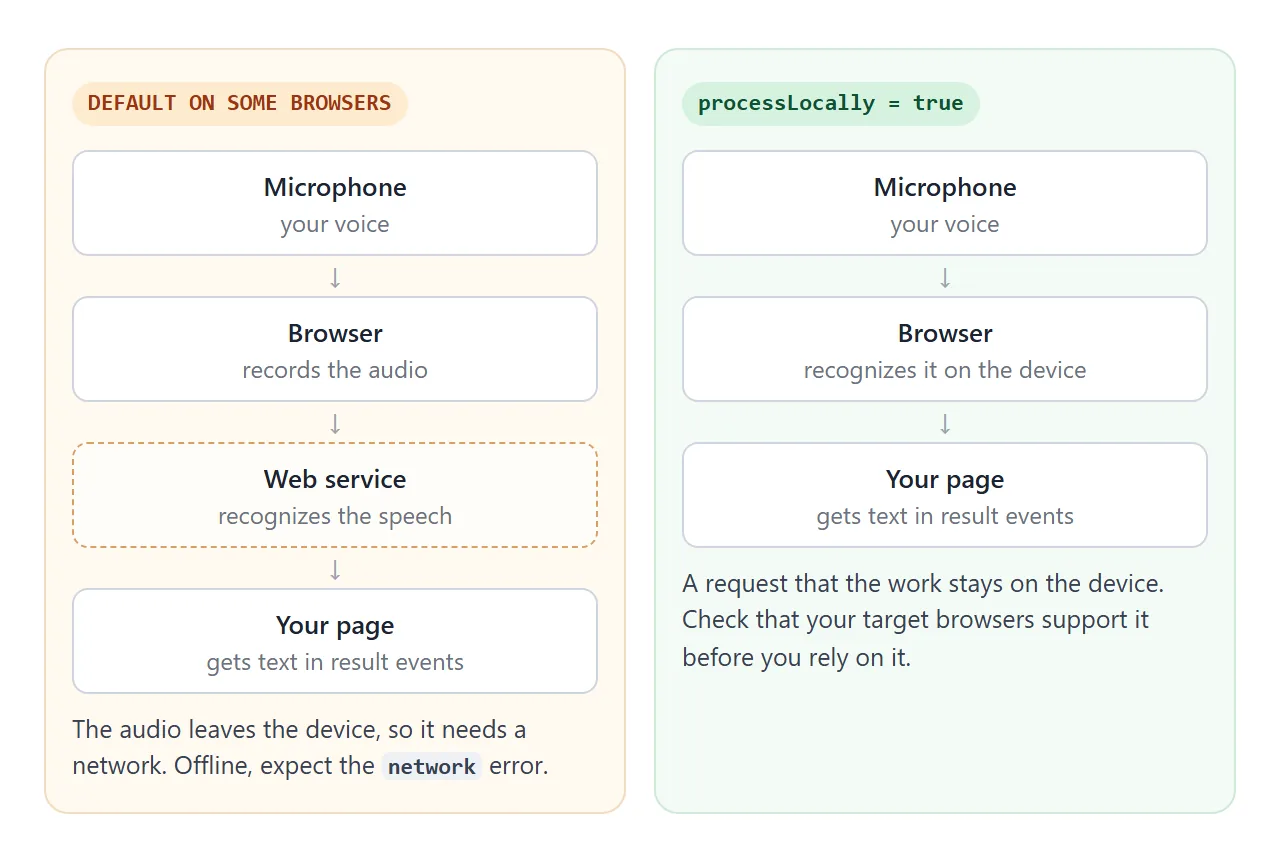
MDN lists a processLocally property for requesting on-device recognition. Treat it as something to test in each browser you target, not as a given.
Because support varies, build the page so it still does something useful without the API. A textarea the user can type in is the simplest fallback.
How the code works: five steps
- Find the constructor. Use
SpeechRecognition, or the prefixed name. - Set options.
langis a BCP 47 tag. Left out, it follows the page'slangattribute, then the browser language. - Listen for
result. The transcript is inside the event. - Call
start()from a button. The prompt then appears right after the user asked for it. - Handle
errorandend. Both matter more than they look, as the rest of this guide shows.
Listeners are attached with addEventListener, the same as on a button. A session fires a series of events as it goes:
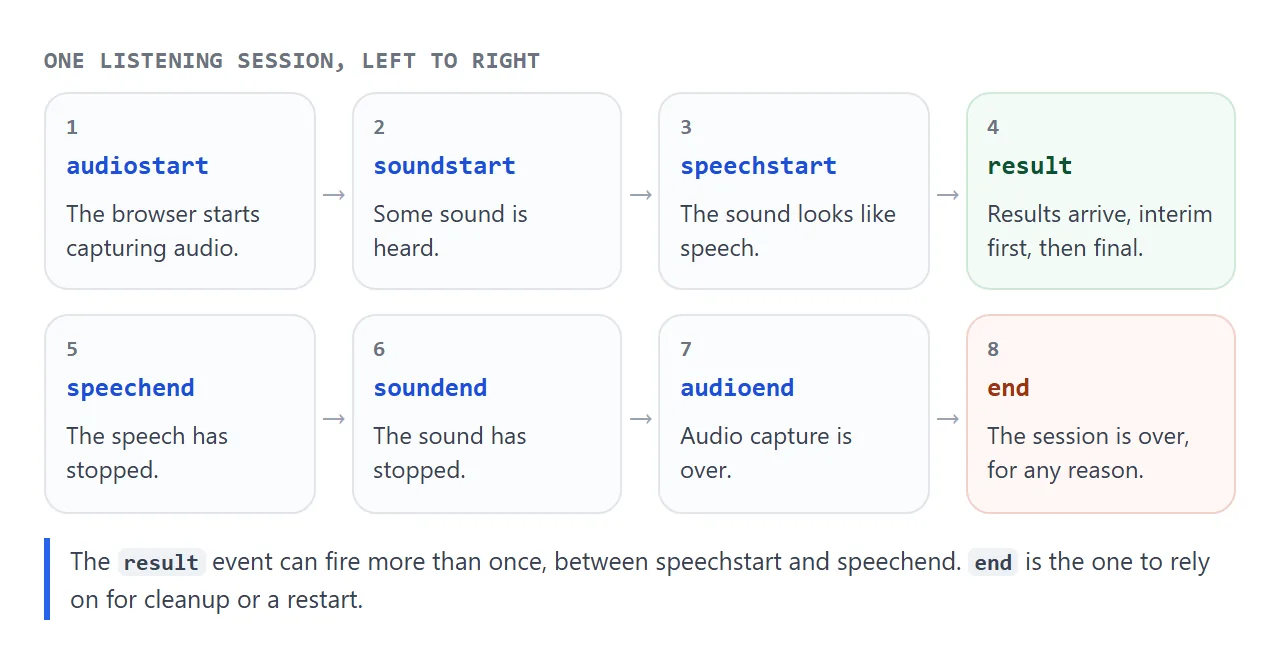
The specification orders them as audiostart, soundstart, speechstart, then speechend, soundend and audioend, with result and nomatch in between. It also says end must fire whenever the session ends, for any reason. That makes end the right place to reset a button or restart listening.
stop() ends the session and tries to return a result from the audio it already has. abort() ends it and returns nothing. Calling start() while a session is still running throws an InvalidStateError, so keep a flag or wait for end.
Reading event.results
A result event carries a list of results. Each result is itself a list of alternatives, and the first alternative is the best guess.
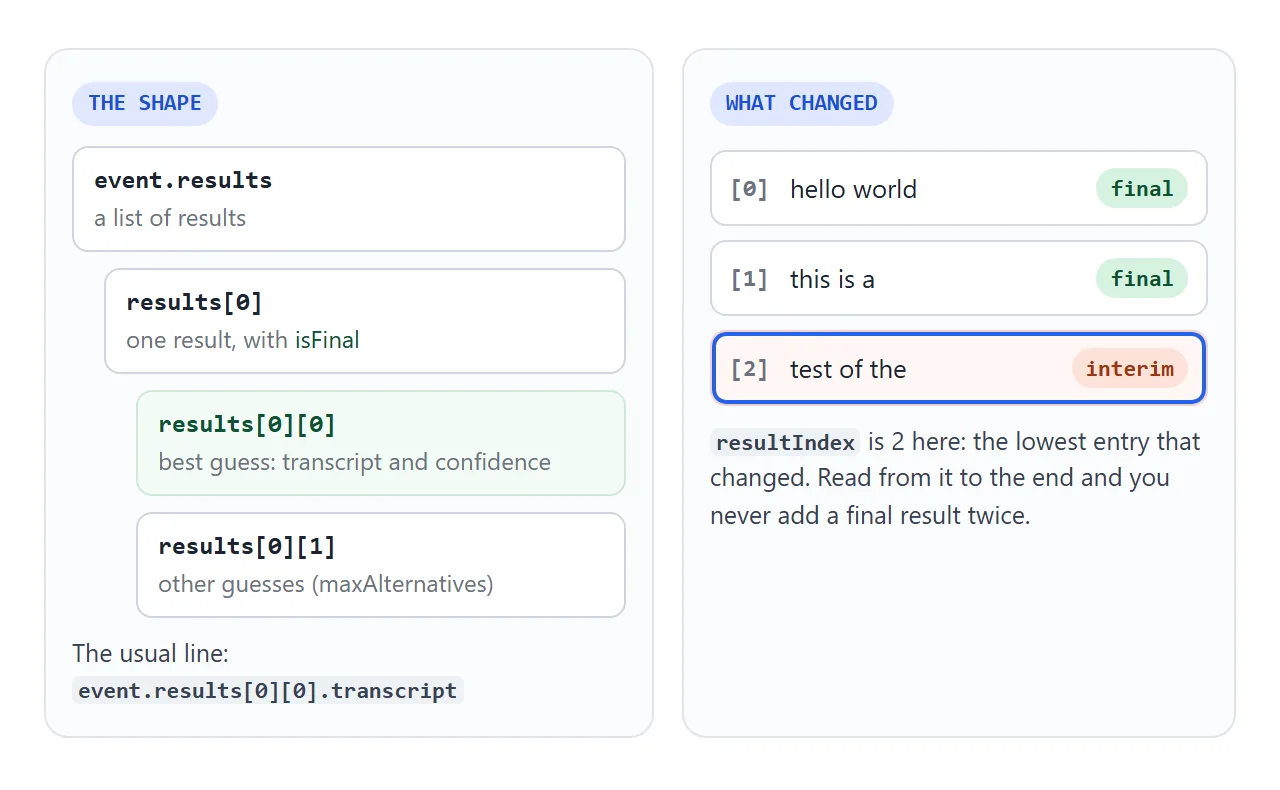
transcriptis the recognized text.confidenceis a number from 0 to 1 for how sure the recognizer is.isFinalon the result is true when this is the last time that entry will be returned. If it is false, the entry is interim and may be updated.maxAlternativesraises the number of guesses per result. The default is 1.
The nomatch event fires when the recognizer returns a final result with no hypothesis above its confidence threshold. It is not an error, just "I did not catch that".
Interim results and continuous
Two options change how results arrive. continuous false, the default, returns no more than one final result. True returns several final results over one long session. interimResults true sends in-progress guesses as the person speaks, and false sends none.
Per the specification, event.results holds all the final results so far, followed by the current best guess for any interim ones. event.resultIndex is the lowest index that changed. Try the options below and watch both numbers.
<!doctype html>
<html lang="en">
<head>
<meta charset="utf-8">
<meta name="viewport" content="width=device-width, initial-scale=1">
<title>Interim and continuous results</title>
<style>
  * { box-sizing: border-box; }
  body { margin: 0; padding: 14px; font-family: system-ui, sans-serif; background: #f4f5f7; color: #1d2330; }
  .opts { display: flex; flex-wrap: wrap; gap: 6px 16px; align-items: center; font-size: 14px; margin-bottom: 10px; }
  select { font: inherit; font-size: 14px; padding: 4px 6px; }
  .row { display: flex; flex-wrap: wrap; gap: 8px; }
  button { font: inherit; font-size: 14px; padding: 9px 14px; border: 0; border-radius: 8px; background: #2563eb; color: #fff; cursor: pointer; }
  button.alt { background: #e3e6ec; color: #1d2330; }
  button:disabled { opacity: .45; cursor: default; }
  #status { margin: 10px 0 8px; font-size: 13px; color: #374151; }
  #text { min-height: 64px; max-height: 110px; overflow: auto; padding: 12px; border-radius: 10px; background: #fff; font-size: 17px; line-height: 1.5; box-shadow: 0 1px 4px rgba(0, 0, 0, .1); }
  .final { color: #111827; }
  .interim { color: #9a3412; font-style: italic; }
  #rows { margin: 10px 0 0; padding: 8px 10px; border-radius: 8px; background: #111827; color: #d1fae5; font: 12px/1.6 ui-monospace, Consolas, monospace; white-space: pre-wrap; min-height: 96px; max-height: 130px; overflow: auto; }
</style>
</head>
<body>
<div class="opts">
  <label><input type="checkbox" id="continuous" checked> continuous</label>
  <label><input type="checkbox" id="interim" checked> interimResults</label>
  <label>lang <select id="lang"><option>en-US</option><option>en-GB</option><option>es-ES</option><option>fr-FR</option><option>de-DE</option></select></label>
</div>
<div class="row">
  <button id="start">Start</button>
  <button id="stop" class="alt" disabled>Stop</button>
  <button id="sample" class="alt">Replay sample</button>
</div>
<div id="status" aria-live="polite">Settings are read each time you press Start.</div>
<div id="text">Final words are dark. <span class="interim">Interim words are orange.</span></div>
<pre id="rows">event.results:
</pre>

<script>
  const $ = (id) => document.getElementById(id);
  const SR = window.SpeechRecognition || window.webkitSpeechRecognition;

  // Draw every entry of event.results: final ones dark, interim ones orange.
  function render(e) {
    $('text').innerHTML = '';
    let dump = 'resultIndex = ' + e.resultIndex + ', results.length = ' + e.results.length + '\n';
    for (let i = 0; i < e.results.length; i++) {
      const r = e.results[i];
      const span = document.createElement('span');
      span.className = r.isFinal ? 'final' : 'interim';
      span.textContent = r[0].transcript + ' ';
      $('text').append(span);
      dump += '[' + i + '] ' + (r.isFinal ? 'final  ' : 'interim') + ' "' + r[0].transcript + '"\n';
    }
    $('rows').textContent = dump;
  }

  // Sample: the same list growing the way a real session grows it.
  function item(text, isFinal) { const r = [{ transcript: text, confidence: 0.9 }]; r.isFinal = isFinal; return r; }
  const steps = [
    { resultIndex: 0, results: [item('hello', false)] },
    { resultIndex: 0, results: [item('hello wor', false)] },
    { resultIndex: 0, results: [item('hello world', true)] },
    { resultIndex: 1, results: [item('hello world', true), item('this is', false)] },
    { resultIndex: 1, results: [item('hello world', true), item('this is a test', true)] },
  ];
  let timer = 0;
  $('sample').addEventListener('click', () => {
    clearInterval(timer);
    let n = 0;
    timer = setInterval(() => { render(steps[n++]); if (n === steps.length) clearInterval(timer); }, 700);
  });

  if (!SR) {
    $('status').textContent = 'This browser has no SpeechRecognition. Replay sample still works.';
    $('start').disabled = true;
  } else {
    const rec = new SR();
    rec.addEventListener('result', render);
    rec.addEventListener('error', (e) => { $('status').textContent = 'Error: ' + e.error; });
    rec.addEventListener('start', () => { $('start').disabled = true; $('stop').disabled = false; $('status').textContent = 'Listening...'; });
    rec.addEventListener('end', () => { $('start').disabled = false; $('stop').disabled = true; });
    $('start').addEventListener('click', () => {
      rec.lang = $('lang').value;
      rec.continuous = $('continuous').checked;
      rec.interimResults = $('interim').checked;
      try { rec.start(); } catch (err) { $('status').textContent = err.name + ': ' + err.message; }
    });
    $('stop').addEventListener('click', () => rec.stop());
  }
</script>
</body>
</html>
This example reads the settings each time you press Start, so change them before a session, not during one. Final text is dark and interim text is orange.
A finished example: a dictation pad
Put the pieces together and you get a pad that types for you. The next example keeps listening through pauses, previews the half-finished sentence, and reports each error in plain words. The textarea stays editable, so typing always works.
<!doctype html>
<html lang="en">
<head>
<meta charset="utf-8">
<meta name="viewport" content="width=device-width, initial-scale=1">
<title>Dictation pad</title>
<style>
  * { box-sizing: border-box; }
  body { margin: 0; padding: 14px; font-family: system-ui, sans-serif; background: #f4f5f7; color: #1d2330; }
  .row { display: flex; flex-wrap: wrap; gap: 8px; align-items: center; margin-bottom: 10px; }
  button { font: inherit; font-size: 14px; padding: 9px 14px; border: 0; border-radius: 8px; background: #2563eb; color: #fff; cursor: pointer; }
  button.on { background: #b91c1c; }
  button.alt { background: #e3e6ec; color: #1d2330; }
  select { font: inherit; font-size: 14px; padding: 7px 6px; }
  #pad { width: 100%; height: 150px; padding: 12px; border: 1px solid #d5d9e0; border-radius: 10px; font: 16px/1.5 system-ui, sans-serif; resize: vertical; }
  #live { min-height: 22px; margin: 6px 0; font-size: 15px; color: #9a3412; font-style: italic; }
  #status { font-size: 13px; color: #374151; min-height: 36px; }
  #count { font-size: 13px; color: #6b7280; margin-left: auto; }
</style>
</head>
<body>
<div class="row">
  <button id="mic">Start dictating</button>
  <select id="lang" aria-label="Language"><option>en-US</option><option>en-GB</option><option>es-ES</option><option>fr-FR</option><option>de-DE</option></select>
  <button id="sample" class="alt">Add sample</button>
  <button id="clear" class="alt">Clear</button>
  <span id="count">0 words</span>
</div>
<textarea id="pad" placeholder="Dictated text lands here. You can also type or edit it."></textarea>
<div id="live" aria-live="polite"></div>
<div id="status" aria-live="polite">Press Start dictating and allow the microphone.</div>

<script>
  const $ = (id) => document.getElementById(id);
  const SR = window.SpeechRecognition || window.webkitSpeechRecognition;
  let listening = false;  // what the user wants
  let rec = null;

  function count() {
    const words = $('pad').value.trim().split(/\s+/).filter(Boolean).length;
    $('count').textContent = words + (words === 1 ? ' word' : ' words');
  }

  // Final results go into the textarea once; interim ones are only previewed.
  function handle(e) {
    let interim = '';
    for (let i = e.resultIndex; i < e.results.length; i++) {
      const r = e.results[i];
      if (r.isFinal) $('pad').value += r[0].transcript.trim() + ' ';
      else interim += r[0].transcript;
    }
    $('live').textContent = interim;
    count();
  }

  function setIdle(msg) {
    listening = false;
    $('mic').textContent = 'Start dictating';
    $('mic').classList.remove('on');
    $('live').textContent = '';
    if (msg) $('status').textContent = msg;
  }

  const fatal = {  // errors where restarting would only fail again
    'not-allowed': 'The microphone is blocked here. Allow it in the browser site settings, or type instead.',
    'service-not-allowed': 'The browser does not allow speech recognition for this page.',
    'audio-capture': 'No working microphone was found.',
    'language-not-supported': 'This browser does not support that language.',
    'network': 'Recognition needs a network connection and could not reach its service.',
  };

  if (!SR) {
    $('mic').disabled = true;
    $('status').textContent = 'This browser has no SpeechRecognition. Typing and Add sample still work.';
  } else {
    rec = new SR();
    rec.continuous = true;
    rec.interimResults = true;
    rec.addEventListener('result', handle);
    rec.addEventListener('error', (e) => {
      if (fatal[e.error]) setIdle(fatal[e.error] + ' (' + e.error + ')');
      // no-speech and aborted are normal: 'end' fires next and restarts
    });
    // 'end' fires whenever a session stops, including after silence.
    rec.addEventListener('end', () => {
      if (!listening) return setIdle();
      try { rec.start(); } catch (err) { setIdle(err.name); }
    });
    $('mic').addEventListener('click', () => {
      if (listening) { listening = false; rec.stop(); return; }
      rec.lang = $('lang').value;
      try {
        rec.start();
        listening = true;
        $('mic').textContent = 'Stop';
        $('mic').classList.add('on');
        $('status').textContent = 'Listening... pauses are fine, it keeps going until you press Stop.';
      } catch (err) { setIdle(err.name + ': ' + err.message); }
    });
  }

  $('sample').addEventListener('click', () => {
    const r = [{ transcript: 'this sentence came from the sample button', confidence: 0.9 }];
    r.isFinal = true;
    handle({ resultIndex: 0, results: [r] });
  });
  $('clear').addEventListener('click', () => { $('pad').value = ''; count(); });
  $('pad').addEventListener('input', count);
</script>
</body>
</html>
- No duplicates: loop from
e.resultIndexto the end ofe.results, and add only the entries whereisFinalis true. - Keep listening: when
endfires and the user has not pressed Stop, callstart()again. - Do not loop on a hard error: after
not-allowedoraudio-capture, a restart would only fail again. Stop and say why.no-speechis normal, so it just restarts. - Typing as a backup: the textarea works with or without recognition. More on the element is in the textarea guide.
We checked the three examples in Chromium with a stand-in recognizer that fires the same events. We did not test a live microphone, so try yours on a device that has one.
When it does not work
| What you see | Cause | Fix |
|---|---|---|
SpeechRecognition is undefined |
Only the prefixed name exists, or no support | Check both names, then show a typing fallback |
| Nothing happens on Start | Page is not a secure context, or the microphone is blocked | Use HTTPS and check the site settings |
Error not-allowed |
The browser disallowed speech input for security, privacy or user choice | Explain it, offer typing |
Error service-not-allowed |
The browser disallowed the requested recognition service | Explain it, offer typing |
Error no-speech |
No speech was detected | Ask the user to try again, or restart on end |
Error audio-capture |
Audio capture failed | Check that a microphone is connected and enabled |
Error network |
Network communication for recognition failed | Check the connection |
Error language-not-supported |
The browser does not support that lang |
Try another tag such as en-US |
InvalidStateError from start() |
A session is already running | Wait for end, or keep a flag |
| Stops after one phrase | continuous is false by default |
Set it true and restart on end |
| The same words appear twice | The loop starts at 0 on every result | Start the loop at e.resultIndex |
Share it as a link
Speech recognition has to be tried on the reader's own device, with their own microphone. A screenshot shows none of that, and an .html attachment may open as plain code on a phone.
To send the working version, paste the page into a NOS document and choose Create share link. HTML to link walks through it. The page renders as written and its scripts run, so the people you send it to can press Start themselves.
Whether the microphone is offered depends on their browser and on where the page is shown, such as inside a sandboxed frame. Keep a Run sample button and a typing fallback in whatever you share, so everyone can try the code.
If you change the code later, the same link shows the new version.