To make a page read text aloud in JavaScript, wrap the text in a SpeechSynthesisUtterance and pass it to speechSynthesis.speak(). That is the whole API for a first test:
const u = new SpeechSynthesisUtterance('Hello, world');
speechSynthesis.speak(u);
It is part of the Web Speech API, built into the browser. There is no server call and no key. Try it below: type something, pick a voice, and press Speak.
<!doctype html>
<html lang="en">
<head>
<meta charset="utf-8">
<meta name="viewport" content="width=device-width, initial-scale=1">
<title>Text to speech</title>
<style>
  body { margin: 0; padding: 14px; font-family: system-ui, sans-serif; background: #f4f5f7; color: #1d2330; }
  .box { max-width: 560px; margin: 0 auto; background: #fff; border-radius: 12px; padding: 14px; box-shadow: 0 4px 16px rgba(0, 0, 0, .08); }
  textarea { width: 100%; box-sizing: border-box; height: 84px; font: inherit; font-size: 15px; padding: 8px; border: 1px solid #cfd4dc; border-radius: 8px; resize: vertical; }
  label { display: block; font-size: 13px; margin-top: 10px; color: #4b5261; }
  select { width: 100%; font: inherit; font-size: 14px; padding: 6px; margin-top: 4px; }
  .sliders { display: grid; grid-template-columns: 1fr 1fr; gap: 12px; }
  input[type=range] { width: 100%; }
  .buttons { display: flex; gap: 8px; margin-top: 14px; flex-wrap: wrap; }
  button { font: inherit; font-size: 14px; padding: 8px 14px; border-radius: 8px; border: 1px solid #cfd4dc; background: #fff; cursor: pointer; }
  button.main { background: #1d4ed8; border-color: #1d4ed8; color: #fff; }
  button:disabled { opacity: .45; cursor: default; }
  #status { margin-top: 12px; font-size: 13px; color: #4b5261; min-height: 18px; }
</style>
</head>
<body>
<div class="box">
  <textarea id="text">Hello! This sentence is being read aloud by your browser.</textarea>
  <label>Voice <select id="voice"><option>Loading voices...</option></select></label>
  <div class="sliders">
    <label>Rate <b id="rateOut">1</b><input id="rate" type="range" min="0.5" max="2" step="0.1" value="1"></label>
    <label>Pitch <b id="pitchOut">1</b><input id="pitch" type="range" min="0" max="2" step="0.1" value="1"></label>
  </div>
  <div class="buttons">
    <button id="speak" class="main">Speak</button>
    <button id="pause">Pause</button>
    <button id="stop">Stop</button>
  </div>
  <div id="status">Ready.</div>
</div>

<script>
  const synth = window.speechSynthesis;
  const $ = (id) => document.getElementById(id);
  let voices = [];

  function loadVoices() {
    voices = synth.getVoices();  // often [] until voiceschanged fires
    if (!voices.length) return;
    $('voice').innerHTML = voices
      .map((v, i) => `<option value="${i}" ${v.default ? 'selected' : ''}>${v.name} (${v.lang})</option>`)
      .join('');
  }

  if (!synth) {
    $('status').textContent = 'This browser has no speechSynthesis.';
    $('speak').disabled = true;
  } else {
    loadVoices();
    synth.addEventListener('voiceschanged', loadVoices);
    // if no list ever arrives, say so instead of waiting forever
    setTimeout(() => {
      if (!voices.length) $('voice').innerHTML = '<option>No voices available here</option>';
    }, 2000);
  }

  ['rate', 'pitch'].forEach((id) => {
    $(id).addEventListener('input', () => { $(id + 'Out').textContent = $(id).value; });
  });

  $('speak').addEventListener('click', () => {
    synth.cancel();  // clear anything still queued
    synth.resume();  // cancel() does not clear the paused state
    const u = new SpeechSynthesisUtterance($('text').value);
    if (voices.length) {
      u.voice = voices[$('voice').value];
      u.lang = u.voice.lang;
    }
    u.rate = Number($('rate').value);
    u.pitch = Number($('pitch').value);
    u.addEventListener('start', () => { $('status').textContent = 'Speaking...'; });
    u.addEventListener('end', () => { $('status').textContent = 'Finished.'; $('pause').textContent = 'Pause'; });
    u.addEventListener('error', (e) => {
      if (e.error === 'interrupted' || e.error === 'canceled') return;  // our own Stop
      $('status').textContent = 'Error: ' + e.error;
    });
    synth.speak(u);
  });

  $('pause').addEventListener('click', () => {
    if (!synth.speaking) return;
    if (synth.paused) { synth.resume(); $('pause').textContent = 'Pause'; $('status').textContent = 'Speaking...'; }
    else { synth.pause(); $('pause').textContent = 'Resume'; $('status').textContent = 'Paused.'; }
  });

  $('stop').addEventListener('click', () => {
    synth.cancel();
    synth.resume();
    $('pause').textContent = 'Pause';
    $('status').textContent = 'Stopped.';
  });
</script>
</body>
</html>
If the voice menu says "No voices available here", this browser or device has no speech voices installed. The code is still correct.
The four steps
- Create an utterance.
new SpeechSynthesisUtterance(text)holds the words. - Set how it sounds.
voice,lang,rate,pitchandvolumeare optional. - Speak it from a click. Call
speechSynthesis.speak(u)inside a click listener. - Control playback.
pause(),resume()andcancel()act on everything queued.
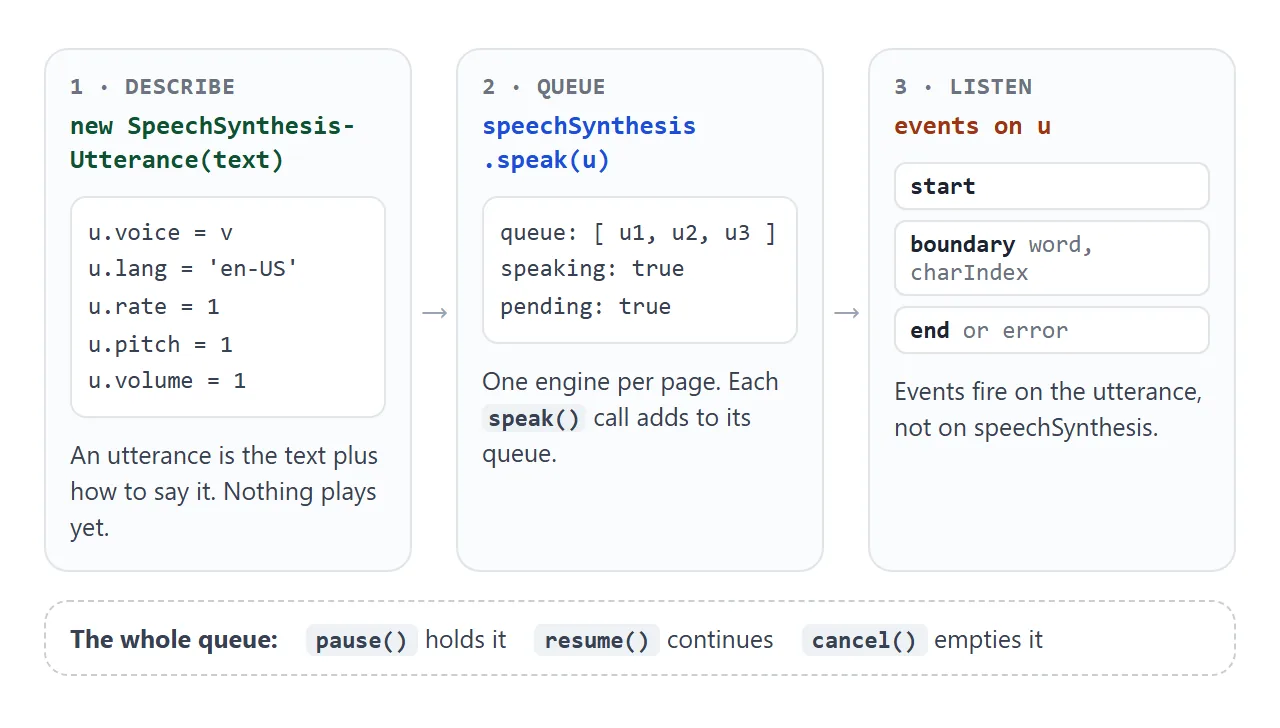
There is one speechSynthesis object per page. Every speak() call adds an utterance to its queue, and they play one after another. That is why the demo calls cancel() before speaking: it clears anything still waiting.
Events such as start and end fire on the utterance, not on speechSynthesis. Attach them with addEventListener before you call speak().
Rate, pitch, volume and lang
| Property | Range | Default | What it changes |
|---|---|---|---|
rate |
0.1 to 10 | 1 | Speed. 2 is twice as fast |
pitch |
0 to 2 | 1 | Higher or lower voice |
volume |
0 to 1 | 1 | Loudness of this utterance |
lang |
a language tag such as en-US |
the page language | Which language the text is read as |
voice |
one item from getVoices() |
the default voice | The exact voice |
These are the ranges in the specification. A voice engine may not use the full range, so the extremes can sound no different from values closer to 1. The demo keeps its range sliders between 0.5 and 2 for that reason.
Why getVoices() is empty
A common problem with this API is speechSynthesis.getVoices() returning []. The browser loads its voices in the background. If your script asks too early, the list is empty, and a menu built from it stays empty.
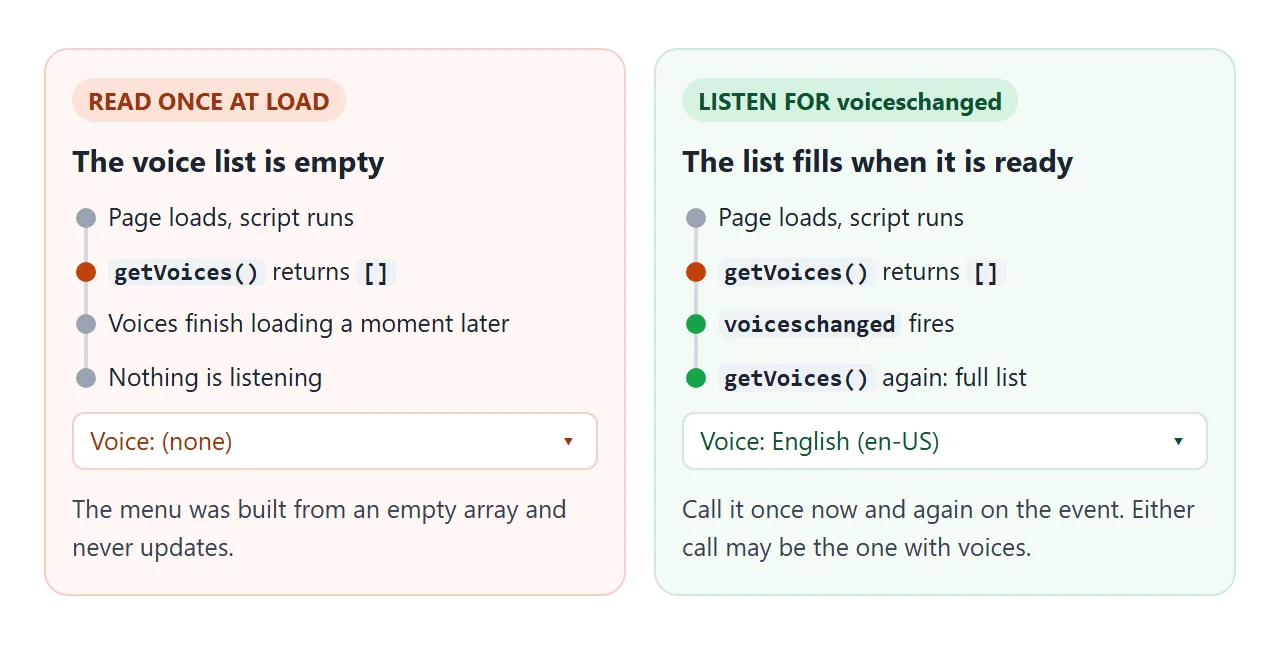
Call it at start, and again whenever voiceschanged fires:
function loadVoices() {
  const voices = speechSynthesis.getVoices();
  if (!voices.length) return;  // not ready yet
  // build the <select> from voices here
}
loadVoices();
speechSynthesis.addEventListener('voiceschanged', loadVoices);
In our test in Chromium on Windows, the first call returned an empty array and the event delivered the list a moment later. If neither call ever returns voices, show a message instead of an empty menu, as the first demo does after two seconds.
Voices depend on the device
The list comes from the operating system and the browser. A laptop and a phone can offer different voices, and the same code sounds different on each. Never hard-code a voice name.
Each voice has a name, a lang and a default flag. localService is true when the voice runs on the device, and false when a remote service produces the speech. Pick by language instead of by name:
const voice = voices.find((v) => v.lang.startsWith('en')) || null;
u.voice = voice;
u.lang = voice ? voice.lang : 'en-US';
A voice for one language will still try to read text in another, often with the wrong pronunciation. Setting lang to match the text avoids most of that.
Highlight words with the boundary event
While it speaks, an utterance can fire boundary events. Each one has a name (word or sentence) and a charIndex, the position in the text where that word starts. Match the index to a <span> around each word and you get karaoke-style highlighting.
<!doctype html>
<html lang="en">
<head>
<meta charset="utf-8">
<meta name="viewport" content="width=device-width, initial-scale=1">
<title>Highlight words as they are spoken</title>
<style>
  body { margin: 0; padding: 14px; font-family: system-ui, sans-serif; background: #f4f5f7; color: #1d2330; }
  .box { max-width: 560px; margin: 0 auto; background: #fff; border-radius: 12px; padding: 16px; box-shadow: 0 4px 16px rgba(0, 0, 0, .08); }
  #text { font-size: 18px; line-height: 1.6; margin: 0 0 14px; }
  #text span { border-radius: 4px; transition: background .1s; }
  #text span.on { background: #fde68a; }
  button { font: inherit; font-size: 14px; padding: 8px 14px; border-radius: 8px; border: 1px solid #1d4ed8; background: #1d4ed8; color: #fff; cursor: pointer; }
  #note { margin-top: 12px; font-size: 13px; color: #4b5261; min-height: 36px; }
</style>
</head>
<body>
<div class="box">
  <p id="text">The boundary event tells you where the voice is. Each word lights up as it is read.</p>
  <button id="read">Read with highlight</button>
  <div id="note">Press the button. Words are highlighted if the voice sends boundary events.</div>
</div>

<script>
  const synth = window.speechSynthesis;
  const p = document.getElementById('text');
  const note = document.getElementById('note');
  const text = p.textContent;

  // wrap each word in a span and remember where it starts in the text
  const words = [...text.matchAll(/\S+/g)];
  p.innerHTML = words.map((m) => `<span data-i="${m.index}">${m[0]}</span>`).join(' ');
  const spans = [...p.querySelectorAll('span')];

  function mark(charIndex) {
    spans.forEach((s) => s.classList.toggle('on', Number(s.dataset.i) === charIndex));
  }

  document.getElementById('read').addEventListener('click', () => {
    if (!synth) { note.textContent = 'This browser has no speechSynthesis.'; return; }
    synth.cancel();
    let boundaries = 0;
    const u = new SpeechSynthesisUtterance(text);
    u.lang = 'en-US';

    u.addEventListener('boundary', (e) => {
      if (e.name !== 'word') return;  // there are also 'sentence' boundaries
      boundaries++;
      mark(e.charIndex);
      note.textContent = `Word boundary at character ${e.charIndex}.`;
    });
    u.addEventListener('start', () => { note.textContent = 'Speaking...'; });
    u.addEventListener('end', () => {
      mark(-1);
      note.textContent = boundaries
        ? `Finished. ${boundaries} word boundary events arrived.`
        : 'Finished, but this voice sent no boundary events, so there was nothing to highlight. Try another voice.';
    });
    u.addEventListener('error', (e) => { note.textContent = 'Error: ' + e.error; });
    synth.speak(u);
  });
</script>
</body>
</html>
u.addEventListener('boundary', (e) => {
  if (e.name !== 'word') return;
  mark(e.charIndex);  // highlight the span that starts here
});
Not every voice sends boundary events. The demo counts them, and if none arrived by the end event, it says so instead of silently showing nothing. Treat highlighting as an extra: the speech still works without it.
Long text: one sentence at a time
You can pass a whole article to one utterance. It is hard to control, though: skipping ahead means cancelling and starting over, and with some voices a very long utterance can stop before the end.
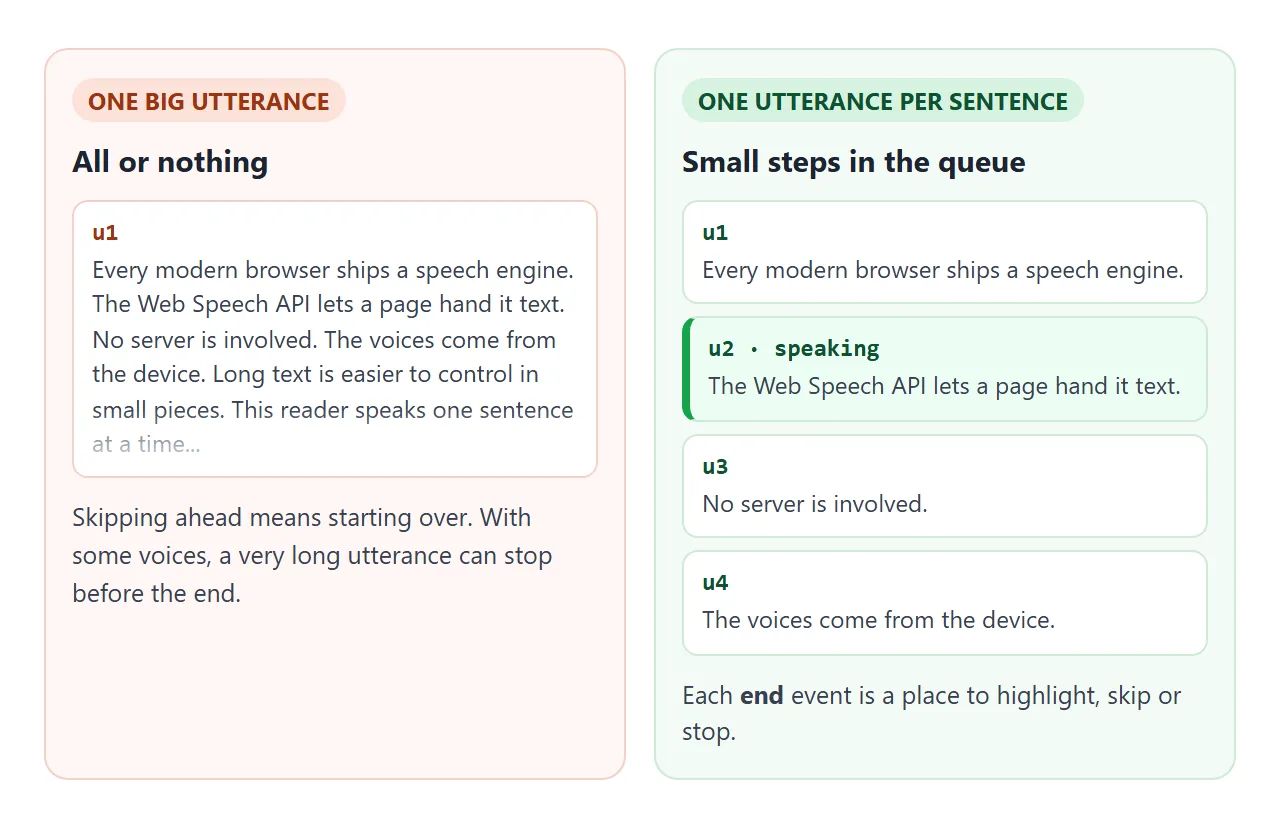
Split the text into sentences and queue one utterance for each. The finished example reads a short article paragraph by paragraph, highlights the current one, and has skip buttons.
<!doctype html>
<html lang="en">
<head>
<meta charset="utf-8">
<meta name="viewport" content="width=device-width, initial-scale=1">
<title>Read this article aloud</title>
<style>
body { margin: 0; padding: 12px; font-family: system-ui, sans-serif; background: #f4f5f7; color: #1d2330; }
.wrap { max-width: 600px; margin: 0 auto; background: #fff; border-radius: 12px; box-shadow: 0 4px 16px rgba(0, 0, 0, .08); overflow: hidden; }
.bar { display: flex; align-items: center; gap: 6px; flex-wrap: wrap; padding: 10px 12px; background: #1d2330; color: #fff; }
.bar button { font: inherit; font-size: 14px; padding: 7px 11px; border-radius: 8px; border: 0; background: #374151; color: #fff; cursor: pointer; }
.bar button#play { background: #16a34a; min-width: 84px; }
.bar select { font: inherit; font-size: 13px; padding: 5px; border-radius: 6px; }
#pos { font-size: 13px; color: #cbd5e1; margin-left: auto; }
article { position: relative; height: 330px; overflow-y: auto; padding: 4px 16px 12px; }
article h2 { font-size: 19px; margin: 12px 0 6px; }
article p { font-size: 15px; line-height: 1.55; margin: 0 0 8px; padding: 6px 8px; border-radius: 8px; border-left: 4px solid transparent; }
article p.now { background: #ecfdf3; border-left-color: #16a34a; }
</style>
</head>
<body>
<div class="wrap">
<div class="bar">
<button id="play">▶ Listen</button>
<button id="prev" aria-label="Previous paragraph">⏮</button>
<button id="next" aria-label="Next paragraph">⏭</button>
<button id="stop" aria-label="Stop">■</button>
<select id="speed" aria-label="Speed">
<option value="0.8">0.8x</option><option value="1" selected>1x</option>
<option value="1.25">1.25x</option><option value="1.5">1.5x</option>
</select>
<span id="pos">Not playing</span>
</div>
<article id="article">
<h2>Why a page can read itself</h2>
<p>Every modern browser ships a speech engine. The Web Speech API lets a page hand it text and get spoken audio back.</p>
<p>No server is involved. The voices come from the device, so a phone and a laptop may sound different.</p>
<p>Long text is easier to control in small pieces. This reader speaks one sentence at a time and moves on when a paragraph ends.</p>
<p>The green bar shows the paragraph being read. Use the skip buttons to jump back or forward.</p>
<p>Press stop at any time. The next press of Listen starts from the paragraph you stopped on.</p>
</article>
</div>
<script>
const synth = window.speechSynthesis;
const paras = [...document.querySelectorAll('#article p')];
const $ = (id) => document.getElementById(id);
let index = 0; // paragraph being read
let run = 0; // bumps on every jump, so old utterances are ignored
function show(i) {
paras.forEach((p, n) => p.classList.toggle('now', n === i));
const box = $('article');
if (i >= 0) box.scrollTop = paras[i].offsetTop - 12;
$('pos').textContent = i >= 0 ? `Paragraph ${i + 1} of ${paras.length}` : 'Not playing';
}
function readFrom(i) {
synth.cancel();
synth.resume(); // cancel() does not clear the paused state
const id = ++run;
if (i >= paras.length) { index = 0; stop(); return; } // finished: next Listen starts over
index = i;
show(i);
$('play').textContent = '⏸ Pause';
// split into sentences: short utterances are easier to pause and skip
const sentences = paras[i].textContent.match(/[^.!?]+[.!?]*/g) || [];
sentences.forEach((s, n) => {
const u = new SpeechSynthesisUtterance(s.trim());
u.rate = Number($('speed').value);
if (n === sentences.length - 1) {
u.addEventListener('end', () => { if (id === run) readFrom(index + 1); });
}
synth.speak(u);
});
}
function stop() {
run++;
synth.cancel();
synth.resume();
show(-1);
$('play').textContent = '▶ Listen';
}
$('play').addEventListener('click', () => {
if (!synth) { $('pos').textContent = 'No speechSynthesis here'; return; }
if (synth.speaking && synth.paused) { synth.resume(); $('play').textContent = '⏸ Pause'; }
else if (synth.speaking) { synth.pause(); $('play').textContent = '▶ Resume'; }
else readFrom(index);
});
$('next').addEventListener('click', () => readFrom(index + 1));
$('prev').addEventListener('click', () => readFrom(Math.max(index - 1, 0)));
$('stop').addEventListener('click', stop);
</script>
</body>
</html>
- Chunking:
text.match(/[^.!?]+[.!?]*/g)splits text into sentences. - Next: the last sentence's
endstarts the next one. - Skipping:
cancel(), then queue the new paragraph. A counter makes staleendevents do nothing. - Pause: in Chromium,
pausedcan staytrueaftercancel(). Checkspeaking && pausedrather thanpausedalone before deciding what a button should do.
For recorded audio files rather than generated speech, the HTML audio tag is the tool.
When it does not work
| What you see | Cause | Fix |
|---|---|---|
| The voice menu is empty | getVoices() ran before voices loaded |
Call it again on voiceschanged |
| Nothing happens on page load | The browser wants a user gesture first | Start speech from a click or key press |
| Different voices on another device | Voices come from the system and browser | Choose by lang, not by name |
| Wrong accent or odd pronunciation | Voice language does not match the text | Set lang and a matching voice |
| Long text stops partway | One very long utterance | Split into sentences and queue them |
| No word highlighting | This voice sends no boundary events |
Show a message; try another voice |
| Old speech keeps playing after Speak | Earlier utterances are still queued | Call cancel() before speak() |
An error event says interrupted |
Your own cancel() stopped it |
Ignore interrupted and canceled |
Share it as a link
Speech is something people need to hear on their own device, with their own voices. A screen recording shows one voice only, and an .html attachment may open as plain code on a phone.
To send the working version, paste the page into a NOS document and choose Create share link. HTML to link walks through it. The page renders as written and its scripts run, so the people you send it to can press Listen themselves.
If you change the code later, the same link shows the new version.