To play a sound in JavaScript, create an audio object and call play() from a click: new Audio('ding.mp3').play(). That is the whole API for a sound file.
Two details matter: play() returns a promise that the browser can reject, and one audio object plays one copy at a time.
Try the three buttons. Press one several times quickly, then switch off Overlap and press again.
<!doctype html>
<html lang="en">
<head>
<meta charset="utf-8">
<meta name="viewport" content="width=device-width, initial-scale=1">
<title>Button sounds with Audio()</title>
<style>
  body { margin: 0; padding: 16px; font-family: system-ui, sans-serif; background: #f4f5f7; color: #1d2330; }
  .row { display: flex; flex-wrap: wrap; gap: 8px; }
  button {
    font: 600 14px system-ui, sans-serif; padding: 10px 16px; border: 0; border-radius: 8px;
    color: #fff; cursor: pointer;
  }
  #click { background: #475569; } #success { background: #15803d; } #error { background: #c2410c; }
  .opts { display: flex; flex-wrap: wrap; gap: 8px 20px; margin: 14px 0 10px; font-size: 14px; }
  .opts label { display: flex; align-items: center; gap: 8px; }
  .opts input[type=range] { width: 130px; }
  .now { font-size: 14px; margin-bottom: 8px; }
  .now b { font: 700 15px ui-monospace, Consolas, monospace; }
  #log {
    margin: 0; padding: 10px 12px; height: 150px; overflow: auto; border-radius: 8px; background: #fff;
    font: 12.5px/1.5 ui-monospace, Consolas, monospace; white-space: pre-wrap;
  }
  .no { color: #9a3412; } .ok { color: #0f5132; }
</style>
</head>
<body>
<div class="row">
  <button id="click">Click</button>
  <button id="success">Success</button>
  <button id="error">Error</button>
</div>
<div class="opts">
  <label><input id="overlap" type="checkbox" checked> Overlap (clone per press)</label>
  <label>Volume <input id="vol" type="range" min="0" max="1" step="0.05" value="0.6"></label>
</div>
<div class="now">Playing now: <b id="now">0</b></div>
<pre id="log"></pre>

<script>
  // Build a short WAV file in memory: 16-bit mono PCM wrapped in a Blob URL
  function makeWav(seconds, sampleAt) {
    const rate = 22050, n = Math.floor(seconds * rate);
    const v = new DataView(new ArrayBuffer(44 + n * 2));
    const text = (at, s) => [...s].forEach((c, i) => v.setUint8(at + i, c.charCodeAt(0)));
    text(0, 'RIFF'); v.setUint32(4, 36 + n * 2, true); text(8, 'WAVE');
    text(12, 'fmt '); v.setUint32(16, 16, true); v.setUint16(20, 1, true); v.setUint16(22, 1, true);
    v.setUint32(24, rate, true); v.setUint32(28, rate * 2, true); v.setUint16(32, 2, true); v.setUint16(34, 16, true);
    text(36, 'data'); v.setUint32(40, n * 2, true);
    for (let i = 0; i < n; i++) v.setInt16(44 + i * 2, sampleAt(i / rate) * 32767, true);
    return URL.createObjectURL(new Blob([v.buffer], { type: 'audio/wav' }));
  }
  const tone = (f, t) => Math.sin(2 * Math.PI * f * t);

  // One preloaded Audio object per sound
  const sounds = {
    click: new Audio(makeWav(0.05, (t) => 0.5 * Math.exp(-90 * t) * tone(1800, t))),
    success: new Audio(makeWav(0.35, (t) => 0.4 * Math.exp(-6 * t) * tone(t < 0.12 ? 660 : 990, t))),
    error: new Audio(makeWav(0.4, (t) => 0.35 * Math.exp(-4 * t) * Math.sign(tone(t < 0.18 ? 220 : 180, t)))),
  };
  Object.values(sounds).forEach((a) => { a.preload = 'auto'; a.load(); });

  const logBox = document.getElementById('log');
  const nowEl = document.getElementById('now');
  const overlap = document.getElementById('overlap');
  const vol = document.getElementById('vol');
  const playing = new Set();  // elements that are sounding right now

  function log(msg, cls) {
    const line = document.createElement('div');
    line.textContent = msg;
    if (cls) line.className = cls;
    logBox.prepend(line);
  }
  function track(a) {
    const show = () => nowEl.textContent = playing.size;
    a.addEventListener('playing', () => { playing.add(a); show(); });
    a.addEventListener('ended', () => { playing.delete(a); show(); });
    a.addEventListener('pause', () => { playing.delete(a); show(); });
  }
  Object.values(sounds).forEach(track);

  function play(name) {
    let a = sounds[name];
    if (overlap.checked) {
      a = a.cloneNode();  // new element, same src: plays on top of the others
      track(a);
    } else {
      a.currentTime = 0;  // reusing one element restarts it and cuts it off
    }
    a.volume = Number(vol.value);  // volume is not copied by cloneNode
    return a.play();
  }

  ['click', 'success', 'error'].forEach((name) => {
    document.getElementById(name).addEventListener('click', () => {
      play(name)
        .then(() => log(name + ': playing', 'ok'))
        .catch((err) => log(name + ': ' + err.name, 'no'));
    });
  });

  // Try once on load, before any click. Most browsers refuse this.
  play('click')
    .then(() => log('On load: played (this browser allowed it)', 'ok'))
    .catch((err) => log('On load, no click yet: ' + err.name, 'no'));
</script>
</body>
</html>
The example has no audio files. Its script writes each sound's samples and a WAV header into memory and passes a Blob URL to new Audio().
The HTML audio tag guide explains that WAV builder line by line. With real files, pass the file's address instead.
The basic pattern
Create each sound once, when the page loads. Play it from an event handler, and catch the rejection.
const ding = new Audio('ding.mp3');  // starts loading now

button.addEventListener('click', () => {
  ding.currentTime = 0;              // rewind if it played before
  ding.play().catch((err) => console.warn('No sound:', err.name));
});
new Audio() makes the same object as an <audio> element, but it is not in the page and shows nothing. The constructor sets preload to auto, so the browser starts fetching the file straight away. The first press then plays without waiting for the download.
Keep the objects in variables and reuse them. Creating a fresh new Audio(url) on every click works, but each one may fetch or decode the file again.
Why play() fails before the first click
Look at the last line of the log in the example. The script called play() once while the page loaded, and the browser answered with NotAllowedError. Browsers block sound until the visitor has interacted with the page: a click, a tap or a key press.
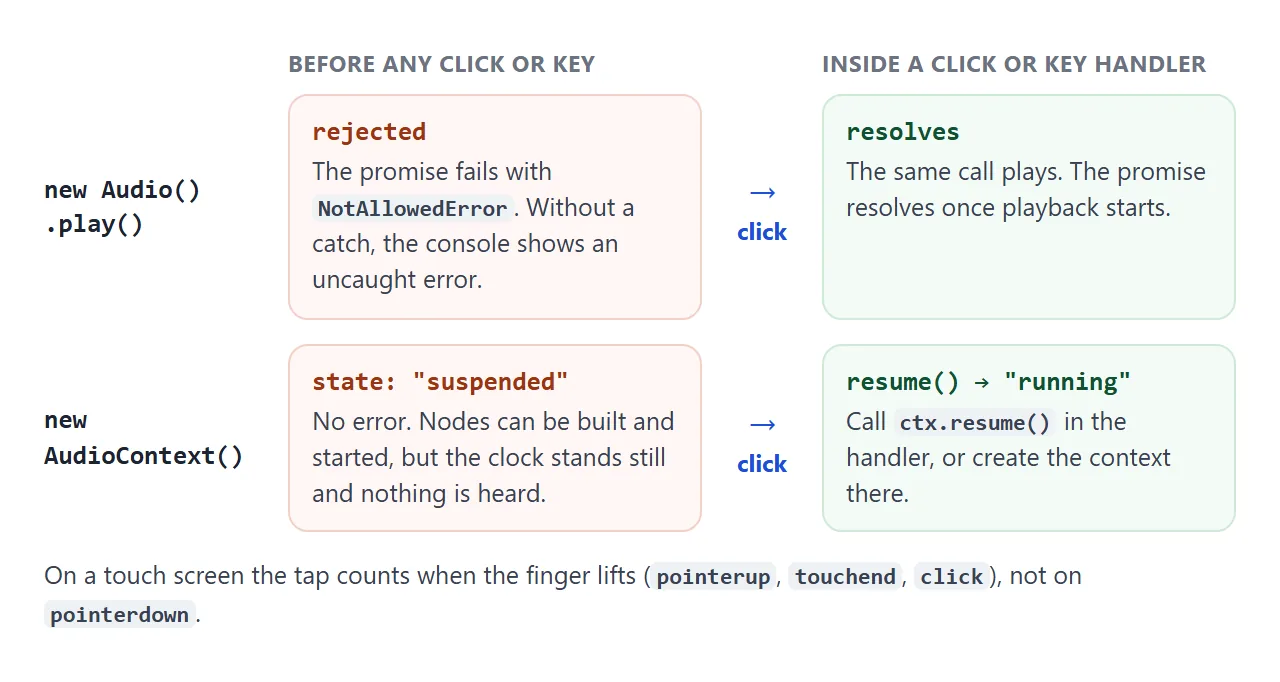
Two rules follow from this:
- Start sounds from event handlers. A click,
keydownor formsubmithandler is the dependable place. A timer that fires before any interaction is refused. - Always catch the promise. Without
.catch(), a refusal shows up as an uncaught error in the console, even though nothing is wrong with your code.
On a touch screen, the tap counts when the finger lifts: pointerup, touchend or click. A pointerdown from a finger is not enough on its own. The addEventListener guide covers the event names.
Overlapping sounds and the cut-off problem
One audio element has one playhead. Calling play() on a sound that is already playing does nothing. Setting currentTime = 0 first restarts it, which cuts off the copy that was still ringing.
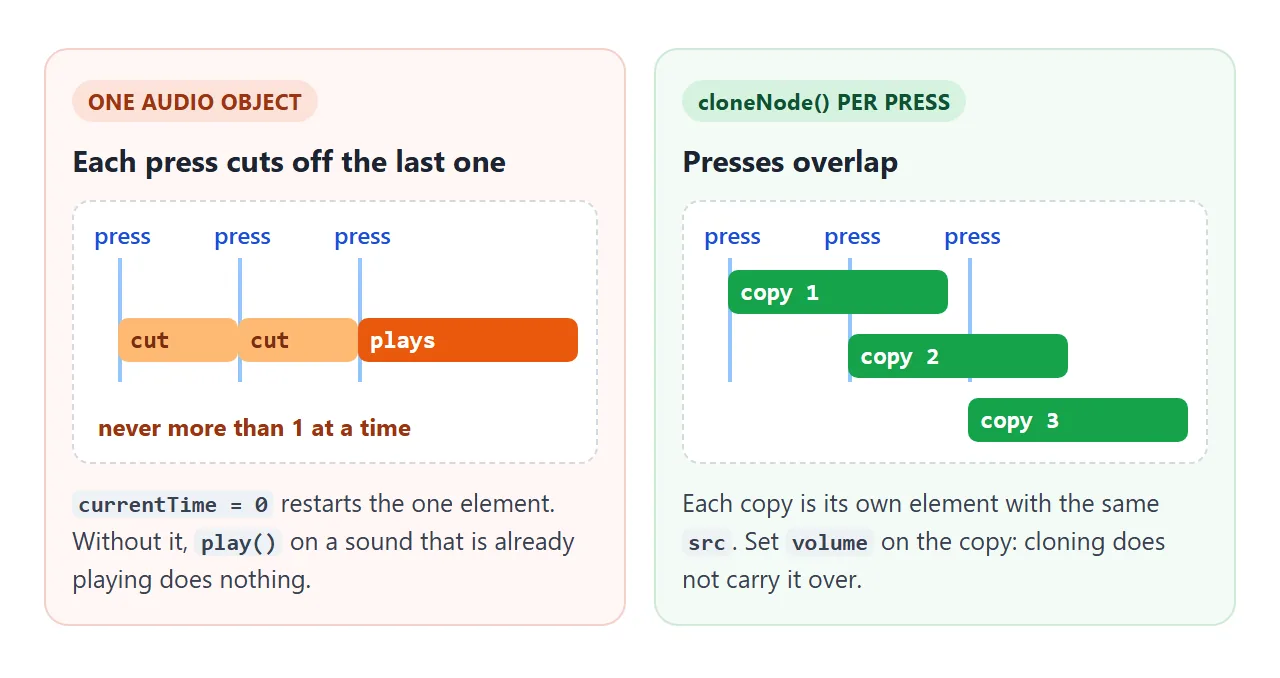
For button clicks that should overlap, clone the element for each press:
function play(sound, volume = 1) {
  const copy = sound.cloneNode();  // same src, new playhead
  copy.volume = volume;            // not copied by cloneNode
  return copy.play();
}
cloneNode() copies attributes such as src, but volume is a property, not an attribute. The copy starts at full volume unless you set it. The example's volume slider does exactly this for every press.
Restarting one element is still the right choice for some sounds. A countdown tick or a notification should not stack up, so there, reuse the single object.
Generated sounds with the Web Audio API
For a beep or a click you do not need a file at all. The Web Audio API builds sound from nodes: an oscillator makes a tone, a gain node sets its volume, and ctx.destination is the speakers.
<!doctype html>
<html lang="en">
<head>
<meta charset="utf-8">
<meta name="viewport" content="width=device-width, initial-scale=1">
<title>Web Audio keyboard</title>
<style>
body { margin: 0; padding: 16px; font-family: system-ui, sans-serif; background: #f4f5f7; color: #1d2330; }
.keys { display: grid; grid-template-columns: repeat(8, 1fr); gap: 4px; max-width: 480px; }
.key {
height: 130px; border: 1px solid #cbd5e1; border-radius: 0 0 8px 8px; background: #fff;
display: flex; flex-direction: column; justify-content: flex-end; align-items: center; padding-bottom: 8px;
font: 600 13px system-ui, sans-serif; color: #475569; cursor: pointer;
touch-action: none; user-select: none; -webkit-user-select: none;
}
.key small { font: 11px ui-monospace, Consolas, monospace; color: #94a3b8; }
.key.down { background: #dbeafe; border-color: #60a5fa; }
.opts { display: flex; flex-wrap: wrap; gap: 8px 18px; margin-top: 14px; font-size: 14px; align-items: center; }
.opts label { display: flex; align-items: center; gap: 6px; }
select { font: 14px system-ui, sans-serif; padding: 4px 6px; }
.state { margin-top: 12px; font-size: 14px; }
.state b { font: 700 14px ui-monospace, Consolas, monospace; }
.suspended { color: #9a3412; } .running { color: #0f5132; }
</style>
</head>
<body>
<div class="keys" id="keys"></div>
<div class="opts">
<label>Wave
<select id="wave">
<option>sine</option><option selected>triangle</option><option>square</option><option>sawtooth</option>
</select>
</label>
<label><input id="env" type="checkbox" checked> Fade in and out (envelope)</label>
</div>
<div class="state">AudioContext: <b id="state"></b> · notes started: <b id="count">0</b></div>
<script>
// One AudioContext for the whole page. Created on load, so it starts "suspended".
const ctx = new AudioContext();
const stateEl = document.getElementById('state');
const showState = () => { stateEl.textContent = ctx.state; stateEl.className = ctx.state; };
ctx.addEventListener('statechange', showState);
showState();
// resume() works once the user has pressed a key, clicked or tapped
const unlock = () => { if (ctx.state === 'suspended') ctx.resume(); };
['pointerdown', 'pointerup', 'keydown'].forEach((t) => document.addEventListener(t, unlock));
const notes = [
['C', 261.63], ['D', 293.66], ['E', 329.63], ['F', 349.23],
['G', 392.0], ['A', 440.0], ['B', 493.88], ['C', 523.25],
];
const letters = 'asdfghjk';
const held = new Map(); // key element -> { osc, gain }
let count = 0;
function start(key, freq) {
if (held.has(key)) return;
const t = ctx.currentTime;
const osc = new OscillatorNode(ctx, { type: document.getElementById('wave').value, frequency: freq });
const gain = new GainNode(ctx, { gain: 0 });
osc.connect(gain).connect(ctx.destination);
if (document.getElementById('env').checked) {
gain.gain.setValueAtTime(0, t);
gain.gain.linearRampToValueAtTime(0.25, t + 0.015); // 15 ms fade in
} else {
gain.gain.value = 0.25; // full volume at once: may click
}
osc.start(t);
held.set(key, { osc, gain });
key.classList.add('down');
document.getElementById('count').textContent = ++count;
}
function stop(key) {
const v = held.get(key);
if (!v) return;
held.delete(key);
key.classList.remove('down');
const t = ctx.currentTime;
if (document.getElementById('env').checked) {
v.gain.gain.cancelScheduledValues(t);
v.gain.gain.setValueAtTime(v.gain.gain.value, t);
v.gain.gain.setTargetAtTime(0, t, 0.03); // smooth fade out
v.osc.stop(t + 0.2);
} else {
v.osc.stop(); // cut instantly: may pop
}
}
const box = document.getElementById('keys');
notes.forEach(([name, freq], i) => {
const key = document.createElement('div');
key.className = 'key';
key.dataset.letter = letters[i];
key.innerHTML = name + '<small>' + letters[i].toUpperCase() + '</small>';
key.addEventListener('pointerdown', () => start(key, freq));
key.addEventListener('pointerup', () => stop(key));
key.addEventListener('pointerleave', () => stop(key));
key.addEventListener('pointercancel', () => stop(key));
box.append(key);
});
// Computer keyboard: A S D F G H J K
document.addEventListener('keydown', (e) => {
const i = letters.indexOf(e.key.toLowerCase());
if (i >= 0 && !e.repeat) start(box.children[i], notes[i][1]);
});
document.addEventListener('keyup', (e) => {
const i = letters.indexOf(e.key.toLowerCase());
if (i >= 0) stop(box.children[i]);
});
</script>
</body>
</html>
const ctx = new AudioContext();  // one for the whole page

function beep(freq = 880, length = 0.15) {
  const t = ctx.currentTime;
  const osc = new OscillatorNode(ctx, { type: 'sine', frequency: freq });
  const gain = new GainNode(ctx, { gain: 0 });
  osc.connect(gain).connect(ctx.destination);
  gain.gain.setValueAtTime(0, t);
  gain.gain.linearRampToValueAtTime(0.2, t + 0.01);         // fade in
  gain.gain.exponentialRampToValueAtTime(0.0001, t + length); // fade out
  osc.start(t);
  osc.stop(t + length + 0.02);
}
An oscillator can be started only once. Make a new one for every sound; they are cheap. The context is the expensive part, so create one and reuse it.
The type option picks the wave shape: sine, square, sawtooth or triangle. Try them in the example. Sine is the softest, square and sawtooth sound buzzy.
The context starts suspended
The synth example creates its context on page load. Its status line reads suspended until the first key press, then running. A suspended context throws no error. Nodes start, but its clock stands still and nothing is heard.
document.addEventListener('pointerup', () => {
  if (ctx.state === 'suspended') ctx.resume();
});
Either call ctx.resume() from a user gesture, as above, or create the context inside the first click handler. The form example below does the second: no context exists until the first sound is needed.
Why a beep clicks, and the envelope fix
If a tone starts or stops at full volume, the speaker has to jump from silence to the middle of a wave in one step. That jump is heard as a click or pop, separate from the tone itself.
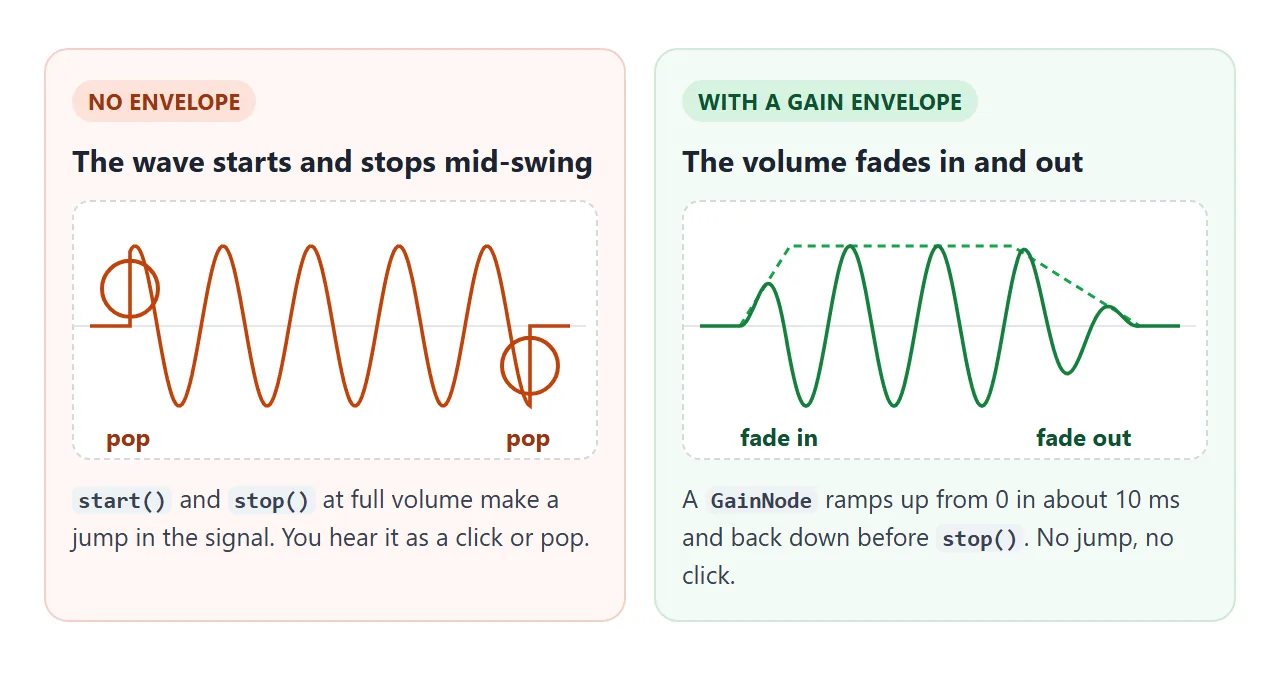
The fix is an envelope: ramp the gain from 0 up over about 10 ms, and back down before stop(). Two details from the code above:
exponentialRampToValueAtTimecannot reach 0, so ramp to a tiny value such as 0.0001, or usesetTargetAtTime(0, t, 0.03).- Call
stop()a little after the fade ends, not at the same moment.
audio tag, Audio() or Web Audio?
| Use | When | Example |
|---|---|---|
<audio controls> |
The visitor controls playback | A podcast or song with a play bar |
new Audio(url) |
Short sound files, triggered by code | A notification or a recorded click |
| Web Audio oscillators | Sounds you generate | Beeps, UI clicks, a keyboard |
| Web Audio buffers | Many overlapping copies of a file, exact timing | Game effects, drum pads |
For the last row, fetch the file once and decode it into an AudioBuffer. Each play is then a new AudioBufferSourceNode, and overlap costs nothing:
const data = await (await fetch('hit.wav')).arrayBuffer();
const buffer = await ctx.decodeAudioData(data);

function hit() {
  const src = new AudioBufferSourceNode(ctx, { buffer });
  src.connect(ctx.destination);
  src.start();
}
To have the browser read text aloud rather than play a sound, see text to speech in JavaScript.
A finished example: form sounds with a sound setting
Interface sounds should be quiet, short and easy to turn off. This form plays a rising blip when it is sent and a low one when a field is missing. The Sound on button is the user's setting.
<!doctype html>
<html lang="en">
<head>
<meta charset="utf-8">
<meta name="viewport" content="width=device-width, initial-scale=1">
<title>Form with UI sounds</title>
<style>
  body { margin: 0; padding: 16px; font-family: system-ui, sans-serif; background: #eceef1; color: #1d2330; }
  .card { max-width: 420px; padding: 16px 18px; border-radius: 14px; background: #fff; box-shadow: 0 6px 20px rgba(0, 0, 0, .08); }
  .head { display: flex; justify-content: space-between; align-items: center; gap: 10px; margin-bottom: 10px; }
  .head h2 { margin: 0; font-size: 17px; }
  #sound {
    font: 600 13px system-ui, sans-serif; padding: 7px 12px; border-radius: 99px; cursor: pointer;
    border: 1px solid #cbd5e1; background: #f8fafc; color: #1d2330; white-space: nowrap;
  }
  #sound[aria-pressed="false"] { background: #1d2330; color: #fff; border-color: #1d2330; }
  label { display: block; font-size: 13px; font-weight: 600; margin: 10px 0 4px; }
  input { box-sizing: border-box; width: 100%; font: 15px system-ui, sans-serif; padding: 9px 10px; border: 1px solid #cbd5e1; border-radius: 8px; }
  input[aria-invalid="true"] { border-color: #c2410c; background: #fff7f5; }
  .send { margin-top: 14px; font: 600 14px system-ui, sans-serif; padding: 10px 18px; border: 0; border-radius: 8px; background: #1d4ed8; color: #fff; cursor: pointer; }
  #msg { margin-top: 12px; min-height: 20px; font-size: 14px; }
  .ok { color: #0f5132; } .no { color: #9a3412; }
  .last { margin-top: 6px; font: 12.5px ui-monospace, Consolas, monospace; color: #6b7280; }
</style>
</head>
<body>
<form class="card" id="form" novalidate>
  <div class="head">
    <h2>Join the list</h2>
    <button type="button" id="sound" aria-pressed="true">Sound on</button>
  </div>
  <label for="name">Name</label>
  <input id="name" name="name" required autocomplete="name">
  <label for="email">Email</label>
  <input id="email" name="email" type="email" required autocomplete="email">
  <button class="send" type="submit">Sign up</button>
  <div id="msg" role="status"></div>
  <div class="last" id="last">Last sound: none yet</div>
</form>

<script>
  let soundOn = true;  // the user's setting
  let ctx = null;      // one AudioContext, created on first use

  // Short blips with a fade in and out, so they never click
  function blip(freqs, type, gap) {
    if (!soundOn) return false;
    ctx ??= new AudioContext();  // created inside a click, so it may start
    if (ctx.state === 'suspended') ctx.resume();
    freqs.forEach((f, i) => {
      const t = ctx.currentTime + i * gap;
      const osc = new OscillatorNode(ctx, { type, frequency: f });
      const gain = new GainNode(ctx, { gain: 0 });
      osc.connect(gain).connect(ctx.destination);
      gain.gain.setValueAtTime(0, t);
      gain.gain.linearRampToValueAtTime(0.15, t + 0.01);
      gain.gain.exponentialRampToValueAtTime(0.0001, t + 0.18);
      osc.start(t);
      osc.stop(t + 0.2);
    });
    return true;
  }
  const sounds = {
    success: () => blip([660, 990], 'sine', 0.09),
    error: () => blip([200, 160], 'triangle', 0.1),
  };
  function cue(name) {
    const played = sounds[name]();
    document.getElementById('last').textContent =
      'Last sound: ' + name + (played ? ' (played, context ' + ctx.state + ')' : ' (skipped, sound off)');
  }

  const btn = document.getElementById('sound');
  btn.addEventListener('click', () => {
    soundOn = !soundOn;
    btn.setAttribute('aria-pressed', soundOn);
    btn.textContent = soundOn ? 'Sound on' : 'Sound off';
  });

  const form = document.getElementById('form');
  const msg = document.getElementById('msg');
  form.addEventListener('submit', (e) => {
    e.preventDefault();  // demo: show the data instead of sending it
    let firstBad = null;
    for (const input of form.querySelectorAll('input')) {
      const bad = !input.checkValidity();
      input.setAttribute('aria-invalid', bad);
      if (bad && !firstBad) firstBad = input;
    }
    if (firstBad) {
      msg.textContent = 'Check: ' + firstBad.labels[0].textContent;
      msg.className = 'no';
      firstBad.focus();
      cue('error');
      return;
    }
    const data = Object.fromEntries(new FormData(form));
    msg.textContent = 'Signed up: ' + data.name + ' <' + data.email + '>';
    msg.className = 'ok';
    cue('success');
  });
</script>
</body>
</html>
- One context, made on demand.
ctx ??= new AudioContext()runs inside the submit handler, so it is created during a user action. - The setting is checked first. With sound off,
blip()returns before touching the context. - The button reports its state.
aria-pressedswitches between true and false, and the label says what is on. - The sound adds to the message. The text still says what went wrong, so a muted visitor misses nothing.
In your own page, remember the setting between visits with your usual storage. The example keeps it in a variable so it runs anywhere. HTML form validation covers the checks behind the error message.
When it does not work
| What you see | Cause | Fix |
|---|---|---|
NotAllowedError in the console |
play() ran before any click or key press |
Call it from an event handler and .catch() the promise |
| Web Audio silent, no error | The AudioContext is suspended |
ctx.resume() in a click, or create the context there |
| A click or pop at the start or end | The tone starts or stops at full volume | Ramp the gain up and down |
| Fast presses cut each other off | One audio element restarted each time | cloneNode() per press, or Web Audio buffers |
| Second press does nothing | play() on a sound that is still playing |
Set currentTime = 0 first, or clone |
AbortError, play() interrupted by pause() |
pause() ran before the play promise settled |
Wait for the promise, or ignore AbortError in the catch |
| Audio resources pile up with every sound | A new AudioContext per sound |
Create one context and reuse it |
Share it as a link
Sound is the one thing a screenshot cannot show. An .html attachment may open as plain code on a phone, or not open at all.
To send the working page, paste it into a NOS document and choose Create share link. HTML to link walks through it.
The page renders as written and its scripts run, so the people you send it to can press the buttons and hear the sounds themselves. If you change the code later, the same link shows the new version.