To host HTML on Vercel, put the file in a folder named index.html, then deploy that folder. Vercel detects there is nothing to build, serves the files as static content, and returns an address.
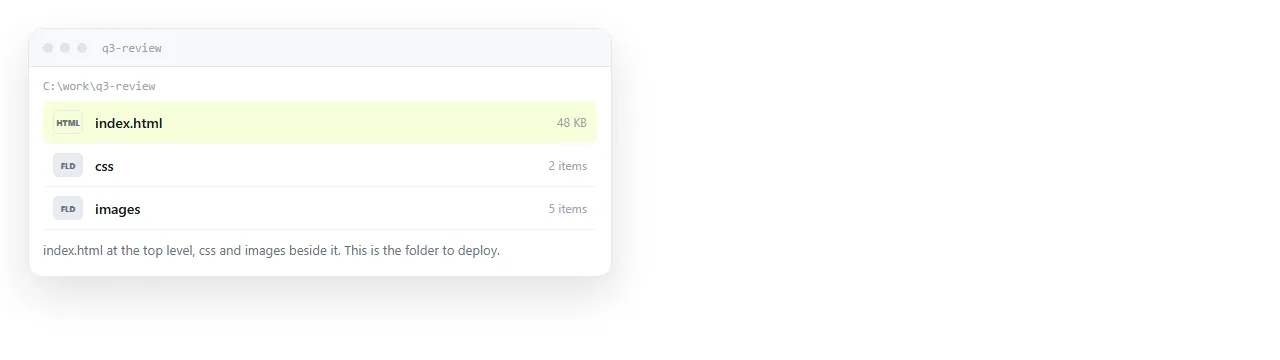
No framework, no configuration file and no build command are required. Static HTML is the simplest case the platform handles.
The command line route
The shortest path from a file on your disk to a public address.
npm i -g vercel
cd my-page
vercel login
vercel
The first vercel run asks a few questions, including the project name and the directory to deploy. Accept the defaults for a single page.
When it finishes it prints a preview address. Open it and the page is live.
vercel --prod
That promotes the deploy to the project's production address, which is the stable one to give people.
Give out the production address, not the one printed by a plain vercel run. The preview address belongs to a single deploy and stops being current as soon as you deploy again.
If the command reports that it detected a framework when there is none, check the folder for a stray package.json. Removing it, or setting the framework preset to none in the project settings, restores the plain static behaviour.
The Git route
Connect a repository to a Vercel project and every push deploys automatically. Each branch gets its own preview address, and merging to the main branch updates production.
This is the right shape for a site kept alongside code, and it is heavier than a single page needs.
The per branch preview is the part worth having. A reviewer opens a working page instead of reading a diff, which is the gap GitHub itself leaves.
Previewing an HTML file in GitHub covers the repository side, including why GitHub shows the source rather than the page.
What you get when you host HTML on Vercel
| Property | Behaviour |
|---|---|
| Address | Stable production address, plus a unique one per deploy |
| HTTPS | Included, no certificate work |
| Build step | None for plain static files |
| Editing live | Not possible, redeploy instead |
| Old versions | Stay reachable at their own addresses |
| Custom domain | Supported, DNS records required |
The fourth row is the one that shapes daily use. The deployed files are immutable. A wrong figure means editing locally and deploying again, which is fine as a habit and tiresome as a correction loop.
The fifth row is worth a moment of attention. Previous deploys remain reachable at their own addresses, which is useful for comparison and worth remembering if a draft contained something you did not intend to publish.
Files beside the page

Vercel serves the folder as it is. A stylesheet in css/ and images in images/ are served at those paths, so a page that worked locally with relative paths works after deploying.
Absolute paths that begin with a slash also work, because there is now a real server root, which is the part missing when the same file is opened from disk.
If the page loads a data file at runtime, it will work here and fail when opened locally, for the same reason. What a static page is covers the boundary between served files and anything that needs a server to compute a response.
When a deploy is the right call
- The page is part of a site with several pages.
- It lives alongside code and should deploy when the code does.
- It needs a custom domain you control.
- More than one person edits it through pull requests.
- It has to survive without depending on any one person's account.
- The history of what was published, and when, matters later.
Those five or six conditions describe a project. When they hold, the deploy step is not overhead, it is the record of what went live.
The reverse is also worth stating plainly. When none of them hold, you are running a release process for a document.
When it is more than the page needs

A single report, a one-pager, a page produced by an assistant. The apparatus is larger than the artefact.
You install a tool, log in, answer prompts, deploy, then repeat the last step every time a number changes. For a site that is amortised across months of work. For one page it is the whole cost.
The alternative is one paste. Put the HTML into a NOS document and it renders as a page of its own, scripts and charts included.
Share, then Share link, then Create link gives it an address. Unlisted by default, and Public on the web is a checkbox if search engines should find it.
Corrections are made by clicking the text in the document. No local edit, no deploy, and the address does not move, so the link you sent last month still points at the current version. The free plan covers three documents.
Static host versus document sets the two working rhythms side by side, and hosting HTML on Google Drive covers the route people usually try before either of them.
Short version
- A folder with
index.htmldeploys to Vercel with no configuration. vercelfor a preview address,vercel --prodfor the stable one.- Git connection adds automatic deploys and per branch previews.
- Live files cannot be edited, so every correction is a deploy.
- For one page that changes often, an address that renders pasted HTML is less work.