A room-capacity lookup is convenient for reads, but a table needs both each room name and its capacity. The entries iterator provides those pairs together. This example converts the iterator to a visible array so the table-shaped output is easy to inspect.
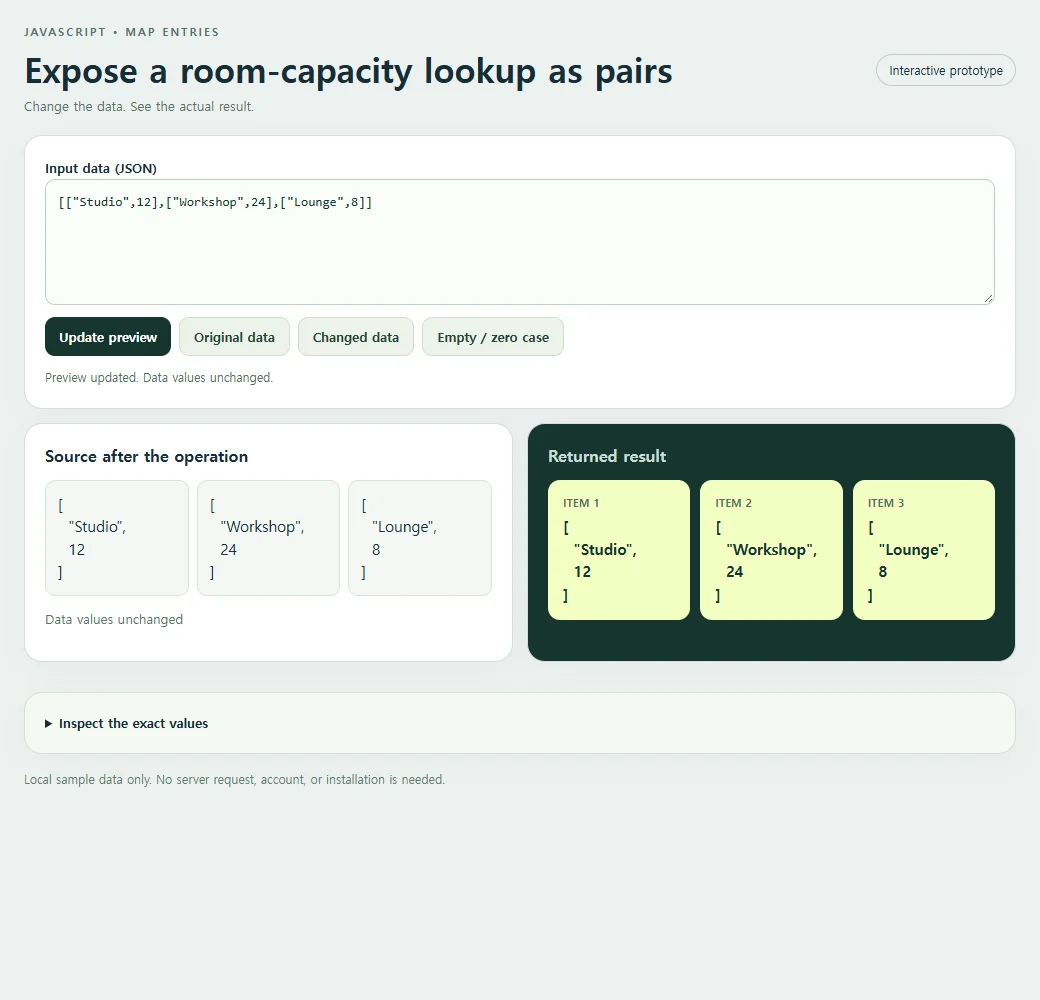
Each result row pairs a room name with its capacity: Studio and twelve, Workshop and twenty-four, Lounge and eight. That two-item structure is useful when you need to render both a label and a value. It keeps the association visible rather than creating unrelated arrays that might be sorted separately and accidentally misaligned.
Try the result before changing the rule
Edit the JSON and select Update preview to rerun the same expression. Original data restores this starting sample; Changed data supplies another preset. The operation runs locally in the example, so trying a value does not send an invitation, change a product, or save a setting.
<!doctype html><html lang="en"><head><meta charset="utf-8"><meta name="nos-demo-layout" content="responsive-lab"><meta name="viewport" content="width=device-width,initial-scale=1"><title>Expose a room-capacity lookup as pairs</title><style>*{box-sizing:border-box}body{margin:0;background:#edf1f0;color:#172d36;font:15px/1.5 system-ui,sans-serif}main{max-width:1040px;margin:auto;padding:24px}header{display:flex;justify-content:space-between;gap:12px;align-items:center;margin-bottom:20px}.eyebrow{font-size:11px;font-weight:800;letter-spacing:2px;color:#55716b;text-transform:uppercase}h1{font-size:clamp(23px,4vw,34px);line-height:1.15;margin:8px 0}h2{font-size:16px;margin:0 0 12px}.tag{border:1px solid #bfceca;border-radius:99px;padding:6px 12px;font-size:12px;white-space:nowrap}.panel{background:white;border:1px solid #d4dfdb;border-radius:18px;padding:20px;margin-bottom:14px;box-shadow:0 9px 30px #1d393407}.grid{display:grid;grid-template-columns:1fr 1fr;gap:14px}.result{background:#17352f;color:#f7fffb}.result h2{color:#c9ded5}.cards{display:grid;gap:10px;grid-template-columns:repeat(auto-fit,minmax(135px,1fr))}.card{background:#f2ffc2;color:#17352f;padding:15px;border-radius:12px;min-width:0;overflow-wrap:anywhere}.card small{display:block;color:#536f60;font-size:11px;font-weight:700;text-transform:uppercase;margin-bottom:4px}.field{display:block;margin:8px 0}.field small{margin:0 0 3px;text-transform:none}.value{font-size:15px;font-weight:650;white-space:pre-wrap}.hero{font-size:clamp(28px,5vw,46px);font-weight:750;line-height:1.2;overflow-wrap:anywhere}.muted{color:#587169;font-size:13px}.result .muted{color:#bed7cb}pre{margin:0;white-space:pre-wrap;overflow-wrap:anywhere;font:13px/1.6 ui-monospace,monospace;max-height:220px;overflow:auto}.toolbar{display:flex;flex-wrap:wrap;gap:8px;margin:12px 0}button{background:#17352f;color:white;border:0;border-radius:10px;padding:10px 14px;font:600 13px system-ui;cursor:pointer}button.secondary{background:#edf3ea;color:#244337;border:1px solid #d0ddd0}button:hover{filter:brightness(.94)}button:focus-visible,textarea:focus-visible,summary:focus-visible{outline:3px solid #749919;outline-offset:3px}textarea{display:block;width:100%;height:126px;border:1px solid #bccfc5;border-radius:10px;background:#fafcf9;padding:12px;font:13px/1.5 ui-monospace,monospace;resize:vertical;color:#15362c}label{font-weight:650;font-size:13px}details{margin-top:16px}summary{cursor:pointer;font-size:13px;font-weight:650}#status{min-height:20px;font-size:12px;color:#526f60;margin-top:8px}.error{color:#ffcfbf}.footer{font-size:12px;color:#627b72;margin-top:16px}.empty{font-size:18px;color:#c7dacd}.source-card{background:#f4f7f3;border:1px solid #dbe4d8;border-radius:10px;padding:12px;overflow-wrap:anywhere;white-space:pre-wrap}.source-list{display:flex;flex-wrap:wrap;gap:8px;max-height:170px;overflow:auto}.source-list .source-card{flex:1;min-width:100px}.code{background:#f5f8f2}mark{background:#f2ffc2;color:#183a2d;padding:2px 5px;border-radius:4px}@media(max-width:620px){main{padding:15px}.grid{grid-template-columns:1fr}.panel{padding:16px}header{align-items:flex-start}.tag{display:none}h1{font-size:25px}.cards{grid-template-columns:repeat(auto-fit,minmax(125px,1fr))}.source-list{max-height:120px}pre{max-height:150px}}</style></head><body><main>
<header><div><div class="eyebrow">JavaScript • Map entries</div><h1>Expose a room-capacity lookup as pairs</h1><div class="muted">Change the data. See the actual result.</div></div><span class="tag">Interactive prototype</span></header>
<section class="panel"><label for="input">Input data (JSON)</label><textarea id="input" maxlength="10000" spellcheck="false"></textarea><div class="toolbar"><button id="run" type="button">Update preview</button><button class="secondary" id="original" type="button">Original data</button><button class="secondary" id="changed" type="button">Changed data</button><button class="secondary" id="edge" type="button">Empty / zero case</button></div><div id="status" role="status" aria-live="polite"></div></section>
<div class="grid"><section class="panel"><h2>Source after the operation</h2><div id="source" class="source-list"></div><p id="source-status" class="muted"></p></section><section class="panel result"><h2>Returned result</h2><div id="result" aria-live="polite"></div></section></div><details class="panel code"><summary>Inspect the exact values</summary><pre id="inspect"></pre></details>
<p class="footer">Local sample data only. No server request, account, or installation is needed.</p></main><script>
'use strict';
const initial = "[[\"Studio\",12],[\"Workshop\",24],[\"Lounge\",8]]";
const alternate = "[\n  [\n    \"Studio\",\n    12\n  ],\n  [\n    \"Workshop\",\n    24\n  ]\n]";
const empty = "[]";
const input = document.getElementById('input');
const output = document.getElementById('result');
const source = document.getElementById('source');
const status = document.getElementById('status');
function transform(data) { return Array.from(new Map(data).entries()); }
function readable(value) {
 if (value === undefined) return 'undefined';
 if (typeof value === 'number' && Object.is(value, -0)) return '-0';
 return JSON.stringify(value, (_, v) => typeof v === 'number' && !Number.isFinite(v) ? String(v) : v, 2);
}
function renderCards(value, host) {
 host.replaceChildren();
 if (Array.isArray(value)) {
  if (!value.length) {const p=document.createElement('p');p.className='empty';p.textContent='No items returned';host.append(p);return;}
  const grid=document.createElement('div');grid.className='cards';
  value.slice(0,40).forEach((item,index)=>{const card=document.createElement('div');card.className='card';const label=document.createElement('small');label.textContent='Item '+(index+1);card.append(label);appendValue(item,card);grid.append(card);});host.append(grid);
  if(value.length>40){const p=document.createElement('p');p.textContent='Showing 40 of '+value.length+' items.';host.append(p);}
 } else if(value && typeof value==='object'){const card=document.createElement('div');card.className='card';appendValue(value,card);host.append(card);}
 else {const p=document.createElement('div');p.className='hero';p.textContent=typeof value==='boolean'?(value?'Yes · true':'No · false'):value===undefined?'No value · undefined':value===''?'Empty string':String(value);host.append(p);}
}
function appendValue(value,host){
 if(value && typeof value==='object' && !Array.isArray(value))Object.entries(value).slice(0,40).forEach(([key,item])=>{const row=document.createElement('div');row.className='field';const label=document.createElement('small');label.textContent=key;const text=document.createElement('span');text.className='value';text.textContent=typeof item==='string'?item:readable(item);row.append(label,text);host.append(row);});
 else {const text=document.createElement('div');text.className='value';text.textContent=typeof value==='string'?value:readable(value);host.append(text);}
}
function update(){
 try{
  if(input.value.length>10000)throw new Error('Keep this sample below 10,000 characters.');
  const data=JSON.parse(input.value);const before=readable(data);const result=transform(data);const after=readable(data);
  renderCards(result,output);source.replaceChildren();(Array.isArray(data)?data.slice(0,40):[data]).forEach(item=>{const card=document.createElement('div');card.className='source-card';card.textContent=typeof item==='string'?item:readable(item);source.append(card);});document.getElementById('source-status').textContent=before===after?'Data values unchanged':'Data values changed in place';document.getElementById('inspect').textContent='Input before:\n'+before+'\n\nReturned result:\n'+readable(result)+'\n\nSource after:\n'+after;
  output.classList.remove('error');status.textContent='Preview updated. '+(before===after?'Data values unchanged.':'Source data changed in place.');
 }catch(error){output.replaceChildren();output.classList.add('error');output.textContent=error.name+': '+error.message;source.replaceChildren();document.getElementById('source-status').textContent='';document.getElementById('inspect').textContent='';status.textContent='Check the JSON and the input shape. Restore Original data to start again.';}
}
document.getElementById('run').addEventListener('click',update);
[['original',initial],['changed',alternate],['edge',empty]].forEach(([id,value])=>document.getElementById(id).addEventListener('click',()=>{input.value=value;update();}));

input.value=initial;update();
</script></body></html>
Follow one run
The Map preserves the three inserted room keys and values. entries creates an iterator yielding a two-item array for each entry. Array.from consumes that iterator into a regular array. The result contains room-capacity pairs, not just capacities, and the original Map remains unchanged.
const data = [
  [
    "Studio",
    12
  ],
  [
    "Workshop",
    24
  ],
  [
    "Lounge",
    8
  ]
];
const result = Array.from(new Map(data).entries());
console.log(result);
The starting sample returns:
[
  [
    "Studio",
    12
  ],
  [
    "Workshop",
    24
  ],
  [
    "Lounge",
    8
  ]
]
The source uses entry pairs so you can see every key and value before the lookup is constructed. The working Map is separate from that source array. Converting its entries for display does not make the Map itself a JSON array, and reading it does not submit a catalog change.
Check the case that changes the answer
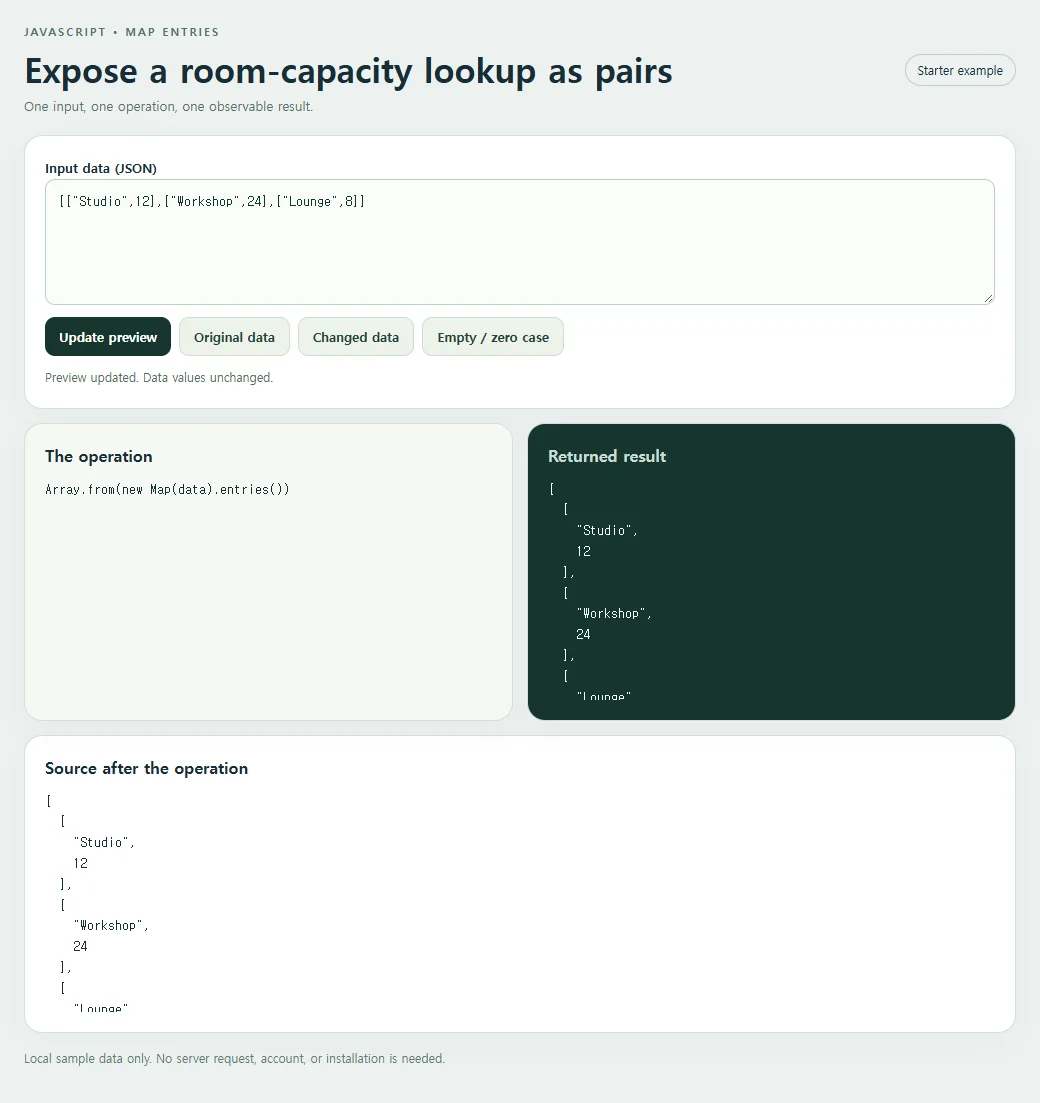
A Map iterator is not itself a normal array. Convert it when you need array methods or JSON-friendly output, and avoid mutating the Map while relying on a fixed snapshot.
entries does not create a permanent snapshot by itself; it returns an iterator. Array.from consumes the iterator into a new array for this display. Later changes to primitive values in the Map do not rewrite those already collected pairs. Object values can still share references, so this conversion is not a deep clone.
The smaller version keeps the same expression with fewer visual elements. Use Edit code to inspect the complete HTML, or Copy code to run it as a local file. If the script does not execute, the JavaScript troubleshooting guide helps check placement and syntax.
<!doctype html><html lang="en"><head><meta charset="utf-8"><meta name="nos-demo-layout" content="responsive-lab"><meta name="viewport" content="width=device-width,initial-scale=1"><title>Expose a room-capacity lookup as pairs</title><style>*{box-sizing:border-box}body{margin:0;background:#edf1f0;color:#172d36;font:15px/1.5 system-ui,sans-serif}main{max-width:1040px;margin:auto;padding:24px}header{display:flex;justify-content:space-between;gap:12px;align-items:center;margin-bottom:20px}.eyebrow{font-size:11px;font-weight:800;letter-spacing:2px;color:#55716b;text-transform:uppercase}h1{font-size:clamp(23px,4vw,34px);line-height:1.15;margin:8px 0}h2{font-size:16px;margin:0 0 12px}.tag{border:1px solid #bfceca;border-radius:99px;padding:6px 12px;font-size:12px;white-space:nowrap}.panel{background:white;border:1px solid #d4dfdb;border-radius:18px;padding:20px;margin-bottom:14px;box-shadow:0 9px 30px #1d393407}.grid{display:grid;grid-template-columns:1fr 1fr;gap:14px}.result{background:#17352f;color:#f7fffb}.result h2{color:#c9ded5}.cards{display:grid;gap:10px;grid-template-columns:repeat(auto-fit,minmax(135px,1fr))}.card{background:#f2ffc2;color:#17352f;padding:15px;border-radius:12px;min-width:0;overflow-wrap:anywhere}.card small{display:block;color:#536f60;font-size:11px;font-weight:700;text-transform:uppercase;margin-bottom:4px}.field{display:block;margin:8px 0}.field small{margin:0 0 3px;text-transform:none}.value{font-size:15px;font-weight:650;white-space:pre-wrap}.hero{font-size:clamp(28px,5vw,46px);font-weight:750;line-height:1.2;overflow-wrap:anywhere}.muted{color:#587169;font-size:13px}.result .muted{color:#bed7cb}pre{margin:0;white-space:pre-wrap;overflow-wrap:anywhere;font:13px/1.6 ui-monospace,monospace;max-height:220px;overflow:auto}.toolbar{display:flex;flex-wrap:wrap;gap:8px;margin:12px 0}button{background:#17352f;color:white;border:0;border-radius:10px;padding:10px 14px;font:600 13px system-ui;cursor:pointer}button.secondary{background:#edf3ea;color:#244337;border:1px solid #d0ddd0}button:hover{filter:brightness(.94)}button:focus-visible,textarea:focus-visible,summary:focus-visible{outline:3px solid #749919;outline-offset:3px}textarea{display:block;width:100%;height:126px;border:1px solid #bccfc5;border-radius:10px;background:#fafcf9;padding:12px;font:13px/1.5 ui-monospace,monospace;resize:vertical;color:#15362c}label{font-weight:650;font-size:13px}details{margin-top:16px}summary{cursor:pointer;font-size:13px;font-weight:650}#status{min-height:20px;font-size:12px;color:#526f60;margin-top:8px}.error{color:#ffcfbf}.footer{font-size:12px;color:#627b72;margin-top:16px}.empty{font-size:18px;color:#c7dacd}.source-card{background:#f4f7f3;border:1px solid #dbe4d8;border-radius:10px;padding:12px;overflow-wrap:anywhere;white-space:pre-wrap}.source-list{display:flex;flex-wrap:wrap;gap:8px;max-height:170px;overflow:auto}.source-list .source-card{flex:1;min-width:100px}.code{background:#f5f8f2}mark{background:#f2ffc2;color:#183a2d;padding:2px 5px;border-radius:4px}@media(max-width:620px){main{padding:15px}.grid{grid-template-columns:1fr}.panel{padding:16px}header{align-items:flex-start}.tag{display:none}h1{font-size:25px}.cards{grid-template-columns:repeat(auto-fit,minmax(125px,1fr))}.source-list{max-height:120px}pre{max-height:150px}}</style></head><body><main>
<header><div><div class="eyebrow">JavaScript • Map entries</div><h1>Expose a room-capacity lookup as pairs</h1><div class="muted">One input, one operation, one observable result.</div></div><span class="tag">Starter example</span></header>
<section class="panel"><label for="input">Input data (JSON)</label><textarea id="input" maxlength="10000" spellcheck="false"></textarea><div class="toolbar"><button id="run" type="button">Update preview</button><button class="secondary" id="original" type="button">Original data</button><button class="secondary" id="changed" type="button">Changed data</button><button class="secondary" id="edge" type="button">Empty / zero case</button></div><div id="status" role="status" aria-live="polite"></div></section>
<div class="grid"><section class="panel code"><h2>The operation</h2><pre id="expression"></pre></section><section class="panel result"><h2>Returned result</h2><pre id="result" aria-live="polite"></pre></section></div><section class="panel"><h2>Source after the operation</h2><pre id="source"></pre></section>
<p class="footer">Local sample data only. No server request, account, or installation is needed.</p></main><script>
'use strict';
const initial = "[[\"Studio\",12],[\"Workshop\",24],[\"Lounge\",8]]";
const alternate = "[\n  [\n    \"Studio\",\n    12\n  ],\n  [\n    \"Workshop\",\n    24\n  ]\n]";
const empty = "[]";
const input = document.getElementById('input');
const output = document.getElementById('result');
const source = document.getElementById('source');
const status = document.getElementById('status');
function transform(data) { return Array.from(new Map(data).entries()); }
function readable(value) {
 if (value === undefined) return 'undefined';
 if (typeof value === 'number' && Object.is(value, -0)) return '-0';
 return JSON.stringify(value, (_, v) => typeof v === 'number' && !Number.isFinite(v) ? String(v) : v, 2);
}
function renderCards(value, host) {
 host.replaceChildren();
 if (Array.isArray(value)) {
  if (!value.length) {const p=document.createElement('p');p.className='empty';p.textContent='No items returned';host.append(p);return;}
  const grid=document.createElement('div');grid.className='cards';
  value.slice(0,40).forEach((item,index)=>{const card=document.createElement('div');card.className='card';const label=document.createElement('small');label.textContent='Item '+(index+1);card.append(label);appendValue(item,card);grid.append(card);});host.append(grid);
  if(value.length>40){const p=document.createElement('p');p.textContent='Showing 40 of '+value.length+' items.';host.append(p);}
 } else if(value && typeof value==='object'){const card=document.createElement('div');card.className='card';appendValue(value,card);host.append(card);}
 else {const p=document.createElement('div');p.className='hero';p.textContent=typeof value==='boolean'?(value?'Yes · true':'No · false'):value===undefined?'No value · undefined':value===''?'Empty string':String(value);host.append(p);}
}
function appendValue(value,host){
 if(value && typeof value==='object' && !Array.isArray(value))Object.entries(value).slice(0,40).forEach(([key,item])=>{const row=document.createElement('div');row.className='field';const label=document.createElement('small');label.textContent=key;const text=document.createElement('span');text.className='value';text.textContent=typeof item==='string'?item:readable(item);row.append(label,text);host.append(row);});
 else {const text=document.createElement('div');text.className='value';text.textContent=typeof value==='string'?value:readable(value);host.append(text);}
}
function update(){
 try{
  if(input.value.length>10000)throw new Error('Keep this sample below 10,000 characters.');
  const data=JSON.parse(input.value);const before=readable(data);const result=transform(data);const after=readable(data);
  output.textContent=readable(result);source.textContent=after;
  output.classList.remove('error');status.textContent='Preview updated. '+(before===after?'Data values unchanged.':'Source data changed in place.');
 }catch(error){output.replaceChildren();output.classList.add('error');output.textContent=error.name+': '+error.message;source.replaceChildren();status.textContent='Check the JSON and the input shape. Restore Original data to start again.';}
}
document.getElementById('run').addEventListener('click',update);
[['original',initial],['changed',alternate],['edge',empty]].forEach(([id,value])=>document.getElementById(id).addEventListener('click',()=>{input.value=value;update();}));
document.getElementById('expression').textContent="Array.from(new Map(data).entries())";
input.value=initial;update();
</script></body></html>
Make one edit you can predict
Add a Library entry and rerun. Inspect each two-item pair, then consider which item becomes the table heading and which becomes the displayed capacity.
Add Library with sixteen seats and expect a fourth pair. Change Studio to fourteen and inspect its pair without losing the label. Empty the source array and expect an empty result. If you build table rows from this output, use each pair together rather than finding labels and capacities in separate lookups. If rows are sorted for display, sort each room-capacity pair as one unit. Splitting labels and values first risks changing the association the Map was preserving.
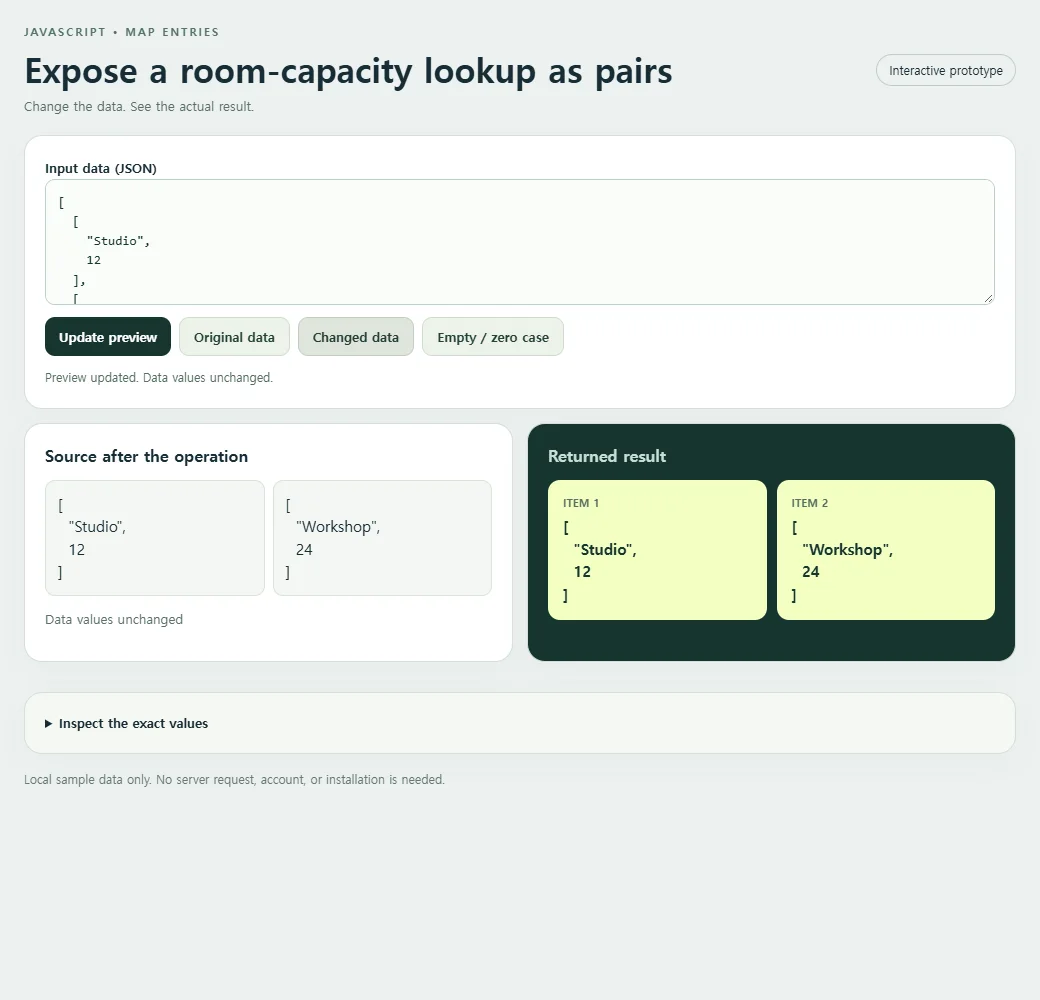
Keep strings double-quoted when editing this sample. A JSON parsing example explains the difference between a parse error and a valid value that the operation cannot use.
Before building table rows, let another person check that each room stays paired with its capacity. Put sample rooms in the HTML and share the runnable example through NOS, so they can change one capacity and verify that the corresponding label remains attached. Their preview edits are local to their run; sharing the HTML does not automatically synchronize those edits.
Source: MDN Map.entries.