An object inspector shows title and status, but a developer also wants to find internal fields that normal key enumeration skips. A list meant for displaying user-facing fields may not be enough for debugging an object's structure.
Object.getOwnPropertyNames includes non-enumerable own string properties. The first example returns title and status because ordinary JSON fields are enumerable. The difference becomes visible when you add an internal property using a descriptor, rather than another JSON entry.
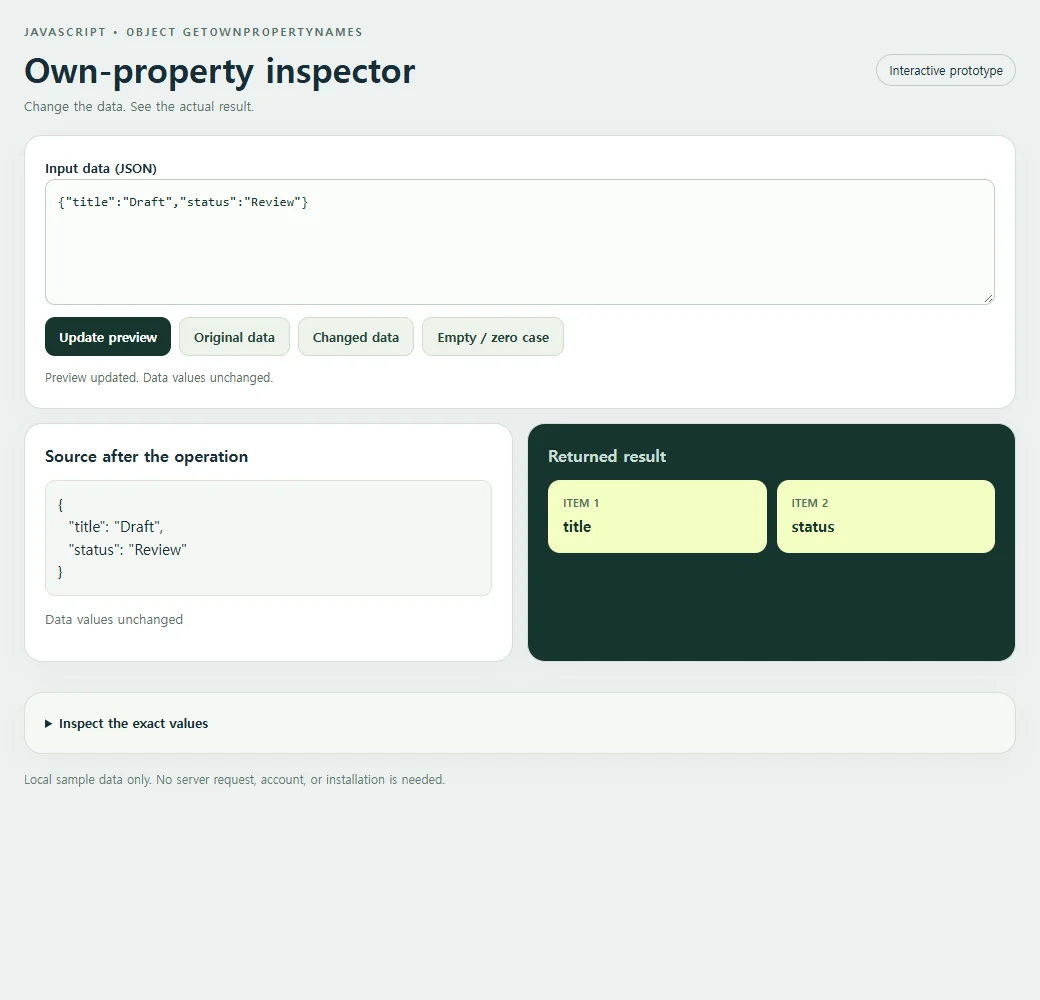
Try the working example
Use Changed data to compare another sample, or edit the JSON and choose Update preview. Original data restores the starting case.
<!doctype html><html lang="en"><head><meta charset="utf-8"><meta name="nos-demo-layout" content="responsive-lab"><meta name="viewport" content="width=device-width,initial-scale=1"><title>Own-property inspector</title><style>*{box-sizing:border-box}body{margin:0;background:#edf1f0;color:#172d36;font:15px/1.5 system-ui,sans-serif}main{max-width:1040px;margin:auto;padding:24px}header{display:flex;justify-content:space-between;gap:12px;align-items:center;margin-bottom:20px}.eyebrow{font-size:11px;font-weight:800;letter-spacing:2px;color:#55716b;text-transform:uppercase}h1{font-size:clamp(23px,4vw,34px);line-height:1.15;margin:8px 0}h2{font-size:16px;margin:0 0 12px}.tag{border:1px solid #bfceca;border-radius:99px;padding:6px 12px;font-size:12px;white-space:nowrap}.panel{background:white;border:1px solid #d4dfdb;border-radius:18px;padding:20px;margin-bottom:14px;box-shadow:0 9px 30px #1d393407}.grid{display:grid;grid-template-columns:1fr 1fr;gap:14px}.result{background:#17352f;color:#f7fffb}.result h2{color:#c9ded5}.cards{display:grid;gap:10px;grid-template-columns:repeat(auto-fit,minmax(135px,1fr))}.card{background:#f2ffc2;color:#17352f;padding:15px;border-radius:12px;min-width:0;overflow-wrap:anywhere}.card small{display:block;color:#536f60;font-size:11px;font-weight:700;text-transform:uppercase;margin-bottom:4px}.field{display:block;margin:8px 0}.field small{margin:0 0 3px;text-transform:none}.value{font-size:15px;font-weight:650;white-space:pre-wrap}.hero{font-size:clamp(28px,5vw,46px);font-weight:750;line-height:1.2;overflow-wrap:anywhere}.muted{color:#587169;font-size:13px}.result .muted{color:#bed7cb}pre{margin:0;white-space:pre-wrap;overflow-wrap:anywhere;font:13px/1.6 ui-monospace,monospace;max-height:220px;overflow:auto}.toolbar{display:flex;flex-wrap:wrap;gap:8px;margin:12px 0}button{background:#17352f;color:white;border:0;border-radius:10px;padding:10px 14px;font:600 13px system-ui;cursor:pointer}button.secondary{background:#edf3ea;color:#244337;border:1px solid #d0ddd0}button:hover{filter:brightness(.94)}button:focus-visible,textarea:focus-visible,summary:focus-visible{outline:3px solid #749919;outline-offset:3px}textarea{display:block;width:100%;height:126px;border:1px solid #bccfc5;border-radius:10px;background:#fafcf9;padding:12px;font:13px/1.5 ui-monospace,monospace;resize:vertical;color:#15362c}label{font-weight:650;font-size:13px}details{margin-top:16px}summary{cursor:pointer;font-size:13px;font-weight:650}#status{min-height:20px;font-size:12px;color:#526f60;margin-top:8px}.error{color:#ffcfbf}.footer{font-size:12px;color:#627b72;margin-top:16px}.empty{font-size:18px;color:#c7dacd}.source-card{background:#f4f7f3;border:1px solid #dbe4d8;border-radius:10px;padding:12px;overflow-wrap:anywhere;white-space:pre-wrap}.source-list{display:flex;flex-wrap:wrap;gap:8px;max-height:170px;overflow:auto}.source-list .source-card{flex:1;min-width:100px}.code{background:#f5f8f2}mark{background:#f2ffc2;color:#183a2d;padding:2px 5px;border-radius:4px}@media(max-width:620px){main{padding:15px}.grid{grid-template-columns:1fr}.panel{padding:16px}header{align-items:flex-start}.tag{display:none}h1{font-size:25px}.cards{grid-template-columns:repeat(auto-fit,minmax(125px,1fr))}.source-list{max-height:120px}pre{max-height:150px}}</style></head><body><main>
<header><div><div class="eyebrow">JavaScript • Object getOwnPropertyNames</div><h1>Own-property inspector</h1><div class="muted">Change the data. See the actual result.</div></div><span class="tag">Interactive prototype</span></header>
<section class="panel"><label for="input">Input data (JSON)</label><textarea id="input" maxlength="10000" spellcheck="false"></textarea><div class="toolbar"><button id="run" type="button">Update preview</button><button class="secondary" id="original" type="button">Original data</button><button class="secondary" id="changed" type="button">Changed data</button><button class="secondary" id="edge" type="button">Empty / zero case</button></div><div id="status" role="status" aria-live="polite"></div></section>
<div class="grid"><section class="panel"><h2>Source after the operation</h2><div id="source" class="source-list"></div><p id="source-status" class="muted"></p></section><section class="panel result"><h2>Returned result</h2><div id="result" aria-live="polite"></div></section></div><details class="panel code"><summary>Inspect the exact values</summary><pre id="inspect"></pre></details>
<p class="footer">Local sample data only. No server request, account, or installation is needed.</p></main><script>
'use strict';
const initial = "{\"title\":\"Draft\",\"status\":\"Review\"}";
const alternate = "{\n  \"title\": \"Draft\",\n  \"status\": \"Review\",\n  \"extra\": \"New field\"\n}";
const empty = "{}";
const input = document.getElementById('input');
const output = document.getElementById('result');
const source = document.getElementById('source');
const status = document.getElementById('status');
function transform(data) { return Object.getOwnPropertyNames(data); }
function readable(value) {
 if (value === undefined) return 'undefined';
 if (typeof value === 'number' && Object.is(value, -0)) return '-0';
 return JSON.stringify(value, (_, v) => typeof v === 'number' && !Number.isFinite(v) ? String(v) : v, 2);
}
function renderCards(value, host) {
 host.replaceChildren();
 if (Array.isArray(value)) {
  if (!value.length) {const p=document.createElement('p');p.className='empty';p.textContent='No items returned';host.append(p);return;}
  const grid=document.createElement('div');grid.className='cards';
  value.slice(0,40).forEach((item,index)=>{const card=document.createElement('div');card.className='card';const label=document.createElement('small');label.textContent='Item '+(index+1);card.append(label);appendValue(item,card);grid.append(card);});host.append(grid);
  if(value.length>40){const p=document.createElement('p');p.textContent='Showing 40 of '+value.length+' items.';host.append(p);}
 } else if(value && typeof value==='object'){const card=document.createElement('div');card.className='card';appendValue(value,card);host.append(card);}
 else {const p=document.createElement('div');p.className='hero';p.textContent=typeof value==='boolean'?(value?'Yes · true':'No · false'):value===undefined?'No value · undefined':value===''?'Empty string':String(value);host.append(p);}
}
function appendValue(value,host){
 if(value && typeof value==='object' && !Array.isArray(value))Object.entries(value).slice(0,40).forEach(([key,item])=>{const row=document.createElement('div');row.className='field';const label=document.createElement('small');label.textContent=key;const text=document.createElement('span');text.className='value';text.textContent=typeof item==='string'?item:readable(item);row.append(label,text);host.append(row);});
 else {const text=document.createElement('div');text.className='value';text.textContent=typeof value==='string'?value:readable(value);host.append(text);}
}
function update(){
 try{
  if(input.value.length>10000)throw new Error('Keep this sample below 10,000 characters.');
  const data=JSON.parse(input.value);const before=readable(data);const result=transform(data);const after=readable(data);
  renderCards(result,output);source.replaceChildren();(Array.isArray(data)?data.slice(0,40):[data]).forEach(item=>{const card=document.createElement('div');card.className='source-card';card.textContent=typeof item==='string'?item:readable(item);source.append(card);});document.getElementById('source-status').textContent=before===after?'Data values unchanged':'Data values changed in place';document.getElementById('inspect').textContent='Input before:\n'+before+'\n\nReturned result:\n'+readable(result)+'\n\nSource after:\n'+after;
  output.classList.remove('error');status.textContent='Preview updated. '+(before===after?'Data values unchanged.':'Source data changed in place.');
 }catch(error){output.replaceChildren();output.classList.add('error');output.textContent=error.name+': '+error.message;source.replaceChildren();document.getElementById('source-status').textContent='';document.getElementById('inspect').textContent='';status.textContent='Check the JSON and the input shape. Restore Original data to start again.';}
}
document.getElementById('run').addEventListener('click',update);
[['original',initial],['changed',alternate],['edge',empty]].forEach(([id,value])=>document.getElementById(id).addEventListener('click',()=>{input.value=value;update();}));

input.value=initial;update();
</script></body></html>
List the directly owned string properties
Pass an object to the method and it returns an array of property names. In this sample, the result is ["title", "status"]. The method reads names directly owned by the object and does not modify their values or descriptor flags.
With these simple fields, Object.keys returns the same names. That agreement is expected: both properties are own, string-keyed, and enumerable. The broader behavior of getOwnPropertyNames matters when an own property is non-enumerable.
Inherited names stay out of the result. For example, an object's inherited toString method does not appear just because it can be called. Symbol-keyed properties are also excluded; this method specifically returns string names.
const data = {
  "title": "Draft",
  "status": "Review"
};
const result = Object.getOwnPropertyNames(data);
console.log(result);
The original sample returns:
[
  "title",
  "status"
]
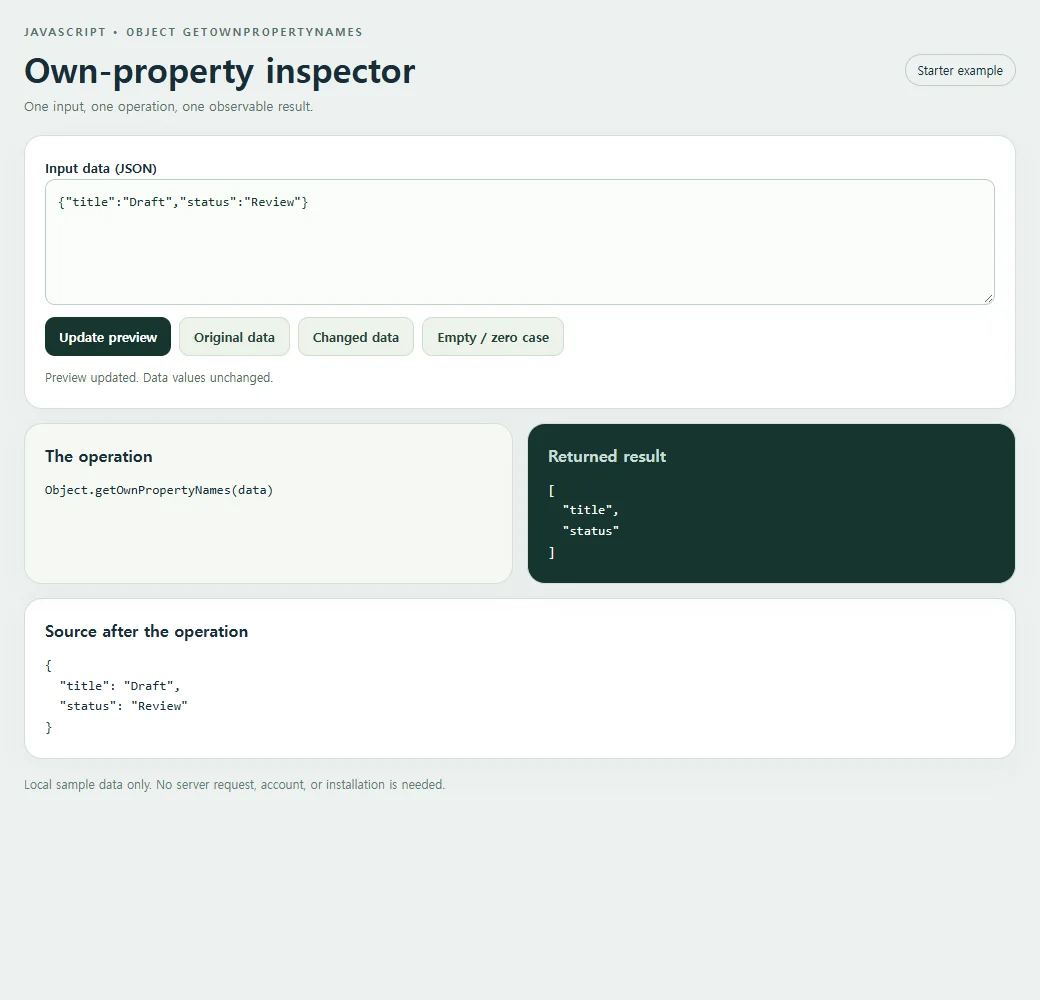
Keep the example on your own page
The smaller version below includes the HTML, styles, and script. Choose Copy code, save the result as an index.html file, and open it in a browser.
<!doctype html><html lang="en"><head><meta charset="utf-8"><meta name="nos-demo-layout" content="responsive-lab"><meta name="viewport" content="width=device-width,initial-scale=1"><title>Own-property inspector</title><style>*{box-sizing:border-box}body{margin:0;background:#edf1f0;color:#172d36;font:15px/1.5 system-ui,sans-serif}main{max-width:1040px;margin:auto;padding:24px}header{display:flex;justify-content:space-between;gap:12px;align-items:center;margin-bottom:20px}.eyebrow{font-size:11px;font-weight:800;letter-spacing:2px;color:#55716b;text-transform:uppercase}h1{font-size:clamp(23px,4vw,34px);line-height:1.15;margin:8px 0}h2{font-size:16px;margin:0 0 12px}.tag{border:1px solid #bfceca;border-radius:99px;padding:6px 12px;font-size:12px;white-space:nowrap}.panel{background:white;border:1px solid #d4dfdb;border-radius:18px;padding:20px;margin-bottom:14px;box-shadow:0 9px 30px #1d393407}.grid{display:grid;grid-template-columns:1fr 1fr;gap:14px}.result{background:#17352f;color:#f7fffb}.result h2{color:#c9ded5}.cards{display:grid;gap:10px;grid-template-columns:repeat(auto-fit,minmax(135px,1fr))}.card{background:#f2ffc2;color:#17352f;padding:15px;border-radius:12px;min-width:0;overflow-wrap:anywhere}.card small{display:block;color:#536f60;font-size:11px;font-weight:700;text-transform:uppercase;margin-bottom:4px}.field{display:block;margin:8px 0}.field small{margin:0 0 3px;text-transform:none}.value{font-size:15px;font-weight:650;white-space:pre-wrap}.hero{font-size:clamp(28px,5vw,46px);font-weight:750;line-height:1.2;overflow-wrap:anywhere}.muted{color:#587169;font-size:13px}.result .muted{color:#bed7cb}pre{margin:0;white-space:pre-wrap;overflow-wrap:anywhere;font:13px/1.6 ui-monospace,monospace;max-height:220px;overflow:auto}.toolbar{display:flex;flex-wrap:wrap;gap:8px;margin:12px 0}button{background:#17352f;color:white;border:0;border-radius:10px;padding:10px 14px;font:600 13px system-ui;cursor:pointer}button.secondary{background:#edf3ea;color:#244337;border:1px solid #d0ddd0}button:hover{filter:brightness(.94)}button:focus-visible,textarea:focus-visible,summary:focus-visible{outline:3px solid #749919;outline-offset:3px}textarea{display:block;width:100%;height:126px;border:1px solid #bccfc5;border-radius:10px;background:#fafcf9;padding:12px;font:13px/1.5 ui-monospace,monospace;resize:vertical;color:#15362c}label{font-weight:650;font-size:13px}details{margin-top:16px}summary{cursor:pointer;font-size:13px;font-weight:650}#status{min-height:20px;font-size:12px;color:#526f60;margin-top:8px}.error{color:#ffcfbf}.footer{font-size:12px;color:#627b72;margin-top:16px}.empty{font-size:18px;color:#c7dacd}.source-card{background:#f4f7f3;border:1px solid #dbe4d8;border-radius:10px;padding:12px;overflow-wrap:anywhere;white-space:pre-wrap}.source-list{display:flex;flex-wrap:wrap;gap:8px;max-height:170px;overflow:auto}.source-list .source-card{flex:1;min-width:100px}.code{background:#f5f8f2}mark{background:#f2ffc2;color:#183a2d;padding:2px 5px;border-radius:4px}@media(max-width:620px){main{padding:15px}.grid{grid-template-columns:1fr}.panel{padding:16px}header{align-items:flex-start}.tag{display:none}h1{font-size:25px}.cards{grid-template-columns:repeat(auto-fit,minmax(125px,1fr))}.source-list{max-height:120px}pre{max-height:150px}}</style></head><body><main>
<header><div><div class="eyebrow">JavaScript • Object getOwnPropertyNames</div><h1>Own-property inspector</h1><div class="muted">One input, one operation, one observable result.</div></div><span class="tag">Starter example</span></header>
<section class="panel"><label for="input">Input data (JSON)</label><textarea id="input" maxlength="10000" spellcheck="false"></textarea><div class="toolbar"><button id="run" type="button">Update preview</button><button class="secondary" id="original" type="button">Original data</button><button class="secondary" id="changed" type="button">Changed data</button><button class="secondary" id="edge" type="button">Empty / zero case</button></div><div id="status" role="status" aria-live="polite"></div></section>
<div class="grid"><section class="panel code"><h2>The operation</h2><pre id="expression"></pre></section><section class="panel result"><h2>Returned result</h2><pre id="result" aria-live="polite"></pre></section></div><section class="panel"><h2>Source after the operation</h2><pre id="source"></pre></section>
<p class="footer">Local sample data only. No server request, account, or installation is needed.</p></main><script>
'use strict';
const initial = "{\"title\":\"Draft\",\"status\":\"Review\"}";
const alternate = "{\n  \"title\": \"Draft\",\n  \"status\": \"Review\",\n  \"extra\": \"New field\"\n}";
const empty = "{}";
const input = document.getElementById('input');
const output = document.getElementById('result');
const source = document.getElementById('source');
const status = document.getElementById('status');
function transform(data) { return Object.getOwnPropertyNames(data); }
function readable(value) {
 if (value === undefined) return 'undefined';
 if (typeof value === 'number' && Object.is(value, -0)) return '-0';
 return JSON.stringify(value, (_, v) => typeof v === 'number' && !Number.isFinite(v) ? String(v) : v, 2);
}
function renderCards(value, host) {
 host.replaceChildren();
 if (Array.isArray(value)) {
  if (!value.length) {const p=document.createElement('p');p.className='empty';p.textContent='No items returned';host.append(p);return;}
  const grid=document.createElement('div');grid.className='cards';
  value.slice(0,40).forEach((item,index)=>{const card=document.createElement('div');card.className='card';const label=document.createElement('small');label.textContent='Item '+(index+1);card.append(label);appendValue(item,card);grid.append(card);});host.append(grid);
  if(value.length>40){const p=document.createElement('p');p.textContent='Showing 40 of '+value.length+' items.';host.append(p);}
 } else if(value && typeof value==='object'){const card=document.createElement('div');card.className='card';appendValue(value,card);host.append(card);}
 else {const p=document.createElement('div');p.className='hero';p.textContent=typeof value==='boolean'?(value?'Yes · true':'No · false'):value===undefined?'No value · undefined':value===''?'Empty string':String(value);host.append(p);}
}
function appendValue(value,host){
 if(value && typeof value==='object' && !Array.isArray(value))Object.entries(value).slice(0,40).forEach(([key,item])=>{const row=document.createElement('div');row.className='field';const label=document.createElement('small');label.textContent=key;const text=document.createElement('span');text.className='value';text.textContent=typeof item==='string'?item:readable(item);row.append(label,text);host.append(row);});
 else {const text=document.createElement('div');text.className='value';text.textContent=typeof value==='string'?value:readable(value);host.append(text);}
}
function update(){
 try{
  if(input.value.length>10000)throw new Error('Keep this sample below 10,000 characters.');
  const data=JSON.parse(input.value);const before=readable(data);const result=transform(data);const after=readable(data);
  output.textContent=readable(result);source.textContent=after;
  output.classList.remove('error');status.textContent='Preview updated. '+(before===after?'Data values unchanged.':'Source data changed in place.');
 }catch(error){output.replaceChildren();output.classList.add('error');output.textContent=error.name+': '+error.message;source.replaceChildren();status.textContent='Check the JSON and the input shape. Restore Original data to start again.';}
}
document.getElementById('run').addEventListener('click',update);
[['original',initial],['changed',alternate],['edge',empty]].forEach(([id,value])=>document.getElementById(id).addEventListener('click',()=>{input.value=value;update();}));
document.getElementById('expression').textContent="Object.getOwnPropertyNames(data)";
input.value=initial;update();
</script></body></html>
JSON cannot create a non-enumerable field
Adding a field to JSON cannot make it non-enumerable. JSON does not represent property descriptor flags, so typing internalId into this editor only adds another ordinary field. Use the copied code for the meaningful comparison.
Define internalId with Object.defineProperty and enumerable: false. Object.keys will omit it, but Object.getOwnPropertyNames will include it. That shows why this method is useful for inspection rather than just duplicating keys.
Non-enumerable is not private or secret. If code has access to the object, it can still inspect those property names. Do not treat a hidden field in a display list as a data-security boundary.
Compare visible and internal keys
First add an owner field through the JSON editor and confirm that it appears in both kinds of key list. Next, copy the starter and define internalId as non-enumerable. Compare the two lists again.
For a fuller inspector, show a separate section for symbol keys using the appropriate symbol-inspection method. Keeping those categories distinct is more useful than claiming this one method lists every possible property associated with an object.
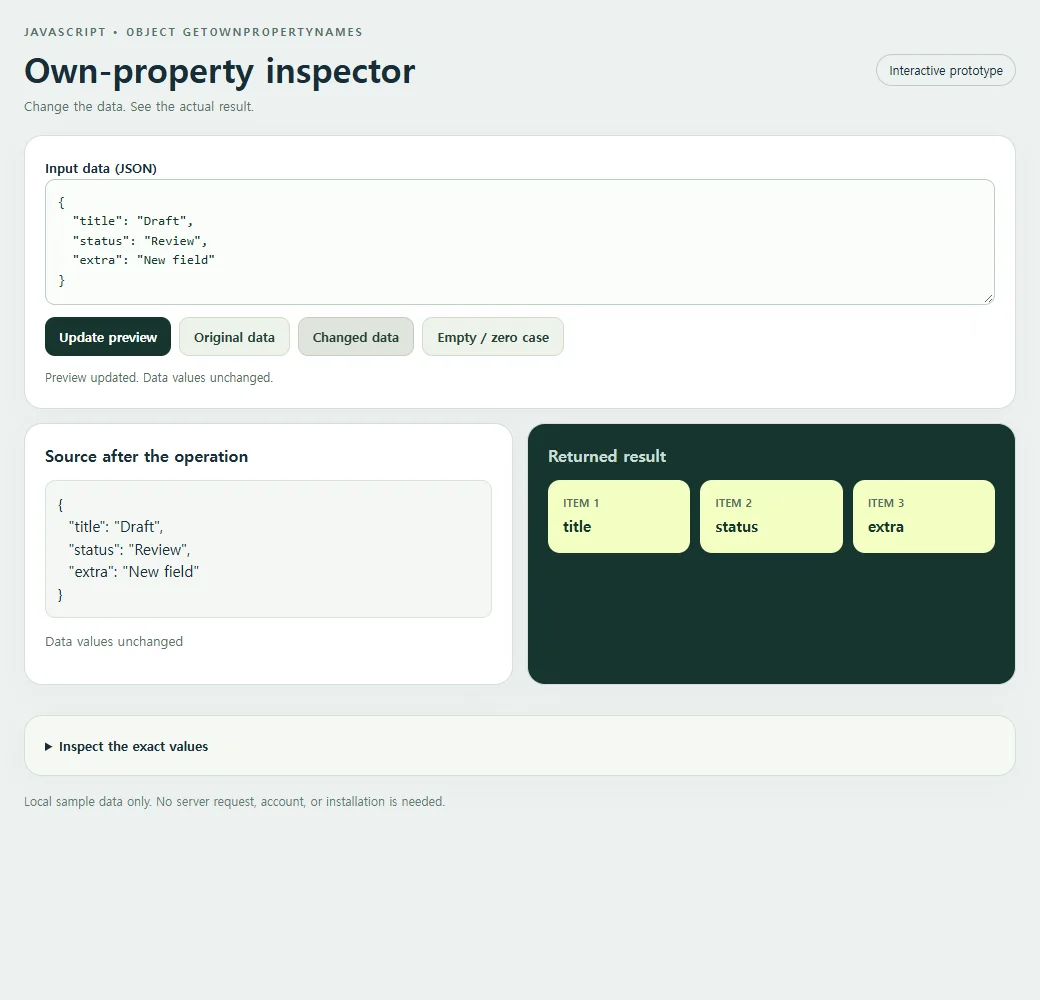
The MDN reference for Object.getOwnPropertyNames() documents the method's full behavior and browser compatibility.
For help editing the sample input, the JSON guide explains valid JSON and how parsing turns it into JavaScript values.
Share a working explanation
An object inspector makes a useful small teaching page when its labels distinguish own, inherited, and non-enumerable properties. Share that HTML through HTML to link with NOS so another developer can inspect the comparison. Use invented internal identifiers rather than exposing identifiers from a private system.