Promise는 서버의 응답과 같이 아직 준비되지 않은 값을 나타냅니다. async 함수는 항상 약속을 반환합니다. 그 안에서 await는 약속이 확정되고 값을 전달할 때까지 해당 기능 하나를 일시 중지합니다. 페이지가 계속 실행됩니다.
먼저 시도해 보세요. 아래 세 가지 작업은 setTimeout로 만든 가짜 요청입니다. 하나씩 달리고, 함께 달리고, 경주로 달리며 총 시간을 비교해 보세요.
<!doctype html>
<html lang="en">
<head>
<meta charset="utf-8">
<meta name="viewport" content="width=device-width, initial-scale=1">
<title>await vs Promise.all vs Promise.race</title>
<style>
  body { margin: 0; padding: 16px; font-family: system-ui, sans-serif; background: #f4f5f7; color: #1d2330; }
  .btns { display: flex; flex-wrap: wrap; gap: 8px; margin-bottom: 12px; }
  button { font: inherit; padding: 8px 12px; border: 1px solid #c9ced8; border-radius: 8px; background: #fff; cursor: pointer; }
  button:disabled { opacity: .5; cursor: default; }
  .row { display: grid; grid-template-columns: 96px 1fr; align-items: center; gap: 8px; margin: 8px 0; font-size: 14px; }
  .track { position: relative; height: 26px; background: #fff; border: 1px solid #e1e4ea; border-radius: 6px; overflow: hidden; }
  .bar { position: absolute; top: 3px; bottom: 3px; width: 0; border-radius: 4px; background: #93b4f5; }
  .bar.done { background: #2f9e5b; }
  .bar.ignored { background: #c7ccd4; }
  pre { margin: 12px 0 8px; padding: 10px; background: #1d2330; color: #e5e9f0; border-radius: 8px; font-size: 13px; overflow-x: auto; min-height: 4.5em; line-height: 1.5; }
  #total { font-weight: 700; min-height: 1.3em; }
</style>
</head>
<body>
<div class="btns">
  <button data-mode="seq">One by one (await)</button>
  <button data-mode="all">Promise.all</button>
  <button data-mode="race">Promise.race</button>
</div>
<div id="rows"></div>
<pre id="code">Pick a button. Each task is a fake request made with setTimeout.</pre>
<div id="total"></div>

<script>
  // A promise that resolves after ms milliseconds
  const wait = (ms) => new Promise((resolve) => setTimeout(resolve, ms));

  const tasks = [
    { name: 'Load user', ms: 900 },
    { name: 'Load posts', ms: 600 },
    { name: 'Load photos', ms: 1200 },
  ];
  const SCALE = 2800; // the track width stands for 2.8 seconds
  const code = {
    seq: 'for (const t of tasks) {\n  await fakeTask(t); // next one waits\n}',
    all: '// all three start now\nawait Promise.all(\n  tasks.map(fakeTask));',
    race: '// first to settle wins\nconst first = await Promise.race(\n  tasks.map(fakeTask));',
  };

  const rows = document.getElementById('rows');
  const bars = tasks.map((t) => {
    rows.insertAdjacentHTML('beforeend', `<div class="row"><span>${t.name}</span><div class="track"><div class="bar"></div></div></div>`);
    return rows.lastElementChild.querySelector('.bar');
  });

  let t0 = 0;
  // Fake request: draws its own bar while it runs
  async function fakeTask(t) {
    const bar = bars[tasks.indexOf(t)];
    const start = performance.now() - t0;
    bar.style.left = (start / SCALE * 100) + '%';
    const grow = setInterval(() => {
      bar.style.width = ((performance.now() - t0 - start) / SCALE * 100) + '%';
    }, 16);
    await wait(t.ms);
    clearInterval(grow);
    bar.style.width = (t.ms / SCALE * 100) + '%';
    bar.classList.add('done');
    return t.name;
  }

  async function run(mode) {
    bars.forEach((b) => { b.className = 'bar'; b.style.width = '0'; });
    document.getElementById('code').textContent = code[mode];
    const total = document.getElementById('total');
    total.textContent = 'Running...';
    t0 = performance.now();
    let note = '';
    let pending = [];

    if (mode === 'seq') {
      for (const t of tasks) await fakeTask(t);
    } else if (mode === 'all') {
      await Promise.all(tasks.map(fakeTask));
    } else {
      pending = tasks.map(fakeTask);
      note = ' - winner: ' + await Promise.race(pending);
      // The losers keep running; race just stops listening to them
      bars.forEach((b) => { if (!b.classList.contains('done')) b.classList.add('ignored'); });
    }
    total.textContent = 'Total: ' + Math.round(performance.now() - t0) + ' ms' + note;
    await Promise.all(pending); // let the losers finish before the next run
  }

  document.querySelectorAll('button').forEach((btn) => {
    btn.addEventListener('click', async () => {
      document.querySelectorAll('button').forEach((b) => (b.disabled = true));
      await run(btn.dataset.mode);
      document.querySelectorAll('button').forEach((b) => (b.disabled = false));
    });
  });
</script>
</body>
</html>
약속이란 무엇인가
약속은 세 가지 상태 중 하나에 있습니다. 보류 중 시작됩니다. 그런 다음 값으로 이행되거나 오류로 인해 거부되며 그 이후에는 절대 변경되지 않습니다. Settled는 마지막 두 가지 중 하나에 해당하는 단어입니다.
fetch 및 많은 브라우저 API가 이미 약속을 반환했기 때문에 약속을 직접 작성하는 경우는 거의 없습니다. 가장 많이 작성할 것은 setTimeout을 기다릴 수 있는 것으로 바꾸는 지연 도우미입니다.
const wait = (ms) => new Promise((resolve) => setTimeout(resolve, ms));

async function start() {
  console.log('one');
  await wait(1000);          // this function pauses for a second
  console.log('two');
}
start();
console.log('this runs before "two"');
마지막 줄이 바로 이어집니다. 페이지가 아닌 start만 일시중지됩니다. 이 페이지의 모든 데모는 동일한 트릭을 사용하여 느린 작업을 가짜로 만들기 때문에 네트워크가 필요하지 않습니다.
비동기 함수는 항상 약속을 반환합니다.
함수 앞에 async를 넣으면 일반 문자열을 반환하더라도 해당 반환 값이 약속으로 래핑됩니다. 내부의 throw는 거부된 약속이 됩니다. 이것이 가장 일반적인 비동기 버그가 페이지에서 다음과 같이 보이는 이유입니다.
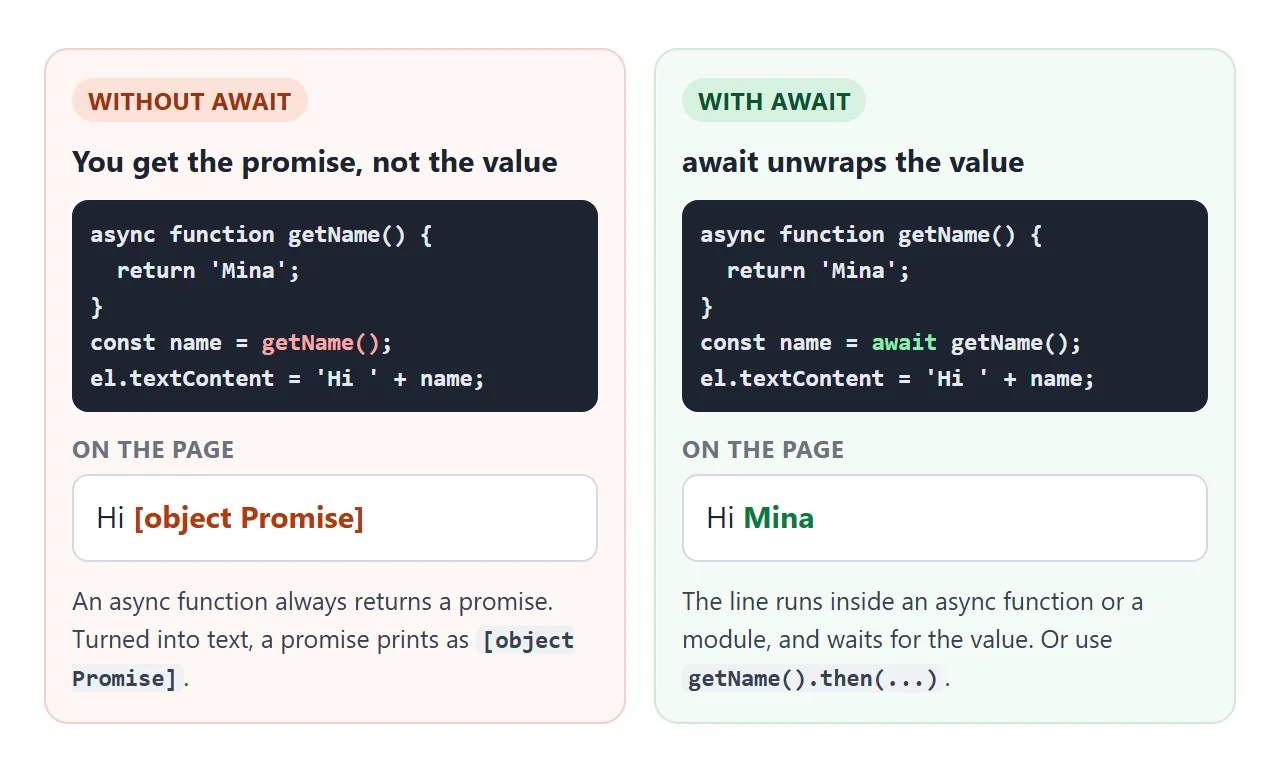
[object Promise]는 코드가 값을 원하는 곳에 약속을 사용했음을 의미합니다. 통화 앞에 await를 추가합니다. 호출 코드가 비동기가 아닌 경우 async도 표시하거나 .then(value => ...)를 사용하세요.
await는 비동기 함수 내부 또는 모듈의 최상위 수준에서만 허용됩니다. 다른 곳에서는 스크립트가 실행되기 전에 브라우저가 SyntaxError로 중지됩니다.
모듈에서 최상위 수준 대기
모듈에서는 모든 함수 외부에 await를 작성할 수 있습니다. 모듈은 나머지를 실행하기 전에 해당 줄에서 기다립니다.
<script type="module">
  const res = await fetch('data.json');
  const data = await res.json();
  document.querySelector('h1').textContent = data.title;
</script>
모듈 스크립트는 연기되므로 위의 HTML은 실행될 때 구문 분석되었습니다. 일반 <script>에서는 동일한 코드가 SyntaxError입니다.
모듈 외부에서는 대신 async function main() { ... } main();로 래핑합니다. 응답 텍스트를 객체로 변환하려면 JSON.parse를 참조하세요.
Try/Catch로 오류 잡기
기다렸던 Promise가 거부되면 await 라인이 발생합니다. 일반 try/catch는 이를 포착하므로 async/await가 .then() 및 .catch() 체인보다 더 쉽게 읽을 수 있는 주된 이유입니다.
async function load() {
  try {
    const data = await getData();
    show(data);
  } catch (err) {
    showError(err.message);   // the request failed
  }
}
아무도 기다리거나 잡지 않는 거부된 약속은 처리되지 않은 거부입니다. 브라우저는 이를 콘솔에 오류로 기록하고 페이지는 다음에 일어날 예정인 모든 작업을 자동으로 건너뜁니다.
아래 세 가지 버튼을 사용해 보세요. 실패율을 가끔씩으로 설정하고 각각을 몇 번씩 누르세요.
<!doctype html>
<html lang="en">
<head>
<meta charset="utf-8">
<meta name="viewport" content="width=device-width, initial-scale=1">
<title>Async errors: try/catch, allSettled, forgotten await</title>
<style>
  body { margin: 0; padding: 16px; font-family: system-ui, sans-serif; background: #f4f5f7; color: #1d2330; font-size: 14px; }
  .btns { display: flex; flex-wrap: wrap; gap: 8px; margin: 10px 0 12px; }
  button, select { font: inherit; padding: 8px 12px; border: 1px solid #c9ced8; border-radius: 8px; background: #fff; }
  button { cursor: pointer; }
  table { width: 100%; border-collapse: collapse; background: #fff; border-radius: 8px; overflow: hidden; }
  th, td { text-align: left; padding: 7px 10px; border-bottom: 1px solid #e8eaef; }
  th { background: #eef1f5; font-size: 13px; }
  .ok { color: #0f7a3d; font-weight: 600; }
  .bad { color: #b4380f; font-weight: 600; }
  #msg { margin-top: 10px; padding: 10px; border-radius: 8px; background: #fff; border: 1px solid #e1e4ea; min-height: 1.4em; }
  code { font-family: ui-monospace, Consolas, monospace; font-size: 13px; }
</style>
</head>
<body>
<label>Each fake request fails:
  <select id="rate">
    <option value="0.4">Sometimes (40%)</option>
    <option value="0">Never</option>
    <option value="1">Always</option>
  </select>
</label>
<div class="btns">
  <button id="all">try/catch + Promise.all</button>
  <button id="settled">Promise.allSettled</button>
  <button id="forgot">Forgot await</button>
</div>
<table>
  <thead><tr><th>Request</th><th>Result</th></tr></thead>
  <tbody id="rows"><tr><td colspan="2">Press a button.</td></tr></tbody>
</table>
<div id="msg"></div>

<script>
  const names = ['user', 'posts', 'photos'];
  const rows = document.getElementById('rows');
  const msg = document.getElementById('msg');

  // Fake request: random delay, fails at the chosen rate
  function fakeRequest(name) {
    const rate = Number(document.getElementById('rate').value);
    return new Promise((resolve, reject) => {
      setTimeout(() => {
        if (Math.random() < rate) reject(new Error(name + ': server error'));
        else resolve(name + ' loaded');
      }, 200 + Math.random() * 500);
    });
  }

  function show(list) {
    rows.innerHTML = list.map(([name, text, ok]) =>
      `<tr><td>${name}</td><td class="${ok ? 'ok' : 'bad'}">${text}</td></tr>`).join('');
  }

  // 1. Promise.all inside try/catch: one failure throws, all results are lost
  document.getElementById('all').addEventListener('click', async () => {
    msg.textContent = 'Loading...';
    try {
      const results = await Promise.all(names.map(fakeRequest));
      show(results.map((r, i) => [names[i], r, true]));
      msg.textContent = 'All three succeeded.';
    } catch (err) {
      show(names.map((n) => [n, 'no result (Promise.all rejected)', false]));
      msg.textContent = 'Caught: ' + err.message;
    }
  });

  // 2. allSettled never rejects: one row per request, success or failure
  document.getElementById('settled').addEventListener('click', async () => {
    msg.textContent = 'Loading...';
    const results = await Promise.allSettled(names.map(fakeRequest));
    show(results.map((r, i) => r.status === 'fulfilled'
      ? [names[i], r.value, true]
      : [names[i], r.reason.message, false]));
    const failed = results.filter((r) => r.status === 'rejected').length;
    msg.textContent = failed + ' of ' + results.length + ' failed. The others still count.';
  });

  // 3. The bug: without await you get the Promise object, not the value
  document.getElementById('forgot').addEventListener('click', async () => {
    const wrong = fakeRequest('user');
    wrong.catch(() => {}); // this demo ignores its failure on purpose
    const text = 'Hello ' + wrong;
    msg.innerHTML = 'Without await: <code></code>';
    msg.querySelector('code').textContent = text;
    try {
      const right = await fakeRequest('user');
      show([['user (no await)', text, false], ['user (await)', right, true]]);
    } catch (err) {
      show([['user (no await)', text, false], ['user (await)', err.message, false]]);
    }
  });
</script>
</body>
</html>
순차적으로 또는 병렬로
비동기 함수를 호출하면 작업이 즉시 시작됩니다. await는 기다릴 때만 결정합니다. 따라서 세 개의 대기가 연속적으로 실행되고, 세 개 모두 먼저 시작한 다음 대기가 겹치게 됩니다.
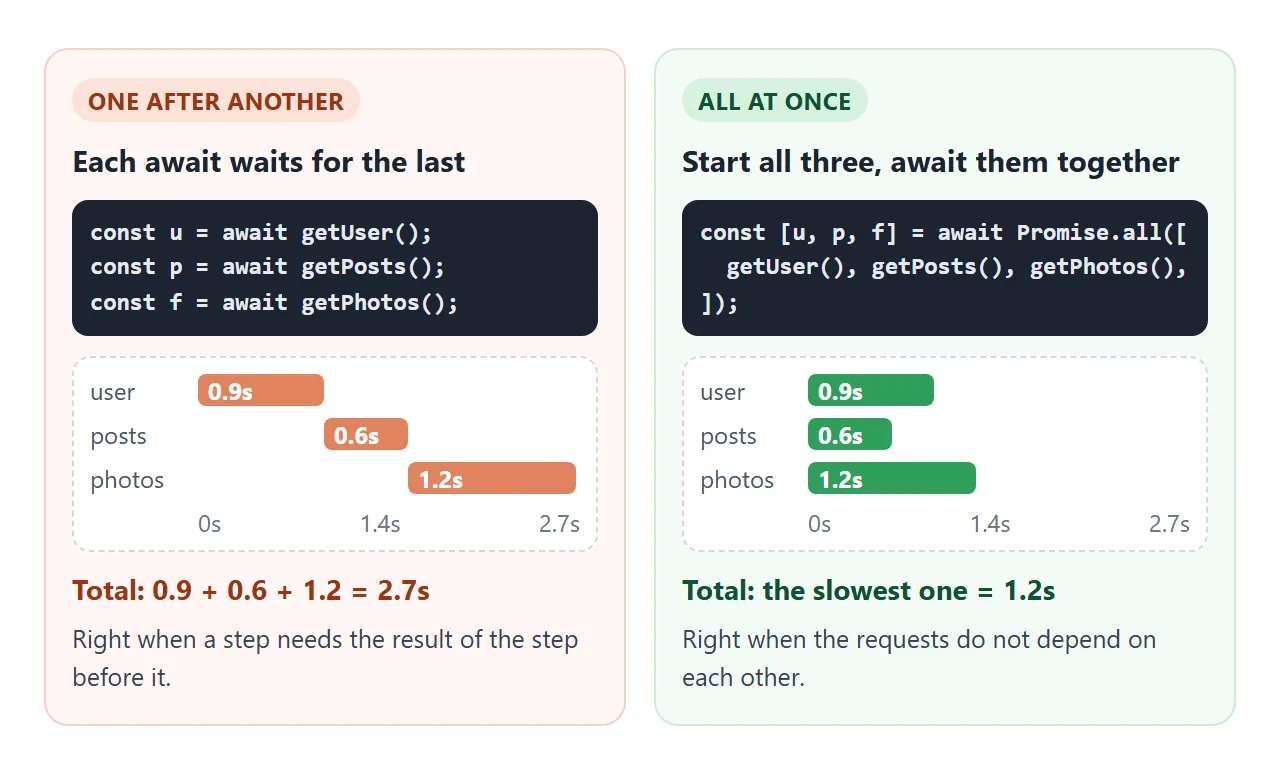
예를 들어 사용자를 로드한 다음 해당 사용자의 게시물을 로드하는 등 단계에 이전 결과가 필요할 때 차례로 사용합니다. 그렇지 않으면 네 가지 연결자 중 하나를 사용하여 시작하십시오.
| 방법 | 다음과 같은 경우에 해결됩니다. | 결과 | 다음에 좋습니다 |
|---|---|---|---|
Promise.all |
모두 이행하거나 첫 번째 거부 | 값 배열 | 모든 것은 성공해야 한다 |
Promise.allSettled |
모든 약속은 확정됐어 | { status, value } 또는 { status, reason } 어레이 |
무엇이 효과가 있었는지 보여주고, 무엇이 실패했는지 보고하세요 |
Promise.race |
첫 번째가 정착, 성공 또는 실패 | 그 하나의 값이나 오류 | 시간 초과 |
Promise.any |
첫 번째는 충족합니다. | 해당 값 또는 모두 거부되는 경우 AggregateError |
여러 소스, 첫 번째 좋은 답변이 승리 |
그들 중 누구도 듣지 않는 약속을 취소하지 않습니다. 위의 레이스 데모에서는 느린 바가 끝까지 계속 실행됩니다. 그 결과는 단순히 무시됩니다.
루프에서 기다리다
내부에 await가 포함된 for...of는 루프 본문을 한 번에 한 항목씩 실행합니다. 주문이 중요한 경우에는 맞습니다. 하지만 항목이 50개 있으면 연속으로 50번의 대기가 필요합니다.
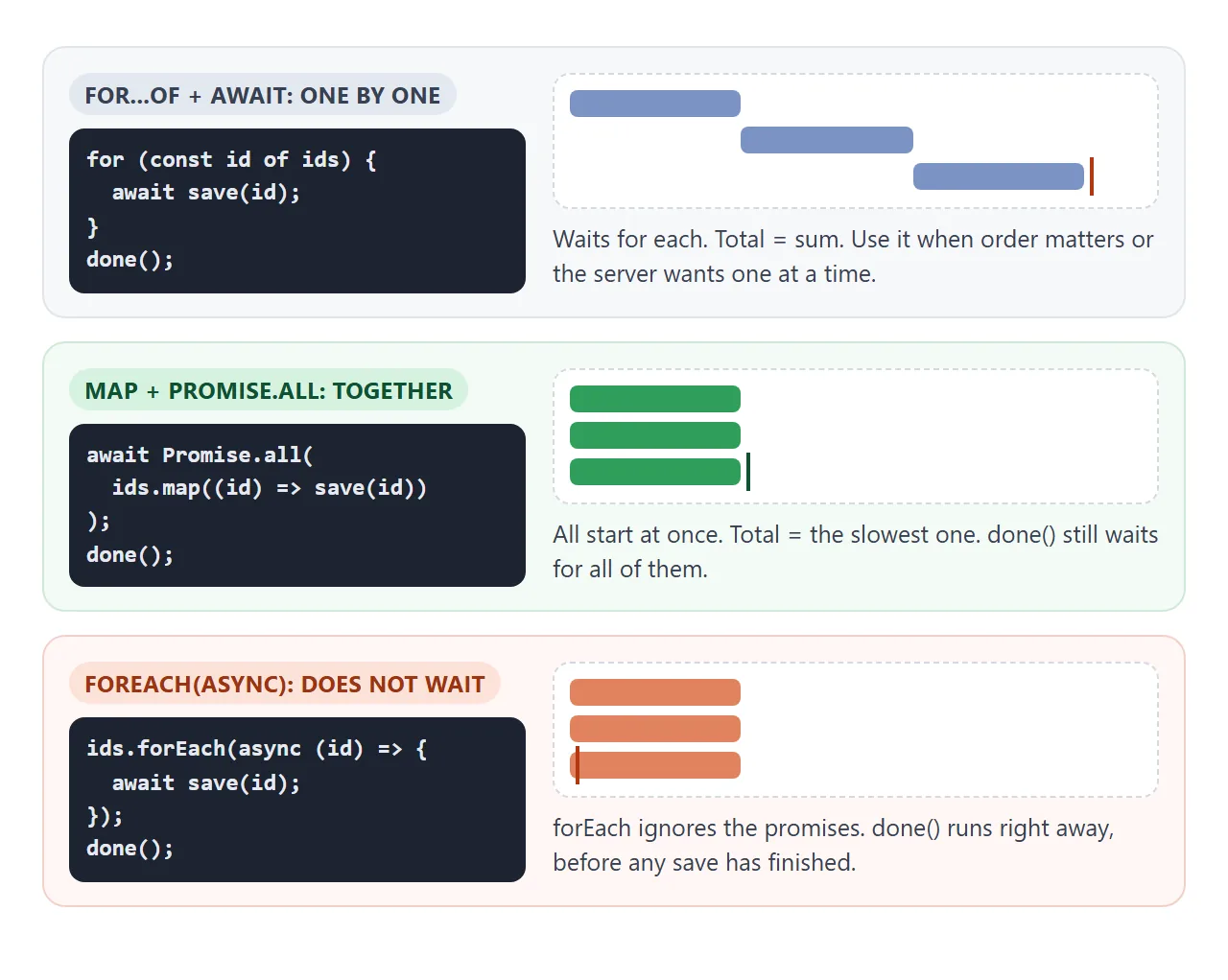
// One at a time: total = sum of all
for (const id of ids) {
  await save(id);
}

// Together: total = the slowest one
await Promise.all(ids.map((id) => save(id)));
비동기 콜백으로 forEach를 피하세요. 콜백이 반환하는 약속을 무시하므로 항목이 완료되기 전에 루프 이후의 코드가 실행됩니다.
시간 초과 및 취소
지연 도우미가 포함된 Promise.race는 모든 약속에 시간 제한을 제공합니다.
const timeout = (ms) => new Promise((_, reject) =>
  setTimeout(() => reject(new Error('Timed out')), ms));

const data = await Promise.race([getData(), timeout(5000)]);
그러면 작업이 아니라 기다림이 중단됩니다. 실제로 요청을 중지하려면 AbortController를 사용하세요. signal를 요청에 전달하고 더 이상 응답이 필요하지 않으면 abort()를 호출합니다. 그런 다음 fetch는 name가 'AbortError'인 오류와 함께 거부합니다.
const controller = new AbortController();
const res = await fetch('/api/search?q=pear', { signal: controller.signal });
// elsewhere, when the user types something newer:
controller.abort();
fetch에 대한 일반 시간 제한의 경우 AbortSignal.timeout(5000)는 자체적으로 중단되는 신호를 만듭니다. 이 경우 오류의 name는 'TimeoutError'입니다.
완성된 예: 검색창
검색창은 이 모든 것을 하나로 묶어줍니다. 입력하면 요청이 전송되고, 답변은 나중에 도착하며, 오래되고 느린 답변이 새 답변을 덮어쓰면 안 됩니다.
<!doctype html>
<html lang="en">
<head>
<meta charset="utf-8">
<meta name="viewport" content="width=device-width, initial-scale=1">
<title>Async search box with cancel</title>
<style>
  body { margin: 0; padding: 16px; font-family: system-ui, sans-serif; background: #f4f5f7; color: #1d2330; font-size: 14px; }
  input[type=search] { width: 100%; box-sizing: border-box; font: inherit; font-size: 16px; padding: 10px 12px; border: 1px solid #c9ced8; border-radius: 8px; }
  .opt { display: block; margin: 8px 0; color: #4b5563; }
  #status { min-height: 1.4em; margin: 8px 0; }
  #status.loading::before { content: ''; display: inline-block; width: 10px; height: 10px; margin-right: 6px; border: 2px solid #93b4f5; border-top-color: transparent; border-radius: 50%; animation: spin .7s linear infinite; }
  #status.error { color: #b4380f; font-weight: 600; }
  @keyframes spin { to { transform: rotate(360deg); } }
  ul { list-style: none; margin: 0; padding: 0; background: #fff; border-radius: 8px; border: 1px solid #e1e4ea; min-height: 40px; max-height: 190px; overflow: auto; }
  li { padding: 7px 12px; border-bottom: 1px solid #eef0f3; }
  #log { margin-top: 10px; font: 12px/1.5 ui-monospace, Consolas, monospace; color: #6b7280; max-height: 92px; overflow: auto; }
</style>
</head>
<body>
<input type="search" id="q" placeholder="Search fruit (type 'oops' for an error)" autocomplete="off">
<label class="opt"><input type="checkbox" id="cancel" checked> Cancel stale requests (AbortController)</label>
<div id="status">Start typing.</div>
<ul id="results"></ul>
<div id="log"></div>

<script>
  const FRUIT = ['Apple', 'Apricot', 'Avocado', 'Banana', 'Blackberry', 'Blueberry', 'Cherry', 'Coconut',
    'Date', 'Fig', 'Grape', 'Grapefruit', 'Guava', 'Kiwi', 'Lemon', 'Lime', 'Lychee', 'Mango', 'Melon',
    'Nectarine', 'Orange', 'Papaya', 'Peach', 'Pear', 'Pineapple', 'Plum', 'Pomegranate', 'Raspberry', 'Strawberry'];

  // Fake search API. Short queries are slower, like a real server with more matches.
  // It listens to an AbortSignal and gives up when told to.
  function fakeSearch(query, signal) {
    return new Promise((resolve, reject) => {
      const ms = Math.max(200, 1800 - query.length * 600) + Math.random() * 150;
      const timer = setTimeout(() => {
        if (query.includes('oops')) return reject(new Error('Search is down. Try again.'));
        resolve(FRUIT.filter((f) => f.toLowerCase().includes(query.toLowerCase())));
      }, ms);
      signal?.addEventListener('abort', () => {
        clearTimeout(timer);
        reject(new DOMException('Cancelled', 'AbortError'));
      });
    });
  }

  const input = document.getElementById('q');
  const status = document.getElementById('status');
  const list = document.getElementById('results');
  const log = (text) => document.getElementById('log').insertAdjacentHTML('afterbegin', text + '<br>');
  let controller = null;
  let debounce = 0;
  let id = 0;

  async function search(query) {
    const n = ++id;
    if (document.getElementById('cancel').checked) {
      controller?.abort();               // cancel the previous request
      controller = new AbortController();
    } else {
      controller = null;
    }
    status.className = 'loading';
    status.textContent = 'Searching for "' + query + '"...';
    const started = performance.now();
    try {
      const found = await fakeSearch(query, controller?.signal);
      list.replaceChildren(...found.map((f) => {
        const li = document.createElement('li');
        li.textContent = f;
        return li;
      }));
      status.className = '';
      status.textContent = found.length + ' results for "' + query + '" in ' + Math.round(performance.now() - started) + ' ms';
      log('#' + n + ' "' + query + '" shown');
    } catch (err) {
      if (err.name === 'AbortError') return log('#' + n + ' "' + query + '" cancelled');
      status.className = 'error';
      status.textContent = err.message;
      list.innerHTML = '';
      log('#' + n + ' "' + query + '" failed');
    }
  }

  // Debounce: wait until typing pauses for 300 ms
  input.addEventListener('input', () => {
    clearTimeout(debounce);
    const query = input.value.trim();
    if (!query) { controller?.abort(); list.innerHTML = ''; status.className = ''; status.textContent = 'Start typing.'; return; }
    debounce = setTimeout(() => search(query), 300);
  });
</script>
</body>
</html>
디바운스: addEventListener와 연결된 각
input이벤트는 300ms 타이머를 재설정합니다. 입력이 일시 중지된 경우에만 검색이 실행됩니다.로드 중 상태:
await앞에 "검색 중..." 메시지를 설정하고 이후에 교체합니다.오래된 요청 취소: 새 검색을 할 때마다 이전 컨트롤러에서
abort()를 호출합니다. 취소된 검색은AbortError와 함께catch에 도달하고 조용히 돌아옵니다.오류:
catch에 있는 다른 항목은 빈 목록 대신 메시지로 표시됩니다.
기다리고 있는 작업에 신호를 전달할 수 없는 경우 요청 카운터가 동일한 작업을 수행합니다. 숫자를 유지하고, 검색할 때마다 숫자를 늘리고, 숫자가 최신이 아닌 답변은 무시하세요.
작동하지 않을 때
| 당신이 보는 것 | 원인 | 수정 |
|---|---|---|
페이지의 [object Promise] |
약속은 await 없이 사용되었습니다. |
await 통화 또는 .then() 사용 |
| 콘솔의 "Uncaught (in promise)" | catch 없이 거부된 약속 |
await 주변의 try/catch 또는 .catch() |
| 대기를 언급하는 SyntaxError | 일반 함수 또는 클래식 스크립트의 await |
async 기능을 표시하거나 type="module"를 사용하세요. |
| 요청 루프에는 시간이 걸립니다 | for...of 내부의 await가 하나씩 실행합니다. |
독립된 경우 map + Promise.all |
| 루프 이후의 코드가 너무 일찍 실행됩니다. | 비동기 콜백을 사용하는 forEach |
for...of 또는 Promise.all |
| 이전 검색결과가 새 검색결과를 대체합니다. | 더 느리고 오래된 요청이 마지막에 완료되었습니다. | AbortController 또는 요청 카운터 |
| 한 번의 실패로 인해 모든 결과가 손실됩니다. | Promise.all는 첫 번째 실패 시 거부합니다. |
Promise.allSettled |
아무것도 하지 않는 스크립트의 경우 HTML JavaScript가 작동하지 않음은 다른 일반적인 원인을 따릅니다.
링크로 공유하세요
비동기 동작은 스크린샷으로 설명하기 어렵습니다. 로딩 상태, 오류 및 도착한 주문 결과는 페이지가 실행될 때만 표시됩니다.
작업 버전을 보내려면 페이지를 NOS 문서에 붙여넣고 공유 링크 만들기를 선택하세요. 링크할 HTML이 이를 안내합니다.
페이지는 작성된 대로 렌더링되고 스크립트가 실행되므로 페이지를 받는 사람은 버튼을 누르고 검색 상자에 직접 입력할 수 있습니다. 나중에 코드를 변경하면 동일한 링크에 새 버전이 표시됩니다.