A Promise stands for a value that is not ready yet, such as a server's answer. An async function always returns a promise. Inside it, await pauses that one function until the promise settles and hands you the value. The page keeps running.
Try it first. The three tasks below are fake requests made with setTimeout. Run them one by one, then together, then as a race, and compare the total time.
<!doctype html>
<html lang="en">
<head>
<meta charset="utf-8">
<meta name="viewport" content="width=device-width, initial-scale=1">
<title>await vs Promise.all vs Promise.race</title>
<style>
  body { margin: 0; padding: 16px; font-family: system-ui, sans-serif; background: #f4f5f7; color: #1d2330; }
  .btns { display: flex; flex-wrap: wrap; gap: 8px; margin-bottom: 12px; }
  button { font: inherit; padding: 8px 12px; border: 1px solid #c9ced8; border-radius: 8px; background: #fff; cursor: pointer; }
  button:disabled { opacity: .5; cursor: default; }
  .row { display: grid; grid-template-columns: 96px 1fr; align-items: center; gap: 8px; margin: 8px 0; font-size: 14px; }
  .track { position: relative; height: 26px; background: #fff; border: 1px solid #e1e4ea; border-radius: 6px; overflow: hidden; }
  .bar { position: absolute; top: 3px; bottom: 3px; width: 0; border-radius: 4px; background: #93b4f5; }
  .bar.done { background: #2f9e5b; }
  .bar.ignored { background: #c7ccd4; }
  pre { margin: 12px 0 8px; padding: 10px; background: #1d2330; color: #e5e9f0; border-radius: 8px; font-size: 13px; overflow-x: auto; min-height: 4.5em; line-height: 1.5; }
  #total { font-weight: 700; min-height: 1.3em; }
</style>
</head>
<body>
<div class="btns">
  <button data-mode="seq">One by one (await)</button>
  <button data-mode="all">Promise.all</button>
  <button data-mode="race">Promise.race</button>
</div>
<div id="rows"></div>
<pre id="code">Pick a button. Each task is a fake request made with setTimeout.</pre>
<div id="total"></div>

<script>
  // A promise that resolves after ms milliseconds
  const wait = (ms) => new Promise((resolve) => setTimeout(resolve, ms));

  const tasks = [
    { name: 'Load user', ms: 900 },
    { name: 'Load posts', ms: 600 },
    { name: 'Load photos', ms: 1200 },
  ];
  const SCALE = 2800; // the track width stands for 2.8 seconds
  const code = {
    seq: 'for (const t of tasks) {\n  await fakeTask(t); // next one waits\n}',
    all: '// all three start now\nawait Promise.all(\n  tasks.map(fakeTask));',
    race: '// first to settle wins\nconst first = await Promise.race(\n  tasks.map(fakeTask));',
  };

  const rows = document.getElementById('rows');
  const bars = tasks.map((t) => {
    rows.insertAdjacentHTML('beforeend', `<div class="row"><span>${t.name}</span><div class="track"><div class="bar"></div></div></div>`);
    return rows.lastElementChild.querySelector('.bar');
  });

  let t0 = 0;
  // Fake request: draws its own bar while it runs
  async function fakeTask(t) {
    const bar = bars[tasks.indexOf(t)];
    const start = performance.now() - t0;
    bar.style.left = (start / SCALE * 100) + '%';
    const grow = setInterval(() => {
      bar.style.width = ((performance.now() - t0 - start) / SCALE * 100) + '%';
    }, 16);
    await wait(t.ms);
    clearInterval(grow);
    bar.style.width = (t.ms / SCALE * 100) + '%';
    bar.classList.add('done');
    return t.name;
  }

  async function run(mode) {
    bars.forEach((b) => { b.className = 'bar'; b.style.width = '0'; });
    document.getElementById('code').textContent = code[mode];
    const total = document.getElementById('total');
    total.textContent = 'Running...';
    t0 = performance.now();
    let note = '';
    let pending = [];

    if (mode === 'seq') {
      for (const t of tasks) await fakeTask(t);
    } else if (mode === 'all') {
      await Promise.all(tasks.map(fakeTask));
    } else {
      pending = tasks.map(fakeTask);
      note = ' - winner: ' + await Promise.race(pending);
      // The losers keep running; race just stops listening to them
      bars.forEach((b) => { if (!b.classList.contains('done')) b.classList.add('ignored'); });
    }
    total.textContent = 'Total: ' + Math.round(performance.now() - t0) + ' ms' + note;
    await Promise.all(pending); // let the losers finish before the next run
  }

  document.querySelectorAll('button').forEach((btn) => {
    btn.addEventListener('click', async () => {
      document.querySelectorAll('button').forEach((b) => (b.disabled = true));
      await run(btn.dataset.mode);
      document.querySelectorAll('button').forEach((b) => (b.disabled = false));
    });
  });
</script>
</body>
</html>
What a Promise is
A promise is in one of three states. It starts pending. It then becomes fulfilled with a value or rejected with an error, and it never changes after that. Settled is the word for either of the last two.
You rarely build promises by hand, because fetch and many browser APIs already return them. The one you will write most is a delay helper, which turns setTimeout into something you can await:
const wait = (ms) => new Promise((resolve) => setTimeout(resolve, ms));

async function start() {
  console.log('one');
  await wait(1000);          // this function pauses for a second
  console.log('two');
}
start();
console.log('this runs before "two"');
The last line runs straight away. Only start is paused, not the page. Every demo on this page uses the same trick to fake slow work, so none of them need a network.
async functions always return a promise
Put async in front of a function and its return value is wrapped in a promise, even if you return a plain string. A throw inside it becomes a rejected promise. That is why the most common async bug looks like this on the page:
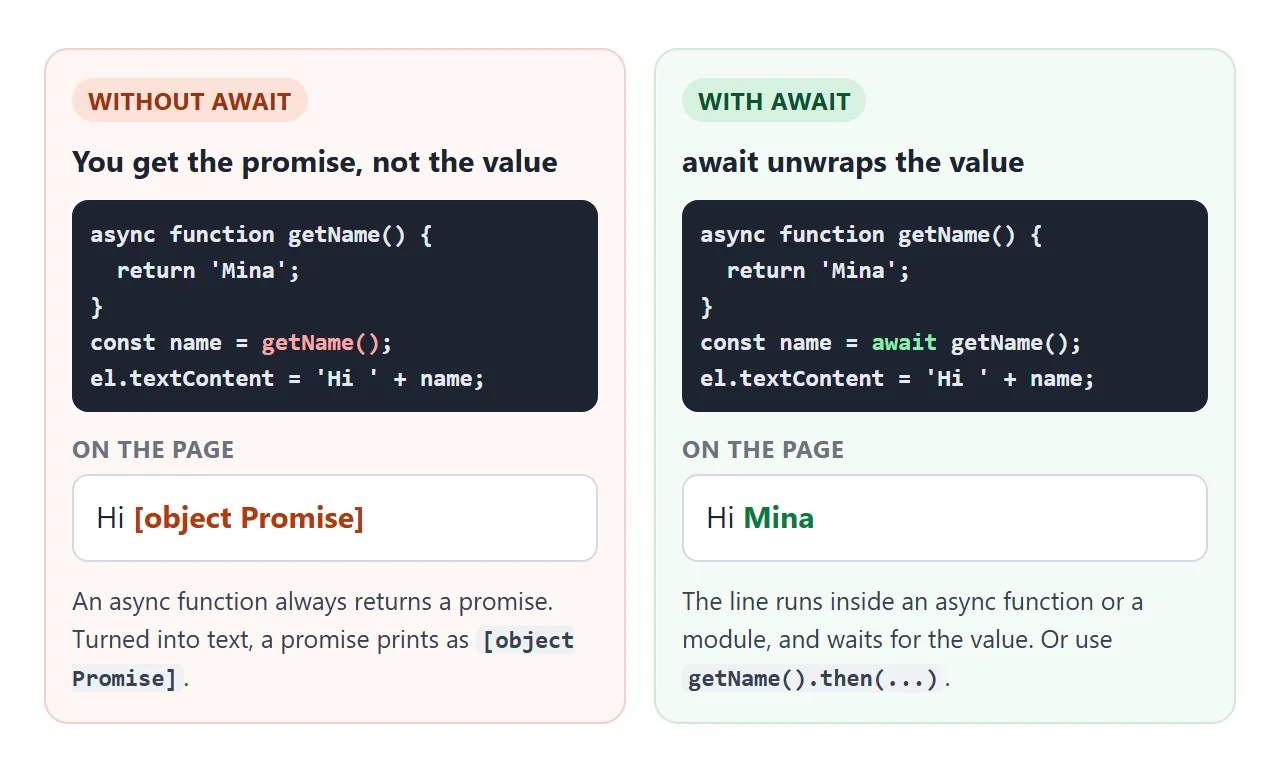
[object Promise] means the code used the promise where it wanted the value. Add await in front of the call. If the calling code is not async, mark it async too, or use .then(value => ...).
await is only allowed inside an async function or at the top level of a module. Anywhere else the browser stops with a SyntaxError before any of the script runs.
Top-level await in modules
In a module you can write await outside any function. The module waits at that line before running the rest.
<script type="module">
  const res = await fetch('data.json');
  const data = await res.json();
  document.querySelector('h1').textContent = data.title;
</script>
Module scripts are deferred, so the HTML above them has been parsed by the time they run. In a normal <script>, the same code is a SyntaxError.
Outside a module, wrap it in async function main() { ... } main(); instead. For turning response text into an object, see JSON.parse.
Catching errors with try/catch
When an awaited promise rejects, the await line throws. Normal try/catch catches it, which is the main reason async/await reads more easily than chains of .then() and .catch().
async function load() {
  try {
    const data = await getData();
    show(data);
  } catch (err) {
    showError(err.message);   // the request failed
  }
}
A rejected promise that nobody awaits or catches is an unhandled rejection. The browser logs it as an error in the console, and your page silently skips whatever was meant to happen next.
Try the three buttons below. Set the failure rate to Sometimes and press each one a few times.
<!doctype html>
<html lang="en">
<head>
<meta charset="utf-8">
<meta name="viewport" content="width=device-width, initial-scale=1">
<title>Async errors: try/catch, allSettled, forgotten await</title>
<style>
  body { margin: 0; padding: 16px; font-family: system-ui, sans-serif; background: #f4f5f7; color: #1d2330; font-size: 14px; }
  .btns { display: flex; flex-wrap: wrap; gap: 8px; margin: 10px 0 12px; }
  button, select { font: inherit; padding: 8px 12px; border: 1px solid #c9ced8; border-radius: 8px; background: #fff; }
  button { cursor: pointer; }
  table { width: 100%; border-collapse: collapse; background: #fff; border-radius: 8px; overflow: hidden; }
  th, td { text-align: left; padding: 7px 10px; border-bottom: 1px solid #e8eaef; }
  th { background: #eef1f5; font-size: 13px; }
  .ok { color: #0f7a3d; font-weight: 600; }
  .bad { color: #b4380f; font-weight: 600; }
  #msg { margin-top: 10px; padding: 10px; border-radius: 8px; background: #fff; border: 1px solid #e1e4ea; min-height: 1.4em; }
  code { font-family: ui-monospace, Consolas, monospace; font-size: 13px; }
</style>
</head>
<body>
<label>Each fake request fails:
  <select id="rate">
    <option value="0.4">Sometimes (40%)</option>
    <option value="0">Never</option>
    <option value="1">Always</option>
  </select>
</label>
<div class="btns">
  <button id="all">try/catch + Promise.all</button>
  <button id="settled">Promise.allSettled</button>
  <button id="forgot">Forgot await</button>
</div>
<table>
  <thead><tr><th>Request</th><th>Result</th></tr></thead>
  <tbody id="rows"><tr><td colspan="2">Press a button.</td></tr></tbody>
</table>
<div id="msg"></div>

<script>
  const names = ['user', 'posts', 'photos'];
  const rows = document.getElementById('rows');
  const msg = document.getElementById('msg');

  // Fake request: random delay, fails at the chosen rate
  function fakeRequest(name) {
    const rate = Number(document.getElementById('rate').value);
    return new Promise((resolve, reject) => {
      setTimeout(() => {
        if (Math.random() < rate) reject(new Error(name + ': server error'));
        else resolve(name + ' loaded');
      }, 200 + Math.random() * 500);
    });
  }

  function show(list) {
    rows.innerHTML = list.map(([name, text, ok]) =>
      `<tr><td>${name}</td><td class="${ok ? 'ok' : 'bad'}">${text}</td></tr>`).join('');
  }

  // 1. Promise.all inside try/catch: one failure throws, all results are lost
  document.getElementById('all').addEventListener('click', async () => {
    msg.textContent = 'Loading...';
    try {
      const results = await Promise.all(names.map(fakeRequest));
      show(results.map((r, i) => [names[i], r, true]));
      msg.textContent = 'All three succeeded.';
    } catch (err) {
      show(names.map((n) => [n, 'no result (Promise.all rejected)', false]));
      msg.textContent = 'Caught: ' + err.message;
    }
  });

  // 2. allSettled never rejects: one row per request, success or failure
  document.getElementById('settled').addEventListener('click', async () => {
    msg.textContent = 'Loading...';
    const results = await Promise.allSettled(names.map(fakeRequest));
    show(results.map((r, i) => r.status === 'fulfilled'
      ? [names[i], r.value, true]
      : [names[i], r.reason.message, false]));
    const failed = results.filter((r) => r.status === 'rejected').length;
    msg.textContent = failed + ' of ' + results.length + ' failed. The others still count.';
  });

  // 3. The bug: without await you get the Promise object, not the value
  document.getElementById('forgot').addEventListener('click', async () => {
    const wrong = fakeRequest('user');
    wrong.catch(() => {}); // this demo ignores its failure on purpose
    const text = 'Hello ' + wrong;
    msg.innerHTML = 'Without await: <code></code>';
    msg.querySelector('code').textContent = text;
    try {
      const right = await fakeRequest('user');
      show([['user (no await)', text, false], ['user (await)', right, true]]);
    } catch (err) {
      show([['user (no await)', text, false], ['user (await)', err.message, false]]);
    }
  });
</script>
</body>
</html>
In sequence or in parallel
Calling an async function starts the work immediately. await only decides when you wait for it. So three awaits in a row run one after another, while starting all three first and then waiting lets them overlap.
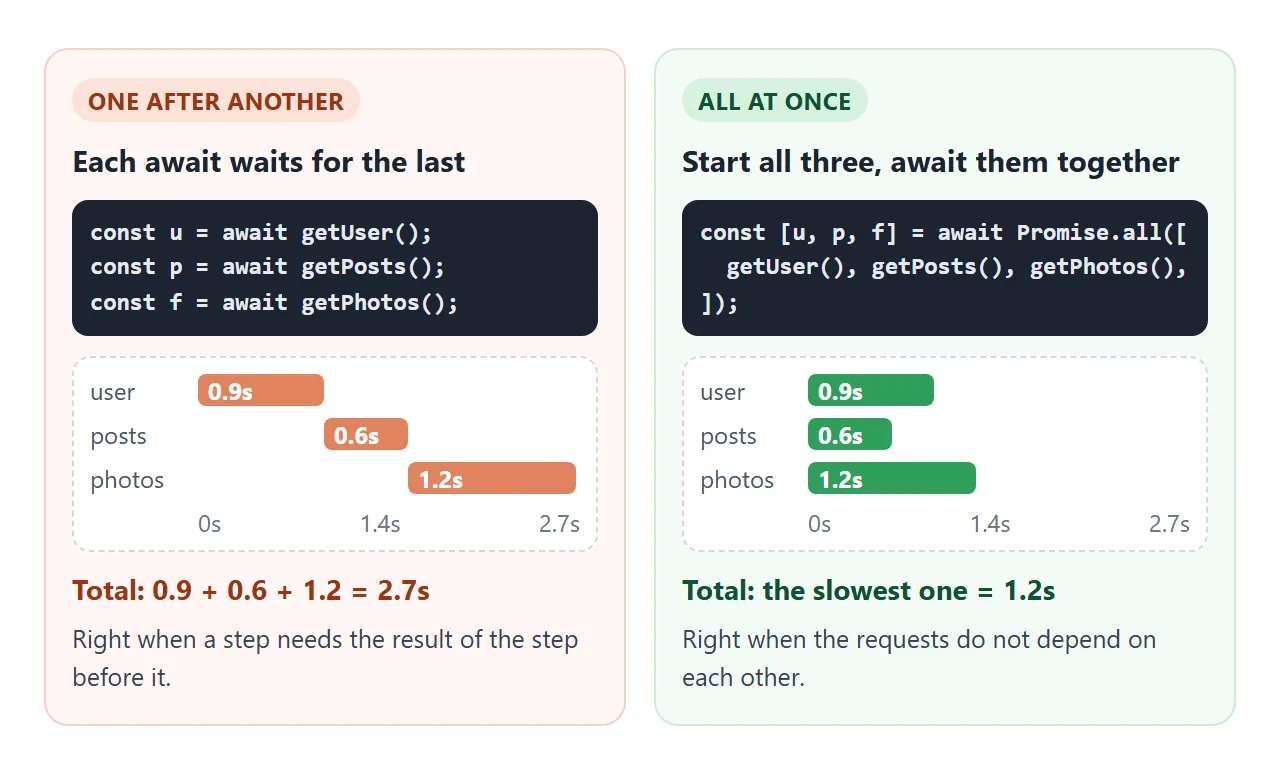
Use one after another when a step needs the previous result, for example loading a user and then that user's posts. Otherwise, start them together with one of the four combinators:
| Method | Settles when | Result | Good for |
|---|---|---|---|
Promise.all |
All fulfil, or the first one rejects | Array of values | Everything must succeed |
Promise.allSettled |
Every promise has settled | Array of { status, value } or { status, reason } |
Show what worked, report what failed |
Promise.race |
The first one settles, success or failure | That one value or error | Timeouts |
Promise.any |
The first one fulfils | That value, or an AggregateError if all reject |
Several sources, first good answer wins |
None of them cancel the promises they stop listening to. In the race demo above, the slower bars keep running to the end. Their results are simply ignored.
await in a loop
for...of with await inside runs the loop body one item at a time. That is correct when order matters, but with fifty items it is fifty waits in a row.
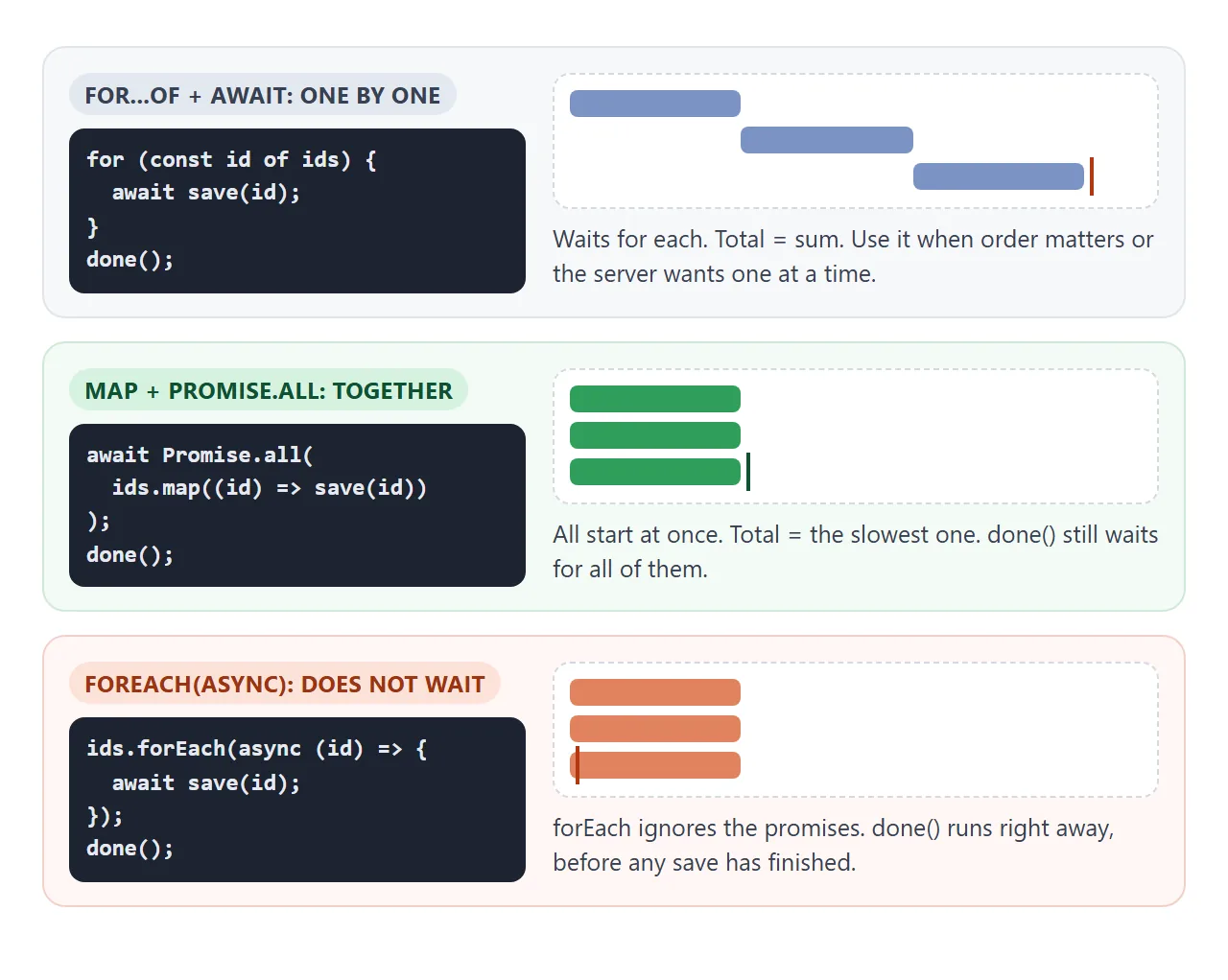
// One at a time: total = sum of all
for (const id of ids) {
  await save(id);
}

// Together: total = the slowest one
await Promise.all(ids.map((id) => save(id)));
Avoid forEach with an async callback. It ignores the promises the callback returns, so code after the loop runs before any item is done.
Timeouts and cancelling
Promise.race with the delay helper gives any promise a time limit:
const timeout = (ms) => new Promise((_, reject) =>
  setTimeout(() => reject(new Error('Timed out')), ms));

const data = await Promise.race([getData(), timeout(5000)]);
That stops the waiting, not the work. To actually stop a request, use an AbortController. You pass its signal to the request and call abort() when you no longer need the answer. fetch then rejects with an error whose name is 'AbortError'.
const controller = new AbortController();
const res = await fetch('/api/search?q=pear', { signal: controller.signal });
// elsewhere, when the user types something newer:
controller.abort();
For a plain time limit on fetch, AbortSignal.timeout(5000) makes a signal that aborts by itself. In that case the error's name is 'TimeoutError'.
A finished example: a search box
A search box puts all of this together. Typing sends a request, the answer arrives later, and an older, slower answer must not overwrite a newer one.
<!doctype html>
<html lang="en">
<head>
<meta charset="utf-8">
<meta name="viewport" content="width=device-width, initial-scale=1">
<title>Async search box with cancel</title>
<style>
  body { margin: 0; padding: 16px; font-family: system-ui, sans-serif; background: #f4f5f7; color: #1d2330; font-size: 14px; }
  input[type=search] { width: 100%; box-sizing: border-box; font: inherit; font-size: 16px; padding: 10px 12px; border: 1px solid #c9ced8; border-radius: 8px; }
  .opt { display: block; margin: 8px 0; color: #4b5563; }
  #status { min-height: 1.4em; margin: 8px 0; }
  #status.loading::before { content: ''; display: inline-block; width: 10px; height: 10px; margin-right: 6px; border: 2px solid #93b4f5; border-top-color: transparent; border-radius: 50%; animation: spin .7s linear infinite; }
  #status.error { color: #b4380f; font-weight: 600; }
  @keyframes spin { to { transform: rotate(360deg); } }
  ul { list-style: none; margin: 0; padding: 0; background: #fff; border-radius: 8px; border: 1px solid #e1e4ea; min-height: 40px; max-height: 190px; overflow: auto; }
  li { padding: 7px 12px; border-bottom: 1px solid #eef0f3; }
  #log { margin-top: 10px; font: 12px/1.5 ui-monospace, Consolas, monospace; color: #6b7280; max-height: 92px; overflow: auto; }
</style>
</head>
<body>
<input type="search" id="q" placeholder="Search fruit (type 'oops' for an error)" autocomplete="off">
<label class="opt"><input type="checkbox" id="cancel" checked> Cancel stale requests (AbortController)</label>
<div id="status">Start typing.</div>
<ul id="results"></ul>
<div id="log"></div>

<script>
  const FRUIT = ['Apple', 'Apricot', 'Avocado', 'Banana', 'Blackberry', 'Blueberry', 'Cherry', 'Coconut',
    'Date', 'Fig', 'Grape', 'Grapefruit', 'Guava', 'Kiwi', 'Lemon', 'Lime', 'Lychee', 'Mango', 'Melon',
    'Nectarine', 'Orange', 'Papaya', 'Peach', 'Pear', 'Pineapple', 'Plum', 'Pomegranate', 'Raspberry', 'Strawberry'];

  // Fake search API. Short queries are slower, like a real server with more matches.
  // It listens to an AbortSignal and gives up when told to.
  function fakeSearch(query, signal) {
    return new Promise((resolve, reject) => {
      const ms = Math.max(200, 1800 - query.length * 600) + Math.random() * 150;
      const timer = setTimeout(() => {
        if (query.includes('oops')) return reject(new Error('Search is down. Try again.'));
        resolve(FRUIT.filter((f) => f.toLowerCase().includes(query.toLowerCase())));
      }, ms);
      signal?.addEventListener('abort', () => {
        clearTimeout(timer);
        reject(new DOMException('Cancelled', 'AbortError'));
      });
    });
  }

  const input = document.getElementById('q');
  const status = document.getElementById('status');
  const list = document.getElementById('results');
  const log = (text) => document.getElementById('log').insertAdjacentHTML('afterbegin', text + '<br>');
  let controller = null;
  let debounce = 0;
  let id = 0;

  async function search(query) {
    const n = ++id;
    if (document.getElementById('cancel').checked) {
      controller?.abort();               // cancel the previous request
      controller = new AbortController();
    } else {
      controller = null;
    }
    status.className = 'loading';
    status.textContent = 'Searching for "' + query + '"...';
    const started = performance.now();
    try {
      const found = await fakeSearch(query, controller?.signal);
      list.replaceChildren(...found.map((f) => {
        const li = document.createElement('li');
        li.textContent = f;
        return li;
      }));
      status.className = '';
      status.textContent = found.length + ' results for "' + query + '" in ' + Math.round(performance.now() - started) + ' ms';
      log('#' + n + ' "' + query + '" shown');
    } catch (err) {
      if (err.name === 'AbortError') return log('#' + n + ' "' + query + '" cancelled');
      status.className = 'error';
      status.textContent = err.message;
      list.innerHTML = '';
      log('#' + n + ' "' + query + '" failed');
    }
  }

  // Debounce: wait until typing pauses for 300 ms
  input.addEventListener('input', () => {
    clearTimeout(debounce);
    const query = input.value.trim();
    if (!query) { controller?.abort(); list.innerHTML = ''; status.className = ''; status.textContent = 'Start typing.'; return; }
    debounce = setTimeout(() => search(query), 300);
  });
</script>
</body>
</html>
Debounce: each
inputevent, attached with addEventListener, resets a 300 ms timer. The search runs only when typing pauses.Loading state: set a "Searching..." message before the
await, replace it after.Cancel stale requests: before each new search, call
abort()on the previous controller. The cancelled search lands incatchwithAbortErrorand quietly returns.Errors: anything else that lands in
catchis shown as a message instead of an empty list.
If you cannot pass a signal to the work you are waiting for, a request counter does the same job. Keep a number, increase it for each search, and ignore any answer whose number is not the latest.
When it does not work
| What you see | Cause | Fix |
|---|---|---|
[object Promise] on the page |
The promise was used without await |
await the call, or use .then() |
| "Uncaught (in promise)" in the console | A rejected promise with no catch |
try/catch around the await, or .catch() |
| A SyntaxError that mentions await | await in a normal function or classic script |
Mark the function async, or use type="module" |
| A loop of requests takes ages | await inside for...of runs them one by one |
map plus Promise.all when they are independent |
| Code after the loop runs too early | forEach with an async callback |
for...of or Promise.all |
| Old search results replace new ones | A slower, older request finished last | AbortController or a request counter |
| One failure loses every result | Promise.all rejects on the first failure |
Promise.allSettled |
For scripts that do nothing at all, HTML JavaScript not working goes through the other usual causes.
Share it as a link
Async behaviour is hard to explain with a screenshot. Loading states, errors and the order results arrive in only show up when the page runs.
To send the working version, paste the page into a NOS document and choose Create share link. HTML to link walks through it.
The page renders as written and its scripts run, so the people you send it to can press the buttons and type into the search box themselves. If you change the code later, the same link shows the new version.