Pyodide is a Python distribution for the browser, built on WebAssembly. Here, WASM means WebAssembly: Pyodide is a port of CPython, the standard Python, to it. It is not a hosting service.
Add one script tag to an HTML page and loadPyodide() gives you a Python you can call from JavaScript, running in the visitor's tab.
This is the smallest page that works. Save it as an .html file, or paste it into a NOS document:
<!doctype html>
<meta charset="utf-8">
<meta name="viewport" content="width=device-width, initial-scale=1">
<pre id="out">Loading Python...</pre>
<script src="https://cdn.jsdelivr.net/pyodide/v314.0.7/full/pyodide.js"></script>
<script>
  async function main() {
    const pyodide = await loadPyodide();
    document.getElementById('out').textContent = pyodide.runPython("sum(range(1, 11))");
  }
  main();
</script>
It prints 55. The next example adds a text box, a Run button, and a place for print() output and errors. Edit the Python and press Run.
<!doctype html>
<html lang="en">
<head>
<meta charset="utf-8">
<meta name="viewport" content="width=device-width, initial-scale=1">
<title>Pyodide: run Python in a page</title>
<style>
  * { box-sizing: border-box; }
  body { margin: 0; padding: 14px; font-family: system-ui, sans-serif; background: #f4f5f7; color: #1d2330; }
  h1 { font-size: 16px; margin: 0 0 8px; }
  #status { font-size: 13px; color: #6b7280; margin: 0 0 8px; }
  #status.ready { color: #0f5132; }
  textarea {
    width: 100%; height: 130px; padding: 10px; border: 1px solid #d5d9e0; border-radius: 8px;
    font: 13px/1.45 ui-monospace, Consolas, monospace; resize: vertical;
  }
  button {
    margin: 8px 0; padding: 9px 18px; border: 0; border-radius: 8px;
    background: #2563eb; color: #fff; font-size: 14px; font-weight: 600; cursor: pointer;
  }
  button:disabled { background: #a8b0bd; cursor: default; }
  pre {
    margin: 0; min-height: 90px; padding: 10px; border-radius: 8px; background: #111827; color: #e5e7eb;
    font: 13px/1.45 ui-monospace, Consolas, monospace; white-space: pre-wrap; overflow-wrap: anywhere;
  }
  pre.err { color: #fca5a5; }
</style>
</head>
<body>
<h1>Python in this page</h1>
<p id="status">Loading Python (first load downloads the runtime)...</p>
<textarea id="code" spellcheck="false">name = "NOS"
squares = [n * n for n in range(1, 6)]
print("Hello from Python,", name)
print("squares:", squares)
sum(squares)</textarea>
<button id="run" disabled>Run</button>
<pre id="out">Output appears here.</pre>

<!-- pinned version: the number in the URL is the Pyodide version -->
<script src="https://cdn.jsdelivr.net/pyodide/v314.0.7/full/pyodide.js"></script>
<script>
  const status = document.getElementById('status');
  const out = document.getElementById('out');
  const runBtn = document.getElementById('run');
  let pyodide;

  // print() in Python calls these two functions, one line at a time
  function show(line) { out.textContent += line + '\n'; }

  async function start() {
    try {
      pyodide = await loadPyodide({ stdout: show, stderr: show });  // returns a Promise
      status.textContent = 'Pyodide ' + pyodide.version + ' is ready.';
      status.classList.add('ready');
      runBtn.disabled = false;
    } catch (err) {
      status.textContent = 'Could not load Pyodide: ' + err.message;
    }
  }

  runBtn.addEventListener('click', () => {
    out.textContent = '';
    out.classList.remove('err');
    try {
      const result = pyodide.runPython(document.getElementById('code').value);
      // runPython returns the value of the last line if it is an expression
      if (result !== undefined) show('=> ' + result);
    } catch (err) {
      out.classList.add('err');
      show(err.message);  // a Python error arrives as a JavaScript exception
    }
  });

  start();
</script>
</body>
</html>
What the page does, step by step
There are four moments, and only one of them is slow.
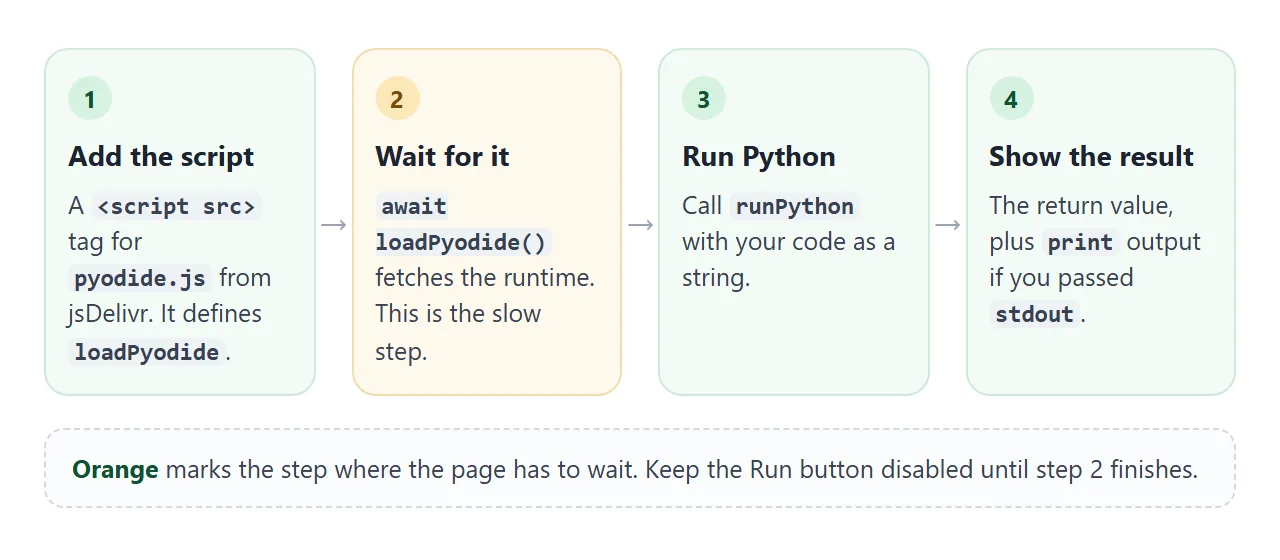
- Add the script tag.
pyodide.jscomes from the jsDelivr CDN. The number in the URL is the Pyodide version, so the page keeps using that release. - Await
loadPyodide(). It fetches and starts the runtime. It returns a Promise, so useawaitinside anasyncfunction. See async and await in JavaScript if that is new. - Call
runPython(). It takes a string of Python. When the last line is an expression, its value comes back to JavaScript. - Put the result in the page. Set
textContenton an element, as the example does.
Wait for the runtime before running Python
An easy mistake is calling runPython right after loadPyodide() without waiting. loadPyodide() returns a Promise, so what you hold is not the runtime yet.
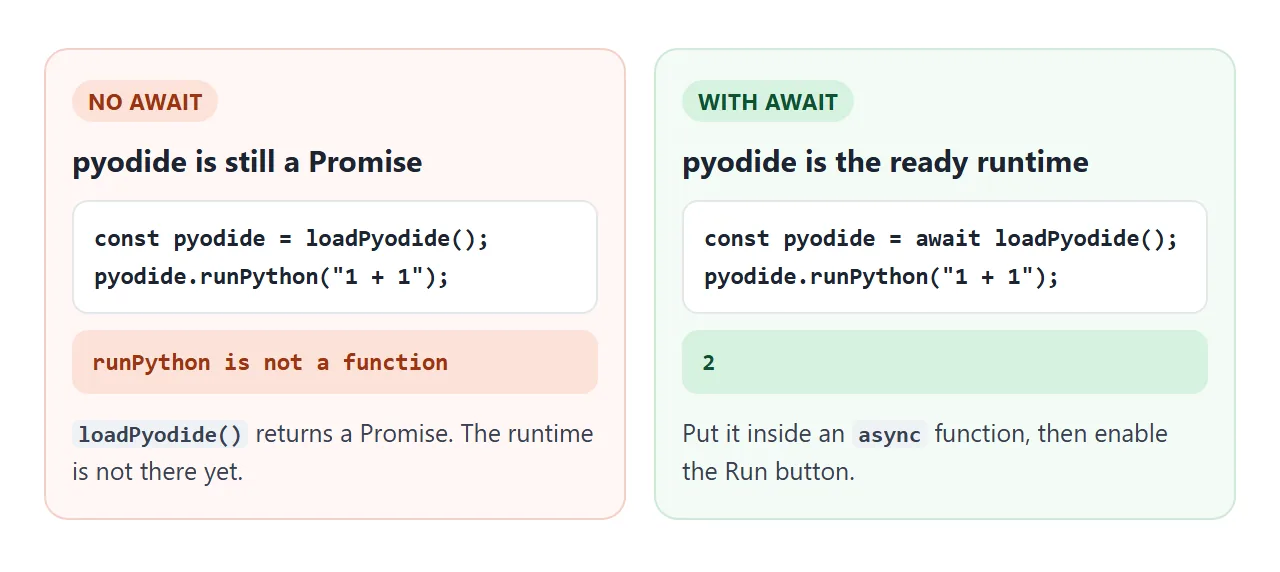
Keep the Run button disabled until await loadPyodide() has finished, then enable it. The demo above does exactly that, and it also shows a message if the download fails, for example when the device is offline.
Show print output and errors on the page
Python's print() does not write into your HTML by itself. Pyodide sends it to a function you can replace with the stdout option, and error text goes to stderr:
const pyodide = await loadPyodide({
  stdout: (line) => { out.textContent += line + '\n'; },
  stderr: (line) => { out.textContent += line + '\n'; },
});
A Python exception arrives in JavaScript as a PythonError, which is a JavaScript error caused by a Python exception. Wrap runPython in try and catch and show err.message. Try print(1/0) in the first demo to see it.
Packages: standard library, loadPackage, micropip
Python's standard library is available, with exceptions such as threads and sockets. Packages that are not in the standard library come from two places.
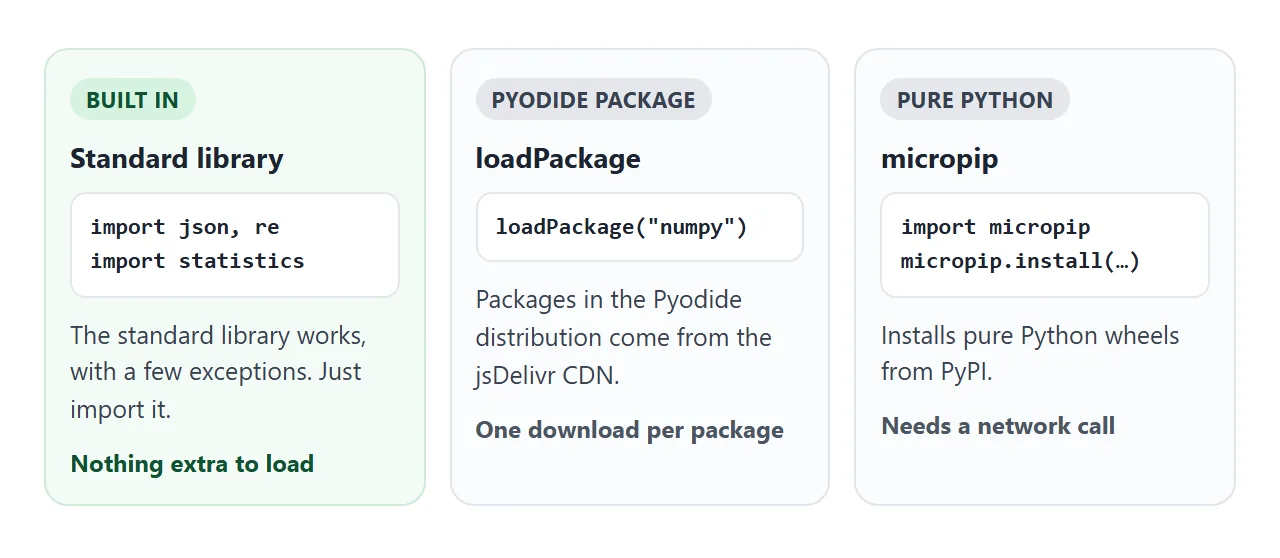
pyodide.loadPackage() loads packages from the Pyodide distribution, and downloads them from the jsDelivr CDN. It returns a Promise, so await it. micropip installs pure Python wheels from PyPI. It is itself a package you load first:
await pyodide.loadPackage('micropip');
await pyodide.runPythonAsync(
  "import micropip\nawait micropip.install('six')"
);
runPythonAsync is the version of runPython that allows top-level await inside the Python code. The next demo computes the same statistics two ways, so you can see the extra download that numpy needs.
<!doctype html>
<html lang="en">
<head>
<meta charset="utf-8">
<meta name="viewport" content="width=device-width, initial-scale=1">
<title>Pyodide: standard library vs loadPackage</title>
<style>
  * { box-sizing: border-box; }
  body { margin: 0; padding: 14px; font-family: system-ui, sans-serif; background: #f4f5f7; color: #1d2330; }
  h1 { font-size: 16px; margin: 0 0 8px; }
  #status { font-size: 13px; color: #6b7280; margin: 0 0 8px; }
  #status.ready { color: #0f5132; }
  label { font-size: 13px; font-weight: 600; }
  input[type=text] {
    display: block; width: 100%; margin: 4px 0 10px; padding: 9px 10px;
    border: 1px solid #d5d9e0; border-radius: 8px; font-size: 14px;
  }
  .row { display: grid; grid-template-columns: 1fr 1fr; gap: 10px; }
  .box { border: 1px solid #e1e4ea; border-radius: 10px; background: #fff; padding: 10px; }
  .box h2 { font-size: 13px; margin: 0 0 4px; }
  .box p { font-size: 12px; color: #4b5563; margin: 0 0 8px; line-height: 1.4; }
  button {
    width: 100%; padding: 9px 8px; border: 0; border-radius: 8px;
    background: #2563eb; color: #fff; font-size: 13px; font-weight: 600; cursor: pointer;
  }
  button:disabled { background: #a8b0bd; cursor: default; }
  .res { min-height: 66px; margin: 8px 0 0; font: 12.5px/1.5 ui-monospace, Consolas, monospace; white-space: pre-wrap; overflow-wrap: anywhere; }
  @media (max-width: 480px) { .row { grid-template-columns: 1fr; } }
</style>
</head>
<body>
<h1>Standard library or a package?</h1>
<p id="status">Loading Python...</p>

<label for="nums">Numbers, separated by commas</label>
<input type="text" id="nums" value="3, 5, 8, 13, 21, 34">

<div class="row">
  <div class="box">
    <h2>statistics (built in)</h2>
    <p>Part of the Python standard library. Nothing more to download.</p>
    <button id="std" disabled>Compute</button>
    <div class="res" id="r1"></div>
  </div>
  <div class="box">
    <h2>numpy (a package)</h2>
    <p>loadPackage downloads it the first time you press the button.</p>
    <button id="np" disabled>Load numpy and compute</button>
    <div class="res" id="r2"></div>
  </div>
</div>

<script src="https://cdn.jsdelivr.net/pyodide/v314.0.7/full/pyodide.js"></script>
<script>
  const $ = (id) => document.getElementById(id);
  let pyodide;

  async function start() {
    try {
      pyodide = await loadPyodide();
      $('status').textContent = 'Pyodide ' + pyodide.version + ' is ready.';
      $('status').classList.add('ready');
      $('std').disabled = false;
      $('np').disabled = false;
    } catch (err) {
      $('status').textContent = 'Could not load Pyodide: ' + err.message;
    }
  }

  // hand the text from the page to Python as a global variable
  function pass() { pyodide.globals.set('raw', $('nums').value); }

  $('std').addEventListener('click', () => {
    pass();
    const t = performance.now();
    try {
      $('r1').textContent = pyodide.runPython(`
import statistics
xs = [float(s) for s in raw.split(",")]
f"mean {statistics.mean(xs):.2f}\\nstdev {statistics.stdev(xs):.2f}"
`) + '\n' + Math.round(performance.now() - t) + ' ms';
    } catch (err) { $('r1').textContent = err.message.split('\n').slice(-2).join('\n'); }
  });

  $('np').addEventListener('click', async () => {
    pass();
    const t = performance.now();
    $('r2').textContent = 'Downloading numpy...';
    try {
      await pyodide.loadPackage('numpy');  // returns a Promise: wait for it
      $('r2').textContent = pyodide.runPython(`
import numpy as np
a = np.array([float(s) for s in raw.split(",")])
f"mean {a.mean():.2f}\\nstd {a.std(ddof=1):.2f}"
`) + '\n' + Math.round(performance.now() - t) + ' ms';
    } catch (err) { $('r2').textContent = err.message.split('\n').slice(-2).join('\n'); }
  });

  start();
</script>
</body>
</html>
To pass data from the page into Python, use pyodide.globals.set('name', value). To read a Python variable back, use pyodide.globals.get('name'). Text and numbers convert to the matching JavaScript types.
What does not work in a browser
Pyodide runs inside the browser's rules, so a few things behave differently from Python on a computer:
- Threads. The Pyodide docs say threading and multiprocessing are not supported.
- Network. All network calls go through the browser, so CORS applies. Read CORS explained for what that means.
- Long calculations. The docs warn that long synchronous computations in the main thread block the UI. The fix is a web worker, which must be a module worker because
pyodide.asm.mjsis an ES module. See web workers in JavaScript. A worker needs its own script file, so it is outside what one pasted page can show here. - Self-hosted files. If you host the Pyodide files yourself, the server must set the WASM MIME type and CORS headers. This article uses the CDN, so there is nothing to host.
A finished example: a word counter
The same pieces make a small tool. The Python lives inside a <script type="text/python"> tag.
A script whose type is not a JavaScript type is a data block that the browser does not run, so it is a tidy place to keep the code. The page reads it with textContent and hands it to runPython.
<!doctype html>
<html lang="en">
<head>
<meta charset="utf-8">
<meta name="viewport" content="width=device-width, initial-scale=1">
<title>Word counter powered by Python</title>
<style>
  * { box-sizing: border-box; }
  body { margin: 0; padding: 14px; font-family: system-ui, sans-serif; background: #f4f5f7; color: #1d2330; }
  h1 { font-size: 16px; margin: 0 0 4px; }
  #status { font-size: 13px; color: #6b7280; margin: 0 0 10px; }
  #status.ready { color: #0f5132; }
  textarea {
    width: 100%; height: 110px; padding: 10px; border: 1px solid #d5d9e0; border-radius: 8px;
    font: 14px/1.45 system-ui, sans-serif; resize: vertical;
  }
  .cards { display: grid; grid-template-columns: repeat(3, 1fr); gap: 8px; margin: 10px 0; }
  .card { background: #fff; border: 1px solid #e1e4ea; border-radius: 10px; padding: 8px 10px; }
  .card b { display: block; font-size: 20px; }
  .card span { font-size: 12px; color: #6b7280; }
  .bar { display: grid; grid-template-columns: 84px 1fr 28px; gap: 8px; align-items: center; font-size: 13px; margin: 5px 0; }
  .bar .w { overflow: hidden; text-overflow: ellipsis; white-space: nowrap; }
  .bar .track { height: 12px; border-radius: 6px; background: #e5e7eb; overflow: hidden; }
  .bar .fill { height: 100%; background: #2563eb; border-radius: 6px; }
  .bar .n { text-align: right; color: #6b7280; }
  details { margin-top: 10px; font-size: 13px; }
  pre { margin: 6px 0 0; padding: 10px; border-radius: 8px; background: #111827; color: #e5e7eb; font: 12px/1.45 ui-monospace, Consolas, monospace; overflow-x: auto; }
</style>
</head>
<body>
<h1>Word counter, computed by Python</h1>
<p id="status">Loading Python...</p>
<textarea id="text" spellcheck="false">The quick brown fox jumps over the lazy dog. The dog sleeps, the fox runs, and the quick fox wins.</textarea>

<div class="cards">
  <div class="card"><b id="words">-</b><span>words</span></div>
  <div class="card"><b id="uniq">-</b><span>different words</span></div>
  <div class="card"><b id="avg">-</b><span>letters per word</span></div>
</div>
<div id="bars"></div>

<details>
  <summary>The Python behind it</summary>
  <pre id="show"></pre>
</details>

<!-- a script with an unknown type is not run by the browser: it is just a safe place to keep Python -->
<script type="text/python" id="py">
import json, re
from collections import Counter

words = re.findall(r"[a-z']+", text.lower())
top = Counter(words).most_common(6)
result = json.dumps({
    "words": len(words),
    "unique": len(set(words)),
    "avg": round(sum(map(len, words)) / len(words), 1) if words else 0,
    "top": top,
})
</script>

<script src="https://cdn.jsdelivr.net/pyodide/v314.0.7/full/pyodide.js"></script>
<script>
  const $ = (id) => document.getElementById(id);
  const code = $('py').textContent;
  $('show').textContent = code.trim();
  let pyodide;

  function analyse() {
    if (!pyodide) return;
    pyodide.globals.set('text', $('text').value);  // page -> Python
    pyodide.runPython(code);
    const r = JSON.parse(pyodide.globals.get('result'));  // Python -> page, as JSON text
    $('words').textContent = r.words;
    $('uniq').textContent = r.unique;
    $('avg').textContent = r.avg;
    const max = r.top.length ? r.top[0][1] : 1;
    $('bars').innerHTML = '';
    for (const [word, n] of r.top) {
      const row = document.createElement('div');
      row.className = 'bar';
      row.innerHTML = '<span class="w"></span><span class="track"><span class="fill"></span></span><span class="n"></span>';
      row.children[0].textContent = word;      // textContent: user text never becomes HTML
      row.children[1].firstChild.style.width = (n / max * 100) + '%';
      row.children[2].textContent = n;
      $('bars').appendChild(row);
    }
  }

  async function start() {
    try {
      pyodide = await loadPyodide();
      $('status').textContent = 'Pyodide ' + pyodide.version + ' is ready. Edit the text.';
      $('status').classList.add('ready');
      analyse();
    } catch (err) {
      $('status').textContent = 'Could not load Pyodide: ' + err.message;
    }
  }

  $('text').addEventListener('input', analyse);
  start();
</script>
</body>
</html>
- Page to Python:
globals.set('text', value)before running. - Python to page: the Python builds a JSON string, and the page reads it with
globals.getandJSON.parse. - Safe display: the page writes words with
textContent, so text typed into the box is never read as HTML.
When it does not work
| What you see | Cause | Fix |
|---|---|---|
loadPyodide is not defined |
The script tag is missing, failed to load, or comes after your code | Put the pyodide.js tag before your script. Check the URL |
runPython is not a function |
loadPyodide() was not awaited |
await it in an async function |
print() shows nothing on the page |
Output goes to a callback, not the DOM | Pass stdout and stderr to loadPyodide |
ModuleNotFoundError for numpy |
The package was never loaded | Call loadPackage('numpy') and await it first |
| The page freezes during a long loop | Python runs on the main thread | Move it into a module web worker |
RuntimeError with threads |
Threading is not supported | Remove threads from the code |
| micropip fails on a URL | That server does not send CORS headers | Use a host that does, or a PyPI package |
| The first run is slow | The runtime has to download | Show a loading message and disable Run |
Share it as a link
A Python page is hard to describe and easy to try. The reader can type their own code or text and watch Python answer, which a screenshot cannot show.
On a phone, the viewport meta tag keeps the page sized right, and opening an HTML file on a phone covers why attachments are awkward.
To send the working version, paste the page into a NOS document and choose Create share link. HTML to link walks through it.
The page renders as written and its scripts run, and pyodide.js comes from jsDelivr, one of the CDN hosts a NOS page can load scripts from. People with the link can open it without an account and run the code themselves.
If you change the code later, the same link shows the new version.