A Web Worker runs JavaScript on a separate thread, so a heavy job does not freeze the page. Create one with new Worker(url), send it work with postMessage(), and receive the result in a message event.
To keep everything in one HTML file, load the worker's code from a Blob URL instead of a second .js file.
Try it first. The blue dot is moved by the page's own JavaScript. Press the button and watch it keep moving while the worker counts.
<!doctype html>
<html lang="en">
<head>
<meta charset="utf-8">
<meta name="viewport" content="width=device-width, initial-scale=1">
<title>Web worker from a Blob URL</title>
<style>
  body { margin: 0; padding: 16px; font-family: system-ui, sans-serif; background: #f4f5f7; color: #1d2330; }
  .track { position: relative; height: 14px; border-radius: 7px; background: #e1e4ea; margin: 4px 0 16px; }
  #dot { position: absolute; top: 0; left: 0; width: 14px; height: 14px; border-radius: 50%; background: #2563eb; }
  button { font: inherit; padding: 10px 16px; border: 0; border-radius: 8px; background: #0f5132; color: #fff; cursor: pointer; }
  button:disabled { opacity: .55; cursor: default; }
  #out { margin-top: 14px; padding: 12px; min-height: 44px; border-radius: 8px; background: #fff; font-size: 14px; line-height: 1.5; }
  small { color: #5b6270; }
</style>
</head>
<body>
<small>This dot is moved by JavaScript on the page. If the page freezes, it stops.</small>
<div class="track"><div id="dot"></div></div>
<button id="run">Count primes below 5,000,000</button>
<div id="out">Press the button. The counting happens in a worker.</div>

<!-- The worker's code. type="text/js-worker" stops the page from running it. -->
<script type="text/js-worker" id="worker-code">
  self.onmessage = (e) => {
    const limit = e.data;
    let count = 0;
    for (let n = 2; n < limit; n++) {
      let prime = true;
      for (let d = 2; d * d <= n; d++) {
        if (n % d === 0) { prime = false; break; }
      }
      if (prime) count++;
    }
    self.postMessage(count);  // send the answer back to the page
  };
</script>

<script>
  // Turn the code above into a file the browser can load: Blob -> blob: URL -> Worker
  const code = document.getElementById('worker-code').textContent;
  const url = URL.createObjectURL(new Blob([code], { type: 'text/javascript' }));
  const worker = new Worker(url);

  const btn = document.getElementById('run');
  const out = document.getElementById('out');
  let started = 0;

  btn.addEventListener('click', () => {
    btn.disabled = true;
    out.textContent = 'Working in the worker... the dot keeps moving.';
    started = performance.now();
    worker.postMessage(5000000);  // send the job
  });

  worker.addEventListener('message', (e) => {
    const ms = Math.round(performance.now() - started);
    out.textContent = e.data.toLocaleString('en-US') + ' primes, found in ' + ms + ' ms.';
    btn.disabled = false;
  });

  // fires if the worker cannot load (for example, a page policy blocks it) or throws
  worker.addEventListener('error', () => {
    out.textContent = 'The worker could not start or crashed.';
    btn.disabled = true;
  });

  // The moving dot: one step per frame, on the page's own thread
  const dot = document.getElementById('dot');
  let x = 0, dir = 1;
  function step() {
    const max = dot.parentElement.clientWidth - 14;
    x += 3 * dir;
    if (x > max || x < 0) { dir = -dir; x = Math.min(Math.max(x, 0), max); }
    dot.style.left = x + 'px';
    requestAnimationFrame(step);
  }
  requestAnimationFrame(step);
</script>
</body>
</html>
Why the page freezes without a worker
A page runs its JavaScript, its layout and its painting on one thread, the main thread. A loop that takes a second holds that thread for the whole second.
During that time the browser cannot draw a new frame or react to a click or a key. Animations driven by JavaScript stop, and the page looks broken.
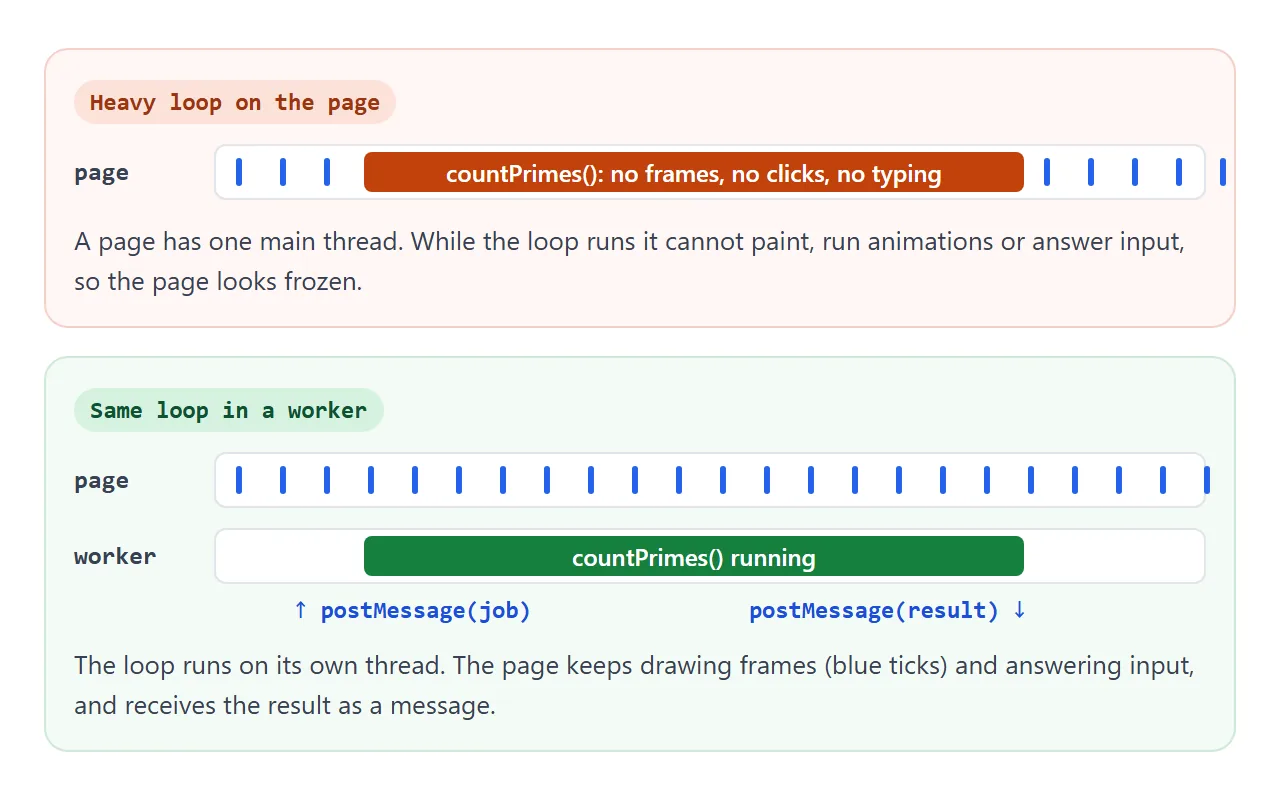
A worker gets its own thread. The heavy loop moves there, and the main thread is left free to draw frames and answer input. Only the finished result comes back.
async and await do not solve this. They help with waiting for things like a timer or a network reply, but a loop that computes is still running on the main thread. Async and await covers what they are for.
Same job, on the page and in a worker
Both buttons below run the same countPrimes() function. The first runs it on the page, the second in a worker. After each run, the example shows the longest gap between two screen updates.
<!doctype html>
<html lang="en">
<head>
<meta charset="utf-8">
<meta name="viewport" content="width=device-width, initial-scale=1">
<title>Same job: on the page vs in a worker</title>
<style>
  body { margin: 0; padding: 16px; font-family: system-ui, sans-serif; background: #f4f5f7; color: #1d2330; }
  .track { position: relative; height: 14px; border-radius: 7px; background: #e1e4ea; margin: 4px 0 12px; }
  #dot { position: absolute; top: 0; left: 0; width: 14px; height: 14px; border-radius: 50%; background: #2563eb; }
  .btns { display: flex; flex-wrap: wrap; gap: 8px; }
  button { font: inherit; padding: 10px 14px; border: 0; border-radius: 8px; color: #fff; cursor: pointer; }
  #onPage { background: #9a3412; } #inWorker { background: #0f5132; }
  button:disabled { opacity: .55; cursor: default; }
  input { box-sizing: border-box; width: 100%; font: inherit; padding: 9px 10px; margin: 12px 0 0; border: 1px solid #c9cdd4; border-radius: 8px; }
  #out { margin-top: 12px; padding: 12px; border-radius: 8px; background: #fff; font-size: 14px; line-height: 1.55; min-height: 66px; }
  small { color: #5b6270; }
</style>
</head>
<body>
<small>Press a button, then try typing in the box while it runs.</small>
<div class="track"><div id="dot"></div></div>
<div class="btns">
  <button id="onPage">Run on the page</button>
  <button id="inWorker">Run in a worker</button>
</div>
<input id="typing" placeholder="Type here while it runs" autocomplete="off">
<div id="out">Both buttons count the primes below 5,000,000 with the same function.</div>

<script>
  // One ordinary function...
  function countPrimes(limit) {
    let count = 0;
    for (let n = 2; n < limit; n++) {
      let prime = true;
      for (let d = 2; d * d <= n; d++) {
        if (n % d === 0) { prime = false; break; }
      }
      if (prime) count++;
    }
    return count;
  }

  // ...copied into a worker as text. Worker code cannot see the page's variables.
  const src = countPrimes.toString() +
    '\nself.onmessage = (e) => self.postMessage(countPrimes(e.data));';
  const worker = new Worker(URL.createObjectURL(new Blob([src], { type: 'text/javascript' })));

  const LIMIT = 5000000;
  const out = document.getElementById('out');
  const buttons = document.querySelectorAll('button');
  let started = 0, running = false, longestGap = 0, lastFrame = 0;

  function begin(where) {
    buttons.forEach((b) => (b.disabled = true));
    out.textContent = 'Running ' + where + '...';
    started = performance.now();
    running = true; longestGap = 0; lastFrame = started;
  }
  function finish(where, count) {
    running = false;
    const ms = Math.round(performance.now() - started);
    out.innerHTML = '<b>' + where + '</b>: ' + count.toLocaleString('en-US') + ' primes in ' + ms + ' ms.<br>' +
      'Longest gap between two screen updates: <b id="gap">' + Math.round(longestGap) + ' ms</b>.';
    buttons.forEach((b) => (b.disabled = false));
  }

  document.getElementById('onPage').addEventListener('click', () => {
    begin('on the page');
    // wait a moment so "Running..." is painted, then block the page
    setTimeout(() => {
      const count = countPrimes(LIMIT);
      requestAnimationFrame(() => finish('On the page', count));  // count the frozen frame too
    }, 50);
  });

  document.getElementById('inWorker').addEventListener('click', () => {
    begin('in a worker');
    worker.postMessage(LIMIT);
  });
  worker.addEventListener('message', (e) => finish('In a worker', e.data));
  worker.addEventListener('error', () => {
    running = false;
    out.textContent = 'The worker could not start.';
    document.getElementById('inWorker').disabled = true;
  });

  // The dot moves once per frame and measures how long the page went without a frame
  const dot = document.getElementById('dot');
  let x = 0, dir = 1;
  function step() {
    const now = performance.now();
    if (running) longestGap = Math.max(longestGap, now - lastFrame);
    lastFrame = now;
    const max = dot.parentElement.clientWidth - 14;
    x += 3 * dir;
    if (x > max || x < 0) { dir = -dir; x = Math.min(Math.max(x, 0), max); }
    dot.style.left = x + 'px';
    requestAnimationFrame(step);
  }
  requestAnimationFrame(step);
</script>
</body>
</html>
When this guide was tested in Chromium, Firefox and WebKit, the page run left the page without a new frame for 795 to 913 ms. The worker run never went past 19 ms. The exact numbers depend on the device.
This example also shows a second way to write the worker's code. countPrimes is an ordinary function on the page, and countPrimes.toString() turns it into text for the worker:
const src = countPrimes.toString() +
  '\nself.onmessage = (e) => self.postMessage(countPrimes(e.data));';
const blob = new Blob([src], { type: 'text/javascript' });
const worker = new Worker(URL.createObjectURL(blob));
This only works for a function that uses nothing but its own arguments. The worker cannot see any other variable on the page.
One file: start a worker from a Blob URL
The usual form is new Worker('worker.js'), which loads a second file from the same site. A page sent as a single HTML file has no second file to load.
Opened straight from disk, it fails in some browsers too. In our test, Chromium refused a local worker.js with a SecurityError, WebKit fired an error event, and Firefox ran it.
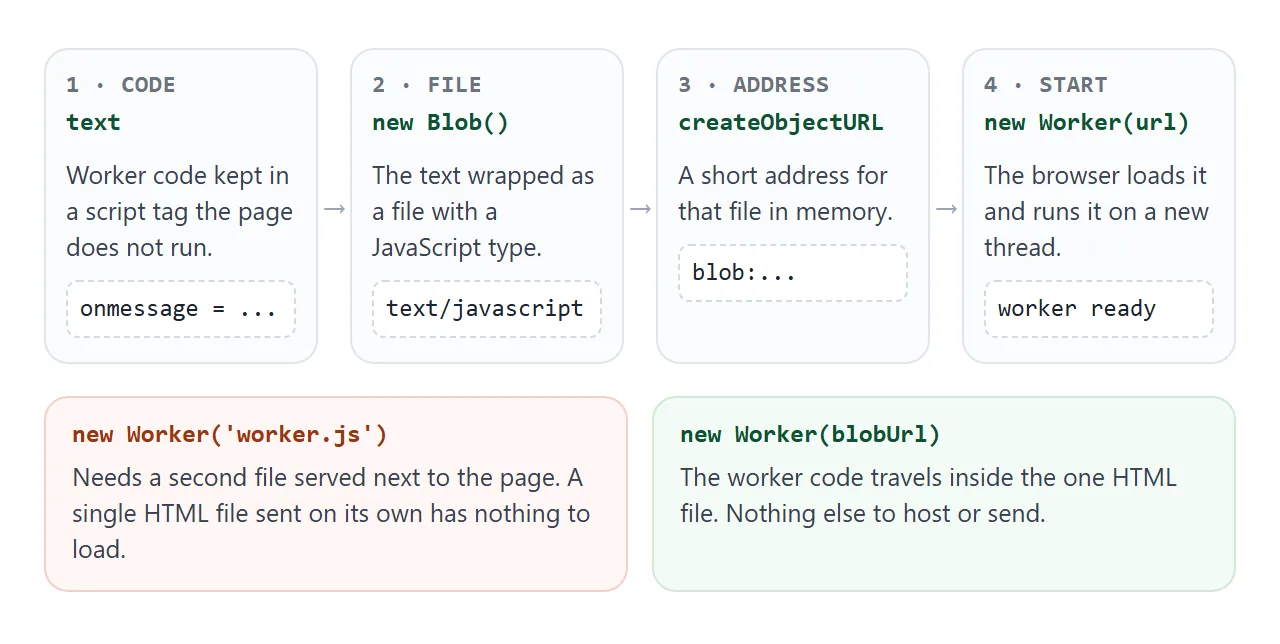
A Blob URL avoids all of that. The worker's code lives in the page:
<script type="text/js-worker" id="worker-code">
  self.onmessage = (e) => {
    self.postMessage(e.data * 2);
  };
</script>
The browser does not run a script tag with a type it does not know, so this code only runs inside the worker. Then build the worker from the tag's text:
const code = document.getElementById('worker-code').textContent;
const blob = new Blob([code], { type: 'text/javascript' });
const worker = new Worker(URL.createObjectURL(blob));
The blob: URL works like any other address for the worker. Blob URLs explains the Blob and createObjectURL part in more detail.
Talking to a worker: postMessage and onmessage
The page and the worker share no variables. Everything passes through messages, in both directions, with the same two calls.
| Where | Send | Receive |
|---|---|---|
| On the page | worker.postMessage(data) |
a message listener on worker |
| In the worker | self.postMessage(data) |
self.onmessage = ... |
| What arrives | a copy of data |
in event.data |
A message can be a number, a string, an array, a plain object, a Map, a typed array and more. The browser copies it with the structured clone algorithm.
Functions and DOM elements cannot be copied. Posting one throws a DataCloneError. Send the plain data the other side needs instead, such as the text of an input or the numbers from a table.
To send more than one kind of message, give each a type field and branch on it in the listener. The finished example below does this for progress and done.
Progress, cancel and a finished example
This example adds the three things a real tool needs: a progress bar, a Cancel button, and a result that is moved rather than copied.
<!doctype html>
<html lang="en">
<head>
<meta charset="utf-8">
<meta name="viewport" content="width=device-width, initial-scale=1">
<title>Prime finder: progress, cancel and transfer</title>
<style>
  body { margin: 0; padding: 16px; font-family: system-ui, sans-serif; background: #f4f5f7; color: #1d2330; }
  .row { display: flex; flex-wrap: wrap; gap: 8px; align-items: center; }
  select, button { font: inherit; padding: 9px 12px; border-radius: 8px; }
  select { border: 1px solid #c9cdd4; background: #fff; }
  button { border: 0; color: #fff; cursor: pointer; }
  #start { background: #0f5132; } #cancel { background: #9a3412; }
  button:disabled { opacity: .5; cursor: default; }
  progress { width: 100%; height: 18px; margin: 14px 0 6px; accent-color: #0f5132; }
  #status { font-size: 14px; color: #374151; min-height: 20px; }
  #result { margin-top: 12px; padding: 12px; border-radius: 8px; background: #fff; font-size: 14px; line-height: 1.6; min-height: 96px; overflow-wrap: anywhere; }
</style>
</head>
<body>
<div class="row">
  <label for="limit">Primes below</label>
  <select id="limit">
    <option value="2000000">2,000,000</option>
    <option value="5000000" selected>5,000,000</option>
    <option value="10000000">10,000,000</option>
  </select>
  <button id="start">Start</button>
  <button id="cancel" disabled>Cancel</button>
</div>
<progress id="bar" max="100" value="0"></progress>
<div id="status">Ready.</div>
<div id="result"></div>

<script type="text/js-worker" id="worker-code">
  self.onmessage = (e) => {
    const limit = e.data;
    const found = [];
    const step = Math.ceil(limit / 100);
    for (let n = 2; n < limit; n++) {
      let prime = true;
      for (let d = 2; d * d <= n; d++) {
        if (n % d === 0) { prime = false; break; }
      }
      if (prime) found.push(n);
      if (n % step === 0) self.postMessage({ type: 'progress', percent: n / step });
    }
    const primes = Int32Array.from(found);
    // Transfer the buffer instead of copying it: the page gets it, the worker loses it
    self.postMessage({ type: 'done', primes }, [primes.buffer]);
    self.postMessage({ type: 'after', bytesLeft: primes.buffer.byteLength });
  };
</script>

<script>
  const url = URL.createObjectURL(new Blob(
    [document.getElementById('worker-code').textContent], { type: 'text/javascript' }));
  const $ = (id) => document.getElementById(id);
  let worker = null, started = 0;

  function setRunning(on) {
    $('start').disabled = on; $('cancel').disabled = !on; $('limit').disabled = on;
  }

  function handle(e) {
    const msg = e.data;
    if (msg.type === 'progress') {
      $('bar').value = msg.percent;
      $('status').textContent = 'Working... ' + msg.percent + '%';
    } else if (msg.type === 'done') {
      const p = msg.primes;
      $('bar').value = 100;
      $('status').textContent = 'Done in ' + Math.round(performance.now() - started) + ' ms.';
      $('result').innerHTML =
        '<b>' + p.length.toLocaleString('en-US') + '</b> primes. Largest: ' + p[p.length - 1].toLocaleString('en-US') +
        '<br>The page received <b id="got">' + p.buffer.byteLength.toLocaleString('en-US') + '</b> bytes.';
    } else if (msg.type === 'after') {
      $('result').innerHTML += '<br>The worker\'s copy is now <b id="left">' + msg.bytesLeft + '</b> bytes: it was moved, not copied.';
      setRunning(false);
    }
  }

  $('start').addEventListener('click', () => {
    if (!worker) {                     // a terminated worker cannot be reused: make a new one
      worker = new Worker(url);
      worker.addEventListener('message', handle);
      worker.addEventListener('error', () => { $('status').textContent = 'The worker could not start.'; setRunning(false); worker = null; });
    }
    $('bar').value = 0; $('result').textContent = '';
    $('status').textContent = 'Starting...';
    started = performance.now();
    setRunning(true);
    worker.postMessage(Number($('limit').value));
  });

  $('cancel').addEventListener('click', () => {
    worker.terminate();                // stops it at once, mid-loop
    worker = null;
    $('status').textContent = 'Cancelled at ' + $('bar').value + '%. The worker was terminated.';
    setRunning(false);
  });
</script>
</body>
</html>
- Progress: every 1% of the work, the worker posts
{ type: 'progress', percent }. The page sets the value of a<progress>element. HTML progress bar covers that element. - Cancel:
worker.terminate()stops the worker at once, even in the middle of the loop. There is no clean-up step inside the worker. - Start again: a terminated worker cannot be reused. The example keeps the blob: URL and makes a new
Workerfrom it on the next Start.
An error thrown inside the worker does not throw on the page. It arrives as an error event on the Worker object, and so does a worker that fails to load. Always add that listener.
Transferables: move big data instead of copying it
Copying is fine for small messages. For a large ArrayBuffer, such as image pixels or a long list of numbers, copying costs time and memory on both sides.
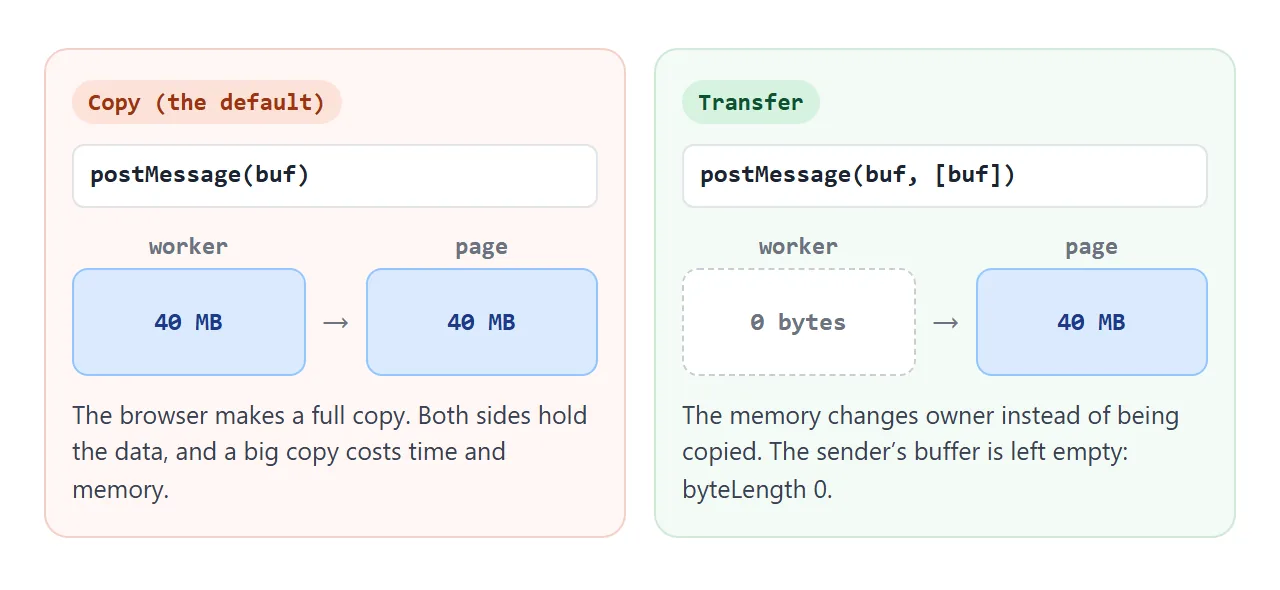
List the buffer in the second argument of postMessage, and the memory is transferred instead:
const primes = Int32Array.from(found);
self.postMessage({ type: 'done', primes }, [primes.buffer]);
// here primes.buffer.byteLength is 0
After the call, the sender can no longer use that buffer. Its byteLength is 0. The finished example prints both sides: the page reports 595,732 bytes for the primes below 2,000,000, and the worker reports 0.
When it does not work
| What you see | Cause | Fix |
|---|---|---|
| The page still freezes | The heavy loop still runs on the page | Move the loop into the worker's code |
document is not defined in the worker |
Workers have no DOM | Send results to the page and update the DOM there |
DataCloneError on postMessage |
The message holds a function or a DOM element | Send plain data |
| SecurityError from a file on disk | The browser will not load a local worker.js |
Start the worker from a Blob URL |
| Error event right away, no result | The page's Content Security Policy blocks workers | Allow blob: in worker-src, or run the job on the page |
A ReferenceError for a helper |
The worker cannot see page variables | Copy the helper into the worker's code |
| Start does nothing after Cancel | A terminated worker cannot run again | Create a new Worker |
| The buffer is empty after sending | It was transferred | Copy it first if both sides need it |
Share it as a link
A frozen page and a responsive one look the same in a screenshot. The difference only shows when someone presses the button and tries to type.
To send the working version, paste the page into a NOS document and choose Create share link. HTML to link walks through it.
The page renders as written and its scripts run. If you change the code later, the same link shows the new version.
Open the link yourself and press Start before you send it. If the page's security policy refuses workers, these examples say The worker could not start, as in the table above.