Here "broadcast" is the BroadcastChannel API, not video streaming software. A page creates a named channel and posts a message. Every other page of the same origin on that channel receives it.
One page can be a control panel and another the on-screen graphic.
Try it. The controller is on top and the screen below. Press Show to slide a lower third in.
<!doctype html>
<html lang="en">
<head>
<meta charset="utf-8">
<meta name="viewport" content="width=device-width, initial-scale=1">
<title>Control panel and lower third</title>
<style>
  * { box-sizing: border-box; }
  body { margin: 0; padding: 12px; font-family: system-ui, sans-serif; background: #f4f5f7; color: #1d2330; }
  h2 { margin: 0 0 6px; font-size: 13px; letter-spacing: .4px; text-transform: uppercase; color: #6b7280; }
  .panel { background: #fff; border-radius: 12px; padding: 12px; box-shadow: 0 2px 8px rgba(0,0,0,.08); margin-bottom: 12px; }
  .row { display: flex; flex-wrap: wrap; gap: 8px; }
  input { flex: 1 1 140px; min-width: 0; padding: 9px 10px; border: 1px solid #cfd4dc; border-radius: 8px; font: inherit; }
  button { padding: 9px 14px; border: 0; border-radius: 8px; background: #2563eb; color: #fff; font: inherit; font-weight: 600; cursor: pointer; }
  button.alt { background: #e5e7eb; color: #1d2330; }
  .stage { position: relative; height: 170px; border-radius: 10px; overflow: hidden;
           background: linear-gradient(135deg, #1e3a5f, #3b6ea5 55%, #6fa8dc); }
  .lower { position: absolute; left: 0; bottom: 18px; max-width: 90%; padding: 8px 18px 8px 14px;
           background: #fff; border-left: 6px solid #f59e0b; border-radius: 0 8px 8px 0;
           transform: translateX(-110%); transition: transform .35s ease; }
  .lower.on { transform: translateX(0); }
  .lower b { display: block; font-size: 18px; }
  .lower span { font-size: 13px; color: #4b5563; }
</style>
</head>
<body>

<div class="panel">
  <h2>Controller</h2>
  <div class="row">
    <input id="nameIn" value="Dana Reyes" aria-label="Name">
    <input id="roleIn" value="Match commentator" aria-label="Title">
  </div>
  <div class="row" style="margin-top:8px">
    <button id="show">Show</button>
    <button id="hide" class="alt">Hide</button>
  </div>
</div>

<div class="panel">
  <h2>Screen</h2>
  <div class="stage">
    <div class="lower" id="lower"><b id="nOut"></b><span id="rOut"></span></div>
  </div>
</div>

<script>
  // Controller side: a channel object named "graphics"
  const tx = new BroadcastChannel('graphics');
  document.getElementById('show').addEventListener('click', () => {
    tx.postMessage({ type: 'show', name: nameIn.value, role: roleIn.value });
  });
  document.getElementById('hide').addEventListener('click', () => {
    tx.postMessage({ type: 'hide' });
  });

  // Screen side: a second channel object with the same name.
  // In a real project this code lives in another tab or window.
  const rx = new BroadcastChannel('graphics');
  rx.addEventListener('message', (e) => {
    const msg = e.data;
    if (msg.type === 'show') {
      nOut.textContent = msg.name;
      rOut.textContent = msg.role;
      lower.classList.add('on');
    } else if (msg.type === 'hide') {
      lower.classList.remove('on');
    }
  });
</script>
</body>
</html>
Both halves are in one file so the example runs anywhere. In a real setup they are two pages, and the screen page is the one you put on the output display.
How the code works
Each page runs one line to join the channel, then one listener to receive and one call to send.
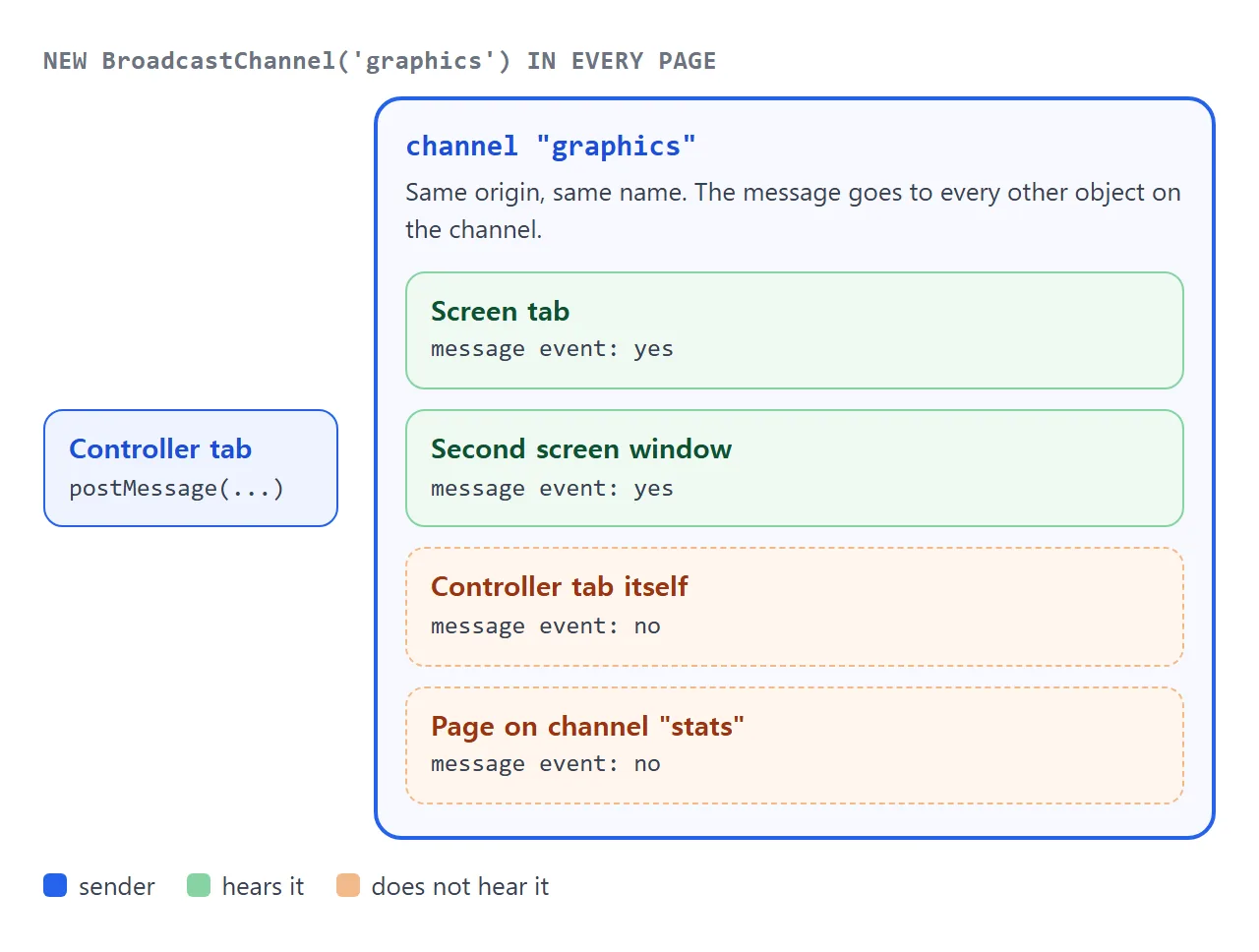
new BroadcastChannel('graphics')joins the channel with that name.postMessage(data)sends a copy ofdatato every other object on the channel.addEventListener('message', ...)receives it. The payload isevent.data.
The sender never hears its own message. The next example makes that visible.
<!doctype html>
<html lang="en">
<head>
<meta charset="utf-8">
<meta name="viewport" content="width=device-width, initial-scale=1">
<title>Who hears a message</title>
<style>
  * { box-sizing: border-box; }
  body { margin: 0; padding: 12px; font-family: system-ui, sans-serif; background: #f4f5f7; color: #1d2330; }
  p.hint { margin: 0 0 10px; font-size: 14px; line-height: 1.45; }
  .grid { display: grid; grid-template-columns: 1fr 1fr; gap: 10px; }
  .node { background: #fff; border-radius: 12px; padding: 10px; border: 2px solid #e5e7eb; transition: border-color .15s, background .15s; }
  .node.hit { border-color: #16a34a; background: #ecfdf3; }
  .node h3 { margin: 0; font-size: 15px; }
  .node .ch { font: 12px ui-monospace, Consolas, monospace; color: #6b7280; margin-bottom: 6px; }
  .node .out { font-size: 13px; min-height: 36px; line-height: 1.4; }
  .node.other .ch { color: #b45309; }
  button { margin-top: 6px; width: 100%; padding: 8px; border: 0; border-radius: 8px; background: #2563eb; color: #fff; font: inherit; font-weight: 600; cursor: pointer; }
</style>
</head>
<body>
<p class="hint">Four channel objects live in this page. Press <b>Send</b> on any card and watch which cards light up.</p>
<div class="grid" id="grid"></div>

<script>
  const nodes = [
    { title: 'Controller', channel: 'graphics' },
    { title: 'Screen A',   channel: 'graphics' },
    { title: 'Screen B',   channel: 'graphics' },
    { title: 'Stats desk', channel: 'stats', other: true },
  ];
  let sent = 0;

  nodes.forEach((node) => {
    const el = document.createElement('div');
    el.className = 'node' + (node.other ? ' other' : '');
    el.innerHTML = '<h3>' + node.title + '</h3><div class="ch">channel: "' + node.channel + '"</div>' +
                   '<div class="out">heard: 0</div><button>Send</button>';
    grid.appendChild(el);

    const out = el.querySelector('.out');
    let heard = 0;
    const bc = new BroadcastChannel(node.channel);  // one object per card

    el.querySelector('button').addEventListener('click', () => {
      sent += 1;
      bc.postMessage({ from: node.title, n: sent });  // the sender does not hear this
    });

    bc.addEventListener('message', (e) => {
      heard += 1;
      out.textContent = 'heard: ' + heard + ' (last from ' + e.data.from + ')';
      el.classList.add('hit');
      setTimeout(() => el.classList.remove('hit'), 400);
    });
  });
</script>
</body>
</html>
Three cards use the name graphics and one uses stats. A message on one name never reaches the other. If a test with a single object seems silent, this is why.
Two real pages: controller and screen
Save two files in the same folder and open both from the same address. The controller sends and the screen listens.
<!-- controller.html -->
<input id="titleIn" value="Dana Reyes">
<button id="sendBtn">Send</button>
<button id="openBtn">Open screen</button>
<script>
  const channel = new BroadcastChannel('graphics');
  sendBtn.addEventListener('click', () => {
    channel.postMessage({ type: 'title', text: titleIn.value });
  });
  // Browsers only allow pop-ups opened from a click
  openBtn.addEventListener('click', () => {
    window.open('screen.html', 'screen', 'width=960,height=540');
  });
</script>
<!-- screen.html -->
<h1 id="out">waiting</h1>
<script>
  const channel = new BroadcastChannel('graphics');
  channel.addEventListener('message', (e) => {
    if (e.data.type === 'title') out.textContent = e.data.text;
  });
</script>
Giving every message a type lets one channel carry several kinds of update. MDN also lists BroadcastChannel as available in web workers, so a worker can listen on the same channel.
Same origin or nothing
Two pages talk only if their origin matches: protocol, host and port. A different path or folder is fine.
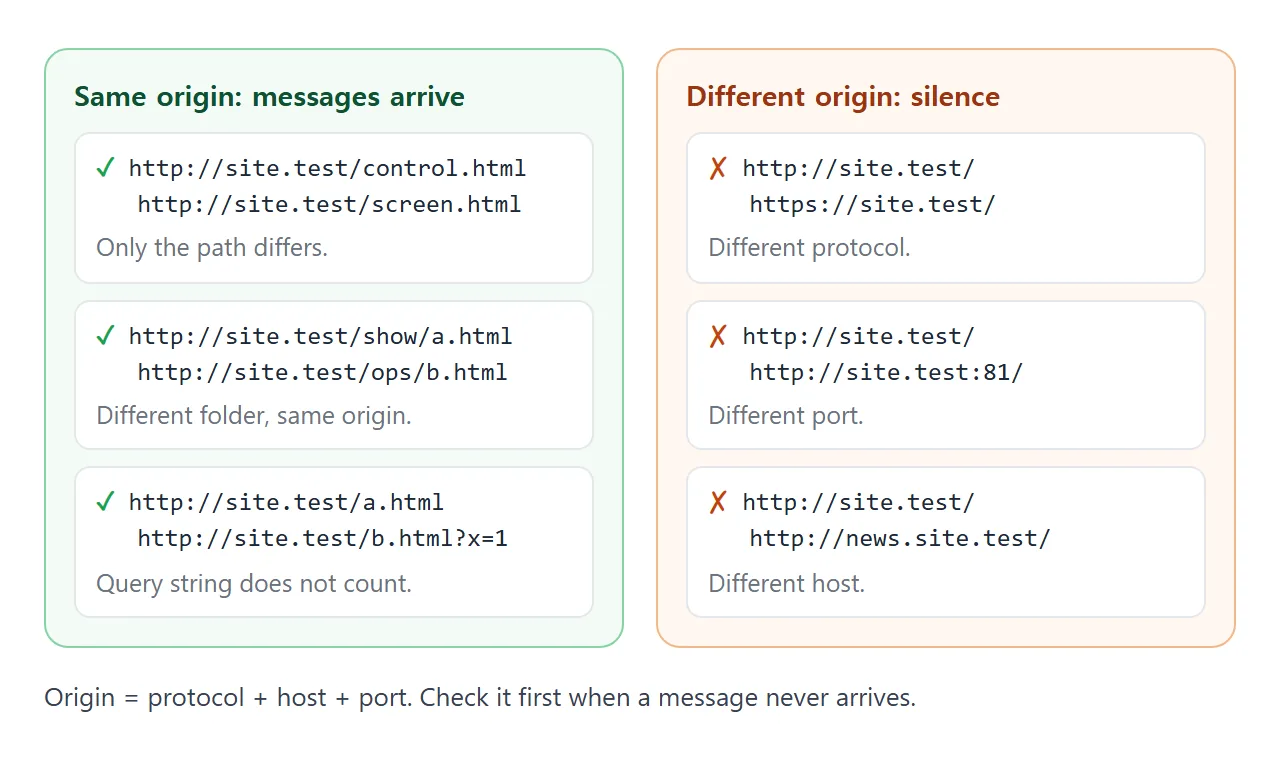
Opening one page from http:// and the other from https://, or from a different port, means the messages do not arrive. Keep both pages on one address.
A frame sandboxed without allow-same-origin gets a special origin that always fails the same-origin check. Two such frames should not be expected to reach each other. Keep the controller and the screen in one page, or in two normal pages. See the sandbox attribute.
A screen that opens late
A channel is live traffic, not a mailbox. A message goes to the objects that exist at the moment you send it. A screen opened afterwards starts empty.
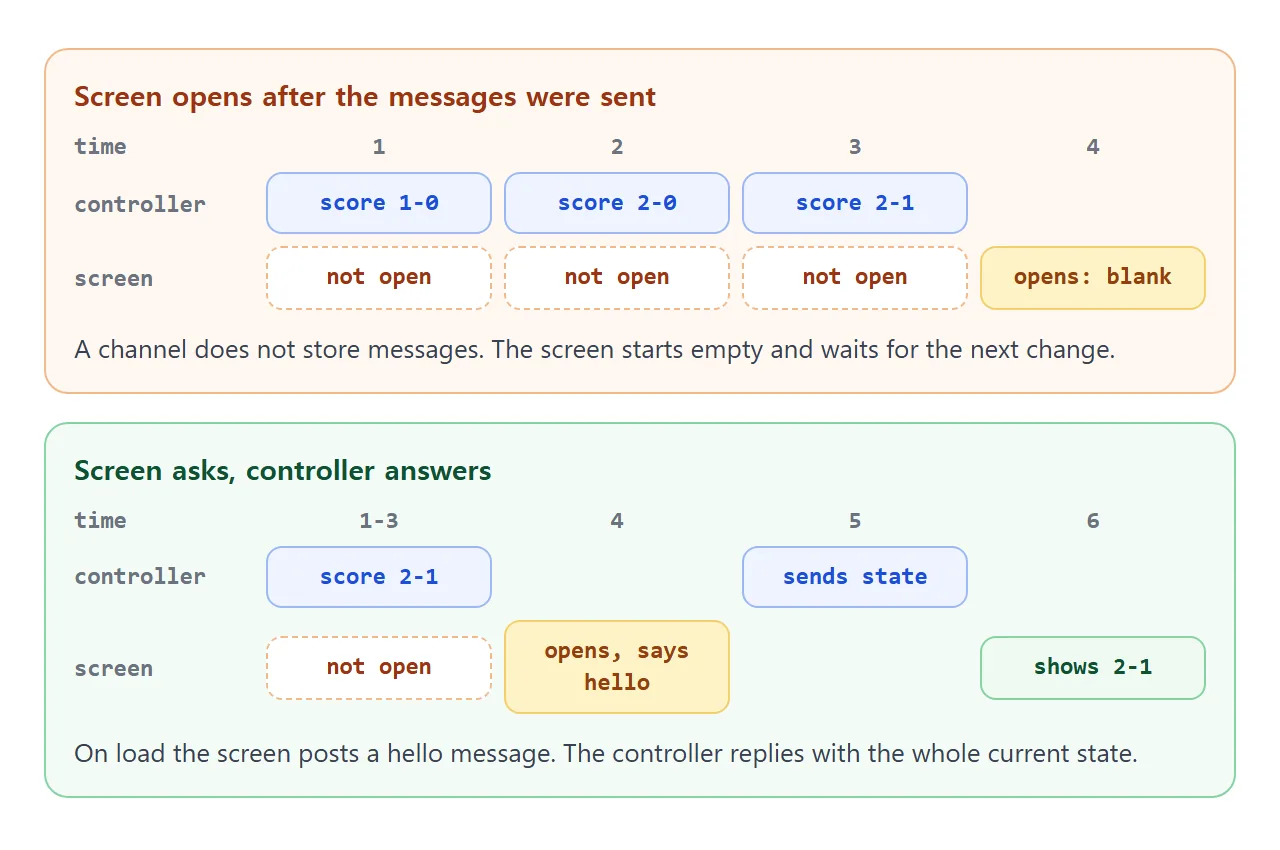
The fix is a handshake. On load, the screen posts { type: 'hello' }. The controller listens for it and replies with the whole current state. Send the full state each time, such as both scores and the visible flag, rather than "add one".
<!doctype html>
<html lang="en">
<head>
<meta charset="utf-8">
<meta name="viewport" content="width=device-width, initial-scale=1">
<title>Scoreboard controller and screen</title>
<style>
  * { box-sizing: border-box; }
  body { margin: 0; padding: 12px; font-family: system-ui, sans-serif; background: #f4f5f7; color: #1d2330; }
  h2 { margin: 0 0 8px; font-size: 13px; letter-spacing: .4px; text-transform: uppercase; color: #6b7280; }
  .panel { background: #fff; border-radius: 12px; padding: 12px; box-shadow: 0 2px 8px rgba(0,0,0,.08); margin-bottom: 12px; }
  .team { display: flex; gap: 6px; align-items: center; margin-bottom: 8px; }
  .team input { flex: 1 1 auto; min-width: 0; padding: 8px 10px; border: 1px solid #cfd4dc; border-radius: 8px; font: inherit; }
  .team output { width: 34px; text-align: center; font-weight: 700; font-size: 18px; }
  button { padding: 8px 12px; border: 0; border-radius: 8px; background: #2563eb; color: #fff; font: inherit; font-weight: 600; cursor: pointer; }
  button.alt { background: #e5e7eb; color: #1d2330; }
  .row { display: flex; flex-wrap: wrap; gap: 8px; align-items: center; }
  label.chk { font-size: 14px; display: flex; gap: 6px; align-items: center; }
  .stage { position: relative; height: 150px; border-radius: 10px; overflow: hidden;
           background: linear-gradient(135deg, #14532d, #2f855a 60%, #68b684); }
  .stage.closed { background: #9ca3af; }
  .board { position: absolute; top: 14px; left: 14px; display: flex; align-items: stretch; border-radius: 8px; overflow: hidden;
           background: #111827; color: #fff; font-weight: 700; box-shadow: 0 4px 14px rgba(0,0,0,.35);
           transition: transform .35s ease, opacity .35s ease; }
  .board.off { transform: translateY(-140%); opacity: 0; }
  .board div { padding: 8px 12px; }
  .board .sc { background: #f59e0b; color: #111827; font-size: 22px; min-width: 40px; text-align: center; }
  .board .nm { font-size: 15px; display: flex; align-items: center; }
  .note { position: absolute; inset: auto 10px 10px 10px; font-size: 13px; color: #fff; }
  .log { font: 12px/1.5 ui-monospace, Consolas, monospace; color: #4b5563; margin-top: 8px; min-height: 18px; }
</style>
</head>
<body>

<div class="panel">
  <h2>Controller</h2>
  <div class="team"><input id="homeName" value="Reds" aria-label="Home team"><button class="alt" data-t="home" data-d="-1">-1</button><output id="homeOut">0</output><button data-t="home" data-d="1">+1</button></div>
  <div class="team"><input id="awayName" value="Blues" aria-label="Away team"><button class="alt" data-t="away" data-d="-1">-1</button><output id="awayOut">0</output><button data-t="away" data-d="1">+1</button></div>
  <div class="row"><button id="toggle">Hide scoreboard</button></div>
</div>

<div class="panel">
  <h2>Screen</h2>
  <div class="stage" id="stage">
    <div class="board" id="board">
      <div class="nm" id="sHome"></div><div class="sc" id="sHomeScore">0</div>
      <div class="sc" id="sAwayScore">0</div><div class="nm" id="sAway"></div>
    </div>
    <div class="note" id="note"></div>
  </div>
  <div class="row" style="margin-top:10px">
    <button class="alt" id="screenBtn">Close screen</button>
    <label class="chk"><input type="checkbox" id="ask" checked> Screen asks for the state when it opens</label>
  </div>
  <div class="log" id="log"></div>
</div>

<script>
  // ---------- Controller ----------
  const state = { home: 'Reds', away: 'Blues', h: 0, a: 0, visible: true };
  const ch = new BroadcastChannel('scoreboard');

  function publish() {
    ch.postMessage({ type: 'state', state });  // one plain object: easy to clone
  }

  document.querySelectorAll('[data-t]').forEach((b) => b.addEventListener('click', () => {
    const key = b.dataset.t === 'home' ? 'h' : 'a';
    state[key] = Math.max(0, state[key] + Number(b.dataset.d));
    homeOut.value = state.h; awayOut.value = state.a;
    publish();
  }));
  homeName.addEventListener('input', () => { state.home = homeName.value; publish(); });
  awayName.addEventListener('input', () => { state.away = awayName.value; publish(); });
  toggle.addEventListener('click', () => {
    state.visible = !state.visible;
    toggle.textContent = state.visible ? 'Hide scoreboard' : 'Show scoreboard';
    publish();
  });

  // A screen that opens later asks "what is the score now?"
  ch.addEventListener('message', (e) => { if (e.data.type === 'hello') publish(); });

  // ---------- Screen (a second tab in real use) ----------
  let rx = null;

  function render(s) {
    sHome.textContent = s.home; sAway.textContent = s.away;
    sHomeScore.textContent = s.h; sAwayScore.textContent = s.a;
    board.classList.toggle('off', !s.visible);
  }

  function openScreen() {
    rx = new BroadcastChannel('scoreboard');
    rx.addEventListener('message', (e) => {
      if (e.data.type === 'state') render(e.data.state);
    });
    stage.classList.remove('closed');
    board.style.display = '';
    note.textContent = '';
    screenBtn.textContent = 'Close screen';
    if (ask.checked) rx.postMessage({ type: 'hello' });
    log.textContent = ask.checked ? 'Screen opened and asked for the state.' : 'Screen opened and asked for nothing.';
  }

  function closeScreen() {
    rx.close();  // no more messages for this object
    rx = null;
    stage.classList.add('closed');
    board.style.display = 'none';
    note.textContent = 'Screen closed. Changes now are missed.';
    screenBtn.textContent = 'Open screen';
    log.textContent = 'Screen closed.';
  }

  screenBtn.addEventListener('click', () => (rx ? closeScreen() : openScreen()));
  openScreen();
  render(state);
</script>
</body>
</html>
The close button calls close() on the screen's channel, as the specification recommends when a channel is no longer needed.
What it carries, and where it reaches
Messages are copied with the structured clone algorithm. Plain objects, arrays, strings, numbers, dates, maps and sets all work. A function or a DOM node throws a DataCloneError. Send data such as { name, role }, and let the screen page build its own markup.
BroadcastChannel stays within one origin's windows, tabs, frames and iframes. To drive a screen on another computer, the page needs a connection to a server.
A WebSocket is one option, and it needs a server you run. This snippet cannot run in a single HTML file:
// Needs a WebSocket server; it will not run on its own
const socket = new WebSocket('ws://localhost:8080');
socket.addEventListener('message', (e) => draw(JSON.parse(e.data)));
socket.send(JSON.stringify({ type: 'title', text: 'Dana Reyes' }));
The rest of the page can stay the same: only the line that sends and receives changes.
When it does not work
| Symptom | Cause | Fix |
|---|---|---|
| Nothing arrives, one object | The sender never hears itself | Listen on a second object or in another tab |
| Nothing arrives, two tabs | Different protocol, host or port | Open both from the same address |
| Nothing arrives, same address | Channel names differ | Keep the name in one constant |
| Screen blank until the next change | It opened after the message was sent | Hello message, then reply with state |
| InvalidStateError on send | The channel was closed | Create a new BroadcastChannel |
| DataCloneError on send | A function or DOM node in the message | Send plain data |
| The screen window never opens | window.open was not called from a click | Call it inside a click listener |
| Two sandboxed frames stay silent | Each has a special origin | Put both parts in one page |
Share it as a link
A controller and a screen are hard to describe and easy to try. A screenshot cannot be clicked, so send the working page. Keep both parts in one document, like the scoreboard above, so they cannot end up on different origins.
To send it, paste the page into a NOS document and choose Create share link. HTML to link walks through it.
The page renders as written and its scripts run, so the people you send it to can press the buttons themselves. If you change the code later, the same link shows the new version. Sharing HTML code as a link has more.