**PWA(프로그레시브 웹 앱)**은 브라우저가 앱으로 설치할 수도 있는 웹 페이지입니다. 아이콘이 생기고 자체 창에서 열리며, 서비스 워커를 추가하면 네트워크 없이 열립니다.
앱은 하나의 HTML 파일에 머물 수 있습니다. 설치에는 작은 매니페스트 파일과 아이콘이 필요하고, 오프라인 다시 로드에는 추가 JavaScript 파일이 하나 필요합니다.
지금 당장 페이지가 실행되는 곳에서 페이지가 무엇을 할 수 있는지 물어보세요. 이 검사는 아래 예제 프레임에서 실행됩니다.
<!doctype html>
<html lang="en">
<head>
<meta charset="utf-8">
<meta name="viewport" content="width=device-width, initial-scale=1">
<title>PWA readiness check</title>
<style>
  body { margin: 0; padding: 16px; font-family: system-ui, sans-serif; background: #f4f5f7; color: #1d2330; }
  h1 { font-size: 17px; margin: 0 0 10px; }
  ul { list-style: none; margin: 0; padding: 0; background: #fff; border-radius: 12px; box-shadow: 0 2px 10px rgba(0,0,0,.08); }
  li { display: flex; justify-content: space-between; gap: 10px; padding: 10px 14px; border-top: 1px solid #eef0f3; font-size: 14px; }
  li:first-child { border-top: 0; }
  .v { font-weight: 600; text-align: right; }
  .yes { color: #0f7a3d; } .no { color: #b45309; }
  button { margin-top: 12px; font: inherit; padding: 9px 14px; border: 0; border-radius: 8px; background: #2563eb; color: #fff; cursor: pointer; }
  #log { margin-top: 10px; font: 13px/1.45 ui-monospace, Consolas, monospace; white-space: pre-wrap; word-break: break-word; }
</style>
</head>
<body>
<h1>What can this page do right now?</h1>
<ul>
  <li>Secure context (HTTPS) <span class="v" id="secure"></span></li>
  <li>Service worker API <span class="v" id="sw"></span></li>
  <li>Manifest linked <span class="v" id="manifest"></span></li>
  <li>Display mode <span class="v" id="mode"></span></li>
  <li>Network <span class="v" id="net"></span></li>
</ul>
<button id="try">Try to register sw.js</button>
<div id="log"></div>

<script>
  function show(id, ok, text) {
    const el = document.getElementById(id);
    el.textContent = text;
    el.className = 'v ' + (ok ? 'yes' : 'no');
  }

  show('secure', window.isSecureContext, window.isSecureContext ? 'yes' : 'no');

  // Reading navigator.serviceWorker can throw in a sandboxed frame
  try {
    const ok = 'serviceWorker' in navigator && !!navigator.serviceWorker;
    show('sw', ok, ok ? 'available' : 'missing');
  } catch (e) {
    show('sw', false, 'blocked (' + e.name + ')');
  }

  const link = document.querySelector('link[rel="manifest"]');
  show('manifest', !!link, link ? 'yes' : 'no');

  // display-mode tells you if the page was opened as an installed app
  const modes = ['standalone', 'minimal-ui', 'fullscreen'];
  const mode = modes.find(m => matchMedia('(display-mode: ' + m + ')').matches) || 'browser';
  show('mode', mode !== 'browser', mode);

  function net() { show('net', navigator.onLine, navigator.onLine ? 'online' : 'offline'); }
  net();
  window.addEventListener('online', net);
  window.addEventListener('offline', net);

  document.getElementById('try').addEventListener('click', async () => {
    const log = document.getElementById('log');
    try {
      const reg = await navigator.serviceWorker.register('sw.js');
      log.textContent = 'Registered. Scope: ' + reg.scope;
    } catch (e) {
      log.textContent = 'Failed: ' + e.name + '\n' + e.message;
    }
  });
</script>
</body>
</html>
기사의 예제 프레임에서 서비스 작업자 행은 차단됨이라고 표시되어 있습니다. 프레임은 allow-same-origin 없이 샌드박스 처리되므로 페이지에는 자체 출처가 없으며 서비스 작업자는 꺼집니다.
디스크에서 열면 다른 오류로 인해 버튼이 작동하지 않습니다. 두 가지 모두 아래에서 다룹니다.
하나의 HTML 파일로 할 수 있는 것과 할 수 없는 것
인라인 CSS와 JavaScript가 포함된 단일 파일은 이미 작동하는 앱입니다. 일단 로드되면 네트워크가 필요하지 않으므로 버튼과 입력이 오프라인으로 계속 작동합니다. 혼자서는 할 수 없는 일은 연결 없이 설치하거나 다시 로드하는 것입니다.
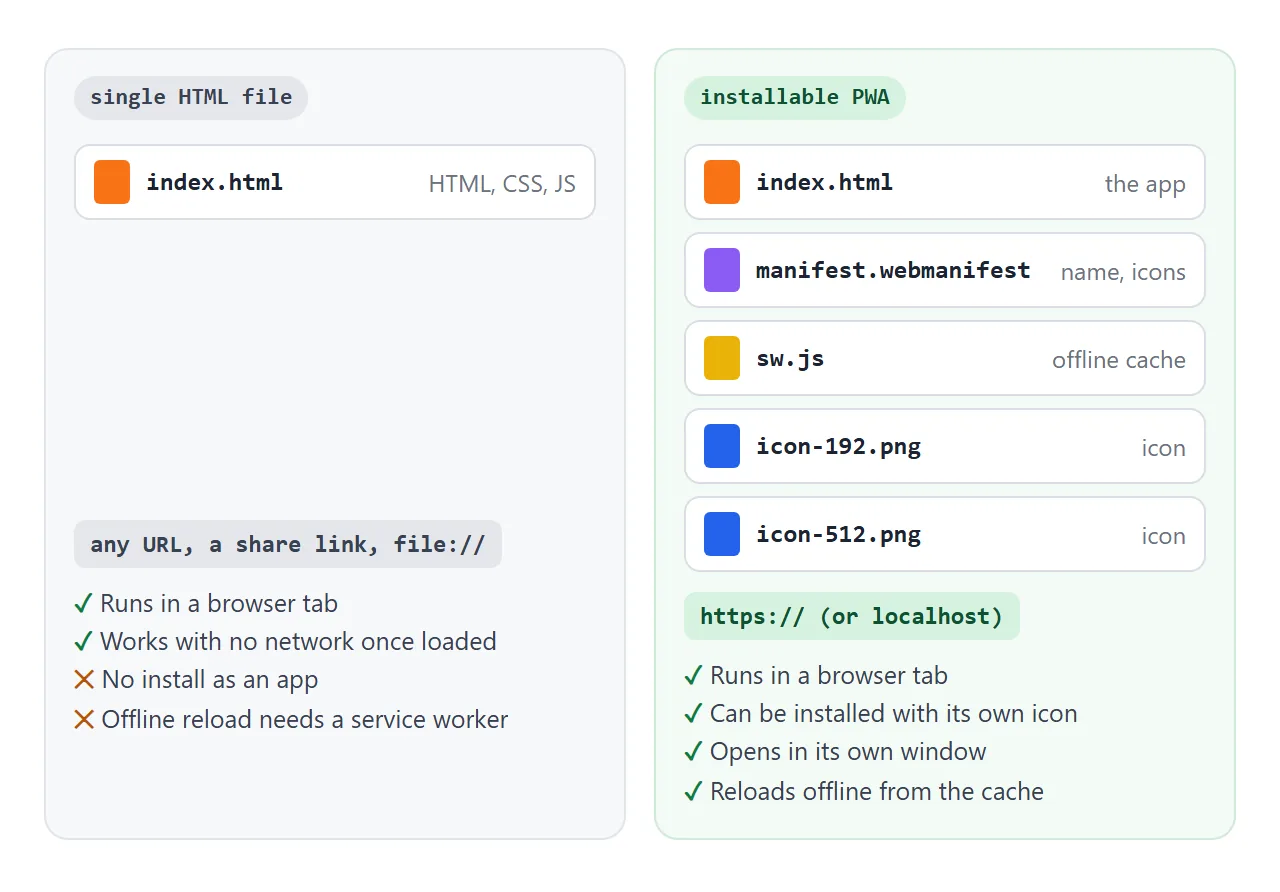
| 특징 | HTML 파일 1개 | 요구 사항 |
|---|---|---|
| 브라우저 탭에서 실행 | 예 | 아무것도 |
| 로드된 후에도 오프라인으로 계속 작업하세요 | 예 | 인라인 CSS 및 JS |
| 자체 아이콘으로 설치 | 아니요 | 매니페스트, 아이콘, HTTPS |
| 네트워크 없이 새로고침 | 아니요 | 서비스 워커, HTTPS |
| 앱으로 열렸다는 걸 알아요 | 예 | display-mode 미디어 쿼리 |
매니페스트: 이름, 아이콘 및 디스플레이
웹 앱 매니페스트는 브라우저에 앱 이름, 아이콘, 앱 여는 방법을 알려주는 JSON 파일입니다. 양식을 작성하여 빌드한 후 다운로드하세요.
<!doctype html>
<html lang="en">
<head>
<meta charset="utf-8">
<meta name="viewport" content="width=device-width, initial-scale=1">
<title>Manifest builder</title>
<style>
  body { margin: 0; padding: 16px; font-family: system-ui, sans-serif; background: #f4f5f7; color: #1d2330; }
  form { display: grid; grid-template-columns: 1fr 1fr; gap: 10px 12px; background: #fff; padding: 14px; border-radius: 12px; box-shadow: 0 2px 10px rgba(0,0,0,.08); }
  label { display: flex; flex-direction: column; gap: 4px; font-size: 13px; font-weight: 600; min-width: 0; }
  input, select { font: inherit; font-weight: 400; padding: 7px 8px; border: 1px solid #cfd4dc; border-radius: 7px; min-width: 0; }
  input[type=color] { padding: 2px; height: 36px; }
  .icon { display: flex; align-items: center; gap: 10px; font-size: 13px; color: #4b5563; margin: 12px 0 6px; }
  .icon img { width: 48px; height: 48px; border-radius: 12px; }
  pre { margin: 0; background: #1d2330; color: #e5e7eb; padding: 12px; border-radius: 10px; font: 12.5px/1.45 ui-monospace, Consolas, monospace; white-space: pre-wrap; word-break: break-word; }
  a { display: inline-block; margin-top: 10px; font-size: 14px; color: #2563eb; }
</style>
</head>
<body>
<form id="f">
  <label>Name <input name="name" value="Score Keeper"></label>
  <label>Short name <input name="short_name" value="Score" maxlength="12"></label>
  <label>Theme color <input type="color" name="theme_color" value="#2563eb"></label>
  <label>Display
    <select name="display">
      <option>standalone</option><option>minimal-ui</option><option>fullscreen</option><option>browser</option>
    </select>
  </label>
</form>
<div class="icon"><img id="preview" alt="Icon preview"> Icon preview, drawn as an inline SVG</div>
<pre id="out"></pre>
<a id="dl" download="manifest.webmanifest">Download manifest.webmanifest</a>

<script>
  const form = document.getElementById('f');
  let blobUrl = '';

  function build() {
    const d = Object.fromEntries(new FormData(form));
    const letter = (d.short_name || d.name || '?').trim().charAt(0).toUpperCase();
    // A square icon as SVG, so the preview needs no image file
    const svg = '<svg xmlns="http://www.w3.org/2000/svg" viewBox="0 0 100 100">' +
      '<rect width="100" height="100" rx="22" fill="' + d.theme_color + '"/>' +
      '<text x="50" y="68" font-size="52" text-anchor="middle" fill="#fff" font-family="sans-serif">' + letter + '</text></svg>';
    document.getElementById('preview').src = 'data:image/svg+xml,' + encodeURIComponent(svg);

    const manifest = {
      name: d.name,
      short_name: d.short_name,
      start_url: '.',
      display: d.display,
      theme_color: d.theme_color,
      background_color: '#ffffff',
      icons: [
        { src: 'icon-192.png', sizes: '192x192', type: 'image/png' },
        { src: 'icon-512.png', sizes: '512x512', type: 'image/png' }
      ]
    };
    const json = JSON.stringify(manifest, null, 2);
    document.getElementById('out').textContent = json;

    // Offer the JSON as a file download
    if (blobUrl) URL.revokeObjectURL(blobUrl);
    blobUrl = URL.createObjectURL(new Blob([json], { type: 'application/manifest+json' }));
    document.getElementById('dl').href = blobUrl;
  }

  form.addEventListener('input', build);
  form.addEventListener('submit', (e) => e.preventDefault());
  build();
</script>
</body>
</html>
페이지의 <head>에서 연결하세요.
<link rel="manifest" href="manifest.webmanifest">
MDN은 Chromium 기반 브라우저가 설치를 제안하기 전에 필요한 사항을 나열합니다: name 또는 short_name, 192px 및 512px 이미지가 있는 icons, start_url, display 또는 display_override. prefer_related_applications는 false이거나 누락되어야 합니다.
페이지는 개발하는 동안 HTTPS를 통해 또는 localhost 또는 127.0.0.1를 통해 제공되어야 합니다.
start_url 및 아이콘 src의 상대 경로는 페이지가 아닌 매니페스트의 URL에 대해 확인됩니다. index.html 옆에 매니페스트를 유지하면 놀라움을 피할 수 있습니다.
서비스 워커: 오프라인에서 작동하는 이유
서비스 워커는 브라우저가 사이트의 백그라운드에서 실행하는 스크립트입니다. 페이지에서 보내는 모든 요청을 포착하고 캐시에서 응답할 수 있습니다. 이것이 바로 네트워크 없이 앱을 다시 로드할 수 있는 이유입니다.
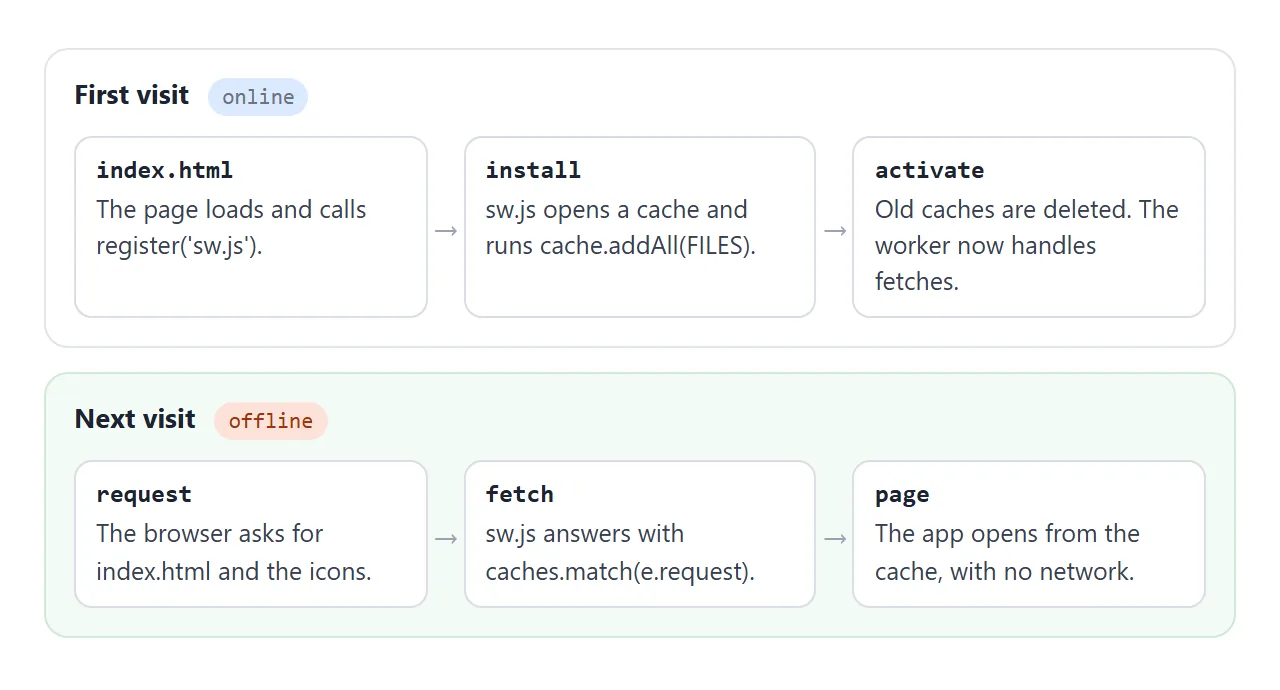
이것은 작은 앱을 위한 완전한 sw.js입니다. 파일을 변경할 때마다 score-v1를 score-v2로 변경하면 새 버전이 캐시되고 이전 캐시가 삭제됩니다.
const CACHE = 'score-v1';
const FILES = ['./', 'index.html', 'manifest.webmanifest', 'icon-192.png', 'icon-512.png'];

// Install: download every file into the cache
self.addEventListener('install', (e) => {
  e.waitUntil(caches.open(CACHE).then((cache) => cache.addAll(FILES)));
});

// Activate: delete caches from older versions
self.addEventListener('activate', (e) => {
  e.waitUntil(caches.keys().then((keys) =>
    Promise.all(keys.filter((k) => k !== CACHE).map((k) => caches.delete(k)))));
});

// Fetch: answer from the cache first, then the network
self.addEventListener('fetch', (e) => {
  e.respondWith(caches.match(e.request).then((hit) => hit || fetch(e.request)));
});
페이지 스크립트 끝부분에 등록하세요.
if ('serviceWorker' in navigator) {
  navigator.serviceWorker.register('sw.js');
}
서비스 워커가 HTML 파일 내부에 존재할 수 없는 이유
작업자는 실제 파일이어야 합니다. register()는 페이지와 동일한 출처의 http: 또는 https: URL만 허용하므로 HTML 내부에 내장된 data: 또는 blob: URL은 거부됩니다. 또한 페이지는 보안 컨텍스트여야 합니다.
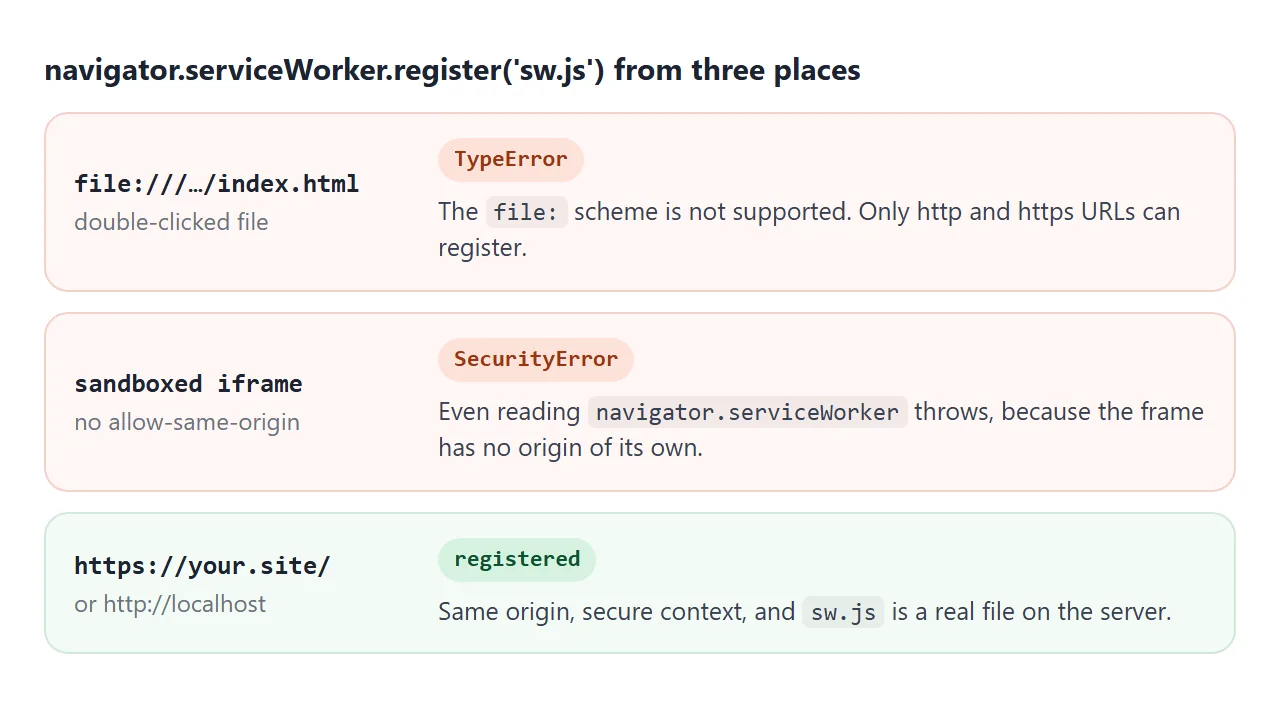
- 파일을 두 번 클릭한 경우:
file:프로토콜이 지원되지 않기 때문에 Chromium은TypeError로 이를 거부합니다. file:// 프로토콜은 로컬 파일의 다른 변경 사항을 설명합니다. - 샌드박스 처리된 프레임:
allow-same-origin가 없으면 프레임에 원본이 없으며navigator.serviceWorker를 읽으면SecurityError가 발생합니다. 샌드박스 속성을 참조하세요. - HTTPS 또는 localhost: 등록됩니다. HTTPS란 무엇입니까에서는 브라우저에서 이를 요구하는 이유를 설명합니다.
완성된 앱, 두 개의 추가 파일 준비
다음은 단일 파일 앱 자체입니다. 점수, 재설정 버튼 및 온라인 칩이 모두 이 하나의 파일에서 실행됩니다. 로드된 후 연결을 끄면 계속 계산됩니다.
<!doctype html>
<html lang="en">
<head>
<meta charset="utf-8">
<meta name="viewport" content="width=device-width, initial-scale=1">
<meta name="theme-color" content="#2563eb">
<title>Score Keeper</title>
<!-- When hosted, add: <link rel="manifest" href="manifest.webmanifest"> -->
<style>
* { box-sizing: border-box; }
body { margin: 0; min-height: 100vh; font-family: system-ui, sans-serif; background: #f4f5f7; color: #1d2330; display: flex; flex-direction: column; }
header { display: flex; justify-content: space-between; align-items: center; padding: 12px 16px; background: #2563eb; color: #fff; }
header b { font-size: 17px; }
.chip { font-size: 12px; padding: 4px 9px; border-radius: 99px; background: rgba(255,255,255,.2); }
.chip.off { background: #f59e0b; color: #1d2330; }
main { flex: 1; display: grid; grid-template-columns: 1fr 1fr; gap: 12px; padding: 14px; }
.team { background: #fff; border-radius: 14px; box-shadow: 0 2px 10px rgba(0,0,0,.08); padding: 12px; text-align: center; }
.team input { width: 100%; font: 600 15px system-ui, sans-serif; text-align: center; border: 0; border-bottom: 1px dashed #cfd4dc; padding: 4px; }
.score { font-size: 56px; font-weight: 700; margin: 10px 0; font-variant-numeric: tabular-nums; }
.btns { display: flex; gap: 8px; }
.btns button { flex: 1; font-size: 22px; padding: 10px 0; border: 0; border-radius: 10px; cursor: pointer; background: #e8eefc; color: #1e40af; }
.btns button.plus { background: #2563eb; color: #fff; }
footer { display: flex; justify-content: space-between; align-items: center; gap: 10px; padding: 0 14px 14px; font-size: 13px; color: #4b5563; }
footer button { font: inherit; padding: 7px 12px; border: 1px solid #cfd4dc; border-radius: 8px; background: #fff; cursor: pointer; }
</style>
</head>
<body>
<header><b>Score Keeper</b><span class="chip" id="net">online</span></header>
<main>
<div class="team" data-team="0"><input value="Home" aria-label="Team name"><div class="score">0</div>
<div class="btns"><button class="minus" aria-label="Minus one">−</button><button class="plus" aria-label="Plus one">+</button></div></div>
<div class="team" data-team="1"><input value="Away" aria-label="Team name"><div class="score">0</div>
<div class="btns"><button class="minus" aria-label="Minus one">−</button><button class="plus" aria-label="Plus one">+</button></div></div>
</main>
<footer><span id="mode"></span><button id="reset">Reset</button></footer>
<script>
// All code and styles live in this one file: nothing else to download
const scores = [0, 0];
document.querySelectorAll('.team').forEach((team) => {
const i = Number(team.dataset.team);
const out = team.querySelector('.score');
team.querySelector('.plus').addEventListener('click', () => { scores[i]++; out.textContent = scores[i]; });
team.querySelector('.minus').addEventListener('click', () => { scores[i] = Math.max(0, scores[i] - 1); out.textContent = scores[i]; });
});
document.getElementById('reset').addEventListener('click', () => {
scores.fill(0);
document.querySelectorAll('.score').forEach((s) => (s.textContent = '0'));
});
// A hint only: navigator.onLine can say "online" without real internet
const chip = document.getElementById('net');
function net() {
chip.textContent = navigator.onLine ? 'online' : 'offline';
chip.classList.toggle('off', !navigator.onLine);
}
window.addEventListener('online', net);
window.addEventListener('offline', net);
net();
const installed = matchMedia('(display-mode: standalone)').matches;
document.getElementById('mode').textContent = installed ? 'Running as an installed app' : 'Running in a browser tab';
</script>
</body>
</html>
두 가지 세부 사항을 통해 PWA를 사용할 수 있습니다. display-mode 미디어 쿼리를 확인하여 설치된 앱으로 열렸는지 확인합니다.
const installed = matchMedia('(display-mode: standalone)').matches;
그리고 MDN은 true가 인터넷 액세스를 보장하지 않는다고 경고하기 때문에 navigator.onLine를 힌트로만 취급합니다.
설치 가능한 PWA로 바꾸려면 이 파일을 하나의 폴더에 넣고 해당 폴더를 GitHub 페이지와 같은 정적 HTTPS 호스트에 업로드하세요.
index.html            the app, plus <link rel="manifest"> and register('sw.js')
manifest.webmanifest  name, start_url, display, icons
sw.js                 the service worker above
icon-192.png          192 x 192 icon
icon-512.png          512 x 512 icon
사람들이 설치하는 방법은 브라우저에 따라 다릅니다. MDN은 Chromium 기반 데스크탑 브라우저의 주소 표시줄에 있는 설치 아이콘, macOS의 Safari에서 파일 > Dock에 추가, iOS 16.4 이상의 공유 메뉴에 대해 설명합니다.
작동하지 않을 때
| 당신이 보는 것 | 원인 | 수정 |
|---|---|---|
TypeError: URL 프로토콜이 지원되지 않습니다. |
file:// 파일로 열린 페이지 |
localhost 또는 HTTPS 호스트에서 제공 |
SecurityError navigator.serviceWorker 읽기 |
allow-same-origin가 없는 샌드박스 iframe |
자신의 원본에 있는 자체 탭에서 페이지를 엽니다. |
| 설치 옵션이 나타나지 않습니다 | 필수 멤버 또는 아이콘 크기가 누락된 매니페스트 | 이름, start_url, 디스플레이 및 두 아이콘 크기를 모두 추가하세요. |
| 등록된 서비스 워커가 없습니다. | cache.addAll의 한 경로가 오류를 반환합니다. |
나열된 모든 파일이 존재하고 철자가 정확하게 작성되도록 합니다. |
| 사용자에게는 여전히 이전 버전이 표시됩니다. | 편집 후 동일한 캐시 이름 | score-v2와 같은 캐시 이름을 범프합니다. |
| Wi-Fi를 통한 전화가 아닌 로컬 호스트에서 작동 | LAN http:// 주소가 안전하지 않습니다. |
HTTPS 호스트에서 테스트 |
| 아이콘 또는 시작 페이지가 잘못되었습니다. | 매니페스트 폴더에 대해 확인된 경로 | index.html 옆에 매니페스트를 유지합니다. |
링크로 공유하세요
호스팅을 설정하기 전에 사람들이 앱 자체를 사용해 보도록 할 수 있습니다. 스크린샷을 탭할 수 없으며 첨부된 .html 파일이 휴대폰에서 일반 코드로 열릴 수 있습니다.
단일 파일 페이지를 NOS 문서에 붙여넣고 공유 링크 생성을 선택합니다. 링크할 HTML이 이를 안내합니다. 페이지는 작성된 대로 렌더링되고 해당 스크립트가 실행되므로 링크가 있는 사람은 누구나 계정 없이 버튼을 누를 수 있습니다.
나중에 코드를 변경하면 동일한 링크에 새 버전이 표시됩니다. 설치 아이콘과 오프라인 다시 로드를 원할 경우 위의 5개 파일을 자체 HTTPS 호스트에 배치하세요.