TypeScript는 JavaScript에 유형 주석을 추가하는 Microsoft의 언어입니다. 브라우저는 이를 직접 실행할 수 없습니다.
빌드 단계 없이 하나의 HTML 파일에서 사용하려면 코드를 <script type="text/typescript"> 블록에 넣으세요. CDN에서 공식 컴파일러를 로드하고 페이지가 실행되는 블록을 JavaScript로 변환하도록 합니다.
시도해 보세요. 가격이나 티켓 수, 총 업데이트를 변경하세요. 이를 수행하는 코드는 TypeScript입니다.
<!doctype html>
<html lang="en">
<head>
<meta charset="utf-8">
<meta name="viewport" content="width=device-width, initial-scale=1">
<title>TypeScript in one HTML file</title>
<style>
  body { margin: 0; padding: 20px; font-family: system-ui, sans-serif; background: #f4f5f7; color: #1d2330; }
  .card { max-width: 360px; background: #fff; border-radius: 12px; padding: 16px 18px; box-shadow: 0 4px 16px rgba(0, 0, 0, .08); }
  label { display: block; margin: 8px 0 4px; font-size: 14px; }
  input { width: 100%; box-sizing: border-box; padding: 8px; font-size: 16px; border: 1px solid #cfd4dc; border-radius: 8px; }
  #out { margin-top: 12px; font-size: 18px; font-weight: 600; }
  small { color: #6b7280; }
</style>
<!-- 1. The TypeScript compiler, pinned to one version -->
<script src="https://cdn.jsdelivr.net/npm/typescript@6.0.3/lib/typescript.min.js"></script>
</head>
<body>
<div class="card">
  <label for="price">Price per ticket</label>
  <input id="price" type="number" value="12" min="0">
  <label for="qty">Tickets</label>
  <input id="qty" type="number" value="3" min="0">
  <div id="out"></div>
  <small id="ver"></small>
</div>

<!-- 2. Your TypeScript. The browser skips this block on its own. -->
<script type="text/typescript">
  type Order = { price: number; qty: number };

  function total(order: Order): string {
    return '$' + (order.price * order.qty).toFixed(2);
  }

  const price = document.getElementById('price') as HTMLInputElement;
  const qty = document.getElementById('qty') as HTMLInputElement;
  const out = document.getElementById('out')!;

  function update(): void {
    out.textContent = 'Total: ' + total({ price: price.valueAsNumber || 0, qty: qty.valueAsNumber || 0 });
  }
  price.addEventListener('input', update);
  qty.addEventListener('input', update);
  update();
</script>

<!-- 3. Compile each TypeScript block to JavaScript and run it -->
<script>
  for (const block of document.querySelectorAll('script[type="text/typescript"]')) {
    const js = ts.transpileModule(block.textContent, {
      compilerOptions: { target: ts.ScriptTarget.ES2020 }
    }).outputText;
    const run = document.createElement('script');
    run.textContent = js;
    document.body.append(run);
  }
  document.getElementById('ver').textContent = 'Compiled in this page by TypeScript ' + ts.version;
</script>
</body>
</html>
페이지는 컴파일러, TypeScript, 두 부분을 연결하는 짧은 스크립트의 세 부분으로 구성됩니다. 다른 모든 것은 일반적인 HTML입니다.
브라우저가 TypeScript를 실행할 수 없는 이유
TypeScript 사이트에서는 언어를 "유형 구문이 있는 JavaScript"로 설명합니다. 타입은 브라우저가 모르는 부분이다.
일반 <script> 태그에서 let n: number의 콜론은 유효한 JavaScript가 아니므로 브라우저는 SyntaxError로 전체 스크립트를 거부합니다. Chrome에서는 콘솔에 Unexpected token ':'가 표시됩니다.
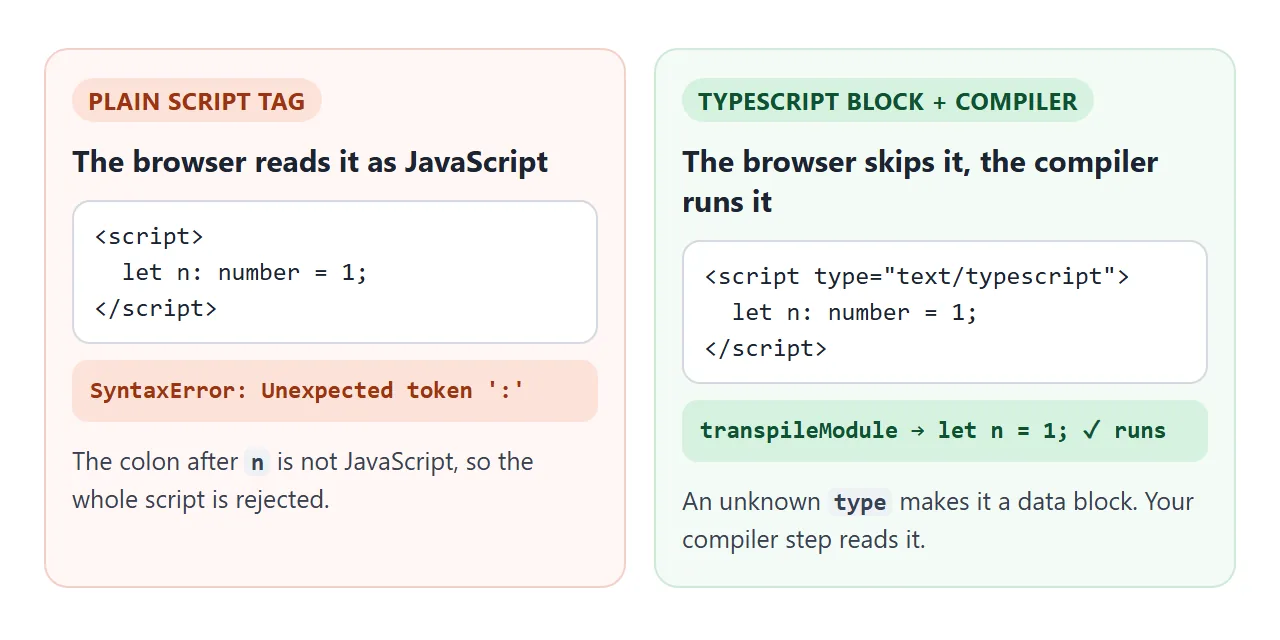
수정 사항은 <script> 요소의 규칙을 사용합니다. <script>에 type가 있는 경우 브라우저는 JavaScript로 인식하지 못하고 콘텐츠를 데이터 블록으로 처리하여 실행하지 않습니다. 자신의 코드는 나중에 읽습니다.
페이지가 컴파일되고 실행되는 방식
기본 예는 다음 네 단계를 따릅니다.
- 컴파일러를 로드합니다. 하나의 스크립트 태그는 전역
ts개체를 정의하는typescript.min.js를 가져옵니다. - 데이터 블록에 TypeScript를 작성합니다. 브라우저가 이를 건너뛰도록
type="text/typescript"를 사용합니다. - 컴파일하고 실행합니다. 블록의 텍스트를
ts.transpileModule에 전달한 다음 출력을 새<script>요소에 넣습니다. - 다른 곳에서 유형을 확인하세요. 아래와 같이 컴파일 단계에서는 유형을 확인하지 않고 제거합니다.
이것은 전체 연결 스크립트입니다.
<script src="https://cdn.jsdelivr.net/npm/typescript@6.0.3/lib/typescript.min.js"></script>

<script>
  for (const block of document.querySelectorAll('script[type="text/typescript"]')) {
    const js = ts.transpileModule(block.textContent, {
      compilerOptions: { target: ts.ScriptTarget.ES2020 }
    }).outputText;
    const run = document.createElement('script');
    run.textContent = js;
    document.body.append(run);
  }
</script>
<head>에 컴파일러를 넣고 TypeScript 블록 뒤에 연결 스크립트를 넣으세요. transpileModule는 컴파일러의 문자열 입력, 문자열 출력 기능입니다. TypeScript 텍스트가 들어가고 JavaScript 텍스트가 나옵니다.
"최신"이 아닌 TypeScript 6 고정
TypeScript 7.0은 2026년 7월 8일에 컴파일러의 기본 포트로 출시되었습니다. 발표에 따르면 API와 함께 제공되지 않으며 npm 패키지에는 lib/typescript.js 파일이 없습니다.
버전 7.0.2에서 해당 파일을 jsDelivr에 요청하면 시도했을 때 404가 반환되었으므로 페이지에 ts 개체가 없습니다. 항상 주소에 버전을 적어주세요.
6.0 라인에는 여전히 lib/typescript.js가 포함되어 있으므로 예제에서는 typescript@6.0.3를 고정합니다.
jsDelivr은 버전이 지정된 주소에서 모든 npm 파일을 제공하며 .min를 JavaScript 파일 이름에 추가하면 축소된 복사본이 반환됩니다. 축소된 컴파일러는 다운로드했을 때 3.5MB를 측정했는데, 이는 페이지에서 컴파일하는 데 드는 비용입니다.
유형이 지워지고 확인되지 않습니다.
컴파일러는 유형을 삭제하고 논리를 유지합니다. TypeScript 핸드북에서는 이를 명확하게 설명합니다. 유형 주석은 프로그램의 런타임 동작을 결코 변경하지 않습니다.
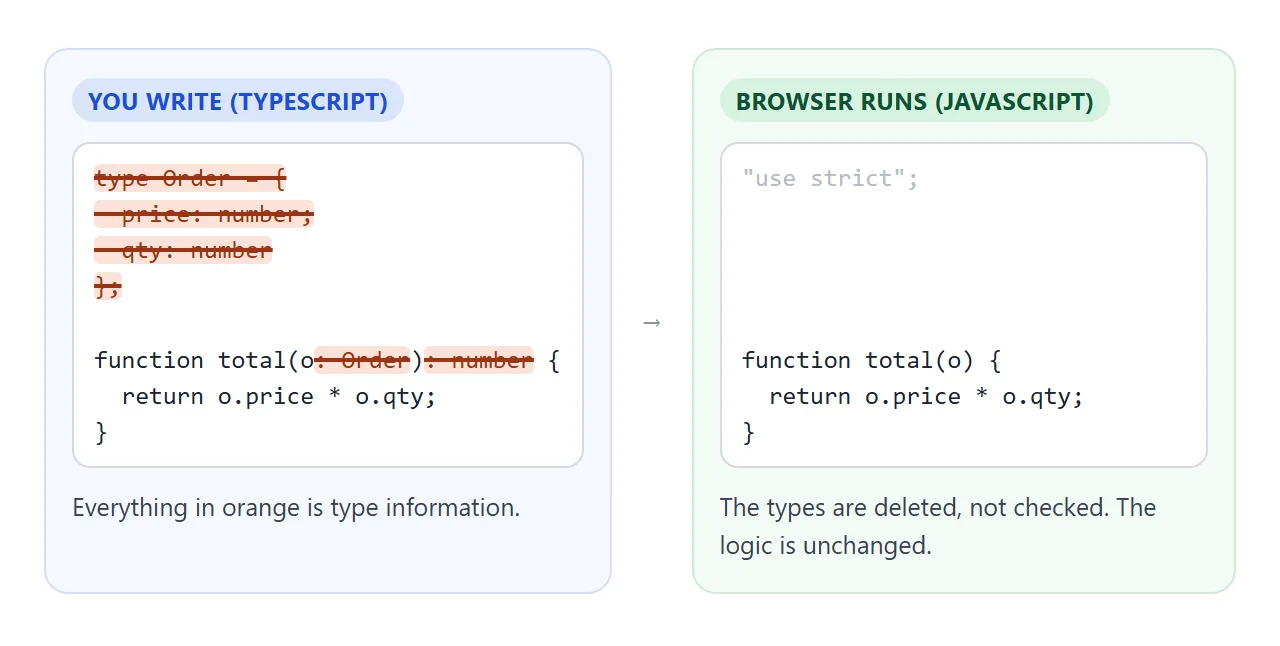
놀라운 점은 transpileModule도 유형을 확인하지 않는다는 것입니다. 한 번에 하나의 파일에 대해 작동하며 전체 유형 시스템을 사용할 수 없습니다.
아래의 첫 번째 샘플은 문자열을 number 변수에 할당하고 코드는 어쨌든 실행됩니다. "3" + 1는 31를 인쇄합니다.
<!doctype html>
<html lang="en">
<head>
<meta charset="utf-8">
<meta name="viewport" content="width=device-width, initial-scale=1">
<title>TypeScript to JavaScript, in the page</title>
<style>
  body { margin: 0; padding: 14px; font-family: system-ui, sans-serif; background: #f4f5f7; color: #1d2330; }
  .bar { display: flex; flex-wrap: wrap; gap: 6px; margin-bottom: 8px; }
  button { font: inherit; font-size: 14px; padding: 7px 11px; border-radius: 8px; border: 1px solid #cfd4dc; background: #fff; cursor: pointer; }
  button.go { background: #2563eb; border-color: #2563eb; color: #fff; }
  textarea, pre { width: 100%; box-sizing: border-box; margin: 0; padding: 10px; border-radius: 8px;
    font: 13px/1.45 ui-monospace, Consolas, monospace; }
  textarea { height: 150px; border: 1px solid #cfd4dc; resize: vertical; }
  pre { min-height: 40px; white-space: pre-wrap; background: #1d2330; color: #e5e7eb; }
  h3 { margin: 10px 0 4px; font-size: 13px; color: #4b5563; text-transform: uppercase; letter-spacing: .4px; }
  #log { background: #fff; color: #1d2330; border: 1px solid #cfd4dc; }
  .err { color: #b42318; }
</style>
<script src="https://cdn.jsdelivr.net/npm/typescript@6.0.3/lib/typescript.min.js"></script>
</head>
<body>
<div class="bar">
  <button data-sample="typeError">Type error</button>
  <button data-sample="syntaxError">Syntax error</button>
  <button data-sample="ok">Interface</button>
  <button class="go" id="run">Compile and run</button>
</div>
<textarea id="src" spellcheck="false" aria-label="TypeScript source"></textarea>
<h3>JavaScript the browser gets</h3>
<pre id="js"></pre>
<h3>Output</h3>
<pre id="log"></pre>

<script>
  const samples = {
    typeError: 'const count: number = "3";  // wrong type\nconsole.log(count + 1);',
    syntaxError: 'let total: number = ;\nconsole.log(total);',
    ok: 'interface User { name: string; age?: number }\n\nconst u: User = { name: "Ana" };\nconsole.log(`${u.name} is ${u.age ?? "unknown"}`);'
  };
  const src = document.getElementById('src');
  const jsBox = document.getElementById('js');
  const log = document.getElementById('log');

  function print(text, isError) {
    const line = document.createElement('div');
    line.textContent = text;
    if (isError) line.className = 'err';
    log.append(line);
  }

  function compileAndRun() {
    const result = ts.transpileModule(src.value, {
      compilerOptions: { target: ts.ScriptTarget.ES2020 },
      reportDiagnostics: true  // syntax errors only, no type checking
    });
    jsBox.textContent = result.outputText;
    log.textContent = '';
    if (result.diagnostics.length) {
      for (const d of result.diagnostics) {
        print('Syntax error: ' + ts.flattenDiagnosticMessageText(d.messageText, ' '), true);
      }
      return;
    }
    // Run the JavaScript in a new script, with a console that writes into the page
    window.pageConsole = { log: (...args) => print(args.join(' ')) };
    window.onerror = (msg) => { print(msg, true); return true; };
    const run = document.createElement('script');
    run.textContent = '(function (console) {\n' + result.outputText + '\n})(pageConsole);';
    document.body.append(run);
    run.remove();
  }

  document.querySelectorAll('[data-sample]').forEach((b) => b.addEventListener('click', () => {
    src.value = samples[b.dataset.sample];
    compileAndRun();
  }));
  document.getElementById('run').addEventListener('click', compileAndRun);
  src.value = samples.typeError;
  compileAndRun();
</script>
</body>
</html>
구문 오류가 다릅니다. 구문 오류 샘플에 누락된 값이 있으며 컴파일러는 작업 코드를 생성하는 대신 이를 보고합니다. 유형 오류만 빠져 나옵니다.
유형 오류를 보려면 TypeScript를 이해하는 편집기에서 코드를 작성하거나 컴퓨터에서 tsc를 실행하세요. 브라우저에서 컴파일되는 페이지는 귀하가 한 일을 신뢰합니다.
완성된 예: 여행 비용 분배기
코드에 모양이 있는 데이터가 있으면 유형이 효과를 발휘합니다. 이 페이지에서는 interface를 사용하여 비용을 설명하고, 통합 유형을 사용하여 지불인을 세 이름으로 제한하고, 누가 빚을 졌는지 합산합니다.
<!doctype html>
<html lang="en">
<head>
<meta charset="utf-8">
<meta name="viewport" content="width=device-width, initial-scale=1">
<title>Trip cost splitter (TypeScript)</title>
<style>
  body { margin: 0; padding: 16px; font-family: system-ui, sans-serif; background: #f4f5f7; color: #1d2330; }
  .card { max-width: 440px; background: #fff; border-radius: 12px; padding: 14px 16px; box-shadow: 0 4px 16px rgba(0, 0, 0, .08); }
  h2 { margin: 0 0 10px; font-size: 18px; }
  form { display: flex; flex-wrap: wrap; gap: 6px; }
  input, select, button { font: inherit; font-size: 15px; padding: 7px 9px; border-radius: 8px; border: 1px solid #cfd4dc; }
  input[name="what"] { flex: 1 1 130px; min-width: 0; }
  input[name="amount"] { width: 90px; }
  button { background: #2563eb; border-color: #2563eb; color: #fff; cursor: pointer; }
  ul { list-style: none; padding: 0; margin: 12px 0; }
  li { display: flex; justify-content: space-between; padding: 6px 0; border-bottom: 1px solid #eef0f3; font-size: 15px; }
  .pos { color: #0f5132; } .neg { color: #9a3412; }
  #msg { color: #b42318; font-size: 14px; min-height: 18px; margin-top: 6px; }
  details { margin-top: 10px; font-size: 14px; }
  pre { white-space: pre-wrap; font: 12px/1.4 ui-monospace, Consolas, monospace; background: #1d2330; color: #e5e7eb; padding: 10px; border-radius: 8px; }
</style>
<script src="https://cdn.jsdelivr.net/npm/typescript@6.0.3/lib/typescript.min.js"></script>
</head>
<body>
<div class="card">
  <h2>Trip costs</h2>
  <form id="add">
    <select name="who" aria-label="Who paid"><option>Ana</option><option>Ben</option><option>Chloe</option></select>
    <input name="what" placeholder="What for" aria-label="What for">
    <input name="amount" type="number" step="0.01" placeholder="0.00" aria-label="Amount">
    <button>Add</button>
  </form>
  <div id="msg"></div>
  <ul id="expenses"></ul>
  <b>Who owes what</b>
  <ul id="balances"></ul>
  <details><summary>Show the JavaScript this page compiled</summary><pre id="js"></pre></details>
</div>

<script type="text/typescript">
  type Person = 'Ana' | 'Ben' | 'Chloe';
  interface Expense { who: Person; what: string; amount: number }

  const people: Person[] = ['Ana', 'Ben', 'Chloe'];
  const expenses: Expense[] = [
    { who: 'Ana', what: 'Train', amount: 84 },
    { who: 'Ben', what: 'Dinner', amount: 57 }
  ];

  // Positive: the group owes this person. Negative: they owe the group.
  function balances(list: Expense[]): Map<Person, number> {
    const share = list.reduce((sum, e) => sum + e.amount, 0) / people.length;
    const result = new Map<Person, number>(people.map((p) => [p, -share]));
    for (const e of list) result.set(e.who, result.get(e.who)! + e.amount);
    return result;
  }

  function row(left: string, right: string, cls = ''): HTMLLIElement {
    const li = document.createElement('li');
    li.innerHTML = '<span></span><span></span>';
    li.children[0].textContent = left;
    li.children[1].textContent = right;
    li.children[1].className = cls;
    return li;
  }

  function render(): void {
    const exp = document.getElementById('expenses')!;
    const bal = document.getElementById('balances')!;
    exp.replaceChildren(...expenses.map((e) => row(`${e.who}: ${e.what}`, e.amount.toFixed(2))));
    bal.replaceChildren(...[...balances(expenses)].map(([p, v]) =>
      row(p, (v >= 0 ? '+' : '') + v.toFixed(2), v >= 0 ? 'pos' : 'neg')));
  }

  const form = document.getElementById('add') as HTMLFormElement;
  form.addEventListener('submit', (ev) => {
    ev.preventDefault();
    const data = new FormData(form);
    const amount = Number(data.get('amount'));
    // Types vanish at runtime, so check what the user typed
    if (!(amount > 0)) {
      document.getElementById('msg')!.textContent = 'Enter an amount above 0.';
      return;
    }
    document.getElementById('msg')!.textContent = '';
    expenses.push({ who: data.get('who') as Person, what: String(data.get('what') || 'Other'), amount });
    form.reset();
    render();
  });
  render();
</script>

<script>
  // Compile the TypeScript block, show the result, and run it
  const block = document.querySelector('script[type="text/typescript"]');
  const js = ts.transpileModule(block.textContent, {
    compilerOptions: { target: ts.ScriptTarget.ES2020 }
  }).outputText;
  document.getElementById('js').textContent = js;
  const run = document.createElement('script');
  run.textContent = js;
  document.body.append(run);
</script>
</body>
</html>
- 데이터 형성:
interface Expense는 모든 비용에 포함된 세 가지 필드를 나열합니다. - 값 제한:
type Person는 세 이름의 결합이므로 편집자는 철자가 틀린 이름을 표시할 수 있습니다. - 런타임 시 사용자 입력 확인: 페이지가 실행되면 유형이 사라지므로 양식에서는 여전히 양이 0보다 큰지 확인합니다.
- 페이지에서 양식을 처리합니다. 제출 리스너가
preventDefault()를 호출하고 FormData로 필드를 읽습니다.
일반적인 경로: 먼저 tsc로 컴파일
TypeScript 핸드북의 경로는 컴퓨터에서 컴파일되므로 JavaScript만 브라우저에 도달합니다. npm을 사용하여 컴파일러를 설치하고 파일에서 tsc를 실행합니다.
npm install -g typescript
tsc --noEmitOnError app.ts
그러면 페이지가 일반 스크립트 태그와 함께 로드되는 app.js가 생성됩니다. 기본적으로 tsc는 유형 오류가 있는 경우에도 JavaScript를 작성합니다. --noEmitOnError는 오류가 수정될 때까지 파일 쓰기를 중지합니다.
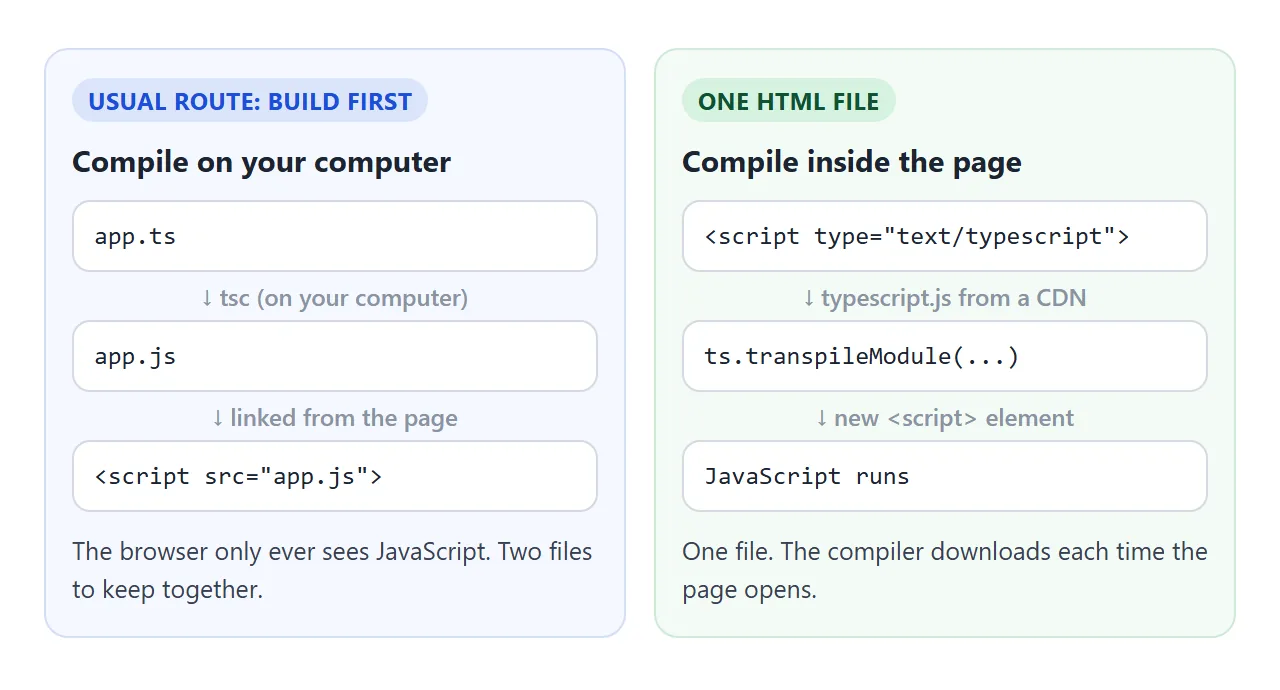
여전히 하나의 파일로 끝낼 수 있습니다. 컴파일된 JavaScript를 일반 <script> 태그에 붙여넣고 컴파일러를 삭제합니다. 그러면 먼저 3.5MB를 다운로드하지 않고 페이지가 열립니다.
세 번째 옵션은 컴파일을 건너뜁니다. JavaScript 파일 상단에 // @ts-check를 추가하고 /** @type {number} */와 같은 JSDoc 주석에 유형을 설명합니다. TypeScript 인식 편집기는 유형 오류를 보고하고 브라우저는 파일을 있는 그대로 실행합니다.
나중에 전체 프로젝트 빌드로 이동하는 경우 빌드된 프런트 엔드 호스팅이 출력 폴더를 포함합니다.
작동하지 않을 때
| 당신이 보는 것 | 원인 | 수정 |
|---|---|---|
Chrome의 Unexpected token ':'와 같은 첫 번째 유형의 SyntaxError |
TypeScript는 일반 <script> 태그 안에 있습니다. |
type="text/typescript" 및 컴파일 단계 사용 |
| 아무 일도 일어나지 않고 오류도 발생하지 않습니다. | TypeScript 블록이 있지만 아무것도 컴파일하지 않습니다. | 블록 뒤에 연결 스크립트를 추가하세요. |
ts is not defined |
컴파일러가 없거나, 스크립트 다음에 로드되거나, 버전 7입니다. | <head>에 typescript@6.0.3 로드 |
export를 언급하는 SyntaxError |
블록은 import 또는 export를 사용합니다. |
이를 제거하고 코드를 하나의 블록에 유지하십시오. |
| 경고 없이 잘못된 유형이 실행됩니다. | transpileModule는 유형을 확인하지 않습니다. |
편집기에서 확인하거나 tsc로 확인하세요. |
| 페이지 시작 속도가 느림 | 코드가 실행되기 전에 컴파일러가 다운로드됩니다. | 대신 컴파일된 JavaScript를 붙여넣으세요. |
페이지가 여전히 비어 있으면 HTML JavaScript가 작동하지 않음 원인을 순서대로 살펴봅니다. 동일한 방식으로 CDN에서 CSS 라이브러리를 로드하는 방법은 HTML 파일에 Tailwind 추가에서 다룹니다.
링크로 공유하세요
TypeScript 페이지는 설명하는 것보다 작동하는 모습을 보여주는 것이 더 쉽습니다. .html 첨부 파일이 전화기에서 일반 텍스트로 열릴 수 있습니다. 휴대전화에서 HTML 파일 열기가 그 이유를 설명합니다.
작업 버전을 보내려면 페이지를 NOS 문서에 붙여넣고 공유 링크 만들기를 선택하세요. 링크할 HTML이 이를 안내합니다.
페이지는 작성된 대로 렌더링되고 스크립트가 실행되며 컴파일러는 jsDelivr에서 로드되므로 링크가 있는 사람은 누구나 계정 없이 사용해 볼 수 있습니다. 나중에 코드를 변경하면 동일한 링크에 새 버전이 표시됩니다.