Here, "Angular" means the web framework documented at angular.dev and maintained by a team at Google.
A normal Angular app is a TypeScript project that the Angular CLI builds. A small one also runs from one HTML file: import three Angular packages from jsDelivr and the browser compiles the template when the page opens.
Try it first. The counter below is Angular 22.2.1, loaded from a CDN, with no install and no build.
<!doctype html>
<html lang="en">
<head>
<meta charset="utf-8">
<meta name="viewport" content="width=device-width, initial-scale=1">
<title>Angular in one HTML file</title>
<style>
  body { margin: 0; padding: 24px; font-family: system-ui, sans-serif; background: #f4f5f7; }
  .card { max-width: 320px; padding: 18px 20px; border-radius: 12px; background: #fff; box-shadow: 0 6px 20px rgba(0, 0, 0, .1); }
  button { font: inherit; padding: 8px 16px; border: 0; border-radius: 8px; background: #c3002f; color: #fff; cursor: pointer; }
  p { margin: 0 0 12px; }
</style>
</head>
<body>
<!-- Angular replaces what is inside this tag once it starts -->
<app-root>Loading Angular...</app-root>

<script type="module">
  // The compiler must load first: it turns the template string into code in the browser
  import 'https://cdn.jsdelivr.net/npm/@angular/compiler@22.2.1/+esm';
  import { Component, signal } from 'https://cdn.jsdelivr.net/npm/@angular/core@22.2.1/+esm';
  import { bootstrapApplication } from 'https://cdn.jsdelivr.net/npm/@angular/platform-browser@22.2.1/+esm';

  class App {
    count = signal(0);  // a value the template reads by calling count()
  }

  // No TypeScript here, so Component() is called on the class instead of written as @Component
  Component({
    selector: 'app-root',
    template: `
      <div class="card">
        <p>You clicked <b>{{ count() }}</b> times.</p>
        <button (click)="count.set(count() + 1)">Click me</button>
      </div>`,
  })(App);

  bootstrapApplication(App);
</script>
</body>
</html>
The whole app is the module script at the bottom. The rest of this guide takes it apart, shows the template syntax you will use most, and explains what changes when you move to a real Angular project.
The four parts of the page
Every single-file Angular page has the same four parts, in this order.
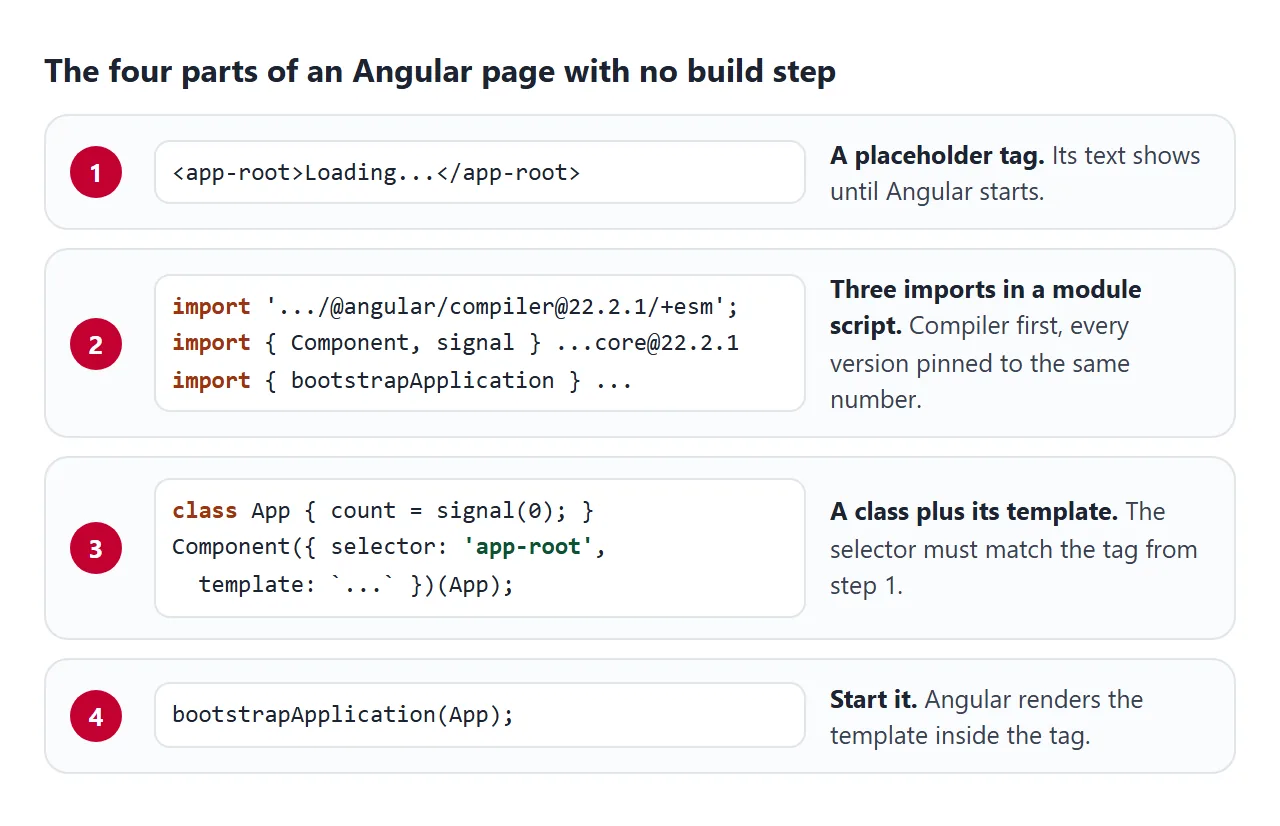
- A placeholder tag. Put
<app-root>in the body with some text inside. The text shows until Angular starts, so if you still see it, Angular did not start. - Three imports in a module script.
@angular/compilercomes first, then@angular/coreand@angular/platform-browser. The script tag needstype="module", orimportis a syntax error. - A class and its template. State lives on the class as signals.
Component()gets aselector, which must match the placeholder tag, and atemplatestring. - One call to start it.
bootstrapApplication(App)finds the tag and renders the template inside it.
Pin every Angular package to the same version number. The @angular/core 22.2.1 package lists @angular/compiler 22.2.1, an exact version, as a peer dependency.
Why it runs without a build
Angular has two ways to compile templates. AOT (ahead of time) compiles them at build time, and it is the default for ng build and ng serve. JIT (just in time) compiles them in the browser while the page runs.
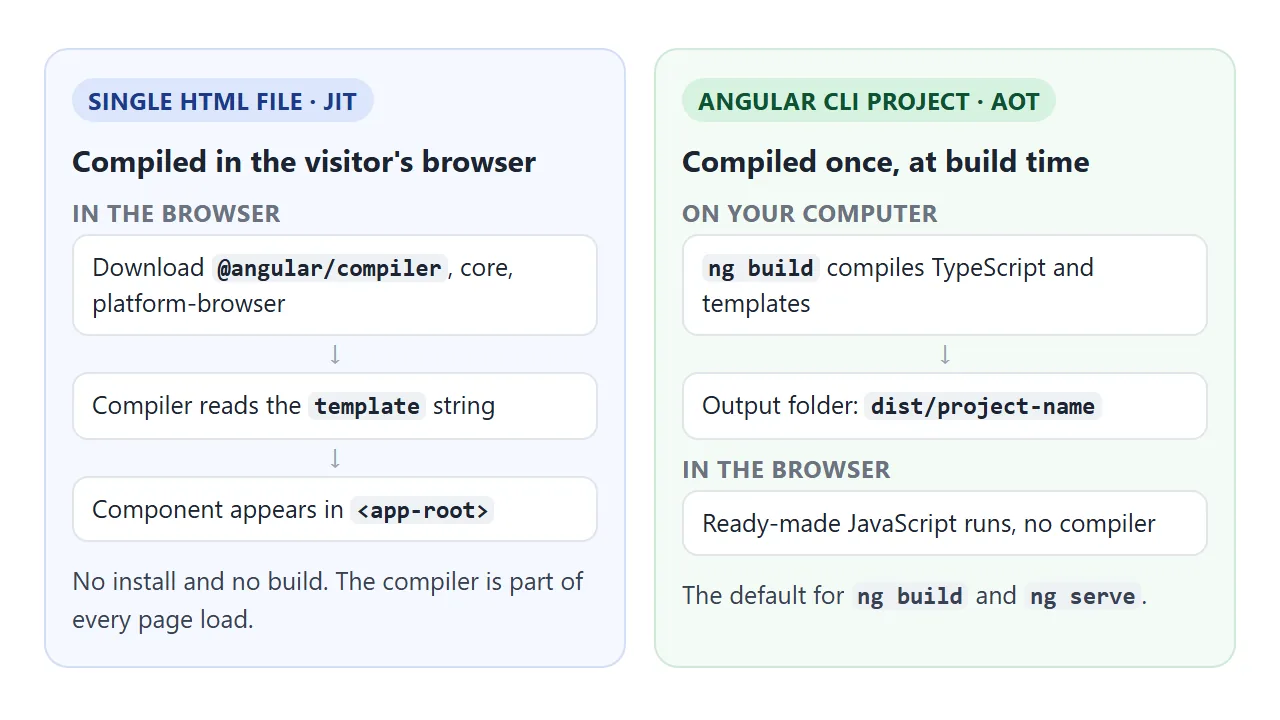
A single HTML file has no build, so it uses JIT. That is why @angular/compiler is imported first: without it, Angular has nothing to turn the template string into code.
The Angular docs note that the compiler is a large part of Angular, so an AOT build that leaves it out ships much less code.
There is also no zone.js script: the Angular docs say change detection without zone.js is the default from v21. Updating a signal that the template reads, or running a listener bound in the template, tells Angular to refresh the view.
The template syntax you will use most
Templates are HTML with a few additions. This example uses most of them. Type in the box to filter the list.
<!doctype html>
<html lang="en">
<head>
<meta charset="utf-8">
<meta name="viewport" content="width=device-width, initial-scale=1">
<title>Angular template syntax</title>
<style>
  body { margin: 0; padding: 20px; font-family: system-ui, sans-serif; background: #f4f5f7; }
  .card { max-width: 360px; padding: 16px 18px; border-radius: 12px; background: #fff; box-shadow: 0 6px 20px rgba(0, 0, 0, .1); }
  input { font: inherit; padding: 7px 9px; border: 1px solid #c9ced6; border-radius: 8px; width: 100%; box-sizing: border-box; }
  ul { padding-left: 20px; }
  li.hit { background: #fff3c4; }
  .note { color: #6b7280; font-size: 14px; }
</style>
</head>
<body>
<app-root>Loading Angular...</app-root>

<script type="module">
  import 'https://cdn.jsdelivr.net/npm/@angular/compiler@22.2.1/+esm';
  import { Component, signal, computed } from 'https://cdn.jsdelivr.net/npm/@angular/core@22.2.1/+esm';
  import { bootstrapApplication } from 'https://cdn.jsdelivr.net/npm/@angular/platform-browser@22.2.1/+esm';

  class App {
    fruits = ['Apple', 'Banana', 'Cherry', 'Grape', 'Mango', 'Pear'];
    query = signal('');
    // computed() re-runs only when query changes
    matches = computed(() =>
      this.fruits.filter(f => f.toLowerCase().includes(this.query().toLowerCase())));
  }

  Component({
    selector: 'app-root',
    template: `
      <div class="card">
        <!-- [value] sets a property; (input) listens to an event, $event is the DOM event -->
        <input placeholder="Filter fruit" [value]="query()" (input)="query.set($event.target.value)">

        <!-- {{ }} prints a value -->
        <p class="note">{{ matches().length }} of {{ fruits.length }} shown</p>

        <ul>
          <!-- @for needs track so Angular can reuse list items -->
          @for (f of matches(); track f) {
            <li [class.hit]="query() !== ''">{{ f }}</li>
          } @empty {
            <li>No fruit matches "{{ query() }}"</li>
          }
        </ul>

        @if (query()) {
          <button (click)="query.set('')">Clear filter</button>
        }
      </div>`,
  })(App);

  bootstrapApplication(App);
</script>
</body>
</html>
| Syntax | What it does | In the example |
|---|---|---|
{{ value }} |
Prints a value as text | The "6 of 6 shown" line |
[property]="expr" |
Sets a DOM property | [value] on the input |
[class.name]="expr" |
Adds the class when the value is truthy | [class.hit] on each item |
(event)="statement" |
Runs code when the event fires | (input) and (click) |
$event |
The DOM event inside a listener | Reads the typed text |
@if (cond) { } |
Shows a block only when true | The Clear button |
@for (x of list; track x) { } |
Repeats a block for each item | The fruit list |
@empty { } |
Shown when the @for list is empty | The "No fruit matches" line |
Two parts of the class drive it. query is a writable signal: read it with query(), change it with query.set(...). matches is a computed() signal, which recalculates when query changes.
query = signal('');
matches = computed(() =>
  this.fruits.filter(f => f.toLowerCase().includes(this.query().toLowerCase())));
track is required in @for. Leave it out and the template fails to compile, so the page stays on its loading text.
Writing a component without TypeScript
In a CLI project, a component is a TypeScript class with @Component written above it, and the template often lives in its own file. A browser running a plain .html file has no TypeScript step and no second file to load.
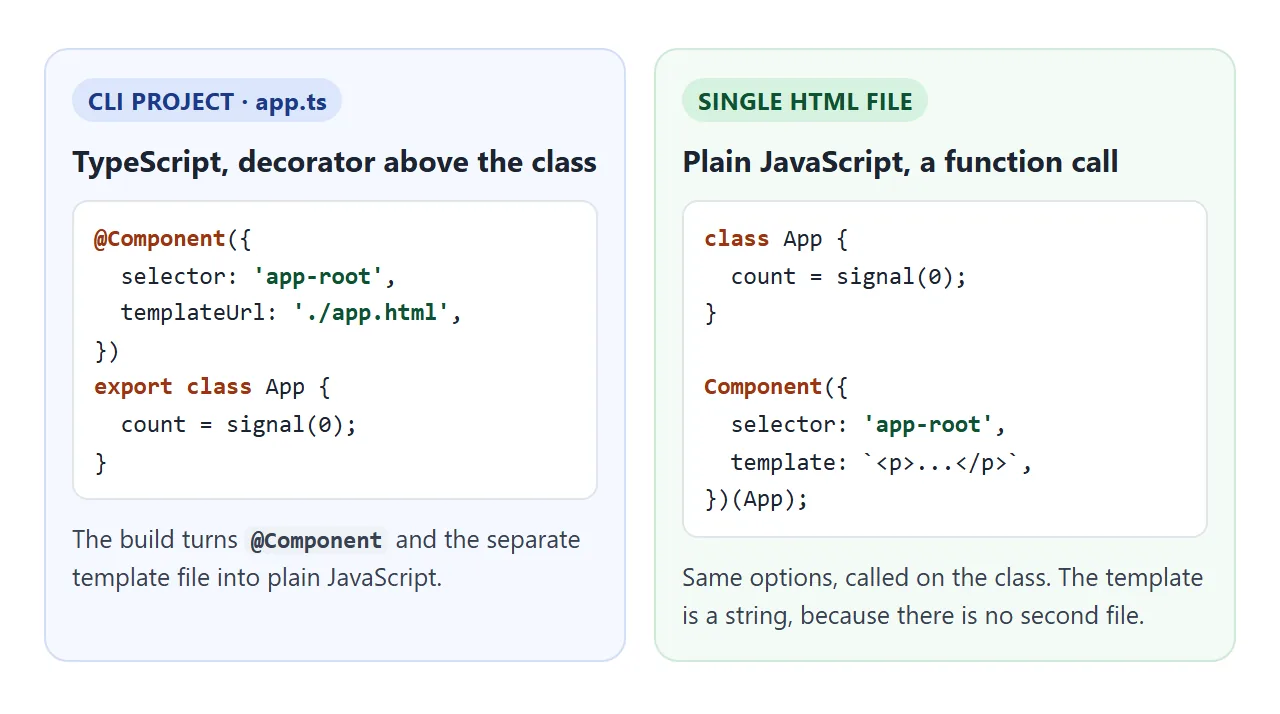
So the single file calls Component() with the same options and passes it the class:
class App {
  count = signal(0);
}

Component({
  selector: 'app-root',
  template: `<button (click)="count.set(count() + 1)">{{ count() }}</button>`,
})(App);
Use template with a backtick string, not templateUrl. Backticks let the template span several lines. If you later move the code into a CLI project, the options carry over as they are.
A finished example: a packing list
This one adds a form, checkboxes and removal. Add an item with Enter or the button, tick items off, and remove them with the cross.
<!doctype html>
<html lang="en">
<head>
<meta charset="utf-8">
<meta name="viewport" content="width=device-width, initial-scale=1">
<title>Packing list in Angular</title>
<style>
  body { margin: 0; padding: 20px; font-family: system-ui, sans-serif; background: #f4f5f7; }
  .card { max-width: 380px; padding: 16px 18px; border-radius: 12px; background: #fff; box-shadow: 0 6px 20px rgba(0, 0, 0, .1); }
  h2 { margin: 0 0 4px; font-size: 20px; }
  .note { margin: 0 0 12px; color: #6b7280; font-size: 14px; }
  form { display: flex; gap: 8px; }
  input[type=text] { flex: 1; min-width: 0; font: inherit; padding: 7px 9px; border: 1px solid #c9ced6; border-radius: 8px; }
  button { font: inherit; padding: 7px 12px; border: 0; border-radius: 8px; background: #c3002f; color: #fff; cursor: pointer; }
  ul { list-style: none; padding: 0; margin: 12px 0 0; }
  li { display: flex; align-items: center; gap: 8px; padding: 7px 0; border-bottom: 1px solid #eceef2; }
  li label { flex: 1; }
  li.done label { color: #9ca3af; text-decoration: line-through; }
  .x { background: none; color: #9ca3af; padding: 2px 8px; }
  .all { margin-top: 12px; color: #0f5132; font-weight: 600; }
</style>
</head>
<body>
<app-root>Loading Angular...</app-root>

<script type="module">
  import 'https://cdn.jsdelivr.net/npm/@angular/compiler@22.2.1/+esm';
  import { Component, signal, computed } from 'https://cdn.jsdelivr.net/npm/@angular/core@22.2.1/+esm';
  import { bootstrapApplication } from 'https://cdn.jsdelivr.net/npm/@angular/platform-browser@22.2.1/+esm';

  let nextId = 4;

  class App {
    items = signal([
      { id: 1, name: 'Passport', done: true },
      { id: 2, name: 'Charger', done: false },
      { id: 3, name: 'Rain jacket', done: false },
    ]);
    left = computed(() => this.items().filter(i => !i.done).length);

    add(event, input) {
      event.preventDefault();  // keep the form from reloading the page
      const name = input.value.trim();
      if (!name) return;
      this.items.update(list => [...list, { id: nextId++, name, done: false }]);
      input.value = '';
    }
    toggle(id) {
      // replace the list (not mutate it) so the signal sees a new value
      this.items.update(list => list.map(i => i.id === id ? { ...i, done: !i.done } : i));
    }
    remove(id) {
      this.items.update(list => list.filter(i => i.id !== id));
    }
  }

  Component({
    selector: 'app-root',
    template: `
      <div class="card">
        <h2>Packing list</h2>
        <p class="note">{{ left() }} of {{ items().length }} still to pack</p>

        <!-- #box names the input so the template can pass it to add() -->
        <form (submit)="add($event, box)">
          <input #box type="text" placeholder="Add an item" aria-label="New item">
          <button>Add</button>
        </form>

        <ul>
          @for (item of items(); track item.id) {
            <li [class.done]="item.done">
              <input type="checkbox" [id]="'i' + item.id" [checked]="item.done" (change)="toggle(item.id)">
              <label [for]="'i' + item.id">{{ item.name }}</label>
              <button class="x" (click)="remove(item.id)" aria-label="Remove">✕</button>
            </li>
          }
        </ul>

        @if (items().length && left() === 0) {
          <p class="all">All packed.</p>
        }
      </div>`,
  })(App);

  bootstrapApplication(App);
</script>
</body>
</html>
- The form does not reload the page.
(submit)="add($event, box)"passes the event, andadd()callsevent.preventDefault(). The Angular docs recommend calling it explicitly. #boxnames the input so the template can hand the element toadd(), which reads and clears its value.- Every change makes a new array.
add(),toggle()andremove()all callitems.update()and return a new list. The signal gets a new value, so theleftcount recalculates. track item.idlets Angular keep the right row when items are removed from the middle.
If you have built a to-do list in plain JavaScript, compare the two. The Angular version has no innerHTML and no code that finds rows to update; the template describes the page for any state.
Moving to an Angular CLI project
A single file is good for learning, a prototype, or a small tool. For an app with many components, routing and tests, the Angular docs start you with the CLI, which needs Node.js:
npm install -g @angular/cli
ng new my-app
cd my-app
npm start
The dev server runs at http://localhost:4200.
ng build compiles TypeScript and templates ahead of time and writes the result to dist/my-app by default. That output is a folder of files, not one HTML page, so it is hosted like any built front end.
Hosting a built front end covers the base path and refresh errors that come up there.
To try the CLI-style code without installing anything, the Angular site has a browser Playground.
Angular or AngularJS?
Older tutorials that use ng-app and ng-model with a single angular.js script are AngularJS. It is a separate, earlier framework, and its site says support ended in January 2022.
| AngularJS | Angular | |
|---|---|---|
| Start-up | ng-app attribute on an element |
bootstrapApplication(App) |
| Template loops | ng-repeat |
@for |
| Docs | angularjs.org | angular.dev |
Code from one does not run in the other. Everything on this page is Angular.
When it does not work
Open the browser console first. When Angular fails to start, the error is there and the page still shows its loading text.
| What you see | Cause | Fix |
|---|---|---|
| Stuck on "Loading", console says the compiler is not available | @angular/compiler not imported |
Import it first, before core |
| Stuck on "Loading", "Cannot use import statement outside a module" | Script tag has no type | Use <script type="module"> |
| Stuck on "Loading", error NG05104 | The selector does not match any element | Make selector and the tag name the same |
| Stuck on "Loading", "@for loop must have a track expression" | track left out |
Add track item.id or track $index |
| The list grows but a computed count stays wrong | The array was changed with push |
Use update() and return a new array |
| Pressing Enter reloads the page and the new item is gone | The form submitted to the page itself | Call event.preventDefault() in the handler |
If no error appears at all, why JavaScript is not working in an HTML file goes through the checks that apply to any page.
Share it as a link
An Angular page is easier to show than to describe. A screenshot cannot be clicked, and an .html attachment may open as plain code, or not at all, on a phone.
To send the working version, paste the page into a NOS document and choose Create share link. HTML to link walks through it.
The page renders as written, its scripts run and the Angular imports load from jsDelivr, so the people you send it to can use the app themselves without an account. If you change the code later, the same link shows the new version.