The shower is on Saturday. Twenty guests, maybe twenty-five.
You have the word list. Bottle, rattle, onesie, the tiny socks.
What you do not have is twenty-five different cards. Doing them by hand means an evening of copying words into boxes and hoping no two cards match.
These days people ask ChatGPT, Claude or Gemini for it and get a finished page in one reply. A page that is its own bingo card generator: your words, your title, as many cards as you need.
Here is one for a baby shower. Press plus for more cards, shuffle, and print.
<!doctype html>
<html lang="en">
<head>
<meta charset="utf-8">
<meta name="viewport" content="width=device-width, initial-scale=1">
<title>Baby shower bingo cards</title>
<style>
@page { size: letter portrait; margin: 12mm; }
* { box-sizing: border-box; }
body { margin: 0; background: radial-gradient(circle at 0% 0%, #ffe1ea, transparent 42%), radial-gradient(circle at 100% 20%, #dcefff, transparent 40%), #fff9f4; color: #3b2a3f; font-family: system-ui, -apple-system, "Segoe UI", sans-serif; }
.page { max-width: 680px; margin: 0 auto; padding: 20px 14px 26px; }
.k { font: 700 11px system-ui; letter-spacing: .18em; text-transform: uppercase; color: #d0587e; }
h1 { margin: 4px 0 4px; font-size: 24px; line-height: 1.15; }
.sub { margin: 0 0 14px; font-size: 14px; color: #7a6880; }
.bar { display: flex; flex-wrap: wrap; align-items: center; gap: 10px; padding: 12px; border-radius: 18px; background: #fff; box-shadow: 0 8px 24px rgba(120, 70, 110, .12); }
.step { display: flex; align-items: center; gap: 2px; background: #f6eef3; border-radius: 12px; padding: 3px; }
.step button { width: 36px; height: 36px; border: 0; border-radius: 9px; background: #fff; color: #3b2a3f; font: 800 20px system-ui; cursor: pointer; box-shadow: 0 2px 0 #e5d6df; }
.step button:active { transform: translateY(1px); box-shadow: none; }
.step .num { min-width: 82px; text-align: center; font: 700 15px system-ui; }
.step .num b { font-size: 20px; color: #d0587e; }
.go { border: 0; border-radius: 12px; padding: 11px 14px; font: 700 14px system-ui; cursor: pointer; }
.shuffle { background: #3b2a3f; color: #fff; }
.print { background: #ffcf4a; color: #3b2a3f; box-shadow: 0 3px 0 #e2ae22; }
.note { width: 100%; margin: 0; font-size: 13px; color: #7a6880; }
.note.warn { color: #b42346; font-weight: 700; }
.cards { margin-top: 14px; display: grid; grid-template-columns: 1fr; gap: 12px; max-height: 600px; overflow: auto; padding: 4px 4px 10px; }
@media (min-width: 440px) { .cards { grid-template-columns: repeat(2, 1fr); } }
.card { background: #fff; border-radius: 14px; padding: 8px; box-shadow: 0 6px 16px rgba(120, 70, 110, .14); animation: deal .45s both; -webkit-print-color-adjust: exact; print-color-adjust: exact; container-type: inline-size; }
@keyframes deal { from { opacity: 0; transform: translateY(14px) rotate(-2deg) scale(.96); } }
.ct { display: flex; justify-content: space-between; align-items: baseline; font: 700 max(10px, 3.6cqw) system-ui; color: #a08aa6; margin: 0 2px 5px; }
.ct span:first-child { color: #3b2a3f; font-size: max(11px, 4.4cqw); }
.hd, .gr { display: grid; grid-template-columns: repeat(5, 1fr); gap: 3px; }
.hd span { text-align: center; color: #fff; font: 900 max(13px, 6.5cqw)/1.5 system-ui; border-radius: 5px; }
.hd span:nth-child(1) { background: #f07fa1; } .hd span:nth-child(2) { background: #f7a65b; } .hd span:nth-child(3) { background: #6cc79a; } .hd span:nth-child(4) { background: #6aa8ea; } .hd span:nth-child(5) { background: #a98be8; }
.gr { margin-top: 3px; }
.gr span { aspect-ratio: 1; display: grid; place-items: center; padding: 2px; border: 1px solid #eadde5; border-radius: 5px; font: 600 max(8.5px, 3.9cqw)/1.1 system-ui; text-align: center; overflow-wrap: anywhere; }
.gr span.free { background: #fff1c2; border-color: #f2d47a; font-weight: 900; color: #b27b00; }
.words { margin-top: 18px; padding: 12px 14px; border-radius: 14px; background: rgba(255, 255, 255, .75); font-size: 13px; color: #6d5b73; }
.words h2 { margin: 0 0 6px; font-size: 12px; letter-spacing: .1em; text-transform: uppercase; }
.words ul { margin: 0; padding: 0; list-style: none; display: flex; flex-wrap: wrap; gap: 4px 12px; }
@media print {
body { background: none; }
.page { max-width: none; padding: 0; }
.k, h1, .sub, .bar, .words { display: none; }
.cards { display: block; max-height: none; overflow: visible; padding: 0; margin: 0; }
.card { box-shadow: none; border: 1.5px solid #3b2a3f; animation: none; width: 96mm; margin: 0 auto 8mm; padding: 3mm; break-inside: avoid; }
.card:nth-child(2n) { break-after: page; }
.ct { font-size: 11pt; } .ct span:first-child { font-size: 13pt; }
.hd span { font-size: 20pt; }
.gr span { font-size: 10pt; }
}
</style>
</head>
<body>
<main class="page">
<div class="k">Printable bingo cards</div>
<h1 id="title">Baby Maya's shower bingo</h1>
<p class="sub">Every card is drawn from the word list at the bottom. Pick how many, shuffle, print.</p>
<div class="bar">
<div class="step"><button id="minus" aria-label="Fewer cards">−</button><span class="num" id="count"><b>6</b> cards</span><button id="plus" aria-label="More cards">+</button></div>
<button class="go shuffle" id="shuffle">Shuffle again</button>
<button class="go print" id="print">Print</button>
<p class="note" id="note"></p>
</div>
<div class="cards" id="cards"></div>
<section class="words">
<h2>Word list</h2>
<ul id="words">
<li>bottle</li><li>rattle</li><li>onesie</li><li>diaper</li><li>pacifier</li><li>crib</li>
<li>stroller</li><li>bib</li><li>blanket</li><li>lullaby</li><li>teddy bear</li><li>booties</li>
<li>car seat</li><li>mobile</li><li>nursery</li><li>bath time</li><li>wipes</li><li>burp cloth</li>
<li>high chair</li><li>baby monitor</li><li>swaddle</li><li>tiny socks</li><li>sun hat</li><li>sippy cup</li>
<li>teether</li><li>board book</li><li>night light</li><li>play mat</li><li>sleep sack</li><li>first tooth</li>
</ul>
</section>
</main>
<script>
let n = 6;
const box = document.getElementById('cards'), note = document.getElementById('note');
function shuffle(a) { for (let i = a.length - 1; i > 0; i--) { const j = Math.floor(Math.random() * (i + 1)); [a[i], a[j]] = [a[j], a[i]]; } return a; }
function make() {
// Words and the title are read from the page, so editing them on the page changes every card.
const words = [...new Set([...document.querySelectorAll('#words li')].map((li) => li.textContent.trim()).filter(Boolean))];
const title = document.getElementById('title').textContent.trim();
document.getElementById('count').innerHTML = '<b>' + n + '</b> ' + (n === 1 ? 'card' : 'cards');
box.innerHTML = '';
if (words.length < 24) {
note.className = 'note warn';
note.textContent = 'A card needs 24 words. Add ' + (24 - words.length) + ' more to the list.';
return;
}
note.className = 'note';
note.textContent = words.length + ' words in the list. ' + Math.ceil(n / 2) + (Math.ceil(n / 2) === 1 ? ' sheet' : ' sheets') + ' of paper, two cards per sheet.';
const seen = new Set();
for (let c = 0; c < n; c++) {
let pick, key, tries = 0;
do { pick = shuffle(words.slice()).slice(0, 24); key = pick.join('|'); } while (seen.has(key) && ++tries < 50);
seen.add(key);
const card = document.createElement('div');
card.className = 'card';
card.style.animationDelay = Math.min(c, 12) * 45 + 'ms';
let cells = '';
for (let i = 0; i < 25; i++) cells += i === 12 ? '<span class="free">FREE</span>' : '<span>' + esc(pick[i < 12 ? i : i - 1]) + '</span>';
card.innerHTML = '<div class="ct"><span>' + esc(title) + '</span><span>#' + (c + 1) + '</span></div><div class="hd"><span>B</span><span>I</span><span>N</span><span>G</span><span>O</span></div><div class="gr">' + cells + '</div>';
box.append(card);
}
}
function esc(s) { return s.replace(/[&<>"]/g, (ch) => ({ '&': '&', '<': '<', '>': '>', '"': '"' }[ch])); }
document.getElementById('minus').onclick = () => { n = Math.max(1, n - 1); make(); };
document.getElementById('plus').onclick = () => { n = Math.min(40, n + 1); make(); };
document.getElementById('shuffle').onclick = make;
document.getElementById('print').onclick = () => window.print();
make();
</script>
</body>
</html>
Three things that make cards worth printing
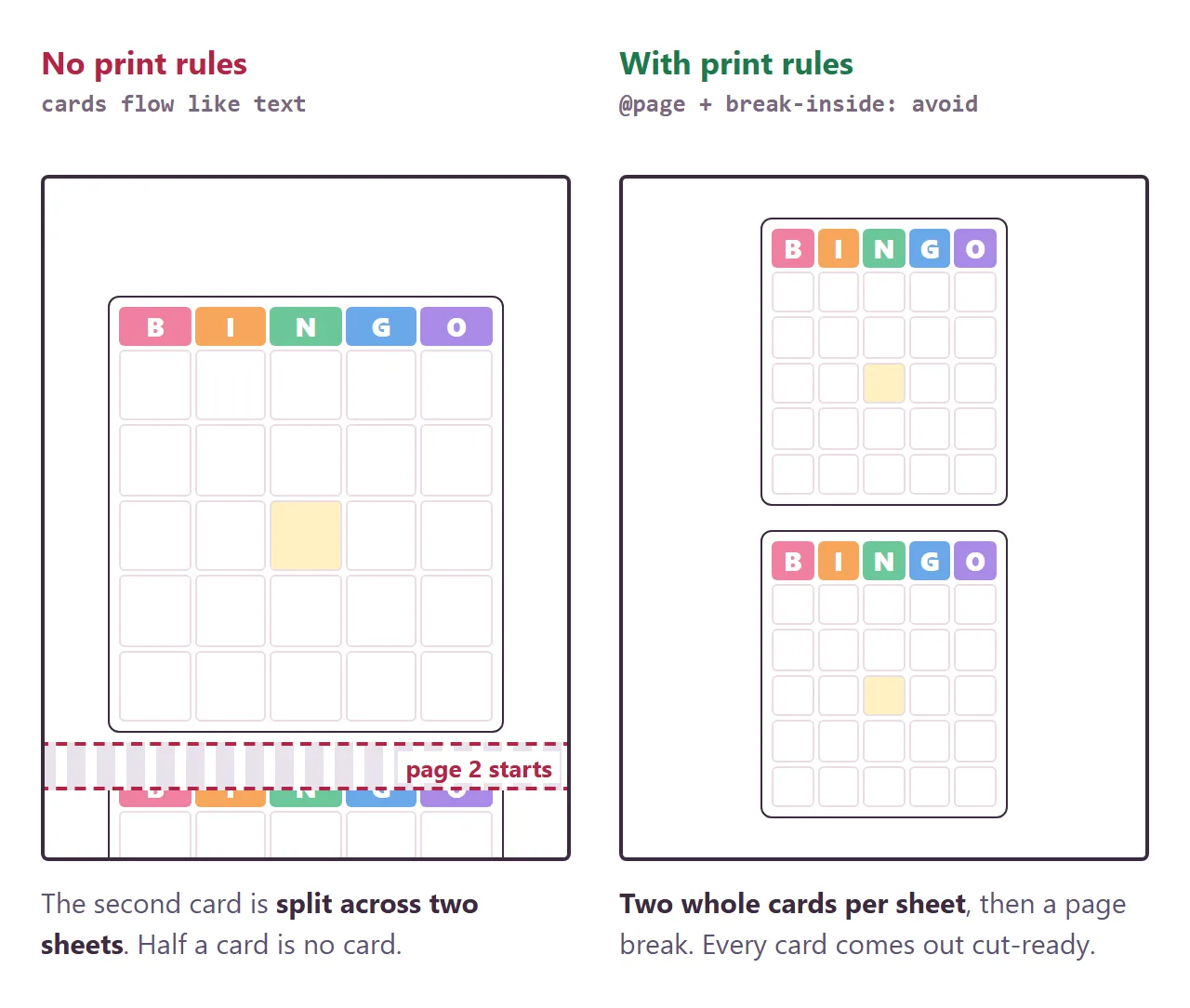
1. More words than squares. A 5 by 5 card has 24 words and a free space. With exactly 24 words, every card holds the same words and the whole room wins on the same call. Thirty or more gives you cards that really differ.
2. Whole cards on every sheet.
A page with no print rules lets cards flow like text, and one lands across the page break. Ask for @page to set the paper size and margins, break-inside: avoid on each card, and a page break after each sheet (MDN: @page, MDN: break-inside).
3. A number on each card. "Card 7" is easier to check than "the one with the rattle in the corner". A number also tells you when a page in the stack went missing.
Make it with AI
Open ChatGPT, Claude or Gemini and paste this. Change the words in capitals and paste your list at the end.
Make one complete HTML file: a bingo card generator.
Title on every card: YOUR TITLE
Card: 5 by 5 with FREE in the middle, B I N G O on top.
A number control for how many cards (1 to 40),
a "Shuffle again" button and a "Print" button.
Fill each card with 24 words from my list in a
random order. No two cards the same. Number each card.
Show my word list as a plain list at the bottom of
the page, and read the words from that list.
Print: letter paper, TWO cards per sheet, never split
a card, page break after each sheet, hide the buttons.
Rules: all CSS and JavaScript inside the file, no images
or fonts from other sites, nothing sent anywhere,
works on a phone. Use only my words, do not invent any.
Word list: PASTE 30 TO 40 WORDS HERE
"Read the words from that list" matters most. It keeps your words as plain text on the page, so changing one later is a matter of editing a line, not asking for new code.
For an office party you might want more control. This one adds the card size, how many cards fit on a sheet, and a caller sheet at the end of the stack.
<!doctype html>
<html lang="en">
<head>
<meta charset="utf-8">
<meta name="viewport" content="width=device-width, initial-scale=1">
<title>Office party bingo sheets</title>
<style>
@page { size: letter portrait; margin: 10mm; }
* { box-sizing: border-box; }
body { margin: 0; background: linear-gradient(160deg, #0f2b25 0%, #123b33 55%, #0c231e 100%); color: #f3efe2; font-family: system-ui, -apple-system, "Segoe UI", sans-serif; min-height: 100vh; }
.page { max-width: 680px; margin: 0 auto; padding: 20px 14px 26px; }
.k { font: 700 11px system-ui; letter-spacing: .18em; text-transform: uppercase; color: #f0c14b; }
h1 { margin: 4px 0 6px; font-size: 24px; line-height: 1.15; }
.sub { margin: 0 0 14px; font-size: 14px; color: #b5c9c1; }
.panel { padding: 12px; border-radius: 18px; background: rgba(255, 255, 255, .07); border: 1px solid rgba(255, 255, 255, .1); display: grid; gap: 10px; }
.row { display: flex; flex-wrap: wrap; align-items: center; gap: 8px; }
.lab { width: 92px; font: 700 12px system-ui; letter-spacing: .06em; text-transform: uppercase; color: #9fb8af; }
.chips { display: flex; gap: 4px; background: rgba(0, 0, 0, .25); padding: 3px; border-radius: 11px; }
.chips button { border: 0; border-radius: 8px; padding: 8px 11px; background: none; color: #d8e4de; font: 700 13px system-ui; cursor: pointer; }
.chips button.on { background: #f0c14b; color: #1b2a22; box-shadow: 0 2px 8px rgba(240, 193, 75, .35); }
.num { min-width: 34px; text-align: center; font: 800 18px system-ui; color: #f0c14b; }
.acts { display: flex; gap: 8px; flex-wrap: wrap; }
.go { border: 0; border-radius: 12px; padding: 11px 14px; font: 700 14px system-ui; cursor: pointer; }
.shuffle { background: #f3efe2; color: #12332c; }
.print { background: #e0533d; color: #fff; box-shadow: 0 3px 0 #a93624; }
.note { margin: 0; font-size: 13px; color: #b5c9c1; }
.note b { color: #f0c14b; }
.note.warn { color: #ff9c8a; font-weight: 700; }
.sheets { margin-top: 14px; display: flex; gap: 14px; overflow-x: auto; padding: 6px 4px 14px; scroll-snap-type: x mandatory; }
.sheet { flex: none; width: 250px; aspect-ratio: 8.5 / 11; background: #fffdf6; color: #1d2b25; border-radius: 4px; padding: 5%; box-shadow: 0 14px 30px rgba(0, 0, 0, .4); scroll-snap-align: start; display: grid; gap: 4%; animation: drop .5s both; -webkit-print-color-adjust: exact; print-color-adjust: exact; }
.sheet { cursor: zoom-in; transition: width .35s ease; }
.sheet.zoom { width: min(calc(100vw - 36px), 560px); cursor: zoom-out; }
@keyframes drop { from { opacity: 0; transform: translateY(18px) scale(.97); } }
.sheet.l1 { grid-template-rows: 1fr; align-items: center; }
.sheet.l2 { grid-template-rows: 1fr 1fr; }
.sheet.l4 { grid-template-columns: 1fr 1fr; grid-template-rows: 1fr 1fr; }
.card { container-type: inline-size; border: 1.5px solid #1d2b25; border-radius: 6px; padding: 4%; display: flex; flex-direction: column; justify-content: center; min-height: 0; }
.sheet.l2 .card { width: 74%; justify-self: center; }
.ct { display: flex; justify-content: space-between; font: 800 6cqw/1.2 system-ui; margin-bottom: 2cqw; }
.ct i { font-style: normal; color: #b03a28; }
.gr { display: grid; gap: 1cqw; }
.gr span { aspect-ratio: 1; display: grid; place-items: center; text-align: center; padding: 1cqw; border-radius: 1.5cqw; background: #eef4ef; font: 600 var(--fs, 3.6cqw)/1.1 system-ui; overflow: hidden; word-break: break-word; }
.gr span.free { background: #f0c14b; font-weight: 900; }
.caller { display: block; }
.caller h3 { margin: 0 0 3%; font-size: 13px; }
.caller p { margin: 0 0 4%; font-size: 8px; color: #5b6b63; }
.caller ul { margin: 0; padding: 0; list-style: none; columns: 2; column-gap: 6%; font-size: 7.5px; line-height: 1.9; }
.caller li::before { content: ""; display: inline-block; width: 7px; height: 7px; border: 1px solid #1d2b25; border-radius: 2px; margin-right: 4px; vertical-align: -1px; }
.pg { font: 600 11px system-ui; color: #9fb8af; text-align: center; margin-top: -6px; }
.words { margin-top: 14px; padding: 12px 14px; border-radius: 14px; background: rgba(255, 255, 255, .06); font-size: 13px; color: #c9d8d1; }
.words h2 { margin: 0 0 6px; font-size: 12px; letter-spacing: .1em; text-transform: uppercase; color: #9fb8af; }
.words ul { margin: 0; padding: 0; list-style: none; display: flex; flex-wrap: wrap; gap: 4px 14px; }
@media print {
body { background: none; color: #000; }
.page { max-width: none; padding: 0; }
.k, h1, .sub, .panel, .words, .pg { display: none; }
.sheets { display: block; overflow: visible; padding: 0; margin: 0; }
.sheet, .sheet.zoom { width: 100%; height: 255mm; aspect-ratio: auto; box-shadow: none; border-radius: 0; padding: 0; animation: none; break-after: page; break-inside: avoid; }
.sheet:last-child { break-after: auto; }
.caller h3 { font-size: 18pt; } .caller p { font-size: 11pt; } .caller ul { font-size: 12pt; }
.caller li::before { width: 11pt; height: 11pt; }
}
</style>
</head>
<body>
<main class="page">
<div class="k">Bingo card generator</div>
<h1 id="title">Office holiday party bingo</h1>
<p class="sub">Choose the card size and how many fit on a sheet. The last sheet is the caller list.</p>
<section class="panel">
<div class="row"><span class="lab">Card</span><div class="chips" data-k="size"><button data-v="3">3 × 3</button><button data-v="4">4 × 4</button><button data-v="5" class="on">5 × 5</button></div></div>
<div class="row"><span class="lab">Per sheet</span><div class="chips" data-k="per"><button data-v="1">1</button><button data-v="2">2</button><button data-v="4" class="on">4</button></div></div>
<div class="row"><span class="lab">Players</span><div class="chips"><button id="minus" aria-label="Fewer cards">−</button></div><span class="num" id="count">12</span><div class="chips"><button id="plus" aria-label="More cards">+</button></div></div>
<div class="acts"><button class="go shuffle" id="shuffle">Shuffle again</button><button class="go print" id="print">Print all sheets</button></div>
<p class="note" id="note"></p>
</section>
<div class="sheets" id="sheets"></div>
<div class="pg">Tap a sheet to zoom in. Swipe for the rest →</div>
<section class="words">
<h2>Squares to draw from</h2>
<ul id="words">
<li>ugly sweater</li><li>Secret Santa gift</li><li>someone sings</li><li>a toast</li><li>photo booth</li><li>a spilled drink</li>
<li>party hat</li><li>"Who brought this?"</li><li>cookie swap</li><li>boss dances</li><li>karaoke</li><li>a work story</li>
<li>tinsel</li><li>a selfie</li><li>group photo</li><li>someone leaves early</li><li>hot cocoa</li><li>gift card</li>
<li>candy cane</li><li>a bad joke</li><li>elf costume</li><li>last slice of cake</li><li>a speech</li><li>"Same time next year"</li>
<li>paper snowflake</li><li>white elephant swap</li><li>someone talks shop</li><li>a card game</li><li>song request</li><li>matching outfits</li>
</ul>
</section>
</main>
<script>
const st = { size: 5, per: 4, n: 12 };
const wrap = document.getElementById('sheets'), note = document.getElementById('note');
function shuffle(a) { for (let i = a.length - 1; i > 0; i--) { const j = Math.floor(Math.random() * (i + 1)); [a[i], a[j]] = [a[j], a[i]]; } return a; }
function esc(s) { return s.replace(/[&<>"]/g, (ch) => ({ '&': '&', '<': '<', '>': '>', '"': '"' }[ch])); }
function build() {
// The squares and the title are read from the visible page text.
const words = [...new Set([...document.querySelectorAll('#words li')].map((li) => li.textContent.trim()).filter(Boolean))];
const title = document.getElementById('title').textContent.trim();
const size = st.size, cells = size * size, free = size % 2 ? Math.floor(cells / 2) : -1, need = free >= 0 ? cells - 1 : cells;
document.getElementById('count').textContent = st.n;
wrap.innerHTML = '';
if (words.length < need) { note.className = 'note warn'; note.textContent = 'A ' + size + ' x ' + size + ' card needs ' + need + ' squares. Add ' + (need - words.length) + ' more to the list.'; return; }
const sheetsN = Math.ceil(st.n / st.per);
note.className = 'note';
note.innerHTML = '<b>' + st.n + '</b> cards on <b>' + sheetsN + '</b> ' + (sheetsN === 1 ? 'sheet' : 'sheets') + ', plus 1 caller sheet. ' + words.length + ' squares in the list.';
const seen = new Set(); let sheet;
const fs = { 3: '6cqw', 4: '4.6cqw', 5: '3.6cqw' }[size];
for (let c = 0; c < st.n; c++) {
if (c % st.per === 0) { sheet = document.createElement('div'); sheet.className = 'sheet l' + st.per; sheet.style.animationDelay = (c / st.per) * 70 + 'ms'; wrap.append(sheet); }
let pick, tries = 0;
do { pick = shuffle(words.slice()).slice(0, need); } while (seen.has(pick.join('|')) && ++tries < 50);
seen.add(pick.join('|'));
let html = '', k = 0;
for (let i = 0; i < cells; i++) html += i === free ? '<span class="free">FREE</span>' : '<span>' + esc(pick[k++]) + '</span>';
const card = document.createElement('div'); card.className = 'card';
card.innerHTML = '<div class="ct"><span>' + esc(title) + '</span><i>#' + (c + 1) + '</i></div><div class="gr" style="grid-template-columns:repeat(' + size + ',1fr);--fs:' + fs + '">' + html + '</div>';
sheet.append(card);
}
const caller = document.createElement('div'); caller.className = 'sheet caller'; caller.style.animationDelay = sheetsN * 70 + 'ms';
caller.innerHTML = '<h3>Caller sheet</h3><p>Read these in any order. Tick each one as you call it.</p><ul>' + shuffle(words.slice()).map((w) => '<li>' + esc(w) + '</li>').join('') + '</ul>';
wrap.append(caller);
wrap.scrollLeft = 0;
}
document.querySelectorAll('.chips[data-k]').forEach((g) => g.addEventListener('click', (e) => {
const b = e.target.closest('button'); if (!b) return;
g.querySelectorAll('button').forEach((x) => x.classList.toggle('on', x === b));
st[g.dataset.k] = +b.dataset.v; build();
}));
wrap.addEventListener('click', (e) => {
const sh = e.target.closest('.sheet'); if (!sh) return;
const z = !sh.classList.contains('zoom');
wrap.querySelectorAll('.sheet').forEach((x) => x.classList.remove('zoom'));
if (z) { sh.classList.add('zoom'); setTimeout(() => wrap.scrollTo({ left: sh.offsetLeft - wrap.offsetLeft - 4, behavior: 'smooth' }), 360); }
});
document.getElementById('minus').onclick = () => { st.n = Math.max(1, st.n - 1); build(); };
document.getElementById('plus').onclick = () => { st.n = Math.min(60, st.n + 1); build(); };
document.getElementById('shuffle').onclick = build;
document.getElementById('print').onclick = () => window.print();
build();
</script>
</body>
</html>
Getting it to the printer
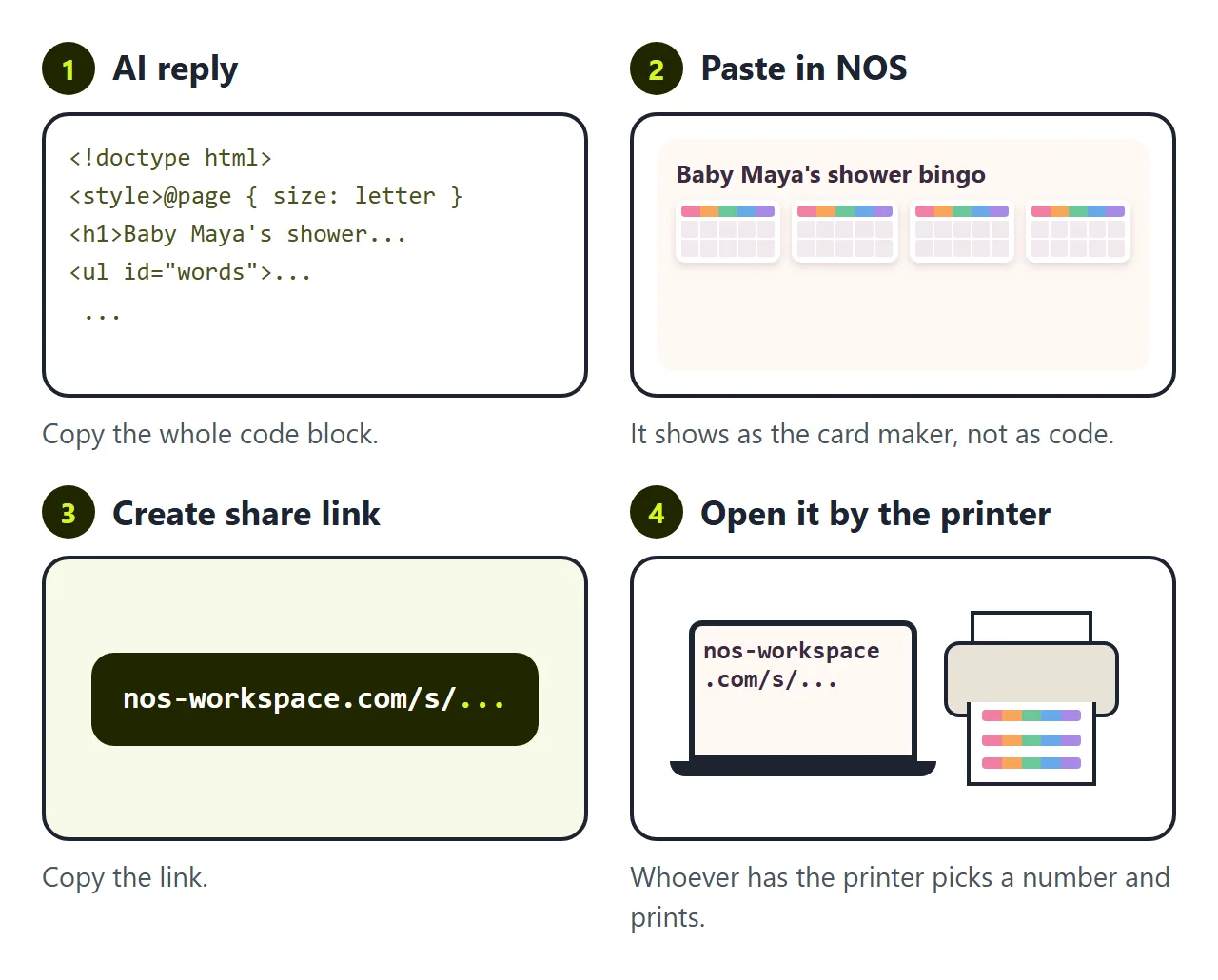
You have a bingo card generator. The AI gave it to you as HTML code, though, and code does not print cards.
The first wall is getting the page to whoever prints. Maybe that is you on a laptop, maybe it is your sister with the good printer. Attach the file and on a phone it opens as a download or as a wall of code. To be a page someone taps and prints, it has to live somewhere.
In NOS you paste the code into a document and it becomes the card maker straight away. Choose Create share link and send it. Whoever opens it picks a number, shuffles, and prints.
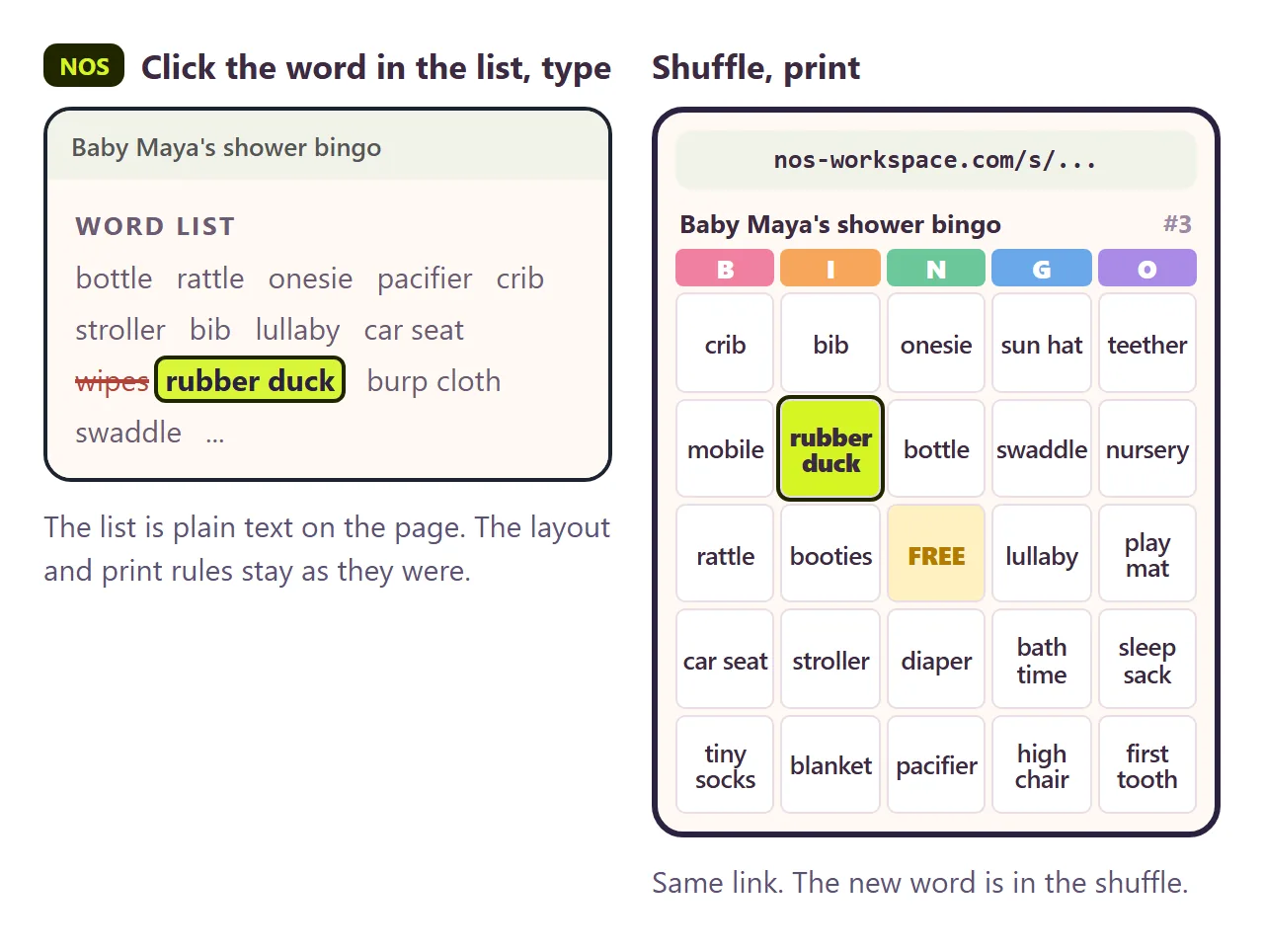
The second wall is one word. Someone points out that "wipes" is not much fun to hunt for. You want "rubber duck" instead.
If you ask the AI again, you wait for a new reply. It often changes the layout or the print rules while it is at it, so you check every sheet again. Then you have a new file and a new link to send.
In NOS you click the word in the list at the bottom of the page and type the new one. The link stays the same. The next shuffle, on any screen, deals cards with the new word.
Before you print the stack
- Print one sheet first. Check the margins and that both cards are whole.
- Count the cards against the guest list, plus two spares.
- Print the caller list or keep the page open on your phone to read from.
- Read the word list once. Every square comes from it, typos included.
If you want students to play on their own screens instead of paper, see Classroom bingo. For more on page breaks, see HTML page break for printing.