Thirty students, one word list, and you want them all listening.
Bingo does that. Every word you read out is a word they hunt for on their card.
The work used to be the cards. Thirty cards, all different, printed, cut, handed out, and collected again so nobody keeps the same one.
These days you can skip that. Ask ChatGPT, Claude or Gemini for a bingo page that shuffles itself, and every student who opens the link gets their own card.
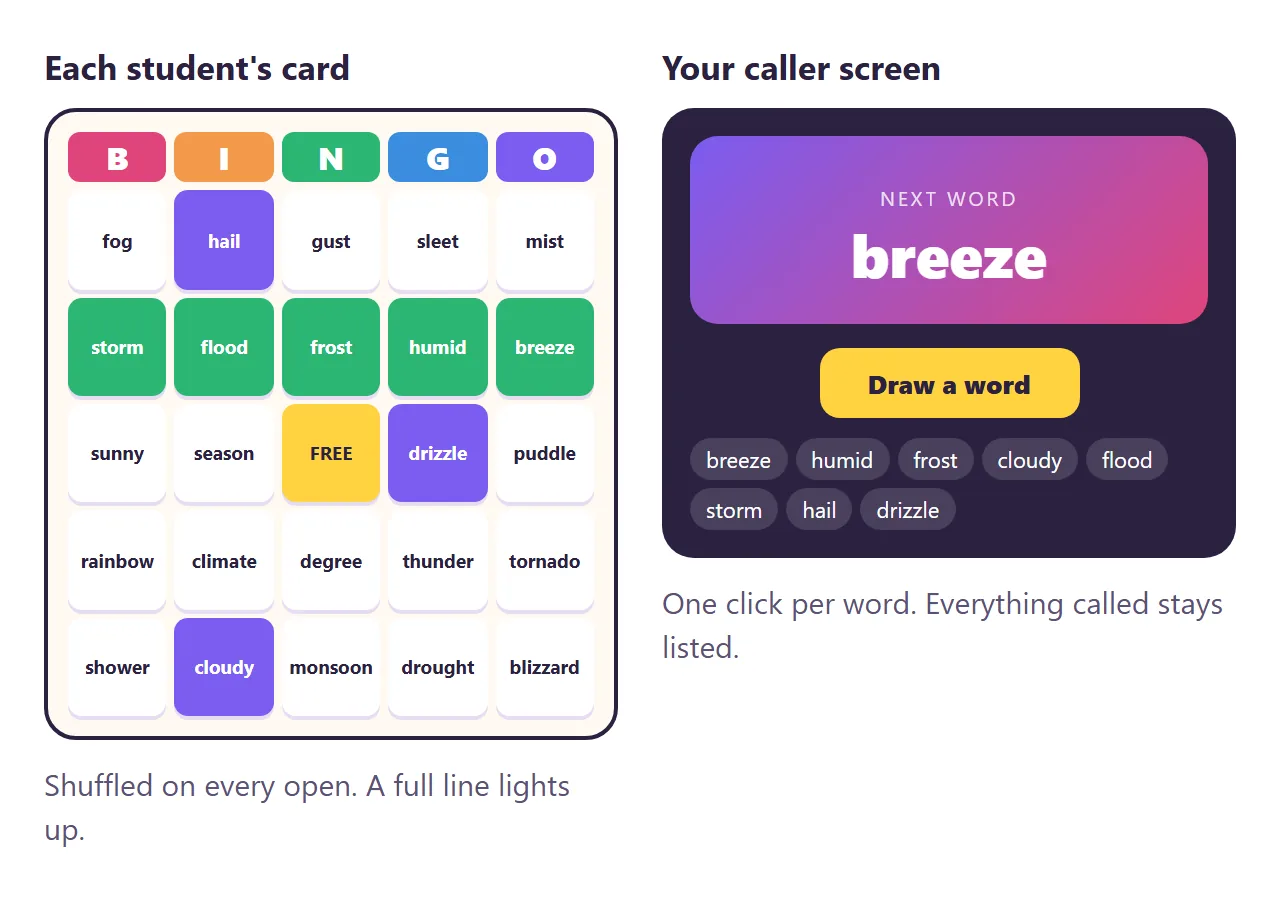
Here is a student card. Tap words to mark them. Get five in a row, a column or a diagonal.
<!doctype html>
<html lang="en">
<head>
<meta charset="utf-8">
<meta name="viewport" content="width=device-width, initial-scale=1">
<title>Vocabulary bingo</title>
<style>
  * { box-sizing: border-box; }
  body { margin: 0; background: radial-gradient(circle at 20% 0%, #ffe3f1, transparent 45%), radial-gradient(circle at 100% 30%, #dff1ff, transparent 40%), #fffaf2; color: #2a2140; font-family: system-ui, -apple-system, "Segoe UI", sans-serif; }
  .page { max-width: 520px; margin: 0 auto; padding: 20px 14px 26px; }
  .top { display: flex; align-items: center; justify-content: space-between; margin-bottom: 12px; }
  h1 { margin: 0; font-size: 22px; }
  h1 span { color: #e0457b; }
  .top button { border: 0; border-radius: 12px; padding: 9px 12px; background: #2a2140; color: #fff; font: 600 13px system-ui; cursor: pointer; }
  .head { display: grid; grid-template-columns: repeat(5, 1fr); gap: 6px; margin-bottom: 6px; }
  .head span { text-align: center; font: 900 24px system-ui; color: #fff; border-radius: 10px; padding: 4px 0; }
  .grid { display: grid; grid-template-columns: repeat(5, 1fr); gap: 6px; }
  .cell { aspect-ratio: 1; display: grid; place-items: center; padding: 4px; border: 0; border-radius: 12px; background: #fff; box-shadow: 0 3px 0 #e6dcf3; font: 700 clamp(11px, 3.3vw, 15px)/1.15 system-ui; color: #2a2140; cursor: pointer; text-align: center; word-break: break-word; transition: transform .12s; }
  .cell:active { transform: scale(.95); }
  .cell.long { font-size: clamp(9px, 2.6vw, 12px); }
  .cell.on { background: #7b5cf0; color: #fff; box-shadow: 0 3px 0 #5a3fd0; }
  .cell.free { background: #ffd23f; color: #2a2140; box-shadow: 0 3px 0 #e0b21f; cursor: default; }
  .cell.win { background: #2bb673; color: #fff; box-shadow: 0 3px 0 #1d8a55; animation: pop .5s; }
  @keyframes pop { 50% { transform: scale(1.12); } }
  .banner { display: none; margin-top: 12px; padding: 14px; border-radius: 16px; background: #2bb673; color: #fff; text-align: center; font: 900 26px system-ui; letter-spacing: .04em; }
  .words { margin-top: 18px; padding: 12px 14px; border-radius: 14px; background: rgba(255,255,255,.7); font-size: 13px; color: #5c5275; }
  .words h2 { margin: 0 0 6px; font-size: 12px; letter-spacing: .1em; text-transform: uppercase; }
  .words ul { margin: 0; padding: 0; list-style: none; display: flex; flex-wrap: wrap; gap: 4px 10px; }
  canvas { position: fixed; inset: 0; pointer-events: none; }
</style>
</head>
<body>
<main class="page">
  <div class="top"><h1>Weather <span>bingo</span></h1><button id="new">New card</button></div>
  <div class="head"><span style="background:#e0457b">B</span><span style="background:#f2994a">I</span><span style="background:#2bb673">N</span><span style="background:#3a8dde">G</span><span style="background:#7b5cf0">O</span></div>
  <div class="grid" id="grid"></div>
  <div class="banner" id="banner">BINGO!</div>

  <section class="words">
    <h2>This week's words</h2>
    <ul id="words">
      <li>drizzle</li><li>thunder</li><li>lightning</li><li>forecast</li><li>humid</li><li>breeze</li>
      <li>blizzard</li><li>drought</li><li>flood</li><li>hail</li><li>fog</li><li>frost</li>
      <li>rainbow</li><li>hurricane</li><li>tornado</li><li>sleet</li><li>cloudy</li><li>sunny</li>
      <li>temperature</li><li>season</li><li>climate</li><li>puddle</li><li>gust</li><li>mist</li>
      <li>storm</li><li>shower</li><li>degree</li><li>snowflake</li><li>monsoon</li><li>heatwave</li>
    </ul>
  </section>
</main>
<canvas id="fx"></canvas>
<script>
  const grid = document.getElementById('grid'), banner = document.getElementById('banner');
  const LINES = [];
  for (let i = 0; i < 5; i++) { LINES.push([0, 1, 2, 3, 4].map((k) => i * 5 + k)); LINES.push([0, 1, 2, 3, 4].map((k) => k * 5 + i)); }
  LINES.push([0, 6, 12, 18, 24], [4, 8, 12, 16, 20]);

  function deal() {
    // Words come from the list on the page, so editing that list changes every new card.
    const words = [...document.querySelectorAll('#words li')].map((li) => li.textContent.trim()).filter(Boolean);
    const pick = words.sort(() => Math.random() - 0.5).slice(0, 24);
    grid.innerHTML = ''; banner.style.display = 'none';
    for (let i = 0; i < 25; i++) {
      const b = document.createElement('button'); b.className = 'cell';
      if (i === 12) { b.textContent = 'FREE'; b.classList.add('free', 'on'); }
      else { b.textContent = pick[i < 12 ? i : i - 1] || '?'; if (b.textContent.length > 8) b.classList.add('long'); b.onclick = () => { b.classList.toggle('on'); check(); }; }
      grid.append(b);
    }
  }

  function check() {
    const cells = [...grid.children];
    cells.forEach((c) => c.classList.remove('win'));
    const won = LINES.filter((l) => l.every((i) => cells[i].classList.contains('on')));
    won.flat().forEach((i) => cells[i].classList.add('win'));
    const was = banner.style.display === 'block';
    banner.style.display = won.length ? 'block' : 'none';
    if (won.length && !was) confetti();
  }

  function confetti() {
    const cv = document.getElementById('fx'), x = cv.getContext('2d');
    cv.width = innerWidth; cv.height = innerHeight;
    const cols = ['#e0457b', '#f2994a', '#2bb673', '#3a8dde', '#7b5cf0', '#ffd23f'];
    const bits = Array.from({ length: 140 }, () => ({ x: Math.random() * cv.width, y: -20 - Math.random() * cv.height * .4, vx: (Math.random() - .5) * 3, vy: 2 + Math.random() * 3, r: Math.random() * 6, c: cols[Math.floor(Math.random() * 6)], a: Math.random() * 6 }));
    let f = 0;
    (function draw() {
      x.clearRect(0, 0, cv.width, cv.height);
      bits.forEach((b) => { b.x += b.vx; b.y += b.vy; b.a += .1; x.fillStyle = b.c; x.save(); x.translate(b.x, b.y); x.rotate(b.a); x.fillRect(-4, -2, 8, 4 + b.r); x.restore(); });
      if (++f < 150) requestAnimationFrame(draw); else x.clearRect(0, 0, cv.width, cv.height);
    })();
  }

  document.getElementById('new').onclick = deal;
  deal();
</script>
</body>
</html>
Three things that make it a good game
1. More words than squares. A 5 by 5 card has 24 words and a free space. With exactly 24 words every card has the same words, just moved around. With 30 to 40, cards really differ and nobody wins on the same call.
2. Read out a clue, not the word. "A word that means very happy" makes students think. "Delighted" just makes them scan. The card shows the word; you read the meaning.
3. Check it yourself. Ask for the page to highlight the winning line. When a student calls bingo, you look at one glowing row instead of reading 25 squares.
Make it with AI
Open ChatGPT, Claude or Gemini and paste this. Change the words in capitals and paste your list at the end.
Make one complete HTML file: classroom bingo.
Topic: TOPIC, for GRADE / AGE.
Card: 5 by 5, free space in the middle. Fill the
other 24 squares from my word list in a random
order every time the page opens. Tap to mark a
square. When a row, column or diagonal is done,
highlight it and show "Bingo!". Add a "New card"
button.
Show my word list as a plain list at the bottom of
the page, and read the words from that list.
Rules: large text, works on a tablet, all CSS and
JavaScript inside the file, no images from other
sites, nothing sent anywhere.
Word list: PASTE 30 TO 40 WORDS HERE
"Read the words from that list" matters. It keeps your words as plain text on the page, which makes changing them later a matter of editing a list.
For the front of the room, ask for a caller screen with the same list. Press the button, a word comes up large, and the ones already called stay visible.
<!doctype html>
<html lang="en">
<head>
<meta charset="utf-8">
<meta name="viewport" content="width=device-width, initial-scale=1">
<title>Bingo caller</title>
<style>
  * { box-sizing: border-box; }
  body { margin: 0; min-height: 100vh; background: #2a2140; color: #fff; font-family: system-ui, -apple-system, "Segoe UI", sans-serif; }
  .page { max-width: 760px; margin: 0 auto; padding: 22px 18px; }
  .bar { display: flex; justify-content: space-between; align-items: center; color: #c8bfe6; font-size: 14px; }
  .stage { margin: 18px 0; padding: 30px 16px; border-radius: 24px; background: linear-gradient(135deg, #7b5cf0, #e0457b); text-align: center; box-shadow: 0 16px 40px rgba(0,0,0,.3); }
  .stage small { display: block; font-size: 13px; letter-spacing: .14em; text-transform: uppercase; opacity: .8; }
  .word { margin-top: 6px; font: 900 clamp(38px, 10vw, 64px)/1.05 system-ui; }
  .word.flip { animation: flip .45s; }
  @keyframes flip { from { transform: rotateX(90deg); opacity: 0; } to { transform: none; opacity: 1; } }
  .btns { display: flex; gap: 10px; justify-content: center; }
  .btns button { border: 0; border-radius: 14px; padding: 14px 20px; font: 800 16px system-ui; cursor: pointer; }
  #draw { background: #ffd23f; color: #2a2140; min-width: 180px; }
  #reset { background: rgba(255,255,255,.12); color: #fff; }
  h2 { margin: 22px 0 8px; font-size: 13px; letter-spacing: .1em; text-transform: uppercase; color: #c8bfe6; }
  .called { display: flex; flex-wrap: wrap; gap: 6px; }
  .called span { padding: 6px 10px; border-radius: 999px; background: rgba(255,255,255,.12); font-size: 14px; }
  .called span:first-child { background: #ffd23f; color: #2a2140; font-weight: 700; }
  #words { margin: 0; padding: 12px 14px; list-style: none; display: flex; flex-wrap: wrap; gap: 4px 10px; border-radius: 14px; background: rgba(255,255,255,.06); font-size: 12.5px; color: #c8bfe6; }
</style>
</head>
<body>
<main class="page">
  <div class="bar"><span>Weather bingo - caller</span><span id="left"></span></div>
  <div class="stage"><small>Next word</small><div class="word" id="word">Ready?</div></div>
  <div class="btns"><button id="draw">Draw a word</button><button id="reset">New game</button></div>
  <h2>Called so far</h2>
  <div class="called" id="called"></div>
  <h2>Word list</h2>
  <ul id="words">
    <li>drizzle</li><li>thunder</li><li>lightning</li><li>forecast</li><li>humid</li><li>breeze</li>
    <li>blizzard</li><li>drought</li><li>flood</li><li>hail</li><li>fog</li><li>frost</li>
    <li>rainbow</li><li>hurricane</li><li>tornado</li><li>sleet</li><li>cloudy</li><li>sunny</li>
    <li>temperature</li><li>season</li><li>climate</li><li>puddle</li><li>gust</li><li>mist</li>
    <li>storm</li><li>shower</li><li>degree</li><li>snowflake</li><li>monsoon</li><li>heatwave</li>
  </ul>
</main>
<script>
  let bag = [], called = [];
  const $ = (id) => document.getElementById(id);
  function reset() {
    bag = [...document.querySelectorAll('#words li')].map((li) => li.textContent.trim()).filter(Boolean).sort(() => Math.random() - 0.5);
    called = []; $('word').textContent = 'Ready?'; render();
  }
  function render() {
    $('called').innerHTML = called.map((w) => '<span>' + w + '</span>').join('');
    $('left').textContent = bag.length + ' left';
    $('draw').disabled = !bag.length;
  }
  $('draw').onclick = () => {
    if (!bag.length) return;
    const w = bag.pop(); called.unshift(w);
    const el = $('word'); el.classList.remove('flip'); void el.offsetWidth; el.textContent = w; el.classList.add('flip');
    render();
  };
  $('reset').onclick = reset;
  reset();
</script>
</body>
</html>
Getting the cards to the class
You have a bingo game. The AI gave it to you as HTML code, though, and code does not shuffle anything for a student holding a tablet.
The first wall is getting the page onto thirty screens. Attach the file and some students download it, some cannot open it on a school tablet, and some see code. Print it, and you are back to one card for everyone.
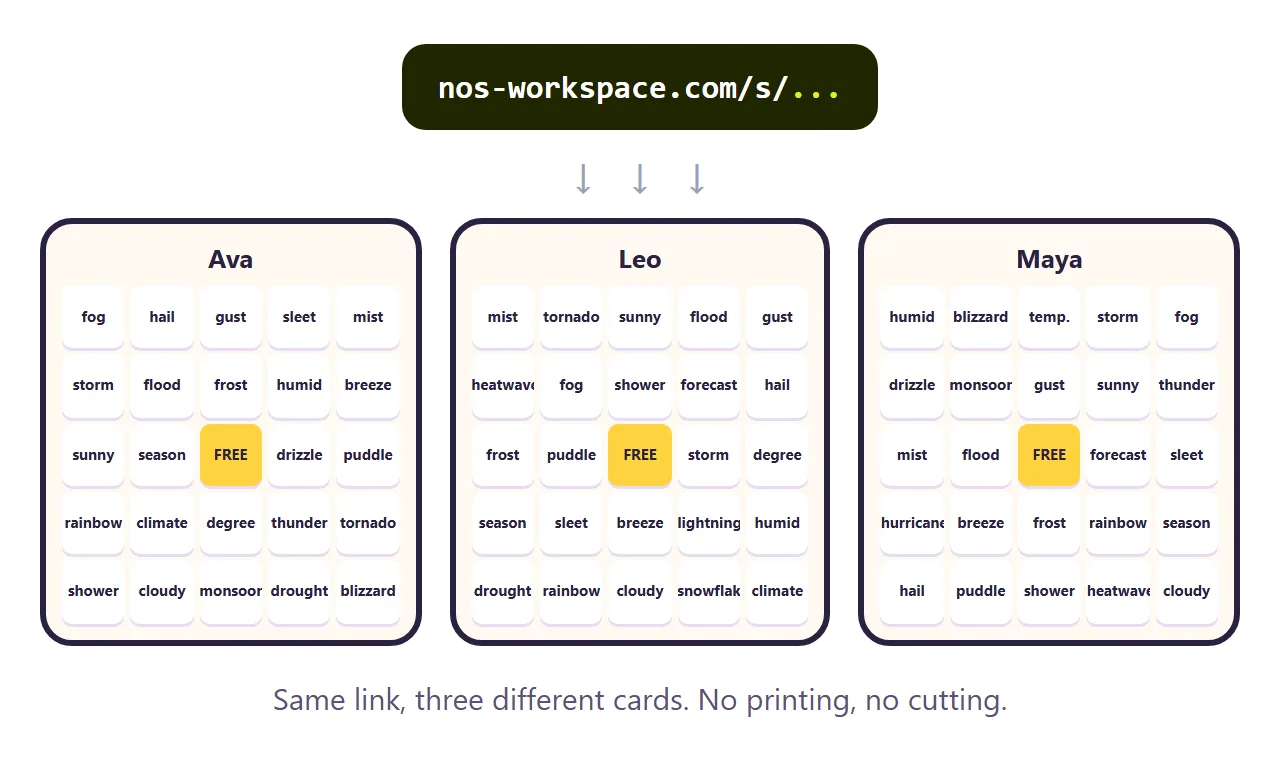
In NOS you paste the code into a document and it becomes the game straight away. Choose Create share link and put that link in your class post, on the board, or in a QR code. Each student who opens it gets a different card. How to send an HTML file in Google Classroom covers the Classroom side.
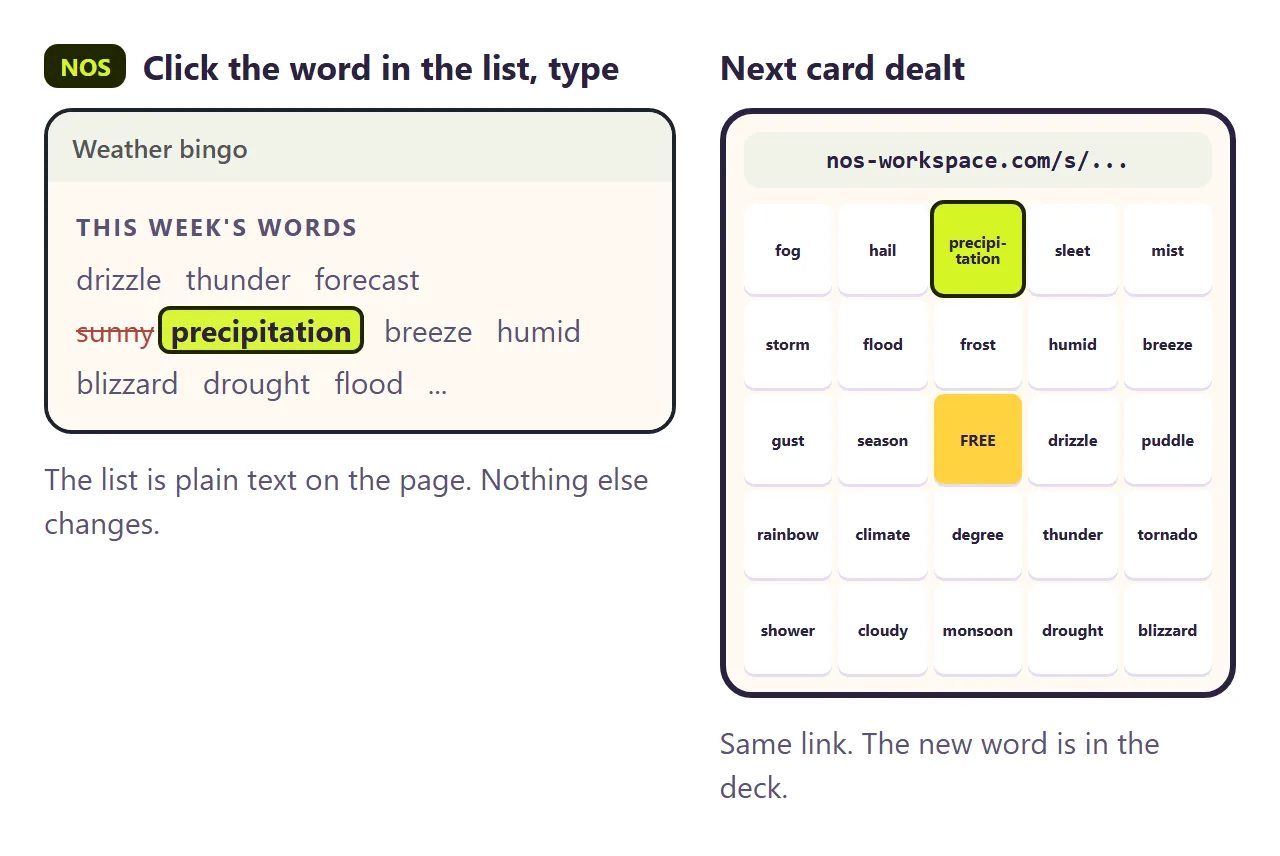
The second wall comes with next week's words. The unit moves on. Two of the words were too easy. You want "precipitation" instead of "sunny".
If you ask the AI again, you wait for a new reply. It often changes the layout or the rules while it is at it, so you test the game again. Then you have a new file and a new link, and some students open last week's.
In NOS you click the word in the list at the bottom of the page and type the new one. The link stays the same, and the next card anyone opens uses the new word.
What it does not do
Each card lives in one student's browser. The page does not know who has which card or who won, and it does not send anything back.
That is how paper bingo works too. Students call it, you check the highlighted line on their screen.
For a game with points and teams, see Jeopardy template for the classroom. For practice with instant feedback, see Interactive worksheet.