A digital escape room for students can be one web page: a few locks, each opened by a puzzle on your unit, and a door that needs a final code.
Ask an AI to write it, paste it into NOS, choose Create share link, and send students one address.
Try the kind of page you would get. Open the locks in order and type the three digits into the door.
<!doctype html>
<html lang="en">
<head>
<meta charset="utf-8">
<meta name="viewport" content="width=device-width, initial-scale=1">
<title>Escape the Water Cycle Lab</title>
<style>
  * { box-sizing: border-box; }
  body { margin: 0; padding: 14px; font-family: system-ui, sans-serif; background: #1e2a3a; color: #1d2330; }
  .room { max-width: 600px; margin: 0 auto; }
  h1 { font-size: 20px; margin: 0 0 4px; color: #fff; }
  .sub { margin: 0 0 12px; font-size: 14px; color: #c7d2e0; }
  .status { display: flex; gap: 8px; align-items: center; flex-wrap: wrap; margin-bottom: 12px; color: #fff; font-size: 14px; }
  .digit { width: 34px; height: 40px; border-radius: 8px; background: #2f3f55; border: 1px solid #4b5d77; display: grid; place-items: center; font: 700 20px ui-monospace, Consolas, monospace; color: #fcd34d; }
  .lock { background: #fff; border-radius: 12px; padding: 14px 16px; margin-bottom: 10px; border-left: 6px solid #9aa3b2; }
  .lock.open { border-left-color: #16a34a; }
  .lock.shut .body { display: none; }
  .lock h2 { font-size: 16px; margin: 0; display: flex; justify-content: space-between; gap: 8px; }
  .tag { font-size: 12px; font-weight: 700; padding: 2px 8px; border-radius: 99px; background: #e5e9f0; color: #374151; white-space: nowrap; align-self: center; }
  .open .tag { background: #e8f7ee; color: #0f5132; }
  .body { margin-top: 10px; font-size: 15px; line-height: 1.45; }
  input[type=text] { font: inherit; padding: 9px 10px; border: 1px solid #c3cad6; border-radius: 8px; width: 170px; max-width: 100%; }
  button { font: inherit; font-weight: 700; padding: 9px 14px; border: 0; border-radius: 8px; background: #2563eb; color: #fff; cursor: pointer; }
  button.small { padding: 6px 10px; background: #e5e9f0; color: #1d2330; }
  .msg { margin: 8px 0 0; font-size: 14px; min-height: 20px; color: #b45309; }
  .msg.good { color: #0f5132; font-weight: 700; }
  ol { list-style: none; padding: 0; margin: 8px 0; }
  ol li { display: flex; align-items: center; gap: 8px; padding: 8px 10px; margin-bottom: 6px; border: 1px solid #d5dbe4; border-radius: 8px; background: #f8fafc; }
  ol li span { flex: 1; }
  svg { width: 100%; height: auto; display: block; border-radius: 10px; margin-top: 8px; }
  svg [role=button] { cursor: pointer; }
  svg [role=button]:focus { outline: 3px solid #f59e0b; }
  .door { background: #fff; border-radius: 12px; padding: 14px 16px; margin-top: 4px; }
  .win { display: none; margin-top: 10px; padding: 12px; border-radius: 10px; background: #e8f7ee; color: #0f5132; font-weight: 700; }
  .note { font-size: 13px; color: #c7d2e0; margin-top: 12px; }
</style>
</head>
<body>
<main class="room">
  <h1>Escape the Water Cycle Lab</h1>
  <p class="sub">The lab door is locked. Each lock you open gives you one digit of the door code.</p>

  <div class="status" aria-live="polite">
    Door code:
    <span class="digit" id="d0">?</span><span class="digit" id="d1">?</span><span class="digit" id="d2">?</span>
  </div>

  <section class="lock" id="lock1">
    <h2>Lock 1: The riddle <span class="tag" id="t1">Open</span></h2>
    <div class="body">
      <p>I am what puddles become when the sun warms them. I rise into the air as invisible vapour. What process am I?</p>
      <input type="text" id="a1" autocomplete="off" aria-label="Answer for lock 1">
      <button type="button" id="b1">Try it</button>
      <p class="msg" id="m1"></p>
    </div>
  </section>

  <section class="lock shut" id="lock2">
    <h2>Lock 2: Put the stages in order <span class="tag" id="t2">Locked</span></h2>
    <div class="body">
      <p>Arrange the journey of a water drop from first to last.</p>
      <ol id="order"></ol>
      <button type="button" id="b2">Check the order</button>
      <p class="msg" id="m2"></p>
    </div>
  </section>

  <section class="lock shut" id="lock3">
    <h2>Lock 3: Find it in the picture <span class="tag" id="t3">Locked</span></h2>
    <div class="body">
      <p>Click the part of the picture where water vapour cools into tiny droplets.</p>
      <svg viewBox="0 0 320 170" role="group" aria-label="Landscape with sun, cloud, hills and a lake">
        <rect width="320" height="170" fill="#bfe3f8"/>
        <g id="sun" role="button" tabindex="0" aria-label="Sun"><circle cx="270" cy="34" r="20" fill="#fbbf24"/></g>
        <g id="cloud" role="button" tabindex="0" aria-label="Cloud"><ellipse cx="120" cy="40" rx="40" ry="16" fill="#fff"/><ellipse cx="96" cy="48" rx="26" ry="12" fill="#fff"/><ellipse cx="146" cy="48" rx="28" ry="12" fill="#fff"/></g>
        <g id="hill" role="button" tabindex="0" aria-label="Hill"><path d="M0 130 Q70 70 150 130 Z" fill="#6aa84f"/><path d="M110 130 Q200 60 320 130 Z" fill="#4f9a3d"/></g>
        <g id="lake" role="button" tabindex="0" aria-label="Lake"><rect x="0" y="125" width="320" height="45" fill="#3b82c4"/></g>
      </svg>
      <p class="msg" id="m3"></p>
    </div>
  </section>

  <section class="door">
    <strong>The door</strong>
    <p style="margin:6px 0 8px;font-size:15px">Type the three digits you found.</p>
    <input type="text" id="code" inputmode="numeric" maxlength="3" autocomplete="off" aria-label="Door code">
    <button type="button" id="open">Open the door</button>
    <p class="msg" id="mdoor"></p>
    <div class="win" id="win">The door swings open. You escaped the lab!</div>
  </section>

  <p class="note">Reload the page and the room starts again from lock 1.</p>
</main>

<script>
  // The answer key lives here. Change these values to make your own room.
  const ANSWER1 = 'evaporation';
  const DIGITS = ['4', '2', '7'];
  const CORRECT_ORDER = ['Evaporation', 'Condensation', 'Precipitation', 'Collection'];
  const HOTSPOT = 'cloud';

  const $ = (id) => document.getElementById(id);
  const found = [null, null, null];

  function solved(n) {
    found[n - 1] = DIGITS[n - 1];
    $('d' + (n - 1)).textContent = DIGITS[n - 1];
    $('lock' + n).classList.add('open');
    $('t' + n).textContent = 'Solved: digit ' + DIGITS[n - 1];
    if (n < 3) {
      $('lock' + (n + 1)).classList.remove('shut');
      $('t' + (n + 1)).textContent = 'Open';
    }
  }

  // Lock 1: typed word
  $('b1').addEventListener('click', () => {
    const typed = $('a1').value.trim().toLowerCase();
    const m = $('m1');
    if (typed === ANSWER1) { m.textContent = 'Click! Digit ' + DIGITS[0] + ' is yours.'; m.className = 'msg good'; solved(1); }
    else { m.textContent = 'Not quite. Think about what the sun does to a puddle.'; m.className = 'msg'; }
  });

  // Lock 2: put cards in order with up/down buttons
  let cards = ['Precipitation', 'Collection', 'Evaporation', 'Condensation'];
  function drawOrder() {
    const list = $('order');
    list.innerHTML = '';
    cards.forEach((name, i) => {
      const li = document.createElement('li');
      const label = document.createElement('span');
      label.textContent = (i + 1) + '. ' + name;
      const up = document.createElement('button');
      up.type = 'button'; up.className = 'small'; up.textContent = 'Up';
      up.setAttribute('aria-label', 'Move ' + name + ' up');
      up.disabled = i === 0;
      up.addEventListener('click', () => { [cards[i - 1], cards[i]] = [cards[i], cards[i - 1]]; drawOrder(); });
      const down = document.createElement('button');
      down.type = 'button'; down.className = 'small'; down.textContent = 'Down';
      down.setAttribute('aria-label', 'Move ' + name + ' down');
      down.disabled = i === cards.length - 1;
      down.addEventListener('click', () => { [cards[i + 1], cards[i]] = [cards[i], cards[i + 1]]; drawOrder(); });
      li.append(label, up, down);
      list.appendChild(li);
    });
  }
  drawOrder();
  $('b2').addEventListener('click', () => {
    const m = $('m2');
    if (found[0] === null) { m.textContent = 'Open lock 1 first.'; return; }
    if (cards.join() === CORRECT_ORDER.join()) { m.textContent = 'Click! Digit ' + DIGITS[1] + ' is yours.'; m.className = 'msg good'; solved(2); }
    else {
      const right = cards.filter((c, i) => c === CORRECT_ORDER[i]).length;
      m.textContent = right + ' of 4 are in the right place.'; m.className = 'msg';
    }
  });

  // Lock 3: hidden spot in the picture
  ['sun', 'cloud', 'hill', 'lake'].forEach((id) => {
    const pick = () => {
      const m = $('m3');
      if (found[1] === null) { m.textContent = 'Open lock 2 first.'; return; }
      if (id === HOTSPOT) { m.textContent = 'Click! Digit ' + DIGITS[2] + ' is yours.'; m.className = 'msg good'; solved(3); }
      else { m.textContent = 'Nothing happens at the ' + id + '. Try another spot.'; m.className = 'msg'; }
    };
    $(id).addEventListener('click', pick);
    $(id).addEventListener('keydown', (e) => { if (e.key === 'Enter' || e.key === ' ') { e.preventDefault(); pick(); } });
  });

  // The door
  $('open').addEventListener('click', () => {
    const m = $('mdoor');
    if ($('code').value.trim() === DIGITS.join('')) {
      m.textContent = ''; $('win').style.display = 'block';
    } else {
      m.textContent = 'The door does not move. Check the digits you found.'; $('win').style.display = 'none';
    }
  });
</script>
</body>
</html>
Sending the page as a file is the risky part. An attachment may open as plain code on a phone. A link opens in the browser, so the room runs the same way for every student.
Make it with AI
Paste the prompt below into ChatGPT, Claude or Gemini and fill in the brackets. It asks for the answers in one list, which makes later fixes easy.
Make a digital escape room as one HTML page.
Students: [grade or age]. Unit: [topic].
Three locks, opened one at a time:
1. a riddle with a typed answer
2. put four steps in order with Up and Down buttons
3. click the right part of a picture drawn with inline SVG
Each lock gives one digit. At the end students type the
digits to open the door.
Keep every answer in one list at the top of the script,
with a comment saying how to change it.
After a wrong answer show a short hint, not the answer.
Large tap targets, works on a phone.
No outside libraries, images, fonts or sign-in.
Do not save anything. Add a note: reloading restarts the room.
Then play it yourself before sending anything:
- Every answer. An AI can write a confident riddle with the wrong answer. Check each one against your lesson.
- Wrong answers. Type a wrong answer in every lock. The hint should help without giving the answer away.
- Guessing. Type random digits into the door. It should stay shut.
- Phone width. Make the window narrow. Buttons should be easy to tap.
- No extras. Images from other websites are blocked on a shared page, so ask for pictures drawn in SVG.
Puzzle ideas that fit on one page
The pattern is the same each time: a clue, a check, and a reward. Here is what to ask for, whatever the subject.
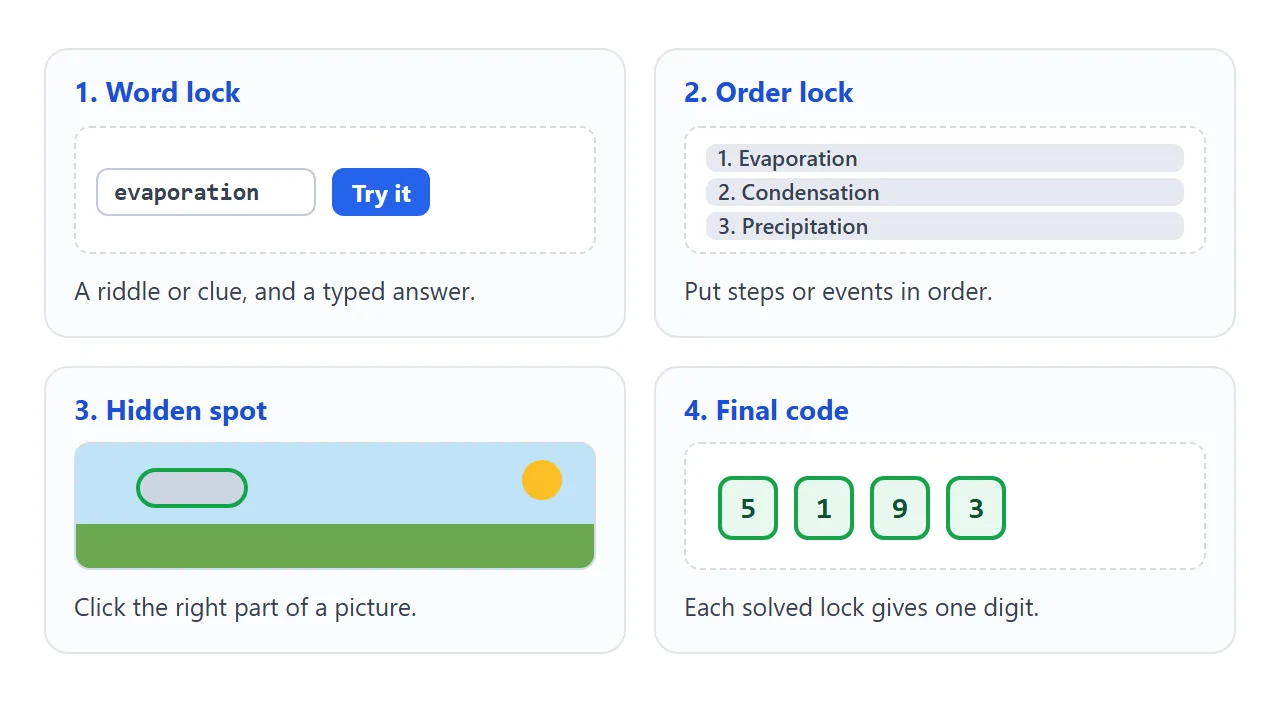
- Word lock. A riddle or definition, and the student types the term. Good for vocabulary in any subject.
- Order lock. Steps of a process, events on a timeline or the parts of an essay, put in order with Up and Down buttons.
- Hidden spot. A picture drawn in SVG, such as a map or a diagram, where one part is the answer.
- Cipher. A message in shifted letters, with the key hidden in another clue.
- Number lock. Maths answers that become the digits of the final code.
Another way to build it is to keep every lock in one list, so you change the unit by editing text. This vault does that for fractions. Open a box and the next one unlocks.
<!doctype html>
<html lang="en">
<head>
<meta charset="utf-8">
<meta name="viewport" content="width=device-width, initial-scale=1">
<title>Fractions Vault</title>
<style>
  * { box-sizing: border-box; }
  body { margin: 0; padding: 14px; font-family: system-ui, sans-serif; background: #f1ece3; color: #1d2330; }
  .vault { max-width: 560px; margin: 0 auto; background: #fff; border-radius: 14px; padding: 18px; box-shadow: 0 2px 10px rgba(0,0,0,.1); }
  h1 { font-size: 20px; margin: 0 0 4px; }
  .sub { margin: 0 0 12px; font-size: 14px; color: #5b6472; }
  .bar { height: 10px; border-radius: 99px; background: #e5e9f0; overflow: hidden; }
  .bar i { display: block; height: 100%; width: 0; background: #16a34a; transition: width .3s; }
  #count { font-size: 14px; margin: 6px 0 12px; color: #374151; }
  .box { border: 1px solid #d5dbe4; border-radius: 10px; padding: 12px 14px; margin-bottom: 10px; }
  .box.locked { background: #f3f4f6; color: #6b7280; }
  .box.done { border-color: #16a34a; background: #e8f7ee; }
  .box h2 { font-size: 15px; margin: 0 0 6px; }
  .q { margin: 0 0 8px; font-size: 15px; line-height: 1.45; }
  input { font: inherit; padding: 8px 10px; border: 1px solid #c3cad6; border-radius: 8px; width: 120px; }
  button { font: inherit; font-weight: 700; padding: 8px 14px; border: 0; border-radius: 8px; background: #2563eb; color: #fff; cursor: pointer; }
  button.ghost { background: #e5e9f0; color: #1d2330; }
  .fb { margin: 6px 0 0; font-size: 14px; min-height: 20px; color: #b45309; }
  .fb.good { color: #0f5132; font-weight: 700; }
  .hint { font-size: 14px; color: #374151; margin: 6px 0 0; }
  #final { background: #fffbeb; border-color: #f59e0b; }
  #end { display: none; margin-top: 10px; padding: 12px; border-radius: 10px; background: #e8f7ee; color: #0f5132; font-weight: 700; }
</style>
</head>
<body>
<main class="vault">
  <h1>Fractions Vault</h1>
  <p class="sub">Four boxes, one at a time. Each answer is a digit of the vault code.</p>
  <div class="bar"><i id="fill"></i></div>
  <p id="count" aria-live="polite"></p>
  <div id="boxes"></div>
  <div class="box locked" id="final">
    <h2>The vault</h2>
    <p class="q">Put your four digits in the order you opened the boxes.</p>
    <input id="code" inputmode="numeric" maxlength="4" autocomplete="off" aria-label="Vault code" disabled>
    <button type="button" id="go" disabled>Open vault</button>
    <p class="fb" id="fbv"></p>
    <div id="end">Click! The vault opens. Well done.</div>
  </div>
  <p style="margin-top:12px"><button type="button" class="ghost" id="restart">Start over</button></p>
</main>

<script>
  // To make your own room, edit this list. "answer" is what the student types.
  // "digit" is the one digit the box gives away. Add "alt" for other accepted answers.
  const BOXES = [
    { title: 'Box 1', q: 'What is 1/2 + 1/4? Type it as a fraction, like 1/8.', answer: '3/4', digit: '5',
      hint: 'Change 1/2 into quarters first.' },
    { title: 'Box 2', q: 'A pizza has 8 slices and 3 are eaten. What fraction is left?', answer: '5/8', digit: '1',
      hint: 'Count the slices that are not eaten.' },
    { title: 'Box 3', q: 'Which is larger, 2/3 or 3/5? Type the larger fraction.', answer: '2/3', digit: '9',
      hint: 'Write both with a denominator of 15.' },
    { title: 'Box 4', q: 'What is 0.5 as a fraction in lowest terms?', answer: '1/2', digit: '3',
      alt: ['one half', 'a half'], hint: 'Five tenths can be shortened.' }
  ];

  const boxesEl = document.getElementById('boxes');
  const fill = document.getElementById('fill');
  const count = document.getElementById('count');
  const final = document.getElementById('final');
  let solved = 0;
  const digits = [];

  function clean(s) { return s.trim().toLowerCase().replace(/\s+/g, ''); }

  function build() {
    solved = 0; digits.length = 0;
    boxesEl.innerHTML = '';
    BOXES.forEach((b, i) => {
      const div = document.createElement('div');
      div.className = 'box' + (i === 0 ? '' : ' locked');
      div.innerHTML = '<h2></h2><p class="q"></p><input autocomplete="off"><button type="button">Try it</button> <button type="button" class="ghost">Hint</button><p class="fb"></p><p class="hint" hidden></p>';
      div.querySelector('h2').textContent = b.title + (i === 0 ? '' : ' (locked)');
      div.querySelector('.q').textContent = b.q;
      const input = div.querySelector('input');
      input.setAttribute('aria-label', 'Answer for ' + b.title);
      input.disabled = i !== 0;
      const [try1, hintBtn] = div.querySelectorAll('button');
      try1.disabled = i !== 0; hintBtn.disabled = i !== 0;
      const fb = div.querySelector('.fb');
      const hint = div.querySelector('.hint');
      hint.textContent = 'Hint: ' + b.hint;
      hintBtn.addEventListener('click', () => { hint.hidden = false; });
      const check = () => {
        const typed = clean(input.value);
        const ok = [b.answer].concat(b.alt || []).map(clean).includes(typed);
        if (!ok) { fb.textContent = 'Not yet. Try again or use the hint.'; fb.className = 'fb'; return; }
        fb.textContent = 'Correct. Your digit is ' + b.digit + '.'; fb.className = 'fb good';
        div.classList.add('done');
        input.disabled = true; try1.disabled = true; hintBtn.disabled = true;
        digits.push(b.digit); solved++;
        update();
        const next = boxesEl.children[i + 1];
        if (next) {
          next.classList.remove('locked');
          next.querySelector('h2').textContent = BOXES[i + 1].title;
          next.querySelectorAll('input,button').forEach((el) => { el.disabled = false; });
        } else {
          final.classList.remove('locked');
          document.getElementById('code').disabled = false;
          document.getElementById('go').disabled = false;
        }
      };
      try1.addEventListener('click', check);
      input.addEventListener('keydown', (e) => { if (e.key === 'Enter') check(); });
      boxesEl.appendChild(div);
    });
    final.classList.add('locked');
    document.getElementById('code').value = ''; document.getElementById('code').disabled = true;
    document.getElementById('go').disabled = true;
    document.getElementById('fbv').textContent = '';
    document.getElementById('end').style.display = 'none';
    update();
  }

  function update() {
    fill.style.width = (solved / BOXES.length * 100) + '%';
    count.textContent = solved + ' of ' + BOXES.length + ' boxes open' + (digits.length ? '. Digits so far: ' + digits.join(' ') : '.');
  }

  document.getElementById('go').addEventListener('click', () => {
    const fb = document.getElementById('fbv');
    if (document.getElementById('code').value.trim() === BOXES.map((b) => b.digit).join('')) {
      fb.textContent = ''; document.getElementById('end').style.display = 'block';
    } else {
      fb.textContent = 'The vault stays shut. Check the order of your digits.';
    }
  });
  document.getElementById('restart').addEventListener('click', build);
  build();
</script>
</body>
</html>
If you want a plain quiz instead of a locked room, HTML quiz shows how a self-checking page is built.
Send it as a link
- Copy all of the page code from the AI chat.
- Paste it into a NOS document. The room renders and its script runs, so test it once more here.
- Choose Create share link and copy the address. HTML to link walks through it.
- Post the link where your students look.
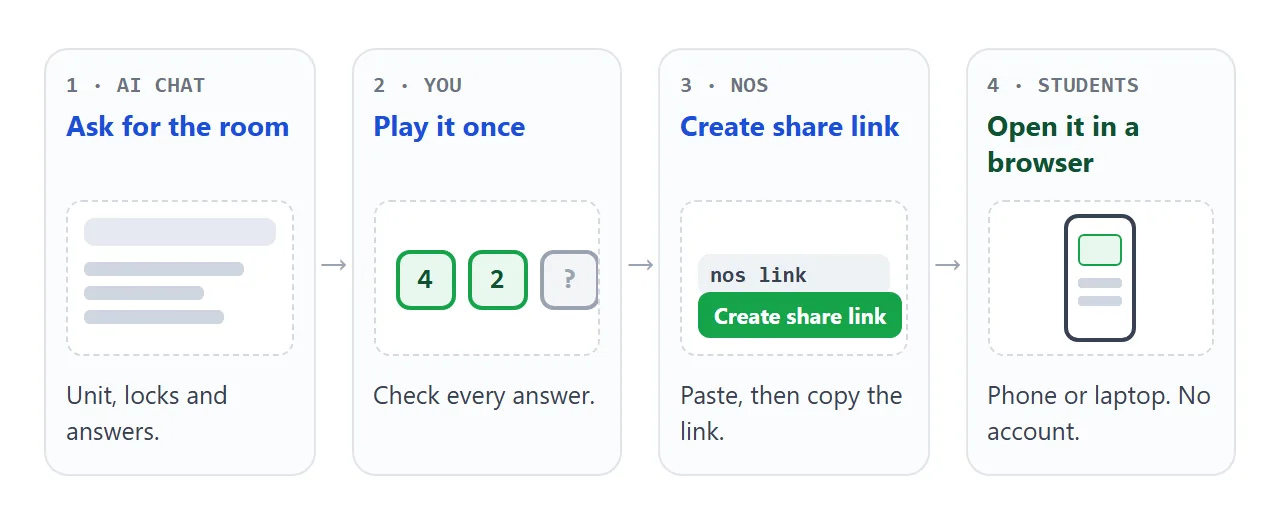
Anyone with the link can open the page without an account, on a phone or laptop, and cannot change it. If you edit the code later, the same link shows the new version.
In Google Classroom on the computer, Google's help says to click Add and choose Link when you add material. For a paper handout, print the link as a QR code; QR code link explains how.
What cannot be saved between visits
A shared page keeps your puzzles, not your students' progress. Whatever a student does stays in their own browser for as long as the page is open.
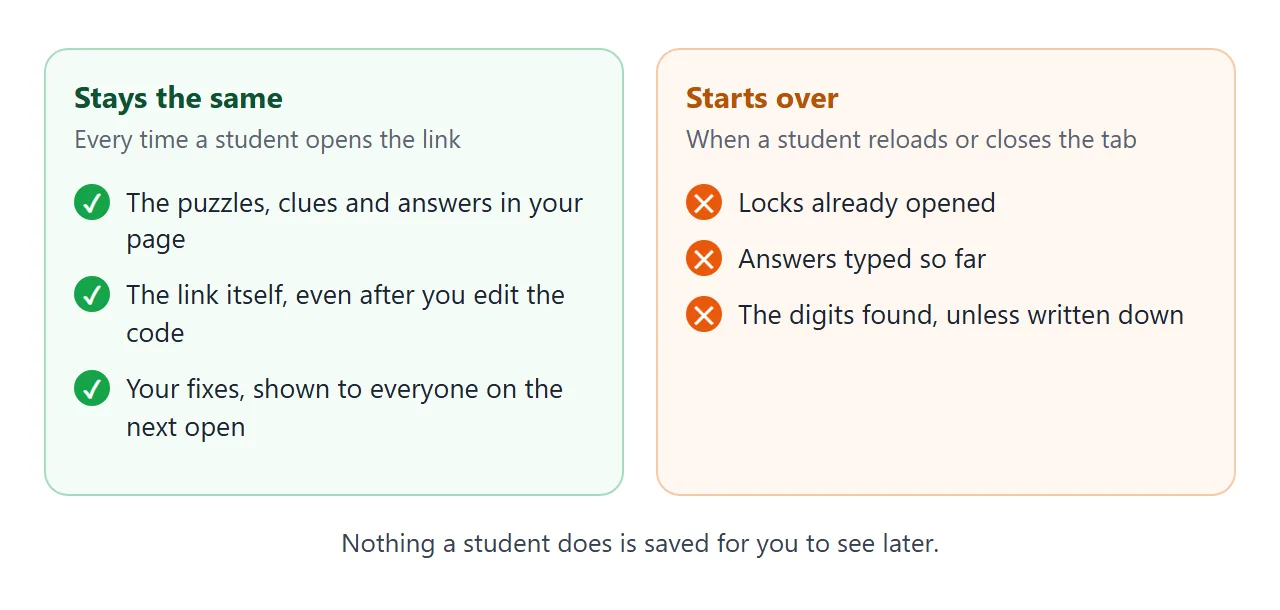
Plan the room around that:
- Keep it short. Aim for a room a student can finish in one sitting, because there is no save point.
- Digits on paper. Ask students to write each digit down as they find it. In the water cycle room, the door accepts a typed code at any time, so a reload costs the locks but not the digits.
- Proof at the end. You cannot see who finished. Have students show the final screen, or read out the door code.
- Answers are in the code. Anyone who looks at the page code can read them. Use the room for review and fun.
Ways to share the room compared
| HTML file attached | Page link | Link as QR code on paper | |
|---|---|---|---|
| Opens in | Depends on the phone | Any browser | Any browser, after scanning |
| Fix an answer later | Send a new file | Edit, paste again, same link | Same code, if it points at the page link |
If a student's phone shows code instead of a room, see opening an HTML file on a phone. That happens with files, not with links.
When it does not work
| Symptom | Cause | Fix |
|---|---|---|
| The room starts over | The student reloaded or closed the tab | Write digits down; keep the room short |
| A student opens the door without solving | The answers are visible in the page code | Use it for practice, not for grades |
| Nothing happens on a button | A line was lost when copying | Copy the whole code from the chat again |
| Pictures are missing | They came from another website, which the page blocks | Ask for pictures drawn in inline SVG |
| A fixed answer still shows the old text | The student has the old page open | Ask them to reload |
| The correct answer is marked wrong | Spelling or capital letters differ | Add other accepted spellings to the answer list |
For a game with more moving parts, host an HTML game covers the same link steps.