You hand back a worksheet and the same mistake is on half of them.
By then the class has moved on. Nobody remembers why they wrote 3/8 instead of 3/4.
An interactive worksheet catches that moment. The student types an answer, the box turns red, and they try again while the question is still in front of them.
These days you do not need a worksheet platform to make one. Teachers ask ChatGPT, Claude or Gemini for it and get a working page in one reply.
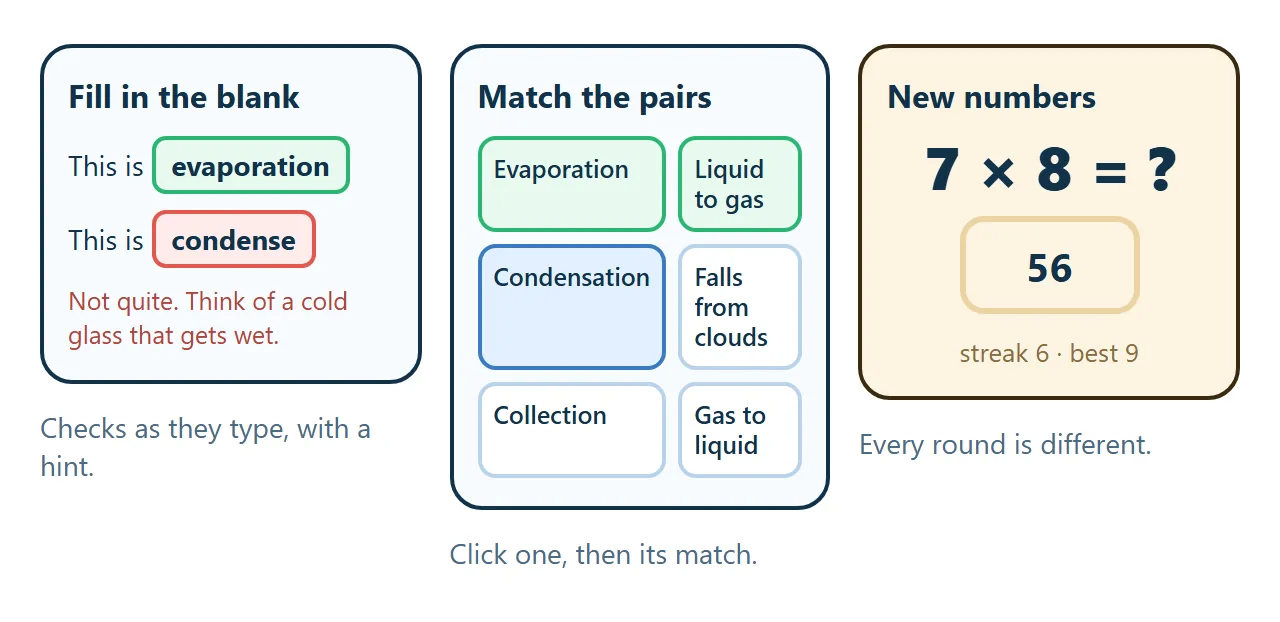
Here is what that looks like. Type an answer, or click a word on the left and then its match on the right.
<!doctype html>
<html lang="en">
<head>
<meta charset="utf-8">
<meta name="viewport" content="width=device-width, initial-scale=1">
<title>The water cycle - worksheet</title>
<style>
  * { box-sizing: border-box; }
  body { margin: 0; background: linear-gradient(180deg, #e3f2ff, #f7fbff 60%); color: #12324a; font-family: system-ui, -apple-system, "Segoe UI", sans-serif; }
  .page { max-width: 640px; margin: 0 auto; padding: 24px 18px 30px; }
  header { display: flex; align-items: center; gap: 14px; margin-bottom: 16px; }
  header svg { width: 64px; height: 64px; flex: none; }
  h1 { margin: 0; font-size: 23px; }
  header p { margin: 2px 0 0; color: #4b6b85; font-size: 14px; }
  .score { position: sticky; top: 0; z-index: 2; display: flex; align-items: center; gap: 12px; padding: 10px 14px; margin-bottom: 14px; border-radius: 14px; background: #12324a; color: #fff; }
  .score .track { flex: 1; height: 10px; border-radius: 5px; background: rgba(255,255,255,.2); overflow: hidden; }
  .score .track i { display: block; height: 100%; width: 0; background: linear-gradient(90deg, #5ee0a0, #2bb673); transition: width .4s; }
  .score b { font-variant-numeric: tabular-nums; }
  .score button { border: 0; border-radius: 9px; padding: 7px 10px; background: #fff; color: #12324a; font: 600 13px system-ui; cursor: pointer; }
  section { background: #fff; border-radius: 18px; padding: 16px; margin-bottom: 14px; box-shadow: 0 6px 18px rgba(18, 50, 74, .07); }
  h2 { margin: 0 0 10px; font-size: 13px; letter-spacing: .08em; text-transform: uppercase; color: #3a7bbf; }
  .q { margin: 12px 0; font-size: 16.5px; line-height: 1.7; }
  .q input { width: 150px; padding: 5px 8px; border: 2px solid #b9d3ea; border-radius: 9px; font: inherit; font-size: 16px; }
  .q input.ok { border-color: #2bb673; background: #e8f9f0; }
  .q input.no { border-color: #e2584d; background: #fdeceb; }
  .hint { display: block; margin-top: 4px; font-size: 13.5px; color: #b2443a; min-height: 1em; }
  .pairs { display: grid; grid-template-columns: 1fr 1fr; gap: 10px; }
  .pairs button { width: 100%; padding: 12px 10px; margin-bottom: 8px; border-radius: 12px; border: 2px solid #b9d3ea; background: #f6faff; font: 600 15px system-ui; color: #12324a; cursor: pointer; text-align: left; }
  .pairs button.sel { border-color: #3a7bbf; background: #e3f0ff; }
  .pairs button.done { border-color: #2bb673; background: #e8f9f0; color: #1b7a4b; cursor: default; }
  .pairs button.shake { animation: shake .3s; border-color: #e2584d; }
  @keyframes shake { 25% { transform: translateX(-4px); } 75% { transform: translateX(4px); } }
  .win { display: none; text-align: center; padding: 16px; border-radius: 16px; background: #e8f9f0; color: #1b7a4b; font-weight: 700; }
</style>
</head>
<body>
<main class="page">
  <header>
    <svg viewBox="0 0 64 64" aria-hidden="true"><circle cx="32" cy="32" r="32" fill="#3a7bbf"/><path d="M32 14 C 24 26 20 32 20 38 a12 12 0 0 0 24 0 c0-6-4-12-12-24z" fill="#e3f2ff"/></svg>
    <div><h1>The water cycle</h1><p>Grade 4 practice. Fill the blanks, then match the pairs.</p></div>
  </header>

  <div class="score"><span>Score</span><div class="track"><i id="bar"></i></div><b id="pts">0 / 8</b><button id="reset">Start again</button></div>

  <section>
    <h2>Part 1 - Fill in the blank</h2>
    <div class="q">The sun heats water and it turns into vapour. This is <input data-a="evaporation" data-h="It starts with e. The water evaporates."><span class="hint"></span></div>
    <div class="q">Vapour cools high up and forms clouds. This is <input data-a="condensation" data-h="Think of a cold glass that gets wet on the outside."><span class="hint"></span></div>
    <div class="q">Water falls back as rain, snow or hail. This is <input data-a="precipitation" data-h="Weather reports call rain and snow this word."><span class="hint"></span></div>
    <div class="q">Water gathers in rivers, lakes and the sea. This is <input data-a="collection" data-h="The water is collected in one place."><span class="hint"></span></div>
  </section>

  <section>
    <h2>Part 2 - Match the pairs</h2>
    <div class="pairs">
      <div id="left"></div>
      <div id="right"></div>
    </div>
  </section>

  <div class="win" id="win">All 8 right. Nice work.</div>
</main>
<script>
  const PAIRS = [
    ['Evaporation', 'Liquid to gas'],
    ['Condensation', 'Gas to liquid'],
    ['Precipitation', 'Falls from clouds'],
    ['Collection', 'Gathers in the sea'],
  ];
  const clean = (s) => s.trim().toLowerCase().replace(/\s+/g, ' ');
  const inputs = [...document.querySelectorAll('.q input')];
  let matched = 0, picked = null;

  function update() {
    const right = inputs.filter((i) => i.classList.contains('ok')).length + matched;
    document.getElementById('pts').textContent = right + ' / 8';
    document.getElementById('bar').style.width = (right / 8 * 100) + '%';
    document.getElementById('win').style.display = right === 8 ? 'block' : 'none';
  }

  inputs.forEach((inp) => {
    inp.addEventListener('input', () => {
      const v = clean(inp.value), hint = inp.nextElementSibling;
      inp.classList.remove('ok', 'no'); hint.textContent = '';
      if (!v) { update(); return; }
      if (v === inp.dataset.a) inp.classList.add('ok');
      else if (v.length >= inp.dataset.a.length) { inp.classList.add('no'); hint.textContent = 'Not quite. ' + inp.dataset.h; }
      update();
    });
  });

  function buildPairs() {
    const L = document.getElementById('left'), R = document.getElementById('right');
    L.innerHTML = ''; R.innerHTML = ''; matched = 0; picked = null;
    const shuffled = PAIRS.map((p, i) => [p[1], i]).sort(() => Math.random() - 0.5);
    PAIRS.forEach((p, i) => { const b = document.createElement('button'); b.textContent = p[0]; b.dataset.i = i; L.append(b); });
    shuffled.forEach(([t, i]) => { const b = document.createElement('button'); b.textContent = t; b.dataset.i = i; R.append(b); });
    L.querySelectorAll('button').forEach((b) => b.onclick = () => {
      if (b.classList.contains('done')) return;
      L.querySelectorAll('button').forEach((x) => x.classList.remove('sel')); b.classList.add('sel'); picked = b;
    });
    R.querySelectorAll('button').forEach((b) => b.onclick = () => {
      if (!picked || b.classList.contains('done')) return;
      if (b.dataset.i === picked.dataset.i) { b.classList.add('done'); picked.classList.add('done'); picked.classList.remove('sel'); picked = null; matched++; update(); }
      else { b.classList.add('shake'); setTimeout(() => b.classList.remove('shake'), 320); }
    });
  }

  document.getElementById('reset').onclick = () => {
    inputs.forEach((i) => { i.value = ''; i.classList.remove('ok', 'no'); i.nextElementSibling.textContent = ''; });
    buildPairs(); update();
  };
  buildPairs(); update();
</script>
</body>
</html>
Three things that make it work
1. One skill per sheet. A worksheet that mixes fractions, decimals and word problems gives a score that tells you nothing. Keep it to one thing, so a low score points at one gap.
2. Feedback that says more than "wrong". "Not quite. Check which number is the whole." helps. A red box alone just invites guessing. Ask for a one-line hint per question.
3. A way to start again. Students learn on the second try. A reset button, or new numbers each time, turns one sheet into five rounds of practice.
Make it with AI
Open ChatGPT, Claude or Gemini and paste this. Change the words in capitals and paste your own questions at the end.
Make one complete HTML file: an interactive worksheet.
Topic: TOPIC, for GRADE / AGE.
Part 1: fill in the blank. Check each answer as the
student types. Green when right. When wrong, show
the hint I give for that question.
Part 2: match the pairs. Click one on the left,
then its match on the right.
Show a score at the top and a "Start again" button.
Rules: large text, works on a tablet, all CSS and
JavaScript inside the file, no images from other
sites, nothing sent anywhere. Accept answers in any
capitals and with extra spaces.
Use only my questions and answers. Do not add any.
Questions, answers and hints: PASTE THEM HERE
The line about capitals and spaces matters. Without it "Evaporation" and "evaporation " can be marked wrong, and students stop trusting the page.
Before you share it, do it once as a student. Type a right answer, a wrong one, and leave one empty.
For practice that never runs out, ask for new numbers each round. This one makes fresh multiplication questions and keeps a streak.
<!doctype html>
<html lang="en">
<head>
<meta charset="utf-8">
<meta name="viewport" content="width=device-width, initial-scale=1">
<title>Times tables practice</title>
<style>
  * { box-sizing: border-box; }
  body { margin: 0; min-height: 100vh; background: #fdf4e3; color: #3a2a12; font-family: system-ui, -apple-system, "Segoe UI", sans-serif; }
  .page { max-width: 460px; margin: 0 auto; padding: 22px 18px; text-align: center; }
  h1 { margin: 0 0 4px; font-size: 22px; }
  .sub { margin: 0 0 14px; color: #8a6d3b; font-size: 14px; }
  .tables { display: flex; flex-wrap: wrap; justify-content: center; gap: 6px; margin-bottom: 16px; }
  .tables button { width: 42px; height: 42px; border-radius: 12px; border: 2px solid #ecd3a3; background: #fff; font: 700 16px system-ui; color: #3a2a12; cursor: pointer; }
  .tables button.on { background: #f29e1f; border-color: #f29e1f; color: #fff; }
  .card { background: #fff; border-radius: 22px; padding: 22px 18px; box-shadow: 0 12px 26px rgba(138, 109, 59, .15); }
  .count { font-size: 13px; color: #8a6d3b; }
  .sum { font-size: 46px; font-weight: 800; margin: 8px 0 14px; font-variant-numeric: tabular-nums; }
  input { width: 140px; padding: 10px; text-align: center; border: 3px solid #ecd3a3; border-radius: 14px; font: 700 28px system-ui; color: #3a2a12; }
  input.no { border-color: #e2584d; animation: shake .3s; }
  @keyframes shake { 25% { transform: translateX(-5px); } 75% { transform: translateX(5px); } }
  .msg { min-height: 22px; margin-top: 10px; font-size: 15px; color: #b2443a; }
  .stats { display: flex; justify-content: center; gap: 18px; margin-top: 14px; font-size: 14px; color: #8a6d3b; }
  .stats b { display: block; font-size: 22px; color: #3a2a12; }
  .done { display: none; }
  .done .big { font-size: 40px; font-weight: 800; margin: 6px 0; }
  .done button { margin-top: 10px; padding: 12px 18px; border: 0; border-radius: 14px; background: #3a2a12; color: #fff; font: 700 15px system-ui; cursor: pointer; }
</style>
</head>
<body>
<main class="page">
  <h1>Times tables practice</h1>
  <p class="sub">Pick a table. Ten questions, new numbers every round.</p>
  <div class="tables" id="tables"></div>
  <div class="card">
    <div id="play">
      <div class="count" id="count">Question 1 of 10</div>
      <div class="sum" id="sum"></div>
      <input id="ans" inputmode="numeric" autocomplete="off" aria-label="Your answer">
      <div class="msg" id="msg"></div>
    </div>
    <div class="done" id="done">
      <div>Round finished</div>
      <div class="big" id="final"></div>
      <div id="note"></div>
      <button id="again">New round</button>
    </div>
    <div class="stats"><div><b id="streak">0</b>streak</div><div><b id="best">0</b>best streak</div></div>
  </div>
</main>
<script>
  let table = 7, qs = [], n = 0, right = 0, firstTry = true, streak = 0, best = 0;
  const $ = (id) => document.getElementById(id);

  for (let t = 2; t <= 12; t++) {
    const b = document.createElement('button'); b.textContent = t;
    b.onclick = () => { table = t; start(); };
    $('tables').append(b);
  }

  function start() {
    document.querySelectorAll('#tables button').forEach((b) => b.classList.toggle('on', +b.textContent === table));
    const pool = [1, 2, 3, 4, 5, 6, 7, 8, 9, 10, 11, 12].sort(() => Math.random() - 0.5);
    qs = pool.slice(0, 10); n = 0; right = 0;
    $('play').style.display = 'block'; $('done').style.display = 'none';
    show();
  }

  function show() {
    firstTry = true;
    $('count').textContent = 'Question ' + (n + 1) + ' of 10';
    $('sum').textContent = table + ' × ' + qs[n] + ' = ?';
    $('ans').value = ''; $('msg').textContent = ''; $('ans').focus();
  }

  $('ans').addEventListener('keydown', (e) => {
    if (e.key !== 'Enter' || !$('ans').value.trim()) return;
    const want = table * qs[n];
    if (+$('ans').value === want) {
      if (firstTry) { right++; streak++; best = Math.max(best, streak); }
      n++;
      $('streak').textContent = streak; $('best').textContent = best;
      if (n === 10) finish(); else show();
    } else {
      firstTry = false; streak = 0; $('streak').textContent = 0;
      $('ans').classList.remove('no'); void $('ans').offsetWidth; $('ans').classList.add('no');
      $('msg').textContent = 'Try again. ' + table + ' × ' + qs[n] + ' is ' + table + ' added ' + qs[n] + ' times.';
    }
  });

  function finish() {
    $('play').style.display = 'none'; $('done').style.display = 'block';
    $('final').textContent = right + ' / 10';
    $('note').textContent = right === 10 ? 'Every one on the first try.' : 'First-try answers count. Go again for a better score.';
  }
  $('again').onclick = start;
  start();
</script>
</body>
</html>
Getting it to the class
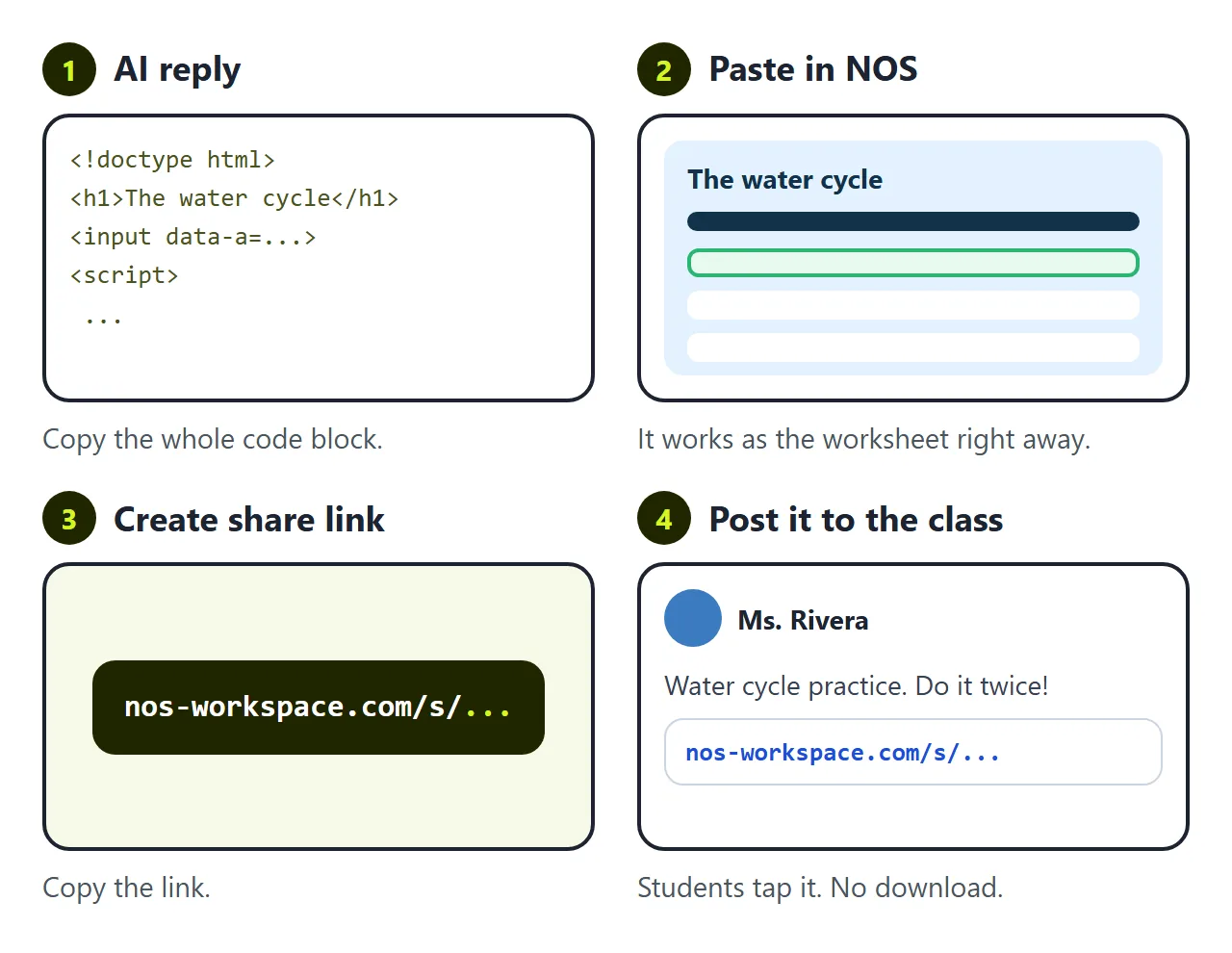
You have a worksheet. The AI gave it to you as HTML code, though, and students cannot do much with code.
The first wall is getting it open. Attach the file to a post and some students download it, some cannot open it on a school tablet, and some see the code. You need it to be a page they tap.
In NOS you paste the code into a document and it becomes the worksheet straight away. Choose Create share link, and post that link wherever you post homework. How to send an HTML file in Google Classroom covers the Classroom side.
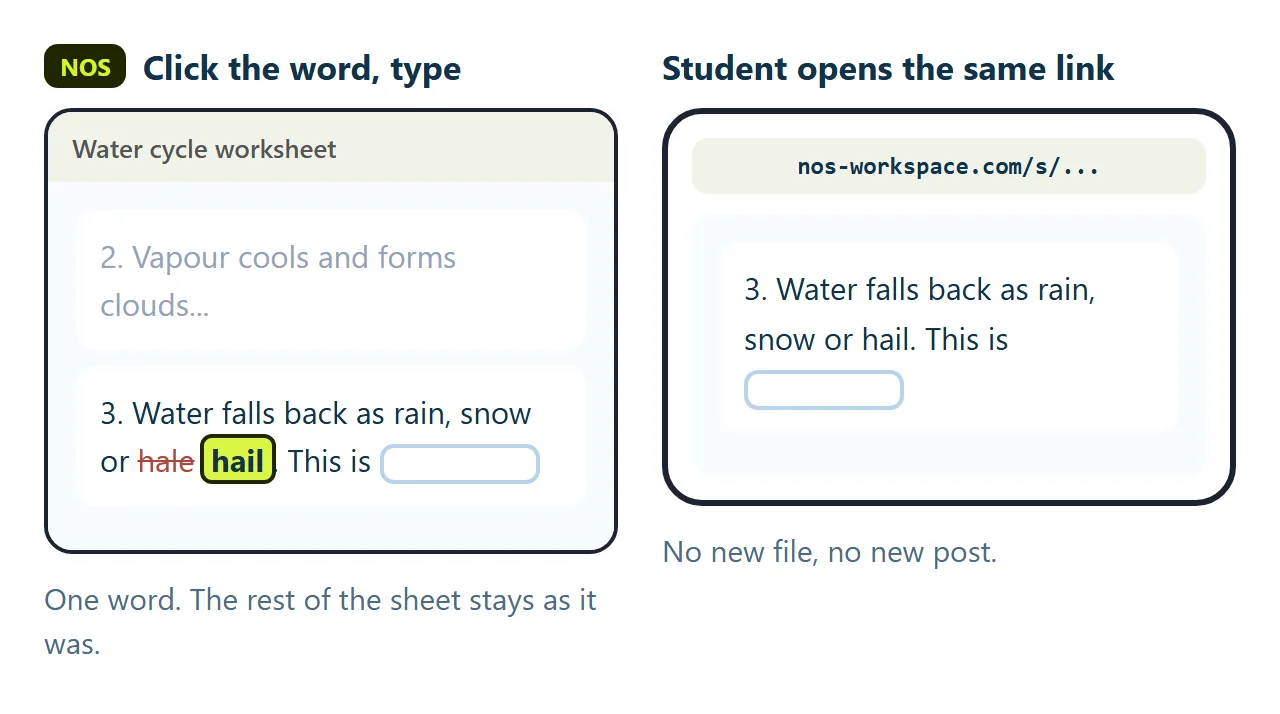
The second wall is the mistake you find on Tuesday. Question 3 says "hale" where it should say "hail". The heading says Grade 3 when the class is Grade 4. Small things, but students notice.
If you ask the AI again, you wait for a new reply. It often rewrites questions you were happy with, so you check every answer key again. Then you have a new file and a new link to post, and half the class still has the old one.
In NOS you click the wrong word on the page and type the right one. The link does not change. Students who open it now get the fixed version.
Changing an answer the page checks against is different: that lives in the code, so edit it in the code view or ask the AI for that one line.
What it does not do
The checking happens in each student's browser. Nothing is sent back, so the worksheet does not record who scored what.
That suits practice. For a graded task, keep the worksheet for practice and use your form or learning platform for the score.
For a quiz with a final score screen, see HTML quiz. For more ways teachers use AI pages in class, see Claude for teachers.