A Jeopardy template for the classroom is a grid: categories across the top, point values down each column, and a tile that opens a clue when you click it. You can ask an AI to write that whole grid as one web page.
Open it from a link on the class screen. There is no slide deck to link by hand, and no PowerPoint file, so there are no macros to enable.
Try this one. It is a four-by-four review board for three teams. Click a tile, read the clue, show the answer, then give the points.
<!doctype html>
<html lang="en">
<head>
<meta charset="utf-8">
<meta name="viewport" content="width=device-width, initial-scale=1">
<title>Review board</title>
<style>
  * { box-sizing: border-box; }
  body {
    margin: 0; min-height: 100vh; padding: 12px;
    font-family: system-ui, sans-serif; background: #0b1e5b; color: #fff;
  }
  h1 { margin: 0 0 10px; font-size: clamp(18px, 3vw, 26px); text-align: center; letter-spacing: .5px; }
  .board { display: grid; grid-template-columns: repeat(4, minmax(0, 1fr)); gap: 6px; }
  .cat {
    display: flex; align-items: center; justify-content: center; text-align: center;
    min-height: 52px; padding: 6px; background: #14308f; border-radius: 6px;
    font-weight: 700; font-size: clamp(12px, 2.4vw, 20px); text-transform: uppercase;
  }
  .tile {
    min-height: 74px; border: 0; border-radius: 6px; cursor: pointer;
    background: #1d4ed8; color: #ffd24a; font-weight: 800; font-size: clamp(20px, 4.5vw, 38px);
  }
  .tile:hover { background: #2a5ee8; }
  .tile:disabled { background: #162a6e; color: #162a6e; cursor: default; }
  .scores { display: flex; gap: 8px; margin-top: 12px; }
  .team { flex: 1; padding: 8px; border-radius: 6px; background: #14308f; text-align: center; }
  .team b { display: block; font-size: clamp(12px, 2.2vw, 16px); font-weight: 600; opacity: .85; }
  .team span { font-size: clamp(20px, 4vw, 32px); font-weight: 800; color: #ffd24a; }
  .reset { margin-top: 10px; background: none; border: 1px solid #5b72c9; color: #cfd8ff; border-radius: 6px; padding: 6px 12px; cursor: pointer; }

  .overlay {
    position: fixed; inset: 0; display: none; flex-direction: column; align-items: center; justify-content: center;
    gap: 14px; padding: 18px; text-align: center; background: #14308f;
  }
  .overlay.open { display: flex; }
  .overlay .tag { font-size: clamp(13px, 2.4vw, 20px); text-transform: uppercase; opacity: .8; }
  .overlay .clue { margin: 0; max-width: 900px; font-size: clamp(22px, 5vw, 46px); font-weight: 700; line-height: 1.25; }
  .overlay .answer { margin: 0; font-size: clamp(22px, 5vw, 42px); font-weight: 800; color: #ffd24a; min-height: 1.3em; }
  .row { display: flex; flex-wrap: wrap; gap: 8px; justify-content: center; }
  .row button {
    border: 0; border-radius: 8px; padding: 10px 16px; cursor: pointer;
    background: #ffd24a; color: #0b1e5b; font-weight: 800; font-size: clamp(14px, 2.4vw, 20px);
  }
  .row button.quiet { background: transparent; color: #fff; border: 1px solid #8fa2e8; }
  [hidden] { display: none !important; }
</style>
</head>
<body>
<h1>Review Game</h1>
<div class="board" id="board"></div>
<div class="scores" id="scores"></div>
<button class="reset" id="reset">New game</button>

<div class="overlay" id="overlay">
  <div class="tag" id="tag"></div>
  <p class="clue" id="clue"></p>
  <p class="answer" id="answer"></p>
  <div class="row" id="show-row"><button id="show">Show answer</button></div>
  <div class="row" id="award-row" hidden></div>
</div>

<script>
  // Edit the clues here. Each clue is [points, clue, answer].
  const categories = [
    { name: 'Planets', clues: [
      [100, 'This planet is known as the Red Planet.', 'Mars'],
      [200, 'The largest planet in our solar system.', 'Jupiter'],
      [300, 'This planet is famous for its rings.', 'Saturn'],
      [400, 'The planet closest to the Sun.', 'Mercury'] ] },
    { name: 'Water cycle', clues: [
      [100, 'Liquid water turning into vapor.', 'Evaporation'],
      [200, 'Vapor cooling into tiny droplets that form clouds.', 'Condensation'],
      [300, 'Rain, snow and hail are all forms of this.', 'Precipitation'],
      [400, 'Water flowing over the land back toward the sea.', 'Runoff'] ] },
    { name: 'Fractions', clues: [
      [100, 'One half plus one half equals this whole number.', '1'],
      [200, 'The simplest form of 4/8.', '1/2'],
      [300, '3/4 written as a decimal.', '0.75'],
      [400, 'One third of 12.', '4'] ] },
    { name: 'Words', clues: [
      [100, 'The opposite of ancient.', 'Modern'],
      [200, 'Words with the same meaning are called this.', 'Synonyms'],
      [300, 'The part of speech that names a person, place or thing.', 'Noun'],
      [400, 'A comparison that uses "like" or "as".', 'Simile'] ] },
  ];
  const teams = ['Team A', 'Team B', 'Team C'];

  const $ = (id) => document.getElementById(id);
  let scores, current;

  function el(tag, text) {
    const e = document.createElement(tag);
    if (text !== undefined) e.textContent = text;
    return e;
  }

  function drawScores() {
    $('scores').replaceChildren(...teams.map((name, i) => {
      const box = el('div'); box.className = 'team';
      const label = el('b', name), value = el('span', String(scores[i]));
      box.append(label, value);
      return box;
    }));
  }

  function drawBoard() {
    const cells = categories.map((c) => { const h = el('div', c.name); h.className = 'cat'; return h; });
    for (let row = 0; row < 4; row++) {
      categories.forEach((c, col) => {
        const clue = c.clues[row];
        const tile = el('button', '$' + clue[0]);
        tile.className = 'tile';
        tile.addEventListener('click', () => openClue(tile, c.name, clue));
        cells.push(tile);
      });
    }
    $('board').replaceChildren(...cells);
  }

  function openClue(tile, category, clue) {
    current = { tile, points: clue[0] };
    $('tag').textContent = category + ' for $' + clue[0];
    $('clue').textContent = clue[1];
    $('answer').textContent = '';
    $('award-row').hidden = true;
    $('show-row').hidden = false;
    $('overlay').classList.add('open');
    $('answer').dataset.text = clue[2];
  }

  function closeClue() {
    current.tile.disabled = true;  // used tiles cannot be played again
    $('overlay').classList.remove('open');
  }

  $('show').addEventListener('click', () => {
    $('answer').textContent = $('answer').dataset.text;
    $('show-row').hidden = true;
    const row = $('award-row');
    row.replaceChildren(...teams.map((name, i) => {
      const b = el('button', '+ ' + name);
      b.addEventListener('click', () => { scores[i] += current.points; drawScores(); closeClue(); });
      return b;
    }));
    const none = el('button', 'No one'); none.className = 'quiet';
    none.addEventListener('click', closeClue);
    row.append(none);
    row.hidden = false;
  });

  function newGame() { scores = teams.map(() => 0); drawScores(); drawBoard(); }
  $('reset').addEventListener('click', newGame);
  newGame();
</script>
</body>
</html>
The whole game is one HTML page. The clues sit in a short list at the top of the code, so changing a question means changing one line, not rebuilding slides.
Make it with AI
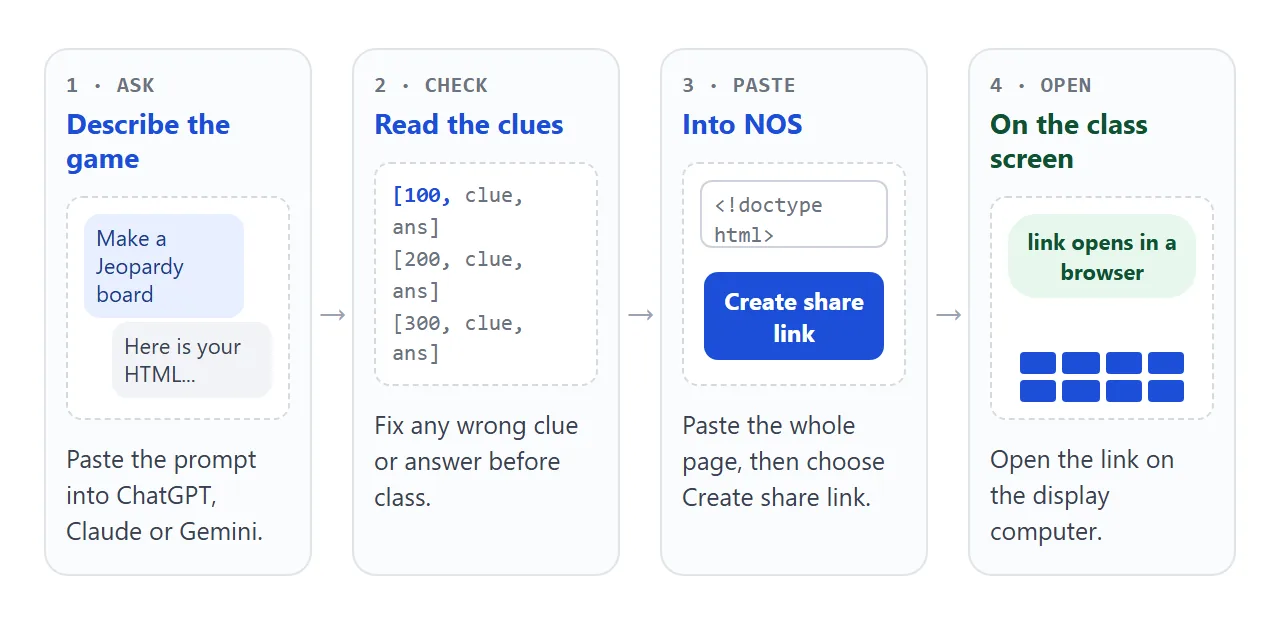
Paste this prompt into ChatGPT, Claude or Gemini. Replace the parts in square brackets with your unit and grade.
Make a Jeopardy-style review game as ONE self-contained HTML file.
Topic: [your unit, for example fractions and decimals]. Grade: [level].
- 5 categories with 5 clues each, worth 100 to 500 points.
  Easier clues are worth fewer points.
- A grid of tile buttons. Clicking a tile opens a full-screen clue
  with a Show answer button.
- Three teams. After the answer, buttons add the points to a team,
  or close the clue with no points.
- Used tiles turn dark and cannot be clicked again.
- Very large text that can be read from the back of a classroom.
  It must also work on a phone.
- Keep every clue in one list at the top of the script.
- No external files, no images, no localStorage.
Write out every clue and answer. Do not use placeholders.
Before you use the result, check four things:
- Every clue and answer. Read them against your own materials. A model can state a wrong answer with full confidence.
- Ambiguous clues. If two answers could be right, rewrite the clue.
- Every tile. Click all of them once, including the last one, to make sure each opens and closes.
- Your phone. Open it on a phone as well as a computer.
If the page comes back blank or cut off, see AI HTML not rendering. For other kinds of games, see AI HTML game generator.
Send it as a link
Copy the whole HTML from the chat, paste it into a NOS document, and choose Create share link. HTML to link walks through it. The page renders as written and its scripts run, so the tiles work.
Anyone with the link can open it in a browser, on a phone too, without an account. They can play it but not edit it. If you fix a clue later, edit the code and the same link shows the new version.
If your page came from Claude, how to share HTML from Claude covers that route.
Run a round on the class screen
Open the link on the computer that drives the projector or display. Keep that tab open for the whole game, because the board does not remember scores once the page is reloaded.
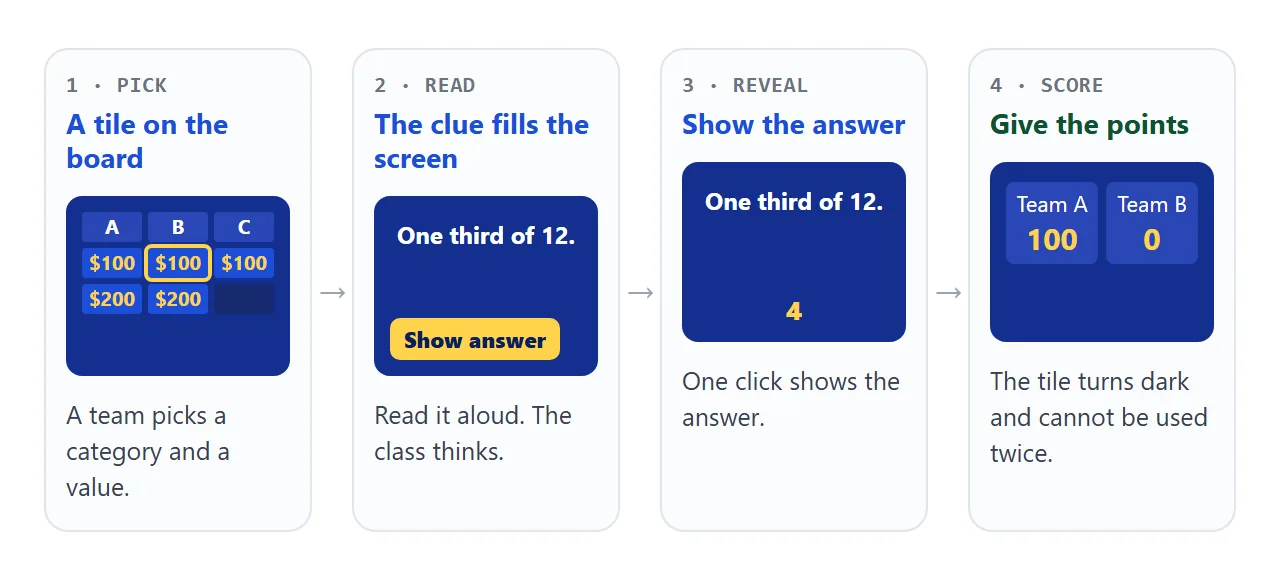
A turn takes four clicks. The tile you used turns dark, so nobody can pick it twice. If the back row cannot read the screen, ask the AI for larger clue text and paste the new version over the old one in NOS.
Make your own board from a list
Rewriting the code for every unit is slow. This second page reads its clues from a plain list instead. Each line is a category, points, a clue and an answer, separated by a vertical bar.
<!doctype html>
<html lang="en">
<head>
<meta charset="utf-8">
<meta name="viewport" content="width=device-width, initial-scale=1">
<title>Board from a list</title>
<style>
  * { box-sizing: border-box; }
  body { margin: 0; min-height: 100vh; padding: 12px; font-family: system-ui, sans-serif; background: #0b1e5b; color: #fff; }
  .editor label { display: block; font-size: 14px; margin-bottom: 4px; color: #cfd8ff; }
  textarea {
    width: 100%; height: 150px; padding: 8px; border-radius: 6px; border: 0;
    font: 13px/1.4 ui-monospace, Consolas, monospace; color: #10204f; background: #f4f6ff;
  }
  .bar { display: flex; flex-wrap: wrap; gap: 8px; margin: 8px 0; }
  button { cursor: pointer; font: inherit; }
  .bar button, .row button {
    border: 0; border-radius: 6px; padding: 8px 14px; font-weight: 700; background: #ffd24a; color: #0b1e5b;
  }
  .bar button.quiet, .row button.quiet { background: transparent; color: #fff; border: 1px solid #8fa2e8; }
  .error { color: #ffb4a8; font-size: 14px; min-height: 1.2em; margin: 0 0 6px; }
  .board { display: grid; gap: 6px; }
  .cat {
    display: flex; align-items: center; justify-content: center; text-align: center; min-height: 44px; padding: 4px;
    background: #14308f; border-radius: 6px; font-weight: 700; text-transform: uppercase; font-size: clamp(11px, 2.2vw, 18px);
  }
  .tile {
    min-height: 60px; border: 0; border-radius: 6px; background: #1d4ed8; color: #ffd24a;
    font-weight: 800; font-size: clamp(18px, 4vw, 34px);
  }
  .tile:hover { background: #2a5ee8; }
  .tile:disabled { background: #162a6e; color: #162a6e; cursor: default; }
  .gap { background: transparent; }
  .scores { display: flex; gap: 8px; margin-top: 10px; }
  .team { flex: 1; text-align: center; padding: 6px; border-radius: 6px; background: #14308f; }
  .team b { display: block; font-size: 13px; font-weight: 600; opacity: .85; }
  .team span { font-size: clamp(20px, 4vw, 30px); font-weight: 800; color: #ffd24a; }

  .overlay {
    position: fixed; inset: 0; display: none; flex-direction: column; align-items: center; justify-content: center;
    gap: 14px; padding: 18px; text-align: center; background: #14308f;
  }
  .overlay.open { display: flex; }
  .overlay .tag { font-size: clamp(13px, 2.4vw, 20px); text-transform: uppercase; opacity: .8; }
  .overlay .clue { margin: 0; max-width: 900px; font-size: clamp(22px, 5vw, 44px); font-weight: 700; line-height: 1.25; }
  .overlay .answer { margin: 0; font-size: clamp(22px, 5vw, 40px); font-weight: 800; color: #ffd24a; min-height: 1.3em; }
  .row { display: flex; flex-wrap: wrap; gap: 8px; justify-content: center; }
  [hidden] { display: none !important; }
</style>
</head>
<body>
<div class="editor" id="editor">
  <label for="src">One clue per line: Category | points | clue | answer</label>
<textarea id="src" spellcheck="false">Oceans | 100 | The largest ocean on Earth. | Pacific
Oceans | 200 | The ocean that lies around the North Pole. | Arctic
Oceans | 300 | The ocean between Africa and Australia. | Indian
Shapes | 100 | A shape with three sides. | Triangle
Shapes | 200 | The number of sides on a hexagon. | 6
Shapes | 300 | A four-sided shape with four equal sides and four right angles. | Square
Spelling | 100 | The plural of "child". | Children
Spelling | 200 | The past tense of "run". | Ran
Spelling | 300 | The silent letter at the start of "knife". | K</textarea>
</div>
<div class="bar">
  <button id="build">Build board</button>
  <button id="toggle" class="quiet">Hide editor</button>
</div>
<p class="error" id="error"></p>
<div class="board" id="board"></div>
<div class="scores" id="scores"></div>

<div class="overlay" id="overlay">
  <div class="tag" id="tag"></div>
  <p class="clue" id="clue"></p>
  <p class="answer" id="answer"></p>
  <div class="row" id="show-row"><button id="show">Show answer</button></div>
  <div class="row" id="award-row" hidden></div>
</div>

<script>
  const teams = ['Team A', 'Team B'];
  const $ = (id) => document.getElementById(id);
  let scores = teams.map(() => 0), current;

  function el(tag, text) {
    const e = document.createElement(tag);
    if (text !== undefined) e.textContent = text;
    return e;
  }

  // Turn the text box into categories, keeping the order you typed.
  function parse(text) {
    const cats = [], errors = [];
    text.split('\n').forEach((line, i) => {
      if (!line.trim()) return;
      const p = line.split('|').map((s) => s.trim());
      if (p.length < 4 || !p[0] || !p[2] || !p[3] || isNaN(parseInt(p[1], 10))) {
        errors.push('Line ' + (i + 1) + ' needs: Category | points | clue | answer');
        return;
      }
      let cat = cats.find((c) => c.name === p[0]);
      if (!cat) { cat = { name: p[0], clues: [] }; cats.push(cat); }
      cat.clues.push({ points: parseInt(p[1], 10), clue: p[2], answer: p[3] });
    });
    return { cats, errors };
  }

  function drawScores() {
    $('scores').replaceChildren(...teams.map((name, i) => {
      const box = el('div'); box.className = 'team';
      box.append(el('b', name), el('span', String(scores[i])));
      return box;
    }));
  }

  function build() {
    const { cats, errors } = parse($('src').value);
    $('error').textContent = errors.join('  ');
    if (!cats.length) { $('board').replaceChildren(); return; }
    const rows = Math.max(...cats.map((c) => c.clues.length));
    $('board').style.gridTemplateColumns = 'repeat(' + cats.length + ', minmax(0, 1fr))';
    const cells = cats.map((c) => { const h = el('div', c.name); h.className = 'cat'; return h; });
    for (let r = 0; r < rows; r++) {
      cats.forEach((c) => {
        const clue = c.clues[r];
        if (!clue) { const g = el('div'); g.className = 'gap'; cells.push(g); return; }
        const tile = el('button', '$' + clue.points);
        tile.className = 'tile';
        tile.addEventListener('click', () => openClue(tile, c.name, clue));
        cells.push(tile);
      });
    }
    $('board').replaceChildren(...cells);
    scores = teams.map(() => 0);
    drawScores();
  }

  function openClue(tile, category, clue) {
    current = { tile, clue };
    $('tag').textContent = category + ' for $' + clue.points;
    $('clue').textContent = clue.clue;
    $('answer').textContent = '';
    $('award-row').hidden = true;
    $('show-row').hidden = false;
    $('overlay').classList.add('open');
  }

  function closeClue() {
    current.tile.disabled = true;
    $('overlay').classList.remove('open');
  }

  $('show').addEventListener('click', () => {
    $('answer').textContent = current.clue.answer;
    $('show-row').hidden = true;
    const row = $('award-row');
    row.replaceChildren(...teams.map((name, i) => {
      const b = el('button', '+ ' + name);
      b.addEventListener('click', () => { scores[i] += current.clue.points; drawScores(); closeClue(); });
      return b;
    }));
    const none = el('button', 'No one'); none.className = 'quiet';
    none.addEventListener('click', closeClue);
    row.append(none);
    row.hidden = false;
  });

  $('build').addEventListener('click', build);
  // Hide the editor before you show the board: it lists every answer.
  $('toggle').addEventListener('click', () => {
    const hide = !$('editor').hidden;
    $('editor').hidden = hide;
    $('toggle').textContent = hide ? 'Show editor' : 'Hide editor';
  });
  build();
</script>
</body>
</html>
To keep your own questions in the shared link, put the lines inside the text box in the code, not on the page. What anyone types on the page is not saved, and reloading brings back the lines from the code.
You can also ask an AI for the list directly:
Write 20 lines for a review game on [topic], grade [level].
Format: Category | points | clue | answer
4 categories, points 100 to 500, one clue per line.
Paste the lines into the box and press Build board. The Hide editor button covers the answers while you project.
Where the link can go
The same link works in several places. Pick the ones your class already uses.
| Where | What you do | What people see |
|---|---|---|
| Class screen | Open the link in a browser on the display computer | The board with clickable tiles |
| Google Classroom | In Classwork, choose Create, then Material, then Add, then Link | A material with the link attached |
| Email or chat | Paste the link into the message | A link that opens in a browser |
| Paper handout | Turn the link into a QR code with any QR code maker | A code to scan that opens the same page |
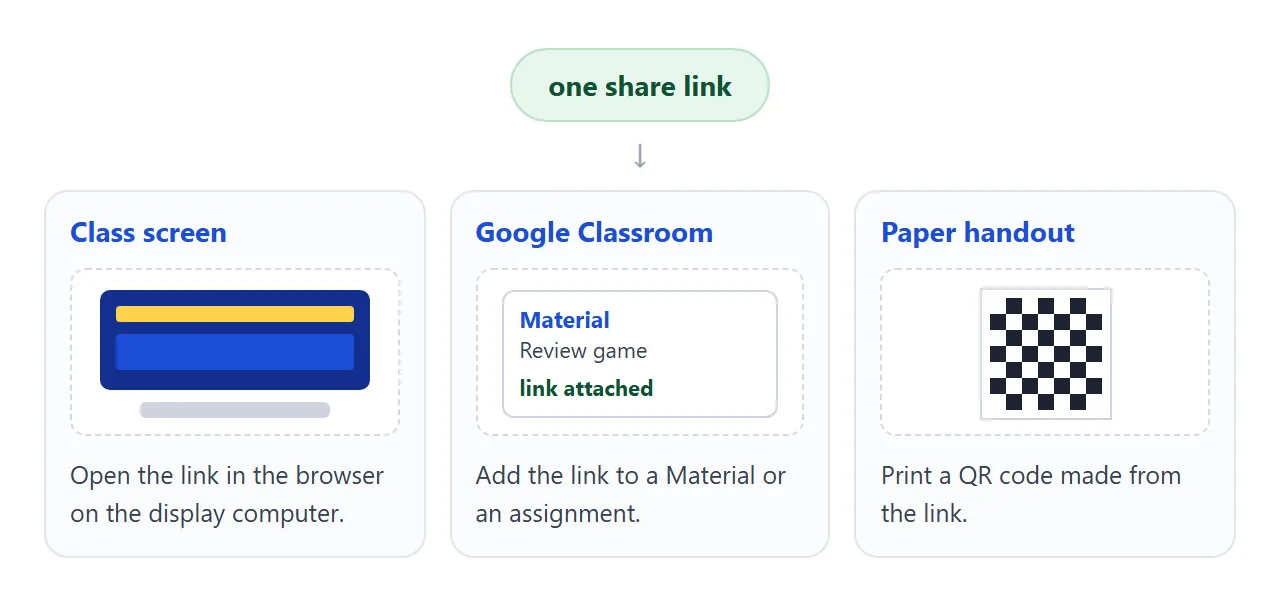
For Classroom, Google's help says to click Create and then Material, enter a title, click Add and choose Link, then click Post. For an assignment, choose Link under Attach, then click Assign.
Menus can change and differ by account type, so check Google's current help page, as of October 2026. For the paper version, see file to QR code.
When it does not work
| What you see | Cause | Fix |
|---|---|---|
| Tiles do nothing when clicked | The AI reply was cut off before the end of the script | Ask for the complete file again, then paste it all |
| Scores went back to zero | The page was reloaded or reopened | Keep one tab open for the whole game |
| A picture is missing | Images from other websites are blocked in NOS pages | Ask for emoji, CSS shapes or inline SVG instead |
| Text is too small at the back | The AI chose a small font size | Ask for clue text of at least 40 pixels |
| Two answers fit one clue | The clue was written loosely | Edit that line in the code; the link stays the same |
| A student sees the old question | Their tab still holds the earlier version | Ask them to reload the page |
| Students can read the answers | The answers are part of the page code | Use it for review play, not for graded tests |