Church bulletin templates are usually layouts you retype every week, and one Quora asker calls the job "a time consuming task". Another way: have an AI write the bulletin as one web page, share it as a link, and change only the marked lines.
Try the page below. The date, hymns, announcements and prayer list are the lines that change. Everything else stays put. The button at the top makes the text larger, which helps readers on a phone.
<!doctype html>
<html lang="en">
<head>
<meta charset="utf-8">
<meta name="viewport" content="width=device-width, initial-scale=1">
<title>Weekly bulletin</title>
<style>
:root { --base: 17px; }
* { box-sizing: border-box; }
body {
margin: 0; background: #f3efe7; color: #2b2622;
font-family: Georgia, 'Times New Roman', serif; font-size: var(--base); line-height: 1.55;
}
.sheet { max-width: 640px; margin: 0 auto; background: #fffdf8; padding: 22px 22px 28px; }
header { text-align: center; border-bottom: 3px double #b9a98c; padding-bottom: 14px; margin-bottom: 8px; }
header h1 { margin: 0; font-size: 1.5em; letter-spacing: .02em; }
header .sub { color: #6c6254; font-size: .9em; }
.size { display: block; margin: 0 0 8px auto; border: 1px solid #b9a98c; background: #fff; border-radius: 6px; padding: 2px 10px; font: inherit; font-size: .8em; cursor: pointer; }
h2 { font-size: 1.05em; text-transform: uppercase; letter-spacing: .08em; color: #7a4b2a; margin: 22px 0 6px; }
ul { margin: 0; padding-left: 1.2em; }
li { margin: 3px 0; }
.order { list-style: none; padding: 0; }
.order li { display: flex; gap: 10px; border-bottom: 1px dotted #d8cdb8; padding: 4px 0; }
.order .t { width: 4.2em; flex: none; color: #7a4b2a; font-variant-numeric: tabular-nums; }
.note { background: #f6efe0; border-left: 4px solid #b9a98c; padding: 8px 12px; border-radius: 0 6px 6px 0; }
footer { margin-top: 24px; padding-top: 12px; border-top: 1px solid #d8cdb8; font-size: .9em; color: #5b5246; }
@media print { body { background: #fff; } .size { display: none; } .sheet { padding: 0; } }
</style>
</head>
<body>
<div class="sheet">
<header>
<button class="size" id="size" type="button">Larger text</button>
<h1>Maple Street Community Church</h1>
<!-- WEEKLY: the date and the name of the Sunday -->
<div class="sub">Sunday, October 5 · Twentieth Sunday after Pentecost</div>
</header>
<!-- WEEKLY: welcome line -->
<p>Welcome. If you are visiting, we are glad you are here. Coffee is in the hall after the service.</p>
<h2>Order of service</h2>
<!-- WEEKLY: hymn numbers, readings and sermon title -->
<ul class="order">
<li><span class="t">10:00</span><span>Welcome and opening prayer</span></li>
<li><span class="t">10:05</span><span>Opening hymn, No. 214</span></li>
<li><span class="t">10:12</span><span>Reading: Psalm 23</span></li>
<li><span class="t">10:20</span><span>Sermon: “Enough for today”</span></li>
<li><span class="t">10:45</span><span>Offering and hymn, No. 87</span></li>
<li><span class="t">10:55</span><span>Blessing</span></li>
</ul>
<h2>This week</h2>
<!-- WEEKLY: announcements, one list item each -->
<ul>
<li>Choir practice moves to Thursday, 7:00 pm.</li>
<li>Food pantry shift: sign up on the sheet in the hall.</li>
<li>Autumn soup lunch next Sunday after the service.</li>
</ul>
<h2>Prayer list</h2>
<!-- WEEKLY: first names only, with permission -->
<p class="note">Anna · Tomas · the Lindqvist family · all who are travelling this week</p>
<!-- STAYS THE SAME: footer -->
<footer>
Office hours: Tuesday to Thursday, 9:00 to 13:00 · office@maplestreet.example<br>
Giving: plate at the door, or the details on our website, maplestreet.example/give
</footer>
</div>
<script>
// Toggle bigger text for easier reading
const btn = document.getElementById('size');
let big = false;
btn.addEventListener('click', () => {
big = !big;
document.documentElement.style.setProperty('--base', big ? '21px' : '17px');
btn.textContent = big ? 'Smaller text' : 'Larger text';
});
</script>
</body>
</html>
What goes on the page, and what changes
A bulletin has a few parts that repeat every week and a few that are new. Splitting them is what makes a template useful. One church-resource page lists ten typical sections, including a welcome message, order of service, announcements, prayer requests, contact and giving information.
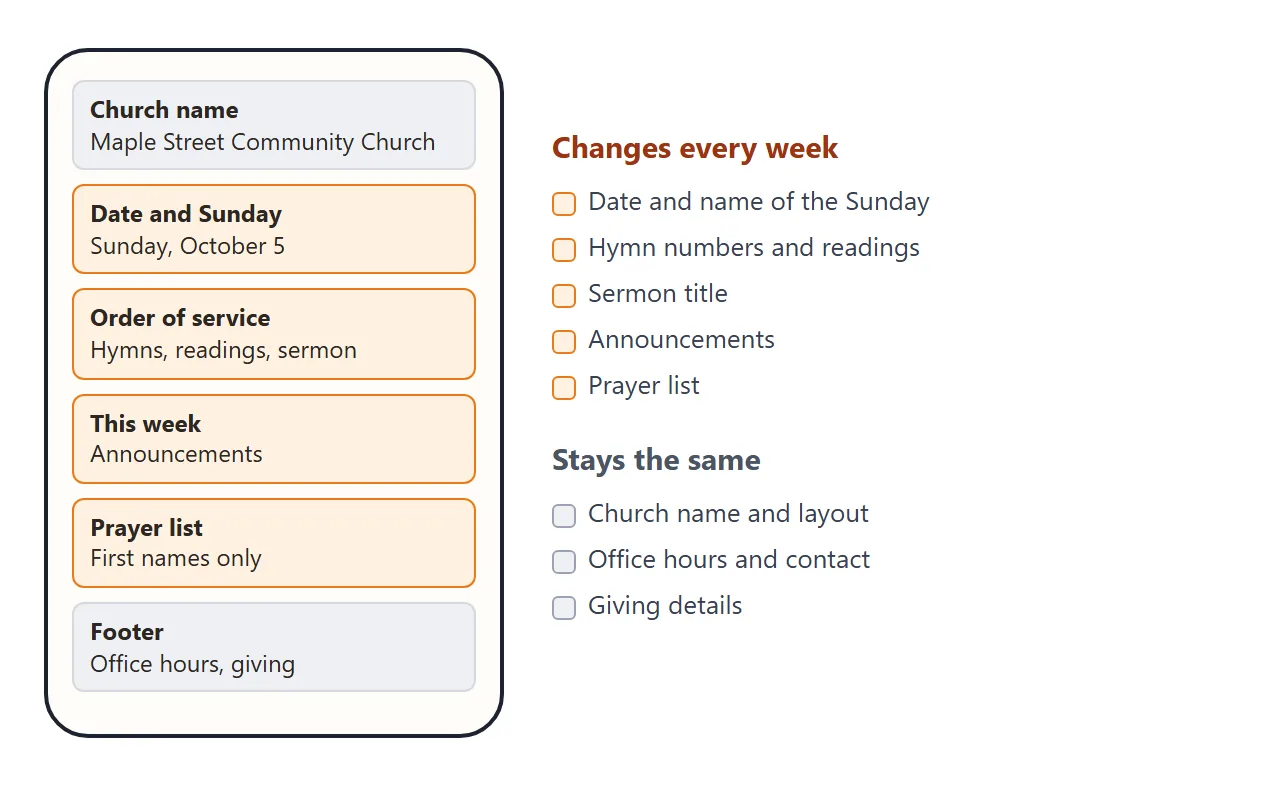
On the page above, the church name and footer stay the same. The date, order of service, announcements and prayer list are the weekly part. Ask the AI to mark both groups with comments, so you can find them later without reading all the code.
Make it with AI
Open ChatGPT, Claude or Gemini and paste this. Replace the words in square brackets.
Build a one-page weekly church bulletin as a single HTML file.
Church name: [your church]. Service: Sunday at [time].
Sections in this order: welcome line, order of service (time and item), announcements, prayer list (first names only), footer with office hours, contact and giving details.
Rules:
- One file. No outside images, fonts or scripts. Use inline SVG or CSS for any picture.
- Works on a phone: viewport meta tag, text at least 17px, one column.
- Add print styles so it prints cleanly.
- Put an HTML comment WEEKLY above every part that changes each week, and STAYS THE SAME above the rest.
- Song titles and numbers only. No song lyrics.
- Add a button that makes the text larger. Do not store anything in the browser.
- Use invented example content and made-up names.
Return the full file in one code block.
Then check the result before you go on:
- Every weekly part has a WEEKLY comment above it.
- It looks right on your phone, with no zooming needed.
- Nothing loads from another website, such as a photo or a font.
- The example has no real members' names, phone numbers or addresses.
Change a few lines each week
There are two ways to do the weekly edit. The plain way: open your document, find the WEEKLY comments and change the text under them. Date, hymn numbers, announcements, prayer list. The rest of the code does not move.
The clicking way: ask the AI for a second page with boxes for the weekly lines. You type in the boxes, check the preview and click Copy code. Then you paste that code over last week's. Try it below.
<!doctype html>
<html lang="en">
<head>
<meta charset="utf-8">
<meta name="viewport" content="width=device-width, initial-scale=1">
<title>Weekly bulletin maker</title>
<style>
* { box-sizing: border-box; }
body { margin: 0; padding: 14px; background: #eef0f3; font-family: system-ui, sans-serif; color: #1d2330; }
.wrap { max-width: 880px; margin: 0 auto; display: grid; grid-template-columns: 1fr 1fr; gap: 16px; align-items: start; }
@media (max-width: 700px) { .wrap { grid-template-columns: 1fr; } }
.panel { background: #fff; border: 1px solid #dde1e8; border-radius: 12px; padding: 14px; }
.panel h2 { margin: 0 0 8px; font-size: 15px; }
label { display: block; font-size: 13px; font-weight: 600; margin: 10px 0 3px; color: #374151; }
input, textarea { width: 100%; font: inherit; font-size: 14px; padding: 7px 9px; border: 1px solid #c9ced8; border-radius: 8px; }
textarea { resize: vertical; }
.hint { font-size: 12px; color: #6b7280; margin: 2px 0 0; }
.out { grid-column: 1 / -1; }
.out textarea { font: 12px/1.4 ui-monospace, Consolas, monospace; height: 110px; }
button { font: inherit; font-size: 14px; font-weight: 600; padding: 8px 14px; border: 0; border-radius: 8px; background: #7a4b2a; color: #fff; cursor: pointer; margin-top: 8px; }
#msg { font-size: 13px; color: #0f5132; margin-left: 8px; }
.previewbox { background: #f3efe7; border-radius: 8px; padding: 8px; overflow: hidden; }
</style>
<style id="sheetcss">
.sheet { background: #fffdf8; color: #2b2622; font: 15px/1.5 Georgia, 'Times New Roman', serif; padding: 18px; max-width: 640px; margin: 0 auto; }
.sheet header { text-align: center; border-bottom: 3px double #b9a98c; padding-bottom: 10px; margin-bottom: 6px; }
.sheet h1 { margin: 0; font-size: 1.4em; }
.sheet .sub { color: #6c6254; font-size: .9em; }
.sheet h2 { font-size: 1em; text-transform: uppercase; letter-spacing: .08em; color: #7a4b2a; margin: 18px 0 4px; }
.sheet ul { margin: 0; padding-left: 1.2em; }
.sheet ul.order { list-style: none; padding: 0; }
.sheet .order li { display: flex; gap: 10px; border-bottom: 1px dotted #d8cdb8; padding: 3px 0; }
.sheet .t { width: 4em; flex: none; color: #7a4b2a; }
.sheet .note { background: #f6efe0; border-left: 4px solid #b9a98c; padding: 6px 10px; }
.sheet footer { margin-top: 18px; padding-top: 10px; border-top: 1px solid #d8cdb8; font-size: .9em; color: #5b5246; }
</style>
</head>
<body>
<div class="wrap">
<div class="panel">
<h2>1. Change this week's lines</h2>
<label for="date">Date and Sunday name</label>
<input id="date" value="Sunday, October 12 · Twenty-first Sunday after Pentecost">
<label for="welcome">Welcome line</label>
<input id="welcome" value="Welcome. Harvest supper tickets are on the table by the door.">
<label for="order">Order of service (time | item, one per line)</label>
<textarea id="order" rows="6">10:00 | Welcome and opening prayer
10:05 | Opening hymn, No. 301
10:12 | Reading: Isaiah 25
10:20 | Sermon: “A table for everyone”
10:45 | Offering and hymn, No. 122
10:55 | Blessing</textarea>
<label for="news">Announcements (one per line)</label>
<textarea id="news" rows="4">Harvest supper on Saturday at 6:00 pm.
Youth group meets after the service.
Please return pantry crates by Friday.</textarea>
<label for="pray">Prayer list (first names, with permission)</label>
<input id="pray" value="Anna · Marek · the Osei family">
<label for="foot">Footer (stays the same most weeks)</label>
<textarea id="foot" rows="4">Office hours: Tuesday to Thursday, 9:00 to 13:00 · office@maplestreet.example
Giving: plate at the door, or maplestreet.example/give</textarea>
</div>
<div class="panel">
<h2>2. Check the preview</h2>
<div class="previewbox"><div class="sheet" id="preview"></div></div>
</div>
<div class="panel out">
<h2>3. Copy the code and paste it over last week's</h2>
<textarea id="code" readonly aria-label="Bulletin code"></textarea>
<button type="button" id="copy">Copy code</button><span id="msg" role="status"></span>
<p class="hint">This page does not remember anything. Keep the code you pasted last time, and use this page again next week.</p>
</div>
</div>
<script>
const $ = (id) => document.getElementById(id);
const css = $('sheetcss').textContent;
// Plain text in, safe HTML out
const esc = (s) => s.replace(/&/g, '&').replace(/</g, '<').replace(/>/g, '>');
const lines = (s) => s.split('\n').map((l) => l.trim()).filter(Boolean);
function sheetHtml() {
const order = lines($('order').value).map((l) => {
const i = l.indexOf('|');
const time = i > -1 ? l.slice(0, i).trim() : '';
const text = i > -1 ? l.slice(i + 1).trim() : l;
return '<li><span class="t">' + esc(time) + '</span><span>' + esc(text) + '</span></li>';
}).join('\n ');
const news = lines($('news').value).map((l) => '<li>' + esc(l) + '</li>').join('\n ');
const foot = lines($('foot').value).map(esc).join('<br>\n ');
return '<header>\n <h1>Maple Street Community Church</h1>\n <div class="sub">' + esc($('date').value) + '</div>\n </header>\n' +
' <p>' + esc($('welcome').value) + '</p>\n' +
' <h2>Order of service</h2>\n <ul class="order">\n ' + order + '\n </ul>\n' +
' <h2>This week</h2>\n <ul>\n ' + news + '\n </ul>\n' +
' <h2>Prayer list</h2>\n <p class="note">' + esc($('pray').value) + '</p>\n' +
' <footer>\n ' + foot + '\n </footer>';
}
function render() {
const inner = sheetHtml();
$('preview').innerHTML = inner;
$('code').value =
'<!doctype html>\n<html lang="en">\n<head>\n<meta charset="utf-8">\n' +
'<meta name="viewport" content="width=device-width, initial-scale=1">\n<title>Weekly bulletin</title>\n' +
'<style>\nbody { margin: 0; background: #f3efe7; }\n' + css.trim() + '\n</style>\n</head>\n<body>\n<div class="sheet">\n ' +
inner + '\n</div>\n</body>\n</html>\n';
}
['date', 'welcome', 'order', 'news', 'pray', 'foot'].forEach((id) => $(id).addEventListener('input', render));
$('copy').addEventListener('click', async () => {
const box = $('code');
box.select();
let ok = false;
try { await navigator.clipboard.writeText(box.value); ok = true; } catch (e) {}
if (!ok) { try { ok = document.execCommand('copy'); } catch (e) {} }
$('msg').textContent = ok ? 'Copied.' : 'Selected. Press Ctrl+C (or Copy on your phone).';
});
render();
</script>
</body>
</html>
To get a page like this, add one more message to the same chat:
Now make a second HTML page with a form for the weekly lines only.
Show a live preview of the bulletin and a Copy code box with the full bulletin file.
The maker page starts from its built-in example on every visit. Keep a copy of last week's bulletin code, so you can take the lines you want to reuse.
Send it as a link
Paste the finished page into a NOS document and choose Create share link. HTML to link walks through it. The page renders as written, including its script, so the larger-text button works for the reader.
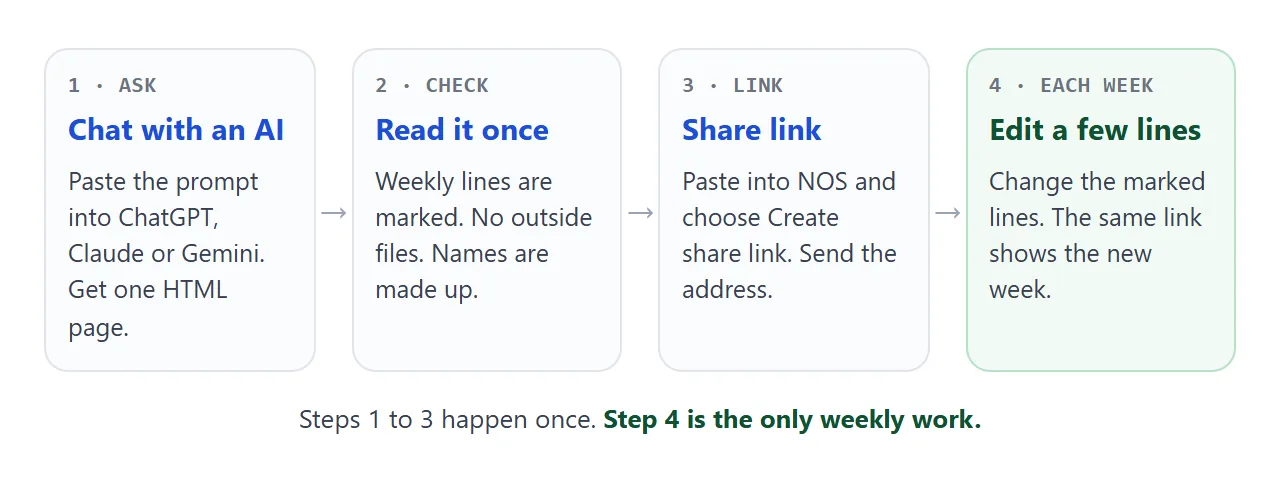
Anyone with the link opens it in a browser, a phone included, with no account. They can read it but not edit it. When you change the code next Saturday, the same link shows the new version, so nothing needs to be sent again.
For what happens when an HTML file is opened directly on a phone, see opening an HTML file on a phone.
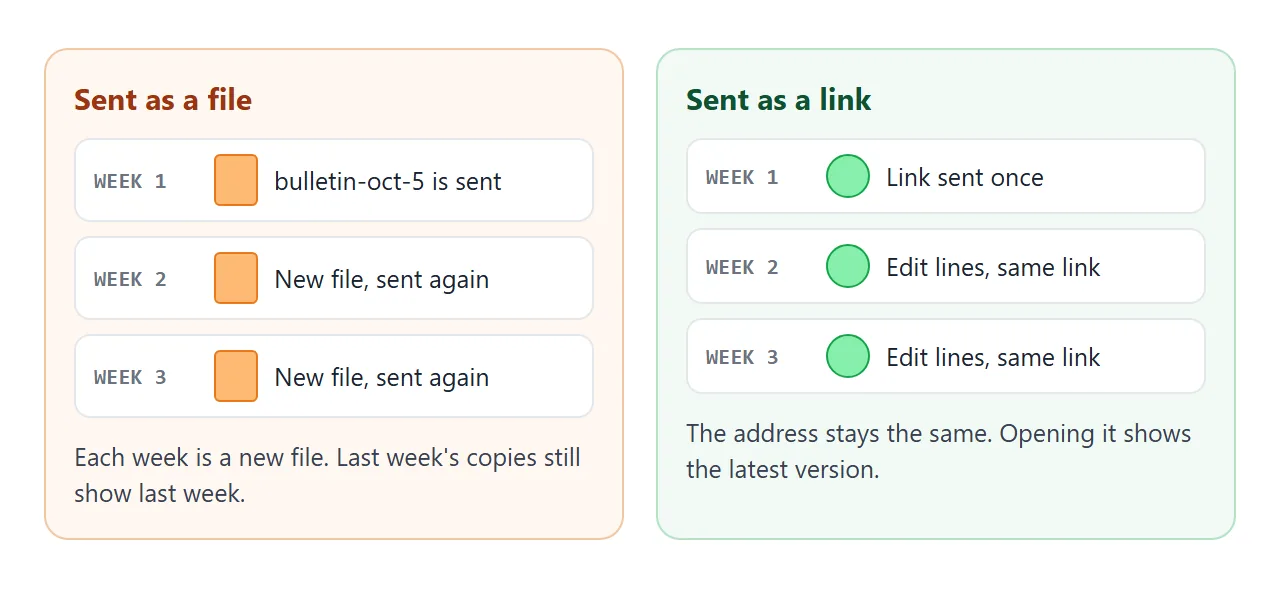
Two cautions. First, anyone who has the link can open the page, and NOS has no password for it. Treat it like a noticeboard in the lobby: first names only, no addresses, no phone numbers.
Second, song words. As of October 2026, CCLI describes its Church Copyright License as covering lyrics printed in bulletins, programs and song sheets. Its page does not say that posting lyrics on a web page is covered. Put titles and numbers online and keep the words on paper, unless your licence says otherwise.
Ways to get the bulletin to people
For people holding the paper bulletin, print a QR code of your link in the corner. The link does not change, so the printed code keeps working next week. QR code link covers making one, and sharing AI-made HTML covers the sending side.
| Way | What people get | Weekly work |
|---|---|---|
| Paper at the door | The sheet in their hand | Print a new one |
| File attachment | A copy from the day it was sent | Send a new file |
| Link in a message | The latest bulletin, in the browser | Edit lines, nothing to resend |
| QR code on paper | The same link, opened by scanning | Print once, if the link stays the same |
When it does not work
| What you see | Cause | Fix |
|---|---|---|
| Text is tiny on a phone | The page has no viewport meta tag | Ask the AI to add it and use 17px or larger text |
| A photo or font from a website is missing | Outside images and fonts are blocked in shared pages | Ask for inline SVG or CSS shapes instead |
| A sign-up form on the page does not send | Sending a form to a server is blocked | Show entries on screen only, or collect sign-ups on paper |
| Someone sees last week's bulletin | They are opening an old attached file | Send the link and stop attaching copies |
| The maker page is empty on a new visit | It does not store anything | Keep last week's bulletin code and copy the lines you reuse |
| A stranger could see the prayer list | Anyone with the link can open the page | First names only, and leave out contact details |