Use <input type="color"> and listen for its input event. The browser draws the picker, and the input's value is the chosen color as a string such as #3b82f6. That is a complete color picker, or color selector, in one HTML file and about ten lines.
<input type="color" id="pick" value="#3b82f6">
<div id="swatch" style="height: 80px"></div>

<script>
  const pick = document.getElementById('pick');
  const swatch = document.getElementById('swatch');

  function show() { swatch.style.background = pick.value; }
  pick.addEventListener('input', show);
  show();  // paint the starting color too
</script>
Try it. The counter line shows which events fired.
<!doctype html>
<html lang="en">
<head>
<meta charset="utf-8">
<meta name="viewport" content="width=device-width, initial-scale=1">
<title>Smallest color picker</title>
<style>
  body { margin: 0; padding: 18px; font-family: system-ui, sans-serif; background: #f4f5f7; color: #1d2330; }
  .row { display: flex; align-items: center; gap: 12px; flex-wrap: wrap; }
  label { font-weight: 600; }
  input[type="color"] { width: 64px; height: 40px; padding: 0; border: 1px solid #c9ced8; border-radius: 8px; background: #fff; cursor: pointer; }
  .swatch { height: 96px; margin-top: 16px; border-radius: 12px; border: 1px solid rgba(0, 0, 0, .12); display: grid; place-items: center; font: 600 22px ui-monospace, Consolas, monospace; color: #fff; text-shadow: 0 1px 3px rgba(0, 0, 0, .55); }
  p { margin: 14px 0 0; font-size: 14px; }
  code { font: 600 14px ui-monospace, Consolas, monospace; background: #e8ebf0; border-radius: 4px; padding: 1px 6px; }
</style>
</head>
<body>
<div class="row">
  <label for="pick">Pick a color</label>
  <input type="color" id="pick" value="#3b82f6">
</div>
<div class="swatch" id="swatch"></div>
<p>The value the page reads: <code id="out"></code></p>
<p>Events seen: <code id="count">input 0, change 0</code></p>

<script>
  const pick = document.getElementById('pick');
  const swatch = document.getElementById('swatch');
  const out = document.getElementById('out');
  const count = document.getElementById('count');
  let inputs = 0, changes = 0;

  function show() {
    swatch.style.background = pick.value;  // pick.value is a string like "#3b82f6"
    swatch.textContent = pick.value;
    out.textContent = pick.value;
  }

  pick.addEventListener('input', () => {   // fires on every change while the picker is open
    inputs++;
    show();
    count.textContent = 'input ' + inputs + ', change ' + changes;
  });
  pick.addEventListener('change', () => {  // fires when the user finishes and closes the picker
    changes++;
    count.textContent = 'input ' + inputs + ', change ' + changes;
  });

  show();  // paint the starting color
</script>
</body>
</html>
How the smallest picker works
Four steps, and only the third one is new.
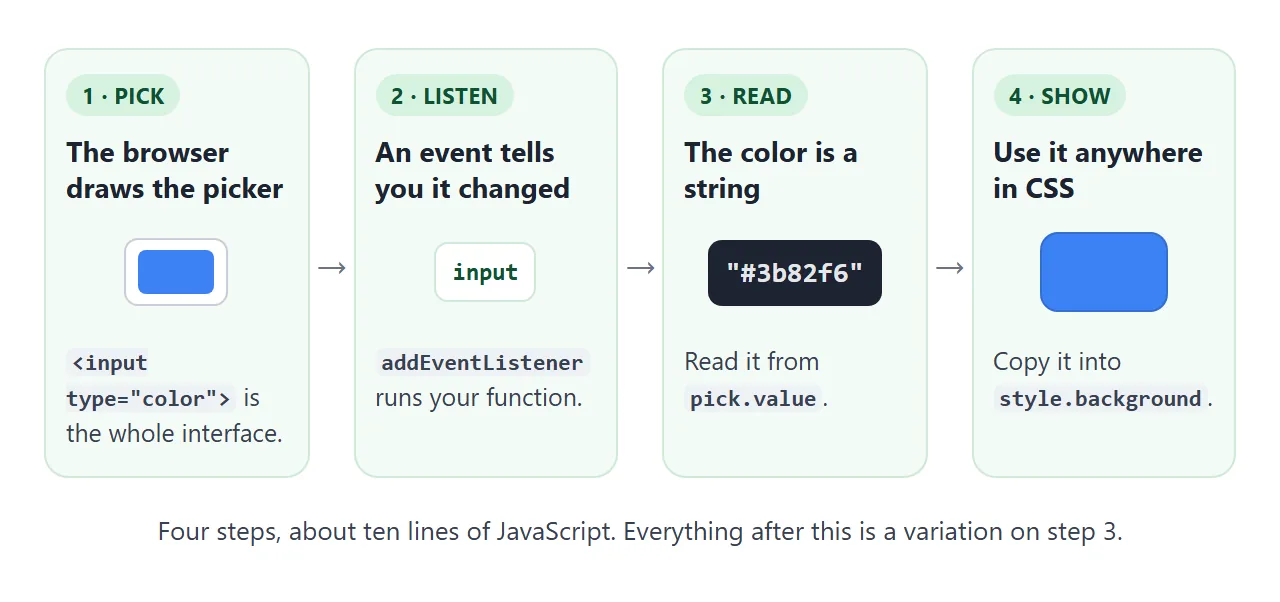
- Add the input. Give it
type="color"and a startingvalue. If the value is missing or invalid, the input starts at#000000, which is black. - Listen for
input. It fires every time the color changes while the picker is open. Thechangeevent fires when the person closes the picker, so it updates late. - Read
pick.value. It is a string, a hash sign followed by six hexadecimal digits. - Use it. Copy the string into any CSS property. Call your function once at load, or the page shows no color until the first pick.
Show the color in other formats
The input hands you hex. Showing RGB or HSL, or building your own controls, means converting. This example has three sliders for hue, saturation and lightness, and turns them into hex.
<!doctype html>
<html lang="en">
<head>
<meta charset="utf-8">
<meta name="viewport" content="width=device-width, initial-scale=1">
<title>HSL sliders to hex</title>
<style>
  body { margin: 0; padding: 16px; font-family: system-ui, sans-serif; background: #f4f5f7; color: #1d2330; }
  .ctl { display: grid; grid-template-columns: 78px 1fr 44px; align-items: center; gap: 10px; margin-bottom: 8px; font-size: 14px; }
  .ctl output { text-align: right; font-variant-numeric: tabular-nums; }
  input[type="range"] { width: 100%; }
  .pair { display: grid; grid-template-columns: 1fr 1fr; gap: 10px; margin: 14px 0 12px; }
  .box { height: 78px; border-radius: 10px; border: 1px solid rgba(0, 0, 0, .12); display: grid; place-items: end start; padding: 8px 10px; font-size: 12px; font-weight: 600; color: #fff; text-shadow: 0 1px 3px rgba(0, 0, 0, .6); }
  dl { margin: 0; display: grid; grid-template-columns: 52px 1fr; gap: 6px 10px; font-size: 14px; }
  dt { font-weight: 600; }
  dd { margin: 0; }
  code { font: 600 13.5px ui-monospace, Consolas, monospace; background: #e8ebf0; border-radius: 4px; padding: 1px 6px; overflow-wrap: anywhere; }
</style>
</head>
<body>
<div class="ctl"><label for="h">Hue</label><input type="range" id="h" min="0" max="360" value="210"><output id="hv"></output></div>
<div class="ctl"><label for="s">Saturation</label><input type="range" id="s" min="0" max="100" value="80"><output id="sv"></output></div>
<div class="ctl"><label for="l">Lightness</label><input type="range" id="l" min="0" max="100" value="50"><output id="lv"></output></div>

<div class="pair">
  <div class="box" id="viaCss">hsl() in CSS</div>
  <div class="box" id="viaHex">hex from our code</div>
</div>

<dl>
  <dt>HSL</dt><dd><code id="outHsl"></code></dd>
  <dt>RGB</dt><dd><code id="outRgb"></code></dd>
  <dt>Hex</dt><dd><code id="outHex"></code></dd>
</dl>

<script>
  const $ = (id) => document.getElementById(id);

  // h in degrees (0-360), s and l in percent (0-100) -> [r, g, b], each 0-255
  function hslToRgb(h, s, l) {
    s /= 100; l /= 100;
    const a = s * Math.min(l, 1 - l);
    const f = (n) => {
      const k = (n + h / 30) % 12;
      return l - a * Math.max(-1, Math.min(k - 3, 9 - k, 1));
    };
    return [f(0), f(8), f(4)].map((x) => Math.round(x * 255 + 1e-9));  // 1e-9 absorbs float error at .5
  }

  const toHex = (rgb) => '#' + rgb.map((x) => x.toString(16).padStart(2, '0')).join('');

  function update() {
    const h = +$('h').value, s = +$('s').value, l = +$('l').value;  // sliders give strings, + makes numbers
    const rgb = hslToRgb(h, s, l);
    const hex = toHex(rgb);
    const hsl = 'hsl(' + h + ' ' + s + '% ' + l + '%)';

    $('hv').textContent = h + '°';
    $('sv').textContent = s + '%';
    $('lv').textContent = l + '%';
    $('viaCss').style.background = hsl;   // the browser converts hsl() itself
    $('viaHex').style.background = hex;   // our conversion; the two boxes should match
    $('outHsl').textContent = hsl;
    $('outRgb').textContent = 'rgb(' + rgb.join(', ') + ')';
    $('outHex').textContent = hex;
  }

  ['h', 's', 'l'].forEach((id) => $(id).addEventListener('input', update));
  update();
</script>
</body>
</html>
Two details are easy to miss. A slider's value is a string, so "210" + 60 gives "21060". Put a + in front, or read valueAsNumber, before doing arithmetic.
The second detail is hex. toString(16) turns a number from 0 to 255 into one or two digits, and padStart(2, '0') makes it always two, so 5 becomes 05 and not 5. Join three of those after a # and you have a hex color.
For more on the formats themselves, and a contrast checker, see HTML colors. Sliders have their own page: HTML range slider.
Native input or a picker you draw
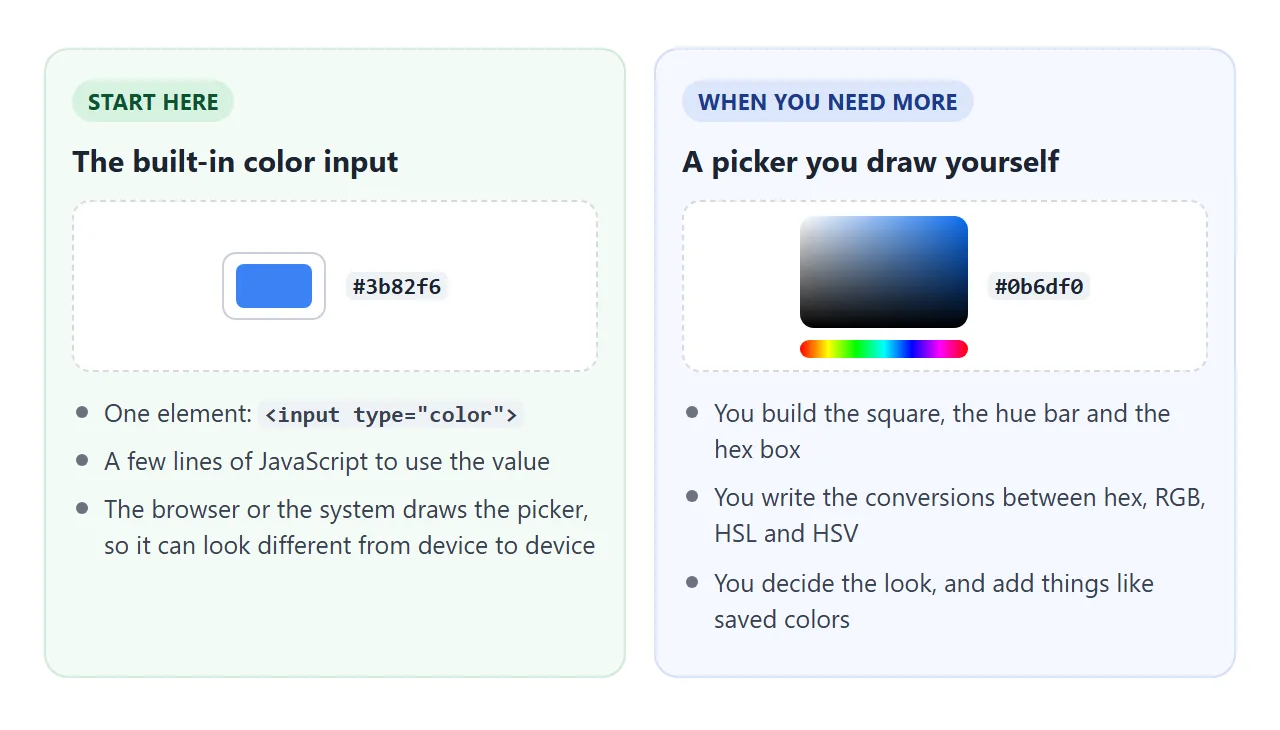
Start with the built-in input. MDN notes that how it looks varies from one browser or platform to another. The picker window looks the way the browser or the system draws it, not the way you style it.
Draw your own when you want a fixed look, other formats, or extra controls.
Searches for a color picker library or plugin turn up many packages. You do not need one to pick a color, and the tool below uses none.
If you do add one, load it from a CDN with a pinned version. NOS loads scripts and styles from cdnjs.cloudflare.com, cdn.jsdelivr.net and unpkg.com.
Build the square and the hue bar
A square-and-bar picker like this one works in HSV: a hue from 0 to 360, plus saturation and value from 0 to 1. The square holds saturation across and value up. The hue bar sets the color in the top-right corner.
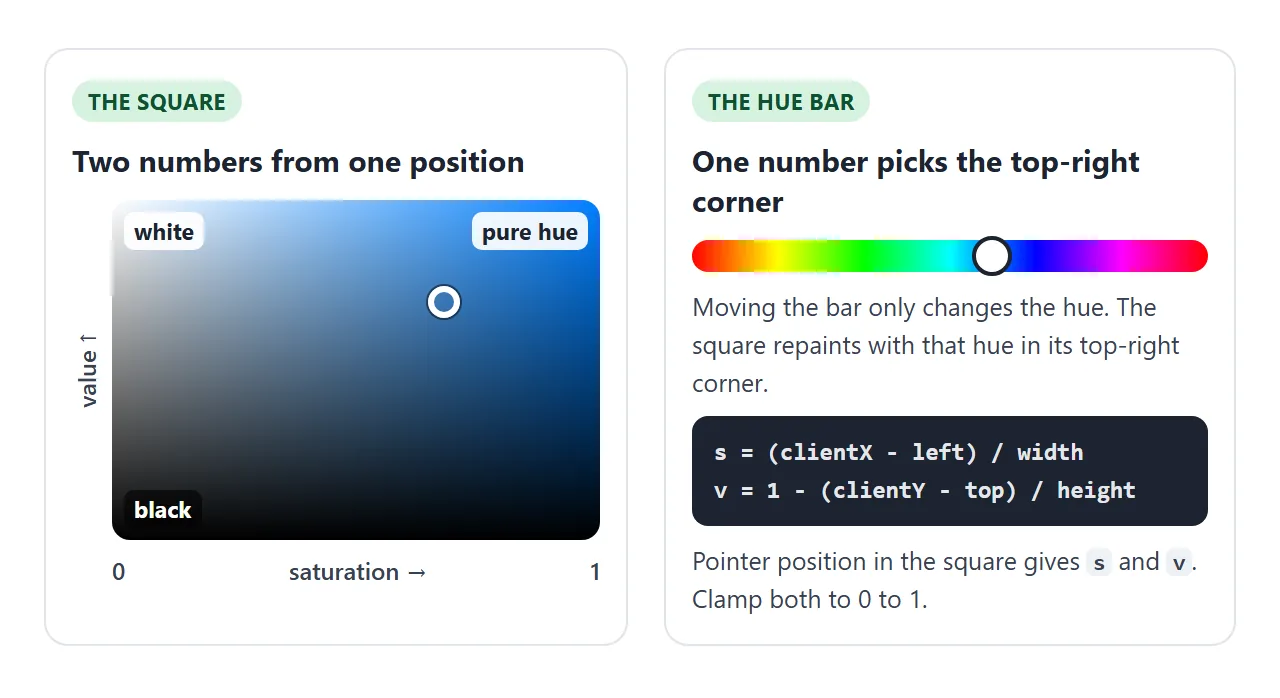
The square is a div with two stacked gradients. The first layer listed is drawn on top, so the black fade goes first. Your code only rewrites the hue in the second gradient.
.sv { background:
  linear-gradient(to top, #000, rgba(0, 0, 0, 0)),
  linear-gradient(to right, #fff, hsl(210 100% 50%)); }
To read the position, measure the square with getBoundingClientRect(), subtract its left and top from the pointer, and divide by its size. Clamp the result between 0 and 1.
function moveDot(e) {
  const r = sv.getBoundingClientRect();
  s = clamp((e.clientX - r.left) / r.width);
  v = 1 - clamp((e.clientY - r.top) / r.height);
  update();
}
sv.addEventListener('pointerdown', (e) => { sv.setPointerCapture(e.pointerId); moveDot(e); });
sv.addEventListener('pointermove', (e) => { if (sv.hasPointerCapture(e.pointerId)) moveDot(e); });
Pointer capture keeps the moves coming when the pointer leaves the square, so a drag that overshoots still works.
On a phone, add touch-action: none to the square only, so a finger drags the dot and does not scroll the page. Draggable div explains the same three events, and pointer events goes deeper.
The finished tool: hex box, copy, random and eyedropper
This version adds everything people usually want next. Drag the square, move the bar, type a hex code, copy it, roll a random color, or save a few.
<!doctype html>
<html lang="en">
<head>
<meta charset="utf-8">
<meta name="viewport" content="width=device-width, initial-scale=1">
<title>Color picker tool</title>
<style>
  body { margin: 0; padding: 16px; font-family: system-ui, sans-serif; background: #f4f5f7; color: #1d2330; }
  .wrap { max-width: 360px; margin: 0 auto; }
  .sv { position: relative; height: 180px; border-radius: 10px; cursor: crosshair; touch-action: none; user-select: none;
        background: linear-gradient(to top, #000, rgba(0, 0, 0, 0)), linear-gradient(to right, #fff, hsl(210 100% 50%)); }
  .dot { position: absolute; width: 18px; height: 18px; margin: -9px 0 0 -9px; border-radius: 50%; border: 3px solid #fff; box-shadow: 0 0 0 1px rgba(0, 0, 0, .5); pointer-events: none; }
  #hue { width: 100%; height: 16px; margin: 14px 0 0; border-radius: 8px; -webkit-appearance: none; appearance: none; touch-action: none;
         background: linear-gradient(to right, #f00, #ff0, #0f0, #0ff, #00f, #f0f, #f00); }
  #hue::-webkit-slider-thumb { -webkit-appearance: none; width: 22px; height: 22px; border-radius: 50%; background: #fff; border: 2px solid #1d2330; }
  #hue::-moz-range-thumb { width: 18px; height: 18px; border-radius: 50%; background: #fff; border: 2px solid #1d2330; }
  .row { display: flex; align-items: center; gap: 8px; margin-top: 14px; flex-wrap: wrap; }
  .swatch { width: 44px; height: 44px; border-radius: 10px; border: 1px solid rgba(0, 0, 0, .15); flex: none; }
  #hex { width: 96px; padding: 9px 10px; font: 600 16px ui-monospace, Consolas, monospace; border: 1px solid #c9ced8; border-radius: 8px; }
  #hex[aria-invalid="true"] { border-color: #c2410c; background: #fff7f5; }
  button { font: 600 14px system-ui, sans-serif; padding: 9px 12px; border: 1px solid #c9ced8; border-radius: 8px; background: #fff; cursor: pointer; }
  button:hover { background: #eef1f5; }
  #status { min-height: 20px; margin: 10px 0 0; font-size: 13px; color: #374151; }
  .chips { display: flex; gap: 8px; flex-wrap: wrap; min-height: 32px; margin-top: 4px; }
  .chip { width: 32px; height: 32px; padding: 0; border-radius: 8px; border: 1px solid rgba(0, 0, 0, .2); }
  h2 { font-size: 13px; margin: 16px 0 6px; color: #4b5563; }
</style>
</head>
<body>
<div class="wrap">
  <div class="sv" id="sv"><div class="dot" id="dot"></div></div>
  <input type="range" id="hue" min="0" max="360" value="210" aria-label="Hue">

  <div class="row">
    <div class="swatch" id="swatch"></div>
    <input id="hex" type="text" maxlength="7" spellcheck="false" autocomplete="off" aria-label="Hex color">
    <button id="copy" type="button">Copy</button>
    <button id="rand" type="button">Random</button>
    <button id="eye" type="button" hidden>Eyedropper</button>
  </div>
  <p id="status" aria-live="polite"></p>

  <h2>Saved colors (kept until you reload)</h2>
  <div class="row" style="margin-top:0"><button id="save" type="button">Save this color</button></div>
  <div class="chips" id="chips"></div>
</div>

<script>
  const $ = (id) => document.getElementById(id);
  const clamp = (n) => Math.min(1, Math.max(0, n));
  let h = 210, s = 0.76, v = 0.96;   // the whole state: hue 0-360, saturation 0-1, value 0-1

  function hsvToRgb(h, s, v) {
    const f = (n) => { const k = (n + h / 60) % 6; return v - v * s * Math.max(0, Math.min(k, 4 - k, 1)); };
    return [f(5), f(3), f(1)].map((x) => Math.round(x * 255));
  }
  function rgbToHsv(r, g, b) {
    r /= 255; g /= 255; b /= 255;
    const max = Math.max(r, g, b), d = max - Math.min(r, g, b);
    let hue = 0;
    if (d) {
      if (max === r) hue = ((g - b) / d) % 6;
      else if (max === g) hue = (b - r) / d + 2;
      else hue = (r - g) / d + 4;
      hue *= 60; if (hue < 0) hue += 360;
    }
    return [hue, max ? d / max : 0, max];
  }
  const toHex = (rgb) => '#' + rgb.map((x) => x.toString(16).padStart(2, '0')).join('');
  function parseHex(text) {          // "#3b82f6", "3b82f6" or "#38f" -> [r, g, b], or null
    let t = text.trim().replace(/^#/, '');
    if (/^[0-9a-f]{3}$/i.test(t)) t = t.replace(/./g, (c) => c + c);
    if (!/^[0-9a-f]{6}$/i.test(t)) return null;
    return [0, 2, 4].map((i) => parseInt(t.slice(i, i + 2), 16));
  }

  function update(keepHexField) {
    const hex = toHex(hsvToRgb(h, s, v));
    $('sv').style.background = 'linear-gradient(to top, #000, rgba(0,0,0,0)), linear-gradient(to right, #fff, hsl(' + h + ' 100% 50%))';
    $('dot').style.left = (s * 100) + '%';
    $('dot').style.top = ((1 - v) * 100) + '%';
    $('hue').value = Math.round(h);
    $('swatch').style.background = hex;
    if (!keepHexField) { $('hex').value = hex; $('hex').removeAttribute('aria-invalid'); }
  }
  const currentHex = () => toHex(hsvToRgb(h, s, v));
  function setFromRgb(rgb) { [h, s, v] = rgbToHsv(...rgb); update(); }

  // drag in the square: x is saturation, y is value
  const sv = $('sv');
  function moveDot(e) {
    const r = sv.getBoundingClientRect();
    s = clamp((e.clientX - r.left) / r.width);
    v = 1 - clamp((e.clientY - r.top) / r.height);
    update();
  }
  sv.addEventListener('pointerdown', (e) => { sv.setPointerCapture(e.pointerId); moveDot(e); });
  sv.addEventListener('pointermove', (e) => { if (sv.hasPointerCapture(e.pointerId)) moveDot(e); });

  $('hue').addEventListener('input', (e) => { h = +e.target.value; update(); });

  $('hex').addEventListener('input', (e) => {
    const rgb = parseHex(e.target.value);
    if (!rgb) { e.target.setAttribute('aria-invalid', 'true'); return; }
    e.target.removeAttribute('aria-invalid');
    [h, s, v] = rgbToHsv(...rgb);
    update(true);                    // do not rewrite the field while the person is typing
  });
  $('hex').addEventListener('change', () => update());  // tidy the field when they leave it

  function say(text) { $('status').textContent = text; }
  $('copy').addEventListener('click', () => {
    const hex = currentHex();
    const fallback = () => { $('hex').focus(); $('hex').select(); say('Press Ctrl+C (or Cmd+C) to copy ' + hex); };
    if (!navigator.clipboard) return fallback();
    navigator.clipboard.writeText(hex).then(() => say('Copied ' + hex), fallback);
  });

  $('rand').addEventListener('click', () => {
    h = Math.random() * 360; s = 0.5 + Math.random() * 0.5; v = 0.7 + Math.random() * 0.3;
    update(); say('Random color ' + currentHex());
  });

  // EyeDropper exists in some browsers only; the other controls work everywhere
  if ('EyeDropper' in window) {
    $('eye').hidden = false;
    $('eye').addEventListener('click', async () => {
      try { setFromRgb(parseHex((await new EyeDropper().open()).sRGBHex)); say('Picked ' + currentHex()); }
      catch (err) { say('Eyedropper closed without a color.'); }
    });
  } else {
    say('Eyedropper is not available here. Use the square, the hue bar or the hex box.');
  }

  $('save').addEventListener('click', () => {
    const hex = currentHex();
    const chip = document.createElement('button');
    chip.type = 'button'; chip.className = 'chip'; chip.title = hex;
    chip.setAttribute('aria-label', 'Use ' + hex);
    chip.style.background = hex;
    chip.addEventListener('click', () => setFromRgb(parseHex(hex)));
    $('chips').prepend(chip);
    if ($('chips').children.length > 8) $('chips').lastElementChild.remove();
  });

  update();
</script>
</body>
</html>
- Hex box. It accepts
#3b82f6,3b82f6and#38f. A bad entry gets a highlighted border, and the box is not rewritten while the person types. - Copy. It calls
navigator.clipboard.writeText(). If that fails, it focuses and selects the box so Ctrl+C works. HTML copy button covers the details. - Saved colors. They live in an array in memory. NOS storage resets on reload, so they last only until the page reloads.
A color generator needs less than a picker. One line makes a random hex color:
const hex = '#' + Math.floor(Math.random() * 0x1000000).toString(16).padStart(6, '0');
Math.random() returns a number from 0 up to, but not including, 1. Multiplying by 16,777,216 and rounding down gives 0 to 16,777,215, which is every six-digit hex color.
The Random button above works differently. It picks a hue and keeps saturation and value in a fixed range, so the result is never near black.
The eyedropper samples any pixel on screen. It is not in every browser, so test for it, and keep the other controls working without it:
if ('EyeDropper' in window) {
  eye.hidden = false;
  eye.addEventListener('click', async () => {
    try {
      const result = await new EyeDropper().open();  // needs a user action such as a click
      setFromHex(result.sRGBHex);
    } catch (err) { /* Escape rejects the promise */ }
  });
}
When it does not work
| What you see | Cause | Fix |
|---|---|---|
| The picker always opens on black | The value is missing or invalid | Set a seven-character value such as #3b82f6 |
| The swatch updates only after the picker closes | The code listens for change |
Listen for input |
| No color shows until the first pick | The function never ran at load | Call it once after adding the listener |
| Adding to a slider value glues digits together | The value is a string | Use +value or valueAsNumber |
| Your hex is one step off the browser's color | The product lands just under .5 and rounds down | Add 1e-9 before Math.round |
| The square scrolls the page on a phone | The browser treats the finger as a scroll | touch-action: none on the square |
| The drag stops outside the square | The square no longer receives the moves | Call setPointerCapture on pointerdown |
| Copy does nothing | The Clipboard API is missing or blocked | Fall back to focus() and select() |
| The Eyedropper button is missing | The browser has no EyeDropper | Test with 'EyeDropper' in window |
Share it as a link
A color picker is something you try, not read about. A screenshot of one cannot pick a color.
To send the working version, paste the page into a NOS document and choose Create share link. HTML to link walks through it.
The page renders as written and its scripts run, so anyone with the link can open it without an account and pick colors themselves. If you change the code later, the same link shows the new version.