Pointer events are one set of JavaScript events for every kind of input. pointerdown, pointermove and pointerup fire for a mouse, a pen and each finger on a touch screen.
One handler replaces separate mouse and touch code, and e.pointerType tells you which device it was.
Try it. Press on the pad with a mouse, a pen or several fingers. Each pointer gets a dot and a line of live values.
<!doctype html>
<html lang="en">
<head>
<meta charset="utf-8">
<meta name="viewport" content="width=device-width, initial-scale=1">
<title>Pointer event inspector</title>
<style>
  body { margin: 0; padding: 12px; font-family: system-ui, sans-serif; background: #f4f5f7; color: #1d2330; }
  #pad {
    position: relative; height: 170px; border-radius: 12px; overflow: hidden;
    background: #fff; border: 1px dashed #c9cdd4;
    display: grid; place-items: center; padding: 0 12px; text-align: center;
    color: #8a919e; font-size: 14px;
    touch-action: none;  /* the pad gets every finger: no scrolling or zooming here */
    user-select: none;
  }
  .dot {
    position: absolute; width: 34px; height: 34px; margin: -17px 0 0 -17px;
    border-radius: 50%; pointer-events: none; opacity: .75;
  }
  .mouse { background: #2563eb; } .pen { background: #9333ea; } .touch { background: #16a34a; }
  #out { margin: 10px 0 6px; font: 12.5px/1.6 ui-monospace, Consolas, monospace; min-height: 40px; }
  #log { font: 12px/1.5 ui-monospace, Consolas, monospace; color: #5b6270; overflow-wrap: anywhere; }
</style>
</head>
<body>
<div id="pad">Press, move and lift here with a mouse, a pen or fingers</div>
<div id="out">No pointer on the pad.</div>
<div id="log"></div>

<script>
  const pad = document.getElementById('pad');
  const out = document.getElementById('out');
  const log = document.getElementById('log');
  const live = new Map();  // pointerId -> { event, dot }
  const names = [];

  // One handler for every event and every pointer type
  function handle(e) {
    // event log: collapse runs of pointermove into one entry
    const last = names[names.length - 1] || '';
    if (e.type === 'pointermove' && last.startsWith('pointermove')) {
      names[names.length - 1] = 'pointermove x' + (Number(last.split(' x')[1] || 1) + 1);
    } else {
      names.push(e.type);
    }
    log.textContent = names.slice(-8).join(' > ');

    if (e.type === 'pointerleave' || e.type === 'pointercancel') {
      live.get(e.pointerId)?.dot.remove();
      live.delete(e.pointerId);
    } else {
      let p = live.get(e.pointerId);
      if (!p) {
        p = { dot: document.createElement('div') };
        pad.append(p.dot);
        live.set(e.pointerId, p);
      }
      p.event = e;
      const r = pad.getBoundingClientRect();
      p.dot.className = 'dot ' + e.pointerType;
      p.dot.style.left = (e.clientX - r.left) + 'px';
      p.dot.style.top = (e.clientY - r.top) + 'px';
    }

    out.innerHTML = [...live.values()].map(({ event: v }) =>
      `<b>${v.pointerType || '?'}</b> id=${v.pointerId}${v.isPrimary ? ' primary' : ''}` +
      ` · pressure ${v.pressure.toFixed(2)} · button ${v.button} · buttons ${v.buttons}` +
      ` · ${Math.round(v.width)}x${Math.round(v.height)}`
    ).join('<br>') || 'No pointer on the pad.';
  }

  ['pointerover', 'pointerenter', 'pointerdown', 'pointermove', 'pointerup',
   'pointercancel', 'pointerout', 'pointerleave'].forEach((t) => pad.addEventListener(t, handle));
</script>
</body>
</html>
A few things to notice. The mouse shows pressure 0 while hovering and 0.5 with a button held down, because it cannot measure pressure. Each finger gets its own id, and only the first finger is primary.
From mouse and touch events to pointer events
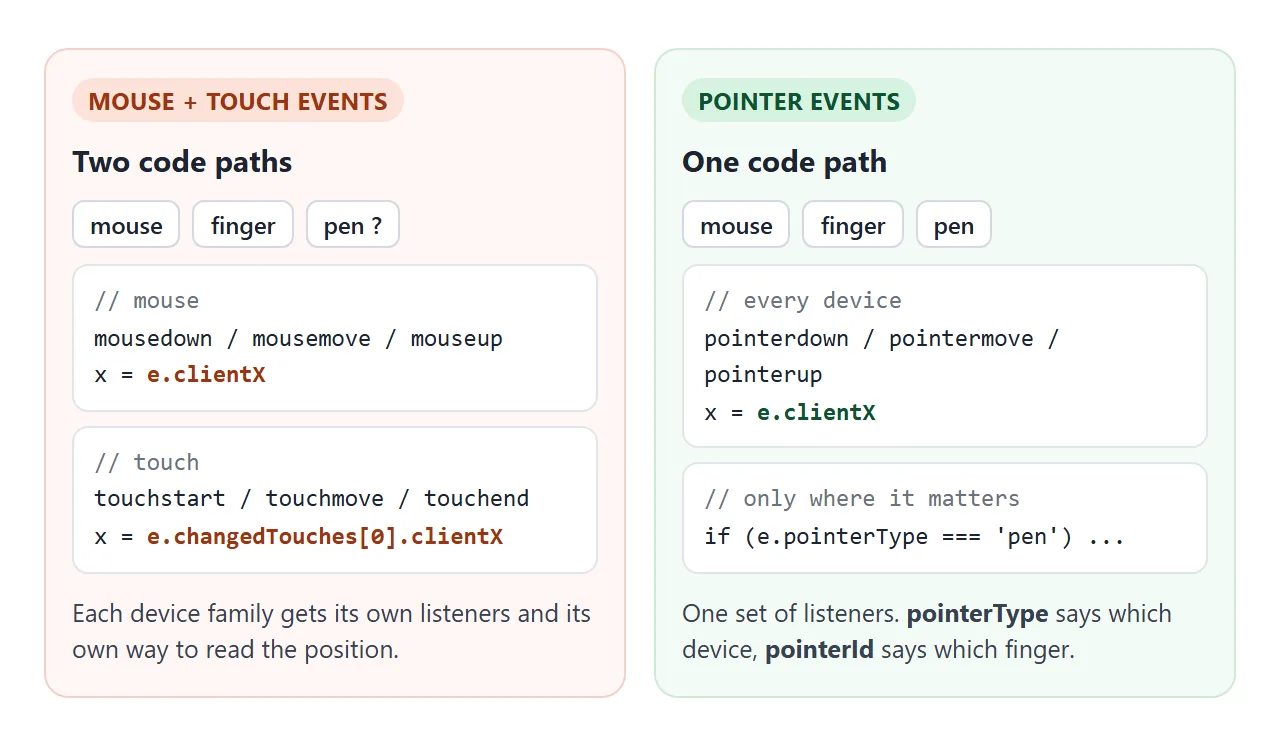
The pointer event names follow the mouse event names. The event object is a PointerEvent, which inherits from MouseEvent, so clientX, clientY, button and buttons are where mouse code expects them.
| Mouse event | Pointer event | Bubbles |
|---|---|---|
mousedown |
pointerdown |
Yes |
mousemove |
pointermove |
Yes |
mouseup |
pointerup |
Yes |
mouseover / mouseout |
pointerover / pointerout |
Yes |
mouseenter / mouseleave |
pointerenter / pointerleave |
No |
| none | pointercancel |
Yes |
| none | gotpointercapture / lostpointercapture |
Yes |
Moving old code over is mostly renaming:
- Replace
mousedownandtouchstartwith onepointerdownlistener, and the same for move and up. - Read
e.clientXande.clientYfrom the event itself for every device. - Give the element
touch-action: none(orpan-y) so a finger is not taken for a scroll. - Call
setPointerCapture(e.pointerId)inpointerdown. - Treat
pointercancellikepointerup.
// before: two listeners, two ways to read the position
el.addEventListener('mousedown', (e) => start(e.clientX, e.clientY));
el.addEventListener('touchstart', (e) => start(e.changedTouches[0].clientX, e.changedTouches[0].clientY));

// after: one listener for mouse, pen and touch
el.addEventListener('pointerdown', (e) => start(e.clientX, e.clientY));
What the event tells you about the device
On top of the mouse properties, a pointer event describes the device and the contact.
| Property | What it holds |
|---|---|
pointerType |
'mouse', 'pen' or 'touch'. An empty string if the browser cannot tell |
pointerId |
A number that stays the same for one pointer from down to up |
isPrimary |
true for the mouse, and for the first finger or pen that touched |
pressure |
0 to 1. Without pressure hardware: 0.5 while pressed, 0 otherwise |
width, height |
Size of the contact area in CSS pixels |
tiltX, tiltY |
Pen tilt in degrees, from -90 to 90 |
twist |
Pen rotation around its own axis, 0 to 359 degrees |
Branch on pointerType only where devices really differ, such as line width from pressure for a pen.
Do not use pointerId to spot the mouse. The specification lets browsers reserve 0 or 1 for it, and in our test Firefox used 0 while Chromium and WebKit used 1.
altitudeAngle and azimuthAngle are a newer way to describe pen angle. MDN's compatibility data lists both in Chrome, Firefox and Safari, but the WebKit build in our test did not have them. Test for them before use, and keep tiltX and tiltY as the fallback.
buttons is a bit mask of everything held down right now. button says which button changed in this event, and is -1 when nothing changed, which is the normal case in pointermove.
| Input | button |
buttons bit |
|---|---|---|
| Left mouse, finger contact, pen tip | 0 | 1 |
| Right mouse, pen barrel button | 2 | 2 |
| Middle mouse | 1 | 4 |
| Pen eraser | 5 | 32 |
To ask "is it pressed?" in pointermove, test the mask:
el.addEventListener('pointermove', (e) => {
  if (e.buttons & 1) draw(e);        // tip, finger or left button down
  if (e.buttons & 32) erase(e);      // pen eraser button
});
Several fingers: pointerId and isPrimary
Every finger fires its own pointerdown, pointermove and pointerup, each with its own pointerId. A handler that only wants one finger can drop the rest:
el.addEventListener('pointerdown', (e) => {
  if (!e.isPrimary) return;  // ignore the second and later fingers
  // ...
});
To follow several fingers at once, keep a Map keyed by pointerId, as the sketch pad below does. For a two-finger pinch built on that map, see touch events in JavaScript.
Pointer capture, touch-action and pointercancel
When a finger goes down, the browser captures that pointer to the element under it. In our Chromium test, gotpointercapture fired right after pointerdown, and moves kept going to that element after the finger slid onto another one.
A mouse gets no automatic capture. Call it yourself so fast moves are not lost:
el.addEventListener('pointerdown', (e) => el.setPointerCapture(e.pointerId));
While an element holds the capture, pointerover, pointerenter, pointerout and pointerleave do not fire for that pointer. Capture ends with lostpointercapture on release. The draggable div guide uses exactly this to move a card.
The browser can also treat a finger as a pan or a zoom. When it decides the gesture is its own, it fires pointercancel and stops sending moves. In our Chromium test, a drag on an element without touch-action got one pointermove and then pointercancel.
Set touch-action: none on the element to keep every finger, or pan-y to keep sideways moves and still let the page scroll. CSS touch-action lists every value.
Do not mix this up with the CSS pointer-events property. That one decides whether an element can be the target of pointer events at all, and CSS pointer-events covers it.
Smoother lines with getCoalescedEvents
Browsers merge several position updates into one pointermove to do less work. Fast strokes then arrive as a few far-apart points. e.getCoalescedEvents() returns the merged updates, so drawing code can use all of them.
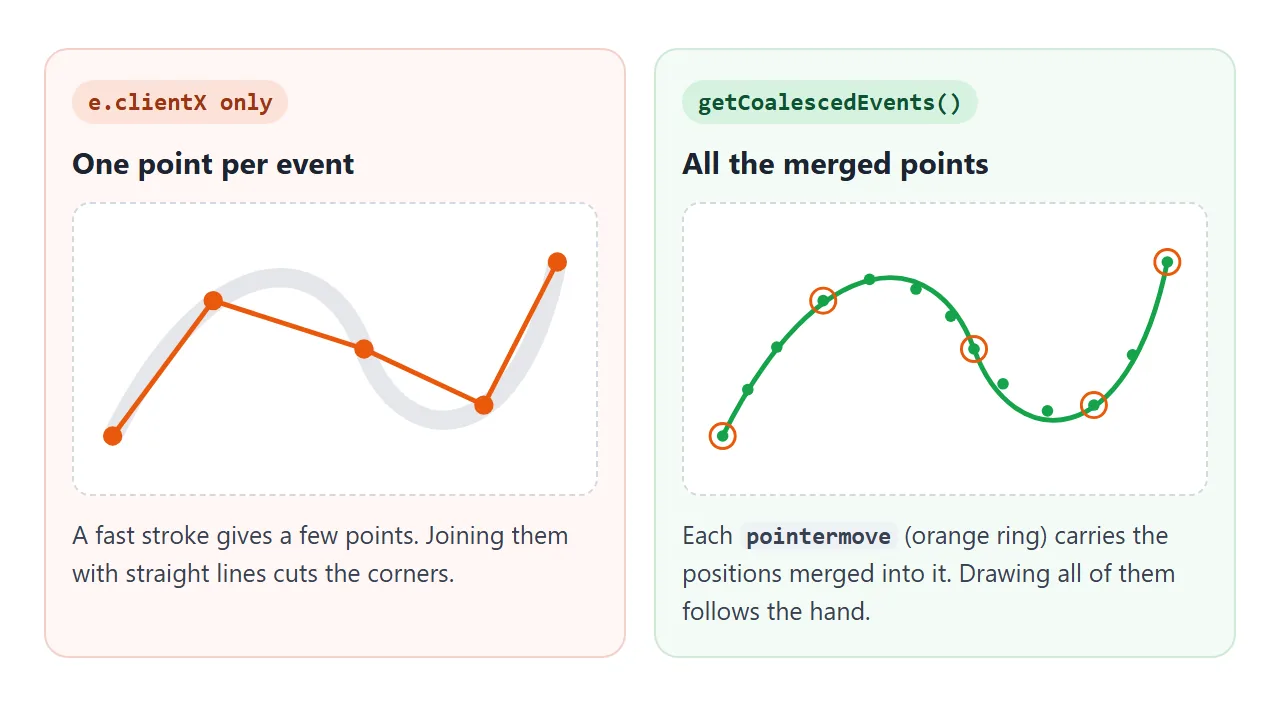
Scribble quickly on the canvas. Orange dots are the pointermove events, green dots are the points inside them.
<!doctype html>
<html lang="en">
<head>
<meta charset="utf-8">
<meta name="viewport" content="width=device-width, initial-scale=1">
<title>pointermove vs getCoalescedEvents</title>
<style>
  body { margin: 0; padding: 12px; font-family: system-ui, sans-serif; background: #f4f5f7; color: #1d2330; }
  canvas {
    display: block; width: 100%; height: 250px; border-radius: 12px;
    background: #fff; border: 1px dashed #c9cdd4;
    touch-action: none; cursor: crosshair;
  }
  .row { display: flex; flex-wrap: wrap; gap: 6px 16px; align-items: center; margin-top: 10px; font-size: 13px; }
  .k { display: inline-block; width: 11px; height: 11px; border-radius: 50%; vertical-align: -1px; margin-right: 4px; }
  button { font: inherit; padding: 5px 12px; border-radius: 8px; border: 1px solid #c9cdd4; background: #fff; }
  #note { margin: 6px 0 0; font-size: 12.5px; color: #9a3412; }
</style>
</head>
<body>
<canvas id="c"></canvas>
<div class="row">
  <span><span class="k" style="background:#ea580c"></span>pointermove events: <b id="nEv">0</b></span>
  <span><span class="k" style="background:#16a34a"></span>coalesced points: <b id="nPt">0</b></span>
  <button id="clear">Clear</button>
</div>
<p id="note" hidden>getCoalescedEvents is not available here (it needs a secure context such as HTTPS), so only the orange dots are drawn.</p>

<script>
  const c = document.getElementById('c');
  const ctx = c.getContext('2d');
  const hasCoalesced = 'getCoalescedEvents' in PointerEvent.prototype;
  let nEv = 0, nPt = 0;
  document.getElementById('note').hidden = hasCoalesced;

  function fit() {
    c.width = c.clientWidth * devicePixelRatio;
    c.height = c.clientHeight * devicePixelRatio;
    ctx.setTransform(devicePixelRatio, 0, 0, devicePixelRatio, 0, 0);
  }
  function dot(x, y, r, color) {
    ctx.fillStyle = color;
    ctx.beginPath(); ctx.arc(x, y, r, 0, Math.PI * 2); ctx.fill();
  }
  function count() {
    document.getElementById('nEv').textContent = nEv;
    document.getElementById('nPt').textContent = nPt;
  }

  c.addEventListener('pointerdown', (e) => c.setPointerCapture(e.pointerId));
  c.addEventListener('pointermove', (e) => {
    if (!e.buttons) return;  // draw only while pressed
    const r = c.getBoundingClientRect();
    // every position the browser merged into this one event
    const points = hasCoalesced ? e.getCoalescedEvents() : [];
    for (const p of points) dot(p.clientX - r.left, p.clientY - r.top, 2.5, '#16a34a');
    dot(e.clientX - r.left, e.clientY - r.top, 6, 'rgba(234, 88, 12, .5)');
    nEv++; nPt += points.length; count();
  });

  document.getElementById('clear').addEventListener('click', () => {
    ctx.clearRect(0, 0, c.width, c.height); nEv = nPt = 0; count();
  });
  new ResizeObserver(fit).observe(c);  // size the canvas once laid out, and again on resize
</script>
</body>
</html>
MDN marks getCoalescedEvents() as available only in secure contexts in some browsers: HTTPS pages, localhost and file: pages.
In our Chromium 147 test it was missing on an about:blank page and present on a file: page. Test for it and fall back to the event itself:
const list = e.getCoalescedEvents ? e.getCoalescedEvents() : [];
for (const ev of list.length ? list : [e]) drawTo(ev.clientX, ev.clientY);
MDN's compatibility data lists getCoalescedEvents() in Chrome, Firefox and Safari.
The newer pointerrawupdate event fires as soon and as often as the browser can, for low-latency drawing. MDN lists it for Chrome, Edge and Firefox, not Safari, marks it as secure-context only, and warns to add it only when the handler is fast.
In our tests the WebKit build had no onpointerrawupdate, while Chromium and Firefox did. Check 'onpointerrawupdate' in window before relying on it, and keep pointermove as the fallback.
Compatibility mouse events and click
Pages written for mouse input still have to work, so browsers may also fire mouse events for pen and touch input. These are called compatibility mouse events. For a finger tap in our Chromium test, they came after pointerup and pointerleave.
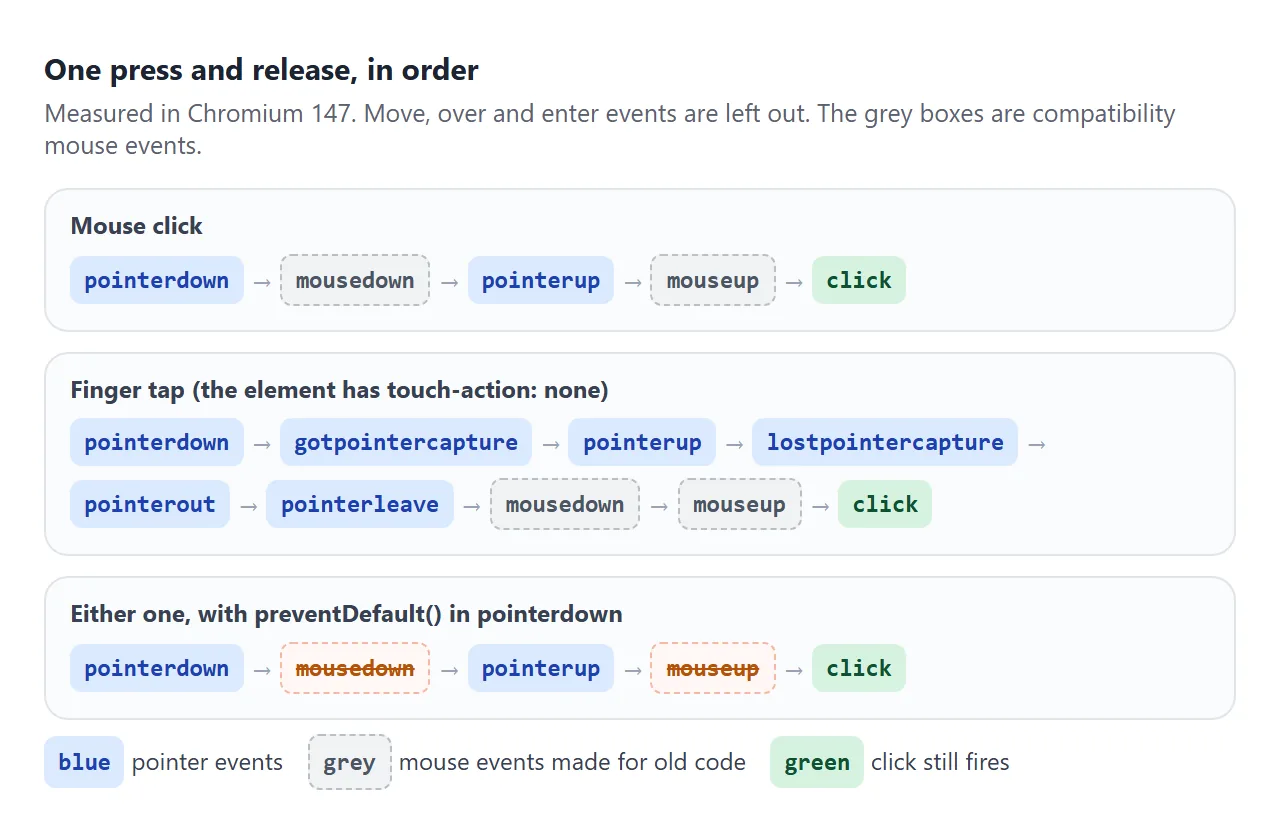
Calling preventDefault() in pointerdown stops the compatibility mousedown and mouseup. It does not stop click, which fired in every browser we tested. mouseover, mouseout, mouseenter and mouseleave are never prevented this way.
click itself is a PointerEvent in the specification, and was one in Chromium, Firefox and WebKit in our test. e.pointerType in a click handler tells a mouse click from a tap.
A finished example: a sketch pad
This pad uses every idea above: one set of listeners, a Map per finger, pressure for pen and touch width, the pen eraser bit, and coalesced points when the page offers them.
<!doctype html>
<html lang="en">
<head>
<meta charset="utf-8">
<meta name="viewport" content="width=device-width, initial-scale=1">
<title>Sketch pad with pointer events</title>
<style>
  body { margin: 0; padding: 12px; font-family: system-ui, sans-serif; background: #eceef1; color: #1d2330; }
  canvas {
    display: block; width: 100%; height: 320px; border-radius: 12px; background: #fff;
    touch-action: none;  /* fingers draw instead of scrolling */
    cursor: crosshair;
  }
  .bar { display: flex; flex-wrap: wrap; gap: 8px; align-items: center; margin-top: 10px; font-size: 13px; }
  button { font: inherit; padding: 6px 12px; border-radius: 8px; border: 1px solid #c3c8d0; background: #fff; }
  button[aria-pressed="true"] { background: #1d2330; color: #fff; border-color: #1d2330; }
  #who { color: #5b6270; }
</style>
</head>
<body>
<canvas id="c"></canvas>
<div class="bar">
  <button id="eraser" aria-pressed="false">Eraser</button>
  <button id="clear">Clear</button>
  <span id="who">Draw with a mouse, a pen or several fingers.</span>
</div>

<script>
  const c = document.getElementById('c');
  const ctx = c.getContext('2d');
  const eraserBtn = document.getElementById('eraser');
  const who = document.getElementById('who');
  const colors = { mouse: '#2563eb', pen: '#9333ea', touch: '#16a34a' };
  const last = new Map();  // pointerId -> last point, so two fingers never mix

  function fit() {
    c.width = c.clientWidth * devicePixelRatio;
    c.height = c.clientHeight * devicePixelRatio;
    ctx.setTransform(devicePixelRatio, 0, 0, devicePixelRatio, 0, 0);
    ctx.lineCap = 'round';
  }
  function pos(e) {
    const r = c.getBoundingClientRect();
    return { x: e.clientX - r.left, y: e.clientY - r.top };
  }

  c.addEventListener('pointerdown', (e) => {
    c.setPointerCapture(e.pointerId);
    last.set(e.pointerId, pos(e));
    who.textContent = `${e.pointerType || 'unknown'} pointer ${e.pointerId}` + (e.isPrimary ? ' (primary)' : '');
  });

  c.addEventListener('pointermove', (e) => {
    if (!last.has(e.pointerId)) return;
    // pen eraser button (buttons bit 32), or the Eraser button
    const erase = (e.buttons & 32) || eraserBtn.getAttribute('aria-pressed') === 'true';
    // all merged positions if the browser offers them, else just this event
    const list = e.getCoalescedEvents ? e.getCoalescedEvents() : [];
    for (const ev of (list.length ? list : [e])) {
      const p = pos(ev), from = last.get(e.pointerId);
      // a mouse reports pressure 0.5 whenever a button is down, so give it a fixed width
      ctx.lineWidth = erase ? 24 : e.pointerType === 'mouse' ? 4 : 1 + ev.pressure * 10;
      ctx.globalCompositeOperation = erase ? 'destination-out' : 'source-over';
      ctx.strokeStyle = colors[e.pointerType] || '#1d2330';
      ctx.beginPath(); ctx.moveTo(from.x, from.y); ctx.lineTo(p.x, p.y); ctx.stroke();
      last.set(e.pointerId, p);
    }
  });

  // up and cancel both end the stroke, for that pointer only
  ['pointerup', 'pointercancel'].forEach((t) =>
    c.addEventListener(t, (e) => last.delete(e.pointerId)));

  eraserBtn.addEventListener('click', () =>
    eraserBtn.setAttribute('aria-pressed', eraserBtn.getAttribute('aria-pressed') !== 'true'));
  document.getElementById('clear').addEventListener('click', () =>
    ctx.clearRect(0, 0, c.width, c.height));
  new ResizeObserver(fit).observe(c);  // size the canvas once laid out, and again on resize
</script>
</body>
</html>
- One stroke per pointer:
laststores the previous point for eachpointerId, so two fingers draw two separate lines. - Width from pressure, except the mouse: a mouse reports 0.5 whenever a button is down, so it gets a fixed width.
- Pen eraser:
e.buttons & 32switches to erasing, and the Eraser button does the same for everyone else. - Cancel ends the stroke:
pointercancelremoves the pointer, likepointerup.
For shapes, text and sharp lines on a canvas, see HTML canvas drawing.
When it does not work
| What you see | Cause | Fix |
|---|---|---|
| On a phone, moves stop after a few pixels | The browser took the gesture and sent pointercancel |
touch-action: none or pan-y on the element |
| Fast mouse moves leave the element behind | No pointer capture for the mouse | setPointerCapture(e.pointerId) in pointerdown |
| Two fingers make one jumpy line | The handler ignores pointerId |
Keep state per pointerId, or skip !e.isPrimary |
| Pressure-based width never changes with a mouse | Mouse pressure is always 0.5 while pressed | Use a fixed width for pointerType === 'mouse' |
| A tap runs both your pointer and your mouse handlers | Compatibility mouse events follow the pointer events | preventDefault() in pointerdown, or drop the mouse listeners |
getCoalescedEvents is not a function |
Page is not a secure context | Serve over HTTPS and fall back to [e] |
One pointerenter listener on a list never sees its items |
pointerenter does not bubble |
Use pointerover for delegation |
Share it as a link
Pointer code has to be tried with a real finger or pen, and a screenshot cannot be drawn on.
To try it on your own phone or tablet, or send it to someone, paste the page into a NOS document and choose Create share link. HTML to link walks through it.
The page renders as written and its scripts run, so people can draw on the pad with whatever they hold. If you change the code later, the same link shows the new version.