There is no HTML attribute that makes a <div> follow the mouse. The draggable attribute does something else, covered below. What works is a few lines of JavaScript: listen for pointer events on the div and change its position as the pointer moves.
Try it first. Drag the card with a mouse, or with a finger on a phone.
<!doctype html>
<html lang="en">
<head>
<meta charset="utf-8">
<meta name="viewport" content="width=device-width, initial-scale=1">
<title>Draggable div</title>
<style>
  body {
    margin: 0; height: 100vh; overflow: hidden;
    font-family: system-ui, sans-serif; background: #f4f5f7;
  }
  .card {
    position: absolute; left: 40px; top: 40px;
    width: 190px; padding: 16px 18px; border-radius: 12px;
    background: #fff; box-shadow: 0 6px 20px rgba(0, 0, 0, .12);
    cursor: grab;
    touch-action: none;  /* on a phone, the finger drags the card, not the page */
    user-select: none;   /* no text highlight while dragging */
  }
  .card.dragging { cursor: grabbing; box-shadow: 0 14px 34px rgba(0, 0, 0, .22); }
</style>
</head>
<body>
<div class="card" id="card"><b>Drag me</b><br>Mouse, pen or finger.</div>

<script>
  const card = document.getElementById('card');
  let dx = 0, dy = 0;  // where the pointer grabbed the card, measured from its corner

  card.addEventListener('pointerdown', (e) => {
    dx = e.clientX - card.offsetLeft;
    dy = e.clientY - card.offsetTop;
    card.setPointerCapture(e.pointerId);  // keep receiving moves even off the card
    card.classList.add('dragging');
  });

  card.addEventListener('pointermove', (e) => {
    if (!card.hasPointerCapture(e.pointerId)) return;  // not dragging
    card.style.left = (e.clientX - dx) + 'px';
    card.style.top = (e.clientY - dy) + 'px';
  });

  // fires on release, and also if the browser cancels the drag
  card.addEventListener('lostpointercapture', () => card.classList.remove('dragging'));
</script>
</body>
</html>
Pointer events cover a mouse, a pen and a finger with the same code, so you do not need separate mouse and touch handlers.
How the code works: three events
Every drag is the same three moments: press, move, release. Each one gets one listener.
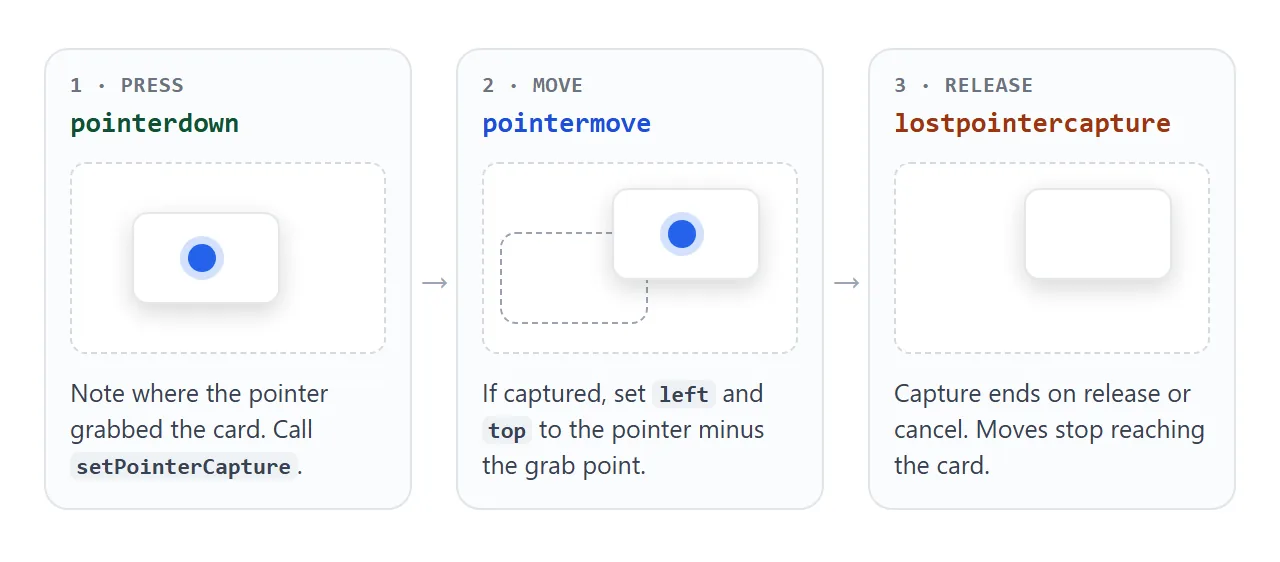
pointerdown– the user presses on the card. Record where they grabbed it, and callsetPointerCapture. Capture sends every later move of that pointer to the card, even if the pointer outruns it.pointermove– if the card holds the capture, setleftandtopfrom the pointer position.lostpointercapture– capture ends when the button or finger lifts, and also when the browser cancels the gesture. One listener covers both cases.
The card needs position: absolute (or fixed). On an element with the default position: static, left and top do nothing.
Why the card jumps to the cursor
A common first attempt sets left to the pointer's clientX directly. The card's top-left corner then snaps to the pointer on the first move, wherever you grabbed it.
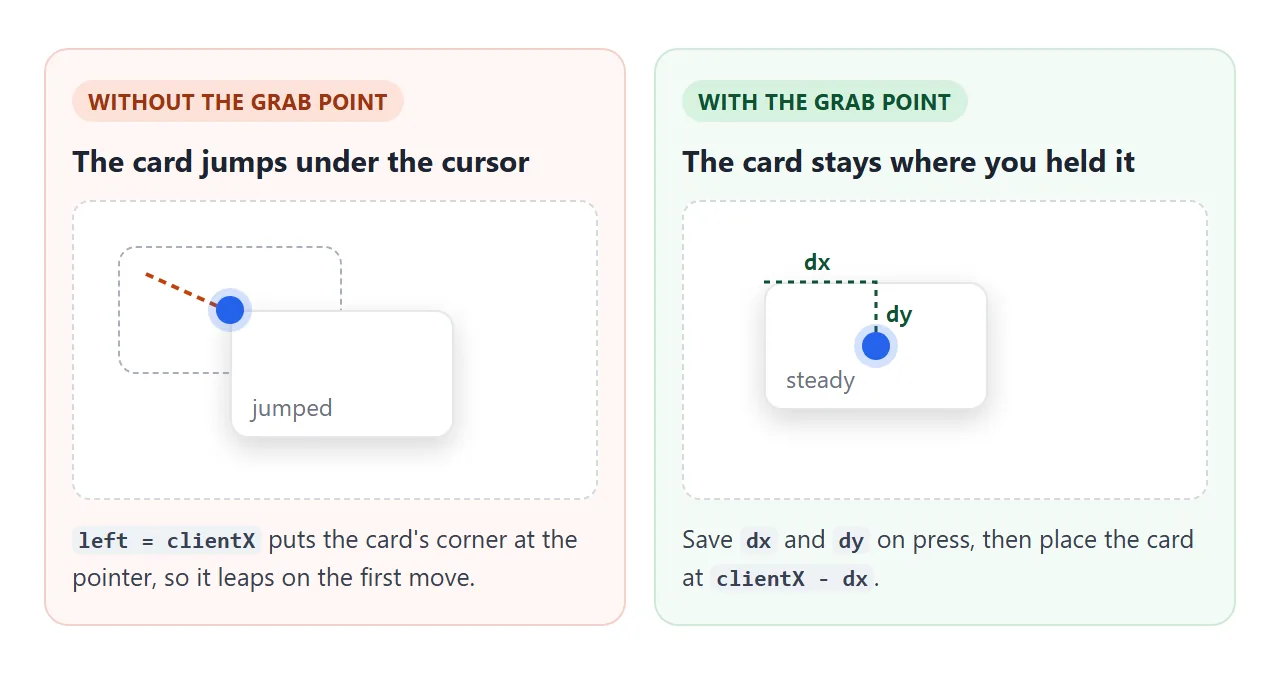
The fix is the grab point. On pointerdown, store how far the pointer is from the card's corner:
dx = e.clientX - card.offsetLeft;
dy = e.clientY - card.offsetTop;
Then place the card at e.clientX - dx and e.clientY - dy on every move. The spot you pressed stays under the pointer for the whole drag.
Making it work on phones
On a touch screen, the browser also wants that finger. A vertical swipe normally scrolls the page. When the browser decides the gesture is a scroll, it sends pointercancel and stops sending moves, so the card stops after a few pixels.
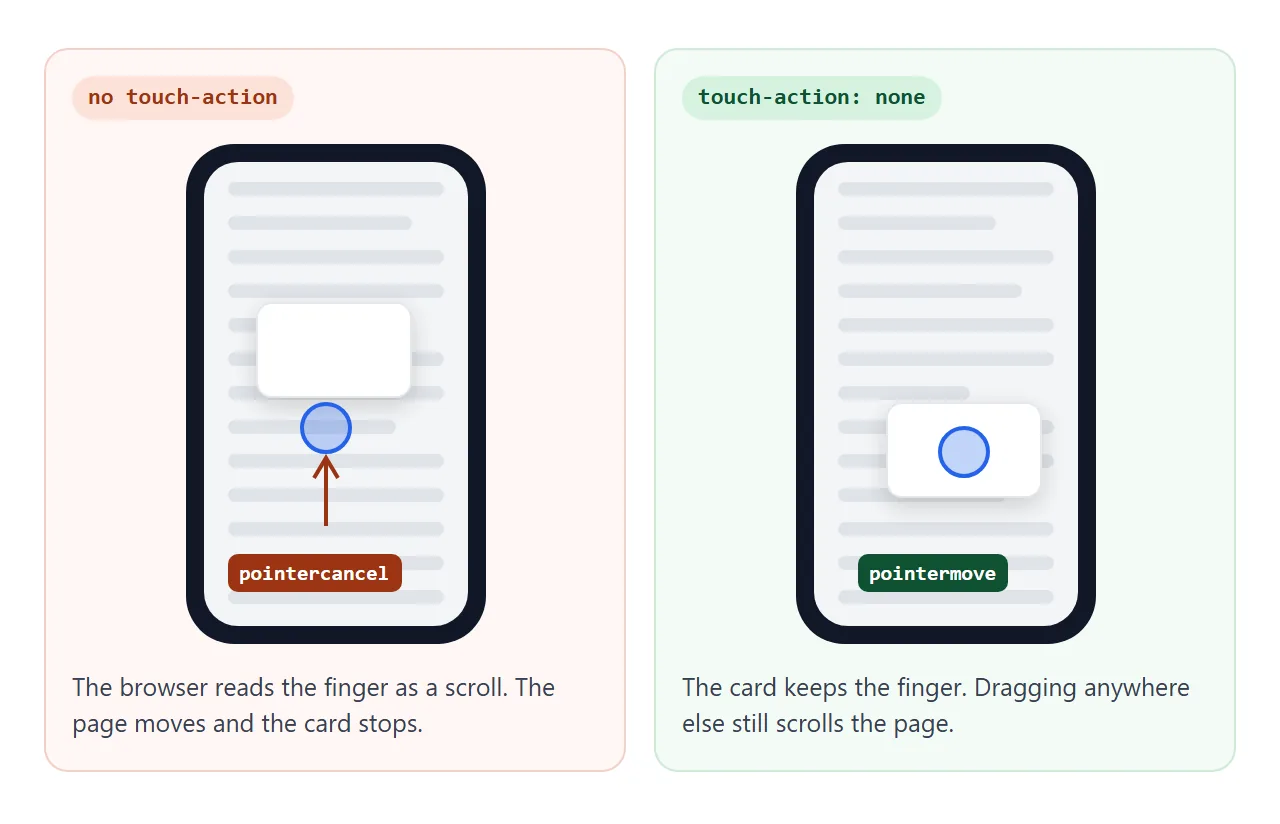
One CSS line on the dragged element fixes it:
.card { touch-action: none; }
Put it on the card only, not on body. The page still scrolls when the finger starts anywhere else. Add user-select: none as well, so a long press does not start selecting the card's text.
For the page to be sized correctly on a phone at all, it also needs the viewport meta tag.
draggable="true" is a different feature
The HTML draggable attribute belongs to the HTML Drag and Drop API. Dragging such an element shows a see-through copy under the pointer, and the element itself stays put. When you let go, the copy disappears and a drop target, if there is one, receives the data.
Compare the two on the left and right:
<!doctype html>
<html lang="en">
<head>
<meta charset="utf-8">
<meta name="viewport" content="width=device-width, initial-scale=1">
<title>draggable="true" vs pointer events</title>
<style>
  body {
    margin: 0; height: 100vh; overflow: hidden;
    font-family: system-ui, sans-serif; background: #f4f5f7;
    display: grid; grid-template-columns: 1fr 1fr;
  }
  .lane { position: relative; padding: 14px; }
  .lane + .lane { border-left: 1px dashed #c9cdd4; }
  .lane h3 { margin: 0 0 4px; font-size: 14px; }
  .lane p { margin: 0; font-size: 12px; color: #5b6270; }
  .box {
    position: absolute; left: 14px; top: 86px;
    width: 128px; padding: 12px; border-radius: 10px;
    background: #fff; box-shadow: 0 4px 14px rgba(0, 0, 0, .12);
    font-size: 13px; cursor: grab; user-select: none;
  }
  #b { touch-action: none; }
</style>
</head>
<body>
<div class="lane">
  <h3>draggable="true"</h3>
  <p>A faded copy follows. The box stays.</p>
  <div class="box" draggable="true">Drag me</div>
</div>
<div class="lane">
  <h3>Pointer events</h3>
  <p>The box itself moves.</p>
  <div class="box" id="b">Drag me</div>
</div>

<script>
  const b = document.getElementById('b');
  let dx = 0, dy = 0;
  b.addEventListener('pointerdown', (e) => {
    dx = e.clientX - b.offsetLeft;
    dy = e.clientY - b.offsetTop;
    b.setPointerCapture(e.pointerId);
  });
  b.addEventListener('pointermove', (e) => {
    if (!b.hasPointerCapture(e.pointerId)) return;
    b.style.left = (e.clientX - dx) + 'px';
    b.style.top = (e.clientY - dy) + 'px';
  });
</script>
</body>
</html>
draggable="true" |
Pointer events | |
|---|---|---|
| What moves | A see-through copy | The element itself |
| Built for | Dropping data onto a target | Moving things around on screen |
| Where it stops | Back at the start, unless a drop target handles it | Wherever you let go |
| Code needed | dragstart, dragover, drop listeners |
pointerdown, pointermove listeners |
Use drag and drop to move data between lists or accept dropped files. Use pointer events when the thing on screen should follow the hand.
A finished example: a board of notes
The same three listeners scale to many elements. This board adds two things: the grabbed note comes to the front, and no note can leave the board.
<!doctype html>
<html lang="en">
<head>
<meta charset="utf-8">
<meta name="viewport" content="width=device-width, initial-scale=1">
<title>Note board</title>
<style>
  body { margin: 0; padding: 14px; font-family: system-ui, sans-serif; background: #eceef1; }
  .board {
    position: relative; height: 330px; border-radius: 12px; overflow: hidden;
    background: #fff radial-gradient(#d9dde3 1px, transparent 1px) 0 0 / 18px 18px;
  }
  .note {
    position: absolute; width: 150px; min-height: 92px; padding: 12px 14px;
    border-radius: 6px; font-size: 14px; line-height: 1.4;
    box-shadow: 0 3px 10px rgba(0, 0, 0, .12);
    cursor: grab; touch-action: none; user-select: none;
  }
  .note.dragging { cursor: grabbing; box-shadow: 0 12px 28px rgba(0, 0, 0, .22); transform: rotate(-2deg); }
  .y { background: #fff3a8; } .b { background: #cfe8ff; } .g { background: #d4f5dc; }
</style>
</head>
<body>
<div class="board">
  <div class="note y" style="left: 24px; top: 24px;">Launch plan<br><small>drag any note</small></div>
  <div class="note b" style="left: 200px; top: 60px;">Copy review</div>
  <div class="note g" style="left: 90px; top: 170px;">Ship Friday</div>
</div>

<script>
  const board = document.querySelector('.board');
  let front = 10;  // z-index for the note in front

  board.querySelectorAll('.note').forEach((note) => {
    let dx = 0, dy = 0;

    note.addEventListener('pointerdown', (e) => {
      const r = note.getBoundingClientRect();
      dx = e.clientX - r.left;
      dy = e.clientY - r.top;
      note.style.zIndex = ++front;          // the grabbed note comes to the front
      note.setPointerCapture(e.pointerId);
      note.classList.add('dragging');
    });

    note.addEventListener('pointermove', (e) => {
      if (!note.hasPointerCapture(e.pointerId)) return;
      const b = board.getBoundingClientRect();
      // keep the whole note inside the board
      const x = Math.min(Math.max(e.clientX - b.left - dx, 0), b.width - note.offsetWidth);
      const y = Math.min(Math.max(e.clientY - b.top - dy, 0), b.height - note.offsetHeight);
      note.style.left = x + 'px';
      note.style.top = y + 'px';
    });

    note.addEventListener('lostpointercapture', () => note.classList.remove('dragging'));
  });
</script>
</body>
</html>
- Bring to front: keep a counter and give the grabbed note the next
z-index. - Keep inside: measure the board with
getBoundingClientRect()and clamp the new position between 0 and the board size minus the note size. - Many elements:
querySelectorAll('.note').forEach(...)gives each note its own grab point.
When it does not work
| What you see | Cause | Fix |
|---|---|---|
| A faded copy moves and the div stays | draggable="true" or dragstart is doing the dragging |
Use pointer events |
| Nothing moves at all | The div is position: static |
Set position: absolute or fixed |
| The div jumps so its corner is under the pointer | No grab point | Subtract dx and dy |
| The div gets left behind on fast moves | The listener only fires while the pointer is over the div | Call setPointerCapture on pointerdown |
| On a phone, it moves a little and stops | The browser took the gesture as a scroll | touch-action: none on the div |
| Text turns blue while dragging | The drag is also selecting text | user-select: none on the div |
Share it as a link
A draggable page is easier to show than to describe. A screenshot cannot be dragged, and an .html attachment may open as plain code, or not at all, on a phone. Opening an HTML file on a phone covers why.
To send the working version, paste the page into a NOS document and choose Create share link. HTML to link walks through it. The page renders as written and its scripts run, so the people you send it to can drag the cards themselves. If you change the code later, the same link shows the new version.