To make a phone vibrate from a web page, call navigator.vibrate(200) inside a click handler. The number is milliseconds. This is the Vibration API, a JavaScript feature with no HTML tag, and the browser ignores the call if the device cannot vibrate.
Try it. On a phone with a supported browser the button buzzes. Elsewhere you still see the answer the call returned.
<!doctype html>
<html lang="en">
<head>
<meta charset="utf-8">
<meta name="viewport" content="width=device-width, initial-scale=1">
<title>Vibrate on tap</title>
<style>
  body { margin: 0; padding: 18px; font-family: system-ui, sans-serif; background: #f4f5f7; color: #1d2330; }
  button {
    font: 600 16px system-ui, sans-serif; padding: 14px 22px; border: 0; border-radius: 10px;
    background: #2563eb; color: #fff; cursor: pointer;
  }
  button:active { transform: scale(.97); }
  .box { margin-top: 16px; padding: 12px 14px; border-radius: 10px; background: #fff; font-size: 15px; line-height: 1.5; }
  .ok { color: #0f5132; } .no { color: #9a3412; }
</style>
</head>
<body>
<button id="btn">Vibrate 200 ms</button>
<div class="box" id="support"></div>
<div class="box" id="result">Tap the button to call navigator.vibrate(200).</div>

<script>
  const btn = document.getElementById('btn');
  const support = document.getElementById('support');
  const result = document.getElementById('result');

  // The function is missing in browsers that do not implement the API
  if ('vibrate' in navigator) {
    support.innerHTML = '<span class="ok">navigator.vibrate exists in this browser.</span>';
  } else {
    support.innerHTML = '<span class="no">navigator.vibrate does not exist here. The page must still work without it.</span>';
  }

  btn.addEventListener('click', () => {
    if (!('vibrate' in navigator)) {
      result.textContent = 'Nothing to call. Show a visual cue instead.';
      return;
    }
    const ok = navigator.vibrate(200);  // vibrate for 200 ms
    result.textContent = 'navigator.vibrate(200) returned ' + ok +
      '. A true result means the request was accepted, not that a motor ran.';
  });
</script>
</body>
</html>
The return value is a boolean. It is false when the request was rejected, for example because of invalid parameters, and true otherwise. It never says whether a motor actually ran.
Patterns: vibrate, pause, vibrate
Pass an array and the numbers alternate: the first is a vibration, the second a pause, the third a vibration, and so on. All values are milliseconds.
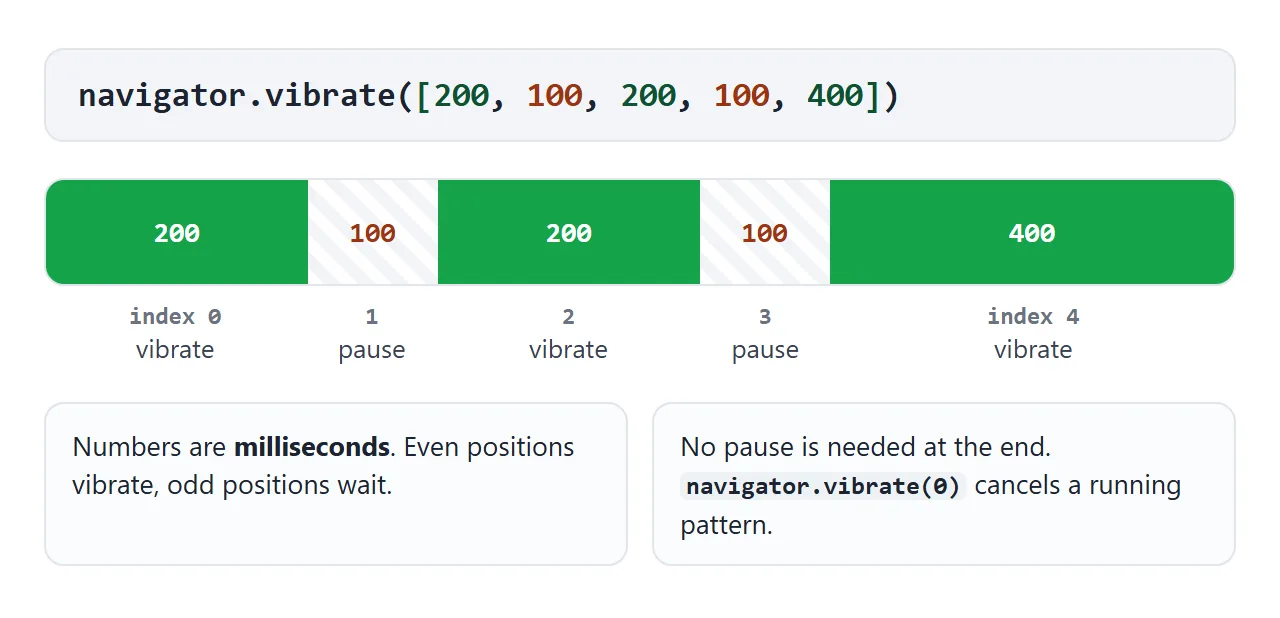
navigator.vibrate(200);                 // one buzz
navigator.vibrate([100, 80, 100]);      // buzz, pause, buzz
navigator.vibrate(0);                   // cancel
Calling vibrate() while a pattern is running stops that pattern and starts the new one. The page below draws each pattern as a bar and lights a circle for each vibrate step, so you can read a pattern without a phone.
<!doctype html>
<html lang="en">
<head>
<meta charset="utf-8">
<meta name="viewport" content="width=device-width, initial-scale=1">
<title>Vibration patterns</title>
<style>
body { margin: 0; padding: 16px; font-family: system-ui, sans-serif; background: #f4f5f7; color: #1d2330; }
.row { display: flex; flex-wrap: wrap; gap: 8px; }
button {
font: 600 14px system-ui, sans-serif; padding: 10px 14px; border: 0; border-radius: 9px;
background: #2563eb; color: #fff; cursor: pointer;
}
button.stop { background: #9a3412; }
.code { margin: 14px 0 8px; font: 600 14px ui-monospace, Consolas, monospace; background: #fff; border-radius: 9px; padding: 10px 12px; word-break: break-all; }
.lane { position: relative; height: 34px; border-radius: 9px; background: #fff; overflow: hidden; }
.seg { position: absolute; top: 6px; height: 22px; border-radius: 5px; background: #16a34a; }
.lane .now { position: absolute; top: 0; bottom: 0; width: 2px; background: #1d2330; left: 0; display: none; }
.legend { margin-top: 6px; font-size: 13px; color: #4b5563; }
.legend i { display: inline-block; width: 12px; height: 12px; border-radius: 3px; background: #16a34a; vertical-align: -1px; }
.out { margin-top: 12px; padding: 10px 12px; background: #fff; border-radius: 9px; font-size: 14px; }
.pulse { margin: 14px auto 0; width: 54px; height: 54px; border-radius: 50%; background: #d1d5db; transition: background .05s; }
.pulse.on { background: #16a34a; }
</style>
</head>
<body>
<div class="row" id="btns"></div>
<div class="code" id="code">pick a pattern</div>
<div class="lane" id="lane"><div class="now" id="now"></div></div>
<div class="legend"><i></i> vibrate blank = pause</div>
<div class="pulse" id="pulse" title="visual copy of the pattern"></div>
<div class="out" id="out">The circle lights up for each vibrate step, so you can see the pattern on a laptop too.</div>
<script>
const patterns = {
'Tap': 200,
'Double': [100, 80, 100],
'Heartbeat': [80, 60, 80, 400, 80, 60, 80],
'SOS': [100, 60, 100, 60, 100, 160, 300, 60, 300, 60, 300, 160, 100, 60, 100, 60, 100],
};
const btns = document.getElementById('btns'), code = document.getElementById('code');
const lane = document.getElementById('lane'), now = document.getElementById('now');
const out = document.getElementById('out'), pulse = document.getElementById('pulse');
let timers = [], raf = 0;
function stopVisual() {
timers.forEach(clearTimeout); timers = [];
cancelAnimationFrame(raf); now.style.display = 'none';
pulse.classList.remove('on');
}
function draw(list) {
// Odd positions are pauses, even positions are vibrations
lane.querySelectorAll('.seg').forEach(s => s.remove());
const total = list.reduce((a, b) => a + b, 0);
let t = 0;
list.forEach((ms, i) => {
if (i % 2 === 0) {
const s = document.createElement('div');
s.className = 'seg';
s.style.left = (t / total * 100) + '%';
s.style.width = Math.max(ms / total * 100, 0.8) + '%';
lane.appendChild(s);
}
t += ms;
});
return total;
}
function run(label) {
stopVisual();
const p = patterns[label];
const list = Array.isArray(p) ? p : [p];
code.textContent = 'navigator.vibrate(' + JSON.stringify(p) + ')';
const total = draw(list);
const ok = ('vibrate' in navigator) ? navigator.vibrate(p) : 'n/a (no API)';
out.textContent = 'Returned: ' + ok + ' | total length: ' + total + ' ms';
// Visual copy of the same timeline
let t = 0;
list.forEach((ms, i) => {
if (i % 2 === 0) {
timers.push(setTimeout(() => pulse.classList.add('on'), t));
timers.push(setTimeout(() => pulse.classList.remove('on'), t + ms));
}
t += ms;
});
const start = performance.now();
now.style.display = 'block';
(function step() {
const f = (performance.now() - start) / total;
if (f >= 1) { now.style.display = 'none'; return; }
now.style.left = (f * 100) + '%';
raf = requestAnimationFrame(step);
})();
}
Object.keys(patterns).forEach(label => {
const b = document.createElement('button');
b.textContent = label;
b.addEventListener('click', () => run(label));
btns.appendChild(b);
});
const stop = document.createElement('button');
stop.textContent = 'Cancel'; stop.className = 'stop';
stop.addEventListener('click', () => {
stopVisual();
code.textContent = 'navigator.vibrate(0)';
lane.querySelectorAll('.seg').forEach(s => s.remove());
const ok = ('vibrate' in navigator) ? navigator.vibrate(0) : 'n/a (no API)'; // 0 cancels
out.textContent = 'Returned: ' + ok + ' | any running pattern is cancelled';
});
btns.appendChild(stop);
</script>
</body>
</html>
Limits on length
Browsers may shorten long patterns. MDN says that if a pattern leads to a too long vibration it is truncated, and the maximum depends on the implementation.
The specification gives numbers: it keeps only the first 10 entries of a pattern and clamps any entry above 10000 milliseconds. Keep patterns short anyway. A buzz is a nudge, not a ringtone.
Why it only works after a tap
The specification requires sticky activation. In plain words, the user must have interacted with the page before the call counts. A call at page load has no tap behind it.
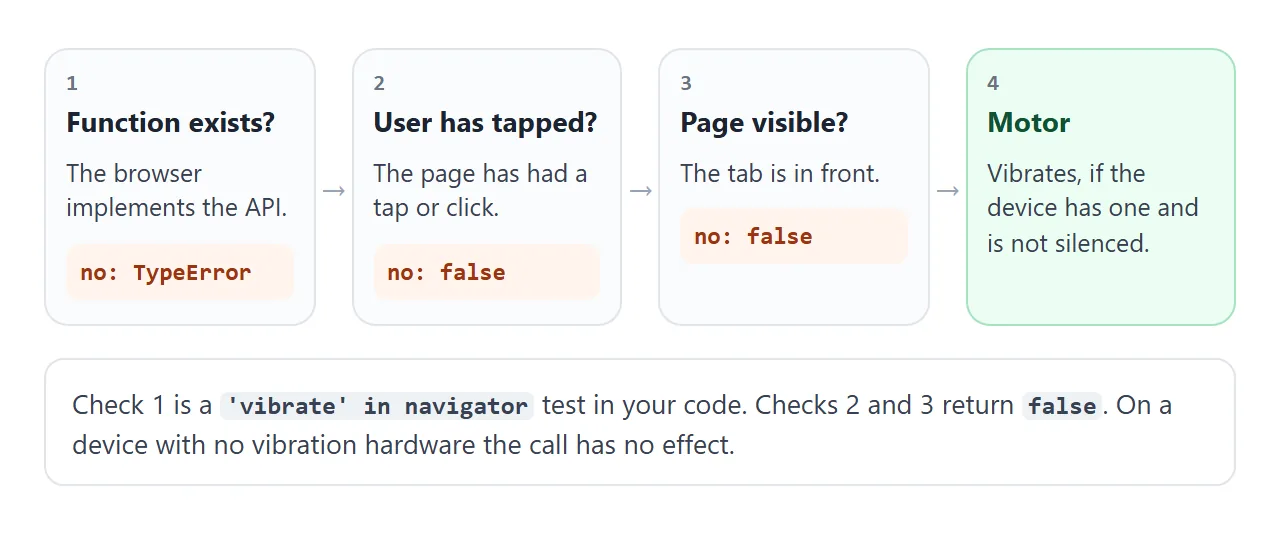
In a Chromium test, navigator.vibrate(100) on load returned false, and the same call after a click returned true. Put the call in a click, pointerdown or key handler. Pointer events covers handlers that work for mouse and finger alike.
The specification also says the call returns false when the page is not visible, and that a running pattern is aborted when the page visibility changes. Switching tabs stops the buzz.
Check for the API, and show something on screen
Not every browser has the function, and many devices have no motor. Calling a missing function throws a TypeError, so test first.
function buzz(pattern) {
  if ('vibrate' in navigator) navigator.vibrate(pattern);
}
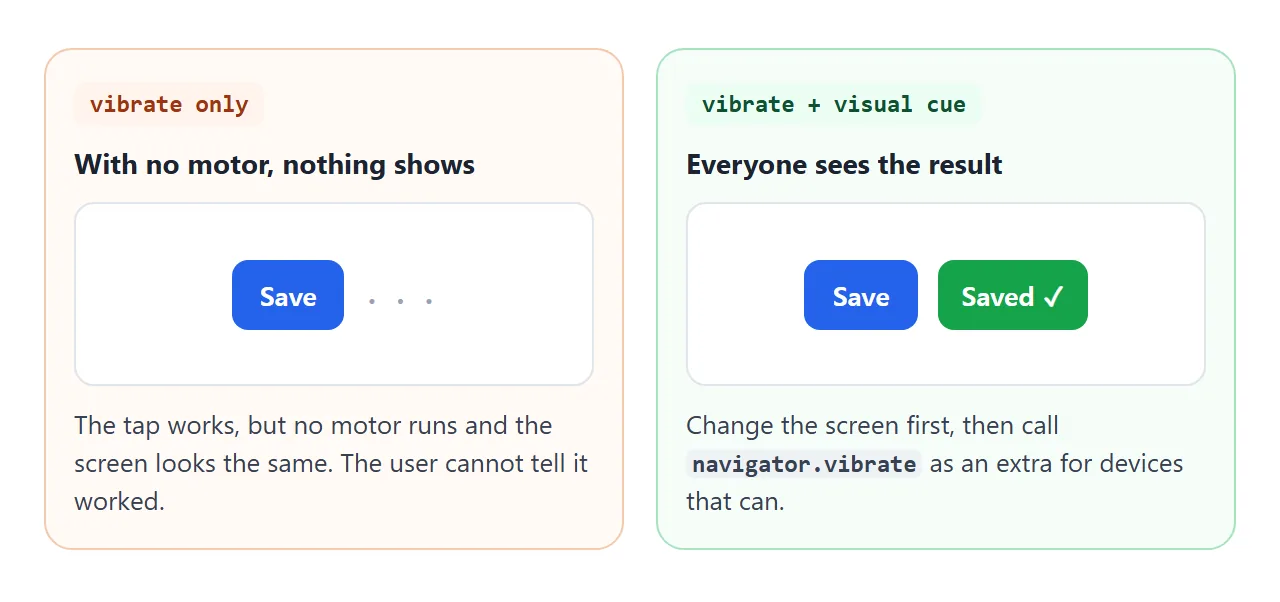
Treat vibration as an extra. Change the screen first (a colour, a check mark, a small shake) and then buzz. Someone on a laptop, with the phone on silent, or in a browser without the API still sees the result.
A finished example: a quiz with haptic feedback
This quiz gives a short tick for a right answer and a double buzz plus a shake for a wrong one. A checkbox turns the haptics off, which is a good habit: let people opt out.
<!doctype html>
<html lang="en">
<head>
<meta charset="utf-8">
<meta name="viewport" content="width=device-width, initial-scale=1">
<title>Quiz with haptic feedback</title>
<style>
  body { margin: 0; padding: 16px; font-family: system-ui, sans-serif; background: #f4f5f7; color: #1d2330; }
  .card { max-width: 380px; margin: 0 auto; background: #fff; border-radius: 14px; padding: 18px; box-shadow: 0 6px 20px rgba(0,0,0,.1); }
  .card.shake { animation: shake .3s; }
  @keyframes shake { 20%, 60% { transform: translateX(-8px); } 40%, 80% { transform: translateX(8px); } }
  h1 { font-size: 17px; margin: 0 0 12px; }
  .opts { display: grid; gap: 8px; }
  .opts button {
    font: 600 16px system-ui, sans-serif; padding: 12px; border: 2px solid #e1e4ea; border-radius: 10px;
    background: #fafbfc; cursor: pointer; text-align: left;
  }
  .opts button.good { border-color: #16a34a; background: #ecfdf3; }
  .opts button.bad { border-color: #ea580c; background: #fff4ec; }
  .meta { margin-top: 12px; font-size: 14px; color: #4b5563; display: flex; justify-content: space-between; gap: 8px; flex-wrap: wrap; }
  label { cursor: pointer; }
  #next { margin-top: 12px; font: 600 15px system-ui, sans-serif; padding: 10px 16px; border: 0; border-radius: 9px; background: #2563eb; color: #fff; cursor: pointer; display: none; }
</style>
</head>
<body>
<div class="card" id="card">
  <h1 id="q"></h1>
  <div class="opts" id="opts"></div>
  <button id="next">Next question</button>
  <div class="meta">
    <span id="score">Score: 0</span>
    <label><input type="checkbox" id="haptics" checked> Haptics on</label>
  </div>
  <div class="meta" id="note"></div>
</div>

<script>
  const quiz = [
    { q: 'Which call stops a running vibration?', o: ['navigator.vibrate(0)', 'navigator.stop()', 'navigator.vibrate(1)'], a: 0 },
    { q: 'In [200, 100, 200], what is the 100?', o: ['A vibration', 'A pause', 'The repeat count'], a: 1 },
    { q: 'When can vibrate() start a vibration?', o: ['On page load', 'After the user has tapped the page', 'Only in a new tab'], a: 1 },
  ];
  const card = document.getElementById('card'), q = document.getElementById('q');
  const opts = document.getElementById('opts'), next = document.getElementById('next');
  const score = document.getElementById('score'), note = document.getElementById('note');
  const haptics = document.getElementById('haptics');
  let i = 0, points = 0, answered = false;

  // One helper: vibrate if the API exists and the user wants it, never throw
  function buzz(pattern) {
    if (haptics.checked && 'vibrate' in navigator) navigator.vibrate(pattern);
  }

  note.textContent = ('vibrate' in navigator)
    ? 'This browser has navigator.vibrate. A device without a motor ignores it.'
    : 'No navigator.vibrate here. The colours and the shake still show the result.';

  function show() {
    answered = false; next.style.display = 'none';
    q.textContent = (i + 1) + '/' + quiz.length + '  ' + quiz[i].q;
    opts.innerHTML = '';
    quiz[i].o.forEach((text, n) => {
      const b = document.createElement('button');
      b.textContent = text;
      b.addEventListener('click', () => answer(b, n));
      opts.appendChild(b);
    });
  }

  function answer(btn, n) {
    if (answered) return;
    if (n === quiz[i].a) {
      answered = true; points++;
      btn.classList.add('good');
      buzz(60);                 // short tick = correct
      score.textContent = 'Score: ' + points;
      next.style.display = 'inline-block';
      next.textContent = i < quiz.length - 1 ? 'Next question' : 'Play again';
    } else {
      btn.classList.add('bad');
      buzz([80, 60, 80]);       // double buzz = wrong
      card.classList.remove('shake'); void card.offsetWidth; card.classList.add('shake');  // visual cue for everyone
    }
  }

  next.addEventListener('click', () => {
    if (i < quiz.length - 1) i++; else { i = 0; points = 0; score.textContent = 'Score: 0'; }
    show();
  });
  show();
</script>
</body>
</html>
- One helper:
buzz()checks the API and the checkbox once. - Different feel, different meaning: one short tick for yes, two for no.
- Visual first: colours and the shake carry the result when nothing vibrates.
When it does not work
| What you see | Cause | Fix |
|---|---|---|
Returns false on page load |
No tap or click has happened yet | Call it from a click or tap handler |
Returns false after switching tabs |
The page is not visible | Vibrate only while the page is in front |
| TypeError: vibrate is not a function | The browser does not implement the API | Test with 'vibrate' in navigator |
Returns true, nothing buzzes |
No vibration hardware, or Silent or Do Not Disturb mode | Show a visual cue as well |
| Works in one browser, nothing in another | Support differs between browsers | Treat vibration as optional |
| Long pattern is cut short | Browsers truncate long vibrations | Keep patterns short |
Share it as a link
Vibration is a feel, so it is hard to describe and easy to try. A screenshot cannot buzz, and an .html attachment may open as plain code, or not at all, on a phone. Opening an HTML file on a phone covers why.
To send the working version, paste the page into a NOS document and choose Create share link. HTML to link walks through it.
The page renders as written and its scripts run, so the people you send it to can tap the buttons on their own phones. If you change the code later, the same link shows the new version.