The CSS baseline-shift property moves a piece of SVG text up or down from the baseline of the text around it. Wrap the piece in a <tspan> and set baseline-shift: super, sub or a length.
The text after the tspan returns to the normal line on its own.
Try it. The orange letter takes whatever value you pick in the menu.
<!doctype html>
<html lang="en">
<head>
<meta charset="utf-8">
<meta name="viewport" content="width=device-width, initial-scale=1">
<title>baseline-shift basics</title>
<style>
  body { margin: 0; padding: 14px; font-family: system-ui, sans-serif; background: #f4f5f7; }
  svg { display: block; width: 100%; max-width: 460px; background: #fff; border-radius: 12px; }
  text { font-size: 30px; fill: #1d2330; }
  .sub { baseline-shift: sub; font-size: 70%; }      /* shift down, and make it smaller */
  .super { baseline-shift: super; font-size: 70%; }  /* shift up, and make it smaller */
  #try { fill: #c2410c; font-size: 70%; }
  .line { stroke: #93c5fd; stroke-dasharray: 4 4; }
  label { display: block; margin-top: 12px; font-size: 14px; }
  select { font: inherit; padding: 4px 6px; margin-left: 6px; }
</style>
</head>
<body>
<svg viewBox="0 0 460 190" role="img" aria-label="Formulas with shifted digits">
  <line class="line" x1="0" y1="60" x2="460" y2="60"/>
  <text x="20" y="60">H<tspan class="sub">2</tspan>O</text>
  <text x="200" y="60">E = mc<tspan class="super">2</tspan></text>
  <line class="line" x1="0" y1="140" x2="460" y2="140"/>
  <text x="20" y="140">x<tspan id="try" style="baseline-shift: super">n</tspan> + 1 = total</text>
</svg>

<label>Orange letter:
  <select id="pick">
    <option>super</option><option>sub</option><option>0</option>
    <option>0.6em</option><option>-0.6em</option>
  </select>
</label>

<script>
  const t = document.getElementById('try');
  // baseline-shift is a CSS property, so it can be set like any other style
  document.getElementById('pick').addEventListener('change', (e) => {
    t.style.baselineShift = e.target.value;
  });
</script>
</body>
</html>
The steps are the same for any raised or lowered piece:
- Wrap the piece in a tspan inside the
<text>element. - Set baseline-shift on the tspan:
super,subor a length. - Make it smaller with
font-size, becausebaseline-shiftdoes not resize anything.
<text x="20" y="60">E = mc<tspan class="sq">2</tspan></text>
.sq { baseline-shift: super; font-size: 70%; }
What baseline-shift moves
A line of SVG text sits on one baseline. baseline-shift gives a tspan its own baseline, set above or below its parent's. The characters in the tspan move with it. The characters after it do not.
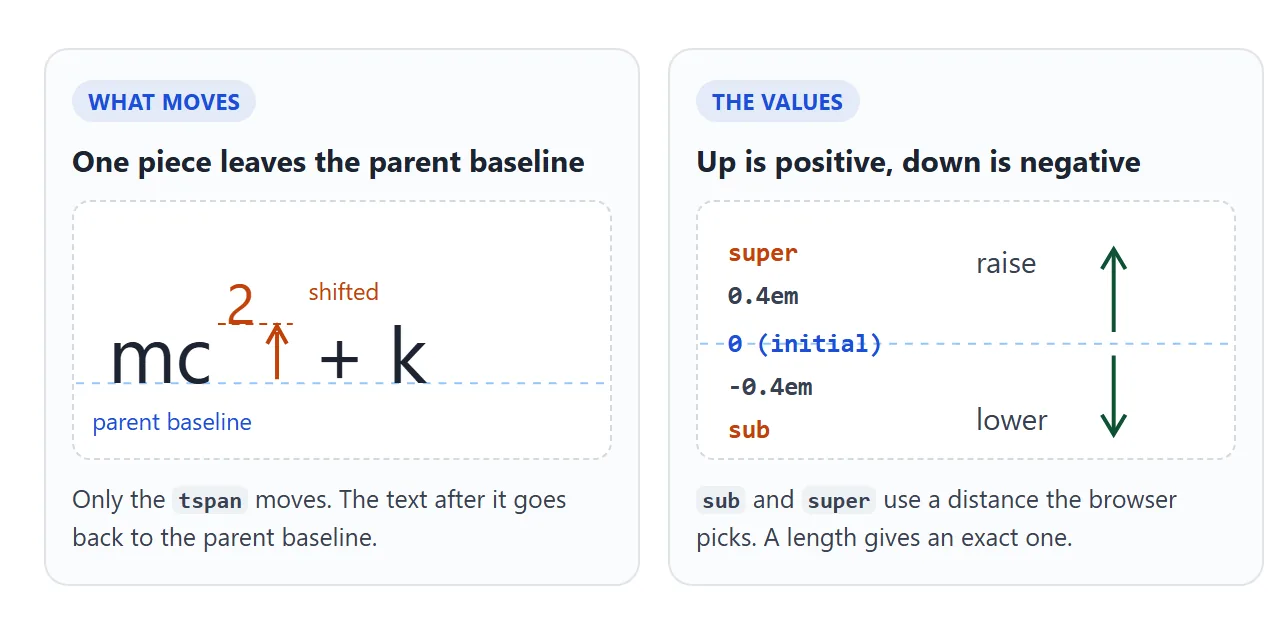
The property is not inherited, and its initial value is 0, which means no shift. It sets a position, not a size, so the digit in the menu example stays at 70% whatever value you pick.
The values: sub, super and lengths
| Value | What it does |
|---|---|
super |
Raises the text to a superscript position |
sub |
Lowers the text to a subscript position |
A length, such as 0.4em |
Positive raises, negative lowers, by that amount |
| A percentage | Raises or lowers by a share of the line height |
0 |
No shift (the initial value) |
For sub and super, the spec lets the browser take the distance from the font's own data. Without that data, it falls back to one fifth of the parent's font size for sub and one third for super.
That means the exact height can differ between fonts and browsers.
When a label has to line up with something else in a drawing, use an em length instead. It scales with the font size, so the gap stays in proportion if you enlarge the text.
The spec also defines top, center and bottom, which align the piece with the edges of the line box. MDN's compatibility data lists them in Firefox only and marks them experimental. Chromium and WebKit both reported them as unsupported in our test.
It works inside SVG, not on HTML text
MDN notes that baseline-shift only applies to <tspan> and <textPath> elements inside an <svg>. The CSS Inline Layout draft describes it for inline boxes as well, but in the Chromium and WebKit builds we tested, it did nothing on an HTML <span>.
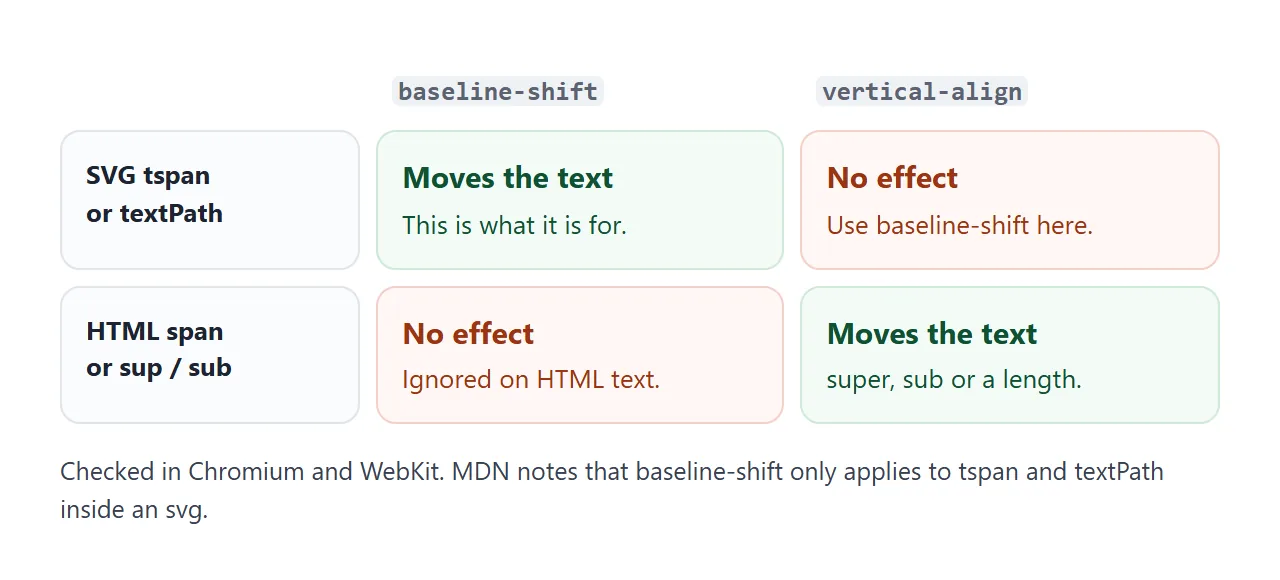
For HTML text, use vertical-align with super, sub or a length, or the <sup> and <sub> tags. The sup and sub tags guide covers the line-spacing side effect they can cause.
The reverse is also true. In every browser we tested, vertical-align on a tspan left it on the line. Inside SVG text, baseline-shift is the property to use.
baseline-shift also exists as an SVG attribute, written baseline-shift="super" on the tspan. When both are present, the CSS property wins over the attribute.
baseline-shift vs dy
Older SVG code often raises a character with dy instead. dy moves the current text position, and every character after it is drawn from the new position. So a single negative dy lifts the rest of the line too.
<!doctype html>
<html lang="en">
<head>
<meta charset="utf-8">
<meta name="viewport" content="width=device-width, initial-scale=1">
<title>baseline-shift vs dy vs vertical-align</title>
<style>
body { margin: 0; padding: 14px; font-family: system-ui, sans-serif; background: #f4f5f7; }
.row { background: #fff; border-radius: 10px; padding: 8px 12px; margin-bottom: 10px; }
.row b { display: block; font-size: 13px; color: #5b6270; font-weight: 600; }
svg { display: block; width: 100%; max-width: 360px; height: 56px; }
text { font-size: 26px; fill: #1d2330; }
.up { fill: #c2410c; font-size: 70%; }
.line { stroke: #93c5fd; stroke-dasharray: 4 4; }
.html { font-size: 26px; line-height: 1.6; }
.html span { color: #c2410c; font-size: 70%; }
</style>
</head>
<body>
<div class="row"><b>SVG · baseline-shift: super</b>
<svg viewBox="0 0 360 56"><line class="line" x1="0" y1="42" x2="360" y2="42"/>
<text x="8" y="42">area m<tspan class="up" style="baseline-shift: super">2</tspan> total</text></svg>
</div>
<div class="row"><b>SVG · dy="-0.6em" only: the rest stays up</b>
<svg viewBox="0 0 360 56"><line class="line" x1="0" y1="42" x2="360" y2="42"/>
<text x="8" y="42">area m<tspan class="up" dy="-0.6em">2</tspan> total</text></svg>
</div>
<div class="row"><b>SVG · dy pair: up, then back down</b>
<svg viewBox="0 0 360 56"><line class="line" x1="0" y1="42" x2="360" y2="42"/>
<!-- the second dy uses the parent's font size, so it is written in px -->
<text x="8" y="42">area m<tspan class="up" dy="-11">2</tspan><tspan dy="11"> total</tspan></text></svg>
</div>
<div class="row html"><b>HTML span · baseline-shift vs vertical-align</b>
m<span style="baseline-shift: super">2</span> ignored m<span style="vertical-align: super">2</span> works
</div>
</body>
</html>
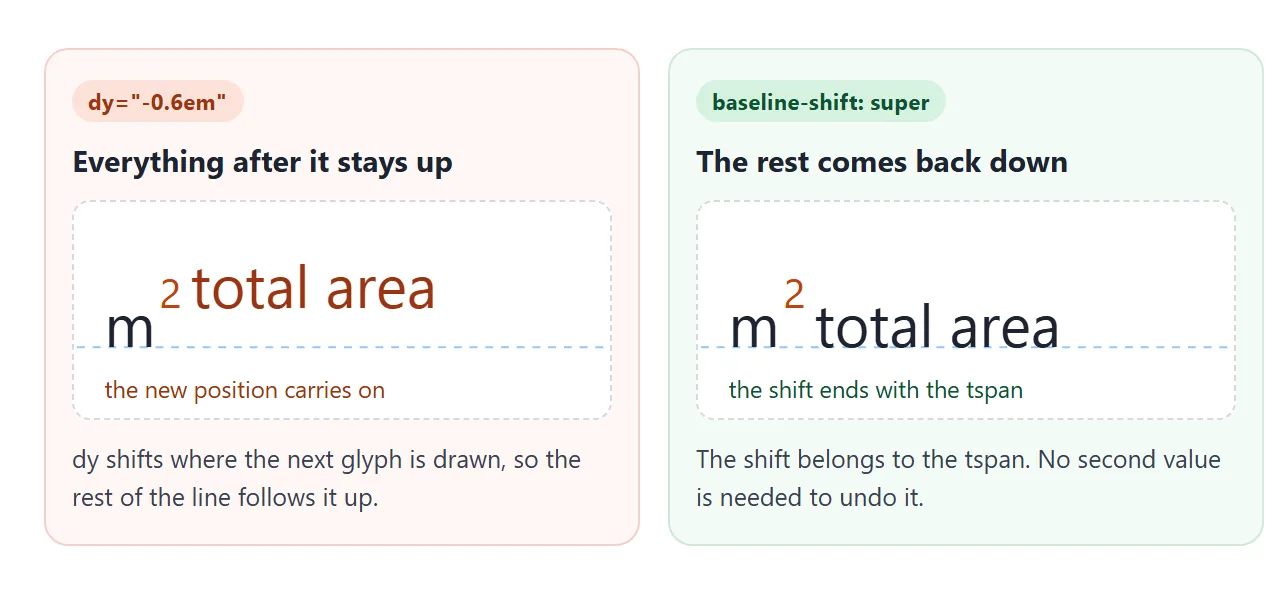
To make dy behave, you need a second dy with the opposite value on the text that follows. That worked in every browser we tested, but the two numbers have to stay in step.
If the tspan has a smaller font, an em value means a different distance on each side, so use px for both.
m<tspan dy="-11">2</tspan><tspan dy="11"> total</tspan>
With baseline-shift there is nothing to undo, and the value can come from a stylesheet class.
Browser support
MDN's compatibility data lists baseline-shift with sub, super and lengths in Chrome, Edge, Firefox and Safari. Firefox support is recent in that data. An older Firefox build we tested ignored both the property and the attribute, so the digits sat on the line.
That failure is mild: the text stays readable, just not raised. To tell readers, or to switch to the dy pair, test for support in CSS:
@supports not (baseline-shift: super) {
  .warn { display: block; }
}
The old baseline keyword is marked deprecated in MDN's data. The spec keeps it only as a legacy value that means 0, so write 0 instead.
A finished example: chart labels
Chart titles and units need this kind of text: CO₂, m², a footnote star. Here every raised or lowered piece reads one custom property, so a single slider moves them all.
<!doctype html>
<html lang="en">
<head>
<meta charset="utf-8">
<meta name="viewport" content="width=device-width, initial-scale=1">
<title>Chart labels with baseline-shift</title>
<style>
  body { margin: 0; padding: 14px; font-family: system-ui, sans-serif; background: #eceef1; }
  .card { background: #fff; border-radius: 12px; padding: 12px; max-width: 480px; }
  svg { display: block; width: 100%; }
  text { font-size: 14px; fill: #374151; }
  .title { font-size: 17px; font-weight: 700; fill: #1d2330; }
  /* one rule for every raised or lowered piece; --lift is set by the slider */
  .sup, .sub { font-size: 70%; fill: #c2410c; }
  .sup { baseline-shift: var(--lift, 0.45em); }
  .sub { baseline-shift: calc(var(--lift, 0.45em) * -0.6); }
  .bar { fill: #86b7f6; }
  .note { font-size: 12px; fill: #6b7280; }
  label { display: flex; align-items: center; gap: 8px; font-size: 14px; margin-top: 10px; }
  input { flex: 1; max-width: 220px; }
  .warn { display: none; margin-top: 8px; padding: 6px 8px; border-radius: 6px; background: #fff3cd; font-size: 13px; }
  @supports not (baseline-shift: super) { .warn { display: block; } }
</style>
</head>
<body>
<div class="card">
  <svg viewBox="0 0 460 206" role="img" aria-label="Bar chart of CO2 per square metre by year">
    <text class="title" x="10" y="26">CO<tspan class="sub">2</tspan> per m<tspan class="sup">2</tspan> of office<tspan class="sup">*</tspan></text>
    <rect class="bar" x="40"  y="70" width="70" height="90"/>
    <rect class="bar" x="150" y="90" width="70" height="70"/>
    <rect class="bar" x="260" y="110" width="70" height="50"/>
    <rect class="bar" x="370" y="126" width="70" height="34"/>
    <text x="52"  y="62">41 kg</text><text x="162" y="82">32 kg</text>
    <text x="272" y="102">23 kg</text><text x="382" y="118">15 kg</text>
    <text x="54"  y="180">2023</text><text x="164" y="180">2024</text>
    <text x="274" y="180">2025</text><text x="384" y="180">2026</text>
    <text class="note" x="10" y="198"><tspan class="sup">*</tspan> Sample numbers for the demo.</text>
  </svg>
  <label>Lift <input id="lift" type="range" min="0" max="1" step="0.05" value="0.45"> <output id="out">0.45em</output></label>
  <div class="warn">This browser ignores baseline-shift, so the small text sits on the line.</div>
</div>

<script>
  const lift = document.getElementById('lift');
  const out = document.getElementById('out');
  // every .sup and .sub reads --lift, so one custom property moves them all
  lift.addEventListener('input', () => {
    const v = lift.value + 'em';
    document.querySelector('svg').style.setProperty('--lift', v);
    out.textContent = v;
  });
</script>
</body>
</html>
- One class per direction:
.supgetsbaseline-shift: var(--lift), and.subgets a negative share of it throughcalc(). - One place to change it: the script sets
--lifton the<svg>, and every tspan inside picks it up. - A notice for old browsers: the yellow line appears only where
@supportsreports no support.
For placing the rest of the chart text, such as centring a number on a point, see the SVG text guide.
When it does not work
| What you see | Cause | Fix |
|---|---|---|
| Nothing moves on an HTML span | The property applies to SVG text | Use vertical-align or <sup> |
| Nothing moves on a tspan | vertical-align was used |
Use baseline-shift |
| The raised digit is full size | It only moves the text | Add font-size: 70% to the tspan |
| The rest of the line jumps up too | dy was used |
Use baseline-shift, or a second opposite dy |
| The attribute value is ignored | A CSS rule sets the property | The CSS property wins; change the rule |
top or center does nothing |
Listed in Firefox only, experimental | Use a length such as 0.5em |
| Digits sit on the line in one browser | That browser does not support it | Show a note with @supports, or use a dy pair |
Share it as a link
A screenshot shows one setting of the slider. A reviewer cannot try another value in it, or check how the labels look on their own screen.
To send the working version, paste the page into a NOS document and choose Create share link. HTML to link walks through it.
The page renders as written and its scripts run, so the people you send it to can drag the slider themselves. If you change the code later, the same link shows the new version.