Put text in <sup> to make it superscript (raised, as in x2) and in <sub> to make it subscript (lowered, as in H2O). Both are inline tags, like <b> or <a>:
<p>The area is x<sup>2</sup>. Water is H<sub>2</sub>O.</p>
The browser's default styles are font-size: smaller plus vertical-align: super for sup and vertical-align: sub for sub. They work, with one side effect: lines that contain them sit further from their neighbours. Tick the box to see the fix.
<!doctype html>
<html lang="en">
<head>
<meta charset="utf-8">
<meta name="viewport" content="width=device-width, initial-scale=1">
<title>sup and sub push lines apart</title>
<style>
  body { margin: 0; padding: 18px; font-family: system-ui, sans-serif; background: #f4f5f7; color: #1d2330; }
  .box { max-width: 520px; margin: 0 auto; background: #fff; border-radius: 12px; padding: 16px 18px; box-shadow: 0 4px 16px rgba(0, 0, 0, .08); }
  p.text {
    margin: 0; font-size: 16px; line-height: 1.5;  /* 24px per line */
    /* guide lines every 24px: text sits on them when spacing is even */
    background: repeating-linear-gradient(transparent 0 23px, #f3b7a3 23px 24px);
  }
  /* the fix: sup and sub stop adding height to their line */
  .fixed sup, .fixed sub {
    font-size: 75%;
    line-height: 0;
    position: relative;
    vertical-align: baseline;
  }
  .fixed sup { top: -0.5em; }
  .fixed sub { bottom: -0.25em; }
  .fixed p.text { background: repeating-linear-gradient(transparent 0 23px, #9fd8b2 23px 24px); }
  label { display: flex; gap: 8px; align-items: center; margin: 14px 0 8px; font-weight: 600; cursor: pointer; }
  input { width: 18px; height: 18px; }
  #out { font: 13px/1.5 ui-monospace, Consolas, monospace; background: #f4f5f7; border-radius: 8px; padding: 8px 10px; }
</style>
</head>
<body>
<div class="box" id="box">
  <p class="text" id="text">The area of a square is x<sup>2</sup> and a cube holds x<sup>3</sup>. Water is H<sub>2</sub>O and the air we breathe out carries CO<sub>2</sub>. She finished 1<sup>st</sup> in the race, and the claim needs a source.<sup>1</sup> Lines without sup or sub keep the normal gap; the others are pushed down.</p>
  <label><input type="checkbox" id="fix"> Apply the fix</label>
  <div id="out"></div>
</div>

<script>
  const text = document.getElementById('text');
  const out = document.getElementById('out');

  // count lines: text directly inside the paragraph sits at one top per line
  function countLines() {
    const tops = new Set();
    for (const node of text.childNodes) {
      if (node.nodeType !== 3) continue;
      const r = document.createRange();
      r.selectNodeContents(node);
      for (const rect of r.getClientRects()) tops.add(Math.round(rect.top));
    }
    return tops.size;
  }

  function report() {
    const h = text.getBoundingClientRect().height;
    const lines = countLines();
    out.textContent = 'Paragraph height: ' + h.toFixed(1) + 'px\n'
      + 'Even spacing: ' + lines + ' lines x 24px = ' + lines * 24 + 'px';
    out.style.whiteSpace = 'pre-line';
  }

  document.getElementById('fix').addEventListener('change', (e) => {
    document.getElementById('box').classList.toggle('fixed', e.target.checked);
    report();
  });
  addEventListener('resize', report);
  report();
</script>
</body>
</html>
Why sup and sub push lines apart
Each line of text is a box as tall as its line height.
The default super shift lifts the small text, and its own box, which still has a line height, pokes out above the top of that line. The browser grows the line to fit it. sub does the same below.
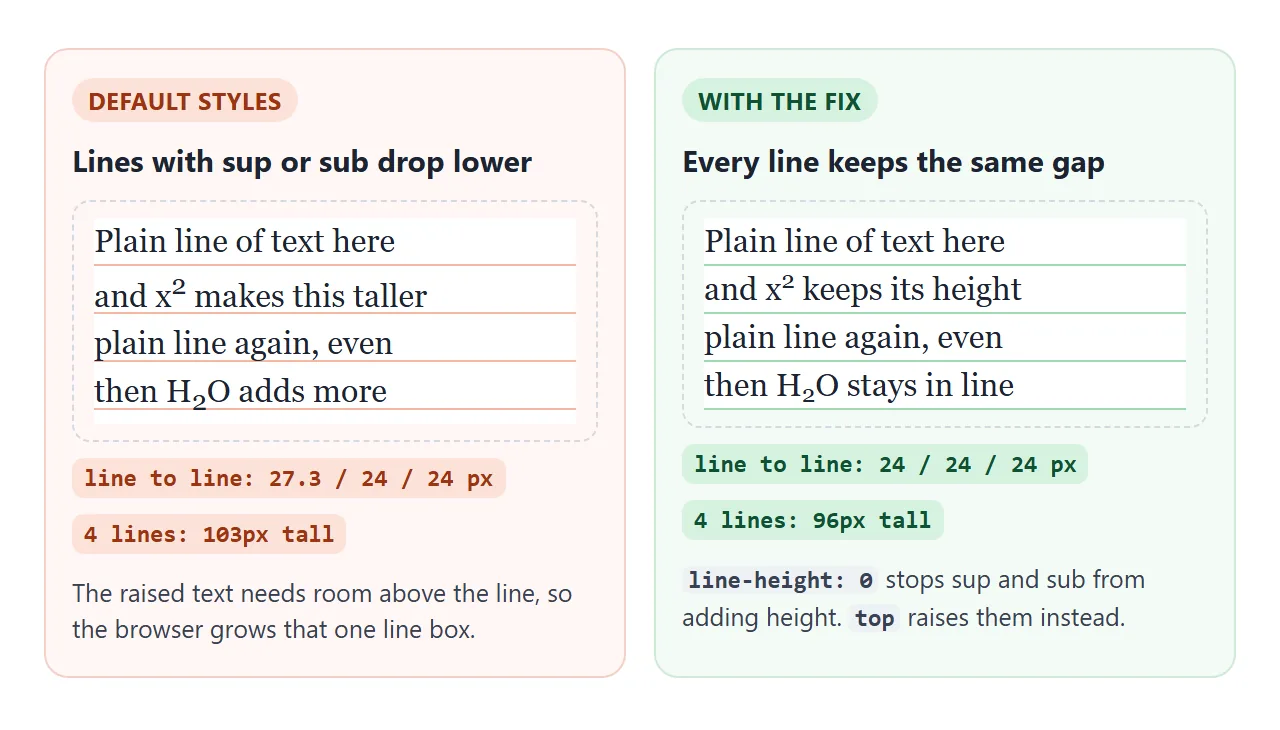
A few pixels on one line is easy to miss in a single paragraph. On a long page full of footnote numbers, every marked line is a little taller, and the text looks unevenly spaced.
The fix: four CSS declarations
The same rules ship in normalize.css. They set the size yourself and move the raise from vertical-align to position: relative, which does not affect layout:
sup, sub {
  font-size: 75%;
  line-height: 0;
  position: relative;
  vertical-align: baseline;
}
sup { top: -0.5em; }
sub { bottom: -0.25em; }
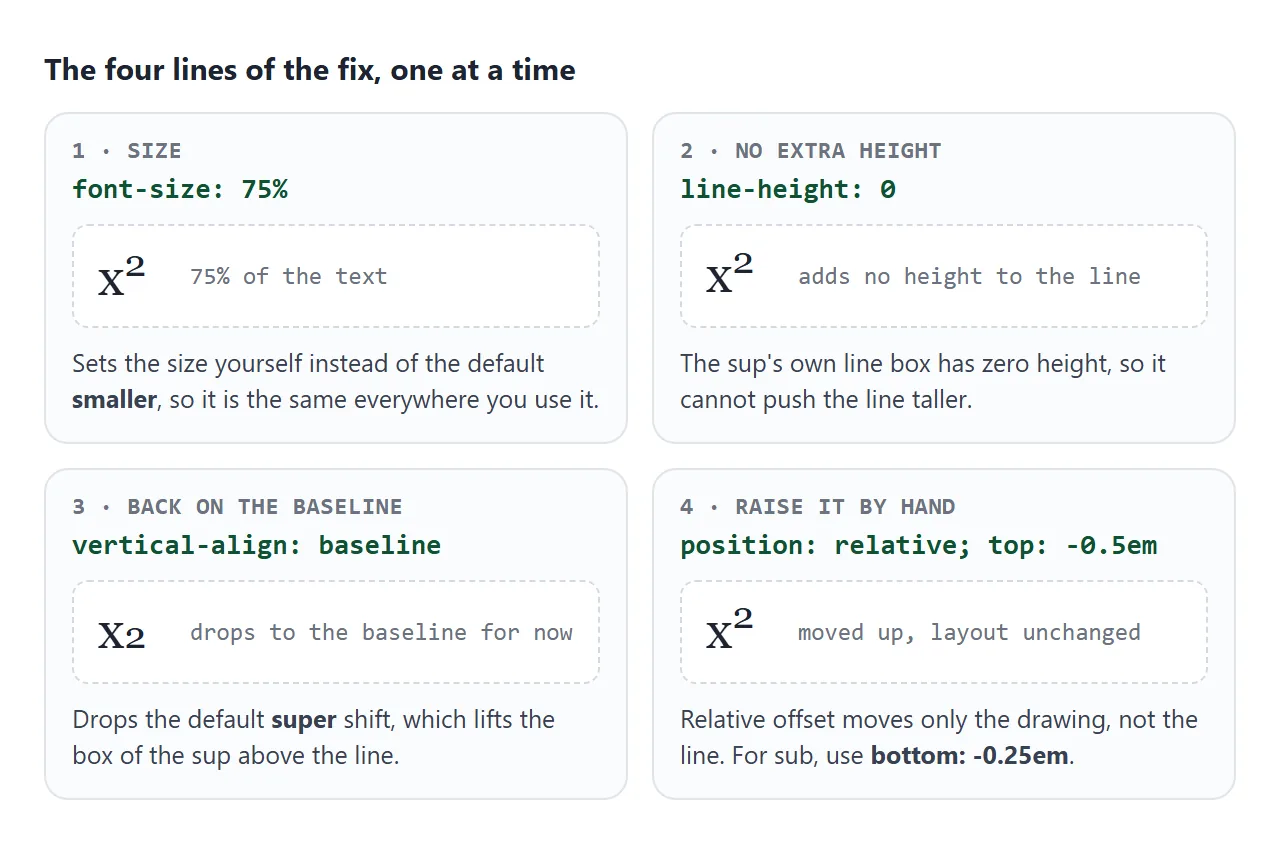
line-height: 0 is the part that stops the growth. position: relative with top moves only where the text is drawn, so the line keeps its height. Adjust -0.5em and -0.25em to suit your font.
For more on how the line box is measured, see line height in CSS, and for the other values of the property, CSS vertical-align.
What sup and sub are for
The HTML standard allows these tags only for typographical conventions with a specific meaning. Remove the tag and the meaning changes: x2 is not x2. The common cases:
<!doctype html>
<html lang="en">
<head>
<meta charset="utf-8">
<meta name="viewport" content="width=device-width, initial-scale=1">
<title>sup and sub examples</title>
<style>
body { margin: 0; padding: 14px; font-family: system-ui, sans-serif; background: #f4f5f7; color: #1d2330; }
/* even line spacing for every example */
sup, sub { font-size: 75%; line-height: 0; position: relative; vertical-align: baseline; }
sup { top: -0.5em; }
sub { bottom: -0.25em; }
.grid { display: grid; grid-template-columns: repeat(auto-fit, minmax(150px, 1fr)); gap: 10px; }
.card { background: #fff; border-radius: 10px; padding: 8px 10px; box-shadow: 0 2px 8px rgba(0, 0, 0, .07); }
.card h3 { margin: 0 0 4px; font-size: 12px; text-transform: uppercase; letter-spacing: .4px; color: #6b7280; }
.show { font-size: 20px; line-height: 1.5; }
code { display: block; margin-top: 6px; font: 12px/1.4 ui-monospace, Consolas, monospace; color: #374151; background: #f4f5f7; border-radius: 6px; padding: 5px 7px; white-space: pre-wrap; word-break: break-word; }
button { margin: 12px 0 8px; font: 600 14px system-ui, sans-serif; padding: 9px 14px; border: 0; border-radius: 8px; background: #1d4ed8; color: #fff; cursor: pointer; }
#plain { font: 13px/1.6 ui-monospace, Consolas, monospace; background: #fff; border: 1px dashed #c3c9d4; border-radius: 8px; padding: 8px 10px; }
#plain:empty { display: none; }
</style>
</head>
<body>
<div class="grid">
<div class="card"><h3>Exponent</h3>
<div class="show">E = mc<sup>2</sup></div>
<code>E = mc<sup>2</sup></code></div>
<div class="card"><h3>Chemical formula</h3>
<div class="show">H<sub>2</sub>SO<sub>4</sub></div>
<code>H<sub>2</sub>SO<sub>4</sub></code></div>
<div class="card"><h3>Ion charge</h3>
<div class="show">SO<sub>4</sub><sup>2−</sup></div>
<code>SO<sub>4</sub><sup>2&minus;</sup></code></div>
<div class="card"><h3>Ordinal</h3>
<div class="show">1<sup>st</sup>, 2<sup>nd</sup>, 3<sup>rd</sup></div>
<code>1<sup>st</sup></code></div>
<div class="card"><h3>Trademark: character</h3>
<div class="show">Acme™</div>
<code>Acme&trade;</code></div>
<div class="card"><h3>Trademark: sup</h3>
<div class="show">Acme<sup>TM</sup></div>
<code>Acme<sup>TM</sup></code></div>
<div class="card"><h3>Footnote marker</h3>
<div class="show">Sales rose.<sup><a href="#">1</a></sup></div>
<code><sup><a href="#note1">1</a></sup></code></div>
</div>
<button id="copy">Show the plain text</button>
<div id="plain"></div>
<script>
// innerText is roughly what a plain-text field receives when you paste
document.getElementById('copy').addEventListener('click', () => {
const lines = [...document.querySelectorAll('.show')].map((el) => el.innerText);
document.getElementById('plain').textContent = lines.join(' | ');
});
</script>
</body>
</html>
| Use | Markup | Result |
|---|---|---|
| Exponent | mc<sup>2</sup> |
mc2 |
| Chemical formula | CO<sub>2</sub> |
CO2 |
| Ion charge | SO<sub>4</sub><sup>2−</sup> |
SO42− |
| Ordinal | 1<sup>st</sup> |
1st |
| Footnote marker | <sup><a href="#note1">1</a></sup> |
a raised, linked 1 |
Writing ordinals as plain 1st is equally correct. The superscript version is a style choice, so pick one and use it throughout.
Trademark, squared and other symbols as characters
Some raised symbols exist as their own characters: ™ (™), ® (®), ² (²) and ³ (³). A character is part of the text itself, so it stays raised when copied into a plain-text field, a chat or a spreadsheet cell.
A <sup> is formatting, and a plain-text paste turns x2 into x2.
Use the character when the text will be copied around, and <sup> when you want CSS control over size and position. The HTML entities list has the codes.
Don't use sup for looks
A small raised "New" or "Beta" next to a menu item is decoration, not a typographic convention. Use a <span class="badge"> and style it. The span can be any size, colour or shape, and it does not claim a meaning it does not have.
Footnotes that link both ways
A footnote is a pair of links. The number in the text links to the note, and the note links back to the number. Each end needs an id:
<p>Tuesday suited everyone<sup><a id="ref1" href="#note1">1</a></sup>.</p>
<ol>
<li id="note1">Monday had the weekly report.
<a href="#ref1" aria-label="Back to reference 1">↑ back</a></li>
</ol>
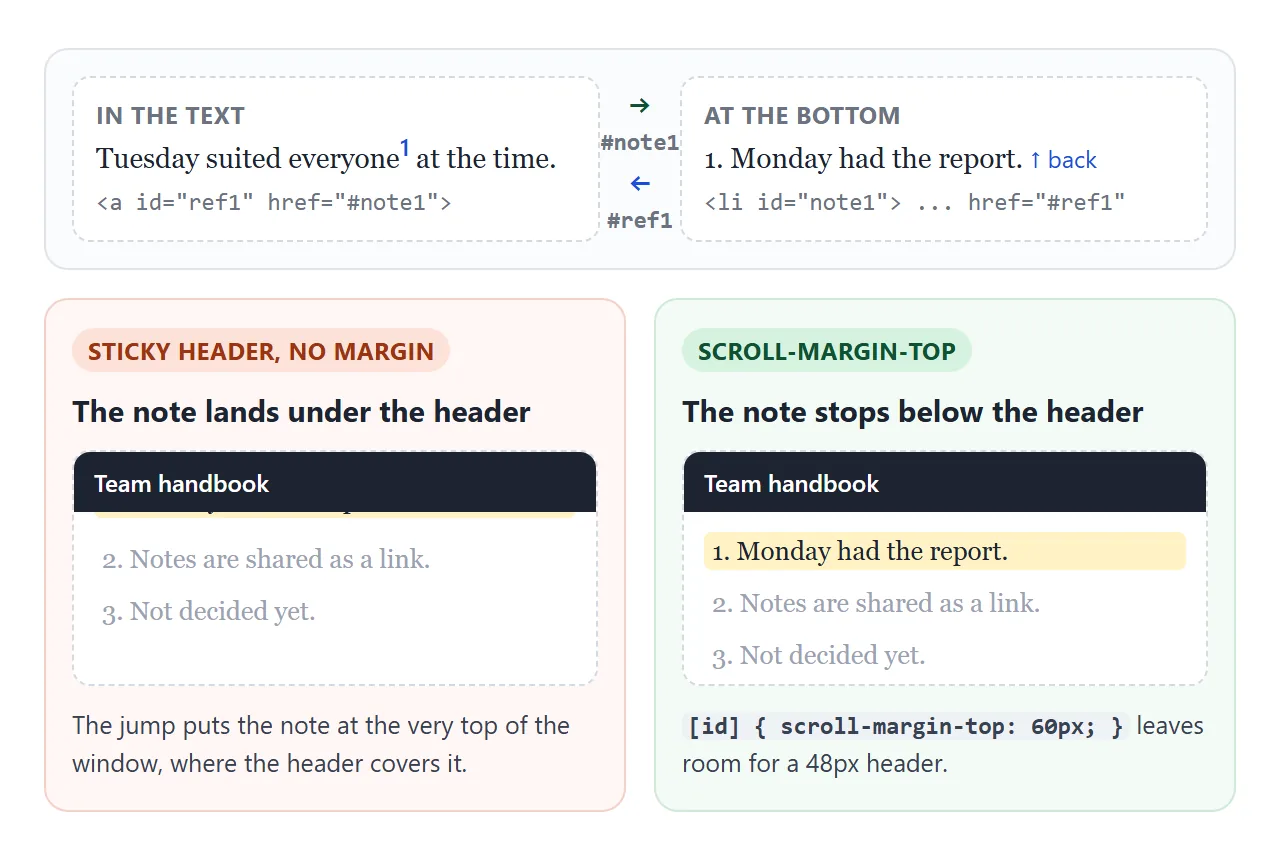
With a sticky header, a jump puts the target at the very top of the window, under the header. scroll-margin-top on the targets makes the browser stop short.
Linking within a page is covered in more depth in link to an anchor on the same page.
<!doctype html>
<html lang="en">
<head>
<meta charset="utf-8">
<meta name="viewport" content="width=device-width, initial-scale=1">
<title>Footnotes with sup</title>
<style>
body { margin: 0; font: 16px/1.6 Georgia, serif; color: #1d2330; background: #fff; }
header { position: sticky; top: 0; z-index: 1; height: 48px; display: flex; align-items: center; padding: 0 18px;
background: #1d2330; color: #fff; font: 600 15px system-ui, sans-serif; }
main { max-width: 560px; margin: 0 auto; padding: 8px 18px 40px; }
/* even line spacing */
sup { font-size: 75%; line-height: 0; position: relative; vertical-align: baseline; top: -0.5em; }
sup a { text-decoration: none; padding: 0 2px; font-family: system-ui, sans-serif; font-weight: 600; }
/* land below the 48px sticky header, not under it */
[id] { scroll-margin-top: 60px; }
/* highlight whatever the last link jumped to */
:target { background: #fff3c4; border-radius: 4px; }
.notes { border-top: 1px solid #d5d9e0; margin-top: 28px; padding-top: 6px; font-size: 14px; }
.notes h2 { font: 700 14px system-ui, sans-serif; margin: 10px 0 4px; }
.notes ol { padding-left: 22px; margin: 0; }
.notes li { margin: 6px 0; }
.back { text-decoration: none; font-family: system-ui, sans-serif; white-space: nowrap; }
.filler { color: #6b7280; }
</style>
</head>
<body>
<header>Team handbook</header>
<main>
<h1 style="font-size:22px;margin:14px 0 8px">Why the team meets on Tuesdays</h1>
<p>Tuesday was the only day everyone was in the office<sup><a id="ref1" href="#note1" aria-describedby="notes-title">1</a></sup> when the meeting started.</p>
<p class="filler">Scroll on, or tap a small number to jump to its note. Each note has a back link that returns you to the exact spot you left.</p>
<p>The notes from each meeting go out the same afternoon.<sup><a id="ref2" href="#note2" aria-describedby="notes-title">2</a></sup> Nobody has to wait until Friday.</p>
<p class="filler">The header stays on top while you scroll. Without scroll-margin-top, a jump would hide the target line under it.</p>
<p>The day may change when the new schedule starts.<sup><a id="ref3" href="#note3" aria-describedby="notes-title">3</a></sup></p>
<section class="notes">
<h2 id="notes-title">Notes</h2>
<ol>
<li id="note1">Monday was ruled out because of the weekly report. <a class="back" href="#ref1" aria-label="Back to reference 1">↑ back</a></li>
<li id="note2">Notes are shared as a link, not an attachment. <a class="back" href="#ref2" aria-label="Back to reference 2">↑ back</a></li>
<li id="note3">The new schedule has not been decided yet. <a class="back" href="#ref3" aria-label="Back to reference 3">↑ back</a></li>
</ol>
</section>
<p class="filler" style="height:380px">End of article.</p>
</main>
</body>
</html>
The <ol> numbers the notes for you. If you also want the markers in the text numbered automatically, CSS counters can do it:
article { counter-reset: fn; }
a.fn { counter-increment: fn; }
a.fn::after { content: counter(fn); }
The numbers then exist only in CSS. If the stylesheet does not load, the markers are empty, so for short pages typing the numbers is the safer choice.
When to use MathML instead
sup and sub handle one exponent or one index. Fractions, square roots, matrices and stacked limits need real math layout. For those, use the MathML <math> element, which browsers render directly without a script.
When it does not work
| What you see | Cause | Fix |
|---|---|---|
| Lines with sup or sub sit further apart | Default vertical-align: super / sub grows the line box |
line-height: 0, vertical-align: baseline, then position: relative with top / bottom |
| Superscript is too big or too small | Default font-size: smaller, or a sup inside a sup shrinks again |
Set font-size: 75% (or your own value) on sup and sub |
| A footnote link lands under the sticky header | The jump aligns the target with the top of the window | scroll-margin-top on the targets, a bit more than the header height |
| A badge made with sup reads oddly or is hard to style | sup is meant for typographic meaning, not decoration | Use a <span> with a class |
| Pasted text shows x2 instead of x² | Plain-text paste drops <sup> formatting |
Use a character such as ² or ™ where one exists |
Share it as a link
Footnotes are easiest to check by clicking them. A screenshot shows the numbers but not the jumps, and an .html attachment may not open at all on a phone.
To send the working page, paste it into a NOS document and choose Create share link. HTML to link walks through it. The page renders as written and its scripts run, so the people you send it to can click every footnote themselves.
If you change the code later, the same link shows the new version.