An HTML entity (the specification calls it a character reference) is a short code that stands for one character.
It starts with & and ends with ;. < is a less-than sign, © is ©, and © and © are the same © written as a number.
You only need entities for a few characters that the browser would otherwise read as markup. On a UTF-8 page, everything else can be typed directly.
Try it: type anything into the box and see the three escaped forms, and what the browser makes of them.
<!doctype html>
<html lang="en">
<head>
  <meta charset="utf-8">
<meta name="viewport" content="width=device-width, initial-scale=1">
<title>HTML entity encoder and decoder</title>
<style>
body { margin: 0; padding: 14px; font-family: system-ui, sans-serif; background: #f4f5f7; color: #1d2330; }
label { display: block; font-size: 13px; font-weight: 600; margin: 0 0 4px; }
textarea, input[type=text] {
width: 100%; box-sizing: border-box; padding: 8px 10px; font: 14px/1.4 ui-monospace, Consolas, monospace;
border: 1px solid #cfd4dc; border-radius: 8px; background: #fff;
}
textarea { height: 58px; resize: vertical; }
.opt { font-size: 13px; margin: 8px 0 10px; display: flex; gap: 6px; align-items: center; }
.out { display: grid; grid-template-columns: 70px 1fr; gap: 6px 8px; font-size: 13px; }
.out b { padding-top: 6px; }
.out code {
display: block; padding: 6px 8px; background: #fff; border: 1px solid #e1e4ea; border-radius: 6px;
font: 13px/1.4 ui-monospace, Consolas, monospace; word-break: break-all; min-height: 18px;
}
.preview { margin: 10px 0 16px; padding: 10px 12px; background: #fff; border-radius: 8px; border: 1px dashed #9aa3b2; font-size: 16px; min-height: 22px; }
.muted { color: #6b7280; font-size: 12px; font-weight: 400; }
hr { border: 0; border-top: 1px solid #dde1e7; margin: 4px 0 12px; }
</style>
</head>
<body>
<label for="src">Text to escape</label>
<textarea id="src">Tom & Jerry <3 "cheese" © 2026 — café</textarea>
<div class="opt"><input type="checkbox" id="all"><label for="all" style="margin:0;font-weight:400">Also escape every non-ASCII character</label></div>
<div class="out">
<b>Named</b><code id="named"></code>
<b>Decimal</b><code id="dec"></code>
<b>Hex</b><code id="hex"></code>
</div>
<div class="muted" style="margin-top:10px">What the browser shows for the named version:</div>
<div class="preview" id="preview" style="margin-top:4px"></div>
<hr>
<label for="enc">Entities to decode</label>
<input type="text" id="enc" value="5 < 7 && 7 > 5 → ✓ ❤">
<div class="muted" style="margin-top:8px">Decoded text:</div>
<div class="preview" id="decoded" style="margin-top:4px"></div>
<script>
// A few names. Characters without a name here fall back to a number.
const NAMES = { '&': 'amp', '<': 'lt', '>': 'gt', '"': 'quot', "'": 'apos',
'\u00A0': 'nbsp', '©': 'copy', '®': 'reg', '™': 'trade', '—': 'mdash', '–': 'ndash',
'…': 'hellip', '€': 'euro', '£': 'pound', '×': 'times', '→': 'rarr', 'é': 'eacute' };
const MUST = /[&<>"']/; // the characters that can break markup
function escape(text, style, all) {
let out = '';
for (const ch of text) { // for...of walks whole characters, emoji included
const cp = ch.codePointAt(0);
if (!MUST.test(ch) && !(all && cp > 127)) { out += ch; continue; }
if (style === 'named' && NAMES[ch]) out += '&' + NAMES[ch] + ';';
else if (style === 'hex') out += '&#x' + cp.toString(16).toUpperCase() + ';';
else out += '&#' + cp + ';';
}
return out;
}
function decode(html) {
const t = document.createElement('textarea');
t.innerHTML = html; // the parser turns entities back into characters
return t.value;
}
const src = document.getElementById('src');
const all = document.getElementById('all');
const enc = document.getElementById('enc');
function update() {
const named = escape(src.value, 'named', all.checked);
document.getElementById('named').textContent = named; // textContent: show the code as typed
document.getElementById('dec').textContent = escape(src.value, 'dec', all.checked);
document.getElementById('hex').textContent = escape(src.value, 'hex', all.checked);
document.getElementById('preview').innerHTML = named; // innerHTML: let the browser render it
}
function updateDecode() {
document.getElementById('decoded').textContent = decode(enc.value);
}
src.addEventListener('input', update);
all.addEventListener('change', update);
enc.addEventListener('input', updateDecode);
update();
updateDecode();
</script>
</body>
</html>
Three ways to write an entity
Every entity has the same shape: an ampersand, then a name or a number, then a semicolon.
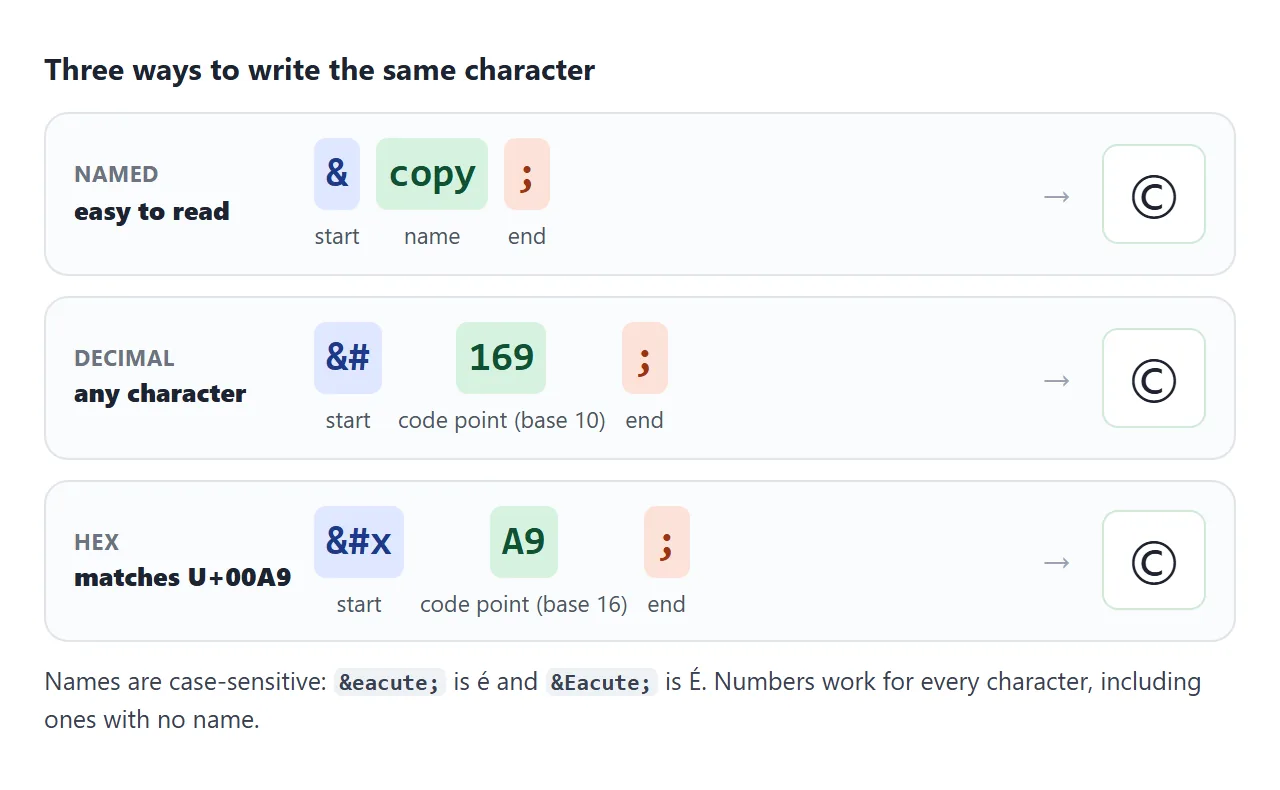
- Named:
©,—,→. Easy to read, but many characters have no name. Names are case-sensitive:éis é andÉis É. - Decimal:
&#plus the Unicode code point in base 10, such as₹for ₹, which has no name. - Hexadecimal:
&#xplus the code point in base 16, such as₹. The hex digits match how Unicode charts print it: U+20B9.
A number works for every character, so it is the fallback when you cannot find a name.
Which characters you must escape
The browser reads < as the start of a tag and & as the start of an entity. Those two are the ones that break things in text. Inside an attribute value, the quote that wraps the value ends it early.
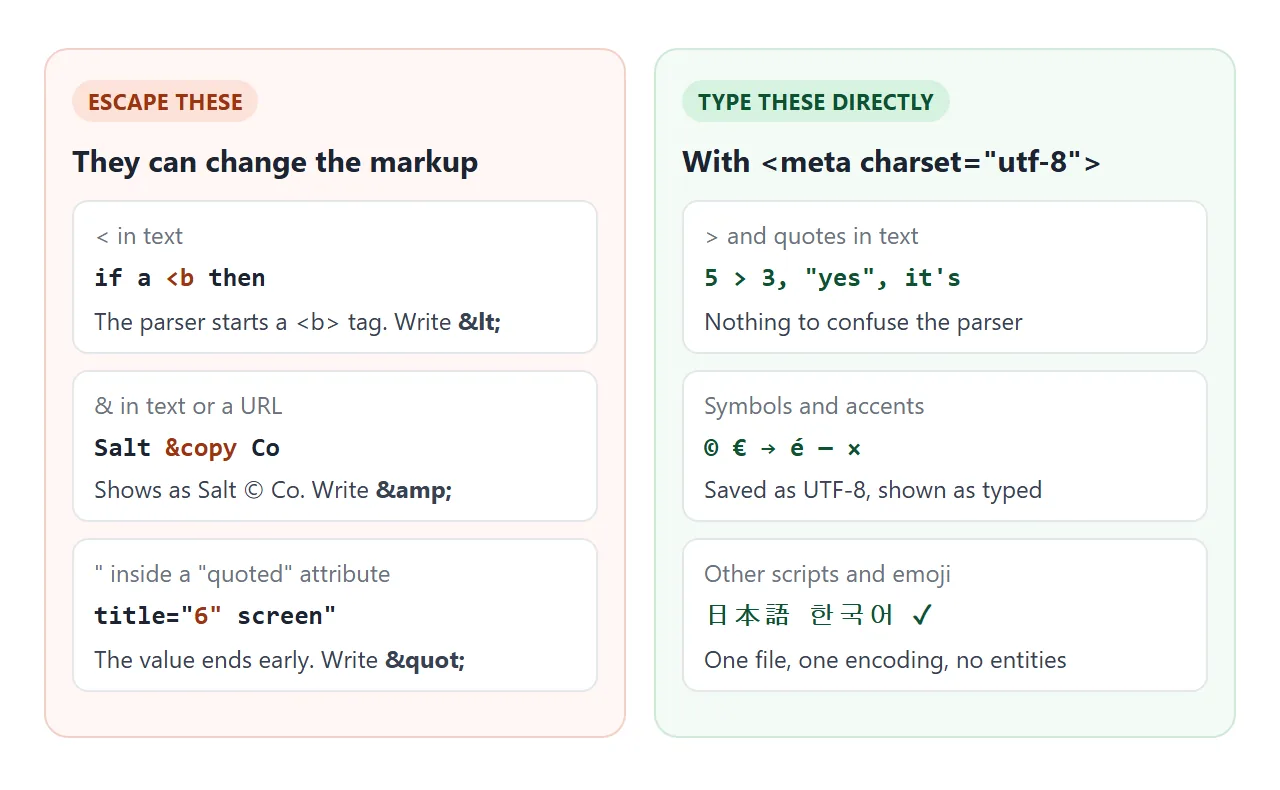
| Character | Where it causes trouble | Write it as |
|---|---|---|
< |
In text, before a letter or / it starts a tag |
< |
& |
In text and in URLs inside href |
& |
" |
Inside an attribute wrapped in " |
" |
' |
Inside an attribute wrapped in ' |
' or ' |
> |
Nowhere in normal text | > is optional |
A bare & followed by a space, as in "Tom & Jerry", displays correctly. The risk is when the letters after it happen to form a name.
© 2026 shows © 2026, even without the semicolon, because a few old names still work without one. Writing & every time removes the guesswork.
A link with several query parameters is the classic case. The correct form in the source is:
<a href="/search?q=shoes&size=42">Shoes in size 42</a>
What you can type directly
If the page declares UTF-8 and the file is saved as UTF-8, you can type ©, é, →, ×, 日本語 or an emoji straight into the HTML. No entity is needed, and the source stays readable.
<!doctype html>
<html lang="en">
<head>
<meta charset="utf-8">
The charset line belongs near the top of <head>. The DOCTYPE guide shows the full starter head.
Entities still have a place for invisible characters such as , and for characters that look alike in code, where − or – says exactly which dash you meant.
The non-breaking space:
is a space that the browser will not break a line at. Put it between two words that must stay together, like a number and its unit, and they move to the next line as one piece. Drag the width slider and compare.
<!doctype html>
<html lang="en">
<head>
<meta charset="utf-8">
<meta name="viewport" content="width=device-width, initial-scale=1">
<title>Normal space vs &nbsp;</title>
<style>
body { margin: 0; padding: 14px; font-family: system-ui, sans-serif; background: #f4f5f7; color: #1d2330; }
.ctl { display: flex; align-items: center; gap: 10px; font-size: 14px; margin-bottom: 12px; flex-wrap: wrap; }
.ctl input[type=range] { flex: 1; min-width: 140px; }
h3 { font-size: 13px; margin: 0 0 4px; }
h3 code { font-size: 12px; background: #e6e9ee; padding: 0 4px; border-radius: 4px; }
.box {
width: 240px; max-width: 100%; box-sizing: border-box; margin-bottom: 14px;
padding: 10px 12px; background: #fff; border: 1px solid #cfd4dc; border-radius: 8px;
font-size: 16px; line-height: 1.5;
}
.show .nb { background: #d6f2df; border-radius: 3px; } /* highlight the glued groups */
</style>
</head>
<body>
<div class="ctl">
<label for="w">Box width</label>
<input type="range" id="w" min="160" max="340" value="240">
<output id="wv">240px</output>
<label><input type="checkbox" id="mark" checked> Highlight glued words</label>
</div>
<h3>Normal spaces</h3>
<div class="box">The train leaves at 10 AM from platform 4, and the fare is 25 EUR.</div>
<h3>With <code>&nbsp;</code> inside each group</h3>
<div class="box show" id="glued">The train leaves at <span class="nb">10 AM</span> from <span class="nb">platform 4</span>, and the fare is <span class="nb">25 EUR</span>.</div>
<h3>Indented with <code>&nbsp;&nbsp;&nbsp;&nbsp;</code> (don't)</h3>
<div class="box"> Step one: open the file and read the first line out loud.</div>
<h3>Indented with CSS <code>text-indent: 2em</code></h3>
<div class="box" style="text-indent: 2em">Step one: open the file and read the first line out loud.</div>
<script>
const w = document.getElementById('w');
const boxes = document.querySelectorAll('.box');
w.addEventListener('input', () => {
boxes.forEach((b) => { b.style.width = w.value + 'px'; });
document.getElementById('wv').textContent = w.value + 'px';
});
document.getElementById('mark').addEventListener('change', (e) => {
document.getElementById('glued').classList.toggle('show', e.target.checked);
});
</script>
</body>
</html>
Two more behaviours matter. A run of is not collapsed the way ordinary spaces are, which is why people use them to push text sideways.
And that is exactly the habit to avoid. The gap is a count of space characters, so its width changes with the font and text size, and the spaces stick to the next word instead of wrapping. Use CSS instead:
- Indent a paragraph:
text-indent: 2em. - Space out items:
gapon a flex or grid container, ormargin. - Keep a whole phrase on one line:
white-space: nowrapon a<span>.
For the opposite problem, long words that refuse to wrap, see text not wrapping. The other space entities are   (half an em),   (one em) and   (thin), all of which allow a line break.
Entities in JavaScript do not decode
Entities belong to the HTML parser. A JavaScript string is not HTML, so '©' in a script is six ordinary characters. Whether they turn into © depends on how you put them on the page.
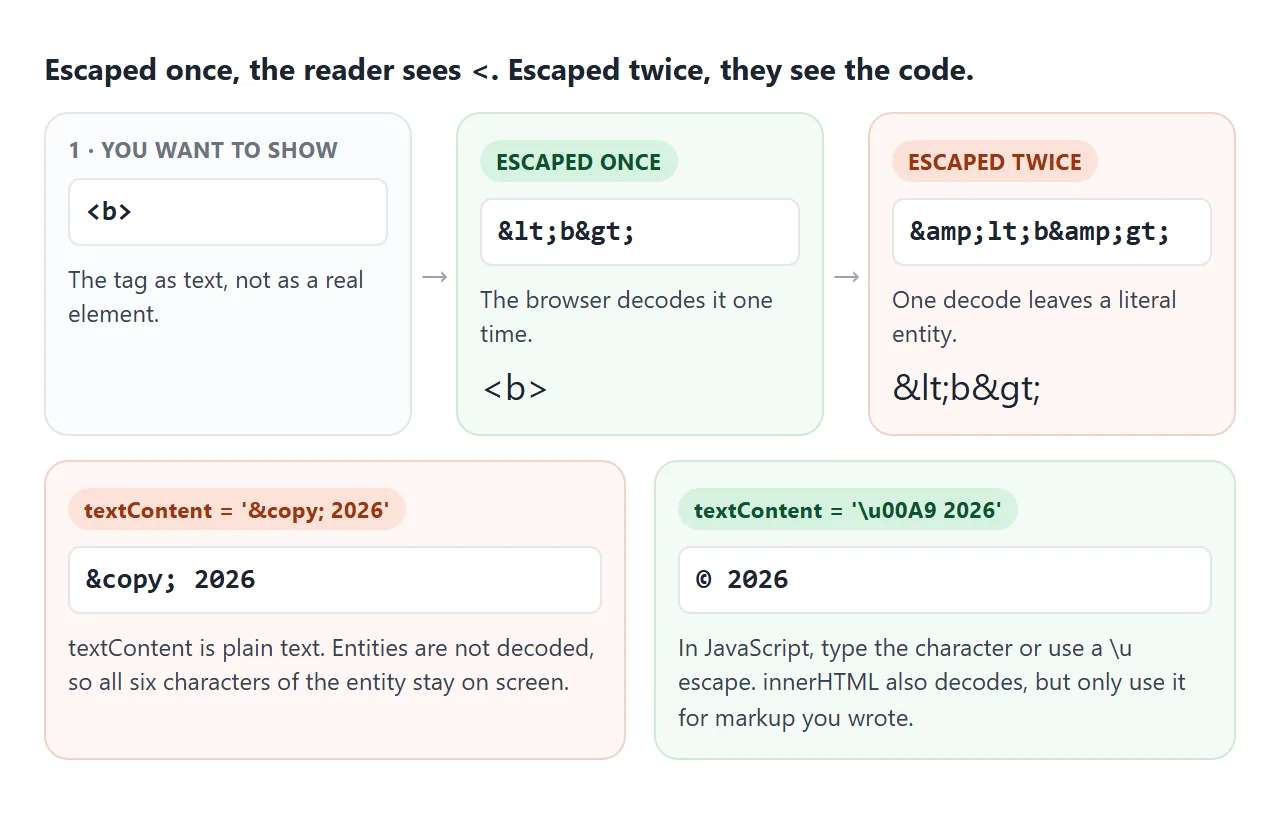
el.textContent = '© 2026';   // shows: © 2026
el.innerHTML   = '© 2026';   // shows: © 2026
el.textContent = '\u00A9 2026';  // shows: © 2026
el.textContent = '© 2026';        // shows: © 2026 (file saved as UTF-8)
textContent is the right choice for text, especially anything a user typed. Keep it, and type the character or use a \u escape. Do not switch to innerHTML just to decode one symbol. innerHTML vs textContent covers why user text must never go into innerHTML.
The same rule applies inside <script> and <style> elements in the page: their content is not scanned for entities.
Common HTML entities: arrows, currency, math
| Group | Characters and entities |
|---|---|
| Arrows | ← ← → → ↑ ↑ ↓ ↓ ⇒ ⇒ |
| Currency | € € £ £ ¥ ¥ ¢ ¢ ₩ ₩ |
| Math | × × ÷ ÷ ± ± ≠ ≠ ≤ ≤ ≥ ≥ |
| More math | ∞ ∞ ° ° ² ² ½ ½ − − |
| Typography | © © ® ® ™ ™ — — – – … … |
| Quotes | “ “ ” ” ‘ ‘ ’ ’ « « » » |
A finished example: a searchable symbol picker
This picker holds the symbols people look up most. Search by name, filter by group, and click a symbol. It shows the named, decimal and hex forms, and copies the named one (or the number, if there is no name).
<!doctype html>
<html lang="en">
<head>
<meta charset="utf-8">
<meta name="viewport" content="width=device-width, initial-scale=1">
<title>HTML entity symbol picker</title>
<style>
  body { margin: 0; padding: 14px; font-family: system-ui, sans-serif; background: #f4f5f7; color: #1d2330; }
  input[type=search] {
    width: 100%; box-sizing: border-box; padding: 9px 11px; font-size: 15px;
    border: 1px solid #cfd4dc; border-radius: 8px;
  }
  .tabs { display: flex; flex-wrap: wrap; gap: 6px; margin: 10px 0; }
  .tabs button {
    border: 1px solid #cfd4dc; background: #fff; border-radius: 99px; padding: 5px 11px; font-size: 13px; cursor: pointer;
  }
  .tabs button[aria-pressed=true] { background: #1d2330; color: #fff; border-color: #1d2330; }
  .grid {
    display: grid; grid-template-columns: repeat(auto-fill, minmax(46px, 1fr)); gap: 6px;
    height: 196px; overflow-y: auto; padding: 2px; align-content: start;
  }
  .grid button {
    height: 46px; font-size: 22px; background: #fff; border: 1px solid #e1e4ea; border-radius: 8px; cursor: pointer;
  }
  .grid button:hover, .grid button.on { border-color: #2563eb; box-shadow: 0 0 0 2px rgba(37, 99, 235, .25); }
  .card {
    display: grid; grid-template-columns: 64px 1fr; gap: 4px 12px; align-items: center;
    margin-top: 12px; padding: 12px; background: #fff; border-radius: 10px; border: 1px solid #e1e4ea;
  }
  .card .big { grid-row: span 3; font-size: 44px; text-align: center; }
  .card div { font-size: 13px; }
  .card code { font: 14px ui-monospace, Consolas, monospace; background: #eef1f5; padding: 1px 5px; border-radius: 4px; }
  .status { margin-top: 8px; font-size: 13px; color: #0f5132; min-height: 18px; }
  .empty { grid-column: 1 / -1; color: #6b7280; font-size: 14px; }
</style>
</head>
<body>
<input type="search" id="q" placeholder="Search: arrow, euro, times, dash" aria-label="Search symbols">
<div class="tabs" id="tabs"></div>
<div class="grid" id="grid"></div>

<div class="card">
  <div class="big" id="big"></div>
  <div id="title"></div>
  <div>Named <code id="cName"></code></div>
  <div>Number <code id="cDec"></code> <code id="cHex"></code></div>
</div>
<div class="status" id="status">Click a symbol to copy its entity.</div>

<script>
  // [character, entity name ('' if HTML has none), words to search, group]
  const SYMBOLS = [
    ['←', 'larr', 'left arrow', 'Arrows'], ['→', 'rarr', 'right arrow', 'Arrows'],
    ['↑', 'uarr', 'up arrow', 'Arrows'], ['↓', 'darr', 'down arrow', 'Arrows'],
    ['↔', 'harr', 'left right arrow', 'Arrows'], ['⇐', 'lArr', 'double left arrow', 'Arrows'],
    ['⇒', 'rArr', 'double right arrow implies', 'Arrows'], ['⇔', 'hArr', 'double left right arrow', 'Arrows'],
    ['↵', 'crarr', 'return enter arrow', 'Arrows'],
    ['€', 'euro', 'euro', 'Currency'], ['£', 'pound', 'pound sterling', 'Currency'],
    ['¥', 'yen', 'yen yuan', 'Currency'], ['¢', 'cent', 'cent', 'Currency'],
    ['₹', '', 'indian rupee', 'Currency'], ['₩', '', 'korean won', 'Currency'], ['₿', '', 'bitcoin', 'Currency'],
    ['×', 'times', 'times multiply', 'Math'], ['÷', 'divide', 'divide', 'Math'],
    ['±', 'plusmn', 'plus minus', 'Math'], ['−', 'minus', 'minus sign', 'Math'],
    ['≠', 'ne', 'not equal', 'Math'], ['≤', 'le', 'less than or equal', 'Math'],
    ['≥', 'ge', 'greater than or equal', 'Math'], ['≈', 'asymp', 'almost equal approximately', 'Math'],
    ['∞', 'infin', 'infinity', 'Math'], ['√', 'radic', 'square root', 'Math'],
    ['°', 'deg', 'degree', 'Math'], ['²', 'sup2', 'squared superscript two', 'Math'],
    ['½', 'frac12', 'one half fraction', 'Math'], ['π', 'pi', 'pi', 'Math'], ['‰', 'permil', 'per mille', 'Math'],
    ['©', 'copy', 'copyright', 'Typography'], ['®', 'reg', 'registered', 'Typography'],
    ['™', 'trade', 'trademark', 'Typography'], ['—', 'mdash', 'em dash', 'Typography'],
    ['–', 'ndash', 'en dash range', 'Typography'], ['…', 'hellip', 'ellipsis dots', 'Typography'],
    ['“', 'ldquo', 'left double quote', 'Typography'], ['”', 'rdquo', 'right double quote', 'Typography'],
    ['‘', 'lsquo', 'left single quote', 'Typography'], ['’', 'rsquo', 'right single quote apostrophe', 'Typography'],
    ['«', 'laquo', 'left angle quote guillemet', 'Typography'], ['»', 'raquo', 'right angle quote guillemet', 'Typography'],
    ['•', 'bull', 'bullet', 'Typography'], ['·', 'middot', 'middle dot', 'Typography'],
    ['§', 'sect', 'section', 'Typography'], ['¶', 'para', 'paragraph pilcrow', 'Typography'],
    ['†', 'dagger', 'dagger footnote', 'Typography'], ['✓', 'check', 'check mark tick', 'Typography'],
    ['<', 'lt', 'less than', 'Must escape'], ['>', 'gt', 'greater than', 'Must escape'],
    ['&', 'amp', 'ampersand and', 'Must escape'], ['"', 'quot', 'double quote', 'Must escape'],
    ['\u00A0', 'nbsp', 'non-breaking space', 'Spaces'], ['\u2002', 'ensp', 'en space', 'Spaces'],
    ['\u2003', 'emsp', 'em space', 'Spaces'], ['\u2009', 'thinsp', 'thin space', 'Spaces'],
  ];
  const GROUPS = ['All', 'Arrows', 'Currency', 'Math', 'Typography', 'Must escape', 'Spaces'];
  let group = 'All';

  const $ = (id) => document.getElementById(id);
  const face = (ch) => (ch.trim() ? ch : '␣');  // spaces are invisible, so show a marker

  function codes(ch, name) {
    const cp = ch.codePointAt(0);
    return {
      named: name ? '&' + name + ';' : '',
      dec: '&#' + cp + ';',
      hex: '&#x' + cp.toString(16).toUpperCase() + ';',
    };
  }

  function show([ch, name, words]) {
    const c = codes(ch, name);
    $('big').textContent = face(ch);
    $('title').textContent = words;
    $('cName').textContent = c.named || 'none, use a number';
    $('cDec').textContent = c.dec;
    $('cHex').textContent = c.hex;
    return c.named || c.dec;  // what gets copied
  }

  async function copy(text) {
    try {
      await navigator.clipboard.writeText(text);
      $('status').textContent = 'Copied ' + text;
    } catch (err) {
      $('status').textContent = 'Copying is blocked here. Select the code above: ' + text;
    }
  }

  function render() {
    const q = $('q').value.trim().toLowerCase();
    const list = SYMBOLS.filter((s) =>
      (group === 'All' || s[3] === group) &&
      (!q || s[2].includes(q) || s[1].toLowerCase().includes(q) || s[0] === q));
    $('grid').replaceChildren();
    if (!list.length) {
      const p = document.createElement('div');
      p.className = 'empty';
      p.textContent = 'No match. Try another word.';
      $('grid').append(p);
    }
    list.forEach((s) => {
      const b = document.createElement('button');
      b.textContent = face(s[0]);
      b.title = s[2];
      b.addEventListener('click', () => {
        document.querySelectorAll('.grid .on').forEach((x) => x.classList.remove('on'));
        b.classList.add('on');
        copy(show(s));
      });
      $('grid').append(b);
    });
  }

  GROUPS.forEach((g) => {
    const b = document.createElement('button');
    b.textContent = g;
    b.setAttribute('aria-pressed', g === group);
    b.addEventListener('click', () => {
      group = g;
      document.querySelectorAll('#tabs button').forEach((x) => x.setAttribute('aria-pressed', x === b));
      render();
    });
    $('tabs').append(b);
  });

  $('q').addEventListener('input', render);
  render();
  show(SYMBOLS[1]);
</script>
</body>
</html>
- Data: one array of
[character, name, words, group]. Add a row to add a symbol. - Numbers:
codePointAt(0)gives the code point.toString(16)turns it into hex. - Copying:
navigator.clipboard.writeText. The copy button guide covers what to do when copying is blocked.
When it does not work
| What you see | Cause | Fix |
|---|---|---|
< or & shows on the page |
The text was escaped twice | Escape once, at the last step before output |
&mdash shows as typed |
Missing semicolon | End every entity with ; |
| An entity set from JavaScript shows as code | textContent never decodes |
Type the character or use a \u escape |
| é shows as é or a box with a question mark | File encoding and declared charset differ | Save as UTF-8 and add <meta charset="utf-8"> |
Text after a < disappears |
The browser read it as a tag | Write < |
Gaps made of look different on every screen |
Their width follows the font, not the layout | Use text-indent, gap or margin |
Garbled accents are rarely an entity problem. They mean the bytes were read with a different encoding than the one they were saved in. The meta tags list shows where the charset line goes.
Share it as a link
A page full of symbols is a good test of whether sharing keeps them intact. An attachment can be opened with the wrong encoding, and a screenshot cannot be searched or copied from.
To send the working version, paste the page into a NOS document and choose Create share link. HTML to link walks through it.
The page renders as written and its scripts run, so the people you send it to can search the picker and copy symbols themselves. If you change the code later, the same link shows the new version.