element.innerHTML is a property that holds the HTML inside an element as a string. Read it and you get the markup. Set it and the browser parses your string, removes everything that was inside, and puts the new elements in their place.
const box = document.getElementById('box');
box.innerHTML = 'Hello <b>world</b>';   // world is bold
console.log(box.innerHTML);             // "Hello <b>world</b>"
Try it with your own text. The left box sets innerHTML, the right box sets textContent to the same string.
<!doctype html>
<html lang="en">
<head>
<meta charset="utf-8">
<meta name="viewport" content="width=device-width, initial-scale=1">
<title>innerHTML vs textContent</title>
<style>
body { margin: 0; padding: 16px; font-family: system-ui, sans-serif; background: #f4f5f7; color: #1d2330; }
label { font-size: 13px; font-weight: 600; }
input { box-sizing: border-box; width: 100%; margin: 6px 0 14px; padding: 9px 10px;
font: 15px ui-monospace, Consolas, monospace; border: 1px solid #c9ced8; border-radius: 8px; }
.row { display: grid; grid-template-columns: 1fr 1fr; gap: 12px; }
@media (max-width: 480px) { .row { grid-template-columns: 1fr; } }
.box { background: #fff; border-radius: 10px; padding: 12px; box-shadow: 0 2px 8px rgba(0,0,0,.08); }
.box h3 { margin: 0 0 8px; font: 700 13px ui-monospace, Consolas, monospace; color: #475569; }
.out { min-height: 24px; font-size: 16px; overflow-wrap: anywhere; }
.read { margin-top: 8px; font: 12px ui-monospace, Consolas, monospace; color: #64748b; overflow-wrap: anywhere; }
</style>
</head>
<body>
<label for="src">Type any text with tags:</label>
<input id="src" value="Hello <b>world</b> & <i>friends</i>">
<div class="row">
<div class="box">
<h3>el.innerHTML = text</h3>
<div class="out" id="asHtml"></div>
<div class="read" id="readHtml"></div>
</div>
<div class="box">
<h3>el.textContent = text</h3>
<div class="out" id="asText"></div>
<div class="read" id="readText"></div>
</div>
</div>
<script>
const src = document.getElementById('src');
const asHtml = document.getElementById('asHtml');
const asText = document.getElementById('asText');
function show() {
asHtml.innerHTML = src.value; // parsed as HTML: tags become elements
asText.textContent = src.value; // shown as plain text: tags stay visible
// Reading innerHTML back shows the markup each box now holds
document.getElementById('readHtml').textContent = 'innerHTML reads: ' + asHtml.innerHTML;
document.getElementById('readText').textContent = 'innerHTML reads: ' + asText.innerHTML;
}
src.addEventListener('input', show);
show();
</script>
</body>
</html>
The small grey line under each box reads innerHTML back. On the right, the tags come back as < and >, because that box holds text, not elements.
Reading innerHTML versus setting it
Reading does not hand you the string you set. The browser builds a fresh string from the elements that exist now. That is why & reads back as &, and why an unclosed tag you set comes back closed.
Setting is a full replacement. The old children are removed, the string is parsed, and the result becomes the new content. Anything you attached to the old children, such as event listeners, is gone with them.
innerHTML vs textContent vs innerText
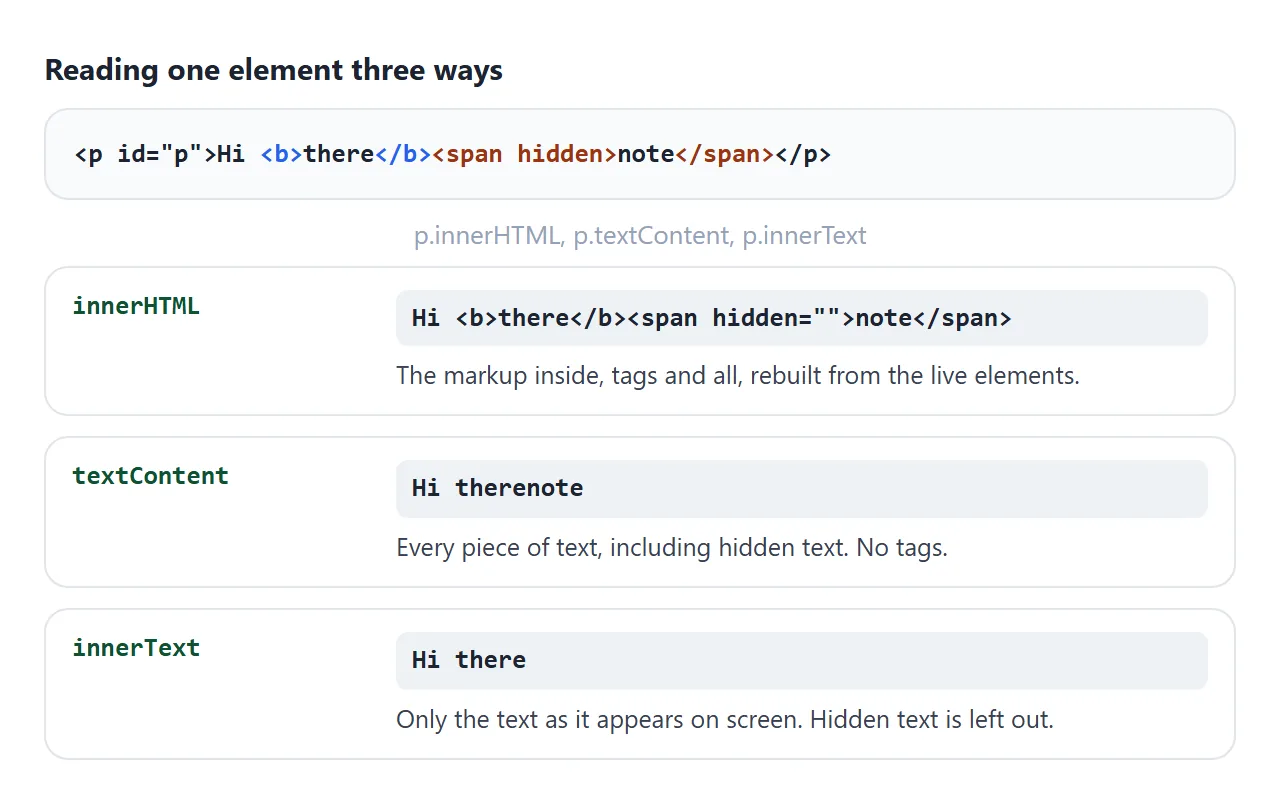
The three properties look alike and behave very differently. Here is the same paragraph read three ways:
| Property | Reading gives | Setting a string with tags | Use it for |
|---|---|---|---|
innerHTML |
The markup inside, as a string | Tags become elements | HTML you wrote yourself |
textContent |
All text, hidden text included | Tags show as plain characters | Plain text, and anything users typed |
innerText |
Only the text as rendered on screen | Tags show as characters, line breaks become <br> |
Copying what the user sees |
outerHTML |
The element itself plus its inside | Replaces the element itself | Swapping out a whole element |
innerText has to know how the page is laid out to decide what is visible, so reading it can make the browser calculate layout. For setting plain text, textContent is the simpler choice.
Why innerHTML += breaks your page
list.innerHTML += '<li>New</li>' looks like it adds one item. It is shorthand for list.innerHTML = list.innerHTML + '<li>New</li>'. The browser turns every existing child into a string, adds yours, then parses the whole thing again.
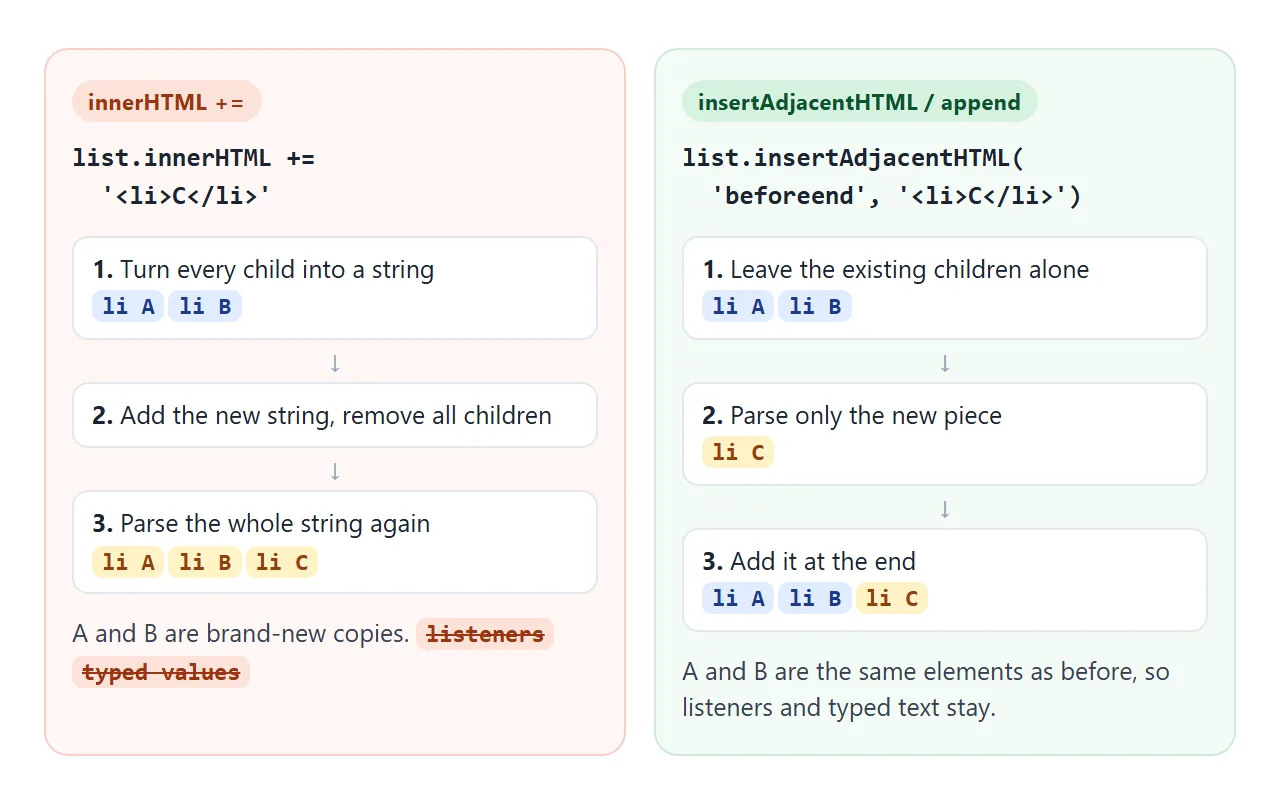
The rebuilt children look identical but are new elements. Two things do not survive the trip through a string:
- Event listeners added with
addEventListenerbelong to the old elements. - Typed values in inputs live in the element, not in the markup, so a field returns empty (or to its
valueattribute).
Try both sides. Type in the boxes, click the counters, then add an item.
<!doctype html>
<html lang="en">
<head>
<meta charset="utf-8">
<meta name="viewport" content="width=device-width, initial-scale=1">
<title>The innerHTML += trap</title>
<style>
  body { margin: 0; padding: 14px; font-family: system-ui, sans-serif; background: #f4f5f7; color: #1d2330; }
  p.how { margin: 0 0 12px; font-size: 14px; }
  .row { display: grid; grid-template-columns: 1fr 1fr; gap: 12px; }
  @media (max-width: 480px) { .row { grid-template-columns: 1fr; } }
  .panel { background: #fff; border-radius: 10px; padding: 12px; box-shadow: 0 2px 8px rgba(0,0,0,.08); }
  .panel.bad { border-top: 4px solid #ea580c; }
  .panel.good { border-top: 4px solid #16a34a; }
  h3 { margin: 0 0 8px; font: 700 13px ui-monospace, Consolas, monospace; }
  ul { list-style: none; margin: 0 0 10px; padding: 0; }
  li { padding: 6px 0; border-bottom: 1px solid #eef0f3; font-size: 14px; }
  li input { width: 100%; box-sizing: border-box; padding: 6px 8px; font-size: 14px; border: 1px solid #c9ced8; border-radius: 6px; }
  button { font: 600 14px system-ui, sans-serif; padding: 7px 12px; border-radius: 8px; border: 1px solid #c9ced8; background: #fff; cursor: pointer; }
  button.add { background: #1d2330; color: #fff; border-color: #1d2330; }
</style>
</head>
<body>
<p class="how">1. Type in both boxes. 2. Click both "Clicked" buttons. 3. Press "Add item" on each side.</p>

<div class="row">
  <div class="panel bad">
    <h3>list.innerHTML += ...</h3>
    <ul id="listA">
      <li><input placeholder="Type here"></li>
      <li><button class="count">Clicked 0</button></li>
    </ul>
    <button class="add" id="addA">Add item</button>
  </div>
  <div class="panel good">
    <h3>list.insertAdjacentHTML(...)</h3>
    <ul id="listB">
      <li><input placeholder="Type here"></li>
      <li><button class="count">Clicked 0</button></li>
    </ul>
    <button class="add" id="addB">Add item</button>
  </div>
</div>

<script>
  // Give each "Clicked" button a listener that counts clicks
  document.querySelectorAll('.count').forEach((btn) => {
    let n = 0;
    btn.addEventListener('click', () => { n++; btn.textContent = 'Clicked ' + n; });
  });

  let a = 0, b = 0;

  // Rebuilds the whole list from a string: new input, new button, no listener
  document.getElementById('addA').addEventListener('click', () => {
    document.getElementById('listA').innerHTML += '<li>New item ' + (++a) + '</li>';
  });

  // Parses only the new piece; the existing nodes are left alone
  document.getElementById('addB').addEventListener('click', () => {
    document.getElementById('listB').insertAdjacentHTML('beforeend', '<li>New item ' + (++b) + '</li>');
  });
</script>
</body>
</html>
On the left, the counter still shows its last number, because that number was text in the markup. Clicking it does nothing, because the listener was on the old button.
Adding HTML without rewriting: insertAdjacentHTML and append
insertAdjacentHTML(position, html) parses only the string you give it and inserts the result at one of four places:
el.insertAdjacentHTML('beforebegin', html);  // before el
el.insertAdjacentHTML('afterbegin', html);   // inside el, first
el.insertAdjacentHTML('beforeend', html);    // inside el, last
el.insertAdjacentHTML('afterend', html);     // after el
If you would rather not write HTML strings at all, build elements and add them with append:
const li = document.createElement('li');
li.textContent = 'New item';
list.append(li);
This is longer, but you get the element back as a variable. You can attach a listener to it on the next line, and text you put in with textContent can never turn into tags.
Script tags inserted with innerHTML do not run
A <script> inside a string you assign to innerHTML becomes an element in the page, and it never executes. This is how the HTML standard defines it, not a bug in your code.
When a script really has to be added from JavaScript, create the element yourself:
const s = document.createElement('script');
s.textContent = 'console.log("this runs")';
document.body.append(s);
Usually, though, the simpler fix is to put the code in your main script and call it after inserting the HTML. If the whole page is not running its scripts, see HTML JavaScript not working.
Never put untrusted text into innerHTML
"No scripts run" does not make innerHTML safe. Inline event handler attributes on the inserted elements can still run code.
If a comment, a name or a URL parameter goes straight into innerHTML, the person who wrote that text gets to write part of your page. This is called cross-site scripting (XSS).
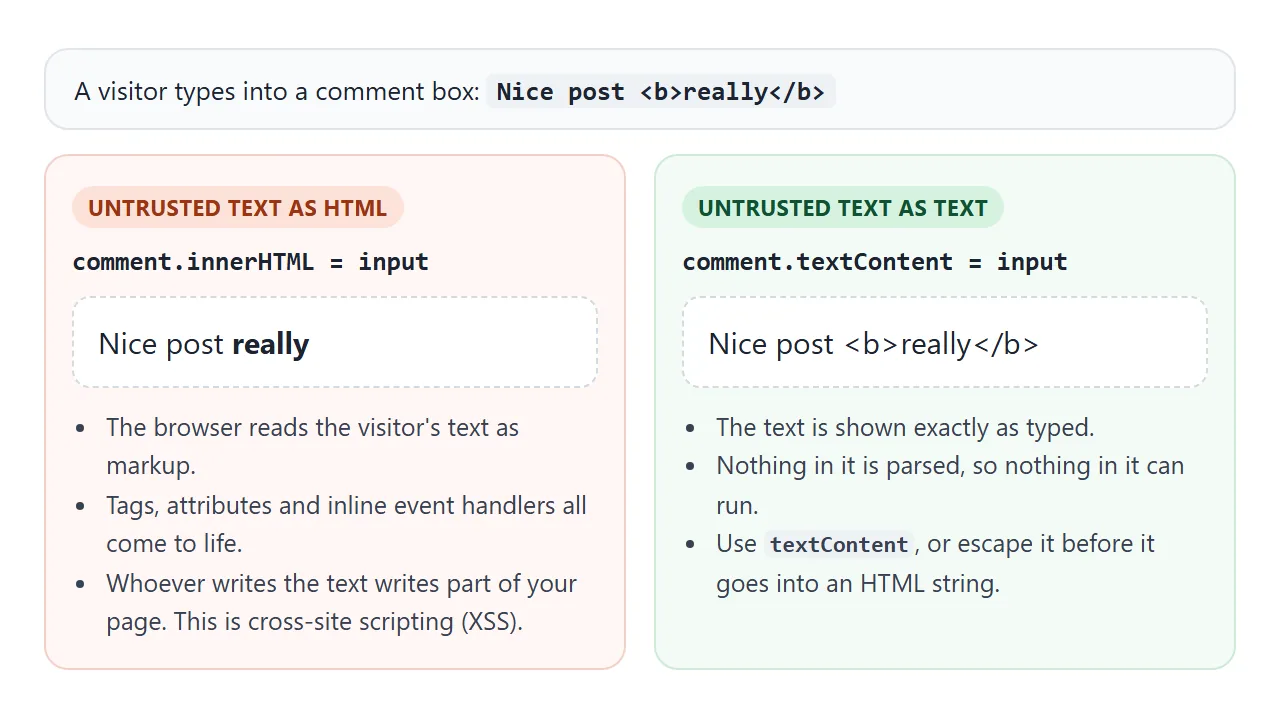
The rule is short. Text from users, from a form, from the address bar or from another site goes in with textContent. Keep innerHTML for strings you wrote yourself.
A finished example: a to-do list from an array
Real pages often keep data in an array and draw the list from it. This one builds each row with createElement and puts the task text in with textContent. The second task is <b>bold</b>, and it stays plain text.
<!doctype html>
<html lang="en">
<head>
<meta charset="utf-8">
<meta name="viewport" content="width=device-width, initial-scale=1">
<title>To-do list rendered safely</title>
<style>
  body { margin: 0; padding: 16px; font-family: system-ui, sans-serif; background: #f4f5f7; color: #1d2330; }
  .app { max-width: 460px; margin: 0 auto; background: #fff; border-radius: 12px; padding: 16px; box-shadow: 0 4px 16px rgba(0,0,0,.08); }
  h2 { margin: 0 0 12px; font-size: 18px; }
  form { display: flex; gap: 8px; margin-bottom: 12px; }
  form input { flex: 1; min-width: 0; padding: 9px 10px; font-size: 15px; border: 1px solid #c9ced8; border-radius: 8px; }
  form button { padding: 9px 14px; font: 600 15px system-ui, sans-serif; border: 0; border-radius: 8px; background: #16a34a; color: #fff; cursor: pointer; }
  ul { list-style: none; margin: 0; padding: 0; }
  li { display: flex; align-items: center; gap: 10px; padding: 9px 2px; border-bottom: 1px solid #eef0f3; }
  li span { flex: 1; overflow-wrap: anywhere; }
  li.done span { text-decoration: line-through; color: #94a3b8; }
  li button { border: 0; background: none; color: #94a3b8; font-size: 18px; cursor: pointer; }
  .count { margin-top: 10px; font-size: 13px; color: #64748b; }
</style>
</head>
<body>
<div class="app">
  <h2>To-do</h2>
  <form id="form">
    <input id="text" placeholder="Add a task, tags and all" autocomplete="off">
    <button>Add</button>
  </form>
  <ul id="list"></ul>
  <div class="count" id="count"></div>
</div>

<script>
  // The data lives in an array; the list is always drawn from it
  const todos = [
    { text: 'Buy milk', done: false },
    { text: '<b>bold</b> stays as text', done: false },
    { text: 'Read about innerHTML', done: true },
  ];
  const list = document.getElementById('list');

  function render() {
    list.replaceChildren();  // empty the list
    todos.forEach((todo, i) => {
      const li = document.createElement('li');
      li.className = todo.done ? 'done' : '';

      const box = document.createElement('input');
      box.type = 'checkbox';
      box.checked = todo.done;
      box.dataset.i = i;

      const span = document.createElement('span');
      span.textContent = todo.text;  // user text goes in as text, never as HTML

      const del = document.createElement('button');
      del.textContent = '×';
      del.setAttribute('aria-label', 'Delete');
      del.dataset.i = i;

      li.append(box, span, del);
      list.append(li);
    });
    const left = todos.filter((t) => !t.done).length;
    document.getElementById('count').textContent = left + ' of ' + todos.length + ' left';
  }

  // One listener on the list handles every checkbox and delete button
  list.addEventListener('click', (e) => {
    const i = e.target.dataset.i;
    if (i === undefined) return;
    if (e.target.type === 'checkbox') todos[i].done = e.target.checked;
    else todos.splice(i, 1);
    render();
  });

  document.getElementById('form').addEventListener('submit', (e) => {
    e.preventDefault();  // stay on the page
    const input = document.getElementById('text');
    const text = input.value.trim();
    if (!text) return;
    todos.push({ text, done: false });
    input.value = '';
    render();
  });

  render();
</script>
</body>
</html>
- One source of truth: the
todosarray. Every change edits the array, then callsrender(). - One listener: clicks are handled on the
<ul>, so rows can be rebuilt freely without re-adding listeners. - Form stays put: the
submithandler callspreventDefault(), so the page does not reload.
If you prefer template literals, escape each value before it goes into the string:
const esc = (s) => String(s)
.replace(/&/g, '&').replace(/</g, '<').replace(/>/g, '>')
.replace(/"/g, '"').replace(/'/g, ''');
list.innerHTML = todos.map((t) => `<li>${esc(t.text)}</li>`).join('');
Replacing the whole list in one assignment like this is fine. It is the repeated += on content with listeners and inputs that hurts. For a longer walk-through of a list app in one file, see the simple HTML todo list.
When it does not work
| What you see (Chrome wording) | Cause | Fix |
|---|---|---|
| "Cannot set properties of null (setting 'innerHTML')" | The script ran before the element existed, or the id is wrong | Put the script at the end of <body> or add defer; check the id spelling |
A <script> you inserted does nothing |
Scripts inserted with innerHTML are never run | Create it with createElement('script') and append it |
| Buttons stop responding after adding an item | innerHTML += replaced them with copies that have no listeners |
Use insertAdjacentHTML or append, or one listener on the parent |
| Typed text in inputs disappears | innerHTML += rebuilt the inputs from markup |
Same fix: stop rewriting existing content |
Tags appear as <b> on screen |
You set textContent or innerText |
Use innerHTML for HTML you wrote |
| Tags vanish and only the words show | You read textContent or innerText |
Read innerHTML to get the markup |
| A visitor's text shows up bold, linked or styled | User text went into innerHTML |
Use textContent, or escape it first. Treat it as a security bug |
For the first row, the defer version looks like this:
<script src="app.js" defer></script>
Share it as a link
The quickest way to show someone what += does to a list is to let them click it. A screenshot cannot be typed into, and an .html file sent as an attachment may open as plain code on a phone.
Paste the page into a NOS document and choose Create share link. HTML to link walks through it.
The page renders as written and its scripts run, so the people you send it to can type, click and add items themselves. If you change the code later, the same link shows the new version.