The HTML <ruby> element puts a small reading above a word. Write the word, then its reading in an <rt> element, and wrap both in <ruby>. Browsers draw the rt text in small type over the base text.
That is how pages show furigana over Japanese kanji and pinyin over Chinese characters.
Try it. Turn the readings off, then move them under the text.
<!doctype html>
<html lang="en">
<head>
<meta charset="utf-8">
<meta name="viewport" content="width=device-width, initial-scale=1">
<title>Ruby readings</title>
<style>
  body {
    margin: 0; padding: 18px; background: #f4f5f7; color: #1d2330;
    /* system fonts that cover Japanese and Chinese */
    font-family: system-ui, "Hiragino Sans", "Yu Gothic", Meiryo,
      "Noto Sans CJK JP", "PingFang SC", "Microsoft YaHei", sans-serif;
  }
  .controls { display: flex; flex-wrap: wrap; gap: 8px 18px; margin-bottom: 14px; font-size: 14px; }
  .card { background: #fff; border-radius: 12px; padding: 12px 16px; margin-bottom: 10px;
          box-shadow: 0 2px 8px rgba(0, 0, 0, .08); }
  .label { font-size: 12px; color: #6b7280; }
  .text { font-size: 30px; line-height: 2.2; }  /* room above and below for the readings */
  rt { font-size: 50%; color: #b4471f; }        /* style the annotation like any text */
  .under ruby { ruby-position: under; }
  .hide rt { visibility: hidden; }              /* keeps the space, so nothing jumps */
</style>
</head>
<body>
<div class="controls">
  <label><input type="checkbox" id="show" checked> Show readings</label>
  <label><input type="radio" name="pos" value="over" checked> Over</label>
  <label><input type="radio" name="pos" value="under"> Under</label>
</div>

<div id="samples">
  <div class="card">
    <div class="label">Japanese furigana, one reading per kanji</div>
    <div class="text" lang="ja">
      <ruby>東<rp>(</rp><rt>とう</rt><rp>)</rp>京<rp>(</rp><rt>きょう</rt><rp>)</rp></ruby>に<ruby>住<rp>(</rp><rt>す</rt><rp>)</rp></ruby>む
    </div>
  </div>
  <div class="card">
    <div class="label">Chinese pinyin</div>
    <div class="text" lang="zh-CN">
      <ruby>你<rp>(</rp><rt>nǐ</rt><rp>)</rp>好<rp>(</rp><rt>hǎo</rt><rp>)</rp></ruby>,<ruby>中<rp>(</rp><rt>zhōng</rt><rp>)</rp>文<rp>(</rp><rt>wén</rt><rp>)</rp></ruby>
    </div>
  </div>
</div>

<script>
  const samples = document.getElementById('samples');

  // show or hide every <rt> with one class on the parent
  document.getElementById('show').addEventListener('change', (e) => {
    samples.classList.toggle('hide', !e.target.checked);
  });

  // move readings above or below the base text
  document.querySelectorAll('input[name="pos"]').forEach((radio) => {
    radio.addEventListener('change', () => {
      samples.classList.toggle('under', radio.value === 'under');
    });
  });
</script>
</body>
</html>
<ruby>漢<rp>(</rp><rt>かん</rt><rp>)</rp>字<rp>(</rp><rt>じ</rt><rp>)</rp></ruby>
The three elements: ruby, rt and rp
Each element has one job. ruby holds the whole annotated run. rt holds a reading and belongs to the base text just before it. rp holds a bracket that only appears where ruby layout does not.
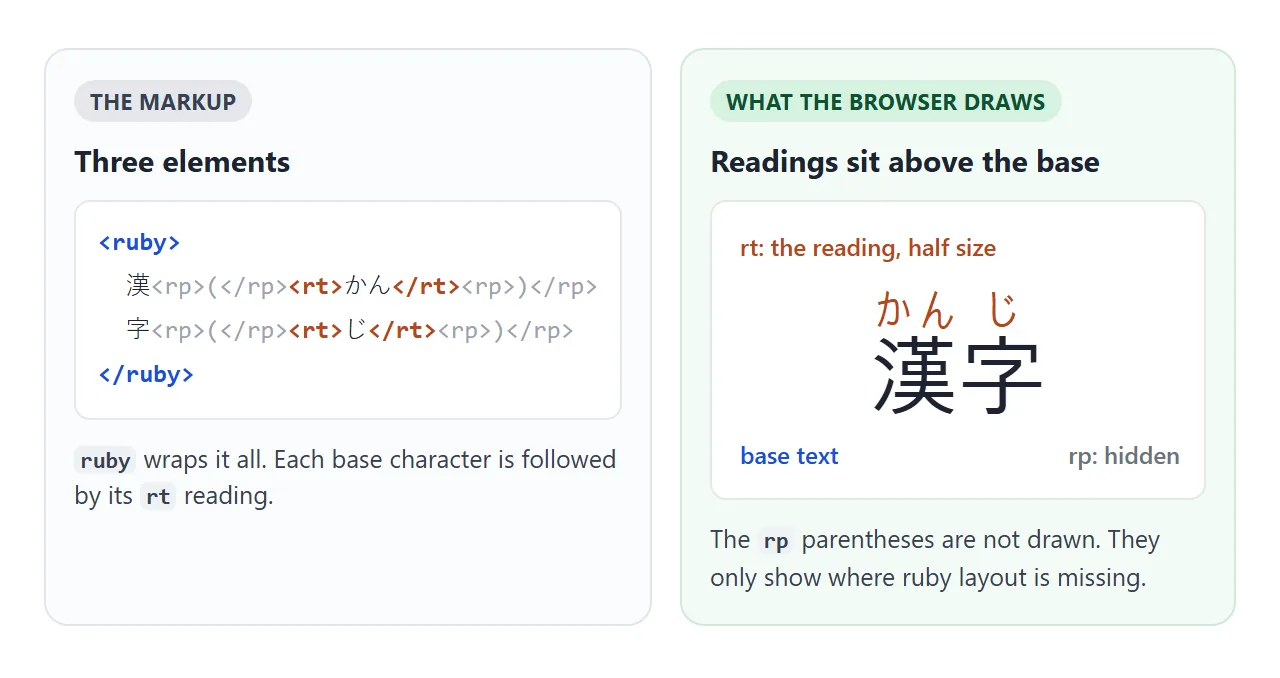
- Put the base text inside
<ruby>. - After each base character, or after the whole word, add
<rt>with the reading. - Put
<rp>(</rp>before eachrtand<rp>)</rp>after it. - Add a
langattribute such aslang="ja"orlang="zh-CN"to the text. - Give the paragraph a taller
line-height, around 2.
Older tutorials also use <rb> and <rtc>. MDN lists both as deprecated, and the three elements above are all a page needs.
Furigana, pinyin and zhuyin
Furigana are kana readings over kanji. A school text might mark every kanji, while a page for adults marks only rare ones. The markup is the same either way: one rt after the characters it reads.
Pinyin works the same way over Chinese characters, with tone marks typed as ordinary letters such as ǎ or ō. Type them directly in a UTF-8 file. The HTML entities guide covers the cases where a character is hard to type.
Zhuyin (bopomofo) is traditionally set to the right of each character. The CSS Ruby spec defines ruby-position: inter-character for that. The Chromium build we tested did not recognise the value, so check the browsers you target before relying on it.
One reading per character, or one per word
There are two ways to attach readings. Mono ruby puts an rt after every character. Group ruby puts a single rt after the whole word.
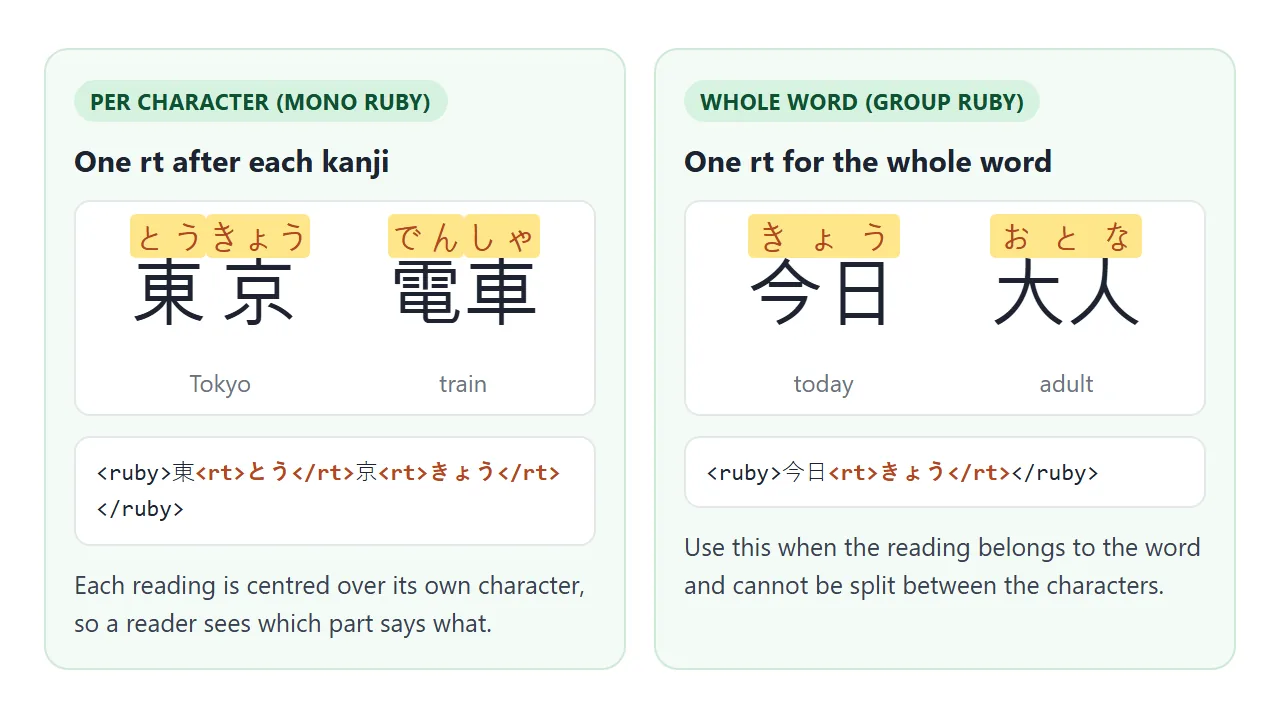
Mono ruby is clearer for learners, because each reading sits over its own kanji. Some words cannot be split. 今日 (today) reads きょう as a whole, and no part of that reading belongs to 今 alone. Those words take group ruby.
| Pattern | Markup | Use it for |
|---|---|---|
| Per character | 東<rt>とう</rt>京<rt>きょう</rt> |
Words whose kanji each have a reading |
| Whole word | 今日<rt>きょう</rt> |
Readings that belong to the word only |
| Several words | One <ruby> per word |
Keeping line breaks between words |
Styling rt with CSS
rt is ordinary text, so font-size, color and font-weight work on it. Chromium draws it at 50% of the base size by default. Raise it a little for small base text, or lower it for large headings.
.reading { line-height: 2; }             /* room for the readings */
rt { font-size: 50%; color: #b4471f; }
ruby { ruby-position: under; }           /* over is the default */
.quiz rt { visibility: hidden; }         /* hide without moving the text */
Two properties control placement. ruby-position takes over or under and goes on the ruby element or a parent.
ruby-align decides how a reading shorter or longer than its base is spread out. Support for ruby-align varies between browsers, so test it before building on it.
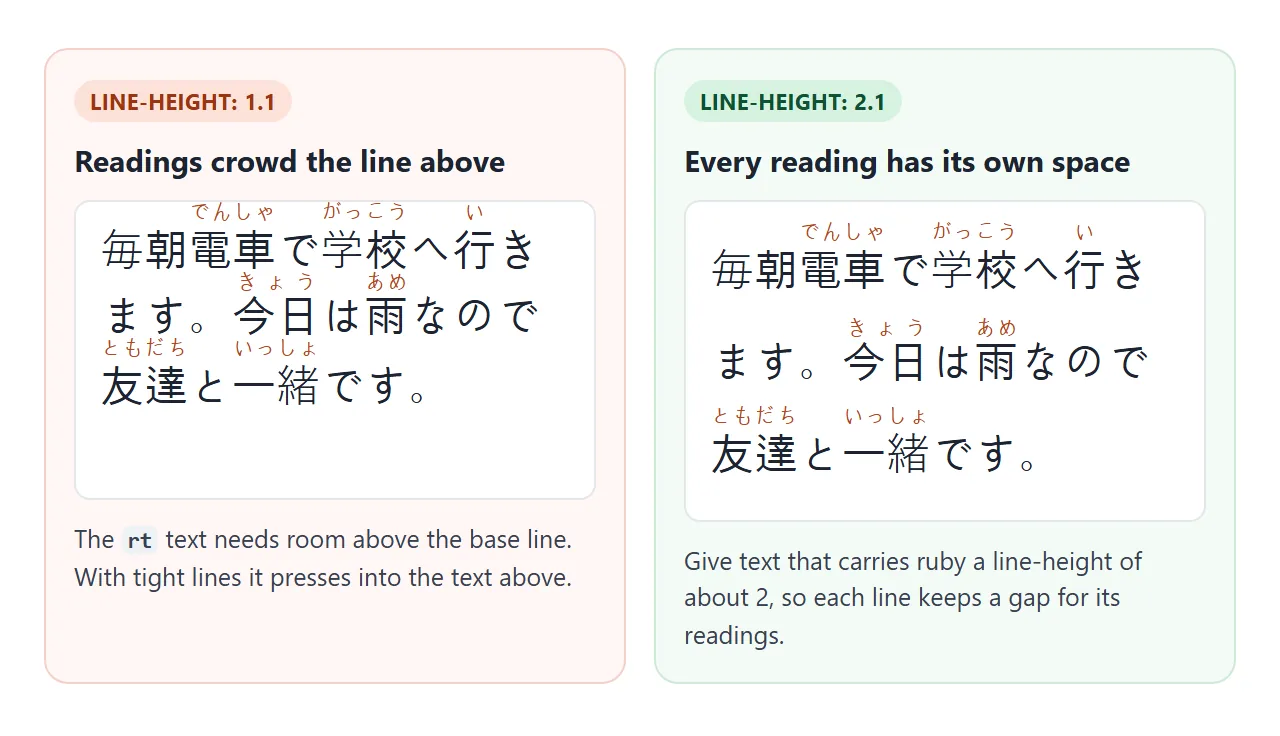
Use visibility: hidden rather than display: none to hide readings. The space stays, and the text does not jump when a reading reappears.
What rp is for
Browsers that lay out ruby hide rp, so on a normal page the brackets never show. They matter where ruby layout is missing, such as a text-mode browser or a tool that turns the page into plain text. There the markup flows inline.
<!doctype html>
<html lang="en">
<head>
<meta charset="utf-8">
<meta name="viewport" content="width=device-width, initial-scale=1">
<title>What rp is for</title>
<style>
  body {
    margin: 0; padding: 16px; background: #f4f5f7; color: #1d2330;
    font-family: system-ui, "Hiragino Sans", "Yu Gothic", Meiryo,
      "Noto Sans CJK JP", "PingFang SC", "Microsoft YaHei", sans-serif;
  }
  .grid { display: grid; grid-template-columns: repeat(auto-fit, minmax(180px, 1fr)); gap: 10px; }
  .panel { background: #fff; border-radius: 12px; padding: 12px 14px; box-shadow: 0 2px 8px rgba(0, 0, 0, .08); }
  h3 { margin: 0 0 4px; font-size: 14px; }
  p.note { margin: 0; font-size: 12.5px; color: #6b7280; line-height: 1.4; }
  .text { font-size: 24px; line-height: 2; margin: 8px 0 4px; white-space: nowrap; }

  /* Pretend the browser has no ruby layout: everything flows inline.
     rp must be switched on by hand, because ruby-aware browsers hide it. */
  .no-ruby ruby, .no-ruby rt { display: inline; font-size: inherit; }
  .no-ruby rp { display: inline; }
</style>
</head>
<body>
<div class="grid">
  <div class="panel">
    <h3>Ruby works</h3>
    <div class="text" lang="ja"><ruby>漢<rp>(</rp><rt>かん</rt><rp>)</rp>字<rp>(</rp><rt>じ</rt><rp>)</rp></ruby></div>
    <p class="note">The rp parentheses are in the markup, and the browser hides them.</p>
  </div>
  <div class="panel no-ruby">
    <h3>No ruby, with rp</h3>
    <div class="text" lang="ja"><ruby>漢<rp>(</rp><rt>かん</rt><rp>)</rp>字<rp>(</rp><rt>じ</rt><rp>)</rp></ruby></div>
    <p class="note">The same markup, flowed inline. The parentheses keep base and reading apart.</p>
  </div>
  <div class="panel no-ruby">
    <h3>No ruby, no rp</h3>
    <div class="text" lang="ja"><ruby>漢<rt>かん</rt>字<rt>じ</rt></ruby></div>
    <p class="note">Without rp, the reading runs straight into the kanji.</p>
  </div>
</div>
</body>
</html>
Without rp, the inline fallback reads 漢かん字じ, which is hard to follow. With it, the reader gets 漢(かん)字(じ). Adding rp costs a few characters and does not change the normal layout.
Fonts, lang and copying
A browser can only draw characters that some installed font covers. List system fonts that include Japanese and Chinese, and the device still needs a font for those scripts. Missing coverage shows as empty boxes.
font-family: system-ui, "Hiragino Sans", "Yu Gothic", Meiryo,
  "Noto Sans CJK JP", "PingFang SC", "Microsoft YaHei", sans-serif;
The lang attribute matters as well. Japanese and Chinese share many characters that are drawn differently in each language, and lang tells the browser which form to pick. The HTML font family list covers font stacks in more detail.
Copying is the other surprise. rt is real text, so in Chromium-based browsers, selecting 漢字 with its readings copies 漢かん字. Other browsers may differ. user-select: none on rt kept the reading out of the copy in Chromium.
A finished example: vocabulary flashcards
The flashcards below use per-character and whole-word ruby. The button switches to a quiz mode that hides every reading. Tap a card to check your answer.
<!doctype html>
<html lang="en">
<head>
<meta charset="utf-8">
<meta name="viewport" content="width=device-width, initial-scale=1">
<title>Kanji flashcards</title>
<style>
  body {
    margin: 0; padding: 16px; background: #f4f5f7; color: #1d2330;
    font-family: system-ui, "Hiragino Sans", "Yu Gothic", Meiryo,
      "Noto Sans CJK JP", "PingFang SC", "Microsoft YaHei", sans-serif;
  }
  .bar { display: flex; align-items: center; justify-content: space-between; gap: 10px; margin-bottom: 12px; }
  button { font: inherit; font-size: 14px; padding: 8px 14px; border: 0; border-radius: 8px;
           background: #1d2330; color: #fff; cursor: pointer; }
  #score { font-size: 14px; color: #4b5563; }
  .cards { display: grid; grid-template-columns: repeat(auto-fill, minmax(150px, 1fr)); gap: 10px;
           list-style: none; margin: 0; padding: 0; }
  .cards li { background: #fff; border-radius: 12px; padding: 8px 12px 10px; text-align: center;
              box-shadow: 0 2px 8px rgba(0, 0, 0, .08); cursor: pointer; }
  .word { font-size: 34px; line-height: 2; }
  .meaning { font-size: 13px; color: #6b7280; }
  rt { font-size: 45%; color: #b4471f; user-select: none; }  /* copying gives the kanji only */

  /* quiz mode: readings are hidden until the card is tapped */
  .quiz li:not(.shown) rt { visibility: hidden; }
  .quiz li:not(.shown) { background: #fffbeb; }
</style>
</head>
<body>
<div class="bar">
  <button id="mode">Hide readings</button>
  <span id="score"></span>
</div>

<ul class="cards" id="cards" lang="ja">
  <li><div class="word"><ruby>猫<rp>(</rp><rt>ねこ</rt><rp>)</rp></ruby></div><div class="meaning">cat</div></li>
  <li><div class="word"><ruby>学<rp>(</rp><rt>がっ</rt><rp>)</rp>校<rp>(</rp><rt>こう</rt><rp>)</rp></ruby></div><div class="meaning">school</div></li>
  <li><div class="word"><ruby>電<rp>(</rp><rt>でん</rt><rp>)</rp>車<rp>(</rp><rt>しゃ</rt><rp>)</rp></ruby></div><div class="meaning">train</div></li>
  <li><div class="word"><ruby>今日<rp>(</rp><rt>きょう</rt><rp>)</rp></ruby></div><div class="meaning">today</div></li>
  <li><div class="word"><ruby>友<rp>(</rp><rt>とも</rt><rp>)</rp>達<rp>(</rp><rt>だち</rt><rp>)</rp></ruby></div><div class="meaning">friend</div></li>
  <li><div class="word"><ruby>水<rp>(</rp><rt>みず</rt><rp>)</rp></ruby></div><div class="meaning">water</div></li>
</ul>

<script>
  const cards = document.getElementById('cards');
  const items = cards.querySelectorAll('li');
  const mode = document.getElementById('mode');
  const score = document.getElementById('score');

  function update() {
    const quiz = cards.classList.contains('quiz');
    const shown = cards.querySelectorAll('li.shown').length;
    score.textContent = quiz ? shown + ' / ' + items.length + ' revealed' : '';
  }

  // switch between study mode and quiz mode
  mode.addEventListener('click', () => {
    const quiz = cards.classList.toggle('quiz');
    items.forEach((li) => li.classList.remove('shown'));
    mode.textContent = quiz ? 'Show all readings' : 'Hide readings';
    update();
  });

  // in quiz mode, tapping a card reveals (or hides again) its reading
  items.forEach((li) => {
    li.addEventListener('click', () => {
      if (!cards.classList.contains('quiz')) return;
      li.classList.toggle('shown');
      update();
    });
  });
</script>
</body>
</html>
- Quiz mode: one class on the list hides every
rtwithvisibility: hidden. - Reveal: tapping a card adds a
shownclass that brings its readings back. - Clean copy:
user-select: noneonrtkeeps the reading out of copied text.
Ruby for abbreviations and other notes
Ruby is not limited to East Asian text. The HTML spec describes it for short annotations in general, so a gloss over a word or a translation over a phrase is valid markup.
An abbreviation is a weaker fit. The expansion becomes part of the line, so it is copied and read along with the short form. For that job, the abbr tag with the full words written out on first use is the usual choice.
When it does not work
| What you see | Cause | Fix |
|---|---|---|
| Readings press into the line above | line-height is too tight for the extra text |
Set line-height to about 2 on text that carries ruby |
| Brackets show around readings | A CSS rule gives rp a display value |
Remove rp from that rule; browsers hide it by default |
ruby-position does nothing |
Set on rt, or an unsupported value such as inter-character |
Set over or under on ruby or a parent |
| Empty boxes instead of characters | No installed font covers the script | Use a system font stack and set lang |
| Characters look slightly wrong | Missing or wrong lang |
Set lang="ja", lang="zh-CN" or lang="zh-TW" |
| Pasted text has readings mixed in | rt is copied with the base text |
user-select: none on rt |
For more on line spacing, see CSS line-height.
Share it as a link
A page with ruby is worth seeing in a browser. A screenshot cannot hide readings or run a quiz, and an .html attachment may open as plain code on a phone.
To send the working version, paste the page into a NOS document and choose Create share link. HTML to link walks through it.
The page renders as written and its scripts run, so the people you send it to can tap the flashcards themselves. If you change the code later, the same link shows the new version.