"Service mark" here means the symbol ℠, the small raised SM that follows the name of a service. It is not about service workers. In HTML you write it as ℠ or ℠, or paste the character itself. There is no named entity for it.
Try the spellings first. Each row shows the code you type and what the browser draws.
<!doctype html>
<html lang="en">
<head>
<meta charset="utf-8">
<meta name="viewport" content="width=device-width, initial-scale=1">
<title>Service mark in HTML</title>
<style>
body { margin: 0; padding: 14px; font-family: system-ui, sans-serif; background: #f4f5f7; color: #1d2330; }
h1 { font-size: 15px; margin: 0 0 10px; }
.row { display: grid; grid-template-columns: 1fr 1fr; gap: 8px; align-items: center;
background: #fff; border-radius: 10px; padding: 9px 12px; margin-bottom: 7px;
box-shadow: 0 1px 4px rgba(0, 0, 0, .08); }
.label { grid-column: 1 / -1; font-size: 11px; font-weight: 700; letter-spacing: .3px; color: #6b7280; text-transform: uppercase; }
code { font: 600 12.5px ui-monospace, Consolas, monospace; background: #eef1f5; border-radius: 4px; padding: 2px 5px; overflow-wrap: anywhere; }
.out { font-size: 20px; font-weight: 600; }
.bad .out { color: #9a3412; }
.bad { background: #fff7f5; }
</style>
</head>
<body>
<h1>One mark, written four ways (plus one that fails)</h1>
<div id="rows"></div>
<script>
const rows = [
{ label: 'Decimal reference', code: 'Brightside℠' },
{ label: 'Hex reference', code: 'Brightside℠' },
{ label: 'The character itself', code: 'Brightside℠' },
{ label: 'Superscript letters', code: 'Brightside<sup>SM</sup>' },
{ label: 'Guessed named reference', code: 'Brightside&servicemark;', bad: true }
];
const box = document.getElementById('rows');
rows.forEach((r) => {
const row = document.createElement('div');
row.className = 'row' + (r.bad ? ' bad' : '');
row.innerHTML = '<div class="label"></div><code></code><div class="out"></div>';
row.querySelector('.label').textContent = r.label;
row.querySelector('code').textContent = r.code; // textContent shows the source as typed
row.querySelector('.out').innerHTML = r.code; // innerHTML parses it like a page would
box.appendChild(row);
});
</script>
</body>
</html>
The symbol is the Unicode character U+2120, named SERVICE MARK, in the Letterlike Symbols block. It is a single character, not the letters S and M styled to look raised.
The four ways to write it
Three of them produce the same character. The fourth uses two ordinary letters.
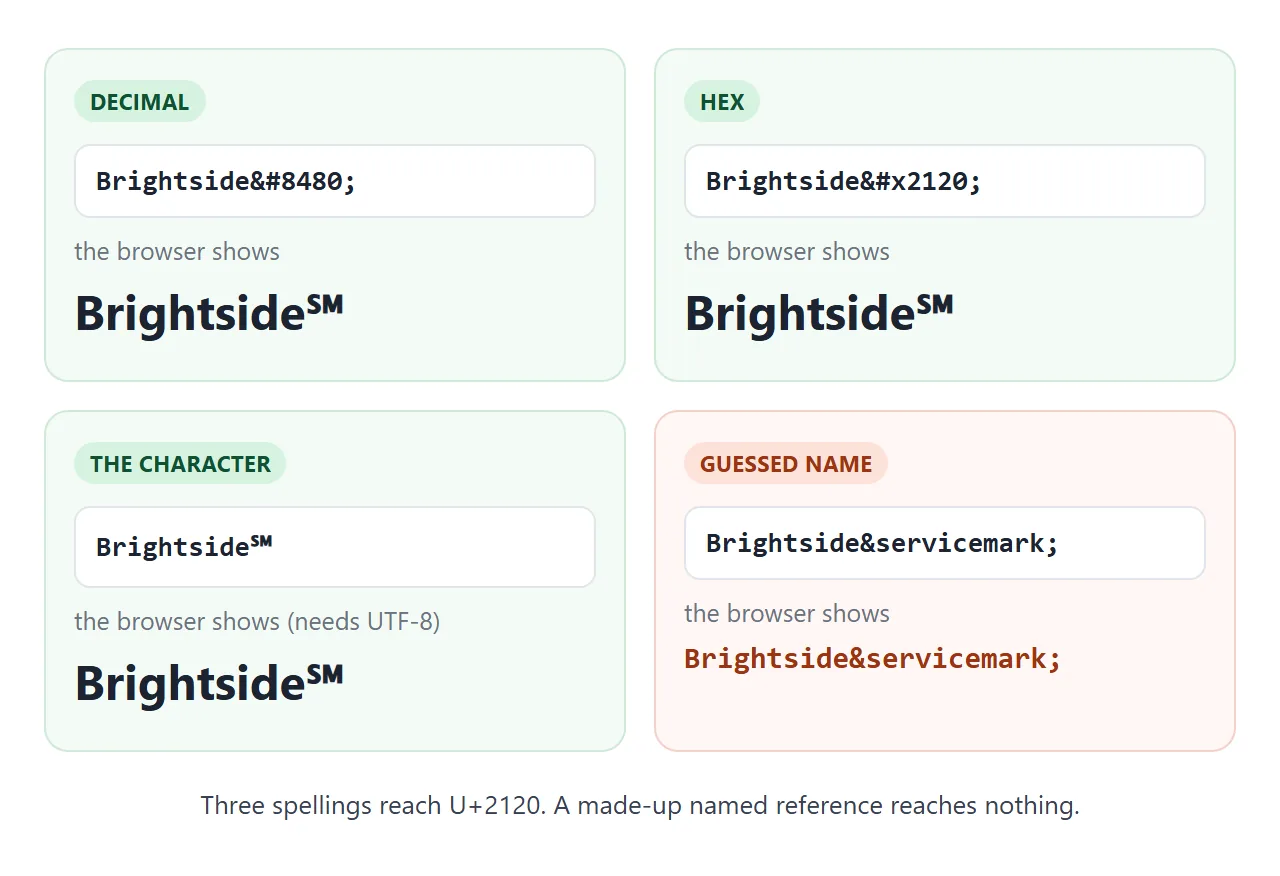
- Decimal reference:
℠starts with&#, then the code point in base ten, then a semicolon. - Hex reference:
℠starts with&#x, then the code point in base sixteen. - The character itself: ℠ pasted into the source. This needs the file to be UTF-8, covered below.
- Superscript letters:
<sup>SM</sup>is markup around two letters, not the symbol.
Named references such as ™ and ® exist for the trade mark and registered signs. The HTML standard's list has no entry for U+2120, so a guessed name is left as plain text. HTML entities covers the rest of the syntax.
Character or sup tag
The two look alike in a heading but behave differently once the text leaves the page. Move the slider and compare the plain text each one gives back.
<!doctype html>
<html lang="en">
<head>
<meta charset="utf-8">
<meta name="viewport" content="width=device-width, initial-scale=1">
<title>Character vs sup tag</title>
<style>
body { margin: 0; padding: 14px; font-family: system-ui, sans-serif; background: #f4f5f7; color: #1d2330; }
.ctl { display: flex; align-items: center; gap: 10px; font-size: 13px; margin-bottom: 10px; }
input[type=range] { flex: 1; min-width: 0; }
.card { background: #fff; border-radius: 10px; padding: 10px 12px; margin-bottom: 8px; box-shadow: 0 1px 4px rgba(0, 0, 0, .08); }
.tag { font-size: 11px; font-weight: 700; letter-spacing: .3px; color: #6b7280; text-transform: uppercase; }
.brand { font-weight: 700; margin: 4px 0 6px; line-height: 1.3; overflow-wrap: anywhere; }
.brand sup { font-size: .5em; }
.plain { font: 12.5px ui-monospace, Consolas, monospace; color: #374151; }
.plain b { background: #d6f2df; color: #0f5132; padding: 1px 5px; border-radius: 4px; }
.plain b.sm { background: #fde2da; color: #9a3412; }
</style>
</head>
<body>
<div class="ctl"><label for="size">Text size</label><input id="size" type="range" min="16" max="44" value="26"><span id="px">26px</span></div>
<div class="card">
<div class="tag">Character U+2120</div>
<div class="brand" id="a">Brightside℠</div>
<div class="plain">Plain text: <b id="a-t"></b> (<span id="a-n"></span> char)</div>
</div>
<div class="card">
<div class="tag">sup tag</div>
<div class="brand" id="b">Brightside<sup>SM</sup></div>
<div class="plain">Plain text: <b class="sm" id="b-t"></b> (<span id="b-n"></span> chars)</div>
</div>
<script>
const size = document.getElementById('size');
const brands = [document.getElementById('a'), document.getElementById('b')];
// textContent is the text without any tags: what a plain-text paste would carry
[['a', 'a-t', 'a-n'], ['b', 'b-t', 'b-n']].forEach(([id, t, n]) => {
const txt = document.getElementById(id).textContent;
document.getElementById(t).textContent = txt;
document.getElementById(n).textContent = [...txt].length - 'Brightside'.length;
});
size.addEventListener('input', () => {
brands.forEach((el) => { el.style.fontSize = size.value + 'px'; });
document.getElementById('px').textContent = size.value + 'px';
});
size.dispatchEvent(new Event('input'));
</script>
</body>
</html>
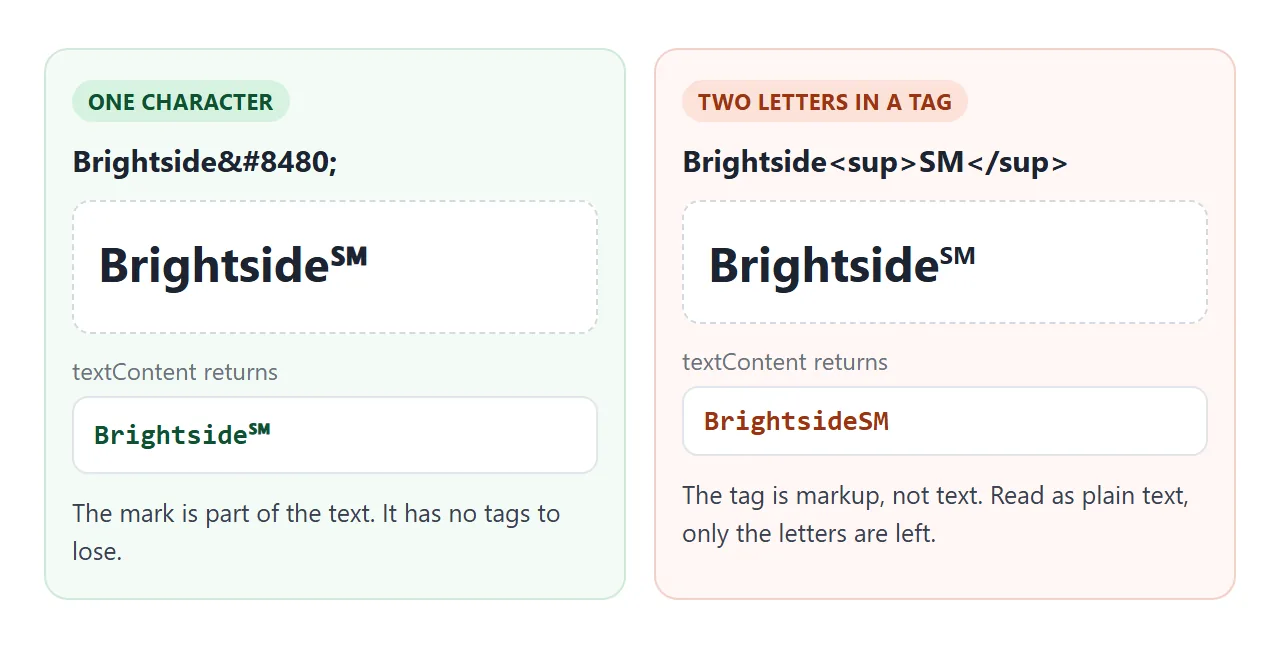
Use the character when the mark must travel with the name, for example in a page title or a copied line.
Use <sup>SM</sup> when you want to size and place the letters yourself (sup and sub in HTML shows how). MDN advises that a brand name's raised look is a styling job for CSS.
Show the right mark for the job
The three marks look similar and mean different things. In the United States, the USPTO says TM may be used for goods and SM for services, even if no application has been filed.
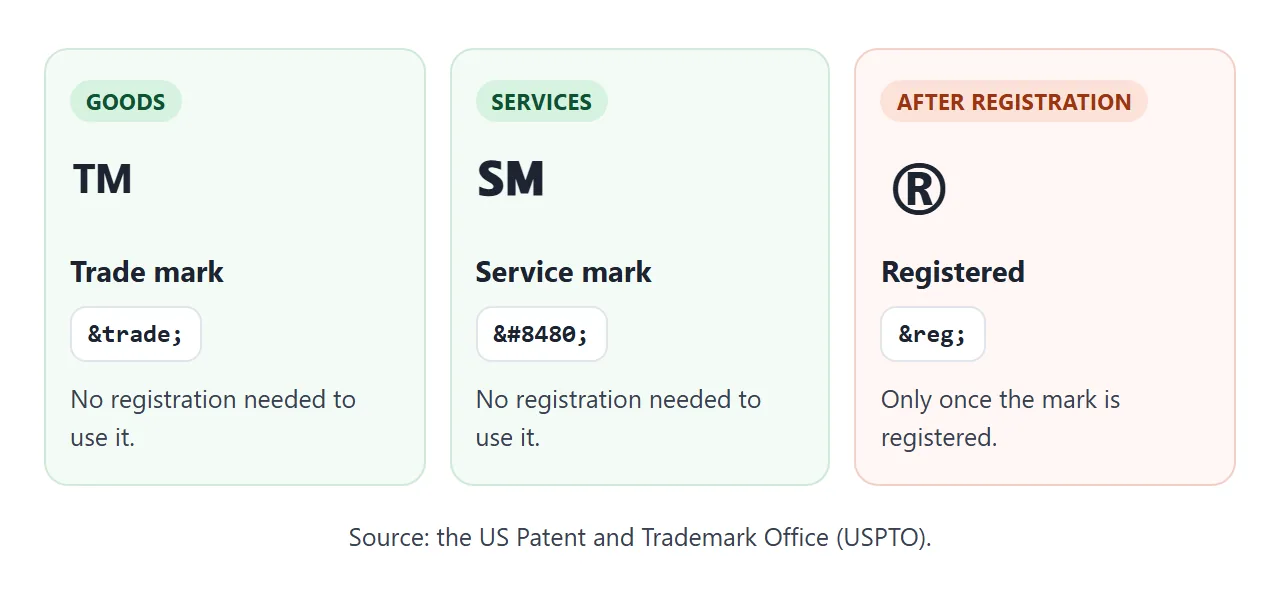
The registered sign ® is different. The USPTO says to use it once you have registered the mark, and only for the goods or services in the registration.
Do not put it next to a mark that is not registered. For a legal question, ask the USPTO or a trademark lawyer.
Declare UTF-8 so the character survives
A pasted ℠ is stored as three bytes in UTF-8. If the browser reads those bytes as Windows-1252 it shows three unrelated characters, â„ followed by a no-break space, instead of one symbol.
Declare the encoding in the head, and save the file as UTF-8:
<meta charset="utf-8">
MDN says UTF-8 is the only valid encoding for HTML5 documents, and the declaration must sit within the first 1024 bytes of the file. Numeric references avoid the problem completely, because they are plain ASCII.
Writing it from JavaScript
Scripts can build the symbol from its code point, so you do not have to type it. String.fromCodePoint(0x2120) returns ℠, and codePointAt(0) goes the other way.
const sm = String.fromCodePoint(0x2120);   // the character
el.textContent = 'Brightside' + sm;         // shown as text
Set it with textContent, not innerHTML. textContent does not parse HTML, so a reference string such as ℠ set this way appears literally on the page. Pass it the character instead.
A finished example: snippet builder
This page combines both ideas. Type a service name, choose a mark and a spelling, and read the snippet it prints. The second card takes any character and shows its code point and references.
<!doctype html>
<html lang="en">
<head>
<meta charset="utf-8">
<meta name="viewport" content="width=device-width, initial-scale=1">
<title>Service mark builder</title>
<style>
  body { margin: 0; padding: 14px; font-family: system-ui, sans-serif; background: #f4f5f7; color: #1d2330; }
  .card { background: #fff; border-radius: 12px; padding: 12px 14px; margin-bottom: 10px; box-shadow: 0 1px 4px rgba(0, 0, 0, .08); }
  h2 { font-size: 13px; margin: 0 0 8px; }
  label { display: block; font-size: 12px; color: #6b7280; margin: 8px 0 3px; }
  input, select { width: 100%; box-sizing: border-box; padding: 8px 9px; font: 15px system-ui, sans-serif; border: 1px solid #cfd5df; border-radius: 8px; background: #fff; }
  .two { display: grid; grid-template-columns: 1fr 1fr; gap: 8px; }
  .preview { font-size: 28px; font-weight: 700; margin: 10px 0 6px; overflow-wrap: anywhere; }
  pre { margin: 0; padding: 8px 10px; background: #eef1f5; border-radius: 8px; font: 12.5px ui-monospace, Consolas, monospace; white-space: pre-wrap; overflow-wrap: anywhere; }
  .note { font-size: 12px; color: #9a3412; min-height: 16px; margin-top: 6px; }
  dl { margin: 8px 0 0; display: grid; grid-template-columns: auto 1fr; gap: 4px 12px; font-size: 13px; }
  dt { color: #6b7280; }
  dd { margin: 0; font: 600 13px ui-monospace, Consolas, monospace; overflow-wrap: anywhere; }
</style>
</head>
<body>
<div class="card">
  <h2>1. Build the snippet</h2>
  <div class="two">
    <div><label for="name">Service name</label><input id="name" value="Brightside Tutoring"></div>
    <div><label for="mark">Mark</label>
      <select id="mark">
        <option value="8480">℠ service mark</option>
        <option value="8482">™ trade mark</option>
        <option value="174">® registered</option>
      </select></div>
  </div>
  <label for="style">Write it as</label>
  <select id="style">
    <option value="dec">Decimal reference</option>
    <option value="hex">Hex reference</option>
    <option value="lit">The character itself</option>
  </select>
  <div class="preview" id="preview"></div>
  <pre id="code"></pre>
  <div class="note" id="note"></div>
</div>

<div class="card">
  <h2>2. Inspect any character</h2>
  <label for="ch">Type or paste one character</label>
  <input id="ch" value="℠" maxlength="4">
  <dl>
    <dt>Code point</dt><dd id="cp"></dd>
    <dt>Decimal</dt><dd id="dec"></dd>
    <dt>Hex</dt><dd id="hex"></dd>
    <dt>NFKC form</dt><dd id="nf"></dd>
  </dl>
</div>

<script>
  const $ = (id) => document.getElementById(id);

  function build() {
    const cp = Number($('mark').value);
    const name = $('name').value || 'Your service';
    const ref = { dec: '&#' + cp + ';', hex: '&#x' + cp.toString(16).toUpperCase() + ';', lit: String.fromCodePoint(cp) }[$('style').value];
    $('preview').textContent = name + String.fromCodePoint(cp);
    $('code').textContent = '<h1>' + name + ref + '</h1>';  // textContent keeps the reference as typed
    $('note').textContent = cp === 174 ? 'Use ® only after the mark is registered.' : '';
  }

  function inspect() {
    const cp = $('ch').value.codePointAt(0);  // first character; undefined when the box is empty
    if (cp === undefined) { ['cp', 'dec', 'hex', 'nf'].forEach((id) => { $(id).textContent = '-'; }); return; }
    $('cp').textContent = 'U+' + cp.toString(16).toUpperCase().padStart(4, '0');
    $('dec').textContent = '&#' + cp + ';';
    $('hex').textContent = '&#x' + cp.toString(16).toUpperCase() + ';';
    $('nf').textContent = String.fromCodePoint(cp).normalize('NFKC');
  }

  ['name', 'mark', 'style'].forEach((id) => $(id).addEventListener('input', build));
  $('ch').addEventListener('input', inspect);
  build();
  inspect();
</script>
</body>
</html>
The NFKC line is worth a look. normalize('NFKC') turns ℠ into the letters SM, because Unicode records SM as its compatibility form. If a search or comparison step normalises text this way, ℠ and SM match.
When it does not work
| Symptom | Cause | Fix |
|---|---|---|
&servicemark; appears as typed |
No named reference exists for U+2120 | Use ℠ or ℠ |
â„ and a blank appear |
UTF-8 bytes read as Windows-1252 | Add <meta charset="utf-8">, save as UTF-8 |
The page shows ℠ as text |
A script set it with textContent |
Set the character, or use innerHTML |
| An empty box or odd glyph | The font has no glyph for U+2120 | Name another font in font-family |
| Search treats ℠ as SM | NFKC normalisation maps it to SM | Normalise both sides before comparing |
| Pasted text has the letters SM | The page used <sup>SM</sup> |
Use the character if the symbol must survive |
Share it as a link
Symbols depend on the file's encoding and the viewer's fonts, so a screenshot proves little and an .html attachment may open as code on a phone. Opening an HTML file on a phone covers why.
To send the working version, paste the page into a NOS document and choose Create share link. HTML to link walks through it.
The page renders as written and its scripts run, so the people you send it to can type their own names into the builder. If you change the code later, the same link shows the new version.