The <math> tag lets you write formulas directly in HTML. Everything inside it is MathML, a small set of tags that describe a formula: which parts are numbers, which are variables, what sits over what.
The browser does the typesetting, so there is no image to export and no library to load.
Here is an inline formula, a block formula and a subscript. Edit the code and the example reruns.
<!doctype html>
<html lang="en">
<head>
<meta charset="utf-8">
<meta name="viewport" content="width=device-width, initial-scale=1">
<title>The math tag</title>
<style>
body { margin: 0; padding: 18px 20px; font: 17px/1.6 system-ui, sans-serif; color: #1d2330; }
math { font-size: 1.15em; }
</style>
</head>
<body>
<!-- inline: sits inside the sentence -->
<p>
The area of a circle is
<math><mi>A</mi><mo>=</mo><mi>π</mi><msup><mi>r</mi><mn>2</mn></msup></math>,
and half of it is
<math><mfrac><mn>1</mn><mn>2</mn></mfrac><mi>π</mi><msup><mi>r</mi><mn>2</mn></msup></math>.
</p>
<p>The quadratic formula, on its own line:</p>
<!-- display="block": own line, centred, full size -->
<math display="block">
<mi>x</mi>
<mo>=</mo>
<mfrac>
<mrow>
<mo>−</mo><mi>b</mi><mo>±</mo>
<msqrt>
<msup><mi>b</mi><mn>2</mn></msup>
<mo>−</mo><mn>4</mn><mi>a</mi><mi>c</mi>
</msqrt>
</mrow>
<mrow><mn>2</mn><mi>a</mi></mrow>
</mfrac>
</math>
<p>Water is H<sub>2</sub>O, and the first term is <math><msub><mi>a</mi><mn>1</mn></msub></math>.</p>
</body>
</html>
Every tag in the quadratic formula above is covered below.
The three token tags: mi, mn, mo
Every visible symbol goes into one of three tags. They tell the browser what the symbol is, and the browser picks the style and spacing.
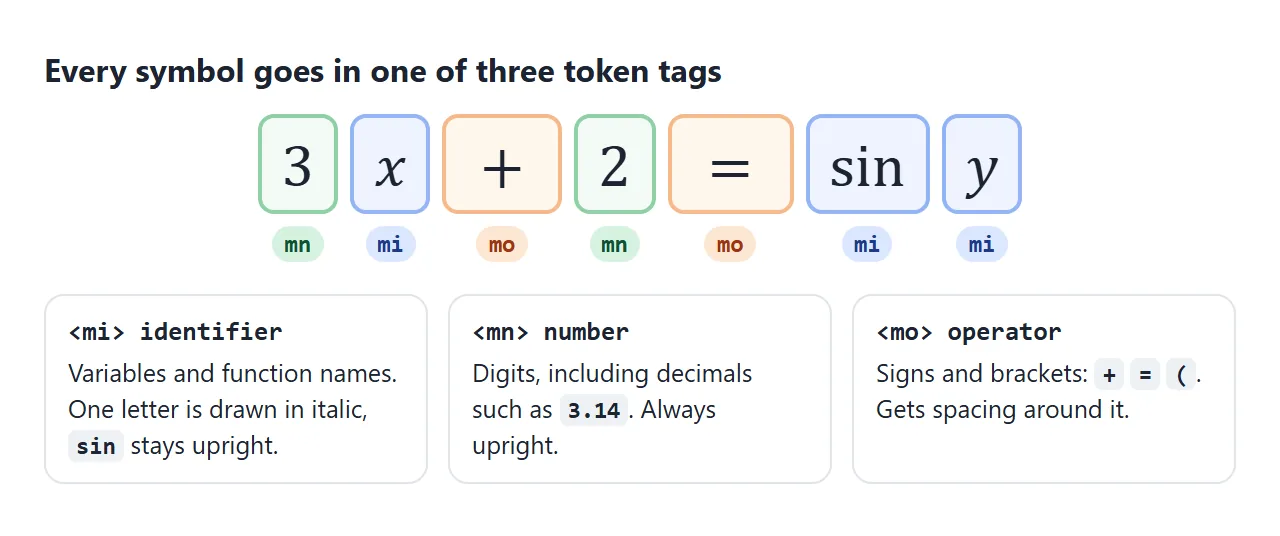
| Tag | Holds | How it is drawn |
|---|---|---|
<mi> |
Variables and names: x, π, sin |
A single letter in italic, a longer name upright |
<mn> |
Numbers: 2, 3.14 |
Upright |
<mo> |
Operators and brackets: +, =, ( |
Upright, with space around it |
So 3x + 2 becomes four tags:
<math><mn>3</mn><mi>x</mi><mo>+</mo><mn>2</mn></math>
You never add the spaces yourself. The <mo> tag decides them.
One trap: type the minus sign as −, not as the hyphen key. In our test, Chrome and Edge drew a keyboard hyphen inside <mo> as a short dash, while Firefox and WebKit turned it into a proper minus.
The entity looks right in all of them. HTML entities lists other symbols you may need, such as × and ≤.
Fractions, powers, subscripts and roots
Four layout tags cover fractions, powers, indexes and roots. The first three take a fixed number of children, in a fixed order.
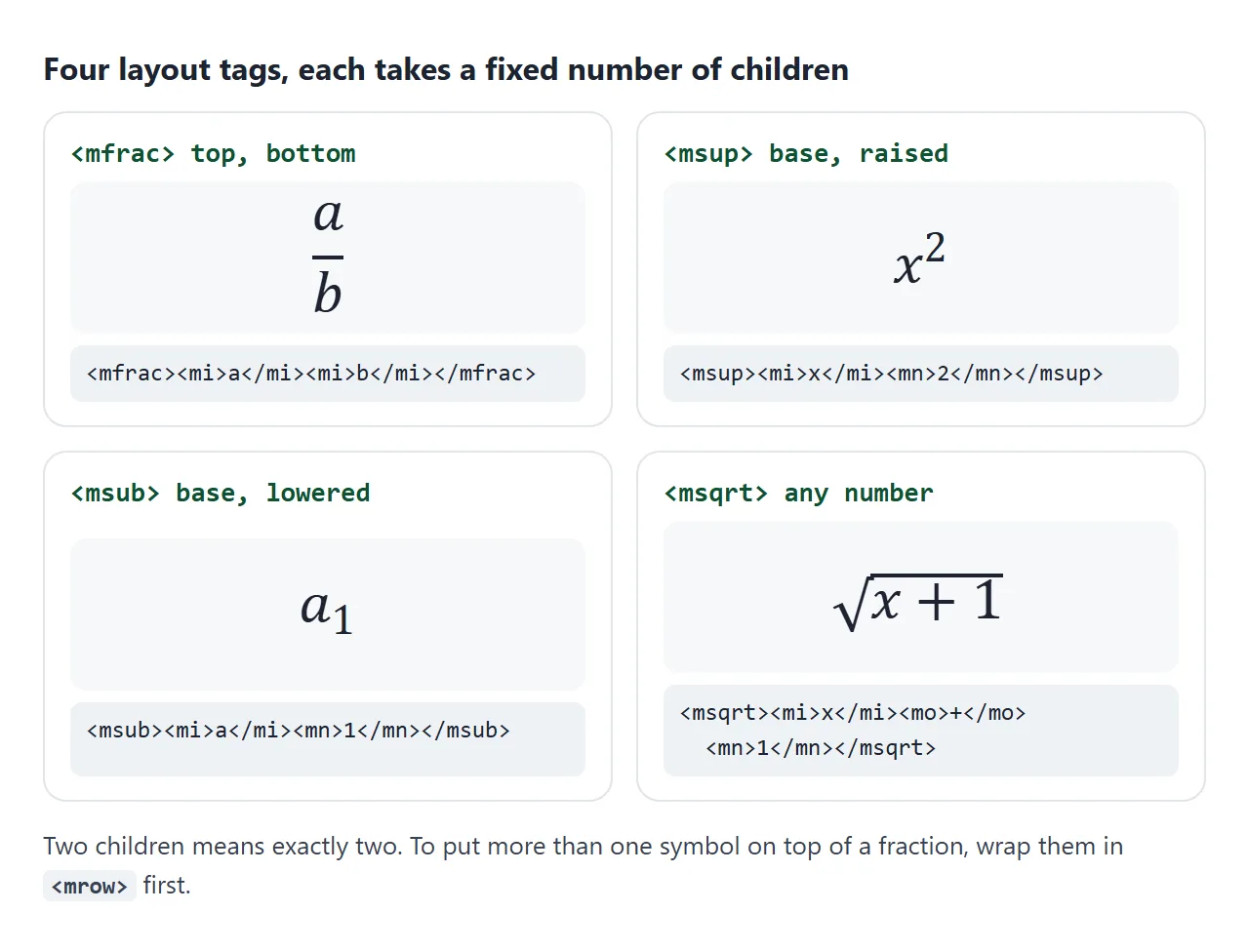
<math>
  <mfrac><mi>a</mi><mi>b</mi></mfrac>        <!-- a over b -->
  <msup><mi>x</mi><mn>2</mn></msup>          <!-- x squared -->
  <msub><mi>a</mi><mn>1</mn></msub>          <!-- a sub 1 -->
  <msqrt><mi>x</mi><mo>+</mo><mn>1</mn></msqrt>
</math>
"Exactly two" matters. To put 2a under a fraction bar, group it first with <mrow>, which bundles its children into one. Without the <mrow>, the fraction gets three children, and in our test Chrome, Firefox and WebKit drew them side by side with no bar.
For both a lower and an upper part on one base, such as a sum from 1 to n, use <msubsup> with three children: base, lower, upper. For a cube root or any other index, <mroot> takes the content first and the index second.
Inline or display="block"
A <math> element without attributes is inline. It sits in the sentence like a word, and the browser draws fractions and big operators in a compact size so the line does not grow tall.
Add display="block" and the formula gets its own line, centred, at full size. Try both, and the CSS switch in between:
<!doctype html>
<html lang="en">
<head>
<meta charset="utf-8">
<meta name="viewport" content="width=device-width, initial-scale=1">
<title>Inline vs block math</title>
<style>
  body { margin: 0; padding: 16px 18px; font: 16px/1.6 system-ui, sans-serif; color: #1d2330; }
  .bar { display: flex; flex-wrap: wrap; gap: 8px 16px; align-items: center; margin-bottom: 10px; }
  button { font: inherit; padding: 5px 12px; border: 1px solid #c9ced8; border-radius: 8px; background: #fff; cursor: pointer; }
  button[aria-pressed="true"] { background: #1d2330; color: #fff; border-color: #1d2330; }
  .box { border: 1px dashed #c9ced8; border-radius: 10px; padding: 8px 14px; }
  .full math { math-style: normal; }  /* inline, but full-size fractions */
  code { background: #eef1f5; border-radius: 4px; padding: 0 4px; font-size: 14px; }
</style>
</head>
<body>
<div class="bar">
  <button id="inline" aria-pressed="true">inline</button>
  <button id="block" aria-pressed="false">display="block"</button>
  <label><input type="checkbox" id="full"> <code>math-style: normal</code></label>
</div>

<div class="box" id="box">
  <p>
    The sum
    <math id="f">
      <msubsup><mo>∑</mo><mrow><mi>k</mi><mo>=</mo><mn>1</mn></mrow><mi>n</mi></msubsup>
      <mi>k</mi><mo>=</mo>
      <mfrac><mrow><mi>n</mi><mo>(</mo><mi>n</mi><mo>+</mo><mn>1</mn><mo>)</mo></mrow><mn>2</mn></mfrac>
    </math>
    sits in this sentence, and the next line of text follows it.
  </p>
</div>
<p id="out"></p>

<script>
  const f = document.getElementById('f');
  const out = document.getElementById('out');

  function show() {
    const r = f.querySelector('mfrac').getBoundingClientRect();
    out.textContent = 'display: ' + getComputedStyle(f).display +
      ' | fraction height: ' + Math.round(r.height) + 'px';
  }

  function setMode(block) {
    if (block) f.setAttribute('display', 'block');
    else f.removeAttribute('display');
    document.getElementById('inline').setAttribute('aria-pressed', !block);
    document.getElementById('block').setAttribute('aria-pressed', block);
    show();
  }

  document.getElementById('inline').addEventListener('click', () => setMode(false));
  document.getElementById('block').addEventListener('click', () => setMode(true));
  document.getElementById('full').addEventListener('change', (e) => {
    document.getElementById('box').classList.toggle('full', e.target.checked);
    show();
  });
  show();
</script>
</body>
</html>
The checkbox sets math-style: normal in CSS. The formula stays inside the sentence but draws its fraction full size, which also pushes the lines apart. The default compact style exists to avoid that.
Use inline for short things like x² in a sentence. Use block for anything with a fraction you want people to read.
Which browsers draw it
We opened the same formulas in Chrome, Edge, Firefox and the WebKit engine that Safari uses, on 2026-09-26. The core tags rendered in all four. The differences were at the edges.
| What we checked | Chrome, Edge | Firefox | WebKit |
|---|---|---|---|
| mi, mn, mo, mfrac, msup, msub, msqrt | Drawn | Drawn | Drawn |
display="block" centres the formula |
Yes | Yes | Yes |
| Brackets grow around a fraction | Yes | Yes | Yes |
Keyboard hyphen in <mo> shown as minus |
No | Yes | Yes |
<mfenced> draws brackets |
No | No | Yes |
| Exposed with the role math | Yes | Yes | Yes |
<mfenced> is an older shortcut for brackets. Write the brackets as <mo>(</mo> and <mo>)</mo> instead. Those stretch to fit a fraction in every engine we tested.
Building a formula with JavaScript
MathML elements live in their own namespace. document.createElement('math') creates an ordinary unknown HTML element, and its contents show as flat text. Create each element with createElementNS:
const NS = 'http://www.w3.org/1998/Math/MathML';
const frac = document.createElementNS(NS, 'mfrac');
Setting innerHTML on an element that is already a <math> also works, because the HTML parser knows the MathML tags. This calculator rebuilds its formula on every keystroke:
<!doctype html>
<html lang="en">
<head>
<meta charset="utf-8">
<meta name="viewport" content="width=device-width, initial-scale=1">
<title>Formula built with JavaScript</title>
<style>
  body { margin: 0; padding: 16px 18px; font: 16px/1.5 system-ui, sans-serif; color: #1d2330; background: #f6f7f9; }
  .card { background: #fff; border-radius: 12px; padding: 14px 16px; box-shadow: 0 3px 12px rgba(0, 0, 0, .08); }
  h3 { margin: 0 0 10px; font-size: 17px; }
  .inputs { display: flex; flex-wrap: wrap; gap: 10px 18px; }
  label { display: flex; align-items: center; gap: 6px; }
  input { width: 70px; font: inherit; padding: 4px 6px; border: 1px solid #c9ced8; border-radius: 6px; }
  #formula { min-height: 110px; padding-top: 8px; }
  math { font-size: 1.3em; }
</style>
</head>
<body>
<div class="card">
  <h3>Longest side of a right triangle</h3>
  <div class="inputs">
    <label>a <input id="a" type="number" value="3" min="0" step="any"></label>
    <label>b <input id="b" type="number" value="4" min="0" step="any"></label>
  </div>
  <div id="formula" aria-live="polite"></div>
</div>

<script>
  const NS = 'http://www.w3.org/1998/Math/MathML';

  // m('mi', 'x') or m('msup', m('mi','a'), m('mn','2')): one MathML element
  function m(tag, ...kids) {
    const el = document.createElementNS(NS, tag);  // createElement('math') would not render
    for (const k of kids) el.append(k);
    return el;
  }
  const sq = (x) => m('msup', m('mn', x), m('mn', '2'));

  function render() {
    const a = document.getElementById('a').value || '0';
    const b = document.getElementById('b').value || '0';
    const c = Math.sqrt(a * a + b * b);
    const shown = Number.isInteger(c) ? String(c) : c.toFixed(3);

    const math = m('math',
      m('mi', 'c'), m('mo', '='),
      m('msqrt', sq(a), m('mo', '+'), sq(b)),
      m('mo', '='), m('mn', shown));
    math.setAttribute('display', 'block');
    math.setAttribute('aria-label', 'c equals the square root of ' + a +
      ' squared plus ' + b + ' squared, which is ' + shown);

    document.getElementById('formula').replaceChildren(math);
  }

  document.getElementById('a').addEventListener('input', render);
  document.getElementById('b').addEventListener('input', render);
  render();
</script>
</body>
</html>
Accessibility: why not an image
A formula exported as a PNG is pixels. It blurs when the page is zoomed, it cannot be selected, and a screen reader gets only its alt text.
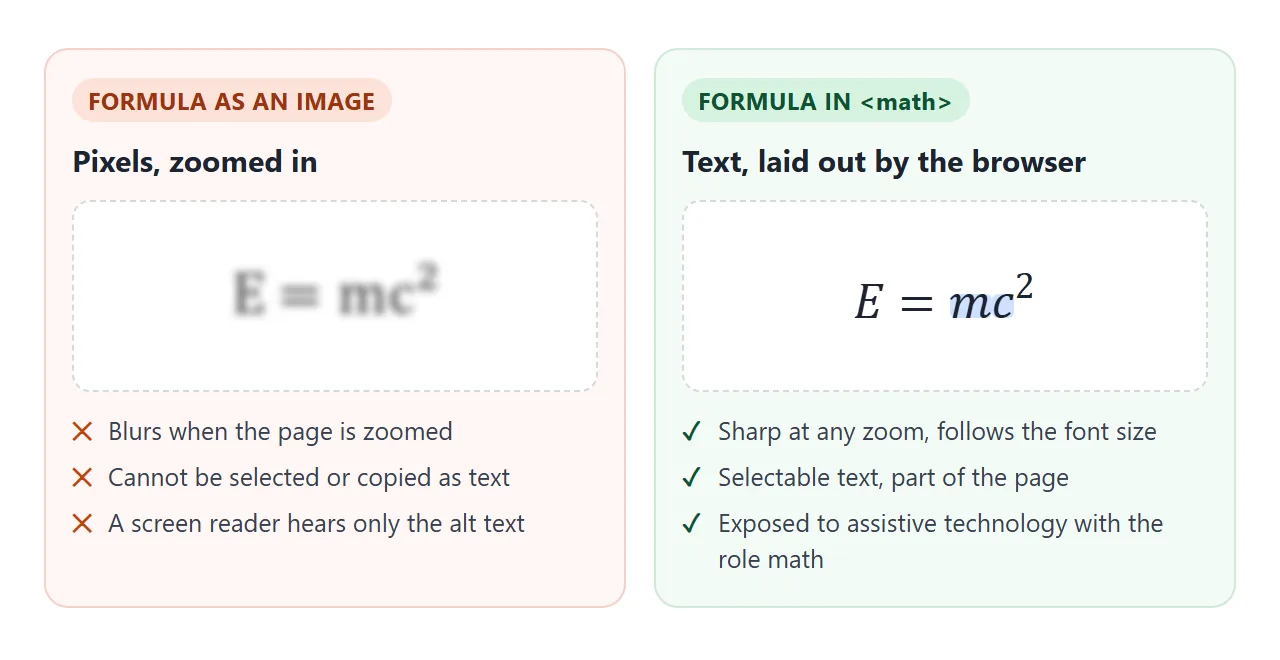
MathML is text. It scales with the font size, it can be copied, and in all four browsers we tested, the <math> element appeared in the accessibility tree with the role math. How that tree is read aloud depends on the screen reader.
For a short formula you can also add a plain-language name with aria-label, as the calculator does. Keep such labels short, and keep the MathML inside so the formula still shows and can be copied.
For single exponents and chemical formulas in running text, sup and sub are enough. Reach for <math> when you need a fraction, a root, or anything stacked.
When it does not work
| What you see | Cause | Fix |
|---|---|---|
The formula shows as flat text like a2 |
The tags are not inside <math> |
Wrap them in <math> |
| A fraction shows its parts side by side | <mfrac> has more than two children |
Group the top or bottom with <mrow> |
| Built with JavaScript, shows as flat text | Created with createElement |
Use createElementNS with the MathML namespace |
| The minus is a short dash in Chrome | Keyboard hyphen inside <mo> |
Write − |
| Brackets missing in Chrome and Firefox | <mfenced> was used |
Write <mo>(</mo> and <mo>)</mo> |
| The fraction is tiny inside a sentence | Inline math is compact by default | Add display="block" or math-style: normal |
Share it as a link
A formula page is easy to lose in transit. A screenshot turns it back into an image, and an .html attachment may open as code on a phone.
To send the working version, paste the page into a NOS document and choose Create share link. HTML to link walks through it.
The page renders as written and its scripts run, so readers see real formulas and can type into the calculator themselves. If you fix a formula later, the same link shows the new version.