In this guide, KaTeX means the JavaScript library that draws TeX math on a web page, not a program installed on your computer.
If you searched latex not working in jupyter notebook and want formulas that also show on a page you can send, one HTML file with KaTeX does it.
Try it first. The page below loads KaTeX from a CDN, holds three formulas as plain text, and draws them once the page has loaded.
<!doctype html>
<html lang="en">
<head>
<meta charset="utf-8">
<meta name="viewport" content="width=device-width, initial-scale=1">
<title>KaTeX in one HTML file</title>
<!-- 1. the stylesheet: without it the math looks broken -->
<link rel="stylesheet" href="https://cdn.jsdelivr.net/npm/katex@0.18.10/dist/katex.min.css">
<!-- 2. the library, then the auto-render add-on -->
<script defer src="https://cdn.jsdelivr.net/npm/katex@0.18.10/dist/katex.min.js"></script>
<script defer src="https://cdn.jsdelivr.net/npm/katex@0.18.10/dist/contrib/auto-render.min.js"></script>
<style>
  body { font-family: system-ui, sans-serif; margin: 0; padding: 18px; line-height: 1.6; color: #1d2330; }
  h1 { font-size: 18px; margin: 0 0 8px; }
  p { margin: 0 0 10px; }
</style>
</head>
<body>
<h1>Pythagoras and a circle</h1>
<p>For a right triangle with legs \(a\) and \(b\) and hypotenuse \(c\), we have \(a^2 + b^2 = c^2\).</p>
<p>The area of a circle of radius \(r\) is:</p>
$$A = \pi r^2$$
<p>And a sum with a fraction:</p>
$$\sum_{k=1}^{n} \frac{1}{k^2} = \frac{\pi^2}{6} \text{ as } n \to \infty$$

<script>
  // 3. after the page loads, turn every \( ... \) and $$ ... $$ into math
  window.addEventListener('load', () => renderMathInElement(document.body));
</script>
</body>
</html>
Everything the page needs sits in its head. Nothing is installed and nothing is built.
When LaTeX fails inside the notebook itself
A notebook and a hand-written page are different places. The Jupyter documentation shows LaTeX in Markdown cells, drawn by MathJax. Inline math goes between single dollar signs, and a displayed formula goes between \begin{equation} and \end{equation}.
So check the basics there first: the formula belongs in a Markdown cell and uses those delimiters. Sharing a notebook as a link covers the export side.
An HTML page renders nothing on its own. It has to load a math library itself, and the rest of this guide does exactly that.
The three parts and where they go
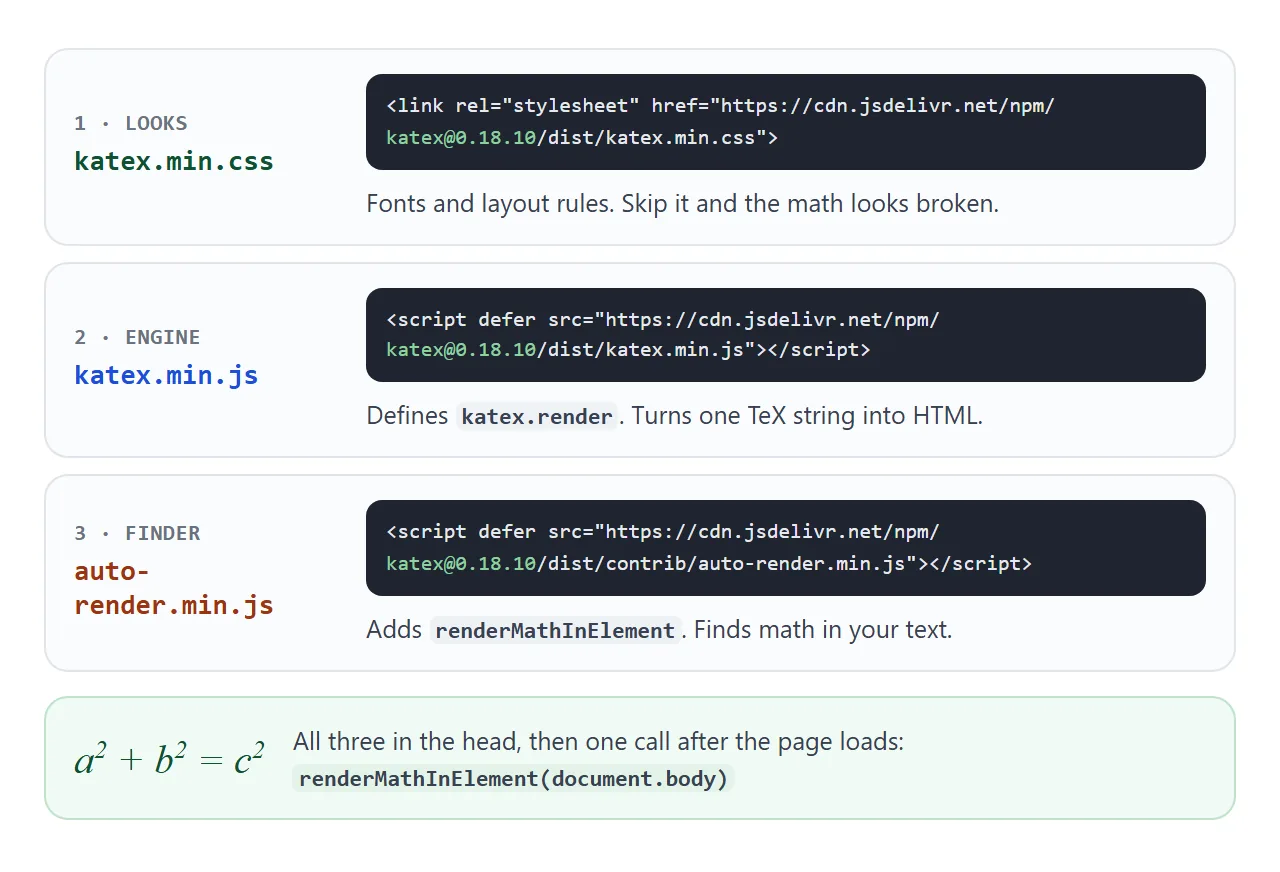
- Link the stylesheet.
katex.min.cssholds the fonts and layout rules. - Load KaTeX.
katex.min.jsdefineskatex.render, which turns one TeX string into HTML. - Load auto-render.
contrib/auto-render.min.jsaddsrenderMathInElement, which finds math in your text. - Call it after the page loads. Put the call in a
loadlistener, as the demo does.
The KaTeX docs show these tags with a pinned version in the address. This guide uses 0.18.10, the version the docs listed on 2026-10-01. Their snippet also adds integrity and crossorigin attributes to each tag.
Both scripts use defer. MDN says a deferred script runs after the document is parsed, in the order written. A plain call placed right after them in the page fails, because the functions do not exist yet.
KaTeX is MIT licensed, and its repository says it is compatible with all major browsers, including Chrome, Safari, Firefox, Opera and Edge.
Which delimiters it finds
Auto-render searches the text nodes inside an element for delimiters, and draws whatever sits between a pair.
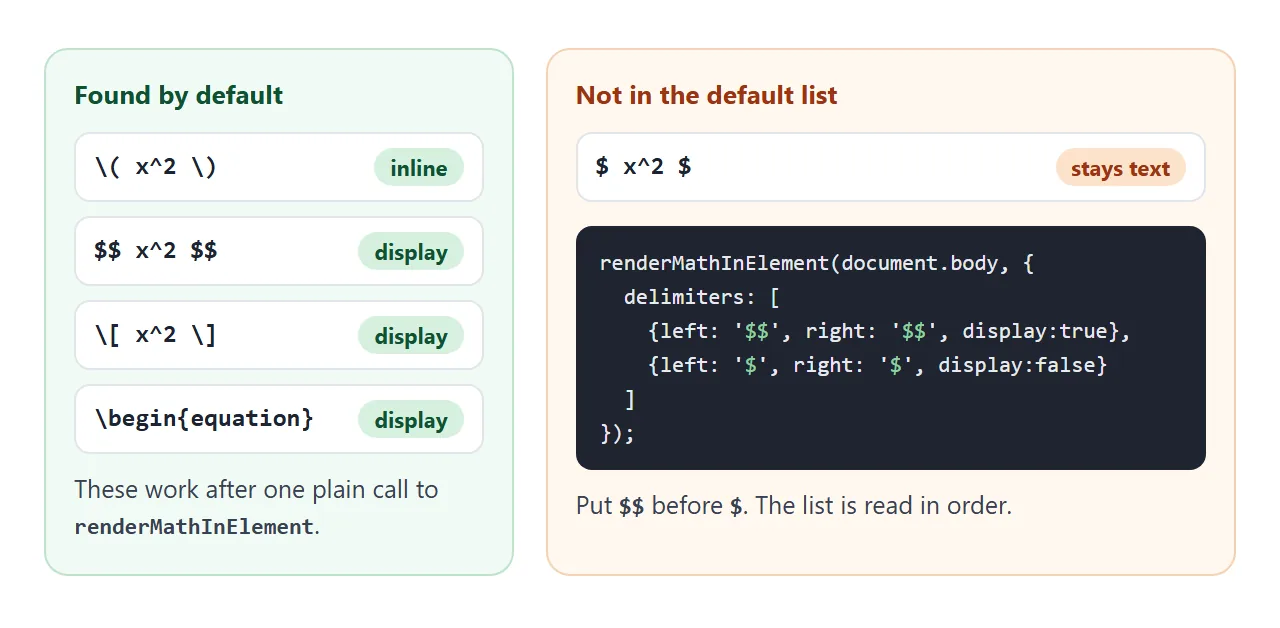
| Written as | Mode | Found by default |
|---|---|---|
\( ... \) |
Inline | Yes |
$$ ... $$ |
Display | Yes |
\[ ... \] |
Display | Yes |
\begin{equation} |
Display | Yes |
$ ... $ |
Inline | No |
Jupyter users reach for the single dollar sign, so add it yourself. Put $$ first, because the list is read in order:
renderMathInElement(document.body, {
  delimiters: [
    { left: '$$', right: '$$', display: true },
    { left: '$', right: '$', display: false }
  ]
});
Auto-render skips script, noscript, style, textarea, pre, code and option by default. Math written inside a code tag stays as text, which is handy when you want to show the source next to the result.
One HTML trap: a less-than sign starts a tag. In \(a<b\), the browser reads <b as the start of a bold tag, and the formula breaks. Write < instead. HTML entities lists the others.
Draw one formula from JavaScript
When you build the formula yourself, call katex.render with the TeX string, a DOM element and options.
katex.render('\\frac{a}{b}', el, { displayMode: true });
displayMode is false by default, which gives an inline formula. Set it to true for a centred, full-size one. katex.renderToString returns the same output as an HTML string instead.
The backslash is doubled because a JavaScript string treats a lone \f as a form feed character, so '\frac' loses its first letters. Inside an HTML text node, like the demo above, one backslash is correct.
By default KaTeX throws a ParseError for an unsupported command or invalid LaTeX. With throwOnError: false it draws the bad part in the error colour, #cc0000 by default, and the rest still renders. Try both:
<!doctype html>
<html lang="en">
<head>
<meta charset="utf-8">
<meta name="viewport" content="width=device-width, initial-scale=1">
<title>KaTeX errors</title>
<link rel="stylesheet" href="https://cdn.jsdelivr.net/npm/katex@0.18.10/dist/katex.min.css">
<script src="https://cdn.jsdelivr.net/npm/katex@0.18.10/dist/katex.min.js"></script>
<style>
  body { font-family: system-ui, sans-serif; margin: 0; padding: 14px; color: #1d2330; }
  textarea { width: 100%; box-sizing: border-box; height: 64px; font: 15px ui-monospace, Consolas, monospace; padding: 8px; border: 1px solid #c9ced8; border-radius: 8px; }
  .presets { margin: 8px 0 12px; display: flex; flex-wrap: wrap; gap: 6px; }
  .presets button { font: 13px system-ui, sans-serif; padding: 5px 9px; border: 1px solid #c9ced8; border-radius: 6px; background: #fff; cursor: pointer; }
  .box { border: 1px solid #e1e4ea; border-radius: 10px; padding: 10px 12px; margin-bottom: 10px; min-height: 54px; }
  .box h2 { font: 700 12px system-ui, sans-serif; color: #6b7280; margin: 0 0 6px; text-transform: none; }
  .box code { font-size: 13px; }
  .err { color: #9a3412; font-size: 14px; overflow-wrap: anywhere; }
</style>
</head>
<body>
<textarea id="src" spellcheck="false">\frac{a}{b} + \sqrt{x^2 + 1}</textarea>
<div class="presets" id="presets"></div>

<div class="box"><h2>throwOnError: true (default) - you catch the error</h2><div id="strict"></div></div>
<div class="box"><h2>throwOnError: false - the bad part is drawn in red, the rest still renders</h2><div id="soft"></div></div>

<script>
  const src = document.getElementById('src');
  const presets = {
    'Works':        '\\frac{a}{b} + \\sqrt{x^2 + 1}',
    'Typo: \\fract': '\\fract{a}{b}',
    'Missing }':    '\\frac{a}{b',
    'Extra $ signs': '$x^2$'
  };

  function draw() {
    const tex = src.value;
    const strict = document.getElementById('strict');
    try {
      katex.render(tex, strict, { throwOnError: true, displayMode: true });
    } catch (err) {
      // katex throws a ParseError; show its message instead of a blank box
      strict.innerHTML = '<div class="err"></div>';
      strict.firstChild.textContent = err.message;
    }
    katex.render(tex, document.getElementById('soft'), { throwOnError: false, displayMode: true });
  }

  const row = document.getElementById('presets');
  Object.keys(presets).forEach((name) => {
    const b = document.createElement('button');
    b.textContent = name;
    b.addEventListener('click', () => { src.value = presets[name]; draw(); });
    row.appendChild(b);
  });
  src.addEventListener('input', draw);
  draw();
</script>
</body>
</html>
renderMathInElement accepts the same options, and its errorCallback defaults to console.error.
Why the formula looks wrong or shows twice
KaTeX writes two copies of each formula: HTML for the eyes and MathML for accessibility. That is the default of its output option. The stylesheet hides the second copy.
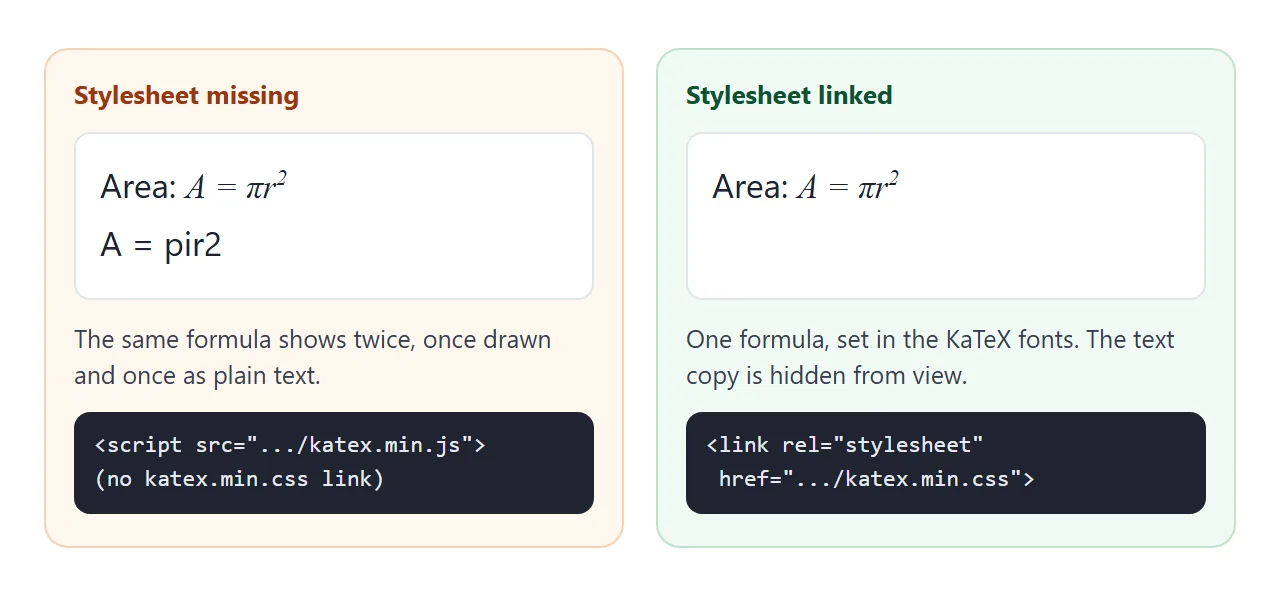
In our test on 2026-10-01, a page without the stylesheet showed the formula twice, once drawn and once as plain text. The KaTeX docs even include a small snippet that prints "The KaTeX stylesheet is not loaded!" when the CSS is missing.
The first line of the file matters too. The docs say KaTeX needs the HTML5 doctype, because without it the browser renders in quirks mode and KaTeX can render incorrectly. Start the file with <!doctype html>.
A finished example: a quadratic solver
Each step below is its own katex.render call into its own element. Change a, b or c, and every formula is drawn again with the new numbers.
<!doctype html>
<html lang="en">
<head>
<meta charset="utf-8">
<meta name="viewport" content="width=device-width, initial-scale=1">
<title>Quadratic solver with KaTeX</title>
<link rel="stylesheet" href="https://cdn.jsdelivr.net/npm/katex@0.18.10/dist/katex.min.css">
<script src="https://cdn.jsdelivr.net/npm/katex@0.18.10/dist/katex.min.js"></script>
<style>
body { font-family: system-ui, sans-serif; margin: 0; padding: 16px; color: #1d2330; background: #f4f5f7; }
.card { background: #fff; border-radius: 12px; padding: 14px 16px; box-shadow: 0 4px 16px rgba(0,0,0,.08); max-width: 460px; margin: 0 auto; }
h1 { font-size: 17px; margin: 0 0 10px; }
.inputs { display: flex; gap: 8px; margin-bottom: 8px; }
label { flex: 1; font-size: 13px; color: #4b5563; }
input { width: 100%; box-sizing: border-box; font-size: 16px; padding: 6px 8px; border: 1px solid #c9ced8; border-radius: 8px; }
.step { border-top: 1px solid #eceef2; padding-top: 4px; }
.step small { color: #6b7280; font-size: 12px; }
.katex-display { margin: .4em 0; overflow-x: auto; overflow-y: hidden; }
.msg { color: #9a3412; font-size: 14px; margin: 8px 0 0; }
</style>
</head>
<body>
<div class="card">
<h1>Solve ax² + bx + c = 0</h1>
<div class="inputs">
<label>a <input id="a" type="number" value="1" step="any"></label>
<label>b <input id="b" type="number" value="-3" step="any"></label>
<label>c <input id="c" type="number" value="-4" step="any"></label>
</div>
<div id="out"></div>
</div>
<script>
const out = document.getElementById('out');
const num = (n) => String(Math.round(n * 10000) / 10000);
// add one step: a label, then a display-mode formula
function step(label, tex) {
const box = document.createElement('div');
box.className = 'step';
const small = document.createElement('small');
small.textContent = label;
const math = document.createElement('div');
box.append(small, math);
out.appendChild(box);
katex.render(tex, math, { displayMode: true, throwOnError: false });
}
function solve() {
out.textContent = '';
const a = parseFloat(document.getElementById('a').value);
const b = parseFloat(document.getElementById('b').value);
const c = parseFloat(document.getElementById('c').value);
if ([a, b, c].some(Number.isNaN)) return;
if (a === 0) {
const p = document.createElement('p');
p.className = 'msg';
p.textContent = 'a must not be 0 for a quadratic.';
out.appendChild(p);
return;
}
const d = b * b - 4 * a * c;
step('Equation', `${num(a)}x^2 + (${num(b)})x + (${num(c)}) = 0`);
step('Discriminant', `D = b^2 - 4ac = ${num(d)}`);
if (d >= 0) {
const x1 = (-b + Math.sqrt(d)) / (2 * a);
const x2 = (-b - Math.sqrt(d)) / (2 * a);
step('Formula', `x = \\frac{-b \\pm \\sqrt{D}}{2a}`);
step('Roots', `x_1 = ${num(x1)}, \\quad x_2 = ${num(x2)}`);
} else {
const re = -b / (2 * a), im = Math.sqrt(-d) / (2 * Math.abs(a));
step('Complex roots', `x = ${num(re)} \\pm ${num(im)}\\,i`);
}
}
document.querySelectorAll('input').forEach((el) => el.addEventListener('input', solve));
solve();
</script>
</body>
</html>
- Labelled steps: one small function adds a label and a display-mode formula to the page.
- Safe rendering:
throwOnError: falsemeans a typo never blanks the result. - Plain text for messages: the "a must not be 0" warning uses
textContent, not math. - Many formulas, one stylesheet: the CSS loads once and serves them all.
For a formula you only need once, with no library at all, see the HTML math tag.
When it does not work
| What you see | Cause | Fix |
|---|---|---|
$x^2$ stays as text |
Single dollar sign is not a default delimiter | Add a delimiters option, $$ first |
| Console says renderMathInElement is not defined | Called before the deferred scripts ran | Call it in a load listener |
| Each formula appears twice | katex.min.css is missing |
Add the stylesheet link |
| Spacing and layout look off | No doctype, so quirks mode | Start with <!doctype html> |
Text after a<b disappears |
The browser read <b as a tag |
Write < |
| Red text, no formula | A typo or unsupported command | Check the name, use throwOnError: false |
| Unexpected character error from JavaScript | One backslash in a JS string | Double each backslash |
Math inside code or pre is left alone |
Those tags are ignored by default | Move it out, or change ignoredTags |
Share it as a link
A formula page is easy to lose in transit. A screenshot cannot be zoomed or copied, and an .html attachment may open as plain code, or not at all, on a phone.
To send the working version, paste the page into a NOS document and choose Create share link. HTML to link walks through it. The page renders as written and its scripts run, and scripts and styles from jsDelivr, the CDN used here, load.
The people you send it to see the drawn formulas and can type into the solver themselves. If you change the code later, the same link shows the new version. For another small interactive page to try the same way, see calculator to link.